Who Can Change Prompts in Production: A Practical Framework
Who should be allowed to change prompts in production? Let’s break down roles, review, change logs, and rollback so the team does not rely on private agreements.
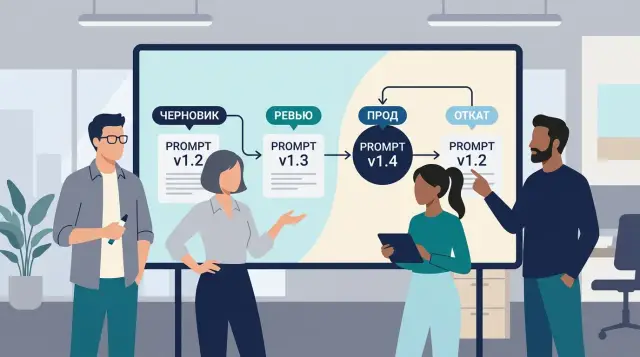
What goes wrong without rules
When prompts are changed by private agreement, the team quickly loses the big picture. One person tweaks a phrase in chat, another agrees verbally, and a third sees the result only after release. A week later, nobody remembers what exactly changed or why.
At first, it seems minor. A few words in the system message, a different answer length limit, a new instruction for classification. But even small edits affect tone, accuracy, request cost, and what data the model shows to the user. If the decision is not recorded anywhere, a debate about wording quickly turns into a product risk.
It gets especially bad when there is no one on the team who can say the final “yes” or “no.” Then the decision gets stuck between product, ML, support, and security. Each side has its own goal: product wants conversion, engineering wants stability, legal wants less risk, and support does not want Monday morning complaints. In the end, the loudest person wins, not the best option.
This usually plays out the same way. The team argues about words but never checks the impact on metrics. A version goes to production that not everyone carrying the risk has seen. And if something breaks after release, rollback is slow because nobody kept the previous version ready.
A typical situation looks ordinary. A manager asks for shorter answers so the bot does not “ramble.” A developer changes the prompt in the evening. In the morning, support sees more complaints: the bot has become sharper, explains refusals poorly, and often cuts off a useful answer. In banking, insurance, or healthcare, such a change affects not only the user experience, but also control and audit requirements.
That is why the question of who can change prompts in production cannot be left to personal relationships. Without clear rules, a prompt stops being part of a product with a version, an owner, and a change history. It becomes a piece of text that everyone touches, but nobody truly controls.
What roles a team needs
If everyone can change the prompt, decisions quickly move into private chats. After a few days, it becomes hard to tell who added a new rule, why they did it, and why the answers got worse.
For production, four roles are usually enough.
The change initiator notices a problem or a new need. This is often a product manager, analyst, support specialist, or process owner. They do not just ask to “fix the text” — they bring a reason: a few bad examples, the desired behavior, and a clear success criterion.
The meaning-and-risk reviewer checks whether the change will break business logic, answer tone, compliance requirements, or personal data handling. In a bank or clinic, this is often someone from the process side, not only an engineer.
The release owner gives the final go-ahead after checking metrics. Their job is simple: make sure the new version performs better than the old one on the chosen tests, not just that it “sounds cleaner.”
The on-call person can quickly roll back the prompt if complaints, errors, or request costs rise after release. This right should be defined in advance, without extra approvals during an incident.
In a small team, one person can combine two roles. But the author of the change should not review it and release it themselves. Otherwise the team ends up back at verbal agreements.
It is better to split review into two short parts. First, the team checks the meaning: does the model answer the question, does it mix up facts, does it stay within the scenario. Then they check the numbers: success rate, number of manual escalations, average request cost, and response time.
A simple access model
A good setup is simpler than it seems. Each working scenario needs one owner. Not one person for the entire LLM system, but a separate owner for each specific scenario: for example, one person owns the support prompt, another the document-checking prompt.
The answer to who may change prompts in production is best fixed in writing and without exceptions. Then the team does not solve this through urgent messages in a messenger app.
A workable model looks like this. The prompt owner proposes changes, is responsible for answer quality, and decides when the version is ready for review. The reviewer from product or business checks whether the meaning still works: does the bot answer correctly, does it promise too much, does it change tone where that is not allowed. The reviewer from security or compliance joins sensitive scenarios where there is personal data, finance, healthcare, or internal documents. The on-call person gets the right to stop the rollout immediately: if the new version starts giving risky answers, they pause the rollout and restore the previous one.
This model works because the roles do not fight over the same responsibility. The owner does not approve their own change from the business side. The product reviewer does not decide on access to sensitive data. The on-call person is not there to debate style — they protect the service from an outage.
The most common mistake is simple: naming the owner as “the whole team.” A team does not have one responsibility. A prompt should have a specific person named as owner, and the emergency stop should have a clear right attached to it without long discussions.
How the change process works step by step
If the team has not agreed who can change prompts in production, edits start living in chats and calls. Later, nobody can quickly explain why the text was changed, who approved the release, or why quality dropped yesterday.
A practical process usually fits into five steps.
- The author writes a short description of the change. One paragraph, no filler: what is not working now, what behavior the team wants, and how they will know the new version is better.
- The team compares the old and new versions on the same examples. That means not only normal requests, but also tricky ones: incomplete data, sharp wording, attempts to bypass rules, and overly long input.
- The reviewer checks the risks. They look for weak spots: promises that go too far, personal data leaks, the wrong tone, a broken answer format, higher cost, or delays.
- The service owner approves the release. They record the version, release date and time, observation window, and who is watching the metrics after rollout.
- If metrics drop, the team immediately returns to the previous version. The rollback threshold is defined ahead of time: the escalation rate rises, accuracy falls on control cases, or answers go beyond the allowed length.
What matters is not the prompt text itself, but the difference between the answers side by side. That is an important point. Very often the wording looks clean, but on real requests the model behaves worse.
A common example: a support team changes the prompt so the bot is less likely to “guess” order details. The author describes the goal in one paragraph, the team runs 15 dialogs, the reviewer spots a risk around refund promises, the owner schedules release for 4:00 p.m., and metrics are watched through the end of the day. If the bot starts making more mistakes in the evening, the old version is restored in minutes.
If the team cannot name the current prompt version, its release date, and the rollback condition in under half a minute, the process is not ready yet.
What to record in the change log
The log is not for reporting. It exists so the team can answer two questions at any moment: what changed, and who is responsible.
A minimal entry is short. Usually the scenario name, owner name, version number, description of the change, reason for the edit, expected effect, date, author, and who approved the release are enough. That already makes it possible to avoid guessing a week later why the model’s answer changed.
Be specific. Instead of “updated the wording,” write: “removed the ban on clarifying questions,” “added a rule about answer tone,” or “shortened the system instruction by 120 words.” The reason should also be plain: the model refused too often, mixed up request categories, or gave text that was too long for the operator.
It is also useful to add one more field: what the team will check in the first 24–72 hours after release. Then the log helps not only with memory, but also with validation. For example, you can immediately note that after launch the team will watch escalation rate, the number of operator complaints, and a sample of ten real conversations.
A good entry sounds human: “Scenario: incoming request classification. Owner: support lead. Version 1.8 -> 1.9. Added a rule: if the text contains two topics, the model chooses the main one and writes the second in a comment. Reason: requests were often routed to the wrong queue. Expected result: fewer routing errors. Check 200 dialogs after release. Author: Aliya. Approved by: Timur. Date: May 14.”
If such an entry is hard to write in two minutes, the change is still too rough. That is usually a clear sign it is too early to release.
Where teams most often make mistakes
The problem is usually not the wording itself, but how the team changes it in the middle of live work. The most common failure looks ordinary: someone writes in chat, “I tweaked the prompt a bit, it’s better now,” and that is the end of it. The reason for the change, version, author, and expected effect are nowhere to be found.
A week later, nobody remembers why the model became stricter, why one answer step disappeared, or where the new disclaimer came from. The team argues from memory, not from facts.
Another common mistake is looking only at good examples. The team tests five tidy requests, likes the smooth answers, and rolls out the change. In production, typos, angry messages, mixed Russian and Kazakh, incomplete data, and other edge cases appear, and the new prompt starts failing exactly where no tests were run.
It is also risky to bundle three different kinds of changes into one release: meaning, tone, and format. After that, nobody knows what actually affected the result. If the answer became shorter, more polite, and also changed JSON, metrics could drop for any of those reasons. It is better to separate these into different versions, even if they seem small.
Another frequent failure is having no scenario owner. When a prompt is “shared,” everyone changes it a little, but nobody is responsible for the outcome. Every scenario needs one person who knows the goal, approves changes, and checks metrics after release.
The most expensive mistake is delaying rollback. Metrics have already dropped, support is complaining, manual checks are increasing, and the team is still discussing whether “the model is just noisy today.” In that situation, rollback first, review later. Prompt rollback should take minutes.
If the reason for the change exists only in chat, tests covered only good examples, one release changed meaning, tone, and format, the scenario has no owner, and the old version was not restored after the metrics dropped, the process is already broken. This is not about personal discipline. The team needs a simple change model where private agreements no longer decide the fate of production.
A real-life example
The debate about who can change prompts in production often starts with something small. Support has a growing number of complaints: the bot answers correctly, but too verbosely. A user asks a simple refund question, gets five paragraphs, and leaves for a human agent.
In a working setup, support does not edit the text themselves or message the author privately with “make it shorter.” Instead, they file a change request and briefly describe the issue: in which scenarios the answers become too long, how many complaints came in, and what people expected to see instead.
After that, the prompt author handles the change. They make a targeted edit: ask the bot to reply in 2–4 short paragraphs, give the direct answer first, and add details only if asked. They do not touch the meaning of the task, the constraints, or the safety rules.
Then the reviewer steps in. They do not judge style for the sake of style. They check whether the usual failure points got worse: is the bot refusing more often without reason, skipping required warnings, or becoming too dry on tricky requests. Often, a sample of recent dialogs and a few hard test cases from the internal set is enough.
If the check passes, the team should not roll out the change to everyone right away. It is much safer to send the new version to 10–20% of traffic and watch the effect with less risk. If traffic goes through a single LLM gateway with audit logs, comparing versions becomes much easier: you can see which prompt went into the request and what changed after release.
After a day, the team looks at three simple signals: how many complaints came in about long or confusing answers, what the average answer length became, and how the escalation rate to a human agent changed. If answer length dropped by 35%, complaints fell, and escalations did not increase, the change can stay. If the bot started refusing more often where it used to help, the author rolls back the version and refines the wording. No arguments, no blame hunt.
Quick pre-release check
Before releasing a new prompt, the team needs a short checklist. It should take minutes, not half a day. Otherwise, people will start agreeing in private messages again and changing the text without a shared decision.
Check five things:
- The version has a named owner and a backup owner.
- The current version is stored in one place where the date, author, and reason for the change are visible.
- Before release, everyone knows who gives the final approval.
- The team has a small set of test examples: a normal case, a rare case, empty input, a provocation, and a request with personal data.
- The previous version is ready to restore immediately, without searching for old text or holding long calls.
This checklist works even in a small team. For example, a bank support bot gets a new prompt and suddenly starts asking the customer for extra data. If the owner is known, the version is stored separately, and the old version is marked as stable, the team can restore it in minutes. If not, arguing about who changed what will take longer than the rollback itself.
The question is solved not by job title, but by process. You can assign a strong ML engineer, an experienced product manager, or a team lead, but without an owner, an approver, and a ready rollback, every release remains risky.
What to do this week
Stop changing prompts through private messages and verbal requests. In one week, you can set up a simple process so every production change follows a clear path.
It is best to start small. First, write down the roles on one page: who proposes the change, who owns the scenario, and who checks risk and quality before release. Then choose one place where prompt versions and decisions are stored. It can be a repository, a folder with files, or a spreadsheet. The main thing is that production takes text only from there.
Do not try to cover every scenario at once. Start with two or three of the most sensitive ones: customer replies, document review, or an internal assistant for employees. For these, define the rollback threshold in advance. If the required answer format breaks, the number of manual fixes rises, or quality drops more than the agreed threshold, the team restores the previous version without long discussions.
If LLM traffic goes through a single gateway, it is useful to connect prompt versions with real requests and logs right away. For teams in Kazakhstan and Central Asia, this is especially convenient when one setup handles model routing, audit logs, and data control. For example, AI Router on airouter.kz helps you see who released a new version, what went into the request, and when rollback was needed. In scenarios with strict requirements for domestic data storage and PII control, this makes life much easier.
That is enough to remove the chaos. You do not need a twenty-page policy. You need a short one- or two-page document that shows: who proposes the change, who approves it, where the current version lives, and which signal triggers rollback.
Test it on a normal situation. Marketing asks to change the tone of a support chatbot before a promotion. If the team immediately knows who approves the change, where the new version is stored, and which signal will roll it back the same day, the process is already working. If even one answer is uncertain, start with that today.
Frequently asked questions
Who should change the prompt in production?
The prompt in production should be changed by the assigned scenario owner. That person prepares the change, is responsible for the result, and hands it over for review. One person owns one scenario, not the whole system at once.
Can everyone on the team be allowed to change prompts?
No. If everyone has the right to change prompts, edits quickly move into chats and responsibility becomes blurred. It is better to give the change right to the scenario owner and leave review and release to other people.
Who gives the final yes before release?
The final approval comes from the release or service owner. They look not at the wording itself, but at tests, metrics, and the risk after rollout. The person who made the change should not sign off on their own release.
What if the team is small?
In a small team, one person can combine two roles, but not all of them. If one person wrote the change, someone else should review or release it. Otherwise the team will go back to deciding everything by word of mouth.
How do you check a change before release?
First compare the old and new versions on the same examples. Use normal requests, edge cases, empty input, prompts meant to provoke the model, and requests with personal data. Then look at the metrics: answer quality, escalations, length, cost, and latency.
When should you roll back a prompt?
Rollback immediately if complaints grow, accuracy drops, the answer format breaks, or requests suddenly become more expensive. It is best to define the rollback threshold before release. Then the on-call person does not waste time arguing and can restore the previous version in minutes.
What must be written in the change log?
Record the scenario, owner, version number, what exactly changed, why it was changed, who approved the release, and what the team checks after launch. Be specific: not “updated the text,” but “removed the ban on clarifying questions” or “shortened the instruction by 120 words.”
Can meaning, tone, and format all be changed in one release?
It is better not to mix such changes in one release. If you change meaning, tone, and format at the same time, it becomes hard to tell what broke the result. Separate changes into versions, even if each one seems small.
Do you need to roll out to part of the traffic first?
Yes, a gradual rollout greatly reduces risk. Send the new version to part of the traffic, compare the answers, and only then expand the launch. If traffic goes through a single LLM gateway with audit logs, it is much easier for the team to see which version was used and when the problems started.
What can be put in place this week?
Start with a simple one-page process. Assign owners for two or three important scenarios, choose one place for prompt versions, and set a rollback condition. After that, ban edits through direct messages and release changes only through the shared process.