Where to Store LLM API Keys and How to Rotate Them
Where to store LLM API keys on servers, in CI, and locally: a simple setup with no secrets in code, images, chats, or logs.
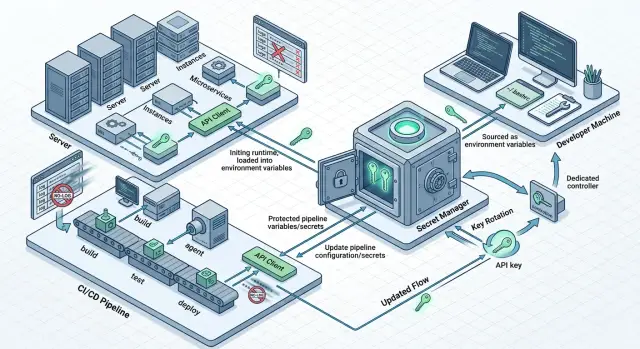
Why API keys leak
Even a careful team can lose a secret on a normal workday. The problem is usually not carelessness, but the fact that the key passes through too many places: a developer laptop, environment variables, CI, a server, monitoring, chat, tickets. The more touchpoints there are, the higher the chance that it will be shown in the wrong place by accident.
Leaks rarely start with a loud breach. Usually it looks ordinary. A developer pasted a key into a code example and forgot to remove it. Someone turned on detailed request logs. Someone sent an error screenshot to a group chat. Someone ran a command with a token directly in the terminal, and it stayed in shell history. One such episode can then live in the repository, logs, and messages for months.
Secrets most often appear in code and config when a key was “just dropped in for five minutes.” Logs are not far behind if the app prints request headers, error bodies, or environment variables. Screenshots, videos, and CI debugging are another problem, because commands are often printed in full there.
The risk with an API key is higher than with a regular password. A password is usually tied to a person: there is account login, two-factor authentication, session history, notifications. A key is more often tied to a service and works silently. If it is stolen, the attacker does not need to “log in” to the system. They just start sending requests on behalf of your application until you revoke access.
Another common mistake is one shared key for everyone. At first it is convenient: fewer settings, easier startup. Then you lose control. It is unclear which service is burning the budget, who set the limits, and where the suspicious traffic came from. And if the key leaks, you have to replace it everywhere at once: on servers, in CI, and in the team’s local environment.
A typical situation looks like this. A backend developer checks a new model call, copies a working key into a local file, and turns on debug logs. The test fails, so they send a screenshot to the group chat. A piece of the token is visible in the image, and the full Authorization header sits in the CI logs. Nobody meant to make a mistake, but the secret has already spread across several systems.
That is why protection should not rely on people being careful. You need a setup where secrets do not reach code, do not get printed into logs, and are not handed out to everyone.
What counts as a secret in LLM infrastructure
Problems often start before the question of where to store keys. The team simply never agreed on what counts as a secret. One person protects only the provider API key, while another calmly commits a token for CI because “it is not prod.”
In LLM infrastructure, a secret is not only access to the model. You should treat as secret anything that grants access, expands permissions, or reveals data: provider and gateway API keys, service tokens for CI and backend, refresh token, webhook secret, signing key, passwords and DSNs for databases, queues, vector stores, logging systems, and private configs with real variable values.
In the repository, you should keep only things that do not grant access by themselves. Templates like .env.example, variable names, the list of required permissions, public model names, base URL, feature flags, and setup instructions are fine. Real values must not be stored, even if the project is test-only, the repository is private, and the key was issued for just one week.
It is better to separate access by environment right away. Dev, staging, and production solve different tasks, and their risk levels are different too. If someone accidentally leaks the dev key, you lose time. If the same key grants access to production, you get someone else’s requests, extra costs, and a bad audit trail.
Separate keys for different environments also make logs and rotation easier. After an incident, you can disable only staging and leave live traffic alone. The same applies to limits, data masking, and access to logs.
Do not mix personal and service keys. A personal key is for a human doing local checks and short experiments. A service key is for an app, CI, or a background job. If the backend talks to production under an engineer’s personal key, proper auditing disappears, and a resignation or role change quickly becomes a problem.
A simple rule: separate everything used by a person from everything used by code. Then revoking access from an employee will not break production, and replacing a service secret will not interrupt the team’s local work.
Where to store keys on servers
On a production server, an API key should not live in the repository, in the container image, or in a .env file on disk. Such files easily end up in backups, snapshots, and service archives. If someone copies the server for diagnostics, the secret goes along with it.
A practical option is a secret manager. That can be a cloud secret manager, Vault, or an internal service that stores secrets separately from the application. The server gets the key at startup or fetches it on demand. Then you change the secret in one place instead of hunting for it manually across all machines.
Usually two patterns are enough. The first: the app receives the secret at startup and keeps it only in memory. The second: the app requests secrets in short sessions if access needs to be revoked quickly and there are many services. The first pattern is simpler. The second is useful where access changes often.
One shared key for all services almost always creates unnecessary risk. It is better to give the web app, the worker, and the internal admin service different keys. Then it is immediately clear who is consuming the limit and where the leak happened. It also makes it easier to limit damage: each service has its own limit, its own set of permissions, and its own name in audit logs.
Secrets themselves often leak not from storage, but from diagnostics. A developer opens a service page with a list of environment variables, writes a token into a debug log, or sends an error dump to a monitoring system. After that, even a good secret store does not help much.
Check two things. The app should not print environment variables in full, even in debug mode. And error handlers should mask tokens, Authorization headers, and similar strings.
The rule here is simple: the server may receive a secret, but it must not show it to a person. If a token is needed only for an outgoing request to the LLM API, keep it in process memory, do not save it to disk, and do not expose it on service pages. That significantly lowers the risk, even during ordinary failures and late-night debugging.
How to store secrets in CI
For CI, the answer is almost always the same: store secrets in protected variables in the CI system itself or in an external secret store that the pipeline can access only for the duration of the job. Do not put keys in YAML files, Dockerfile, test data, or command templates. Repositories are copied, forked, and cached more often than it seems.
A secret should not flow into every build step. The lint step should not see the deployment token, and the frontend build should not receive the production LLM key. The narrower the scope, the smaller the damage if someone accidentally prints the variable into a log or saves an artifact.
A good setup usually looks like this:
- Tests, build, and production use different secrets.
- Dev, staging, and production use different values.
- Secrets reach only the jobs where they are truly needed.
- Deployment gets a short-lived token, not a permanent key.
This approach makes rotation easier. If a test token leaks, you change only that one. If deployment uses a temporary token for 10–15 minutes, it will not be useful for long.
Build logs usually cause the most trouble. People add echo, turn on verbose shell mode, or print the whole environment for debugging. After that, the secret ends up in job history, notifications, and sometimes external monitoring systems. So mask secrets in CI, disable command output for sensitive variables, and check which artifacts the pipeline keeps.
It helps to treat any step that writes to logs as risky. Give it only what it truly needs to do its job.
If the team reaches models through a single gateway, it is convenient to keep separate keys for staging and production while using the same base_url. The code barely changes, while permissions and limits stay separated by environment. For teams using AI Router, this is especially handy: you can keep the same SDKs and the same OpenAI-compatible endpoint, but split access and limits by separate keys.
How to work locally without secrets in the repository
Local development breaks not because of complicated attacks, but because of habits. Someone puts a token into .env, then accidentally commits the file. Someone inserts the key directly into a terminal command, and it stays in shell history.
The basic rule is simple: the repository must not contain a single live secret. Not in .env, not in config.yaml, not in request examples, and not in tests. The repository should store only the shape, not the contents.
For that, you need a template like .env.example without values. It should contain only variable names: LLM_API_KEY=, LLM_BASE_URL=, MODEL_NAME=. A new developer copies the template into a local .env, and gets the real data not from chat or README, but from a protected place.
It is better to keep working secrets in a system store or a team password manager. On a laptop, that could be Keychain, Credential Manager, or a similar tool. Then the token does not sit in plain text in the project folder and does not end up in a random commit.
Local work needs a separate dev key. Do not give developers the same key that is used on the server or in CI. The local token should have low limits, a separate quota, and, if possible, access only to test models.
A short version looks like this:
- the repository stores only
.env.exampleand a description of variables; - the local
.envis added to.gitignore; - real tokens live in a system store or password manager;
- a separate dev key is used for development.
There is also a less obvious problem: command history. If a developer ran something like export LLM_API_KEY=... directly in the terminal, the token may have been saved in shell history. After such a mistake, it is not enough to delete the line from the screen. You need to clear history, issue a new key, and check whether it ended up in IDE logs, terminal logs, or local scripts.
A good test is very simple: clone the project on a clean machine and try to run it using the instructions. If the app starts without hunting for secrets in messages and without manual edits in code, the setup is already working well.
How to rotate keys step by step
Do not delay rotation. The longer one key lives in production, the higher the chance that it has already ended up in an old log, dump, screenshot, or CI variable.
A workable setup looks like this: the new key should start serving requests before you disable the old one. Otherwise, you create downtime for yourself.
- First, collect a list of all active keys. For each one, note the owner, storage location, the services that use it, and who is responsible for the replacement.
- Issue the new key ahead of time. Do not delete the old one right away. Leave a short overlap where both keys exist in parallel.
- Update the secret in the secret manager, not in code and not in a config file on the server. Then restart only the services that read the secret at startup.
- Immediately verify real requests after the replacement. Look at authorization errors, rising 401 and 403 responses, limit usage, and failure alerts.
- Once you are sure traffic is using the new key, disable the old one and record the rotation date in the change log.
In practice, the third step breaks most often. The team updates the secret but forgets that some workers keep it in memory. As a result, half the requests pass and the other half fail. If the service caches config, give it an explicit restart and check that the new process actually started with the new secret version.
A typical example: you have a backend, a task queue, and a nightly job for prompt evaluation. All three components call the LLM API. If you changed the key only for the backend, the site will keep working, while background jobs will start failing later. That is why it is better to keep the consumer list in advance instead of trying to remember it from memory on rotation day.
If the team uses one LLM gateway instead of a bunch of direct integrations, rotation is usually simpler: you change one secret in the manager instead of several keys from different providers. But the order stays the same. First the new key, then traffic verification, and only then disable the old one.
A simple example for a team
A small SaaS team has two LLM scenarios: in-product chat and nightly batch jobs for labeling requests. Both call the same gateway, but with different secrets. That makes it easier to see usage, set limits, and avoid breaking everything at once with one mistake.
In production, the team stores only service keys, one per environment and workload type. The chat key lives in the backend service’s secret manager. The key for batch jobs is kept separately because it has a different limit, a different schedule, and a higher risk of suddenly burning through the budget.
The setup might look like this:
prod-chat- user requests from the app;prod-batch- background jobs and reprocessing;dev-shared- test environment and manual verification;personal-dev- a developer’s personal key with a small limit.
CI does not store the secret permanently. During deployment, the pipeline gets the needed production key from the secret store, places it into the service’s environment variables, and loses access after the job is done. For tests, CI uses a separate dev-shared key or runs on mocks if a real model call is not needed.
Locally, the developer does not put the secret in the repository, Dockerfile, or messages. They take personal-dev, save it into a local .env that is already in .gitignore, and work with a hard limit. If the laptop is lost or the key appears in a log, the damage stays limited.
When an employee leaves, the setup does not fall apart. The team disables their SSO, access to the secret manager, and the personal dev key. Production keys do not need to change, because the former employee never saw them in plain form and did not keep them on their machine.
Common mistakes
Most problems start not with a breach, but with a desire to do things faster. A token is placed “temporarily” in a convenient spot, and then it outlives the project.
The most expensive mistake is one key for all employees and all services. At first it looks convenient: one token for the backend, tests, scripts, and several people on the team. Then someone goes on vacation, someone changes access, the service load grows, and you no longer understand who burned through the limit and which process caused the cost spike. Revoking such a key is painful too: everything breaks at once.
It is usually better to issue different secrets by role and task. The service gets its own key, CI gets its own, local development gets a temporary one, and each person gets personal access with a clear lifespan.
Another common mistake is secrets in Dockerfile, ready-made images, and Helm configs. If a token is placed into a Dockerfile through ARG or ENV, it can remain in image layers and in build history. If the key sits in a Helm values file, it quickly spreads across the repository, artifacts, and environments. Removing the line from the current version is not enough. Traces often remain in old commits, registries, and build logs.
Another problem is printing Authorization headers in logs. It happens more often than people think: debug middleware, verbose HTTP client logging, error tracing in a proxy. One such log then goes to the logging system, the on-call chat, or a screenshot for a ticket. After that, the token can no longer be considered secret.
A bad practice usually looks like this:
- one shared key for production, CI, and local runs;
- a token in Dockerfile or in an open values file;
- full HTTP headers in the access log;
- secrets in Telegram, Slack, email, and tickets;
- rotation “when there is time.”
Sending tokens to messengers is almost always justified by urgency. “Send the key for 10 minutes” quickly turns into a permanent leak channel. The message gets copied, forwarded, and found through search across work chats. A month later, nobody remembers where the latest working version is stored.
Manual rotation without a list of owners and dates also breaks processes. If a key has no owner, nobody watches its lifespan. If there is no date for the next replacement, the key lives for years. If there is no list of services that depend on it, rotation turns into a night-time incident.
The minimum worth implementing right away is this: store secrets only in a secret manager or in protected environment variables, assign an owner to every key, record the creation date and replacement date, and fully hide tokens and authorization headers in logs.
Quick check before release
A release often breaks not the code, but the little things around it: a forgotten token in an environment variable, debug output in CI, an old key without limits. A few minutes before deployment, it is better to run a short checklist and close these gaps than to handle an incident later.
Before release, check five things:
- each service has its own separate key, not one shared token for the whole team;
- each key has a rate limit, budget limit, or both;
- CI does not print secrets in step logs, error logs, or debug mode;
- application logs and tracing hide tokens, Authorization headers, and PII;
- the calendar includes the date of the next rotation and a clear owner.
This checklist is especially useful when you have several services: support chat, internal search, batch jobs. If one key leaks, you will quickly understand which service was affected and will not stop everything at once.
CI is worth checking by hand. Open the latest pipelines and look at what ended up in stdout and stderr. A secret often leaks not in a successful step, but in a failing one, when someone prints the full error object together with request headers.
The rule for logs is the same: the developer should see what happened, but should not see the secret itself. The same applies to personal data. Tokens are best hidden completely, and PII should be removed or replaced with safe labels.
And one more simple note. Rotation without an owner does not work. If the calendar has a date but nobody knows who changes the key and who checks the service after replacement, you do not have a process—you have hope and luck.
What to do next
Start not with a new tool, but with an audit of what is already in the code, CI, and on servers. After such a review, it is usually quickly clear which keys live too long, who uses them, and where they may accidentally be printed into a log.
You do not have to fix everything at once. In one day, you can remove secrets from the repository, separate access by environment, and enable log masking. That already lowers the risk noticeably.
Next, it is worth taking a few practical steps: make a list of all secrets, assign an owner to each one, split dev, staging, and production, choose one place to store secrets and one place for log-masking rules. If somewhere you can replace permanent keys with short-lived tokens, start with CI and temporary jobs. And for the production flow, agree right away on who sends requests, where the data is stored, what limits each service has, and where to find the audit trail.
If the team works in Kazakhstan and runs LLM workloads through several providers, it can sometimes help to reduce the number of direct secrets on servers and in CI. At that point, AI Router can simplify the setup: one OpenAI-compatible endpoint, separate keys for services, audit logs, rate limits, PII masking, and data stored inside the country if that matters for internal rules or legal requirements.
A good target for the next week is simple: remove secrets from the repository, split access by environment, enable log masking, and set a date for the first rotation. After that, security stops being a one-time cleanup and becomes a normal part of development.
Frequently asked questions
Can I store an API key in .env?
In the repository — no. For local work, you can keep it in .env only if the file is in .gitignore and you never paste it into chat, screenshots, or logs. On servers and in CI, store secrets in a secret manager or in the platform’s protected variables.
What should count as a secret in LLM infrastructure?
Not only model access. Secrets also include CI tokens, refresh token, webhook secret, signing key, database passwords, DSNs, access to queues, vector stores, and any configs with real values that grant access or reveal data.
Why shouldn’t we use one key for everyone?
A single shared key quickly breaks accounting and rotation. You won’t know which service is consuming the limit, who caused the traffic spike, or where the leak happened. If that key leaks, the team has to change it everywhere at once.
Where is the best place to store keys on a production server?
Keep production keys in a separate secret store and give them to the application at startup or through a short session. Don’t put them in the repository, container image, Dockerfile, or a file on disk. Let the service keep the secret only in process memory.
How do I prevent a key from leaking into logs?
Close three places right away: Authorization headers, environment variables, and full error messages. The application should not print them even in debug mode, and CI should not output commands with sensitive variables. If you need to investigate a failure, show the reason for the error, not the token itself.
How should secrets be stored safely in CI?
Store secrets in protected CI variables or in an external secret store and give them only to the jobs that truly need them. Tests, staging, and production should each have different values. For deployment, it is better to use a short-lived token so leaked access loses value quickly.
How can I do local development without secrets in the repository?
Keep only .env.example without values in the repository, plus clear startup instructions. The real dev key should come from a protected place and be used separately from production. If you can, store the working token in a system secret store, not as plain text in the project folder.
How do I rotate keys without downtime?
First issue a new key and let services switch to it. Then update the secret in storage, restart all processes that read it at startup, and check live traffic, 401 and 403 errors, and limit usage. Disable the old key only after that check.
What should I do if a key has already leaked?
Treat the key as compromised and change it immediately. Then check where it was exposed: logs, CI, chat, shell history, screenshots, and local files. After the replacement, review usage, suspicious requests, and split access if several services used the same secret before.
What should I check before release?
Before release, quickly check the simple things: each service has its own secret, the keys have limits, CI does not print sensitive data, and the application hides tokens and PII in logs. Another useful habit is to assign a key owner and the next rotation date in advance so rotation does not turn into a night-time scramble.