What to Log in an LLM App Without Unnecessary Risk
Learn what to log in an LLM app to debug failures, track incidents, and pass audits without storing prompts, PII, or extra data.
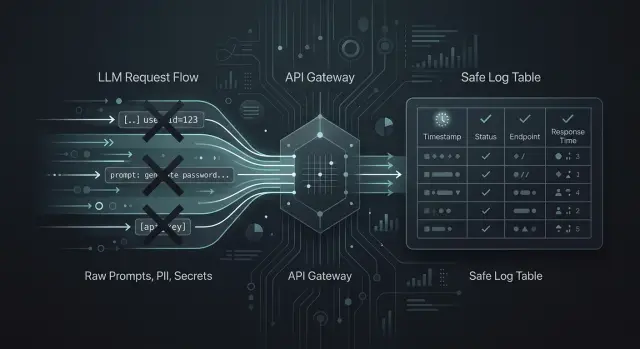
Where logs help, and where they hurt
Without logs, the team sees only the user complaint and the general fact that something failed. That is not enough if you need to understand why the model gave a strange answer, why costs went up, or why requests started failing at night.
In LLM applications, logs are not needed "just in case" — they are needed for specific tasks. They help find prompt template failures, latency spikes, routing errors between models, limit breaches, and provider-side outages. If there is a single OpenAI-compatible gateway between the app and the models, it is easy to lose sight of where the problem actually is without logs: in the app, in the chosen model, or in the access policy by key.
But the most convenient log for a developer is often the most dangerous for the business. Raw prompts and full responses quickly turn into a pile of unnecessary data: customer names, contract numbers, message excerpts, medical details, internal instructions, API keys, and document fragments. Today that log helps investigate an incident, but a month later it becomes a source of risk on its own.
So it is better to separate the goals from the start. For debugging, a technical trail is usually enough: when the request came in, which model ran, how long the response took, and where the error occurred. For security, risk signals matter: an attempt to send a secret, a traffic spike, an unusual IP, frequent failures on one key. For audit, you need proof of the action: who called the system, which route the request followed, which rule fired, and whether the required trace was preserved.
When these tasks get mixed together, logging grows without adding value. The team starts storing everything because "it might be useful later." In practice, only a small part is needed, but later you still have to answer for the entire volume.
The principle is simple: keep only what helps you make a decision. If a record does not help fix a failure, investigate an incident, confirm an action for audit, or meet a legal requirement, it is better not to write it at all. For any sensitive data, ask two questions first: who will read it, and how many days is it really needed.
Minimum log set
If you are deciding what to log in an LLM app, start with metadata, not the prompt text. For debugging, security, and audit, a short set of fields is almost always enough to show what happened, when it happened, and which route the request took.
First, you need identifiers: request_id, trace_id, tenant_id, and the exact request time. request_id helps you find one specific call, trace_id connects a chain of several services, and tenant_id separates one customer or department from another. When errors suddenly spike at 14:03, the logs quickly turn into noise without these fields.
Next comes the model call description: model name, provider, selected route, and prompt version. This is especially important if the app can switch between several models or goes through a single gateway. Without the route and prompt version, it is hard to understand why yesterday’s answer was fine, but today it became worse or more expensive.
Another group of fields is needed for operations and cost: latency, status_code, the number of input and output tokens, and the cost of the call. These data quickly show where the app slows down, where the model answers too long, and which scenario is burning the budget.
It is also useful to mark the type of operation right away: chat, embeddings, tool_call, moderation. Otherwise, it becomes hard to separate a chat failure from a failure in knowledge base search or a tool call.
Also record instability signals separately: whether there was a retry, whether a timeout occurred, whether the request hit a rate_limit. One such flag is often more useful than a long error text. It immediately shows whether this was a one-time network glitch or a system-wide limit problem.
The minimum log set usually fits into five groups:
- who sent the request and when:
tenant_id,request_id,trace_id,timestamp - where it went: model, provider, route, prompt version
- what happened: operation type and
status_code - how long it took:
latency, tokens, cost - whether there were failures:
retry,timeout,rate_limit
If these fields are written consistently, the team can already investigate incidents, track costs, and pass audits without unnecessary risk from storing sensitive data.
What is better not to store
The main mistake is simple: everything ends up in the logs. That is convenient for debugging for the first couple of days. After that, those logs become a problem themselves.
Raw prompts are better left out if a user might paste in a full name, IIN, card number, address, diagnosis, contract, or internal company data. To investigate an incident, a prompt template, app version, request time, and a few technical markers are usually enough. If you need an example text, save a short masked fragment instead of the full input.
The same goes for full model responses. A model often repeats secrets from input data, paraphrases parts of documents, or returns the result of a tool_call almost unchanged. That response is convenient to read for a developer, but keeping it for months is a bad idea. In most cases, a response status, length, task type, moderation score, and a flag showing that the answer was sent to the user are enough.
Everything that gives direct access should be removed from logs:
- API keys
- access token
- cookie
- session id
- temporary file links
Even one such fragment in a shared log can open extra access for a tester, a contractor, or any employee with read permissions.
Attachments and documents should not be stored "just in case" either. PDFs, passport scans, statements, medical records, and internal reports pile up quickly, and they bring almost no value in logs. If a file matters for an investigation, it is better to save it as a separate protected object with a short lifetime and a link to the incident, while the log only stores the file type, size, and hash.
One more risk area is often underestimated: tool_call results. The app may query a CRM, banking system, ERP, or medical registry and return an IIN, account number, balance, diagnosis, or transaction history. That data does not belong in regular logs. It is enough to save the tool name, call time, result code, and a list of fields without values.
For a banking bot, the rule is very practical. It can log request_id, the model, latency, token count, and the fact that an error happened. But it does not need to store a document photo, the full complaint text with personal data, or a backend response with a card number.
Separate logs by purpose
One of the most common mistakes is putting everything into one stream. That stream ends up containing chat texts, errors, user actions, rule triggers, and product metrics. After a month, the log is hard to read, and the risk of leakage grows for no good reason.
It is better to split logs by the question you want to answer. If the question is different, the stream should be different too.
Debugging
Debug logs are needed to reproduce a failure and understand what went wrong. Usually, request_id, time, model, prompt version, error code, latency, token count, and masking status are enough. It is best to keep such records for a short time.
After an incident is investigated, a long history of the raw request is usually no longer needed. In practice, a prompt hash, template ID, model parameters, and a couple of safe masked fragments are often enough.
Audit
The audit stream should be strict and predictable. What matters there is event order, time, actor_id, policy_id, outcome, and trace_id. If you work in an environment with data-residency requirements and audit log rules, it is better to keep this stream separate and retain it longer than technical logs.
Security
Security logs answer a different question: is someone trying to abuse the system? Here, failed sign-in attempts, traffic spikes, bypasses of rate_limit, filter triggers, attempts to send PII, and unusual patterns by keys or IP matter. It is not a good idea to mix this with product analytics.
Analytics
For analytics, aggregates are usually enough. Average latency, failure rate, cost per 1,000 requests, and escalation-to-human rate give more value than an archive of other people’s chats. Raw texts are usually unnecessary here.
Support is also better off keeping only what helps reproduce the failure. A banking bot operator rarely needs the full customer conversation. What matters more is request_id, the scenario type, the error code, and the fact that the system hid the card number.
How to implement a logging scheme
Teams often take the wrong path: they turn on detailed logging for everything and hope to figure it out later. A better approach is simpler. First, collect a small log scheme, then test it on a real incident.
-
List 5-10 events that the team cannot do without when looking for the cause of a failure. That is usually enough: incoming request, model call, model response, provider error,
rate_limitrejection, admin action, routing change. -
For each field, ask two questions: why is it needed, and who looks at it.
request_idis needed by an engineer for tracing,timestampis needed by almost everyone, andmodelandproviderare needed by the team investigating cost and failures.user_idis better stored as a hash if that is enough for search. -
Enable PII masking before writing to the log. Phone numbers, email, IIN, card numbers, addresses, and free text with personal data are better cut out or replaced with a token right in the app. Late cleanup almost always causes leaks, because the raw string has already reached several systems.
-
Set a retention period for each log type. Technical logs for debugging often live for 7-14 days, security logs live longer, and audit logs are kept according to internal policy and regulator requirements. One retention period for all log types is usually inconvenient.
-
Run a short test. Take one incident, for example a sharp rise in errors for one customer, and try to find the cause without the raw conversation text. If
request_id, response status, time, route to the model, token counters, user hash, and filter trigger flag are enough, the logging scheme works.
If there is a single API gateway between the app and the model, keep the same request_id at every step. Then the team can quickly link application, security, and provider logs into one chain and avoid opening unnecessary data for routine debugging.
Example: a bank support bot
A bank support bot usually answers simple questions: where to check an application status, how to reissue a card, or why a payment did not go through. To answer, it queries the CRM for customer data and the knowledge base for rules and instructions. In this setup, logs are needed, but the full conversation should not be stored.
It is more practical to collect the minimum log set. It helps you understand what happened if the bot made a mistake, froze, or gave a questionable answer, while not dragging unnecessary personal data into the journal.
One log entry per request may include:
request_idto build the event chain- model route: which model answered and whether there was a fallback
latency: total response time and, if needed, the CRM or knowledge base lookup timetool_callstatus:success,error,timeout,blocked- a short intent label or a hash of the normalized question instead of the original text
If a customer writes: "I cannot log in, my number is 8 777 123 45 67, IIN 990101300123", the app first masks that data. The log does not get the original string, but something like intent=login_problem, phone=8 777 *** ** 67, iin=990101******. It is even better not to write the number and IIN at all if they are not needed to investigate the incident.
The same rule applies to bot replies. There is no point storing the full conversation just because it might be useful someday. For audit, a chain of events is usually enough: the bot received the request, chose a model, queried the CRM, got a timeout, went to the knowledge base, and returned a safe fallback answer.
When there is a dispute about the answer, the team pulls request_id and looks at the decision path, not the whole chat. That is often enough to find the reason quickly. For example, the bot gave a generic answer about limits not because the model made it up, but because the CRM did not return the customer profile within 2.4 seconds and the system switched to a fallback scenario.
If you want to reduce risk even further, log the article ID and version instead of the text of the article that was found. Then the engineer can see which material the bot relied on without copying its contents into the journal.
Common mistakes
The most common mistake is writing the full prompt and the full model response into the log. At first, that seems convenient. Later, logs start collecting contract numbers, message fragments, addresses, diagnoses, internal instructions, and document excerpts. For debugging, you almost never need the full text of every request. Usually, the prompt version, model name, input size, status, response time, and a few safe flags are enough.
The second problem appears more quietly. A developer once turns on detailed debug in production to catch a rare failure, and then nobody turns it off. Manual debugging gets mixed into normal working logs, the noise increases, and people who do not need access to sensitive data get it anyway. It is much better to keep the two modes separate: short production logs by default and temporary extended collection with a clear deletion date.
Another trap is the lack of a shared event chain. The request came in, tool_call went to the CRM, then the model returned an answer, but there is no common trace_id. A day later, no one knows where the failure happened: in orchestration, the model, the external service, or the client code. One trace_id often saves hours of investigation.
Problems also come from keeping logs forever. The team thinks extra records do not bother anyone until an internal audit or a data-deletion request arrives. If debug is needed for seven days, do not keep it for six months. If the audit requires one set of fields, do not store everything else next to it.
And one more common mistake: logs capture not only chat text, but also tool_call parameters, JSON from ERP, the file name, OCR text from an attachment, or a PDF fragment. Even if the gateway masks PII and keeps audit logs, the application itself can still leak extra data through its own logs.
A quick self-check looks like this:
- any developer can see the full user prompt
- a PDF or image is written to the log in full
debuglogs have no deletion period- one user request cannot be traced across all services
tool_callwrites raw fields from CRM or billing
If at least two of these are true, the logging system is already creating risk, not just helping you find errors.
Pre-launch check
An hour before release, do not look at log volume — look at whether the logs can quickly answer a simple question: what happened to a specific request? A good log set gives a clear picture for one request_id; a bad one only accumulates risk.
Run a short test. Take one test request and check whether its path is visible from the API entry point to the user response. If the request went through several steps, for example data masking, model selection, and a retry after an error, that should read like one story, not a pile of unrelated records.
Before launch, it helps to go through a short checklist:
- for one
request_id, the team can see the full request route: entry, processing, model call, response, and failure if there was one - the logs include the model, latency, token usage, approximate cost, and a clear error reason, not just code
500 - the logs do not contain PII, secrets, access tokens, card numbers, passwords, or full document or conversation text
- each log type has an owner: who reviews it, who approves access, and when it should be deleted
- the team can turn on detailed logs during an incident and then quickly return to the normal mode
If one item does not work, it is better to slow the launch down. Usually the problem is in the details: request_id exists at the entry point but is lost after a retry; cost is calculated in a separate system; the error is recorded without the provider message; PII masking works in the app but fails in infrastructure logs.
It is also useful to do one manual check. Let an engineer who was not involved in the setup try to investigate one failed request from the last 24 hours using the logs. If they can understand in 5-10 minutes which model answered, how long the call took, why the failure happened, and what data the system kept, the log set is built well.
And one last thing: extended logging must not stay on "just in case." After an incident, the team should turn it off through a clear procedure. Otherwise, a temporary measure quickly becomes a permanent risk.
What to do next
Start not with system setup, but with a simple table. It quickly shows what to log in an LLM app, where masking is needed, and what should not be written to logs at all. Without such a table, teams almost always collect too much, then spend a long time cleaning up storage and arguing with security.
The table usually needs four columns:
- field or event
- why it should be kept
- retention period
- status: keep, mask, do not store
Include not only prompt and response texts. You also need operational data: request ID, model, prompt version, response time, error code, tool name, filter trigger, user or session hash. But full document numbers, phone numbers, cards, medical data, and raw input with personal data should usually be masked or not stored at all.
Then run all real scenarios through this table. Not just chat. Check document search, agent chains, and tool_call separately. That is where the log set often drifts more than it seems.
For example, in search it is useful to store the IDs of found documents and the relevance score, but not the full fragment text. In an agent, it is useful to see the order of tool calls, timeouts, and the reason for failure, but not secrets from the CRM or the contents of internal tokens. This kind of review quickly finds extra fields.
Review the table once a quarter. The best time is after an incident, an internal review, or an audit. If one field was missing for an error investigation, add it deliberately. If a field never helped once, remove it. Logs should not grow by habit.
If you have several models and providers, it helps to have one layer where logging and audit rules are applied consistently. For teams in Kazakhstan and Central Asia, AI Router can serve this role: a single OpenAI-compatible endpoint, audit logs, PII masking, and data storage inside the country. That is convenient when you need to switch providers without rewriting the SDK, code, and prompts, while still keeping control over the logs.
Assign an owner to this table and set a date for the first review right away. Otherwise, even a good field list will become outdated in a few months.
Frequently asked questions
Do we need to log the full user prompt?
Usually not. For most failures, request_id, template version, model, route, response time, and error code are enough. If you really cannot avoid the text, keep a short masked fragment and delete it after a short retention period.
Which fields should we log first?
Start with metadata. Most of the time, request_id, trace_id, tenant_id, timestamp, model, provider, route, prompt version, status_code, latency, token count, cost, and flags like retry, timeout, and rate_limit are enough. This set helps you find failures and track costs without extra data.
Why do we need both request_id and trace_id?
request_id finds one specific call, while trace_id links the whole chain across services. When a request goes through the app, gateway, tool_call, and model, the team quickly loses the picture without trace_id. It is best to pass both identifiers at every step.
How long should debug logs be kept?
Do not keep them for long by default. For debugging, 7–14 days is often enough if the team resolves incidents quickly. Security and audit logs usually stay longer, but they should be stored separately and under their own rules.
Can we store full model responses?
It is better not to store the full model response. It often repeats personal data, document excerpts, or the result of a tool_call. Usually, the log only needs the status, response length, operation type, moderation score, and whether the answer was sent to the user.
What should we do with tool_call logs and CRM responses?
Do not pull raw data from CRM, ERP, or medical systems into normal logs. It is better to record the tool name, call time, result code, and a list of fields without values. That is enough to see where the chain broke.
How do we know masking PII really works?
Mask data before it is written to the log, not after. Then run test strings with a phone number, IIN, card, and email through the full request path and check not only the app, but also the infrastructure logs. If the raw string shows up even once, the setup needs to be fixed.
How do we know there are too many logs?
You can tell from simple signs. The logs contain full chats, attachments, or access tokens, records have no deletion period, and some fields are never used even during incident reviews. If the journal grows out of habit, it is already causing more harm than help.
What should be in audit logs?
Keep the audit stream strict and separate. It usually includes actor_id, policy_id, outcome, trace_id, event time, and the request route. This log shows who did what and which rule fired, without copying the full conversation.
How do we investigate a failure if we do not store the dialog text?
Do not look at the chat text itself — look at the request path. With request_id and trace_id, you can pull the model, provider, prompt version, latency, tokens, cost, retry and timeout flags, and the tool_call status. In many cases, that is enough to understand the cause without reading someone else’s conversation.