User Feedback for Eval: How Not to End Up with a Folder of Screenshots
User feedback for eval turns “helpful” and “error” buttons into a task queue: what to collect, how to label it, and what to check.
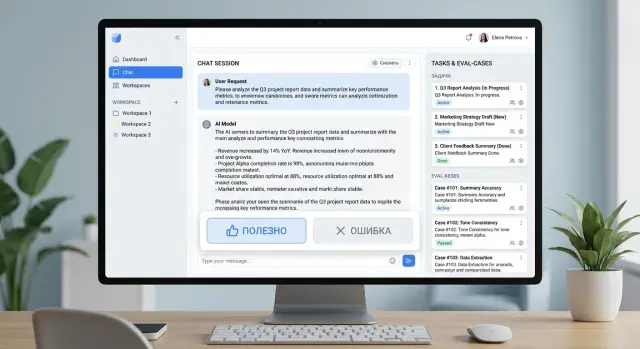
Why buttons alone are not enough
A “helpful” or “error” button gives you a signal, but it does not explain the reason. One user clicks “error” because the answer is factually wrong. Another does it because the bot wrote too much. A third simply did not understand the wording. For the team, those are three different problems, but in the report they all look the same.
If you collect feedback only as clicks, you can see the general mood, but not the actual failure. There is almost nothing useful to fix in that stream. The team starts arguing over guesses instead of reviewing a concrete case.
The problem becomes even more obvious when the click does not save context. Without the prompt, the system instruction version, the model name, the parameters, and the exact answer text, it is impossible to understand what went wrong. Even a small change in the template or the model-selection rule can lead to a different result. A week later, nobody will remember what the user actually saw.
This is especially noticeable when requests go through several models or providers. If the team routes traffic through a gateway like AI Router, the same question may be handled differently depending on rules, limits, or the selected model. A click without context gives almost nothing in that setup.
Screenshots also rarely help. They quickly get lost in chats, buried in threads, and are hard to search. A screenshot often does not include the full conversation, the request ID, or data about which model answered. That is enough for an argument in a chat. For an LLM improvement queue, it is not.
There is another trap too. The same failure gets logged under different names: “hallucination,” “wrong fact,” “the bot made up a condition,” “the answer is not based on the database.” In the end, it looks like there are many different cases, even though the root cause is the same. The stats get noisy, and priorities drift.
For each click, it is worth storing at least five things: the prompt and 1–2 previous messages, the exact answer text, the model and prompt version, the request time, a short reason from a clear list, and a case ID to avoid duplicates. Then the button stops being a sign of frustration or approval. It becomes a marker on a specific case that can be checked, grouped, and later added to an eval set.
What to record with the click
One click explains almost nothing. A user pressed “error,” but a day later the team no longer remembers what exactly they saw on screen or why the answer was not good enough. So do not save only the rating. Save the full context that will let you reproduce the situation later.
The first rule is simple: log the full prompt and the full answer. Not just the last message, but the whole conversation that led to the click. The error often does not start in the final message. It starts a couple of steps earlier, when the model misunderstood the goal, missed a constraint, or steered the conversation in the wrong direction.
You also need a technical trace next to the text. If the same request goes to different models at different times, you will not know whether the failure came from the model, the provider, or a new prompt version. If the team works through AI Router, it is especially useful to store the model, provider, and request route alongside the case.
Usually five groups of data are enough: the conversation itself, the request route, the product context, the click reason, and system fields. The conversation should include the prompt text, message history, and model answer. The route should include the model, provider, prompt version, and, if needed, temperature and system instruction. The product side should include the screen, the scenario, and the user role, such as “support agent” or “bank customer.” You also need the time, language, dialog number, and session ID.
A short reason tag saves a lot of time. It is better to offer 6–8 clear options like “factual error,” “did not answer the question,” “too long,” “bad tone,” and “wrong language.” The user chooses one option in a second, and the team can then quickly build samples by problem type.
A small example. A bank customer asks in chat how to reissue a card. They click “error” not because the answer was rude, but because the model gave instructions for a different product. If all you have is a click and a screenshot, the discussion will go in circles. If you have the conversation text, language, user role, model, provider, and prompt version, the task is already clear: check the route, update the instruction, and add this case to the eval set.
If requests include personal data, keep a masked copy for analysis. Otherwise, a useful log quickly turns into a risk.
How to sort bad answers by type
One click on “error” explains very little. If you throw all bad answers into one folder, the team only sees noise and argues about the reasons. That kind of feedback does not help improve the model.
Group failures by meaning, not by the user’s emotion. The same answer can annoy people for different reasons, but each reason needs a different fix.
- Factual error. The model gives the wrong fact, amount, date, rule, or status.
- Task miss. The facts may be correct, but the answer does not solve the request. The user asked for a comparison and got a summary instead.
- Format failure. The meaning is fine, but the answer came in the wrong form: too long, missing structure, wrong language, or broken JSON.
- Risky answer. The model gives dangerous advice, exposes too much data, invents company policy, or pushes the user toward something they should not do.
- Tone and delivery. The answer is rude, dry, blaming, or too confident, even though it may be mostly correct.
These types are often confused. A polite but wrong answer is a factual error, not a tone problem. A style that feels unpleasant but is safe is a tone issue, not a risk issue. If you mix those cases up, the team will fix wording where the logic or data needs work.
Keep speed complaints separate. A slow answer, a timeout, or a first-token delay is just as annoying as bad text, but it is a different workflow. Those cases usually go to the people responsible for infrastructure, limits, and model selection, not to the people adjusting prompts or the eval set.
A simple example makes this clear. The user asks: “Give a short answer in 3 bullets and only about return conditions.” If the model makes up a return period, that is a factual error. If it goes off into delivery and discounts, that is a task miss. If it gives a wall of text instead of 3 bullets, that is a format failure. If it suggests bypassing identity checks, that is a risky answer. If it sounds harsh, that is a tone problem.
A good rule is simple: one complaint, one main reason. If there are two reasons, choose the main one and add the second as an extra tag. Otherwise the improvement queue quickly turns into a storage room of disputed cases, where everyone reads the same screenshot differently.
How to move from click to task queue
To keep feedback from turning into a folder full of screenshots, every click should be turned into a case right away. A user clicks “error,” and the system generates a click_id, links it to the session, message, prompt version, model route, and time. After that, the case can be found, reviewed, and compared with similar ones.
The next step should not be delayed. At the moment of the click, the system should create a case card instead of waiting for someone to manually describe the problem in a team chat. Otherwise, half the details will disappear the same day.
A case card usually needs only the conversation around the disputed answer, the technical context, a short failure tag, and fields for status, owner, and decision. That way, the team gets not “a complaint” but a working object. One case goes to prompt changes, another to model switching, and a third to cleaning up the knowledge base. If the request goes through AI Router, it is useful to see right away which provider and which model it passed through.
Similar complaints should be merged into one cluster. Not by the words the user used, but by the actual problem. If people complain in different ways that the bot confuses plans or makes up limits, that is one class of error. Without clusters, the queue quickly fills with duplicates, and frequent failures look like a pile of random little issues.
Priority is best measured along two axes: how often it happens and how serious it is. A rare but dangerous answer about payments, personal data, or legal terms should be ranked higher than twenty complaints about a dry tone. A simple scale works better here than a complex formula: frequency, business risk, customer risk, and fix cost.
After that, the cluster enters the improvement queue as a task. The task should have an owner, a deadline, and a fix hypothesis. For example: check retrieval, split model-selection rules by request type, or add a fallback for unknown limits. If there is no hypothesis, it is better to mark the card as “need 10 more examples” than send it to a general list with no clear next step.
That is how a click stops being a reaction to frustration and becomes a unit of work that can be measured, fixed, and checked again.
How to build an eval set from live feedback
Live feedback is useful only when the reason for the failure is clear in each case. If a user clicked “error” but the team cannot explain what exactly is wrong, that example is better left in a raw archive. The eval set should include cases with a clear defect: the model made up a fact, failed to ask a clarifying question, broke the format, or missed a constraint.
It is better to store each case as a short record with fields rather than a screenshot. Then the set can be run again after a model, prompt, or route change. Usually the user prompt, the model answer, the “helpful” or “error” label, a short reason, and the expected answer or checking rule are enough.
The expected answer does not always need to be a long gold standard. Often a simple rule is enough: “do not invent a plan,” “ask for the order number first,” “answer in 3 bullets,” “do not expose personal data.” These rules are easier to maintain than perfect examples for every case.
It helps to keep good and bad examples on the same topic side by side. If one answer passed and another failed in similar requests, the team can spot the problem faster. Very often, the failure is not in the model itself but in the request route, the system prompt, or the fact that an extra piece of data slipped into the context.
The set should follow a simple rhythm. After a model change, it should be run again in full. This is especially important if the team tests several models through a single API gateway: small differences in answer style can easily turn into real failures in checks.
Older cases should be removed without long debates. If the product policy changed, the answer format is different, or the bug is already gone, the example no longer reflects the current system. Archive it and move on. Otherwise the set grows too large and the signal gets weaker.
A good eval set does not have to be big. Forty clear cases with a clear reason and check are better than 400 screenshots that nobody can make a decision from.
Example: a bank support chat
A customer writes in the mobile bank chat: “What is the transfer limit in the app?” They mean the daily limit. The model answers confidently but mixes up the periods and gives the monthly limit instead of the daily one.
The customer clicks “error” and chooses the tag “fact.” If the collection is set up well, the record includes not only the click itself, but also the question, the model answer, the prompt version, the model, the answer source, and the request time. One such package is already something the team can review instead of sending a screenshot back and forth.
Then an operator or analyst quickly sees where the failure is. Sometimes the model simply made the answer up. But in bank support, the problem is more often hidden in the source: an old knowledge base article, unclear wording, or a table where the daily and monthly limits sit next to each other and look almost the same.
In that case, the team finds the mistake in the source and edits the text. The wording is made direct: one limit for the day, another for the month. If the limit depends on the customer type or verification status, that is written clearly too, without footnotes or vague lines.
Then the case is not lost. It is added to the eval set as a separate test: a question about the transfer limit in the app, the expected meaning of the answer, acceptable phrasing, and a clear rule not to confuse days and months. After release, this test goes into regression checks together with similar questions about fees, deadlines, and limits.
The value here is very practical. The user click points to a real pain point, the “fact” tag narrows the search for the cause, the fix goes both into the source and into the eval set, and the same mistake does not quietly return a week later.
That is how live feedback stops being a pile of screenshots. It becomes a task queue with a clear owner, a follow-up check after the fix, and a memory of what has already broken before.
Where teams most often go wrong
The first common mistake is simple: after a click on “not helpful,” the team asks the user to write a long comment. Almost nobody does that. The person wanted to finish the task in 20 seconds, and instead they are asked to take a mini survey. The result is lots of negative clicks and almost no explanation. Short one-click reasons and an optional comment field usually work better.
The second mistake makes raw feedback almost useless. All bad answers are dumped into one folder, chat, or spreadsheet without tags. A week later, nobody can quickly tell where the model made up a fact, where it misunderstood the question, and where the answer was correct but sounded rude or too vague. Without simple labeling, you are not building a task queue. You are keeping a digital warehouse of complaints.
There is another mistake almost everyone makes: the team rushes to fix a rare but loud case before common repeats. One screenshot from a manager can derail an entire sprint. Meanwhile, dozens of similar failures from regular users stay untouched because nobody grouped them into a repeating pattern. For prioritization, it is more useful to look at repeat frequency, the share of affected sessions, and the cost of the error to the business, not at the loudest example.
This is also tied to another issue: teams look at the total number of clicks, not repeats. One hundred negatives do not always mean one hundred different problems. Sometimes it is the same request run many times in a test environment, or one frustrated user downvoting every answer. Repeats of one failure type are more useful than the raw sum of reactions.
Complaints are also often not linked to a model release, a new prompt, or a route change. Then the team sees a rise in negative feedback but does not understand what caused it. If you work through AI Router and can quickly switch routes between models and providers, version tracking is especially important: the same scenario may break only on one model and work fine on the others.
A bad process almost always looks the same: too little context, no tags, priorities based on emotion instead of repeats, and no one sees the link between the complaint and a system change.
Quick checklist before launch
Before launch, five checks are enough:
- Errors have short tags, and there are not too many of them. Usually 3–7 options are enough.
- The log stores not only the click, but also the prompt, answer, model, prompt version, time, language, session ID, and basic metadata.
- Similar cases are merged instead of becoming dozens of identical tickets.
- The eval set is updated on a schedule, not only when someone remembers to do it.
- One specific person owns the process, not “everyone a little bit.”
That is already enough for feedback to start working as a normal input into development. The team sees not just user dissatisfaction, but repeatable failures with clear context.
There is a simple test. Take any “error” click from yesterday and try to answer three questions: what exactly went wrong, how often does it repeat, and who will take it on. If you cannot answer at least one of them, the process is still too raw.
What to do next
Start with one scenario, not the whole product at once. Pick a flow where people often see the model’s answer and where mistakes are obvious right away. For example, support chat answers about pricing, delivery, or application status. Turn on the “helpful” and “error” buttons for a week and do not try to build the perfect setup on day one.
This kind of short launch quickly shows whether the process works for your team. If clicks are coming in but nobody can tell what actually broke, the problem is not the buttons. The problem is that the click is missing context and shared rules for review.
Agree on a simple set of reason tags right away. There should not be too many. Usually 5–7 is enough: factual error, skipped step, bad tone, outdated data, unnecessary refusal. Also define a priority rule. A repeated failure with high risk should be worked on before a rare oddity, even if it looks dramatic.
Then keep a simple rhythm: collect clicks for one scenario for seven days, move repeats into the eval set once a week, and put the full case into the task, not a screenshot — prompt, answer, reason, and expected result. What matters is not the total noise, but repeats of the same failure.
If you already route requests through AI Router, it makes sense to store the model, provider, and request route next to the case from the start. That helps you quickly see whether the prompt, a specific model, or a routing rule broke. In teams with audit-log requirements, personal data masking, and in-country storage rules, this context is especially useful: review is faster and safer.
The rule of thumb is simple: do not chase the number of clicks. Seven identical misses in one scenario matter more than thirty unrelated complaints. Improvement queues come from repeats. Noise becomes a folder of screenshots that nobody returns to.
Next week, keep the same process, remove one unnecessary tag, and add one new test to the eval set. If you can do that regularly, the system is already working.
Frequently asked questions
Why aren’t the “helpful” and “error” buttons enough?
Because a click shows a reaction, not the reason. One person marks “error” because the fact is wrong, another because the answer is too long, and a third because the wording is bad. Without context, the team only sees noise and argues from guesses.
What should be recorded with a user click?
Save the user’s prompt, the previous 1–2 messages, the exact model answer, the model and prompt version, the time, the language, the session ID, and a short reason for the complaint. That is usually enough to reproduce the case and see what needs fixing.
How many reason tags should you give users?
Usually 5–7 tags are enough. If there are too many options, people get confused and click at random; if there are too few, different failures get lumped together.
How do you quickly group bad answers by type?
Split them by meaning: wrong fact, task miss, format failure, risky answer, and tone problem. That way the team won’t spend time fixing style where the data or logic is broken.
Are screenshots enough to investigate mistakes?
No, screenshots usually lose too much detail. They often miss the full conversation, the request ID, the prompt version, and the model route, and without that it is hard to reproduce and verify the error.
How do you decide which complaint to handle first?
First look at two things: how often the failure repeats and how serious it is. A risky answer about payments, personal data, or service rules should be prioritized above a dozen complaints about a dry tone, even if there are fewer cases.
How do you turn live feedback into an eval set?
Take cases with a clear failure reason and a clear check. If the model made up a fact or broke the format, add the prompt, the answer, the reason tag, and a short rule like “do not mix up daily and monthly limits.”
Should complaints about answer quality and speed be mixed together?
It is better to keep them separate. A slow answer, a timeout, and a delayed first token are just as frustrating, but they are fixed through limits, infrastructure, and model choice, not through the prompt.
What should you do with personal data in logs?
If requests contain personal data, keep a masked copy for analysis. That way the team can review cases without extra risk or exposing sensitive information.
Where should you start if you do not have a process yet?
Start with one visible scenario, such as support chat, and collect clicks with full context for a week. Then group repeats, pick the most common failures, and add at least a few cases to the eval set.