Tool Calling Across Multiple Providers Without Surprises
Tool calling across multiple providers often breaks on schemas, types, and error codes. Let’s look at what to check before production.
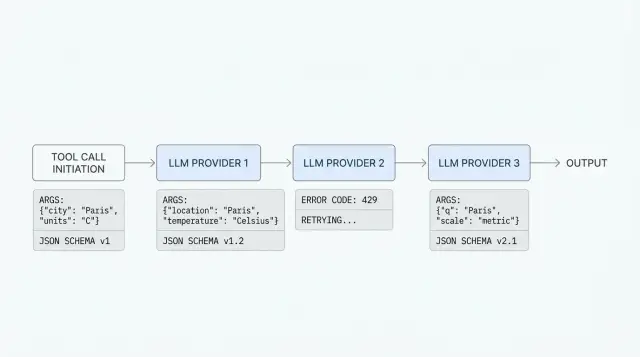
Why one call breaks with different providers
The same request with a tool often works with one provider and fails with another, even when both claim OpenAI API compatibility. The shape looks similar, but the details differ: how the model reads the schema, how it builds arguments, how the provider returns an error, and what ends up in the log.
You can see this in production right away. The team gives the model two tools, for example find_customer and create_ticket, and expects one neat tool_call. With the first provider, the model calls find_customer with valid JSON. With the second, it puts numbers into strings, adds an extra field, or replies with plain text instead of calling a function. With the third, the request fails even earlier because the schema is formally valid for your SDK, but the provider expects a different format.
A common wrapper helps you get started quickly, but it often hides where the break happens. If the adapter reduces every failure to a message like "tool call failed", the team loses the most important part: what the model actually saw, which arguments it returned, and at which step the error appeared.
Most often, the problem sits in four places:
- in the tool schema, when one provider tolerates a vague parameter description and another strictly checks types and required fields
- in the arguments, when the model returns a JSON string, an object, an empty set of fields, or extra data
- in error handling, when one place gives you a real
400and another gives you200with broken content - in logs, if you do not save the raw request and the raw response
In real integrations, failures rarely look neat. The model may pick the wrong tool, call the same tool twice after a retry, mix up customer_id with client_id, or pass null even though the field is required. Sometimes everything works on ten test requests and then falls apart on long conversations, when the context gets large and the model starts saving effort on argument precision.
That is why tool calling across multiple providers cannot be reduced to "everyone has the same API". On paper, compatibility exists. In practice, behavior differs in the details, and those details are what break the system.
If the team logs the tool schema, the raw tool_call, the final JSON after parsing, and the provider error code from day one, debugging takes ten minutes. Without that, even a simple failure can easily eat half a day.
What differs in tool schemas
The same tool rarely looks identical across providers. Even if the team sends requests through an OpenAI-compatible gateway, differences still show up in the tools format, JSON Schema rules, and the way the model returns the tool choice.
Where formats diverge
Usually it is not the function logic that breaks, but the packaging. With one provider, the tool lives in tools as an object with type: "function" and a nested function. With another, the same data is expected in name, description, and input_schema without the extra layer.
Field names also do not always match. Somewhere the argument schema is called parameters, somewhere input_schema, and somewhere only a trimmed-down JSON Schema variant is supported. If the wrapper hides these differences, it may silently drop some rules, and the model will start inventing arguments in free form.
Support for enum, default, and nullable, the treatment of additionalProperties, nested objects and arrays, required fields in required, and sometimes even the length and allowed characters in the function name often differ.
JSON Schema should not be treated as universal either. Many models handle type, properties, and required well, but struggle with oneOf, anyOf, complex string constraints, or deep nesting. If the schema describes an order as if a lawyer wrote it, the model usually does worse, and the provider sometimes simply strips unsupported parts.
Enum is especially tricky. One provider will strictly force a choice from the list, another will accept almost any text, and a third will return an error if the enum values do not match in type. Required fields are similar: some systems validate them before the model call, some only after, and some leave that entirely to your side.
What the model returns
The response when choosing a tool is not shared either. One provider returns tool_calls with the function name and a JSON string in arguments, another sends a structured object where the arguments are already parsed, and a third adds plain text next to the tool call.
Because of this, you cannot write a parser based on one good example. If you have get_weather(city, units) and find_order(order_id), test not only the successful call but also the strange cases: empty arguments, an extra field, a value outside enum, or an attempt to call two tools at once. That is where you see whether the abstraction hides the differences or honestly exposes them.
How providers read arguments
The same schema does not guarantee the same result. One model returns {"count": 3}, while another sends {"count": "3"}. For code, that is only a minor detail on paper. In practice, a filter, calculator, or order lookup may go down a different branch.
Confusion between strings, numbers, and booleans is the most common issue. string is often used too broadly: a date, an amount, a customer id, and plain text all come in as one type, even though the rules for them are different. number is not so simple either: some models turn "00125" into 125 and break the identifier, while others round 12.00 down to 12. The same goes for boolean: instead of true and false, the model may return "true", "yes", 1, or even an empty string.
Differences are also easy to spot with nullable fields. One provider accepts null without issue, while another expects the field to simply disappear. The same happens with arrays: somewhere [] means "nothing here", and somewhere the model places null or a single string instead of an array of strings. In nested objects, failures pile up faster because the model may skip a required field inside while the outer response still looks almost normal.
The response shape is another separate issue. Some models return arguments already as a JSON object, while others put JSON into a string that still needs to be parsed. Sometimes the string is almost valid, but has a trailing comma, a comment, or numbers in quotes. If the wrapper silently fixes such responses, the team later spends a long time looking for the cause of strange behavior.
Usually the most useful thing is a strict rule for the fields that break most often:
- keep dates in one format, for example
"2025-04-27", and do not let the model write"27/04"or"next Monday" - pass amounts as a string with currency or as a number in minor units
- keep identifiers as strings almost all the time, even if they contain only digits
- choose one empty value:
null,"", or no field at all
A good abstraction does not hide these differences. It checks them on input and on output. If the tool expects strict JSON, validate every argument after the model responds and save the original response in full. Otherwise, a convenient wrapper turns the normal differences between providers into a quiet production bug.
How to build a shared wrapper step by step
If the team sends requests through a single gateway, it is easy to think compatibility is already covered. In practice, a shared endpoint removes some routine work, but it does not erase the differences in LLM tool calling. A good wrapper does not hide those differences. It keeps them under control.
Start with the simplest possible contract for the tool. Do not add nested objects, arrays inside arrays, or long optional fields until you truly need them. The simpler the schema, the less often the model mixes up argument names, and the easier it is to see where the call broke.
Then define one internal workflow.
- Describe each tool in a short JSON schema with clear types and required fields. If the tool needs
city, do not call that fieldlocationin one place,queryin another, andtextsomewhere else. - Validate the arguments before sending them to the model. If the schema requires a number, do not let a string through. If a field is required, stop the request immediately and return a clear error to your code, not to the provider.
- Normalize model responses to one internal format. For example, store
tool_name,arguments,call_id, andfinish_reasoninternally, even if the provider names those fields differently or places them on another JSON level. - Save the raw request and the raw response. Otherwise, a day later nobody will remember whether the model did not see the tool, broke the JSON, or the provider returned its own error format.
- Move error mapping into a separate layer. One provider may return 400 for an extra field, another may answer 422, and a third may send text without structure. Your app should see not a zoo of responses, but your own codes such as
INVALID_TOOL_SCHEMA,BAD_ARGUMENTS, orPROVIDER_TIMEOUT.
This approach saves time when debugging failures. Suppose the model called get_customer and passed customerId: "abc", even though you expect a number. If validation happens right after the response, the error appears in one place. If it does not, you get somebody else’s 400 and start guessing whether the schema, the model, the SDK, or the provider itself is to blame.
A useful habit here is simple: first make the wrapper boring and strict. Add convenience, retries, and rare fields later.
A simple scenario with two tools
Let us take a support chatbot for an online store. It can do two things: find an order by number and create a ticket if the customer needs help. On the surface, that looks simple, but this is exactly the kind of case where provider differences show up most clearly.
The tools can be described like this:
[
  {
    "name": "find_order",
    "description": "Найти заказ по номеру",
    "parameters": {
      "type": "object",
      "properties": {
        "order_id": { "type": "string" }
      },
      "required": ["order_id"]
    }
  },
  {
    "name": "create_ticket",
    "description": "Создать заявку в поддержку",
    "parameters": {
      "type": "object",
      "properties": {
        "order_id": { "type": "string" },
        "reason": { "type": "string" },
        "urgent": { "type": "boolean" }
      },
      "required": ["order_id", "reason"]
    }
  }
]
The user writes: "Where is my order 45128? If it is lost, create a ticket." One provider may return a clean find_order call with JSON like {"order_id":"45128"}. The app looks up the order, sees a delivery issue, and on the next step gets a second correct call: {"order_id":"45128","reason":"delivery delay","urgent":true}.
Now the unpleasant version. Another provider, on the same prompt, returns almost the same thing but breaks the types: {"order_id":45128,"reason":"delivery delay","urgent":"true"}. For a human, the difference is small. For code, it is already two risks: the order number became a number, and the urgent flag became a string.
Even if the team routes everything through one OpenAI-compatible gateway, you still have to catch these differences in the app. The gateway simplifies access to models, but it does not remove argument validation before calling internal systems.
In the first case, everything is clear: validate the JSON, call the tool, and write the result to the log. In the second case, the app should not silently send broken data onward. The order is simple:
- check the tool name and argument schema
- convert safe types only by explicit rules
- reject dangerous or ambiguous values
- return a clear error to the model or ask it to clarify
order_id can often be safely converted to a string. But urgent: "true" is better not to guess if it affects queue priority or notifies an employee. In that case, the app can return a message like: "The urgent field must be boolean" and ask for the tool call again.
The takeaway is simple: a shared wrapper is useful, but it must be strict on the way in. Otherwise, one provider gives you working JSON, while another quietly pushes an error into the CRM or ticketing system.
Where teams usually make mistakes
The first mistake is simple: the team sees an OpenAI-compatible API and assumes the behavior will be the same too. In reality, the request shape matches, but not every detail of execution. One provider will silently allow an extra field, another will return an error. One will return neat tool_calls, another will send the arguments as a string with a small JSON break.
This often shows up where a shared gateway already exists. For example, AI Router provides one OpenAI-compatible endpoint, so you can keep your previous SDKs, code, and prompts. But the differences between providers do not disappear, so schemas, arguments, and responses still need explicit validation.
The second common mistake is hiding provider-specific fields in the shared wrapper too early. The team keeps only the tool name and arguments and cuts everything else as "noise". Later, strict schema settings, the tool-choice mode, the argument return format, and other details get lost, and the behavior is no longer reproducible.
Usually it is better to keep two layers. The first is the shared contract for tool name, schema, and tracing. The second is the provider-specific fields that you have not normalized yet. And you should always save the raw response before post-processing and record which adapter changed the request and response.
The third mistake hurts debugging. Teams collapse all failures into one code like TOOL_CALL_FAILED. After that, it becomes impossible to quickly tell where it broke: the model did not build JSON, the provider rejected the schema, your backend rejected the arguments, or the tool itself timed out.
Another trap is trusting the model to check required arguments. The model may forget customer_id, insert a string instead of a number, or invent an enum value that does not exist in your system. Your code should check that before the tool call, not after a strange backend response.
A common example: the get_invoice tool expects customer_id and month. One provider passes both fields. Another decides customer_id can be "understood from context" and leaves it out. If the backend does not validate the request, you get an unclear 500 error and spend an hour looking for the cause.
And the last common mistake is going to production without a test set of calls. You need at least fixed cases for a normal request, a missing required field, an extra field, a wrong type, and a long argument. This set should run every time the schema, SDK, or provider changes.
How to debug failures without guessing
If the same LLM tool calling works sometimes and breaks with different providers, the problem is almost never "model magic". It is usually poor failure analysis. Putting every error into one "did not work" bucket is a sure way to spend weeks fixing the wrong thing.
First, separate failures into three types. Schema errors happen when the tool description or argument format does not match what the provider or your validator expects. Model errors look different: the schema is formally correct, but the model picked the wrong tool, skipped a required field, or inserted a strange value. Network failures are the easiest to spot thanks to timeouts, 429s, 5xx errors, and connection drops.
This split is not for reports. It is for action. A schema error is not fixed by resending the request. A model error is rarely fixed by a normal retry, but a stricter schema, explicit examples, and separate required-field checks can help. A network failure usually needs a retry, backoff, or a switch to another provider.
The minimum useful log set is small: tool name, arguments before and after normalization, provider id, request id, and the validation result with the error text. Without that, debugging is blind.
It is especially important to show not just that something failed, but exactly where. A message like "invalid arguments" is almost useless. A message like field: customer_id, expected: integer, got: "12A" can already be sent to a developer or directly into a fix loop.
A good practice is to save failed calls as separate regression examples. Not only the raw model response, but the whole context: the tool description, the prompt, the provider response, the normalized arguments, and the final validation result. Then after you change the wrapper, you can rerun old failures and immediately see whether things improved.
A small example: the model called get_balance, passed account="00125", and your validator expects a number. If this is a schema error, you change the type or the string-to-number normalization. If another provider in the same scenario chooses search_customer instead, that is a model error. If both versions sometimes fail on a timeout, the problem is in the network, not in the arguments.
When requests go through a gateway like AI Router, it helps to log not only the internal id, but also the provider id where the call was sent. Otherwise, two failures that look identical from the outside will seem like one, even though the causes are different. In practice, this saves many hours.
A short checklist before launch
Before release, it is better not to write dozens more tests for every possible case, but to run a few nasty scenarios by hand and in automated tests. Those are the cases where tool calling across several providers breaks most often, even when the requests look compatible.
The same tool must be named the same everywhere, without quiet differences like get_user, getUser, and fetch_user. For the model, those are already different functions. If you route through a shared gateway, an error in the name does not disappear. It just shows up later and makes debugging harder.
Before launch, check five things:
- compare tool names,
enumvalues, and argument descriptions across all providers that will go to production - go through required fields and default values
- make sure the system survives an empty tool call
- check the reaction to an extra field and a wrong type
- verify whether the logs let you reconstruct the full chain from the input prompt to the final model response
A small example: the check_order tool expects order_id as a string. One provider silently accepts the number 12345, another returns a schema error, and a third returns a tool call with empty arguments. If the app normalizes the type in advance, catches the empty call, and logs the original payload, the failure is fixed in 10 minutes instead of half a day.
It is also worth checking that logs do not lose context between retries. Otherwise, you will only see the final error and not know whether the model broke the schema, the proxy cut off a field, or your code built the arguments incorrectly.
What to do next
After the theory, do not jump straight into writing a "universal" layer for every case. First, take the 2-3 providers you really plan to use and run the same test set through all of them. Otherwise, you will very quickly end up with code that looks tidy but breaks on the first real LLM tool calling.
A good starter set is simple: one tool without required fields, one with a nested object in the arguments, and one scenario where the model should refuse to call a tool. That is already enough to see differences in function argument schemas, field names, message order, and error text. Often the problem is not the function itself, but how the provider expects the JSON Schema to be described or how it returns invalid arguments.
It is useful to keep a short table next to the code, not in notes. Usually five columns are enough: how the provider accepts the tool description, how the model returns arguments, what comes back for invalid JSON, what a tool-call refusal looks like, and which fields you must normalize on your side.
That table quickly shows where you have a shared contract and where it is more honest to keep a separate branch. One abstraction is useful only as long as it does not hide important differences.
Then lock the normalization rules directly into the team’s code. Not in your head and not in a wiki, but in tests and in one adapter layer. For example, agree that before calling any tool you always do three things: convert arguments to one format, validate required fields, and save the provider’s raw response for debugging.
If you need one OpenAI-compatible entry point for different models, it is better to test that in advance with your own traffic. With AI Router, the convenient part is that you can change only base_url to api.airouter.kz and keep working with familiar SDKs. But before launch, you should still look at how tool calls from different providers pass through the gateway, what appears in audit logs, and where rate limits are triggered at the key level.
If you do only one practical thing after this article, let it be a shared test run with the same prompts and the same tools. Then tool calling across multiple providers stops being a lottery and becomes a predictable part of the system.
Frequently asked questions
Why does the same tool call work with some providers and not others?
Because only the broad API shape matches, while the details differ. One provider validates the schema more strictly, another packages tool_call differently, and a third returns 200 with broken content, so your code sees a very different scenario.
What should I log first to find the failure quickly?
Save the tool schema, the raw request, the raw response, the tool_call before parsing, and the validation result. Without those details, the team has to guess whether the failure is in the schema, the model, the adapter, or the provider.
Which parts of tool schemas cause the most problems?
The most common trouble spots are required, field types, enum, nullable, and extra fields. If you want fewer surprises, start with simple type, properties, and required, and add things like oneOf and deep nesting only when you really need them.
How do I describe a tool so the model mixes up arguments less often?
Keep the schema short and unambiguous. If a field is called order_id, do not rename it to id or customer_order, and do not let the model guess the format for dates, amounts, or identifiers.
What should I do if the model returns a number instead of a string or a string instead of a boolean?
Do not fix those answers silently. Validate every argument after the model responds, and convert types only by explicit rules, for example 45128 to a string for order_id if that is safe.
If I use an OpenAI-compatible gateway, do I still need validation?
No, it does not remove the need for validation. A single endpoint simplifies connection setup, but it does not make model behavior identical, so your app still has to check the schema, arguments, and error codes.
How should I handle invalid JSON in arguments?
First, save the raw response and show the exact parse error. Then decide whether the model can safely retry the call or whether you should reject it right away if the JSON is ambiguous or risky for your backend.
When does retry make sense, and when does it not?
Retries mainly help with timeouts, 429, and temporary 5xx errors. If the provider rejected the schema or the model keeps mixing up arguments, retries only waste time and money. In that case, you need to change the schema, the prompt, or the validation layer.
How do I test tool calling before production?
Run the same prompts on the same tools with every provider you actually plan to use in production. Make sure you test a normal call, empty arguments, an extra field, the wrong type, and a long dialogue where the context has already grown.
How do I build a shared wrapper without hiding important differences?
Keep two layers. Inside the app, store a shared format such as tool_name, arguments, call_id, and your own error code, and keep provider-specific fields and the raw response nearby so you do not lose important details during debugging.