Tool Call Cost: What Makes Up the Price
Tool call cost depends on more than tokens: let’s break down model choice, schema errors, retries, latency, and the cost of process downtime.
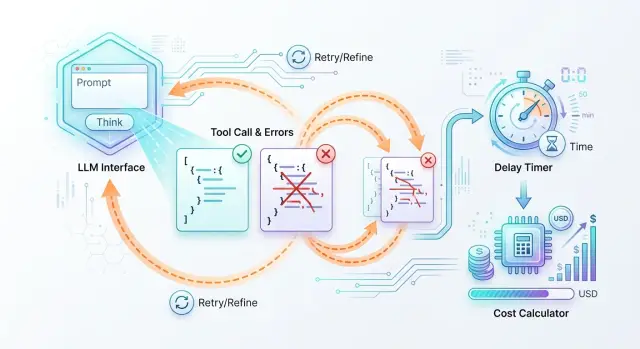
Why one call costs more than it seems
Teams often look only at token price. Because of that, a single call looks cheap, even though the business is not paying for the model’s answer, but for the whole step end to end.
First, the model reads the request and decides whether a tool is needed. Then the application checks the arguments, the tool itself performs the action, and the model assembles the final answer for an employee, a customer, or another system. If something goes wrong at any stage, the chain repeats. And the bill grows.
That is why even a cheap request can quickly become expensive. For example, the model itself may cost almost nothing, but it answers in 4 seconds, the tool works for another 3 seconds, and the employee waits the whole time. At that moment, you are paying not only for the API, but also for process time. For a bank, retail company, support team, or call center, this quickly becomes a noticeable expense.
The full cost of one step usually has five parts:
- the first request to the model;
- the tool’s work, for example a CRM search or a status check;
- the model’s second response after the function result;
- waiting time for an employee, customer, or next service;
- retries if the arguments or schema fail validation.
A simple example: an operator asks for the status of a request. The token cost is tiny. But if the model returned JSON without a required field, the system rejects the call, sends a new request, and waits again. One such failure seems minor. If it happens in 3–5% of requests every day, it becomes a constant budget leak.
A one-off timeout once a week is unpleasant, but it does not change the economics of the process. A quiet recurring error is much worse: a weak model fills the arguments poorly, the schema is too strict, or the service triggers retries too often. These losses are almost invisible in token price, but they are easy to see in the number of retries, response time, and the share of manual fixes.
You should count the whole path of the request: how many attempts there were, how long the tool took, and how many minutes the team loses waiting or fixing errors. Most of the cost is usually hidden there.
How model choice changes the final cost
The token rate is only the beginning. One model looks cheap in the price list, but it makes format mistakes more often, uses extra tokens, and asks for a retry. Another costs more per 1 million tokens, but it completes the task on the first try and ends up cheaper per finished action.
Let’s take a simple scenario: the assistant must call the create_ticket function and pass 5 required fields. The request contains more than just the user’s sentence. It also includes system instructions, the tool description, the field schema, types, enum, and validation rules. Even a short conversation can easily turn into 1,200–1,500 input tokens. If the model also fills the arguments wordily, the bill includes service JSON that nobody reads, but still has to be paid for.
In the same scenario, the cheaper model may cost 3 times less in tokens, but its format handling is worse. Suppose that out of 1,000 requests, it breaks JSON or misses a required field in 8% of cases. In another 4% of cases, it calls the tool unnecessarily, even though a normal answer would have been enough. That already means 80 repeated LLM calls and 40 unnecessary requests to internal systems.
Now compare that with a more expensive model. It may cost noticeably more per token, but it makes format mistakes only in 1.5% of cases and produces false calls only 1% of the time. The difference adds up quickly. You are paying not only for the model’s text, but also for every extra validation, queue delay, and service action that received an unnecessary request.
Missed calls also cost money. If the model was supposed to open a ticket, check a limit, or request an order status, but instead answers in general terms, the process stops. The user writes again, the system makes another pass, and the employee waits longer. Sometimes one such miss costs more than the price difference between models across hundreds of normal calls.
When testing, do not look at token price alone. Watch four metrics:
- the share of successful calls on the first try;
- the average number of tokens per successfully completed action;
- the share of false calls;
- the share of missed calls.
When a team compares models on the same set of real conversations, the uncomfortable truth appears quickly: the cheapest model on paper often produces the most expensive request, order, or ticket.
Where the schema breaks the process
Even a low-cost call becomes expensive quickly if the model does not fit the schema on the first try. On paper, you pay for one tool call. In reality, you pay for argument generation, JSON validation, a retry request, and the time while the process is blocked.
Most often, it breaks on small things. The model writes phoneNumber instead of phone, puts a string where a number is expected, or forgets a required field. The mistake looks minor, but the chain is already broken. The system cannot call the tool, the application asks the model to fix the answer, and the user waits for another round.
The most common failures look like this:
- the field name does not match the schema;
- the data type is wrong: a string instead of a number, an object instead of an array;
- a required field is empty;
- the arguments are only partially filled;
- the model added extra fields that the validator removes.
An overly strict schema also creates problems. If you require a perfect format for every field, even a useful answer may fail validation. For example, a loan application already contains the IIN and the amount, but the model did not pass currency. Formally, the JSON is invalid, even though the process could have continued and one field could have been clarified later. Instead, the system makes another API call where a soft check and a short question to the user would have been enough.
Empty and partially filled arguments are dangerous in a different way. They do not always fail validation right away. Sometimes the tool starts, but then business logic runs into null, an empty string, or an incomplete object. Then the team spends time not only on a retry, but also on figuring out why: the model made a mistake, the user did not provide the data, or the schema was too strict.
The cost of this error is not limited to tokens. Usually there are four more costs: regenerating arguments, extra validation on the application side, manual incident review in the logs, and operational delay. That is why the share of invalid arguments should be counted next to model price, not separately from it.
Why retries quickly eat the budget
Money rarely disappears in one big failure. More often, it leaks through a chain of small retries. The user clicked once, and the system managed to call the model, invoke the tool, fail to get a response, and start over. If you look only at the price of one request, this is almost invisible.
There are three types of retries. The first is a model retry. It happens when the model returned broken JSON, chose the wrong tool, or did not follow the format. Then the orchestrator asks it to answer again, and you pay once more.
The second is a tool retry. The model already chose an action, but the tool itself returned a timeout, a 500 error, or an empty body. The system runs the same call again. If the tool is paid, the money goes out twice.
The third is a duplicate of the original request. This is no longer caused by the model, but by the client, front end, or queue: the user refreshed the page, the interface thought the request was stuck, or the worker received a repeated delivery. This is the most unpleasant case, because the whole chain is duplicated.
In practice, retries often stack on top of one another. The system checks a request: the model breaks JSON on the first try, chooses the validation tool on the second, the tool times out, and after 10 seconds the front end repeats the original request. One operation turns into four paid steps.
To find unnecessary retries, it is not enough to look at the total bill. You need the trace of every step. If in one operation you see the same tool with the same arguments twice in a row, that is almost always a logic error in response handling, not a “smart” system behavior.
A practical rule is simple:
- set a separate retry limit for the model, the tool, and the whole user request;
- allow tool retries only for network errors, not for any failure in a row;
- write an
idempotency keyfor each business operation; - store the status of each step:
started,succeeded,failed,timed_out,duplicate_skipped.
If a step has no own identifier, no retry limit, and no final status, the budget starts leaking not because of an expensive model, but because of retries that nobody counted.
How latency turns into money
Latency rarely looks expensive until you turn it into the price of one operation. If the model responds in 12 seconds instead of 2, the business is paying not only for tokens. It is paying for employee time, queue growth, and users who simply close the window.
How to calculate the cost of waiting
Start with a simple formula: how much one minute of the process costs. If a bank or support operator costs the company 3,000 tenge per hour, one minute of their time costs 50 tenge. If they wait 10 extra seconds for a model response on each request, that is about 8.3 tenge of loss per operation from idle time alone.
Then volume kicks in. At 20,000 requests per month, those same 8.3 tenge become 166,000 tenge. And that is still without retries, JSON schema errors, and manual review after a failure.
Latency almost always comes with three more layers of cost: the operator cannot move to the next task, the queue grows and the SLA is missed, and some users abandon the session if the answer takes too long.
In a customer-facing flow, the losses are often even higher. If a person waits for an order status, approval, or chat reply for more than 15–20 seconds, they are more likely to leave. Then the operation cost grows not in the API report, but in lost conversion.
When to wait synchronously and when to move to the background
A synchronous response works where a person is really looking at the screen and waiting: chat, search, an operator hint, form validation. Here, latency must be kept tight. If the step does not fit the limit, it is better to show an intermediate status and send the heavy part to the background.
Background processing is better for long chains: document matching, CRM enrichment, data collection from several systems, report generation. The user gets confirmation right away, and the result arrives later. In many cases, this is cheaper than keeping a person waiting for 30–40 seconds.
It is normal to set a time ceiling for each step in advance. For example, model call — up to 3 seconds, external tool call — up to 2 seconds, one retry — no more than 2 seconds, total operation limit for a screen flow — up to 8–10 seconds. If a step does not fit this budget, the process is better simplified: choose a faster model, shorten the response schema, or move part of the work to the background.
How to estimate the full cost in advance
You should not start with token price, but with the whole chain that a request goes through before it produces a useful result. Until you break the process into steps, the full cost almost always looks lower than it really is.
Take one typical scenario. For example, a user submits a request, the model extracts fields, calls a CRM check, then makes a second tool call to calculate the status, and only then returns the answer to the operator. Each step costs money on its own and also brings retries and waiting with it.
A convenient calculation order looks like this. First, write down the steps from the first message to the final answer. Then assign a model price, a tool price, and a retry price to each step. After that, multiply the step not by the ideal one attempt, but by the average number of retries from the logs. Finally, add the waiting cost: how much one minute of idle time costs for the operator, customer, or process.
The formula is usually simple: the sum of all step costs, multiplied by the average number of attempts, plus the cost of waiting and the cost of errors that went to manual handling. If a step does not happen every time, use its probability. For example, CRM checking is needed in 70% of cases, so the calculation model should use a coefficient of 0.7 rather than 1.
Two things distort the bill the most. The first is repeated calls caused by a bad JSON schema, timeouts, or incomplete arguments. The second is choosing a model for function calling that is too cheap, looks attractive, but makes more mistakes and asks for extra retries. If a more expensive model removes even one retry out of ten requests, it is often cheaper in total cost.
Count latency separately. If the operator waits 12 seconds instead of 4, that is not just a technical metric. At a flow of 1,000 requests, the team loses hours of working time, and the customer is more likely to abandon the process. For a bank, retail company, or SaaS business, that is already a noticeable expense.
It is better to check the calculation on a batch of 1,000 live requests, not on one pretty example. After such a test, the numbers almost always change. Usually upward, but without unpleasant surprises after launch.
Example on one request
A tariff change request clearly shows why the cost of an operation is rarely equal to the cost of one model response. The customer writes in chat or in their account: “Move me from the basic plan to the business plan starting from the first day of the month.” On the outside, this looks like one simple command, but inside the system goes through several steps.
First, the model has to understand the request, collect the fields for the CRM, and check whether there is enough data. It needs the customer number, the current plan, the new plan, and the change date. If some of the data is already in the profile, the model builds JSON and calls the CRM. If something is missing, it asks a clarifying question. That is already another answer, more tokens, and more time.
Even in a neat scenario, the money does not go into one line: the first model response and argument preparation for the CRM, JSON schema validation, the CRM call itself and waiting for the answer, and the final message to the customer.
The problem often starts with the schema. The CRM expects, for example, plan_code and a date in the YYYY-MM-DD format, while the model returns “Business” and “from the first day of next month.” The validator rejects the request. The system retries, asks the model to fix the JSON, spends tokens again, and waits again. If the second response also fails, the request goes to manual review.
With illustrative numbers, it looks like this: the first model pass costs 6 tenge, the retry after the schema error costs another 6 tenge, and the CRM call, logging, and internal processing cost little, say 1–2 tenge per request. But if an employee spends even one minute checking it, the operation cost grows not by percentages, but by multiples. That one minute can easily cost more than all the tokens combined.
There is also a hidden part of the bill. While the customer waits the extra minute, they may send a second message, create a duplicate request, or leave for support. Then one schema error turns not into one retry API call, but into a chain of extra actions. For the business, this is already an expensive operation overall, not just an expensive request to the model.
That is why choosing a model for function calling cannot be judged separately from the schema and the speed of the process. A cheap model with frequent retries often loses to a more expensive one if the latter returns the correct arguments on the first try and does not slow the request down.
The most common calculation mistakes
The most common mistake is to count too narrowly. The team takes the model’s input and output tokens, multiplies them by the rate, and gets a nice number. On paper everything adds up, but in production the final cost is noticeably higher.
The first problem is simple: only the successful response is included in the calculation. But failed attempts also eat money. A timeout, connection drop, model response in the wrong format, a repeated request after 429 or 500 — all of these also cost money and time.
If you have repeated API calls, you should not hide them under “rare failures.” Even 3–5% retries quickly change the total if the tool is called at almost every step of the process.
The second common mistake is related to the schema. The team counts only successful function calls and forgets that JSON errors are also paid for. The model first tries to fill the fields, then gets rejected by the validator, then makes another attempt. Sometimes a clarifying prompt is added on top, and one logical step turns into three or four requests.
Empty tool responses are also often left out of the calculation. Formally, the call succeeded: the function returned 200, no errors. But if the tool returned an empty array, null, or incomplete data, the model almost always takes another step. It asks again, changes the arguments, or moves to a fallback path. Billing continues even though the business result is still missing.
Another source of confusion appears when the team mixes test load and live traffic. In testing, requests are short, the data is clean, and the operator watches every response. In real work, users write longer messages, tools respond unevenly, and the chain lives under limits and queues. That is why latency grows, and with it the indirect cost.
It is better to count not the “cost of one ideal call,” but the cost of one completed task. For that, four lines are usually enough:
- all model requests, not just successful ones;
- all tool calls, including empty responses;
- all retries after errors, timeouts, and validation failures;
- process time, if an employee or customer is waiting for the result.
If you look at the full path of the request instead of the cost of one model response, the picture quickly becomes more honest.
Pre-launch check
Before release, it is worth going through a short checklist. It takes 10 minutes, but often saves weeks of work untangling duplicates, empty responses, and jumps in the bill.
If the scenario includes a tool call, do not look only at token price. Money is also lost when the model makes a mistake, the system retries the request, and the process stalls for an extra 20–30 seconds.
Check five things:
- is there a hard retry limit for the model and the tool;
- can the schema accept partially filled but still useful data where that is allowed;
- is the tool protected against duplicates by the same identifier;
- is latency visible by step, not only as total response time;
- is it clear after which failure the case is handed to a human.
A good test is very simple: take 20 real requests and run them in conditions close to production. Then see how many times the system retried, where it lost fields, and at which step latency grew. Even such a small run usually reveals weak spots quickly.
In support, this is visible right away. The bot collects customer data, calls an internal tool, and creates a ticket. If the schema requires all fields without exception, the model makes mistakes more often. If the tool cannot handle retries safely, duplicates appear. If the team does not know when to bring in an operator, the customer just waits.
It is worth launching only the scenario where every extra loop is already limited, partial data does not break the flow, and a person is brought in by a clear rule.
What to do next
After all the calculations, many people again look only at the price per 1 million tokens. That almost always leads them in the wrong direction. The final cost is more often determined by process steps, schema errors, retries, and the time the business loses.
Start with a simple table. You do not need a complicated Excel model. One row per step is enough: model choice, first function call, JSON validation, retry on error, request to an external service, final answer. For each step, write down four numbers: token price, average latency, error rate, and the cost of one minute of waiting for the business.
Then run 20 live scenarios with logs and timings. It is better to take not test examples, but something that already looks like real work: a request, document check, CRM lookup, order status. Watch not only for success. Record where JSON breaks, how many times the system makes a repeated API call, and at what point the process starts slowing down.
It is also worth rethinking model choice based on real data. A cheap model on paper can easily lose if it makes more mistakes in function calling. If a more expensive model returns the correct tool call and valid JSON on the first try, the final bill is often lower. This is especially noticeable in processes where an extra 15–30 seconds slows down a request or response to the customer.
If the team needs to compare several models without rewriting integrations, that layer is better designed in advance. For companies in Kazakhstan and Central Asia, things like data storage, auditability, and a single connection method are often important here, not just price. For example, AI Router gives one OpenAI-compatible endpoint, and the team only needs to change base_url to api.airouter.kz; at the same time, audit logs and data storage inside Kazakhstan help you count retries, latency, and the full cost of the operation more precisely.
The next good step is very simple: count not the cost of a request, but the cost of a successfully completed task. That is the number that actually ends up in the budget.
Frequently asked questions
How do I understand the real cost of one tool call?
Count the cost of the completed step, not the cost of a single model response. Include the first model call, the tool execution, the second response after the function result, retries caused by schema errors, and the waiting cost if an employee or customer is watching the screen.
Why can a cheaper model end up costing more?
Because the token price does not show errors and retries. If the model breaks JSON more often, misses required fields, or calls the tool unnecessarily, you pay again for the model, the service, and the extra seconds of the process.
What usually breaks JSON in function calling?
Most often the model mixes up a field name, a data type, or leaves a required value empty. Another common reason is an overly strict schema, where even a useful answer fails validation because one field is missing.
How many retries should be allowed?
First, set a hard limit separately for the model, the tool, and the whole operation. For a screen-based flow, one retry for a network error is usually enough; if the failure repeats, it is better to stop the chain and hand the case to a person.
When is latency more important than token price?
When a person is waiting for an answer right now, delay quickly turns into money. In support, banking, retail, and call centers, an extra 5–10 seconds on each request creates noticeable idle time and builds up the queue.
What should be included in the full cost of an operation?
Include all model requests, not just successful ones; all tool calls, including empty responses; all retries after timeouts and validation errors; and waiting time. If some cases are sent to manual review, add that cost too.
How do you check the schema before launch?
Run real requests, not pretty tests. Watch where the model loses fields, how many times the system retries, and at which step the delay grows. If the schema rejects useful partial data without a clear benefit, soften the validation.
When is it better to process something in the background?
Move a step to the background when it uses several services, takes tens of seconds, or does not require an immediate answer on screen. The user should get a clear status right away, and the result can come later without extra waiting.
How can I compare two models for function calling fairly?
Compare them on the same set of live conversations. Look not only at token price, but also at the share of successful first attempts, the average number of tokens per completed task, unnecessary tool calls, and missed actions.
How can a gateway like AI Router help?
This layer makes it easier to switch models without rewriting code and helps you collect a complete picture from logs and latency. For teams in Kazakhstan, it is also a way to keep data in the country, keep audit trails, and pay by B2B invoice in tenge through one OpenAI-compatible endpoint.