Testing tool calling: what breaks beyond the happy path
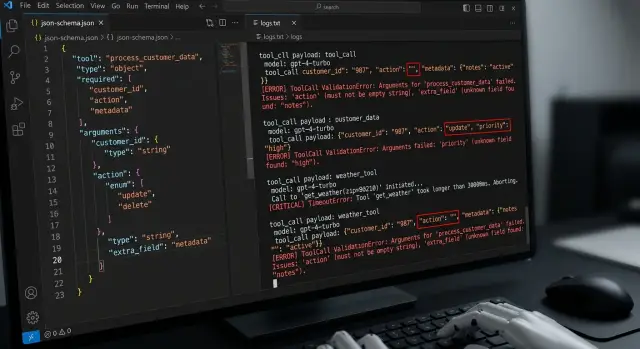
Tool calling testing is more than the happy path. This article covers empty arguments, extra fields, wrong types, timeouts, and retries.
Why the happy path is not enough
One successful call proves almost nothing. It only shows that the model, schema, and tool happened to line up on a convenient example. In production, that is rare.
Tool calling often breaks because of a simple mistake: if the demo worked, everything must keep working the same way. But the model does not execute code on a fixed script. It rebuilds each call from scratch. With a rare phrasing, it can easily drop a field, confuse a type, or add an extra argument.
Then a small error pulls the next one behind it. The tool receives bad JSON, returns a failure, and the next turn of the conversation is already built on a broken state. The user sees a guess, an extra question, or a strange pause, even though the first problem was minor.
In demos, people usually use a short request, clean data, and a fast tool. In real work, users type with typos, ask for two things at once, change their wording along the way, and the external service responds slowly. The same scenario behaves very differently.
This is easy to see in teams that use one OpenAI-compatible API and simply switch the model or provider. The call format is the same, but the behavior is not: one model keeps the schema carefully, another sometimes skips a required field. If you do not check this in advance, the system breaks on small things like an empty string in a required argument.
The happy path is necessary. But it is only the starting point. If you do not test rare inputs, tool failures, and behavior after an error, you are testing the demo, not the working system.
Empty arguments and missing fields
Most often everything breaks on empty arguments. The model may return null, an empty string "", or an empty object {}, and on the surface it will look like a normal call.
Test these cases separately. For the schema and for the code, these are different signals. {\"order_id\": null} may fail validation, {\"order_id\": \"\"} may pass and break the lookup, and {} shows how the system behaves without the required field at all.
For the find_order tool, a simple test is useful: first pass an empty value in order_id, then remove the field completely. In the first case, the model seems to understand that the argument is needed, but cannot fill it in. In the second, it misses the fact that the tool cannot be called without order_id.
Compare the behavior of the two layers separately. The validator should clearly say what is wrong with the input data. The tool itself should behave predictably even if the validator accidentally lets something through. Otherwise, in tests the team sees one error, and in production gets a completely different one.
It helps to lock in a few simple rules right away. If a field is missing for a safe lookup, the system asks for clarification. If the action sends, charges, or changes something, the call should stop immediately. If a value is empty, the error should be explicit, with no guessing and no defaults. If the schema rejected the request, the tool should not run at all.
This is one of the most useful sets of checks. It quickly shows where you have real protection and where it only looks that way. If an empty argument gets too far down the chain, the bug later has to be found not in the model, but in business logic and logs.
Extra fields and a broken schema
Extra fields break tool calling more quietly than wrong types. The request looks almost normal, the tool sometimes even responds, but the meaning has already drifted. The model added debug, comment, or user_context, and the code either swallowed it or passed it on without checking.
That is why it is important to verify not only that the JSON is valid, but also that the argument shape is strict. If the schema allows anything, the error stays hidden until the tool starts behaving strangely. For example, an order creation function expects amount and currency, but the model sends discount_override as well. If the parser silently ignores that field, you lose control over what the model is actually trying to do.
A useful test here is very simple: take a correct set of arguments, add one or two junk fields, and check that the validator clearly rejects the payload instead of trying to "fix" it. In logs, store the original payload in full, before normalization and trimming. And separately note where the failure happened: the model built the wrong arguments, or the parser failed to hold the schema.
Logs matter here more than it seems. If only the cleaned-up version of the arguments remains in the record, the team will not see the real cause of the failure. Later it looks as if the tool simply returned an error, when in fact the model added a field that should never have been there.
There are two different classes of problems. The first is that the model generated an extra field. The second is that the validation layer quietly accepted it. They are fixed in different ways. In the first case, you improve the tool description, examples, and system instructions. In the second, you tighten the schema, forbid additional properties, and do not let the parser guess on behalf of the model.
If, after the test, you cannot answer what exactly the model sent and at which step the schema stopped it, the check is not ready yet.
Wrong types and silent conversions
The most unpleasant errors do not appear where the schema rejects the request right away, but where it "helps" too early. The model sent "limit": "10" instead of a number, the code silently converted the string to 10, and the test passed. Then another model returned "0010", and the next service read it not as a quantity, but as a code.
These cases need to be caught separately. Pass a number as a string and a string as a number, even if the library can auto-cast. Otherwise you are testing not the tool contract, but the leniency of a specific parser.
A few simple bad examples work well:
"amount": "5000", if the schema expects an integer"currency": 398, if the field should be a string"mode": true, if the field accepts only"strict"or"soft"- an array instead of an object, for example
[{"id":1}]instead of{"id":1}
Also test bool instead of enum and array instead of object. These errors often pass through different layers differently: one layer complains, another silently coerces the type, and a third fails later inside business logic. The team only sees a generic tool failed and spends time investigating.
Do not rely on auto-casting unless you have written the rule down explicitly. If a field can be converted from string to number, define that in one place and add a test. If it cannot, reject the request immediately. A mixed approach breaks the system quickly, especially when the same call goes through different models or through a gateway to different providers. One model returns 42, another "42", and a third null.
It is also important to test the error text. For code, you need a precise message like field amount: expected integer, got string. For the model, you need a short and clear message so it can repeat the call with the correct type. If these messages vary from tool to tool, retries become random, and debugging takes an extra hour.
Long tools and waiting for a response
A tool can hang longer than the model itself. More often it is not the LLM that slows down, but an external service: CRM lookup, billing request, document check, price calculation. If you do not test this in advance, the conversation seems to freeze, and the user decides the system is broken.
The same call is worth running in at least three modes:
- 100 ms
- 5 s
- 30 s
At 100 ms, almost everything looks fine. At 5 seconds, you can already see whether the interface shows a live status, whether the request can be canceled, and whether the conversation history disappears. At 30 seconds, errors appear that are easy to miss in a normal check: timeout, lost response, retry, and a blank screen with no explanation.
What the user should see
If the tool takes longer than a couple of seconds, the interface should say so in simple words. Short statuses like Checking data or Waiting for the service response work well. Do not leave the conversation hanging without a status, or the person will start sending the same request again.
Imagine a chat that checks product availability in a warehouse. At 5 seconds, the user is still willing to wait. At 30 seconds, they need a choice: wait longer, cancel the request, or get a clear message that the service did not respond in time.
Here it is important to test not only the time limit itself, but also the behavior around it:
- what happens on timeout: a clear error or silence
- whether the call can be canceled manually
- whether the system retries automatically and how many times
- whether a late response arrives in an already closed conversation
Automatic retry often hurts the experience more than a single honest timeout. If the system silently starts a second attempt, the user does not understand what is happening, and later the team looks for the cause of strange duplicates in the logs. Better one clear status and one simple waiting rule than endless loading.
Repeat call and idempotency
The model may call the same tool twice. This happens after a timeout, an unclear tool response, or a simple break in the message chain. If your tests only cover the happy path, this kind of defect can easily reach production.
It is better to test the duplicate scenario separately. Give the model a chance to repeat the call with the same arguments immediately, after a few seconds, and after a partial response. Then see how the system distinguishes a normal retry from a real duplicate.
Read and write should be separated from the start. Asking again for a balance, ticket status, or document list is usually safe. Creating an order, sending an email, or charging a payment again is dangerous: the user gets two emails, two requests, or a double payment.
Usually a duplicate is identified not by prompt text, but by an operation id. This id is created by the client or server and sent along with the tool call. If the system sees the same id a second time, it does not run the action again, but returns the previous result or the current status.
But even that is not enough. Check the edge case where the operation id matches, but the arguments are different. Such a request must not be accepted silently. The system should reject it, log the conflict, and not perform the write again.
The minimum test set looks like this:
- the same call arrives twice in a row
- the second call arrives after a timeout
- the first call completed, but the response never reached the model
- the same operation id arrived with changed arguments
In practice, this is especially important for orders, emails, and payments. One saved operation id often saves more money and nerves than a long list of complex tests.
How to build tests step by step
Almost all failures start with something simple: the team does not record what each tool should accept and return. Put this into one table or file. For each tool, write down required arguments, types, allowed values, and side effects. If a call creates an order, ticket, or database record, mark that separately.
Then it is useful to go through one template:
- For each field, define valid input, empty input, and invalid input.
- Add a case with an extra field, even if JSON schema is already enabled.
- Check tool timeouts: fast response, slow response, time cutoff.
- Create a duplicate of the same call and see whether the system creates a second object.
- For each test, write the exact expected outcome.
The last point is often done badly. The phrase should be handled with an error is almost useless. It is better to write it specifically: the tool is not called, the model asks for clarification, the system returns a validation error, the repeated request does not create a duplicate, the user sees a clear message.
Then run the same set across multiple models. That quickly shows the difference in behavior. One model returns an empty string, another turns a number into a string, a third adds an extra argument. If you have one OpenAI-compatible endpoint, this kind of run is easy to automate without rewriting the client.
A small example. There is a create_ticket tool with title and priority fields. A minimal test set for it looks like this: both fields are provided, title is empty, priority is missing, priority came as a number, the model added a department field, the tool responded too late, and the same call was sent twice. After such a set, it becomes clear where a normal input check is enough and where idempotency is needed.
A simple real-world scenario
An assistant books a meeting through calendar.create. The user writes: Book client Aigul for a meeting. The model sees the name, but does not get the exact date. Instead of asking a clarifying question, it still calls the tool and passes only client_name.
Then more than one thing breaks at once. The calendar service responds slowly, for example in 8-10 seconds. While the response has not arrived, the model decides the call was lost and sends a second request. If the system does not check duplicates, the team gets two booking attempts instead of one.
This kind of test is more useful than it seems. It checks not only JSON schema, but the behavior of the whole chain: model, tool, retries, and post-error logic.
In the good scenario, the system does four things. It rejects the call without a date, without gentle guessing. It does not create a meeting from an incomplete set of fields. It recognizes the repeated call as a duplicate by request_id or another stable identifier. And it asks the user to clarify the date instead of silently trying again.
If even one of these points does not work, the error quickly reaches production. The user sees a strange conversation, the operator later searches for the duplicate in the calendar, and the team spends time digging through logs.
For tool calling, this is a very revealing case. It looks simple, but catches several typical failures at once: a missing required argument, tool timeouts, and lack of idempotency.
A good expected result sounds boring, and that is normal. The assistant should answer something like: Please specify the meeting date for Aigul. One clear question is better than two accidentally created calendar entries.
What teams often miss
Most often, teams check only one pleasant case: the model returned valid JSON, the tool accepted the arguments, and the response came back quickly. For a demo, that is enough. For production, almost never.
Because of that, tests look "green" until the first strange response appears. The model may send an empty object, add a field that is not in the schema, or pass a string instead of a number. If tests only look at whether the call succeeded, such failures slip through.
Another common mistake is storing only the normalized response and not keeping the raw model output. Then the team sees only what remained after parsing, retrying, or custom mapping. It becomes hard to understand the cause later: did the model make a mistake, did the code silently clean the data, or did the gateway rewrite the format?
This is especially visible in systems where requests go through several models and providers. If you have one OpenAI-compatible endpoint, like in AI Router, it is better to store the raw response, the audit log, and the final normalized result separately. Otherwise two different failures will look the same.
Another common confusion is mixing two classes of errors. A schema error means the tool cannot be run at all: the arguments are incomplete, the type is wrong, or a required field is missing. A business logic error is different: the schema is valid, but the request itself is bad, for example the transfer amount exceeds the limit or the item is already out of stock.
Another gap is that teams do not check what the system does after a failed call. Does it ask the model to retry the request? Does it return a clear error to the user? Does it repeat the same call a second time? This is where extra charges, duplicate requests, and confusing logs appear.
The minimum worth checking:
- log the raw model response and the normalization result separately
- distinguish a schema error from a business logic error
- test behavior after a failure, not only the failure itself
- check whether the system makes a repeated call without control
Quick check before release
Before release, it is useful to run a short test set that catches expensive failures before production. If a tool received an empty argument once and the chain kept going, the user will not see a schema error, but a broken action: a repeated payment, an empty search, or a stuck response.
Problems are almost always boring. The model sends null, an empty string, an extra field, or a string where JSON schema expects a number. In demos, these cases are often invisible. In a live flow, they surface immediately.
- For each required argument, give at least three bad values:
null,"", and the wrong type. Ifamountshould be a number, pass a string. Ifcityshould be a string, pass an array. - Check extra fields separately. The system should stop the request with a clear error or remove such fields before the tool call according to a rule you have already defined.
- Set a wait limit for slow tools. When time is up, the user should get clear text: what failed and what they can do next.
- For dangerous operations, add duplicate protection. A repeated call to charge, send an email, or create a request should not perform the action a second time.
- Make sure logs capture the full call flow: the original request, the chosen tool, the raw arguments, the validation result, the tool response, and the text the user saw.
If the team uses several models, this run is needed for each combination. The call format is the same, but the small model errors are different. In an environment like AI Router, this is especially noticeable: one OpenAI-compatible endpoint simplifies integration, but it does not replace testing each model's behavior. Such a run takes minutes. Debugging an incident after release usually takes much longer.
What to do next
After the first tests, do not try to cover everything at once. It is better to build a short regression set of 8-12 cases and run it after every model change, system prompt change, and JSON schema change. That is usually enough to catch most breakages before release.
That set should include not only the happy result. You need cases with empty arguments, a missing required field, an extra field, the wrong type, a tool timeout, and a repeated call of the same action. If the tool can charge money, change an order status, or send a message, test idempotency separately.
The working minimum looks like this:
- one regression set for each critical tool
- a run after changing the model, prompt, and schema
- separate checks for timeouts, retries, and duplicates
- control over logs and PII masking
- one owner for the schema and call rules
If the team compares several models, there is no point in changing SDKs and creating separate integrations for every run. It is easier to keep one OpenAI-compatible path to all models and change only the route. For teams in Kazakhstan and Central Asia, this can be set up through AI Router on api.airouter.kz: the code and SDK stay the same, and comparing model behavior under the same conditions becomes much easier.
It is better to agree on logs in advance, not after an incident. Decide where you store requests and responses, who has access to raw tool arguments, how long logs live, and how personal data is masked. If the arguments may contain IINs, phone numbers, addresses, or medical data, the masking rule should work by default.
And one last thing: the schema, tests, and retry rules should have an owner. One person or one team. Otherwise the schema changes, tests lag behind, and the repeated call starts behaving differently in neighboring services. In practice, that is what breaks production more than the model itself.