Tenant-based feature flags for AI features: launch plan
Feature flags for AI features let you enable new models by tenant without a global release: launch plan, checks, failures, and an example.
Why a global release hurts different customers
In B2B AI, customers are almost never ready at the same time. One has already run tests on the new model, checked answer quality, and wants to enable it today. If you hold them back until a global release, the team loses time and the business loses the benefit of the launch.
Another customer moves at a different pace. Their security team checks data storage, legal reviews the contract, procurement approves the budget, and the process owner asks for a pilot for only part of the users. For banks, the public sector, and healthcare, this is normal. You cannot simply say, “the model is already available to everyone.”
A global release puts everyone in the same queue. The fastest customer starts waiting for the slowest one. In the end, the schedule is set not by the one who is ready, but by the one with the longest internal approval process.
The problems are very practical. A ready customer waits for no reason. A customer without approval feels pressure from their own business. Support gets confused about who can already use the new model and who still cannot. And if the new model has a failure, it affects all tenants at once.
That last risk is often underestimated. Suppose the new model behaves well on short prompts, but one tenant has long conversations, complex prompts, and heavy traffic. They are the first to see higher latency, odd answers, or a spike in costs. With a global release, the problem does not stay local. It spreads through the shared environment and affects everyone, even though nobody planned such a test.
Even if you have a single OpenAI-compatible endpoint, the moment of activation should not be the same for everyone. A single API is convenient for integration, but access rules should differ by tenant.
Feature flags solve this simply: those who are ready move forward. Those still approving the launch stay on the current version without rush and without someone else’s risk.
What to put behind the flag
Feature flags only work well when the team chooses the right level of control from the start. A common mistake is simple: they create one flag like new_model_enabled, then try to use it to switch models, change the prompt, limit traffic, and separate test from production.
That kind of flag quickly stops explaining anything. One customer has already approved the new model, but not the new prompt. Another is ready for the new scenario, but only with old limits. One switch cannot handle that.
Usually, three levels are enough.
The first is the model. This flag is needed when you give a tenant access to a specific model or version. For example, a bank is still waiting for internal approval, while a SaaS customer can already move to the new route.
The second is the prompt. It is useful when the model stays the same, but you change the system instruction, response format, or tool-calling rules. That lets you ship updates surgically, without unnecessary noise for the whole chain.
The third is the full scenario. This is no longer just model_id, but the whole workflow: routing, prompt, limits, tools, and post-processing. This level is handy when you are launching a new feature, not just changing the model under the hood. For example, you enable a new call summarization flow for some tenants, or a draft reply for an operator with a different tool-call logic.
In practice, teams often combine these levels. There is a scenario flag on the outside, and inside it the model version and prompt version are fixed. That makes it easier to understand exactly what you enabled and what needs to be rolled back.
How to build a tenant-based launch scheme
A tenant-based scheme starts not with code, but with a short registry. Each customer in it should have a tenant ID, the current model, approval status, the decision owner, and the date when the new scenario can be enabled. The most common mistake is to keep all of this in messages or in one person’s head.
It is better to treat a tenant not as “the company under contract,” but as the specific tenant_id the system sees in the request. Then the rule is checked automatically, without manual exceptions. Otherwise, the same customer quickly splits into test accounts, subsidiary teams, and temporary environments.
The states should be simple and understandable not only to developers:
- Off - the new model or feature is unavailable, and the request follows the old scenario.
- Pilot - access is enabled, but with limits on volume, time, or user group.
- Production access - the new scenario is enabled for the entire tenant under the normal rules.
Usually, these three states are enough. If you add five or six, the team will start arguing about names instead of launching.
The rule should be tied to tenant_id, not to the customer name in the CRM. A convenient format is simple: tenant_id -> state -> model -> start_date -> owner. For example, tenant bank-17 stays on the current model, while tenant retail-04 gets a pilot on the new one. If you use a single LLM gateway, it is convenient to perform the check before sending the request further down the route. With AI Router, the app can still work through one OpenAI-compatible endpoint, while the decision about who gets access to the new model is made on your side based on tenant_id and the flag.
Each rule should have one owner. Not a committee and not a group chat. One person is responsible for enabling, pausing, and rolling back. Next to the owner, set the start date and review date. Without this, a pilot can easily sit for months and turn into a strange half-production setup.
You should prepare the way back on the same day you create the rule. For each tenant, save the previous model, limits, and the condition that will return the system to the old route. Rollback should not require a release. Ideally, an operator changes the state from “pilot” to “off,” and the tenant is back on the previous scenario within a minute.
A workable scheme rests on five things: an exact tenant list, three clear states, a rule tied to tenant_id, a named owner, and a rollback described in advance. Everything else can be added later.
Where to store the rules and who changes them
When rules live in chats, spreadsheets, and personal notes, the team quickly gets confused. One manager remembers that the customer already approved the new model, another sees an old comment and blocks the launch. Feature flags need a single registry where the current state is visible without guessing.
That registry is best kept close to the working configuration, not in conversation threads. If a tenant’s access to an AI scenario changes, the record should be updated in one place. Then development, support, and the account team all see the same thing.
What to store next to the flag
A flag without context is not very helpful. Next to it, store the tenant, scenario, model or model version, current status, change date, change author, and a short reason. It is also useful to add the flag’s lifespan. Temporary solutions like to live for months, and then nobody remembers why they were left there.
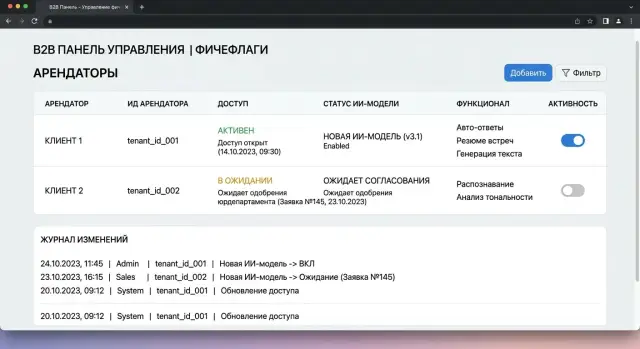
A change log is also needed. If a bank got access to a new model after a security review, and another customer is still waiting for internal approval, the system should clearly show who changed the status and why. This removes disputes and saves a lot of time during an incident.
The right to change a flag and the right to deploy code are best separated. Tenant status is often changed by product, the customer owner, compliance, or security. Code is deployed by a different team. If the same person does everything at once, a release mistake can open the model to the wrong customers.
You rarely need a complex admin panel here. Usually a simple dashboard is enough, showing the tenant, scenario, current and fallback model, flag status, end date, approver, and the person who last changed the record. That is enough to answer a common question quickly: why does customer A already have the new model, while customer B still has the old one?
If traffic goes through a single gateway, it is useful to keep this status close to routes and the change log. Then the decision is visible immediately, without searching through chats and tickets. If a flag has no owner and no expiration date, it will almost certainly stay in the system longer than needed.
A scenario with two customers
Bank A and retailer B use one service for their chat operator. Both customers send requests to the same API and expect a similar result. But their readiness for the new model is different: the bank has already passed approval, while the retailer is still waiting for an internal decision.
If the team enables the new model for everyone at once, it creates unnecessary risk. The bank gets what it has already approved, and the retailer gets something it is not yet allowed to launch. That is why the service needs to know more than just the request route. It needs tenant_id and a rule that checks the flag before choosing the model.
The logic is simple:
- a request arrives with
tenant_id; - the service reads the
model_v2_enabledflag for that tenant; - for Bank A, it selects the new model;
- for Retailer B, it keeps the previous version;
- in the logs, the team can see which tenant was sent where.
The advantage of this setup is that the application does not need to be split into separate branches for each customer. The chat operator works through one service, while the fork lives in the rules layer. If there is an OpenAI-compatible gateway like AI Router under the hood, the app can keep sending requests to a single compatible endpoint without changing the SDK, code, or prompts, and leave model selection to your access logic.
In practice, Bank A can be moved to the new model first for part of the operators or for one type of conversation. That gives you a real-world check without a global switch. For Retailer B, the flag stays off until legal, security, or the product owner gives approval.
It is important for the team to see not only the model’s response, but also the launch trail. When the log includes tenant_id, the active flag, the model version, and the time the rule changed, there are fewer disputes. If the bank says that answers got shorter after Tuesday, the team can quickly see whether the new route was the cause or whether the reason was something else.
A quick check before enabling
You do not need a long audit before launch. You need a few clear answers that the team can verify in 10–15 minutes. If even one item is unresolved, it is better to postpone the rollout.
A new model may behave well in one scenario and break another: change the response format, use more tokens, or hit the limit sooner than the old one. That is why, before launching, it is worth quickly going through a short checklist.
What to check in a few minutes
- List the affected scenarios. Not a generic “chat” or “search,” but specific flows: call summarization, draft reply for the operator, form validation, request classification.
- Fix the request limit for the tenant. The team should know not only the daily cap, but also what counts as a warning in the first hour after activation.
- Separate the logs for the new and old flows. This will save hours later: you will immediately see where the new model responded and where the old route was still used.
- Set a clear rollback signal. It can be a rise in errors, a cost spike, latency above the threshold, or a complaint from the business team about a specific scenario.
- Give support a short cheat sheet: launch date, list of tenants, what changed for the user, and who to contact in case of a failure.
Usually, it is not the model that breaks, but the agreement between teams. Developers focus on answer quality, support expects customer wording, and the product owner assumes the limits are already approved. In the end, the flag is switched on, and then the team spends half a day figuring out who was supposed to notice the load increase.
A good sign of readiness is simple: any on-call person can answer two questions in a minute — who has the flag enabled, and what signal should turn it off. If the answer is being searched in a chat from last week, the launch is still rough.
If you route traffic through AI Router, check before release that the audit logs show traffic by tenant, and that the rate limits at the key level are already set up the way you agreed with the client. Then, at the first deviation, you will see not just “errors increased,” but which customer, on which flow, and after which activation it happened.
Mistakes that derail the launch
Most often, it is not the model itself that breaks the launch, but poor access control. When one flag enables new logic for all tenants at once, any problem for one customer blocks the entire release. Feature flags only make sense when rules are separated by tenant, scenario, and model version.
The second common mistake is even simpler: the flag is created for a pilot and then forgotten. A few months later, nobody remembers why one customer is still on the old branch, who approved it, or whether the workaround code can be removed. Every flag should have an owner and an end date. Otherwise, a temporary measure turns into permanent confusion.
Old prompts also often break the launch. The team changes only model_id and thinks that is enough. But the new model interprets the instruction differently, keeps the format differently, and may answer longer, more cautiously, or, on the contrary, too briefly. If you did not check the system prompt, prompt examples, and post-processing rules, the problems will be in the answer itself, not in the flag logic.
Another trap is the response format. The API may stay the same, but the model returns extra text before the JSON, changes the order of fields, calls a tool differently, or adds an explanation where there used to be a clean object. For the business, this is not a minor issue. One customer sees an acceptable response, while another gets a parser failure and a blank screen.
Another mistake seems boring until the bill arrives. Teams often do not compare costs by tenant before launch. Two customers may make the same number of requests, but one sends short prompts while the other pushes a long context and asks for a large response. After the new model is enabled, costs rise unevenly, and the conversation quickly shifts from quality to budget.
If you use a gateway like AI Router, look at metrics not on average across the system, but separately by tenant, model, prompt size, and response length. Otherwise, the overall picture may look fine, while one expensive customer quietly eats half the budget.
Before enabling, it is useful to ask four questions:
- Does the flag enable the feature only for the right tenant, not for everyone at once?
- Does the flag have a lifespan and someone who will later remove it from the code?
- Has the team checked old prompts, parsers, and response templates on the new model?
- Can you see cost, errors, and latency separately for each tenant?
If any answer is vague, it is better to slow the launch down by a day. That is cheaper than later investigating an incident at a customer during business hours.
How to roll back without the drama
Feature flags only make sense when rollback takes minutes, not half a day. If the new model produces weak answers or latency rises, the team should move a specific tenant back to the previous route with one action. No code changes, no urgent release, and no manual prompt replacement.
For that, it is better to keep the enabling rule separate from the application. The tenant should have a simple choice: new model or previous one. Then rollback comes down to one switch in a config, rules database, or internal dashboard.
Teams often get stuck on a basic thing: they remove the old model right after the new one is launched. That is a bad idea. The previous model should stay available at least during the observation period, with the same call scheme and a clear version. If requests go through one OpenAI-compatible gateway, you can change the route for one customer without touching the application itself.
During the first 10–15 minutes after enabling, watch three metrics right away:
- answer quality on live requests;
- cost per scenario or conversation;
- latency to the first token and to the full response.
Do not wait for user complaints to pile up. If answers get worse, costs go over plan, or the service starts responding more slowly, it is better to roll back immediately. Early rollback is almost always cheaper than a long investigation after an incident.
It is useful to set thresholds in advance. For example, if average latency rises by 40% or the share of invalid responses exceeds the norm, the on-call engineer returns the tenant to the previous model through a prepared rule. That way the team does not argue in the moment and does not waste time on extra approvals.
After rollback, leave a note in the log. A short line is enough: who switched it, which tenant was affected, when it happened, and what exactly went wrong. The reason should be specific: “cost increased by 1.8x,” “the model broke response format more often,” “latency exceeded SLA.”
It is even better to save a snapshot of the settings at the time of rollback: model, prompt version, limits, and enabled tools. A week later, that will save a lot of time and spare the team from arguing based on memory.
What to do after the first launch
The first launch rarely ends the moment you enable a new model for one tenant. After it, there are almost always temporary flags, fallback routes, and limits that were set “just in case.” If you do not clean this up right away, in a couple of weeks the team is already arguing about what counts as normal and what was only a temporary measure.
First, remove everything that has already done its job. Delete the flags that were only needed for the test or pilot, keep the change history, and write down why you turned them off. Extra flags can become a source of risk themselves.
Then record the normal approval flow for new models. You do not need a twenty-page policy. A short scheme is enough: the requester asks for the model, the product owner confirms the scenario, security and legal review the constraints, the budget owner checks the cost, and then an engineer enables access by tenant. When this order is written down, the next request goes through without drama.
It is useful to keep a few things in one place: model routes by tenant, audit logs for activations and rule changes, limits by API key and scenario, and PII masking and data retention rules if they are required for the customer.
If some customers require data to be stored inside Kazakhstan, a single gateway like AI Router simplifies the basic part of the setup: one OpenAI-compatible endpoint, audit logs, PII masking, and infrastructure inside the country. But the access order itself is still better kept explicitly on your side, through tenant_id, statuses, and clear rollback rules.
And finally, review the first launch based on facts. How many requests went through the new route? Were there any manual interventions? Where did limits trigger? Were there any unnecessary denials because of access rules? These notes save a lot of time before the next release.
A good sign of a mature process is very simple: the next launch takes hours, not a week of manual approvals. The team opens one place with the rules, selects the tenant, sets the limit, and enables the model through a clear scheme.