Task-based routing: a model matrix without unnecessary costs
Task-based routing helps you choose models for summarization, extraction, chat, and code in a way that lowers costs without sacrificing quality.
Why one favorite model quickly gets expensive
One model for every task feels convenient only at the beginning. When traffic is small, the price difference is hardly noticeable. But as soon as the number of requests grows, you start paying for complex work even where you only need the simplest answer.
The problem is usually not the model itself, but the fact that it is used for everything. The same expensive level of response goes both to analyzing a long contract and to a simple “compress this text into 3 points.” In a real product, there are many simple requests like this: short summarization, extracting a contract number, identifying the topic of a message, checking the answer format. You do not need a model that writes code well or thinks for a long time.
There is a second, less obvious loss. When customer chat, document processing, and developer tasks sit in the same queue, long heavy requests start slowing down the whole flow. One large code request can delay dozens of short conversations where the user needs an answer in a couple of seconds.
In practice, it looks very down to earth. Say a support team gets 1,000 requests a day. Only a small part of them really needs a strong model: disputed cases, long complaints, answers under strict rules. Everything else is classification, summary from a conversation, field lookup, short chat. If you send all of that through one expensive route, the bill grows faster than the quality.
Then the internal debate starts. Someone says, “this model writes more nicely,” someone else says, “that one sounds smarter.” But you should look not at taste, but at numbers: where accuracy really improves, where latency drops, and which requests eat the budget. Until tasks are separated, personal preferences almost always beat the facts.
That is why task-based routing usually gives a more realistic result. Cheaper models handle the routine. Strong models stay where they truly are needed.
Which tasks should be separated first
It is better to start not with dozens of scenarios, but with a few clear groups where the difference in price and behavior is visible right away.
Summarizing long texts almost always tolerates a small loss of “beauty” in the answer. If you need to compress meeting notes, a contract, or a long thread into 5-10 points without losing meaning, a cheaper model with a long context window is often enough. It makes sense to keep the expensive model for documents where the cost of a mistake is higher: legal wording, medical notes, complex reports.
Extracting fields from emails, PDFs, and forms should be split into a separate flow even earlier. You do not need lively style here. You need discipline: find the invoice number, IIN, date, amount, status of the request, and return everything in a strict structure. A model that handles conversation nicely often does worse at keeping JSON format. For banks, retail, and any back office, this often brings the first noticeable savings.
Chat with a user is a different story. Here people notice tone, speed, and how the model keeps the context of the conversation. An answer in 2 seconds is usually more useful than a perfect answer in 12. That is why chat often gets its own model and its own response-length limits.
Code generation and code editing should also not be mixed with regular chat. Coding tasks depend heavily on syntactic accuracy, the ability to read diffs, and following project constraints. A model that writes customer emails well may be weak at fixing tests or may break existing logic.
It is worth marking rare difficult cases separately. These are the 5-10% of requests where the rules stop working: unreadable PDFs, mixed language, long email chains, unusual code, conflicting data. Do not try to pick a “middle” model for them. It is easier to send such requests to a stronger route based on clear signals or straight to manual review.
At the first stage, five branches are usually enough: summarization, extraction, chat, code, and exceptions. That alone is enough to reduce costs without a noticeable drop in quality.
A matrix for summarization, extraction, chat, and code
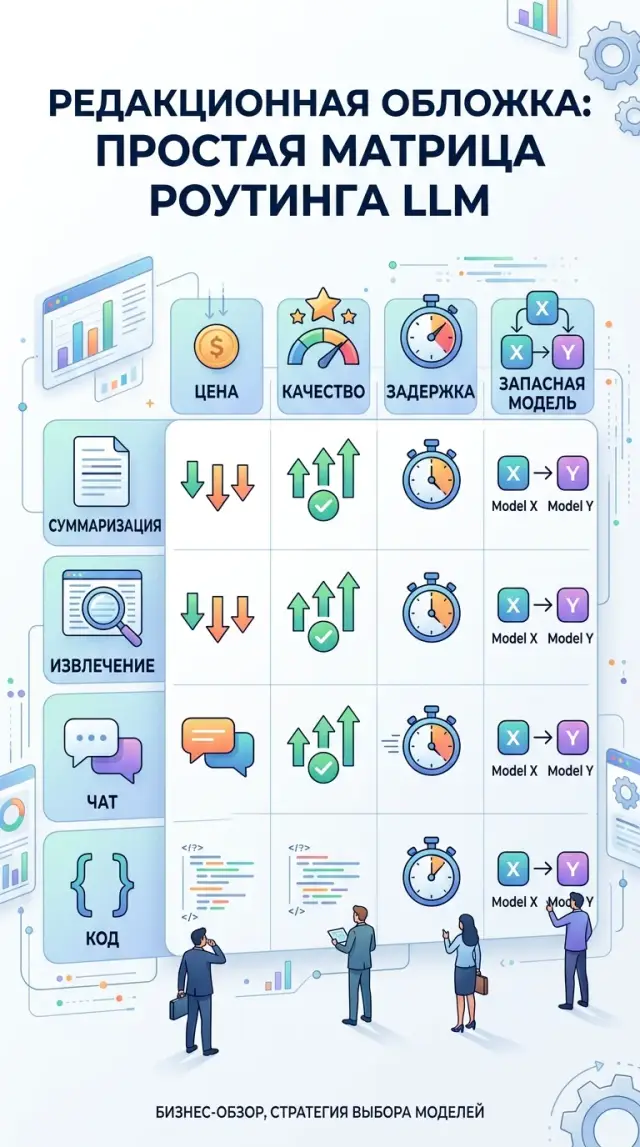
Different tasks have different risks. For a short summary, price and factual accuracy matter. For extraction, structure stability matters. For chat, response speed matters. For code, tests matter, not pretty text. So instead of looking for one “best” model, it is better to build a simple matrix and assign each task type a main and fallback route.
| Task type | What to check first | What usually works as the main route | What to keep as a fallback |
|---|---|---|---|
| Summarization | Cost per 1M tokens, context length, factual errors | A cheaper model with a long context window and steady style | A more accurate model for long or risky documents |
| Extraction | Stable JSON, field error rate, missing values | A model that strictly follows the schema and rarely breaks the format | A more disciplined model, even if it is slower |
| Chat | Latency, conversation memory, response tone, number of extra words | A fast conversational model with mid-range pricing | A stronger model for complex cases and escalations |
| Code | Test pass rate, number of fixes after the answer, accuracy of changes | A model that edits code well within one file or PR | A stronger model for complex logic and refactoring |
This table is useful because it removes the “I like it” conversation. Instead, the team looks at metrics.
With summarization, the same mistake happens most often: people pick the strongest model and overpay. If the document is standard, it is better to start with a cheaper model with a large context window and check one simple thing: did it mix up numbers, deadlines, or names?
For extraction, a strict test on 100-200 examples works best. Here, what matters is not general “adequacy,” but errors by field. If a model consistently loses the IIN, date, or amount, it is not suitable, even if the text looks smooth.
In chat, latency is noticeable immediately. Even an 800 ms difference can be felt. It is even more important that the model keeps the context of the last few messages and does not change tone for no reason.
With code, the rule is simple: a long answer proves nothing. Count how many tasks pass tests on the first try, how many edits the developer had to make, and how much time was needed for follow-up work.
If the team builds this kind of setup through AI Router, you can keep a main and fallback route for each scenario under one OpenAI-compatible endpoint and switch models without changing the SDK, code, or prompts. That is handy when you want to test several options without rewriting the integration.
How to build routing step by step
Task-based routing does not start with picking the “smartest” model. First, you need a real set of requests. For each task, 50-100 examples is usually enough: emails for summarization, forms for field extraction, support conversations, code snippets, technical specs. Use what actually appears in work, including short, long, and awkward cases.
Then run the same set through 3-5 models. Do not change the prompt for each model. Otherwise the comparison will not be fair. Look at three things: answer quality, average cost, and latency. Sometimes a model answers slightly better, but costs several times more. For summarization and extraction, that is often wasted money.
After that, set simple thresholds. For summarization, the answer is good if it keeps the meaning and does not lose important details. For extraction, a field is correct only if it matches exactly. For chat, tone, completeness, and the number of dangerous mistakes matter. For code, syntax is not enough — the result must run. For cost, set a ceiling per request and per 1,000 requests right away.
When the numbers are ready, write down the selection rules without complex logic. Short texts for summarization can go to a cheaper model, while long and risky cases go to a higher-tier one. Extraction from template documents can stay on a separate route, and customer chat can go to the model that is faster and makes fewer mistakes in dialogue.
This setup is easy to test on a real task. For example, a bank handles customer requests: first the system identifies the task type, then it sends the request to the right route instead of one expensive model for everything. Costs usually become visible already in the first week of testing.
And one more thing that is often missed: a fallback route is needed from day one. If the provider starts slowing down, hits a limit, or becomes temporarily unavailable, the system must switch to the backup without manual intervention. If you use a gateway like AI Router, the main and backup paths can live under one API and the route can change without rewriting the application.
How to measure quality and cost without a complex setup
Measuring only the price per 1M tokens is almost useless. The team does not pay for tokens themselves, but for a completed scenario: parse an email, extract fields, answer a customer, generate a patch. If one model is cheaper per token but often needs a second request or fails during verification, the final cost is already higher.
For the first comparison, four metrics are usually enough: cost per completed run, time to first token, total response time, and a simple quality score. That is enough to see where routing really lowers costs and where it only adds retries and latency.
It helps to split latency into two parts. Time to first token shows how quickly a user sees the beginning of the answer in chat. Total response time shows when the task is fully done. For support, the first number matters more. For back-office work, where the model extracts fields from documents, the second is often more important.
You do not need a complex benchmark for extraction. Take a small sample, for example 50 documents, and check the needed fields by hand: IIN, contract number, amount, date, status. Count the share of correctly filled fields and the share of fully correct records. These two numbers quickly show the difference between models.
With summarization, teams often argue about style and lose the point. One answer may sound better, but miss a deadline, amount, or customer name. So compare facts: what happened, who is involved, what numbers are there, what is the next step. If the model missed a fact, that answer is worse, even if it looks neat.
For code, it is even simpler. Run tests and count the share of answers that pass them without fixes. Separately note the answers where a developer spends 5 minutes on a small edit, and the answers that have to be rewritten almost from scratch. That gives an honest picture of quality.
If you have a single gateway for several models and providers, it is useful to store the same logs for all routes. Then the team sees not which model is more likable, but which one solves a specific task better in terms of cost, speed, and result.
An example for support and back office
In support and back office, there is almost never just one task. In one hour you get short chat questions, long email threads about tickets, PDF attachments, and rare requests for SQL or code fixes. If all of that goes to one expensive model, costs grow without clear benefit.
A good example is retail or bank support. The customer asks in chat where their request is. The operator needs a summary of the ticket from the last three days. The back office gets an email with a contract and an act, where it needs to pull out the number, date, and amount. Then an analyst asks for a SQL fix for a report. These are different tasks, and they do not need the same model.
Usually, this split works better. Customer chat goes to a fast conversational model with low latency. Ticket summaries go to a cheaper model with a long context window. The system extracts fields from email and PDF in a strict format. Complex SQL, a patch, or an error analysis goes to a separate route for code.
The difference is especially clear in a live flow. One hundred chat answers should not wait while one heavy SQL task analyzes a schema with 20 tables. When you separate queues, limits, and timeouts, high-volume requests move quickly, and rare complex tasks do not clog the whole channel.
The most common mistake here is simple: the team sees complex cases and raises the model for everyone. In the end, chat and extraction start costing like a coding task, while the benefit is almost zero. It is much smarter to split the flow first and only then compare quality within each task type.
Where teams make mistakes most often
The first mistake is putting everything on one model that looked great in the demo. In the presentation it answers chat questions confidently, but in real work you have summarization, field extraction, short classification, and code. These tasks need different strengths, and paying top price for every small request makes no sense.
The second mistake is testing models on easy examples. People take ten neat prompts with no typos, no long attachments, and no strange wording. Then the setup breaks on real data: emails mix Russian, Kazakh, and English; documents have poor OCR; and users write in fragments. Even 100-200 real examples give a more honest picture than a pretty handpicked set.
The third mistake is looking only at token price. A cheaper model may lose on final cost if it makes more mistakes, needs a rerun, or forces an employee to fix the answer manually. For summarization, it helps to measure the cost of an accepted summary; for extraction, the cost of a correct field set; for chat, the cost of a resolved request.
The fourth mistake is not having a fallback route. If the provider slows down, cuts the limit, or is temporarily unavailable, some requests just fail. The user sees an empty answer, and the team later spends a long time finding the cause. It is much calmer to keep a second path for the same task type right away, even if it has slightly softer requirements.
Another problem is routing by department instead of task type. Back office and support may have the same extraction tasks. Legal and product teams may have similar long-document summarization tasks. If you build the matrix by department, it grows too fast and becomes a burden.
The working logic is simpler: first identify the output type, then choose the model. If you need a short structured JSON, that is one branch. If you need a live conversation, that is another. If you need code, that is a third. This approach usually gives fewer errors and noticeably lowers costs.
A quick check before launch
The idea of routing rarely fails because of the models themselves. It usually fails because of small things: the team did not agree on metrics, did not set a cost ceiling, and did not record what exactly worked. Because of that, the first few days look fine, and then after a week the bills grow, quality becomes unstable, and nobody understands why.
Before launch, it helps to run through a short checklist. Each task needs its own quality metric. For summarization, this is factual accuracy and answer length; for extraction, field accuracy; for chat, usefulness or the share of resolved requests; for code, pass rate on tests. One shared metric for all scenarios usually lies.
Each model should have a clear price limit. If a request is more expensive than the set threshold, the route should switch to a cheaper model or shorten the context. Otherwise one heavy branch will quickly eat up the whole benefit of the setup.
Each route needs a fallback. Logs should store not only the request text, but also the task type, chosen model, cost, latency, and final quality score. It is also worth deciding in advance who on the team changes the routing rules. If thresholds and routes are edited by everyone, the system quickly turns into chaos.
There is also a simple pre-launch test. Take 20-30 real requests for each task type and run them manually. If the team argues on at least half of the examples about which model won, the rule is still rough. If the winner is obvious almost immediately, the route is ready.
What to do in the next two weeks
In two weeks, you can build a pilot that shows numbers, not opinions. You do not need a big project to start. A small set of real requests, the first matrix, and a partial traffic check is enough.
Week 1
Collect 30-50 live examples from working flows. Include not only successful cases, but also the ones where the model gets confused, adds extra text, or gives an answer that is too expensive. It is better to leave the prompts as they are, without cosmetic edits, otherwise the test will look too perfect.
Split the examples into four groups: summarization, field extraction, chat, and code. For each example, briefly write down what counts as an acceptable result. That is already enough for the first evaluation.
Then build a simple matrix: task type, main route, fallback route, price limit per request, and quality criterion. At this step it usually becomes clear very quickly that summarization and extraction can go to cheaper models, while chat and code should stay with stronger ones.
Week 2
Send 10-20% of traffic through the new setup. Do not change everything at once. Compare final cost, latency, and manual review of the answer on the same task set. If extraction keeps its accuracy and chat does not get worse in tone or usefulness, the matrix works.
If you need one OpenAI-compatible endpoint for this setup, AI Router lets you change the base_url to api.airouter.kz and keep working with the same SDK, code, and prompts. That is handy when you do not want to build separate integrations for each provider.
If your team has strict requirements, it is better to check them before expanding the pilot. For companies in Kazakhstan, this is often part of the architecture, not a formality: data stored inside the country, audit logs, PII masking, and rate limits at the key level. In AI Router, these things are already in place, so you can build the pilot faster and without extra API glue.
Task-based routing is good not because it makes the setup more complex. It removes unnecessary expense and brings back common sense: simple requests should be cheap, and complex ones should get a strong model only where it is truly needed.
Frequently asked questions
Why does one model for all tasks get expensive so fast?
Because you pay the high rate even for simple requests. Short summarization, classification, or field extraction rarely need a strong model, and long heavy requests can also slow down the whole flow.
Which tasks should be separated first?
Start with four groups: summarization, field extraction, chat, and code. That split usually lowers the bill because each group needs a different balance of speed, accuracy, and cost.
How many examples do you need for the first model test?
For the first round, 50–100 real examples per task type is usually enough. Include not only clean cases, but also long emails, bad OCR, mixed-language text, and fragmented messages.
How do you know a cheaper model is enough for summarization?
Look at facts, not style. If the model keeps the meaning, does not confuse numbers, dates, or names, and costs much less, it can be used for standard documents.
What should you check in field extraction tasks?
Check exact matches for each field: IIN, contract number, date, amount, and status. If the model writes nicely but misses fields or breaks JSON, it is not a good fit for extraction.
Why does chat often need a separate model?
In chat, people notice latency and context mistakes right away. It is better to give an answer in a couple of seconds with a steady tone than to wait longer for a small gain in wording.
How should you fairly evaluate a model for code?
Do not trust a long answer by itself. Run tests, count how many tasks pass on the first try, and see how much time developers spend fixing the result afterward.
When should a request go to a stronger model?
A stronger route is needed when the mistake is costly or the case falls outside the usual rules. That usually includes long complaints, risky documents, unusual code, unreadable PDFs, and conflicting data.
Why keep a fallback route from day one?
A fallback protects the flow when the provider slows down, hits a limit, or becomes temporarily unavailable. Without one, some requests will just fail and the team will have to investigate manually.
How can you launch a routing pilot in two weeks?
Collect 30–50 real examples, group them by task type, and set simple quality metrics plus a price cap. Then send 10–20% of traffic through the new setup and compare cost, latency, and results on the same scenarios.