Streaming Responses or a Full Response: What to Choose for LLMs
Streaming responses or a full response: a comparison for chat, search, and agent scenarios based on UX, cost, latency, and integration complexity.
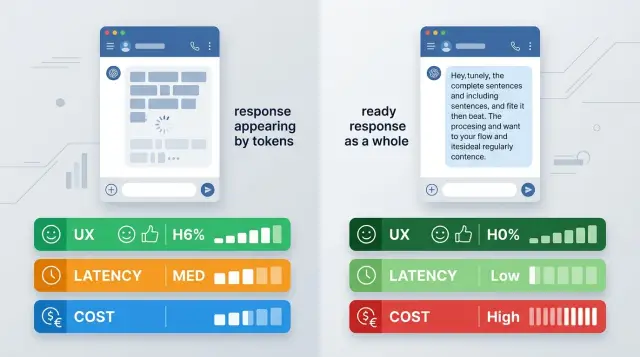
What the choice is really about
The debate over streaming versus a full response sounds purely technical. For the user, the difference is obvious right away. They either see the first words almost instantly, or they wait for the whole answer and only then realize the model has actually started working.
The very same request can feel fast or slow without any change in the model. If generation takes 8 seconds, streaming shows the first token almost immediately and takes some of the frustration away. A full response with the same 8 seconds feels like a pause and silence.
But this is not just about the feeling of speed. The mode you choose changes the behavior of the whole product: how you show progress, how you handle broken connections, what you write to logs, how you measure latency, and what you actually count as a finished answer.
With streaming, text can cut off halfway through a sentence. Then the interface has to decide what to do with that piece: keep it, hide it, or ask for more. With a full response, there are fewer such forks, but the user stares at a waiting indicator for longer.
For chat, streaming often looks better because the person sees movement and starts reading sooner. For search and RAG, the choice is less obvious. If the answer is short, cites sources, and has a clear structure, a finished block is often more convenient. In agent scenarios, things get more complicated: there are tool calls, timeouts, intermediate steps, and errors.
In an OpenAI-compatible API, the mode often changes with one setting. In practice, you are changing not one option but the entire interface logic and user expectations.
What streaming feels like in chat
In chat, people notice the pause before the first word most of all. If the interface is silent for 6 seconds, the answer feels slow, even if the text itself turns out to be good. If the first tokens arrive after a second, waiting becomes easier.
That is why streaming usually wins in chat when it comes to the feeling of speed. The user sees that the system has started answering and is less likely to press "send" again. That seems like a small thing, but these repeats are what create duplicates, extra requests, and a nervous UX.
There is another advantage too: a long answer can be stopped halfway through. That is useful when the model goes off track, repeats itself, or stays too vague.
A good example is an internal support chat. An employee asks about a refund and sees the start of the answer after a second. If the first lines clearly do not fit the case, they stop generation and clarify the request right away. The conversation moves faster, and the cost of a mistake is lower.
But streaming output needs a careful interface. Partial text often looks messy: broken sentences, unclosed brackets, list items with no end. If you show that too bluntly, the chat feels broken even though the model is working fine.
Usually a few simple things are enough: a separate "typing" state, a stop button for long answers, smooth output without sharp jumps, and a clear final status. The user should be able to tell that the answer is really finished. Otherwise they will either wait too long or ask a new question too early.
Streaming in chat is almost always more pleasant for the person. It does not make the answer smarter, but it makes the wait shorter and clearer.
When a full response is better
A full response wins where the final result matters more than the feeling of speed. The user clicks, waits a couple of seconds, and gets a ready block of text without flicker or card reshuffling.
This is especially useful in interfaces where the answer is read, copied, or sent onward. The card does not change in front of the user, lines do not jump around, and they do not have to reread the same paragraph while the model finishes the last sentence.
It is also simpler for the team. The answer is easier to save in history, tie to an analytics event, and store in an audit log as one finished object. It is easier to compare prompt versions, count answer length, and find failures.
After the full generation is done, it is easier to run everything that comes next: rule checks, personal data masking, JSON normalization, adding headings, and cleaning up extra text. You can do this with streaming too, but the code quickly becomes more complex and the chance of errors grows.
A full response is especially useful when you need a strict output format, when the result is saved into a CRM, ticket, or report, when an extra check is needed before display, and when failure is better shown as one clear status.
That last case is often underestimated. If the request cuts off in the middle of a stream, the user sees half a sentence and thinks the system failed in a strange way. If a full response cannot be assembled, the interface honestly says, "Could not prepare the answer." It is less flashy, but easier to support.
For search, help, and internal assistants, this mode often looks cleaner. It does not give the dramatic effect of typing, but in work scenarios it is often the better choice.
What changes in search and RAG
In RAG, the bottleneck is often not generation but retrieval. First you need to find the documents, filter the noise, and sometimes rerank the snippets. If you turn streaming on too early, the user will see a polite but empty opening like "I’ll answer your question now," while the useful part appears only a couple of seconds later. That feels worse than honest waiting.
This is especially noticeable in a knowledge base where the answer depends on quotes. A person asks about a refund period, the system spends 2-3 seconds finding the right policy, and the interface is already printing a general answer without facts. Then the model changes the wording, inserts a different document, and trust drops.
A different pattern often works better: give a short conclusion in one piece, and show the found excerpts and document links in a separate block right after it. Then the answer does not "move around" in front of the user, and the sources look like support rather than a guess the model filled in on the fly.
It is better to agree on citations and document numbers ahead of time. Usually there are two ways to do it: either finish the search completely and lock in the source set before generation starts, or start the text without citations and add the source block only after the final rerank.
Mixing both modes is risky. If the model cites document 12 in the first paragraph, and document 7 later becomes the main source after reranking, the interface looks unreliable.
In search, it helps to think not only about time to first token but also about answer honesty. If retrieval takes a while, a simple status like "searching the knowledge base" or "checking documents" is often better than early streaming. The user understands that the system is busy doing real work instead of wasting time with empty words.
The rule is simple: when search takes longer than generation, do not rush to print text. Find the support first, then answer.
What happens in agent scenarios
In an agent, an answer is rarely born in a straight line. The model may first decide it needs to search the knowledge base, then call the CRM, and after that completely change its plan. So streaming and a full response have a very different effect here than in a normal chat.
If you show text right away, the user often sees a draft, not an answer that has already been checked by tools. An agent may start with "It looks like the payment did not go through," then a second later, after checking billing, find that the payment did go through but the receipt did not arrive. For support, that is a bad scenario. People remember the first version better than the correction.
The problem is not only UX. Partial output is harder to check against rules and harder to mask for PII. If an agent prints token by token, it may reveal a contract number, part of a phone number, or an internal ticket status before the filter acts. In banking, telecom, and healthcare, that risk is usually unnecessary.
That is why in practice it is often better to stream not the answer itself but the work in progress: "Looking up the request," "Checking status in CRM," "Comparing with the knowledge base," "Preparing the final result." The user sees that the system has not frozen, but does not get raw text that the agent may rewrite later.
The final answer is safer to send in one piece after all checks are complete. Then the team has time to run PII masking, rule checks, formatting, and logging. For companies that care about audit logs and storing data inside the country, this order is usually easier to support and explain to security.
If you work through an OpenAI-compatible API, a mixed mode is often the calmest option: step statuses stream, and the final answer arrives in one block.
How the mode affects cost
If you look at the mode choice through money, the debate usually is not about token price. For the same model, the tariff is often the same for streaming and for a full response. The difference appears around the request: how many times the user pressed "retry," how many answers were cut off halfway, and how many events the system wrote to logs.
Streaming can sometimes be cheaper in a live chat for a simple reason. The user sees the first words almost immediately and is less likely to send the same question again because they think the system froze. If you have a large queue and noticeable time to first token, that quickly turns into extra duplicates, and duplicates mean extra input and output tokens.
But streaming has a downside too. Early output more often triggers cancellations and restarts. The person sees the wrong tone, the wrong language, or simply loses patience halfway through the answer, hits stop, and sends a new request. That is unpleasant for the bill: some tokens have already been generated, and the new request must also be paid for.
A full response is easier to control on the product side. It is easier to cache, reuse in similar scenarios, and return again without a new model call. This is especially noticeable in search, FAQ, and internal assistants, where similar questions repeat dozens of times.
It helps to think about cost in at least four layers, not one number: tokens, cancellations and retries, cache hits and reuse, plus logging and network events on your side.
That is why you cannot choose the cheap mode from the model price list alone. You only see it in real traffic. If your product has many impatient users, streaming often reduces repeats. If you have many identical requests and strict cost control, a full response often wins.
Where integration gets harder
A full response usually follows a simple request-response pattern: send the request, wait for JSON, show the text. With streaming, the problems start in the details. Even if you already have an OpenAI-compatible API integration, the client needs more than just reading the content field.
The first problem is interruptions. The user has already seen half the answer, and the connection closed because of the network, a proxy timeout, or a mobile network switch. At that moment, the server, client, and logging system often "see" different versions of the same conversation. If the team has not decided ahead of time what counts as a finished answer, duplicates, empty tails, and complaints like "the bot cut itself off" appear quickly.
The client side also needs more logic. The app has to collect text chunks into a buffer, update the interface without flicker, and separately catch the clear signal that the stream has ended. If that signal does not exist or the client misses it, the user may see a neat but unfinished answer. This happens more often on mobile clients than people expect.
The team also needs to decide in advance how to store partially received text after a disconnect, when to mark the answer as final, what exactly to write to logs, and how to repeat the request without sending it twice to the user.
Logs are almost always harder with streaming. If you store only the final version, you lose the picture of the failure. If you store every streaming event, data volume grows and incidents become harder to investigate. In practice, teams often save both the stream and the final assembly with a separate completion status.
There is another layer too: the network between the client and the model. Mobile SDKs, corporate proxies, and load balancers sometimes buffer events, cut long connections, or change SSE behavior. So streaming may look good in a local environment and behave strangely in production.
If you compare modes through a single OpenAI-compatible gateway like AI Router, it is useful to check not only the model but the entire path of the answer to the user's screen. That is more useful than measuring latency on one backend and guessing where the failure happens.
How to choose the mode for your scenario
The mode should be chosen by measurements, not by team habit. Look at at least two numbers: time to first token and time to a finished answer. For chat, the first metric is often more important because the person feels the response almost immediately. For search, reports, or long answers, the second matters more because the user wants one complete result.
Another good signal is user behavior. If people often stop an answer halfway, quickly clarify the question, or hit "generate again," streaming is usually justified. If they almost always read to the end and need a clean result without text flicker, a full response may be simpler and calmer.
Do not test the modes in one scenario and carry the conclusion over to everything else. In chat, streaming almost always feels more alive. In search and RAG, it helps only if you can show an early draft without breaking trust in the sources. In agent flows, the risks are even higher: if the model calls tools, takes several steps, and can roll back the plan, showing text too early can only confuse the user.
Before launch, answer a few simple questions. What will the person see if the model freezes after the first tokens? Can you show a partial answer, and how should it be labeled? When should the interface wait silently for the final result? Who will repeat the request after a timeout, and how?
For a pilot, it helps to keep a mode switch. That lowers the risk, especially if you work through an OpenAI-compatible API and can change the behavior without rebuilding the entire client. In AI Router, this test is also convenient because you can run the same scenario through different models and providers without changing the SDK, code, or prompts.
If you want a short rule of thumb, it is this: chat usually benefits from streaming, search requires a check for trust and readability, and tool-based chains are better started with a full response and only given streaming after measurement.
Example: a banking call-center assistant
For a bank operator, speed is not the only thing that matters. The key question is when the text is safe to show on the screen. If the assistant assembles a long hint from call history, bank rules, and customer notes, streaming creates a nice effect: the first phrases appear almost right away, and the operator does not sit in front of an empty window for 6-8 seconds.
This is especially useful when the customer asks a long question. For example, they want to know why a fee was charged or how to reissue a card. The assistant can print the answer as it is generated, and the operator already understands the model's line of thought and can join the conversation faster.
But once the answer includes an amount, payment date, credit limit, or block status, it is better to wait for the full response. One intermediate fragment with a wrong number creates extra risk. In banking, that is not a minor detail but a reason for a complaint and a repeat call.
Early printing is not always useful in knowledge base search either. First the system needs to find the correct fragment of the policy or tariff. If it shows a half-answer too early, the operator may read a beautiful but inaccurate formulation. It is easier to first return the found excerpt and only then the finished text for the customer.
For CRM steps, it is more convenient to show not the answer itself but the process state: "Opening customer record," "Checking active products," "Creating a callback task," "Saving a note to the history."
After that, the assistant returns the final result in one piece: the task is created, the deadline is set, the note is saved. In this kind of scenario, a mixed mode usually works best: long explanations can be streamed, while verifiable data and action results are shown only after the full check.
Where teams go wrong
A common mistake is simple: the team turns on streaming everywhere because it looks faster. But a nice typing effect does not mean the user solved the problem sooner. If the answer needs search, data checks, or a tool call, early tokens may only create a false feeling of speed.
This is especially noticeable in scenarios where the model first writes a general answer, then gets a tool result and rewrites the reply. The user reads one version, then sees another. That is annoying in chat. In operator interfaces, it is worse: the employee has already started acting on the draft.
That is why it is useful to split the flow. The introduction, step status, or a short progress message can be streamed. Facts, amounts, found documents, and recommendations after a tool call are better sent in their final form.
Another common issue is request cancellation. The user closes the tab, presses "stop," or the app loses connection, but the server keeps generating anyway. As a result, bills grow, logs fill up, and the load picture becomes distorted. Cancellation must be handled on both the client and the backend, not just hidden by removing the typing indicator.
There is also a quieter mistake: the team looks only at time to first token. That metric is useful, but by itself it says very little. If the model started writing in 400 ms but the useful result came 9 seconds later after two tool calls, the user will remember not the first token but the overall wait.
Finally, many people forget to save the final answer. With streaming, this happens often: pieces of text reached the screen, but no one stored the final version. For banks, telecom, and other regulated sectors, that is a bad idea. If you need audit, complaint handling, or quality control, store the completed answer, not only the token stream.
Quick checks before launch
These modes are often chosen by feeling. That is not enough for launch. You need simple checks, or the team sees a pretty demo while users get broken text, timeouts, and strange logs.
Look at two delays, not one. The first is time to the first token. It shows how quickly the interface comes alive. The second is time to a useful answer. For chat, that is the point when the user already understands the meaning. For search, it is the line after which a decision can be made, not just read as an introduction.
Before release, check at least five things:
- You measure the delay to the first token separately from the full path to a useful answer.
- The client can survive a connection drop and reconnect without duplicate messages in the chat window.
- The team has already decided what to do with partial text and what exactly to save in logs.
- Masking is enabled for sensitive data, and PII does not end up in raw logs.
- Errors are visible right away: model timeout, stream interruption, empty final answer, repeated tokens.
Partial text almost always breaks analytics if you do not plan for it ahead of time. A bank operator may see a draft answer that changes in the last sentence. If the log kept only the middle of the stream, the incident review turns into guesswork.
Check the sensitive-data flow separately. If traffic goes through a gateway like AI Router, it is better to set up PII masking and audit logs before the first live request, not after a conversation with security.
A good test is very simple: give ten people the same scenario, measure both delays, and see where they really wait and where they can already work.
What to do next
Stop arguing at the level of feelings. Take the same scenario, the same model, and run it in two modes: with streaming and with a full response. Only then can you see what is better for your product, not for an abstract demo.
Do not look only at time to first token and total response time. The mode often breaks in places that are not usually measured. In streaming, the user more often presses "stop," and the interface gets repeats or broken text. With a full response, it is easier to hide intermediate noise, but the wait is longer and it is harder to show that the system is working at all.
For a quick check, four metrics are enough: time to the first visible character, time to the final answer, the share of canceled generations, and the number of errors or odd repeats in the UI and logs.
If you already have an OpenAI-compatible integration, testing both modes is usually simpler than it sounds. Through AI Router and api.airouter.kz, you can change the base_url and run the same SDKs, code, and prompts without rewriting the client. That is useful when the team wants to compare streaming and full responses under the same conditions.
After the test, write down one short rule, not ten exceptions. For chat, streaming usually wins because it makes the pause look shorter. For search and RAG, a full response is often more convenient if completeness and careful source handling matter. In agent steps, it is better to separate the modes: stream statuses outward, and keep internal tool calls and checks in the full response.
If the rule does not fit into one sentence, the scenario is not narrow enough yet.
Frequently asked questions
What is better for a regular chat: streaming or a full response?
For a regular chat, streaming is usually the better choice. The user sees the first words sooner, feels less frustrated, and is less likely to send the same question again.
This is especially useful for long answers that can be stopped halfway if the model goes in the wrong direction.
When is a full response more convenient than streaming?
A full response is better when the finished result matters more than the feeling of speed. The text does not jump around on the screen, it is easier to copy, save in history, and pass along.
This mode is often used for CRM, tickets, reports, and any answer with a strict format.
What should I choose for search and RAG?
In search and RAG, do not rush to turn on early text output. The system first needs to find the documents and choose the basis for the answer, or the user will see a weak opening with no facts.
If search takes longer than generation, a clear status like "searching the knowledge base" is usually better than raw text.
Can both modes be mixed in one product?
Yes, a mixed mode often works best. Stream the step status, and send the final answer in one piece after the checks.
This approach is especially useful in agent scenarios, where the model calls tools, changes plans, and may correct an early draft.
Is streaming always cheaper?
Not necessarily. The token price for one model usually does not change, but user behavior changes the final bill.
Streaming can reduce repeat requests if people often press send again. A full response can be cheaper if you have many repeated questions and a good cache.
What should I do if a stream stops halfway through an answer?
First decide what to do with partial text. Either mark it honestly as unfinished, or hide it and offer a retry.
On both the server and the client, record one final status so you do not create duplicates in history and logs.
How should progress be shown in an agent scenario?
In an agent, it is better to stream the work in progress, not the draft answer itself. The user should see that the system is looking up data, checking the CRM, or comparing the knowledge base.
The final text is safer to show after all steps are done. That way you do not confuse the person with an early version that the agent will later rewrite.
Which mode is safer for sensitive data?
For sensitive data, teams often choose a full final response. That gives them time to mask PII, run checks, and save a proper audit log.
In banking, telecom, and healthcare, a raw stream adds extra risk: the model may reveal a number, date, or status before the filter kicks in.
Which metrics should I look at when choosing a mode?
Look at at least two delays: time to the first token and time to a useful answer. The first metric matters for chat, the second for search, reports, and tool-based flows.
It also helps to watch cancellations, repeated requests, UI errors, and the share of unfinished answers.
Can I quickly test both modes without rewriting the client?
If you already have an OpenAI-compatible integration, the test is usually simple. Change base_url, run the same scenario in both modes, and compare latency, cancellations, and UI behavior.
Through AI Router, you can run the same SDKs, code, and prompts without rewriting the client. That makes it easier to compare modes on equal terms.