Storing Data in Kazakhstan for LLMs Without the Extra Complexity
Storing data in Kazakhstan for LLMs: a simple setup for requests, logs, and PII masking that meets local requirements without extra layers.
Where the setup usually breaks
The failure usually does not start in the model. It starts earlier. The team quickly puts together the first workflow, connects the LLM to chat, the CRM, or an internal bot, and everything goes into the model: the customer’s name, IIN, phone number, address, contract number, and the full conversation. That is the easiest way to launch a pilot. Then that "temporary" path stays in production.
The second problem is logs. It is convenient for developers to write the full request and response text because it is easier to debug errors that way. A couple of weeks later, the logs already contain entire customer conversations, often with no retention period and no clear rule for who can read them. If support, an analyst, and an admin all see the same thing, there is no real control anymore.
The event flow breaks too. One service writes to the database, another to APM, a third to SIEM, and a fourth stores debug files locally. Later, nobody can answer two simple questions: what text actually went to the model, and who opened that data afterward. For data storage requirements in Kazakhstan, that is a weak point. It is not enough to keep one database inside the country if request traces are scattered across different systems.
There is also a quieter mistake: giving log access to too many people "just in case." In practice, very few people should see that data, and every access should leave a clear trail. If the company cannot quickly tell who read a log, when, and for what task, the setup is already cracking.
This usually looks like this: raw CRM text goes into the prompt without masking, full conversations stay in logs for weeks, API and app logs have different retention periods, and a broad group of employees can access them.
A simple example: a customer writes to a bank chat and sends an IIN together with a question about a loan. The bot takes the full text, sends it to the model, then saves the same text in the application logs and the provider’s log. Formally, the service works. In practice, personal data has already been duplicated in several places.
A proper setup is simpler than it sounds: remove unnecessary data before calling the model, keep logs in one environment, separate access by role, and record every view. If the team uses a single gateway for LLMs, such as AI Router, these rules still need to be designed before launch, not after the first incident.
What to store in the country, and what not to put in logs
The most common mistake is simple: the team writes almost everything into logs and then tries to clean it up later. For working with data in Kazakhstan, that approach is bad. First, split the data by type, then decide what to store, where to store it, and for how long.
Usually, four categories are enough. The first is the request text and the response text. They often already contain personal or sensitive data. The second is metadata: model, call time, response length, status, cost, and service ID. The third is technical events: timeouts, errors, retries, and the request route. The fourth is secrets and attachments. Those almost never need to go into logs.
Request and response text should be stored inside the country if they may contain PII, a contract number, an address, a diagnosis, or other sensitive information. The audit trail is also better kept inside the country: who sent the request, to which service, when, with what result, and under which access rule. Metadata can be stored longer, but without the text content. For reporting, identifiers, token counts, and error codes are usually enough. Technical logs should not contain API tokens, passwords, cookies, raw files, or full request headers.
The rule for attachments is strict: do not store raw PDFs, images, audio, or archives in a regular log. If a file is needed to investigate an incident, a hash, size, MIME type, and internal ID are enough. That is sufficient to understand what happened without bringing extra risk into the system.
Retention periods should also be set by data type, not as one number for everything. It often makes sense to delete request and response text quickly, for example after 7-30 days, if it is only needed for quality review. Technical events can be kept for 30-90 days. Audit logs usually live longer because they are used to verify access and employee actions. Masked aggregates for analytics can be kept even longer if internal policy allows it.
When all LLM calls go through one gateway, the setup becomes much simpler. Texts, PII, and the audit trail stay inside the country, while only safe metadata goes into shared technical logs. That saves a lot of time when security asks who saw the data and where it is stored.
What blocks to use for a simple LLM setup
A good setup usually does not consist of ten services, but of a few clear blocks. If you separate them early, data storage in Kazakhstan becomes an architecture problem instead of a set of manual rules for the team.
Basic blocks
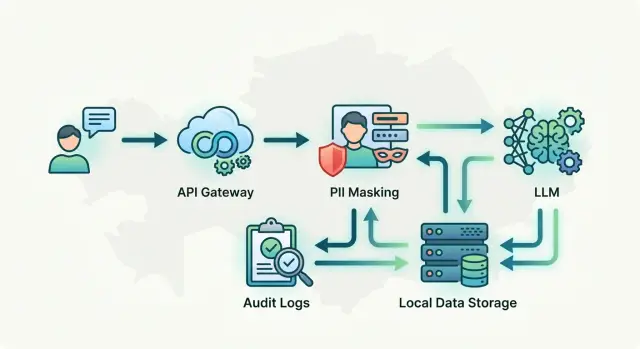
The first block is a single entry point for all model calls. This is the API gateway that handles chat, summarization, and internal assistants. Such a layer removes chaos: the team does not hard-code direct calls to different providers into every service, but changes routing rules in one place.
The second block is PII masking before the request is sent to the model. It should sit before the router, not after it. If a customer wrote an IIN, phone number, or address, the system first hides those fields and only then sends the text onward.
The third block is the model router. It decides where to send the request: to a locally hosted model or to an external provider. For sensitive scenarios, this is useful: the same API can send requests with personal data into the internal environment, while less sensitive tasks go outside.
The fourth block is an audit log separated from product logs. In product logs, the team looks for interface bugs and delays. The audit log needs different events: who called the model, with which key, what role the request had, which rule was triggered, whether masking happened, and where the call went.
The fifth block is the access layer. Access rules are better stored close to API keys, roles, and limits rather than spread across application code. That way, you can quickly block one group of employees from external models or apply restrictions to a specific key.
What this looks like in practice
Many teams already have code built around the OpenAI SDK. In that case, it is easier to place an OpenAI-compatible gateway in front of the models and change only base_url. That makes it possible to add routing, masking, audits, and limits without rewriting the whole application.
Another required layer is environment separation. The development environment and the production environment should not share the same keys, logs, or datasets. Otherwise, a test request with real data can quickly end up somewhere it was never meant to be.
In a simple form, the chain looks like this: application -> gateway -> masking -> model selection -> separate audit log. That is already enough to avoid spreading access control and sensitive data handling across the whole stack.
How a request flows step by step
For data storage requirements in Kazakhstan, the important part is not the model call itself, but the order of actions around it. If the order is simple and strict, it is easier for the team to pass review, find errors, and avoid sending extra data to the model or into logs.
First, the application receives the request and immediately assigns it a request_id. This identifier connects the full path of the request: who sent it, which service processed it, which model replied, which checks were triggered, and who later reviewed the result.
Next, the system checks who made the request. User role, service key, rate limits, and available models should be checked before any external call. If an employee may only work with anonymized text, that rule must trigger immediately.
Then the text passes through the cleaning layer. At this stage, the system looks for PII: full name, phone number, IIN, address, contract number, and card details. It masks the found fields or replaces them with tokens such as [CLIENT_NAME] and [PHONE]. That is usually enough for the model. The meaning of the request stays intact, but personal data does not go any further.
Only after that is the cleaned text sent to the selected model. In the simplest version, the application calls one internal gateway, and the gateway decides which model to use. That is convenient because masking rules, limits, and auditing all live in one place.
When the model returns an answer, the system stores more than just the text. It records security tags, the model name, response time, request status, and audit events. It is better to put the cleaned version of the text into logs, not the original. If the full text is needed at all, it should be stored separately and under stricter access.
For a regular employee, this looks simple: they see the response and the masked fields. A manager or compliance employee with the right role can open the full version if there is a valid reason. That action should also go into the audit log.
A minimal working flow looks like this:
- The application receives the request and assigns a
request_id. - The access module checks the role, key, and limits.
- The protection layer finds and masks PII.
- The gateway sends the cleaned text to the model.
- The system stores the response, tags, and audit events.
If you skip even one step, problems usually appear quickly. Most often, teams either log the original text without masking or show the full version to too broad an audience.
How to mask data before the model
If a request contains personal data, the model should not see it in its original form. The simplest working approach is this: first remove sensitive fields, then send the cleaned text to the LLM.
Teams usually start with the things that appear in almost every business flow: name, IIN, phone number, address, card number. That is already enough to significantly reduce the risk of leaks and avoid putting unnecessary information into the prompt.
Instead of real values, use clear markers: [CLIENT_NAME], [IIN], [PHONE], [ADDRESS], [CARD]. The model can almost always answer correctly without the original data if the meaning of the request is preserved.
For example, the phrase "Client Aizhan Sarsenova with IIN 990101300123 requests a delivery address change to Almaty, Abaya 10" is better turned into "Client [CLIENT_NAME] with IIN [IIN] requests a delivery address change to [ADDRESS]". For classification, a short reply, ticket routing, or a draft email, that is usually enough.
Keep the substitution table separate from prompts and logs. It is better to store it in a protected system with a short record lifetime, strict access, and clear auditing. If the company needs to keep sensitive data inside the country, this storage and its operation log are usually the first things kept in the local environment.
Restore the original data only where it is truly necessary. A contact-center agent can see a ready answer with the customer’s name filled in, while intermediate services, the model, and shared logs can work only with markers. The fewer systems see the original, the better.
There is also a common mistake: the team masks data so aggressively that the request loses its meaning. If you remove everything, the model will get confused. Test this with real examples. The address can often be hidden completely, but sometimes it is useful to keep the city. A card number should almost always be removed entirely, while the product type or customer status is better kept.
In practice, this looks like a separate step before the model call: the service finds PII, replaces the values, writes the substitution map to a closed store, and only then sends the text onward. If you use a gateway like AI Router, it is still better to perform masking before sending the request to the API, and do the reverse substitution only inside the trusted internal zone.
How to handle audit logs and access control
Audit is not for show. It is there so you can quickly understand who sent the request, which prompt was used, which model was called, and what happened after the response. Without that, every review turns into manual searching across fragments of logs.
The minimal trail for each call should be the same across all services. Usually, a few fields are enough: who called the model, when the request was sent and when the response came back, which prompt version was used, which model and provider handled the request, how large the request and response were, how the call ended, and how much it cost.
That is already enough for proper auditing without unnecessary noise. If the team changes prompts often, it is better to version them explicitly. An entry like prompt_version=v12 is more useful than a long block of text in the log that nobody can later match to the version that went into production.
Keep a separate trail for actions on the logs themselves. One thing is a model call. Another is reading a log, exporting CSV, viewing a conversation, or changing a key limit. These events should also leave a record: who opened it, what was exported, for which period, from which IP, and under which role. Leaks often happen not through the model, but through overly easy access to logs.
Access rules are best handled by practice: roles work, shared accounts break control. A developer needs one set of rights, a support analyst another, and security a third. Give people access based on the task, not to the whole system at once. If an employee leaves the team, you simply disable their account and do not have to hunt down where else the shared password was used.
Key-level limits also help a lot. Set a separate limit for requests, tokens, and budget for each service or team. Then one bad release will not burn the whole monthly budget and will not clog the queue for everyone else.
If you need a single environment for these rules, AI Router fits this scenario: it has one OpenAI-compatible endpoint, monthly B2B invoicing in tenge, and local controls such as audit logs, PII masking, and key-level limits. But even with such a gateway, access architecture and retention periods still need to be defined inside the company.
A simple contact-center example
In a contact center, an agent receives a complaint: the customer says money was charged from their account, and the text includes an IIN, a phone number, and a contract number. In raw form, that request should not be sent to the model. First, the form or an intermediate service hides the sensitive fields and inserts markers like [IIN hidden] and [contract number hidden]. The meaning of the complaint still remains clear.
Then the system sends the cleaned text to the LLM together with a short instruction: provide a concise 3-4 sentence reply, keep a calm tone, and do not promise what the agent cannot deliver. The model does not see personal data, but it still helps in a useful way: it briefly summarizes the complaint, suggests a draft answer, and keeps the right tone.
For data storage in Kazakhstan in this scenario, it is usually enough to keep the raw complaint text, original logs, customer data, and access history inside the country. If the request goes to an external model, only the cleaned version without PII leaves the environment.
The audit log does not need to store the full conversation. It is better to keep only what will be useful for review: the case ID, who opened the customer record, when the request was sent to the model, which fields the service masked, and who approved the final response.
A supervisor then sees a clear sequence of actions. For example, agent Aizhan opened the conversation at 14:03, the system hid the IIN, phone number, and contract number, the model returned a draft response, and the agent sent the final text at 14:05. That is enough for disputed cases, audits, and access control.
Common mistakes
Most often, the team starts not with data boundaries, but with complex routing. An orchestrator appears with branches, retries, and model selection, while logs, roles, and retention rules are left for later. Then it turns out that requests are already going into production, and nobody can answer the question of who sent which data and when.
The second mistake is simpler and more dangerous: full conversations are stored in the same place as technical logs. Developers find that convenient, but for control it is a bad idea. A technical log should be used for response time, status, model, and request cost. Full transcripts, document numbers, phone numbers, and addresses do not belong there. If everything is in one place, access for debugging quickly becomes access to sensitive data.
Masking is also often done too late. The team sends the text to the model first and only then cleans the response and logs. At that point, it is too late: personal data has already moved further down the chain. IIN, card number, phone number, address, and full name must be found and hidden before the model is called.
Access has a similar story. One API key for the whole team looks harmless until there is a disputed request, overspending, or a leak. After that, you can no longer separate one developer’s tests from the production calls of the service. In practice, it is better to issue separate keys by service and environment, and keep limits and auditing at the level of each key.
If the setup is already built badly, you can see it quickly:
- full chat transcripts are in the logs;
- nobody knows which service sent a specific request;
- masking happens after the model call;
- test and production traffic use the same key;
- customer responses do not indicate that the text was generated by AI.
People often think about marking AI content only at the very end, although it is not a minor detail. If a bank, retail company, or contact center publishes such text without a label in the output channel, the problem is no longer technical. Good logging alone will not fix it later.
Even if the team works through an OpenAI-compatible gateway and changes only base_url, these mistakes do not disappear. A simple setup is almost always better: masking before the call, separate logs, separate keys, and clear labeling on output.
Short checklist before launch
Before turning on real traffic, check not only the model, but the data path as well. Failures more often happen not in the LLM’s answer, but in the fact that the request cannot later be traced, deleted, or explained during an audit.
Here is the minimum checklist:
- Every call has its own
request_id, and next to it there is an owner - the service, team, or employee on whose behalf the request was sent. - Personal data is masked before the model call. Names, phone numbers, IINs, addresses, and contract numbers are replaced with tokens, and the mapping is stored separately inside the country.
- The audit logs already have a retention period and a clear structure: who called the system, when it happened, which route was chosen, which masking rule was triggered, and whether the response was shown to the user.
- Roles and limits are enabled before launch. The access log is checked separately: who viewed the logs and who changed the rules.
- The team knows how to delete data according to policy without improvising manually: find the record by
request_id, delete related data in the working storage, and keep only the trace required by law and internal control.
If you use a local or hybrid gateway, some of this is easier to build. For example, with AI Router you can keep the data inside Kazakhstan and route calls through one compatible endpoint without rewriting your existing SDKs. But the process for handling data, access, and logs still has to be defined in advance.
A good test is very simple. Take one real scenario, such as a contact-center request, and walk through it manually from entry to deletion. If at any step the team says "we’ll figure it out later," it is too early to launch.
What to do next
Start not with a new platform, but with one diagram. Take the current request path and draw it end to end: where the application accepts input, where the data is cleaned, where the LLM call goes, what is written to logs, who sees the response, and where the traces of work are stored. Usually, this already reveals unnecessary things: duplicate logs, direct calls to different models, and fields with personal data that nobody planned to keep.
Then choose one pilot scenario. Not the entire product at once, but one flow that is easy to measure on real logs. For a bank, it could be a draft response for an agent; for retail, a support case review; for SaaS, a short ticket summary. One scenario is easier to check for latency, cost, masking errors, and access rules.
A working order usually looks like this:
- Draw the current request path on one diagram.
- Mark which data must stay in the country and which data does not need to be stored at all.
- Consolidate all LLM calls into one API so log policy, PII masking, and limits work the same way.
- Run the pilot on real logs and check not only answer quality, but also what exactly remains in the audit trail.
One common gateway almost always makes life easier. When one team goes directly to OpenAI, another to Anthropic, and a third to a locally hosted model, exceptions pile up quickly. Then someone forgets to turn off raw logs, someone writes PII into tracing, and someone works without proper auditing. One entry point for all LLM calls removes most of that confusion.
If you need a compatible API gateway without being tied to one provider, you can look at AI Router with the host airouter.kz. It lets you change only base_url, supports one OpenAI-compatible endpoint, and works well for teams that need to keep data and audits inside Kazakhstan. For a pilot, that is often easier than assembling your own setup from several disconnected services.
A week after launch, open the audit logs and check three things: whether any PII leaked, who actually had access, and whether you can reconstruct the path of one request from the logs without guessing.
Frequently asked questions
Why change the setup if the pilot already works?
Because a working pilot often already sends extra data to the model and into logs. If you do not fix the request path right away, you end up with duplicate data, broad access to logs, and slow incident reviews.
What should be stored inside Kazakhstan first?
Keep the raw text with PII, the post-masking substitution table, and the audit trail inside the country. Metadata such as call time, model, status, and token counts can be stored separately if they do not reveal personal data.
Do we need to save the full text of requests and responses?
No, full text is needed only rarely. For debugging and reports, request_id, prompt version, model, status, and token counts are usually enough. If the text is still needed, store the cleaned version and delete it quickly.
When should personal data be masked?
First, before the model is called. The service should find the IIN, phone number, address, contract number, and other fields, replace them with markers, and only then send the text onward. If you clean data after the request, you are already too late.
What data should never go into regular technical logs?
Do not write API tokens, passwords, cookies, full headers, raw files, or complete chat transcripts into technical logs. A tech log should help you diagnose errors, not collect every sensitive detail in one place.
What must be written to the audit log?
For review purposes, a simple set is enough: who sent the request, when, through which service, which model was called, what happened during masking, how the call ended, and who opened the result later. If someone viewed a log or exported data, the audit should show that too.
Can external models be used if data must stay in the country?
Yes, but only the cleaned text should leave the local environment. The raw request, customer data, and access logs are better kept in the internal setup, and the gateway should decide which scenarios can go to an external provider.
Why issue separate API keys by service and environment?
Different keys give you real control. You can immediately see which service sent a request, who spent the budget, and where the failure happened. One shared key quickly breaks auditing and makes it hard to separate test traffic from production traffic.
How long should data be kept?
Usually, request and response text is kept for a short time if it is only needed for quality control. Technical events live longer, and audit logs are often stored even longer because they are used to verify access and employee actions. Set the retention period by data type, not one number for everything.
Where should you start before launching an LLM scenario?
Start with one scenario and walk through it manually from entry to deletion. Check where request_id appears, where masking happens, what exactly goes into logs, who can see the full text, and whether you can delete the record quickly according to policy.