Speculative Decoding: Where It Speeds Things Up and Where It Doesn’t
Speculative decoding doesn’t always speed up LLMs. We’ll show where a draft model really cuts latency—and where it eats the gain instead.
Why the answer doesn’t always come back faster
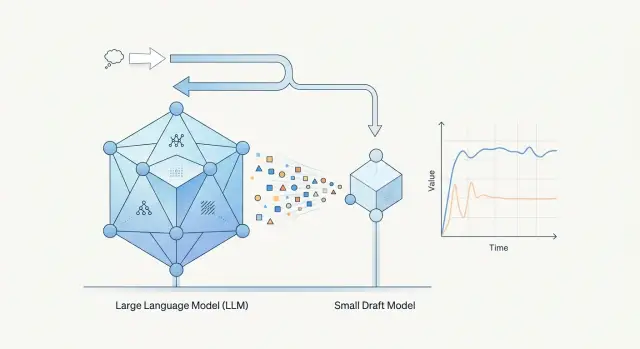
Speculative decoding adds one more step to generation. First, a small draft model quickly suggests several next tokens. Then the larger model checks them and either accepts or rejects them. On paper, that looks like a simple way to speed up the response. In a real system, it’s more complicated: checking also takes time and compute.
That’s why a small model does not automatically create a win. It has to guess the continuation often enough. If it is wrong too early, the larger model spends resources not only on normal generation, but also on constantly re-checking someone else’s guesses. Some of the time is simply lost.
It’s a bit like working with an editor. If the draft is almost ready, the editor confirms it quickly and moves on. If the text is weak, it’s easier to rewrite from scratch. The same logic applies to models.
The difference is especially visible on short answers. When the system only needs to return 20–30 tokens, for example a label, a short call summary, or an answer like “yes” or “no”, the overhead can easily eat the whole gain. Time goes into starting the draft model, passing hypotheses over, and having the main model check them. In the end, plain generation is often faster simply because it has fewer steps.
The picture is often better for longer and more predictable answers. If the model is writing a standard text, a structured summary, or a piece of code with a clear pattern, the draft model is more likely to guess the right continuation. Then the larger model accepts several tokens in one pass, and latency drops noticeably.
Usually it comes down to four things: how often the draft model guesses correctly, how long your answers are, how quickly the main model can verify a batch of tokens, and how much network or server overhead the setup adds.
That’s why the same model pair can behave very differently across tasks. For a short legal-bot reply, the gain may disappear. For a long call summary in a contact center, it can be obvious. If a team checks only one scenario, it can easily draw the wrong conclusion.
In production, it’s better not to expect a miracle from the idea itself. First ask a simpler question: on which requests does the draft model reliably guess correctly, and is the larger model checking faster than generating from scratch? Only there does the scheme usually pay off.
How the setup works, without formulas
With speculative decoding, two models work together instead of one. The smaller model suggests a continuation, and the target model decides which tokens to keep. The draft model is not there for answer quality. It is there for speed.
The cycle is simple:
- The draft model suggests several next tokens.
- The main model checks that fragment in one pass.
- If the prediction matches, the system accepts several tokens at once.
- If the draft model was wrong, the system drops the tail and continues from the point of divergence.
The speedup does not come from the mere fact that the setup includes a small model. It comes from runs of accepted tokens. If the draft model guesses well, the larger model confirms chunks of text at once, and the response moves faster. If it guesses poorly, the system spends time on both the draft and the check, and the gain disappears quickly.
A good example is a call summary template. A phrase like “The customer reported a delivery delay and requested a callback” is fairly predictable in form. For fragments like that, the draft model often guesses both the words and the order. Then the main model confirms several tokens in a row.
Here it’s important not to confuse two different metrics. The first is time to first token. That is how quickly the user sees the beginning of the answer. The second is total response time, meaning how fast the system produces the full text after it starts.
Speculative decoding helps more on longer continuations. The first token may hardly speed up at all, and sometimes it may even arrive a little later because of the extra draft-model step. But on a 200–500 token answer, the gain can be quite noticeable if the draft model is good at matching the style and structure.
That’s why you can’t judge this setup by a single number. If you look only at the first token, you may decide it has no value. If you look only at the average speed of long answers, you may miss the fact that the interface feels less responsive at the start.
What to measure before drawing conclusions
If you look only at average response time, the result can be misleading. Averages hide long delays, and those are what users remember most. Alongside the average, keep an eye on the median and at least p95. That way you can see whether the speedup works almost all the time or only on easy requests.
Measure time to first token and time to the end separately. For the user, these are two different feelings. A model may start responding a little sooner, but finish at almost the same time. The opposite also happens: the first token doesn’t change, but the long answer is assembled much faster.
Speculative decoding also has a direct indicator: the share of draft tokens that the larger model accepted without recomputing. If the draft model guesses correctly often, the setup pays off. If the main model keeps rejecting its suggestions, you are paying for extra work and losing time on checks.
It also helps to look not just at the overall acceptance rate, but at the breakdown by request type. Acceptance is often higher for short, structured answers, strict JSON, and tasks with repeated patterns. It usually drops for complex reasoning, rare terms, and long code.
Another common mistake is comparing cost and latency on different request sets. Don’t do that. You need the same sample, the same generation settings, the same token limit, and the same load conditions. Otherwise you won’t know whether the setup helped or the request mix simply changed.
A minimal metric set usually looks like this:
- median, average, and p95 latency;
- time to first token and total response time;
- share of accepted draft tokens;
- cost per response and cost per 1,000 output tokens.
If you want to test the setup fairly, take at least 100–200 real production requests without hand-picking good examples. Then compare plain generation and the “draft model + main model” pair on the same dataset. At that point, it usually becomes clear where there is a real win and where the numbers only look good in the summary report.
Where the gain usually appears
Speculative decoding tends to help when the answer is long and predictable in structure. If the model is writing a template summary, listing extracted fields, or giving an explanation in a fixed format, the small model often guesses the next piece well enough. Then the larger model confirms several tokens at once, and the pauses between steps shrink.
A good example is call summarization in a contact center. For many teams, the final summary looks similar from call to call: reason for contact, what the agent did, the outcome, and whether a follow-up is needed. The wording changes, but the answer skeleton stays almost the same. On that kind of traffic, LLM inference acceleration is usually easier to see than in open-ended chat or creative writing.
The gain usually shows up in tasks where the model follows a narrow track: call and meeting summaries, field extraction from emails and tickets, support replies for standard scenarios, and short reports with fixed sections. In all of these cases, the draft model does not need to be very strong. It only needs to stay in the expected rhythm of the answer often enough: filler words, markers, common transitions, repeated structures. The fewer surprises in the text, the more confirmations the main model can make in a row.
The model pair matters a lot too. What works best is not an abstract “small plus strong” combination, but pairs where the smaller model writes in roughly the same style and order. That often happens within the same model family or with models trained on similar instructions. If the main model likes long caveats and the draft model answers sharply and briefly, there will be fewer matches.
There is also a practical side. The speedup is more visible when coordination between the two models is cheap. If both models are already warm, close to the user, and don’t require extra network hops, the gain holds up better. If each check needs an extra request to another region or another provider, the added latency quickly eats the benefit.
For that reason, this approach often performs better on repeatable server-side tasks than in a one-off demo. If a team tests different model pairs through a single gateway like AI Router, the easiest way is to look at long structured answers and compare results across the same traffic streams, not through one lucky example.
Where the gain disappears quickly
Speculative decoding gives little or no benefit when the draft model rarely guesses the continuation correctly. In that case, the main model rejects its options, and the system spends time on an extra round of work instead of speeding up.
The most common case is very short answers. If the assistant usually writes one or two sentences like “Yes, the document has been received” or “Please try again later,” the delay is not caused by long generation, but by starting the models, passing the request, and checking the draft. There is almost nothing to speed up there.
Problems also start where the text is hard to predict. You see this in tasks with complex reasoning, precise terms, product codes, names, contract numbers, and other rare tokens. The draft model often slips early, and the main model spends steps fixing it.
A weak draft model also eats the benefit quickly. If it is noticeably worse than the main model not only in quality but also in continuation style, you get two problems at once: more rejections during checking and wider latency spread. One request is fast, and the next one ends up slower than plain generation.
The setup usually does not pay off in four cases: the answer itself is very short, the text contains many numbers and rare tokens, the draft model diverges from the main one in the first steps, or checking the draft is almost as expensive as normal generation.
The last point is often underestimated. Checking also requires compute. If you chose models that are too close in size, keep a long context, or hit memory and queue limits, the savings become almost invisible. In measurements, it looks unpleasant: the system is more complex, but the speed changes only a little.
It helps to look at more than average latency. Compare the median, p95, and the share of accepted draft tokens across request types. If short answers did not get faster and the main model often rejects the draft on harder requests, it is better to keep plain generation and avoid adding complexity for no gain.
How to test it on your own tasks
Start with one common task. Don’t mix chat, summarization, field extraction, and email generation into one test. Otherwise you get an average number that explains nothing. If users mostly ask for short ticket classification, test that.
Then build a proper request sample. It should include not only typical examples, but also different answer lengths: very short, medium, and long. Very often, speculative decoding brings a gain on long answers and hardly changes latency on short ones. If you mix them without splitting the results, the conclusion will be wrong.
Next, run both modes with the same settings. In the first run, keep only the main model. In the second, add the draft model. Don’t change temperature, max tokens, system prompt, cache, or parallelism. Any of those changes will break the comparison.
It’s better to watch a set of metrics, not just one: p50 and p95 response time, cost per request and for the whole sample, quality on the same evaluation, and the share of requests where acceleration actually showed up.
Quality should be checked with a simple rule, not with two lucky answers. For summarization, that might be fact completeness; for classification, label accuracy; for data extraction, the number of correctly filled fields. If speed improved by 15% but the error rate went up, the test cannot be called successful.
After that, swap the draft model and run the test again. In practice, this is often more useful than long debates about the idea itself. One small model genuinely guesses the text continuation well and speeds up LLM output, while another wastes tokens. The model pair matters more than it seems.
If you already have a single OpenAI-compatible gateway like AI Router, this kind of test is easier to run cleanly: you can switch model pairs through the same API and leave the rest of the code untouched. That is convenient because you are testing the effect of the pair itself, not side effects from the integration.
A good result looks boring, and that’s normal: one task, one sample, the same settings, and a clear difference in p50, p95, price, and quality.
Example: a call summary in a contact center
Take a normal support call lasting 8–10 minutes. The customer spends a long time explaining the issue: the order arrived at the wrong address, the agent already changed the address once, the payment was charged twice, and there is still no answer in chat. After the call, the system needs to produce a short but useful summary for the CRM.
In a task like this, speculative decoding often gives a solid gain. The reason is simple: the final answer is longer than one line, and it contains many predictable fragments. The draft model easily guesses common pieces like “the customer reported,” “the agent checked the order,” or “a payment review is needed.” If the stronger model confirms those tokens in a row, the system returns the text faster.
If the summary is 80–150 tokens long, the overhead is easier to pay back. The draft model has time to move ahead, and the stronger model does not need to generate every word from scratch. This is especially noticeable where the structure is almost always similar: reason for contact, what has already been done, what was promised to the customer, next step.
Now compare that with another task. After checking, the agent needs a one-line answer: “What’s the ticket status?” The system must return one sentence like “The ticket was passed to tier two, and a reply is expected by 18:00.”
There is very little text here. Sometimes it is only 10–20 tokens. The draft model barely has time to save anything, but it still adds its own pass. If the answer includes a ticket number, time, amount, or customer name, the stronger model is more likely to re-check the uncertain tokens. The accepted-token rate drops, and the gain disappears.
There is also a second point. In a short answer, people notice the delay before the first word more than the overall output speed. So even a small extra step before checking can hurt the feeling of fast response, even though the same approach would work well on a longer summary.
If a team is choosing model pairs through AI Router, this scenario is easy to test on the same call stream. Usually the picture becomes clear quickly: long summaries speed up more noticeably, while one-sentence replies often gain little or nothing.
Where teams go wrong in tests
Most teams break the experiment before they even get the first numbers. They change two things at once: the prompt and the model pair. Then they see a difference in response time and no longer know what actually caused it — the new prompt, the different draft model, or the setup itself.
With speculative decoding, this is especially easy to miss. The same prompt can produce a short, confident answer, and after a tiny edit it can produce a longer answer with caveats, a table, or a list. At that point, you are no longer comparing the speed of the method, but a completely different workload.
Another common mistake is looking only at average time. The average can look great even if every tenth request suddenly slows down. For production, the tail latency is often more important than the average. p95 and p99 quickly show where the setup starts to break down.
A small sample can also mislead you. If the team ran 20 or 30 requests and saw a gain in one easy scenario, that proves nothing yet. You need dozens, and preferably hundreds, of real requests with different lengths, structures, and levels of difficulty.
Teams often forget to look at two things: answer length and the share of accepted draft tokens. If the larger model rejects the draft model’s suggestions often, the gain disappears very quickly. On short answers, this is especially obvious: the overhead is already there, and there is almost nothing to save.
A proper test usually looks like this:
- the same prompt and the same generation settings;
- the same request set for the baseline and for speculative decoding;
- comparison not only of the average, but also of p50, p95, and p99;
- breakdown of results by answer length;
- a separate calculation of the share of draft tokens accepted by the main model.
A good counterexample is a fast reality check. Suppose a model pair cuts latency by 18% on short classification tasks. The team celebrates and rolls the result out across the whole service. But on long legal summaries, the same pair may show no improvement or even a slowdown, because the draft model makes too many mistakes and the main model spends time checking them.
If your conclusion rests on just one lucky request set, it is not a conclusion. It is just a lucky test day.
Before you launch
Speculative decoding is rarely worth turning on by default for every request. It makes sense where the draft model often guesses the continuation correctly and the main model confirms those tokens without long rollbacks.
Before launch, it helps to check a few things. Look at answer length. If the model usually writes 20–40 tokens, the overhead often eats the gain. If the answers are longer, the effect is more visible. Then check whether the answers are similar in shape. Call summaries, case cards, field extraction, and template emails fit better than free-form brainstorming or complex analysis.
Next, measure more than average speed. You need the share of accepted tokens, time to first token, and p95 for the full response length. The average can paint a nice picture while users still see slow tails. And always compare quality on real data, not on five lucky prompts. If the draft model often pushes the main model down the wrong branch, the speedup is not worth the loss.
Before launch, it also helps to decide where the setup is not needed. For short answers, low acceptance rates, or expensive rollbacks, it’s better to turn the mode off quickly than to keep it just because the idea sounds good.
A good sign looks like this: long answers with similar structure, stable token acceptance, and a clear drop in p95. A bad sign is simpler: average time gets a little better, but the tails get longer and quality becomes uneven.
In practice, teams often enable speculative decoding on one scenario, see a 15–20% gain, and then apply that result to all tasks. That’s not a good idea. Even within one system, some routes may benefit and others may not. If you test this through a single gateway like AI Router, it is smarter to enable the mode selectively by request type rather than for all traffic at once.
What to do next
Don’t roll speculative decoding out to all traffic at once. Start with one task where the answer is longer than a couple of sentences and where latency is noticeable to the user or operator. Good pilot candidates include call summaries, assistant replies in support chat, or field extraction from long documents.
Choose your metrics right away, or the test will quickly turn into a discussion based on feelings. Usually four are enough: p50 and p95 latency, the share of tokens accepted from the draft model, cost per 1,000 requests, and the quality difference on a small manual sample. If quality slips, speed no longer saves the day.
It helps to define a success threshold in advance. For example, the setup counts as a win if p95 drops by at least 20%, quality does not decline, and cost rises by no more than 5%. Every team will have its own numbers, but the threshold itself is necessary. Otherwise, the test can drag on for weeks and the result will be interpreted differently every time.
The action plan should be simple too: choose one model pair and one request type, run the same batch of examples with and without the setup, separate short requests from long ones, and record when the method helps and when it gets in the way.
You also need a rollback plan from day one. Short requests, one- or two-sentence answers, and complex reasoning often eat up the whole gain. For those cases, it’s better to set a simple rule right away: if the request is shorter than the chosen threshold, if the accepted-token rate drops below normal, or if the number of corrections in the answer goes up, the system falls back to normal mode.
If your team already compares models through AI Router, this test is easier to run. You can switch model pairs and routing at the gateway without touching client code, SDKs, or prompts. That saves time and lowers risk: engineers get honest numbers faster instead of spending a week rewriting the integration for one experiment.
A good next step is very simple: pick one scenario, set a usefulness threshold, run 500–1,000 real requests, and save the result in a table. After that, it becomes clear whether it is worth scaling the setup further.
Frequently asked questions
What is speculative decoding in simple terms?
It’s a setup with two models. A small model quickly suggests several next tokens, and a larger model checks that piece right away and keeps only what matches. The gain appears when the larger model confirms several tokens in a row instead of just one.
Why doesn’t speculative decoding always speed up the response?
Because the setup adds an extra step. First the draft model runs, then the larger model spends time checking it, and when the match is weak, that checking eats up the whole benefit. You see this especially often on short answers.
Which tasks usually benefit from this setup?
It works best on long answers that follow a familiar pattern. Good fits include call summaries, field extraction, support replies, and short reports with a fixed structure. In those tasks, the draft model is more likely to guess the next part correctly.
When is it better to stick with plain generation?
Avoid it for very short answers, one-line replies, and tasks with rare tokens. Contract numbers, amounts, names, product codes, and complex reasoning quickly lower the match rate. In those cases, plain generation is often faster and simpler.
Does the scheme speed up time to first token?
Usually not. The first token may arrive at about the same time, or even a bit later, because the system has to run the draft model first. On long answers, though, the total time often drops more clearly.
What metrics should I measure in a test?
Don’t look at just one average number. Check p50, p95, time to first token, total response time, and the share of draft tokens accepted. Also calculate the cost per response and per 1,000 output tokens. That way you see not only the fast wins, but also the slow tails.
How many requests do I need for a fair check?
For an initial read, 100–200 real requests is usually enough if the sample is fair and not hand-picked. If your traffic varies a lot in length and task type, use 500–1,000 requests and break the results down by scenario. Otherwise, the average will hide the real failures.
How do I choose a draft model?
Pick the model that writes in a style and word order similar to the main model, not just the smallest one. Models from the same family or with similar instructions often work better. After that, check the accepted-token rate on your own data, not on one lucky example.
Can this scheme hurt quality or increase cost?
Yes, and you need to test that separately. If the draft model makes too many mistakes, the larger model spends more steps rolling back and correcting, which raises both cost and latency. Look not only at speed, but also at label accuracy, summary completeness, or the number of correctly filled fields.
How can I safely roll out speculative decoding in a production service?
Start with one scenario and set a success threshold in advance. For example, enable it only where responses are longer than a set limit, p95 really drops, and quality does not slip. If you test model pairs through AI Router, it’s easy to change routing at the gateway and leave client code untouched.