Small Models for PII Masking and Classification
Small models for PII masking and classification can cut costs on streaming workloads. Here’s how to compare price, recall, and errors.
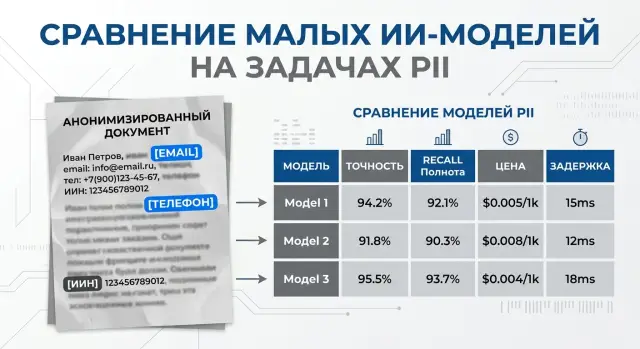
Why PII does not always need a large model
PII masking is rarely a one-time task. In most cases, checks happen on every chat message, every application, every call transcript, and every document the system takes in. If you send all of that traffic to an expensive large model, the bill grows very fast.
For tasks like this, a strong generator is often not needed at all. When a system looks for an IIN, phone number, address, card number, or a label like "passport data," it is not creating new text. It is doing a narrow job: finding entities and assigning them to the right class.
This is where small models often win. They are cheaper, simpler, and usually faster. For an online form, the difference between 300 ms and 2 seconds is obvious right away. For chat and call centers, it matters even more: pauses annoy both the agent and the customer.
There is also a purely financial reason. PII checks almost always sit at the start of the pipeline and run on every message, while answer generation is not needed in every scenario. So even a small saving on one request can make a large difference over monthly volume. If you have 2 million short messages a month, a few extra cents on each request quickly turn into a noticeable budget line.
A large model is still needed in harder cases: when data is hidden in free-form speech, written with mistakes, mixed across two languages, or hinted at without a direct mention of personal information. But those examples are usually fewer than routine tasks like finding obvious identifiers and standard categories.
In practice, a simple setup works well. A fast first layer finds and masks PII, and a larger model is used only where context is needed or the cost of an error is too high. This approach reduces latency and avoids wasting expensive resources on easy work.
This is especially useful where local PII processing matters. If the team keeps the masking step close to the data, it lowers the risk of sending sensitive text too far and gives better control over logging, limits, and retention rules. For some teams in Kazakhstan, this is a production requirement, not an extra option.
Which tasks fit a small model
A small model works best when the task is narrow and the answer has to be short and predictable. It does not need to write polished text or reason at length. It needs to find sensitive fragments quickly, mark the type, and finish before the text is written to logs, a database, or a search index.
Usually, such a model is enough to find full names, phone numbers, email, IIN, addresses, and card numbers in a message or document, replace the found fragments with masks like [NAME] or [CARD], assign an entity label, and separate ordinary text from sensitive parts before anything is stored.
These tasks fit a small model well because the rules are clear and the context is often short: a support chat, an application, an agent comment, a "note" field in a CRM. If the text looks like a stream of similar messages, the cost drops noticeably and the accuracy is often more than good enough.
The working pattern is simple: put the small model in the first layer. It processes the whole stream quickly and handles the obvious cases. If confidence is low, the request goes either to a stronger model or to a person for review.
In a bank, it looks very practical. A customer writes: "My name is Aлия Sarsenova, my IIN is 990101300123, call me back at 8701..." The small model masks the name, IIN, and phone number, and also marks the record as customer data. But if the text contains a 16-digit number with no explanation, the model may not know whether it is a card, a contract number, or an internal ID. That kind of case should not be handled blindly.
Local processing also pairs well with small models. They are easier to keep in your own environment or close to the data when latency and in-country storage matter. For the first line of filtering, that is often more sensible than sending every text to the most expensive model.
How to build a fair test set
A test set should look like your normal data flow, not like a set of perfect demo examples. If the model will later mask PII in chats, applications, and emails, those are the kinds of texts you need in the test. Otherwise, the cost-versus-accuracy comparison will look too good and be of little real use.
To start, it is enough to collect texts from a few real templates: support chats, application forms and questionnaires, customer and employee emails, and OCR text from scans and document photos. This kind of set quickly shows where small models behave consistently and where they start confusing entities. OCR is especially useful: spacing, case, and punctuation often break there first, and that is where errors show up earliest.
Do not make the sample too "clean." If the test only contains tidy emails with no typos, the model will look better than it really is. In a live flow, people write "IIN," "iin," "iin123...", glue phone numbers to names, put an address on one line, and mix Russian with Kazakh. All of that should be included.
A good set mixes short and long texts. A two-line phrase is one thing. A long thread is another, where a name, account number, and address are spread across different paragraphs. It helps to mix formal and casual styles: an application, a messenger message, a follow-up after a call, an agent comment.
Rare cases are better marked separately instead of being buried in the main group. Flag typos, merged words, transliteration, double surnames, abbreviations, and mixed languages. Then you see not only the overall score, but also the model's specific weak spots.
If you work with data from Kazakhstan, do not limit yourself to Russian examples. Add Kazakh names, addresses, application phrasing, and OCR from local documents. For local PII processing, this is often more important than a couple of points on an English benchmark.
A practical rule is simple: collect 200–500 examples, with about 80% matching the normal flow and 20% made up of awkward cases. That kind of test does not flatter the model and helps you understand what you are actually paying for.
How to measure accuracy without pretty numbers
One average metric almost always tells the wrong story. For PII masking and classification, it hides the real question: which entities the model is missing.
Look at recall for each PII type separately. If the model finds email and phone numbers well but keeps missing IIN, card numbers, or account numbers, the overall number may still look fine, while the business risk remains high.
Precision matters just as much as recall. A model that masks extra words damages the text, breaks document search, and adds manual review. In practice, that looks like this: the model sees a long application number and mistakes it for an IIN, even though it is just an internal identifier.
The most useful report keeps four things together: recall for each entity type, precision for each entity type, entity-level errors, and cost plus latency on the same test set. If quality and cost are in separate tables, teams almost always end up looking at only one side.
Document-level checks often paint too rosy a picture. If an email contains ten entities and the model found nine, the document may be marked as successful by mistake. But for the real process, that is still a miss: one unmasked entity still goes further into the system or to an agent.
So count entities one by one. For each PII type, record true positives, false positives, and false negatives, then calculate precision and recall. That makes it immediately clear where the model is cautious and where it masks too much.
Cost and latency should sit next to quality. Otherwise, it is easy to choose a model with better recall and not notice that it is four times more expensive and 800 ms slower. For a flow with millions of messages a month, that is a major difference.
If you run comparisons through AI Router, it is useful to save not only the model output and labels for each run, but also tokens, provider cost, and p95 latency. Then the decision is honest: you can see not just who found more entities, but who gives acceptable accuracy for reasonable money and response time.
What drives cost the most
If you look at the bill without illusions, the most expensive part of tasks like PII masking and classification is often not the model itself. Budgets are more often broken by text length, the number of repeated calls, and escalation rules to a stronger model.
The first trap is a long prompt. Teams often add a half-page policy, examples, output format, country-specific exceptions, and a separate JSON instruction. As a result, even a cheap model burns a lot of tokens before it even sees the document. If the task is narrow, it is better to keep the instruction short and the output schema strict.
With OCR text, the bill grows even faster. A scanned contract or form often comes back with noise: repeated headers, broken lines, table artifacts, empty blocks. Tokens may be cheap for a low-cost model, but on 30 pages that still does not save much. Before sending it, it helps to clean obvious noise and split the document into sensible chunks.
The second common source of extra cost is retries. One timeout, one JSON validation error, one extra retry, and the price of the document almost doubles. Sometimes the pipeline itself makes three passes in a row: first it looks for PII, then it checks the answer, then it repeats the call because of a borderline field. On paper the model looks cheap. In production, the bill is very different.
A few simple habits usually help more than long price optimization. Cache the same instructions and templates, batch short records if latency can tolerate it, remove duplicate pages and repeated blocks, and do not send already clear and complete documents back for another pass.
There is also a factor that is often underestimated. The escalation threshold usually changes the overall budget more than the difference between two close models. If a small model reliably handles 90% of applications, and the remaining 10% go to a stronger model only when confidence is low, the total cost drops a lot.
This is easy to see in a simple banking example. A stream of applications goes through one LLM gateway, and the team sees that the price difference between two small models is only a few percent, while reducing escalation from 25% to 8% cuts the monthly bill much more strongly. That is why it is better to start cost-versus-accuracy comparison with the whole processing chain of one document, not with the token price alone.
How to run the comparison step by step
Model comparisons for PII often break even before the first run. The team uses different examples, changes the output format in the middle of testing, and then compares numbers that cannot really be compared. If you are choosing small models, start by fixing the rules.
List the entity types before the test begins. For example: IIN, card number, phone, email, full name, address. Next to each one, write what the model should do with it: hide it completely, keep the last 4 digits, return a class label, or do both.
Then keep the conditions the same for all models.
- Build one test set. It should include short, long, and noisy texts: a customer chat, a statement, an application, an email, and an OCR fragment.
- Give all models the same prompt and the same response format. A simple JSON with fields for entity type, position, and masked value is usually best.
- If the model behaves inconsistently, run the same set at least three times. Then calculate the average result and the spread.
- Split the results into easy, borderline, and failed cases. Easy cases show the base level, borderline cases reveal the limits of the rules, and failed cases show the risk right away.
- Count not only the average cost per run, but also the cost of one missed error.
The last point often changes the choice. A cheap model may win on token cost but lose in practice if it misses an IIN in every twentieth document. A useful way to think about it is: how much one full run of the set costs and how many entities the model missed. Then compare the cost difference and the miss difference between two models.
A simple example: model A costs 900 tenge on the set and misses 12 entities, while model B costs 1400 tenge and misses 4. The savings with model A are 500 tenge, but you get 8 extra misses. That means each "saved" miss costs about 62.5 tenge. For a bank or a clinic, that is usually a bad deal.
If you test through a single gateway, it is easier to keep one code path and one request format for all models. With AI Router, the team often only needs to change the base_url to api.airouter.kz and leave the SDK, code, and prompts untouched. That removes extra noise from the comparison and makes it easier to compare providers and self-hosted models fairly.
A simple scenario for a bank
A customer writes to support chat: "The payment is not going through, my phone is 8 777 123 45 67, IIN 990101300123, contract number 45821." A bank does not need the strongest generator to handle a message like that. First, the system needs to remove sensitive data, and only then figure out the topic of the request.
The first small model masks PII before the text is written to logs, queues, and internal case records. It replaces the phone number, IIN, and contract number with labels like [PHONE], [IIN], and [CONTRACT]. If the model works carefully, the employee still sees the meaning of the complaint, but raw data does not travel through the services and logs.
After that, a second small model assigns a simple label: payment, card, or loan. For short messages, this is usually cheaper and faster than sending the whole stream to one strong model. If the bank receives 100,000 requests a day, the cost difference becomes noticeable very quickly.
Suspicious cases are better not pushed too hard. If a message looks like two topics at once, contains a rare document format, or the model is unsure about the answer, the system sends it on to a stronger model. That route gives a good balance: common requests move fast, and hard ones do not get lost.
For a bank in Kazakhstan, this setup is also convenient because part of the stack can stay inside the country. For example, a small model can run close to the logs and access-control systems, while a stronger one is used only for rare borderline messages. If the infrastructure must keep data inside Kazakhstan, audit logs, PII masking before further transfer in the chain, and key-level limits are especially useful.
Here, the team looks not at pretty averages, but at the remaining errors per thousand requests. If out of 1,000 messages the model missed 3 IINs and mislabeled 18 topics, that is already a clear conversation for risk, security, and the product owner. After that, you can decide whether it is cheaper to fine-tune the small model, adjust the rules, or widen the escalation threshold.
Where small models fail most often
A small model usually handles clean, short text fairly well. Problems begin where meaning depends on nearby words. If a line contains only a number and the symbol "#", the model can easily confuse a contract number, an account number, and a card number. Without context, they look almost the same.
For PII masking, that confusion hurts in both directions. Sometimes the model hides too much and the document becomes hard to read. Sometimes it misses a sensitive fragment because it decided it was just an ordinary service identifier.
OCR makes things worse. A scanned application, a photo of a form, or an old PDF after recognition often produces noisy text: letters look like numbers, lines shift, spaces disappear. A small model latches onto broken patterns and misses IIN, phone numbers, addresses, or full names. And sometimes it masks a random string simply because it looks like a number.
Language and script mixing adds another layer of trouble. One message can easily include Russian, Kazakh, and Latin text: a name in Cyrillic, a street in Latin letters, and a service note in Kazakh. On such data, small models lose accuracy faster than they seem to in a clean Russian demo. They may treat a name as a company name, fail to recognize an address, or leave a fragment like "Abai 26, apt 14" unmasked.
Another common mistake looks almost funny, but it hurts in production. After the word "my," the model starts masking too much. The phrase "my doctor said" or "my plan changed" suddenly turns into a wall of placeholders, even though there is no PII there. This usually happens when the model has overlearned a too-simple rule: personal information often follows a possessive word. On real data, that rule breaks quickly.
Quality also drops in another scenario: one request tries to do everything at once. If you ask the model to find PII, assign a class to each entity, and also generate a response for the user, the small model starts saving effort on labeling. The response may look smooth, but the labels become messy and some PII gets lost.
If those mistakes are already visible in testing, do not try to fix them with one new instruction. It is usually better to run OCR cleanup separately, classify separately, and add short context around the number or name for borderline cases.
A quick check before launch
Before production, small models should be checked on a few boring but decisive things. A nice average result means very little if the model misses a rare IIN, a card number in free text, or a surname with a typo.
First, look not at overall accuracy, but at recall for the most sensitive data types. If IIN, phone numbers, addresses, and document numbers are critical for a bank or clinic, test those on rare and messy examples: mixed language, extra spaces, manual agent input, text from an old CRM. One missed entity here is usually more expensive than a few extra triggers.
Then count the money in a simple way. Not "how much a thousand tokens costs," but how much one day and one month cost at your real load. Take a normal weekday flow, add a buffer for peaks, and see whether PII masking fits the budget without surprises. Often the small model wins not because it is much more accurate, but because you can keep it on for the whole flow, not just part of the requests.
Latency follows the same logic. For a website form, an extra 300–500 ms is already noticeable. For support chat, latency adds up on every message. For an agent in a contact center, even one extra second is more annoying than it looks on a demo. Check not the average response time, but p95 in a live scenario.
Before launch, a short checklist is usually enough:
- recall does not drop on critical PII types, especially on rare examples
- daily and monthly cost is clear in advance, with buffer for peaks
- latency does not break the form, chat, or agent workflow
- logs do not keep raw PII longer than needed for audit and debugging
- the team knows when to send a request to a stronger model
The last point often decides everything. You need simple escalation rules: low confidence, long unstructured text, a borderline category, mixed languages, or a conflict between two checks. If you use AI Router, such routes can be built through one OpenAI API-compatible interface, while data stays in a controlled environment with audit logs, PII masking, and key-level restrictions if company policy requires it.
What to do next
Small models for PII masking and classification are best introduced one data flow at a time. Do not expand the pilot to chat, email, applications, and documents all at once. Pick one clear source, such as web form requests, and compare 2–3 models of the same class under the same prompt.
That kind of start is less flashy than a big launch, but it usually brings more value. You will see faster where the model misses a phone number or IIN, and where the problem definition itself is still too rough. When there are too many variables in the test, the conclusions are almost always blurry.
Next, set aside a separate set for regular rechecking. Do not change it after every improvement, or the metric will only go up because the test has become easier. It is better to keep a small but stable set and run it every week, especially after changing the prompt, provider, or model version.
Usually, a simple process is enough: choose one type of input data, keep the conditions the same for all models, count PII misses and false positives separately, and record cost not only for tokens but also for repeated runs.
If the team already works with OpenAI-compatible SDKs, these comparisons can be built without a long rebuild. In AI Router, you can run the same requests through different providers or through open-weight models on your own GPU infrastructure without changing your usual code and prompts. This is especially useful when you need to know quickly whether a cheap model gives the same accuracy on your data or whether the savings disappear because of extra retries.
For flows that must keep data inside Kazakhstan, look beyond the model itself. Check where the logs live, whether audit logs exist, how the service masks PII before passing it further along the chain, and whether processing can stay inside the country. With strict data rules, these details influence the choice just as much as the price per million tokens.
If, after a week, the same test shows stable results and a clear cost per thousand records, move only that flow to production. Then add the next channel using the same pattern instead of starting over.
Frequently asked questions
When is a small model enough for PII?
If the model is looking for obvious entities like IIN, phone numbers, email, addresses, or card numbers, a small model is usually enough. It responds faster and is noticeably cheaper on a large stream of short messages.
What is better for PII: one large model or a two-layer setup?
A two-layer setup is usually the better choice. The first small model handles the obvious cases, and you only bring in a stronger model when the text is noisy, bilingual, or the cost of a mistake is too high.
What data can a small model usually mask without problems?
In most cases, it does best at finding full names, phone numbers, email, IIN, addresses, and card numbers in short messages and forms. It is also a good fit for simple replacement with masks like [NAME] or [IIN] before text is written to logs and storage.
Where do small models make mistakes most often?
The biggest errors usually come from short numbers without context, OCR noise, typos, and mixes of Russian, Kazakh, and Latin text. In those cases, the model may confuse a card number with a contract number, miss an address, or mask extra words.
How do I build a fair test set for checking PII?
Collect 200–500 examples from the real flow: chats, forms, emails, and OCR from documents. Keep not only normal texts, but also awkward cases with typos, merged strings, transliteration, and mixed languages.
What metrics should I look at besides overall accuracy?
Do not look only at one overall number. Track recall and precision separately for each PII type, and keep cost per run and p95 latency next to them so you can see quality and cost in one place.
What affects the cost of PII masking the most?
Budgets usually grow because of long instructions, noisy OCR, unnecessary retries, and too much escalation to an expensive model. The bill usually drops faster when you clean the text, split documents into parts, and reduce the share of unclear requests.
When should I escalate a request to a stronger model?
Send the request onward if the model is unsure, if it sees long unstructured text, or if the category is unclear. The same applies to mixed-language cases and numbers that need more context.
Can PII be processed locally inside Kazakhstan?
Yes, that setup is possible if you keep the first processing step close to the data and do not send raw text through extra services. For teams with data residency requirements, this is often better for both risk and latency.
Where should I start a pilot so I do not overspend or get confused?
Start with one flow, such as a web form or support chat, and compare 2–3 models of the same class with the same prompt and output format. If you already use an OpenAI-compatible stack, AI Router can help you run the same scenario through different providers without rewriting code.