Session Context and User Profile: How to Separate Them
Session context and user profile should be stored separately so the assistant does not mix one-time details, preferences, history, and personal data.
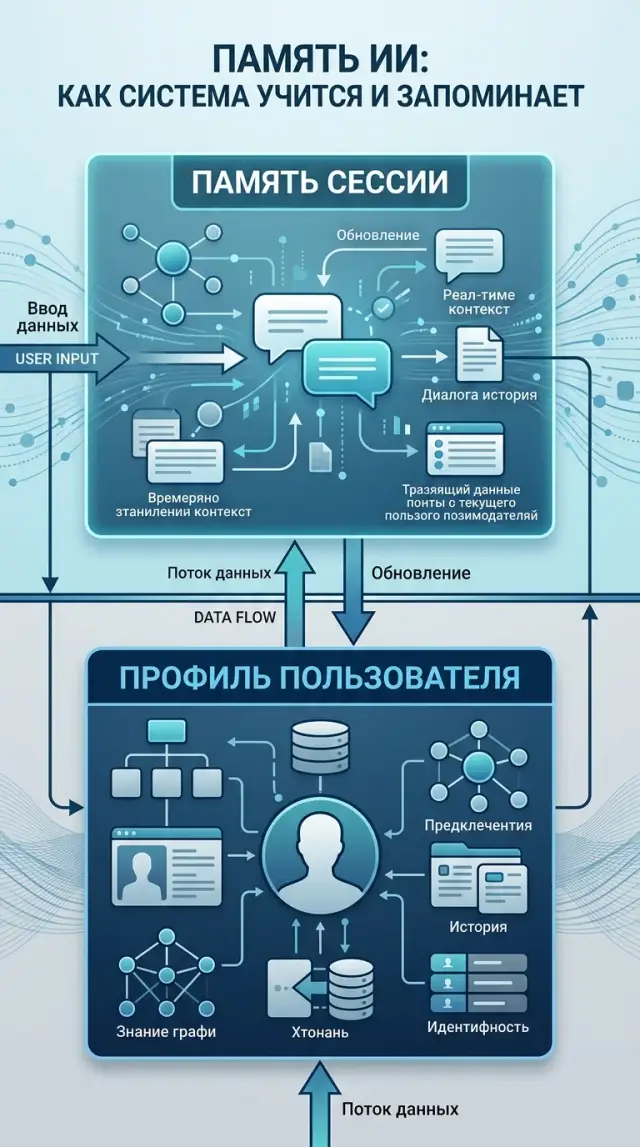
Where the confusion comes from
The problem starts when a team puts everything the user said into one bucket. For the model, it is just text from a past conversation. For the product, it is already two different layers: temporary session context and data that can be stored longer.
The most common failure is simple. A user writes: “Reply briefly today, I’m in meetings.” That is a request for one day, or sometimes even one hour. But if the system saves it as a permanent preference, the assistant will still cut answers a week later, even though the person expects normal depth by then.
That is how a temporary detail turns into a rule. The same happens with phrases like “I’m in Almaty now,” “I’m preparing a report for the bank,” or “show examples in Python.” Inside a specific session, that is useful. In the user’s long-term memory, it is often just noise.
A long chat makes the mistake much worse. The model sees the same temporary fact many times and starts treating it as stable. If summarization sits on top, nuance disappears even faster: words like “now,” “this week,” and “for this project” vanish, while the bare statement remains.
That hurts answer quality. The assistant drags old constraints into a new dialog, does not ask the right clarifying question, and builds the answer around a fact that is no longer current. The main mistake is simple: the system remembered the wrong thing and forgot that it was temporary.
The user notices these failures immediately. The assistant stubbornly keeps an old tone, uses an outdated role or city, suggests something that worked yesterday, and sometimes even argues with the person using their own old words.
Worst of all is not one wrong reply, but the feeling that the assistant has “stuck” to a random detail. After that, trust drops fast. The person either rewrites the rules every time or simply turns memory off.
In LLM applications, this confusion usually starts not in the model, but in the data storage logic. If the system does not distinguish “a fact for now” from “a fact for later,” long-term memory will quickly damage even a good conversation.
What to keep only in session
Session is for the current task. Anything that helps answer now, but should not affect future dialogs, is better kept there only.
The first rule is simple: the goal of the conversation is almost always temporary. If someone writes “make a short summary of the call for the director” or “compare two contracts and find the risk in clause 4,” that is a one-chat task. It has no place in the profile.
The same goes for one-time clarifications and new input. A user may ask for a drier tone, take into account a lawyer’s fresh comment, or temporarily avoid tables. The assistant needs that right now. If you move such details into long-term memory, the next conversation can easily go off track.
Usually, session contains:
- the current goal of the dialog
- one-off constraints and clarifications
- files, request numbers, amounts, and dates from this chat
- drafts, working hypotheses, and intermediate conclusions
Another group is facts tied to a specific conversation. A user uploads a PDF, writes request number 48152, gives an amount of 1,250,000 tenge, and asks to check the mismatch with the act. The assistant needs to remember that until the task is finished. After that, these details no longer describe the user. They are case details, not part of the profile.
Drafts and assumptions also should not be moved into long-term memory. If the assistant guessed that the document relates to procurement, or made an intermediate conclusion from incomplete data, that is working state, not fact. Otherwise old guesses will start appearing in new answers.
In practice, it is useful to keep a separate store for session with a session_id, a short TTL, and explicit cleanup after the task is closed. Even if the app works through a single LLM gateway, the logic does not change: the profile stores stable user properties, while session stores what dies with the current request.
A good test sounds like this: if a fact loses its meaning right after the answer, keep it in session.
What to keep in the user profile
The profile contains facts that live longer than one conversation and help avoid starting from scratch. If the information is still useful a week later and does not depend on the current task, it belongs in the profile.
This usually includes name, form of address, role, and language of communication. If a person asks to be called “Alya,” writes as a support manager, and always communicates in Russian, the assistant does not need to ask again in every chat. Role also affects the answer: one person needs a short summary for decision-making, another needs an example with API and logs.
Permanent preferences for answer format can also be stored, but only if the user set them themselves or repeated them several times. A one-time request like “make it shorter” should not immediately become a rule for the future.
Time zone and allowed communication channels are better kept close to the profile, not in session. This affects reminders, reports, quiet hours, and escalation time. If the user lives in Almaty time and only agrees to receive notifications in a corporate chat, the system should not message them in another channel just because they replied there once.
Another profile layer is consents, prohibitions, and work restrictions. These are not user preferences, but rules that must not be broken:
- consent to process and store history
- prohibition on using personal data without masking
- allowed communication channels and sending hours
- limits on automatic actions without confirmation
- answer-style requirements, if they are set by team policy
For a corporate assistant, the profile may store the user’s language, company role, time zone, rule to mask PII, and a ban on sending replies to external messengers. But phrases like “I’m on duty today” or “I’m preparing a report until 5:00 PM” should stay in session.
A simple rule is this: the profile stores stable human properties and boundaries. Session stores the current situation.
How to handle borderline cases
Mistakes most often hide in gray areas. It is not always clear what to do with phrases like “I’m traveling right now,” “I prefer short answers,” or “I’m preparing a report until Friday.” If the team saves such facts to the profile right away, the assistant will start confusing a one-off situation with a habit.
It helps to check every borderline fact with the same questions:
- Will this fact survive the end of the conversation? If a person writes “I’m working from home today,” that is almost always part of the current session. If they ask to always reply in Russian, the fact may live longer.
- Will it change in a day? The current project, deadline, meeting role, and mood change quickly. Such data is better kept near the dialog.
- Does it need user confirmation? A name for address, a permanent language, and an answer format should be saved only after direct consent. The assistant’s guess is not the same as a fact.
- What happens if the system is wrong? An extra fact in session usually disappears on its own. An error in the profile will return in a new conversation and irritate more.
If the answer is not obvious, keep the fact temporary. That is safer. The assistant can ask again tomorrow and check whether the fact is still current.
A lifetime for borderline records also helps. For example, a preference like “write shorter” can be saved for a few days, then confirmed again. And a note like “I’m approving the budget now” is better deleted after the task or by the end of the day.
These rules make the system much simpler. Teams often blame the model, even though the problem is not in the answers, but in memory. For a bank, retail company, or internal assistant, the error looks the same: the assistant remembers what it should have forgotten.
How to separate the data step by step
If a team does not label data from day one, the profile quickly turns into a pile of random phrases. To keep session context and user profile from mixing, every field needs three things: meaning, lifetime, and update owner.
- List all fields the assistant can see or receive from your systems. Usually this includes the current chat text, language, user role, order history, tone settings, location, ticket status, and operator notes.
- For each field, ask a simple question: “Is this true only now, or almost always?” The phrase “I want a shorter answer in this chat” lives in session. The phrase “I prefer Russian” can live in the profile.
- Assign a lifetime in advance. For session, that means minutes, hours, or one dialog. For the profile, it means weeks, months, or until manual change, if the data is confirmed.
- Write down who can change the profile. It is better when the profile is updated by the user, a CRM event, or an explicit rule. The assistant should not move a random line like “I’m in Almaty today” into the profile.
- Check the profile for junk. Remove everything that ages quickly: the current task, a temporary priority, a one-time discount, mood, or a location from one trip.
After this sorting, it is convenient to set up two separate storage schemes. Session keeps the short live layer that is needed right now. The profile stores stable facts and preferences that do not change from message to message.
If a field causes debate, do not rush to put it in the profile. Keep it in session for a couple of weeks first and see whether it changes often. That is easier than cleaning the profile later and explaining why the assistant remembered too much.
If you work through AI Router on airouter.kz or another LLM gateway, do not make the gateway the place where the profile lives. The profile is better kept in your own system, next to access rules, auditing, and PII masking. Send to the model only the slice of data that is truly needed for the answer.
A good sign is very simple: an engineer looks at any field and can say in 10 seconds where it is stored, how long it lives, and who can change it.
Example from one conversation
The difference is easiest to see in a live example. The same bank customer may keep some data only for the duration of the chat and some settings between conversations.
Imagine a support chat about a payment. The customer already chose Russian earlier and asked to be addressed formally. That is profile data. But today they have a different request: answer very briefly because they are writing from a phone between meetings. That is session data.
The dialog might look like this:
“Hello. Please reply briefly. I need to check the payment for request 48127 for 245,000 tenge.”
The assistant replies in Russian and formally because it knows the customer’s permanent preferences. But it keeps the “briefly” request only inside the current conversation. Request number 48127 and the amount 245,000 tenge also live only in session context. They are needed to finish the task and not needed in the next chat.
Ten minutes later, the customer writes:
“Was the payment found?”
The assistant understands which payment is being discussed because the session is still open. It does not need to ask for the request number and amount again. That is convenient and does not clutter the profile with extra details.
Now the chat is closed. After that, the system deletes the temporary facts: the request number, the payment amount, and the “reply briefly today” request. The profile keeps the stable things:
- answer language
- form of address
- if needed, time zone or date format
The next day the customer starts a new conversation: “Good afternoon, I want to check my card status.”
The assistant again replies in Russian and formally. But it should no longer automatically be overly brief, and it should not remember the old request 48127. If these data appear in a new chat for no reason, then session context and profile are mixed.
This rule works almost always: a one-time fact is needed until the task is complete. A repeated preference can be stored longer. This separation reduces errors and helps handle user data more carefully.
Where teams go wrong most often
The most common problem is not the model, but the team creating one big “memory bag.” It contains the current chat history, user habits, and account settings. After a couple of weeks, nobody understands why the assistant suddenly remembers too much.
The first mistake is simple: almost everything from the conversation gets written into the profile. A user once said “I’m on a business trip until Friday” or “reply shorter now,” and the system saves it as a permanent fact. That is how a temporary detail lives longer than it should and breaks future conversations.
The second mistake is related to data lifetime. Temporary facts have no TTL, expiration date, or clear deletion rule. Because of that, session and profile get mixed up, even though they do different jobs: one layer helps carry the current conversation, the other stores stable preferences and important settings.
Another issue is storing personal data without a clear reason. If a task can be done without a date of birth, personal number, or address, do not drag it into memory. This is especially risky where there are audit logs and strict data requirements: a control log and a user profile are not the same thing.
A good example of the mistake is this. A user writes: “I’m sick today, move the reminder and don’t call.” The phrase “don’t call” may relate to the communication channel setting if the person repeats it more than once. The phrase “I’m sick today” should not go into long-term memory without a very strong reason. And “move the reminder” belongs to the current action, not the profile.
Often, the user has no way to fix the profile either. The system remembered something, but the person cannot see it and cannot delete the record. Then the error lives for months, while the team argues with the model, even though the ordinary storage layer is broken.
Warning signs are usually these:
- the assistant recalls random details from old chats
- it stores preferences, history, and account settings in the same way
- it does not delete temporary data automatically
- it collects personal data “just in case”
- it does not show the user what exactly is saved in the profile
If you have an LLM gateway, request logs and security labels should also be kept separately. In AI Router, for example, audit logs, PII masking, and rate limits handle control and compliance. That data should not quietly turn into the assistant’s memory about a person.
The healthiest setup is usually boring: session lives separately, profile separately, account settings separately, logs separately. The fewer gray areas there are between these layers, the less often the assistant behaves strangely.
Quick pre-launch checklist
Before release, check not only the models, but also the memory rules. Strange answers usually appear not because of the prompt, but because session and profile are mixed in one data scheme.
First, review each field the assistant reads or writes. Every field should have a clear source and lifetime. If the source is unclear, the assistant should not rely on that fact. If the lifetime is not set, temporary information almost always stays longer than needed.
- Keep one-off facts only in session. Phrases like “I’m in Almaty today,” “reply shorter,” or “help me choose a plan for this month” should not go into the profile.
- Keep permanent data separate. Name, language, time zone, work role, or consent for notification format can be stored longer if the user confirmed it.
- Set session cleanup with a simple rule: after 30 minutes of inactivity, after the task is completed, or after an explicit chat reset.
- Give the user a place where they can see permanent data and edit or delete it.
- Logs should show why the assistant made a conclusion: the fact came from the current dialog, from the profile, or from an external system.
There is a simple pre-launch test. Take one real conversation and ask: if the person comes back in a week, what is the assistant allowed to remember without a new request? Anything awkward to show on a separate profile screen is better not stored as long-term user memory.
If you are building an LLM application on several models, the rule does not change. Even if an API gateway helps with request routing, auditing, and storing data inside the country, memory separation still has to be defined in the application itself.
Another useful test is done by support or QA. A person opens the answer log and tries to reconstruct the chain: which fact came from where, who wrote it, and when it will expire. If that cannot be understood in a minute, there will be extra arguments and manual reviews after launch.
What to do next
Start simple: split memory into two stores. One holds only what is needed for the current conversation, the other stores the user profile and lives longer. As long as session context and profile stay in one place, the errors will keep repeating.
At the first stage, you do not need a complex setup. It is enough to define clear fields, record lifetimes, and set rules for who can read and change each part of memory. Even this basic separation usually removes most strange answers.
Minimal plan
- Create a separate store for session and a separate one for the profile.
- Turn on read and write logs so the team can see where the assistant got each fact.
- Add simple cleanup rules: session is deleted by TTL or after the task is finished, and the profile is updated only after a confirmed signal.
- Check which fields cannot be stored in plain text, and mask PII before saving.
Logs are useful not only for troubleshooting. They quickly show when the model writes a random phrase from the conversation into the profile or drags an old detail into a new dialog that is no longer needed. A good rule is simple: if you cannot explain in one sentence why a fact should live longer than the session, do not put it in the profile.
It is better to sort out data requirements before launch, not after the first incident. Check where records are physically stored, who has access to them, how you delete data on request, and how you mask personal information in logs. For banking, telecom, public sector, and healthcare, this is a normal part of the architecture.
If you are putting an LLM into production, it helps to think about routing and control early, not just the model itself. For teams in Kazakhstan and Central Asia, AI Router is often used here: it provides a single OpenAI-compatible API and also helps with audit logs, PII masking, and in-country data storage requirements. But your application still has to define the boundary between session and profile.
In short, the order is this: first separate the stores, then enable observability, then check the storage rules. After that, memory errors stop being a mystery and become an ordinary engineering task.
Frequently asked questions
How is session context different from a user profile?
Session stores what is needed for the current conversation: the task, temporary limits, files, amounts, and request numbers. The profile stores what stays useful a week later: language, form of address, role, time zone, consents, and restrictions.
If a fact stops mattering as soon as the reply is sent, keep it in session. If it helps in future chats and does not depend on the current task, store it in the profile.
What should not be saved in the user profile?
Do not store temporary details in the profile: “reply briefly today,” “I’m in Almaty now,” “I’m preparing a report until evening,” a request number, an amount from the current case, draft conclusions, or the assistant’s guesses.
These details age fast. If they end up in the profile, the assistant will drag them into future chats and start making mistakes.
When can a request like “keep it short” be saved in the profile?
Save a preference like this only after explicit confirmation or after it has been repeated in several chats. A person may ask for a short reply just because they are on a phone or in a meeting.
Without confirmation, it is better to keep it in session with a short lifetime. You can ask again after a few days.
Should session data have a TTL?
Yes, without a lifetime limit temporary facts almost always stay longer than they should. Set a simple rule: clear the session after the task is finished, after an explicit chat reset, or after a period of inactivity.
Even a short TTL already reduces strange answers. The assistant will less often carry old details into a new conversation.
How do you handle borderline cases when it is unclear whether something belongs to session or profile?
If you are unsure, keep the fact temporary. Then check three things: will it survive the end of the dialog, will it change in a day, and did the user agree to store it longer?
Also look at the cost of the mistake. An extra record in session usually disappears on its own, while an error in the profile will annoy the person in every new chat.
Where should a request number, payment amount, and files from the chat be stored?
Such data lives in session until the task is done. It describes the current case, not the user.
After the chat is closed, delete it or move it only into the systems where it belongs by process. It is better not to drag it into the assistant’s long-term memory.
Can audit logs be used as the assistant’s memory?
No. Logs are for audit, debugging, and access control, not for long-term memory about a person. If you mix logs and memory, the assistant will start remembering too much.
Keep logs separate from the profile and separate from session. Leave only the data that is truly needed for the answer in memory.
Who should update the user profile?
It is better if the profile is updated by the user, a CRM event, or an explicit rule in the app. The assistant should not write a random phrase from the conversation into the profile on its own.
This reduces the chance that a one-time fact becomes permanent. It also makes it easier to explain where each record came from.
How do you check before launch that memory is set up correctly?
Run a simple test on one real conversation. Ask yourself: what is the assistant allowed to remember a week later without a new request?
Then open the log and check whether you can quickly tell where each fact came from, who wrote it, and when it expires. If that is not clear, the memory design is still rough.
What should you do if the assistant has already remembered too much?
First clean the profile of temporary records and separate it from session. Then add write rules: what lives only in the chat, what requires confirmation, and what is deleted by TTL.
After that, give the user a screen or setting where they can see permanent data and edit it. If you use an LLM gateway, keep the profile in your own system, not in the gateway.