Semantic Cache vs Exact Match: Where the Savings Are Greater
We look at when exact match saves more, and when semantic caching catches more repeats but starts returning someone else’s answers.
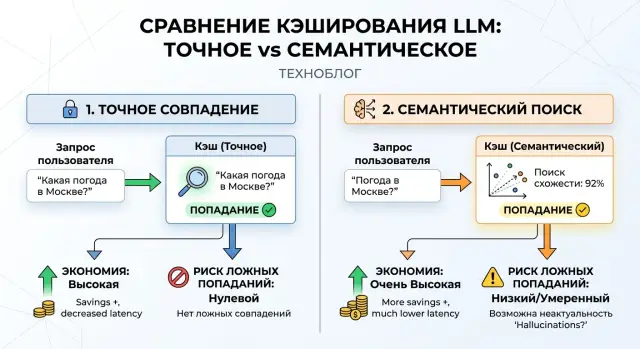
Where caching solves a problem and where it creates a new one
Caching helps when people ask for the same thing but phrase it differently. You can see this in support right away: one customer writes “how do I return an item,” another says “where do I start a return,” and a third says “I need to return my order.” The meaning is the same, but the strings are different. If you send every one of those requests to the model again, you spend tokens on repetition.
The problem is that exact match only sees a full copy of the string. That kind of cache works well when the question is repeated word for word: in template commands, short FAQs, identical system prompts, and standard prompts inside a product. But once you reorder words or replace one with a synonym, the cache no longer hits.
Semantic caching closes that gap. It does not look for the same string, but for similar meaning. That is why it finds more repeats and usually saves more tokens. In support, internal search, and knowledge bases, the effect can be visible within the first few days.
But a different problem appears here. Similar phrases do not always mean the same thing. “How do I change my plan” and “how do I cancel my plan” sound close, but the action is different. If the cache decides they are the same request, the user gets someone else’s answer. The cost chart looks great. The product does not.
Damage usually starts in two cases: when requests are short and ambiguous, and when similar intents sit next to each other while the difference in the answer changes what the user does. Then savings quickly turn into lost trust. One wrong answer in a help article can still be tolerated. An error in banking, telecom, or healthcare usually ends with a complaint, a repeat request, and manual review.
A good cache should not only answer faster, but do so safely. If a question allows only one exact answer, it is better to miss some repeated calls than to confidently return the wrong result. And if you have a stream of repeated paraphrases, semantic caching usually pays off faster than exact match.
What exact match gives you
Exact match is the strictest and most understandable type of cache for LLMs. The system takes the entire request, compares it character by character or by hash, and then looks for a ready answer. If the string matches completely, the cache returns the result right away. If not, the model answers again.
The biggest advantage of this approach is that it almost never mixes in someone else’s answer. The request “Show order status 1542” will not be confused with “Show order status 1543.” For support, billing, internal forms, and any operation where one number changes the meaning, that is a major benefit.
But strict rules quickly reduce the hit rate. Sometimes a tiny thing breaks it: an extra space, a different date, a new customer number, or a different field order in JSON. The meaning is the same, but for the cache it is a new request. That is why exact match rarely feels magical in live chat, where people write in many different ways, and works best where text follows a template.
Its value is especially visible in systems with repeating scenarios. For example, a team sends the same system prompt and the same request structure to the model and changes only rarely updated blocks. In that case, the hit rate can be high and token savings noticeable. If those requests go through a single OpenAI-compatible gateway such as AI Router, it is easier to check cache behavior in advance and compare results across models.
This approach has another advantage: it is easy to explain to the team. Developers, analysts, and support staff quickly understand why there was a hit or a miss. Logs are transparent too: the string matched or it did not.
Exact match works best where there are ready-made templates without free text, frequent repeats of service requests, and answers where you cannot risk changing the meaning. If you need a first safe layer of caching, this option usually wins. It does not catch every similar request, but it behaves honestly and predictably. In production, that is often more important than a few extra percentage points of savings.
What semantic caching changes
Semantic caching does not work on an exact string. It first turns the question into a vector, then searches the cache for text that is not identical but close in meaning. That is why it catches paraphrases, abbreviations, and simple synonyms that exact match misses.
For LLMs, that is a meaningful difference. One user writes “how do I change my plan,” another writes “where do I switch plans.” The text is different, but the meaning is almost the same. If semantic caching is in place, the system often returns a ready answer and does not send a new request to the model. On repeated questions, that raises the number of hits and saves more tokens.
But together with savings comes a new risk point: the similarity threshold. It decides when requests are close enough to reuse an old answer. If the threshold is high, the cache behaves cautiously: fewer errors, but fewer hits too. If the threshold is lower, savings grow, but so does the risk of false matches.
The problem is usually not the idea itself, but the details. The system can easily confuse “how do I close my card” and “how do I block my card” if it only looks at semantic closeness. For a person, the difference is obvious. For an unrestricted cache, this is already an error zone.
That is why semantic caching is rarely launched as-is. It almost always needs simple filters: language, product, user role, and sometimes documentation version or region. If a team routes LLM traffic through a single gateway like AI Router, it is convenient to keep those limits close to request routing and logs. Then the cache searches for a similar answer in a narrower and safer set, not across everything at once.
The difference between the two approaches is simple. Exact match catches identical requests. Semantic caching catches identical intent. That is what creates more value, and that is where false matches begin.
Where each approach saves more
Savings depend on request shape. If users keep typing the same short phrase over and over, exact match almost always gives the best result. It is fast, cheap, and almost never returns someone else’s answer.
That happens in simple scenarios: password reset, order status, business hours, template commands in a bot. One answer can be reused many times without another model call. The shorter the text and the fewer the variables, the higher the token savings.
Semantic caching is useful where the meaning is the same but the wording is different. In support, FAQ, and knowledge-base search, people rarely ask the same question in the same words. One says “how do I return an item,” another says “can I request a return,” and a third says “what should I do if the item doesn’t fit.” For exact match these are three different requests, but for semantics they are almost one.
On long prompts, the picture changes. If the request contains a customer name, date, amount, contract number, or other fields, exact matches are rare. For a regular cache, that is bad for hit rate, but often better for safety, because the answer depends on details.
If the request involves personal data or money, exact match is usually safer. Questions like “why was 12,500 tenge charged” and “why was 15,200 tenge charged” are similar in form, but the answers may differ. Semantic caching can easily mix in the wrong answer here.
It is better to compare the approaches on four metrics: cache hit rate, average token savings per request, false-match rate, and the cost of a mistake to the business. In practice, the pattern is often this: exact match gives fewer hits but almost no risk; semantic caching gives more reuse in support and FAQ, but needs a strict similarity threshold and checks for sensitive fields.
If the error is expensive, it is better to give up part of the savings. If the answers are routine and the general meaning matters more than exact details, semantic caching usually pays off faster.
When it makes sense to combine both
One method rarely covers every case. A mixed setup almost always gives a better balance: exact match catches identical requests with almost no risk, and semantic caching picks up paraphrased questions and saves where people ask the same thing in different words.
Order matters here. First, look for exact match. It is faster, cheaper, and almost never creates false matches. If there is no exact hit, you can check similar requests, but only within the same scenario. An answer from FAQ should not be pulled into a payments conversation just because the phrases are similar.
A working rule is simple: keep separate cache zones for FAQ, payments, delivery, and internal prompts; do not let semantic caching handle requests with a customer name, amount, order number, balance, date, or current status; use a short TTL for answers that change often; and always keep a path to fresh generation if confidence is low or the context is unclear.
In practice, it looks simple. In support chat, questions like “How do I pay the invoice?” and “Where can I find payment details?” can often be answered with the same cached response. The meaning is the same, and the wording is different. But the question “Why was 12,500 tenge charged yesterday?” cannot come from a similar answer. One number changes everything, and the mistake is visible immediately.
Semantic caching works especially well for repeated explanations: return policies, plan terms, setup steps, and basic employee instructions. Exact match is better for commands, template prompts, and system requests where every character matters.
If in doubt, narrow the scope from the start. Let the semantic layer serve only safe and general questions. Anything that depends on current data is better sent to fresh generation or straight to business logic. That setup usually gives savings without unpleasant surprises.
Example from a support chat
In support chat, the difference between the two cache types is visible almost immediately. People rarely repeat a question word for word, but they often ask the same thing in different ways.
If one customer writes “how do I return an item” and a minute later another says “can I make a return,” exact match will not work. The strings are different. Semantic caching, on the other hand, will likely consider the meaning the same and return a ready answer. For frequent FAQ, that saves a noticeable amount of tokens.
With returns, this usually works well if the answer is general: return window, required documents, shipping method. In such cases semantic caching removes many repeated calls, and the user does not notice any difference.
Problems begin where similar words lead to different processes. “Exchange” and “return” often look close to a model, but the business meaning is different. An exchange may have different deadlines, a different warehouse, different shipping logic, and extra charges. If the cache merges those scenarios, the chat will answer confidently but incorrectly.
The request “where is my order” is even riskier. You should not serve it from semantic caching as a regular FAQ, because the person needs fresh status. The package may already have arrived, be stuck in sorting, or have moved to courier delivery in the last half hour. Even a good old answer becomes stale quickly here.
In practice, simple scenario labeling before the cache helps. You do not need a complex setup at the start. It is enough to separate safe questions from those whose answers depend on current data. Questions about returns can go through semantic caching if the answer is general. Exchanges are better kept separate from returns. Order status should not be served from semantic caching without checking fresh data. Personal accounts and payments are safer to cache only by exact match, or not to cache at all.
That filter often works better than trying to find one universal similarity threshold. For standard rules, semantics saves more. For live statuses and neighboring but different scenarios, exact match or a direct query to the order system is safer.
In support, caching works best not where questions are merely similar, but where a similar question really allows the same answer.
How to test the setup step by step
It is better to start with live logs, not theory. Take 200–500 real requests from support, search, or an internal assistant and do not clean them by hand. Typos, short phrases, and awkward wording are exactly what show how the cache behaves in real work, not in a neat demo.
Then label the requests where a small fragment changes the whole meaning. Most often that is a date, number, name, article number, city, or negation. The phrases “delivery today” and “delivery not today” look almost identical, but they need different answers. That is where semantic caching fails most often.
After that, split the sample into three groups: exact duplicates, paraphrases, and similar but risky requests where details change the answer. That is enough to quickly see where exact match will give clean savings and where semantic search is worth trying.
Run several similarity thresholds on the same sample. Do not pick one threshold and trust it blindly. For example, compare 0.85, 0.90, and 0.95. The difference between them is often visible not only in savings, but also in the number of wrong answers.
Look at three things at once: how many tokens you saved, how latency changed, and how many false matches you got. If savings rose by 12% but wrong answers doubled, that win usually is not worth the risk. It is especially visible in scenarios with orders, payments, healthcare, and personal data.
A good practice is simple: first enable caching only for safe request types. FAQ, repeated policy questions, and short help answers are a good start. Do not cache payment disputes, legal wording, or requests where the user is talking about a specific person or contract on day one.
If the test shows many duplicates, make exact match the first layer. If paraphrases are common and false matches are rare, add semantic caching as a second layer and keep the threshold strict. A working setup usually becomes clear from the first sample, without a long pilot.
Where wrong answers begin
Errors begin the moment the cache sees similar words but misses the difference in meaning. The most common failure involves negation. The phrases “I was not charged” and “I was charged” are very close in form, but they describe two different situations. If semantic caching treats them as the same, the user gets the wrong resolution path.
The second trap is mixing general help content with a customer’s personal status. The question “how does a return work” can be cached fairly safely. The question “where is my return” already needs data for a specific person, date, and transaction. If you return an answer from the general cache here, it will sound plausible, but it will not help.
Problems grow quickly where dates, prices, and limits change. Requests about a plan, fee, balance, delivery time, or account limit should not all live in the same cache without extra tags. Otherwise, an answer that was correct yesterday is wrong today. Exact match is usually safer in these cases, because it is less likely to return an old or чужой answer.
Another common mistake is not updating the cache after rule changes. The company changes a plan, a limit, or policy text, and the old answer keeps living in the cache for weeks. The user sees a confident, coherent text and assumes it is official. Cleaning up that trail later takes a long time, especially in support and finance.
Early signs of trouble are usually simple: after the bot answers, more follow-up questions appear; people rephrase the same request several times; operators more often correct the answer manually; and complaints rise even though token usage falls.
Savings alone prove nothing. If the team looks only at cost reduction, it will miss the moment when false matches start hurting quality. That is why it is better to track two numbers at once: how many tokens were saved and how many answers later had to be corrected by a person. If the second number starts rising, the similarity threshold is too low or the caching rules were chosen poorly.
A quick pre-launch check
Before launch, it helps to do a short check on paper and in test traffic. It takes a couple of hours, but it often saves you from the most expensive mistake: the system starts answering quickly and cheaply, but sometimes it serves the wrong meaning.
First, mark the cases where caching should not be used at all. Usually these are requests with personal data, fresh prices, order status, balances, limits, legal terms, and any answers that depend on the current state of the database. If the answer can change in a minute, caching is risky there.
Then define the acceptable false-match rate. For internal search over old documentation, a team may accept 1–2% questionable matches. For a bank or clinic support team, even 0.1% may be too much. It is better to write that down in advance, otherwise the discussion after launch will be based on feelings.
Next, do a short checklist. List the scenarios where caching is forbidden. Set a false-match threshold for each request type. Make sure the logs show the source of the answer. Add rare and awkward phrasings to the tests. And separately confirm that the system can fall back to fresh generation calmly when the cache should not trigger.
Logs should show not just the answer, but its path. Otherwise you will see a user complaint, but you will not know where the text came from: exact match, semantic cache, or a new model call. A simple label like “exact,” “semantic,” and “fresh” makes debugging much easier.
It is also worth checking awkward wording. People rarely ask in the same way. One will write “how do I return an item,” another will say “it didn’t fit, I want to cancel the purchase,” and a third will add typos and extra details. That is exactly the kind of request where semantic caching sometimes returns a confident but unrelated answer.
And one more important test: what happens if the cache should not trigger. The system should simply request a fresh generation, without a manual flag and without an engineer stepping in. If the fallback breaks, savings quickly turn into an incident queue.
A good sign of readiness is simple: you can open any disputed answer in the logs and understand within a minute why it appeared and whether it should have appeared.
What to do next
Do not roll caching out across the whole product at once. Pick one stream where requests repeat often and mistakes are easy to notice. Usually that is FAQ in support, short help answers, or an internal assistant with a narrow task set.
Test exact match and semantic caching on the same sample. You need the same requests, the same model, the same system instructions, and the same success criteria. Otherwise the comparison quickly turns into a debate about impressions instead of numbers.
It helps to lock down a few rules right away. Track hit rate separately for exact and semantic caching. Look not only at token savings, but also at the share of wrong answers. Record which request hit the cache and why. Keep the similarity threshold and TTL in config, not in someone’s memory.
These rules are better kept both in code and in team metrics. If a developer changes the similarity threshold from 0.92 to 0.84, that should be visible right away. Otherwise, in a month nobody will understand why the LLM cache became cheaper on paper but worse in practice.
If the team routes several models through a single OpenAI-compatible gateway, it is important to keep the same call structure for every test. With AI Router, that is convenient: you can change the route to the model without rewriting the integration and without mixing results because of different call settings. That makes the comparison cleaner.
After the pilot, expand the cache only where misses are rare and understandable. If false matches appear because of dates, amounts, order status, or different policy versions, do not expect another threshold to fix everything. For such requests, exact match or strict filters before the semantic layer are usually safer.
The right next step looks boring, and that is a good thing: one stream, one sample, one set of metrics, then careful expansion. That way token savings do not break the answers your team is responsible for.
Frequently asked questions
When is exact match enough?
Exact match works best when the text follows a template and one small detail changes the meaning. It is a strong choice for order status, billing, system prompts, and service commands, where it is safer to miss some repeats than to return someone else’s answer.
Where does semantic caching save the most?
Semantic caching brings the most value when people ask about the same thing in different words. That is usually support, FAQ, knowledge bases, and internal search, where paraphrases are common but the answer stays broadly the same.
Why does semantic caching sometimes return a wrong answer?
It looks at similarity in meaning rather than an exact string. Because of that, the system may merge neighboring intents like “change plan” and “cancel plan” and return a confident but wrong answer.
Which requests should not go into semantic caching?
Do not put in requests with amounts, dates, balances, order status, contract numbers, or personal data. If the answer depends on the current state of the system or on one number, use a fresh call or exact match only.
Which cache order usually works better?
Start with exact match because it is faster and almost never confuses answers. If there is no exact hit, look for similar requests only within the same scenario and only for safe questions.
How do you choose a similarity threshold without guessing?
Do not guess one threshold. Take live logs, test several values, and see where savings rise without a spike in false matches; in practice, teams often compare levels like 0.85, 0.90, and 0.95.
Which metrics really show the value of caching?
Do not look only at hit rate. You also need average token savings, latency, false-match rate, and the business cost of a mistake, because a cheap answer is useless if an operator has to fix it later.
Do cached answers need a TTL?
Yes, and the lifetime should depend on the type of answer. Return rules can live longer, while tariffs, limits, and statuses should update quickly, otherwise the cache will start serving stale text.
How can you test the setup quickly on real data?
Take 200–500 real requests without cleaning them by hand and split them into exact duplicates, paraphrases, and risky cases where details change the answer. Then compare how many tokens you saved and how many answers users marked as wrong.
Can semantic caching be used in banking or healthcare?
Yes, but only for narrow and safe scenarios. In banking, telecom, and healthcare, semantic caching is better for general rules and help content, while money, limits, status, and personal-data requests should go through exact match or fresh generation.