Response validation before writing to CRM and ERP without failures
Response validation helps catch a broken schema, wrong numbers, and bad links before writing to CRM or ERP and reduces manual corrections.
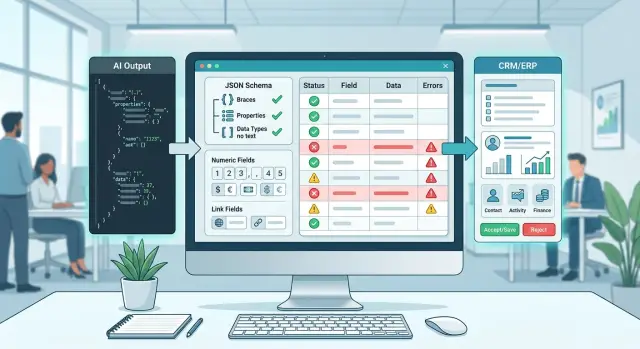
Where writes to the system break
Problems rarely start in CRM or ERP. More often, the failure appears earlier: the model returns an answer that looks plausible but does not match the system format. A person can still understand it. An import cannot.
One of the most common failures is simple: the model changes a field name. Yesterday the integration expected client_id, and today it received customer_id. The meaning is similar, but the loader cannot guess the intent. It skips the field, inserts a blank value, or breaks the entire request.
Errors with numbers are no less unpleasant. On the screen, the string "150000" looks almost the same as the number 150000. But CRM treats them differently. Because of that, limits, filters, sorting, and deal calculations break. Sometimes the error is silent: the record goes through, and the wrong amount shows up only in a report a week later.
An empty ID is more dangerous than it seems. If the system updates a card by identifier, a blank value can create a duplicate. In a bad scenario, the integration will use a default value and affect the wrong record. Then the team spends time not on one request, but on untangling the whole chain of changes.
Links are the same story. The model may return an address that opens in a browser but does not meet the internal rule: a different domain, an extra parameter, a truncated path, or a trailing space. For a person, that is a small thing. For a system, it is someone else’s document, an empty card, or a write failure.
Usually the break looks like this:
- the import ends with error 400 or 422;
- the record is created, but fields are filled in only partially;
- a duplicate appears instead of an update;
- the report calculates amounts incorrectly;
- CRM pulls the wrong file or cannot find the document.
That is why the response should be checked before writing, not after. If it passes schema, type, ID, and link checks at the input stage, you catch the error in one place. If there is no check, the problem quickly spreads further: into customer cards, calculations, statuses, and the team’s manual work.
What to check before sending
The model may return neat JSON and still break the write. Usually the problem is in the details: an empty required field, a number as a string, a date in the wrong format, or an external ID that does not exist in your database.
The check should look not at whether it "seems true," but at strict rules. If a field fails validation, the system does not write it to CRM or ERP and sends the response for reprocessing or manual review.
Schema and formats
Start by fixing the response schema. For each field, define three things: whether it is required, what type it has, and whether it can be empty. If CRM expects customer_id as an integer, do not accept "123" as a normal option. This kind of compromise usually backfires.
Usually four groups of rules are enough: required fields, data types, value formats, and length or pattern limits. Check string, number, date, array, and object separately. For phone numbers, currency, dates, or internal codes, define your own format, and if you know the field length or mask, fix that too.
It is better to choose one format and not mix variants. If a date sometimes comes as 2025-04-27 and sometimes as 27.04.2025, errors quickly spread into reports and exchanges. The same goes for currency: either codes like KZT and USD, or your internal labels, but not both approaches at once.
Numbers, links, and external IDs
Check numbers not only for type, but also for meaning. An amount cannot be negative. A discount should not be greater than 100%. A rate should be stored in one form only: either 12.5 or 0.125. If you do not lock this down, the model will eventually return the percentage on a different scale, and the error will move further down the chain.
Define acceptable ranges right away. For example, a request amount from 1,000 to 50,000,000, contract term from 1 to 60 months, commission from 0 to 30. This helps you catch not only junk, but also plausible mistakes, which are especially unpleasant.
Links, codes, and external IDs also need strict validation. A link should not contain spaces, random text, or a broken format. An external ID must exist in the source system, and a department code must match the directory. If the model returned ALM-01, it is better to check it immediately than to later search for the cause of the failure in ERP.
If a field affects money, status, or the connection between systems, check it especially carefully. That is where a small mistake costs the most.
How to build the rules step by step
Start not with abstract requirements, but with live data. Take 10-20 real responses for one operation: for example, creating a lead, updating an order, or writing a request into ERP. On a set like that, it is quickly clear where the model adds extra text, mixes up the date format, or returns a number as a string with spaces.
Then describe the schema for each field precisely, without phrases like "should look similar." Is the field required or not, what type does it have, can an empty value be passed, is there a list of allowed statuses. If CRM expects amount to be a number, the rule should say exactly that. If client_id must be a 24-character string, that also needs to be fixed.
A workable order is usually this: first required fields and data types, then value boundaries, then dates and time, then links, external identifiers, and directory codes. At the end, split errors into critical and debatable.
With numbers, it is better to be strict. If the system expects an integer, do not silently round 12.7 to 13. If the order amount is negative or the discount is above 100, the write must stop. Silent fixes seem convenient only until the first report failure.
The same simple rule applies to dates: one format for the entire flow. If the model sometimes writes 2025-04-01, sometimes 01.04.2025, and sometimes 1 April, errors will pile up. Choose one format and reject everything else.
Links and external identifiers require separate checks. A URL must be complete and free of extra text around it. An external ID must match the pattern and, if needed, exist in the directory. If the model returned "Client ID: 4571", that is not an ID, but a phrase with an ID inside.
Critical errors should block the write immediately. Debatable cases are better sent to a manual queue. For example, if the amount passed validation but the customer status was not found in the directory, an operator can sort out such a case in a minute. This approach reduces failures without slowing down the whole process.
How to catch errors in numbers and dates
Before writing to CRM or ERP, validation should look not only at whether the field exists, but also at its type and meaning. Amounts, quantities, and dates cause the most silent failures: the value looks plausible, but the system either rejects it or accepts it incorrectly.
Numbers
The first check is simple: distinguish a number from text. If the model returned "10" and the field expects 10, the write may not behave the same everywhere. Some connectors will convert the type on their own, while in others you will get a failure out of nowhere. It is better to convert types explicitly and not rely on luck.
Next, check the sign. For a "amount due" field, a negative value is usually not allowed. If returns or adjustments exist in the process, define that as a separate rule for the specific document type instead of leaving negative numbers open for all cases.
The error often hides in the total. The model may correctly recognize the invoice lines, but give the wrong total because of a discount, VAT, or simple rounding. So it is better to calculate the total yourself: add up the lines, apply your system’s formula, and compare the result with the total field. If the difference is greater than the acceptable threshold, the write should stop.
Currency and decimal places also need control. The amount field without currency is almost useless. And if the currency is present, check the number of digits after the decimal point according to your accounting system’s rules. The value 1250.567 should not go into a document if the field allows only two digits.
The minimum set of checks is this:
- convert the value to a number before writing;
- check the allowed range and sign;
- recalculate the total from the lines;
- verify the currency and rounding precision.
Dates
With dates, the problem is usually not the format, but the meaning. 2025-02-31 looks like a date, but no such date exists. 03.04.2025 is also risky: one service will read it as April 3, another as March 4. One input format, preferably ISO, sharply reduces this kind of error.
After that, check the timeline. The invoice date should not be later than the payment date. The contract start date should not come after the end date. If a request must reach CRM within 30 days of the inquiry, anything older is better sent for manual review.
A small example: the model returned an amount of -15000, currency KZT, a payment date one month earlier than the invoice date, and a total that does not match the line items by 200 tenge. Each field separately looks plausible. Together, it is already a clear stop signal.
How to check links and external identifiers
A link and an external ID often look normal, but break the write later. CRM accepts the card, and the next step fails: the link points to the wrong place, the domain is wrong, the ID is truncated, or it was taken from a test environment. That is why link and identifier checks must happen before writing, not after.
If the team receives the model response through AI Router and then sends the data to CRM or ERP, that filter is best kept between the model response and the business system API. That way the errors do not go further down the chain. The gateway will deliver the response, and the check next to the business logic will decide whether it can be written.
Link validation
Start by parsing the URL by parts, not by looking for a substring. The field should contain only an allowed protocol. In most cases, that is https. Sometimes companies keep http for internal services, but that is a rare case and should be described separately in the rules.
Next, compare the domain against the allowed list. Check the host itself, not just the presence of a familiar word in the string. client-example.com and client-example.com.fake look similar, but they are different addresses. If you store links only to a partner’s production systems, immediately block test, staging, sandbox, dev, localhost, and internal environments.
Shortened and truncated links are also better left out. A shortener hides the real address, and a string with ... almost always means someone copied it incompletely. For CRM, that is a poor compromise: the employee sees the link, but cannot open the needed object.
A useful minimum here is this: accept only approved protocols, compare the host against the list of allowed domains, reject shortened and clearly truncated links, and block addresses from test and temporary environments.
External ID validation
An external identifier is checked separately from the link. Do not try to guess what was meant. Set exact boundaries: minimum and maximum length, allowed characters, required prefix, and pattern.
For example, if an order ID must look like ORD- plus 10 digits, the strings 12345, test_77, or a 40-character value should not enter the system. If the ID comes as a number, store it as a string. Otherwise, it is easy to lose leading zeros and then fail to find the record in the external provider.
That is how proper validation works: either the data passes the rules and goes to CRM, or the record is not created at all. Half-measures usually cost more here than one extra rejection at the input stage.
A simple example with a CRM request
After a call, the bot collects a lead card: name, phone number, loan amount, company website, and a short comment. On the screen, everything looks plausible. But CRM does not break on obvious errors, it breaks on small things people often do not notice.
The manager says "one hundred thousand," and the model returns "1O0000". Visually, the string is almost correct, but instead of zero there is the letter O. For an amount field, that is no longer a number. If the write goes through without validation, CRM may reject the whole card or save it with an empty amount.
The same story applies to the website. The client names the company address, and the response contains company.kz without https://. For an employee, that is a normal website. For a system that expects a link in a strict format, it is an error.
What the rules do
This is where pre-write validation in CRM helps. It does not look at the overall meaning, but at each field separately. The schema makes sure the amount is stored in a numeric field and the website in a string with the right format. Number validation filters out symbols like O, spaces in odd places, and extra characters. Link validation requires http:// or https://. Required fields do not let you save an empty card.
If the loan amount fails the rule, the system does not write the lead to the live CRM. It saves a draft, marks the error reason, and creates a task for the operator. The operator immediately sees what needs to be fixed: replace 1O0000 with 100000 and confirm the write.
For the website address, the rule can be softer. If the domain looks normal, the system adds the protocol automatically. If the response contains text like "we will send the website later" instead of an address, the write also stops and goes for manual review.
This kind of filter seems minor when the number of requests is small. But even 5 errors a day become dozens of cards with gaps or failures in a month. It is easier to catch them before writing than to later search for why the lead did not enter the funnel and who should restore it.
Common mistakes in validation rules
The most common mistake is simple: the team checks only the shape of the response, not the meaning. The JSON may be perfectly formed, the fields may be in the right places, but CRM or ERP will still break the write. For example, the model returned client_id, amount, and status, the schema passed, but status does not exist in your directory. Formally everything is correct; under business rules, it is not.
This is especially noticeable in projects where all validation comes down to one question: "Can the JSON be parsed?" That is not enough. If you receive the model response through any gateway or API, including OpenAI-compatible ones, validation must happen in two layers: first structure, then field meaning.
The second mistake is treating null as the same thing as an empty string. For business systems, these are different states. An empty string in the comment field may be acceptable, while null in the customer_name field often means the value is not defined at all. If you mix these cases, the system will sometimes accept a broken record and sometimes reject a valid one.
The third mistake is more dangerous than it seems: silently fixing amounts, dates, or other numbers. If the model returned 99999.999, and the rule rounded the amount to 100000 and sent it on without a trace, you are no longer validating data, but rewriting it. For an invoice, loan application, or purchase, that is a bad idea. It is better to reject the write clearly and return the reason.
Another common confusion is mixing warnings and stop errors. These statuses must behave differently. A warning means the record can be saved, but a person should check it. A stop error does not allow the record to move forward. A technical error shows that the model or service returned an incomplete response. A directory conflict means the value exists, but the system does not know it.
If all of that is thrown into one invalid status, incident analysis will become long and painful.
And finally: many people do not store the rejection reason. Later, the record did not make it into CRM, the team sees only the failure, and starts guessing. Keep the error code, the original field value, and the rule that fired. One such log often saves hours of analysis and quickly shows what needs to be fixed: the prompt, the mapping, or the validation itself.
A quick check before launch
Before giving the model the right to write to CRM or ERP, run a short test on real examples. 20-30 responses are enough: some normal, some with missing fields, some with errors in amounts, dates, and links. This kind of check almost always finds failures that later cost the most.
At the center of the check is not the model, but the write contract. If a field is required for a deal, invoice, or request, a blank value should not go any further. If a field stores a number, a string like "about 50000" should be rejected, even if a person understands the meaning.
A short launch checklist looks like this:
- every required field has an explicit rule: empty or not empty;
- each field has a defined type, and the system makes no guesses;
- amounts, discounts, and quantities have lower and upper limits;
- external links and identifiers are checked against allowed domain or format lists;
- the rejection reason goes not only to the log, but also to a review or retry queue.
The last point is often skipped. As a result, the team sees that the record did not appear in CRM, but does not know why. A proper log should show the field, the value, and the rule that stopped the response. The queue is needed so those cases are not lost: either the rule is fixed or the model is asked to rebuild the response, after which the record can be sent again.
A mini test before write access
Let’s take a simple request. The model returned the client name, phone number, order amount, and source link. Before writing, the system checks that the name is not empty, the phone number matches the required format, the amount does not fall below zero and does not look anomalous, and the link leads only to an allowed domain. If the amount came back as "about 2 million," the request does not go to CRM. It goes into the queue with the note "field amount: expected a number."
Even if responses come through a single OpenAI-compatible gateway like AI Router, validation still has to live next to the business logic. The gateway will deliver the model response, but only your system knows which fields are required, which limits are acceptable, and which domains can be accepted.
If this test passes without surprises, you can open writes first on a small share of traffic. That is calmer than fixing corrupted customer cards already inside CRM or ERP.
What to do next
Do not try to cover all of ERP or all of CRM with validation at once. That plan almost always gets stuck in the details. It is better to take one operation where mistakes are expensive: creating a customer, writing an order, or updating an invoice.
In this narrow area, validation quickly shows its value. The team sees which fields the model fills in reliably, where it mixes up the number format, and in which cases it inserts the wrong external identifier. After a few days, you will have not theory, but a list of real failures.
A good first set of rules is usually small. Stop the write if a required field is missing, the amount does not look like a number, the date cannot be read, or the link leads nowhere. Other debatable cases are better logged first instead of being blocked right away.
It is useful to keep simple statistics by error type. Not the overall "success or reject" number, but the reason for each failure: empty email or phone, amount with an extra separator, date in the wrong format, non-existent external ID, link the system does not accept.
That list is quickly sobering. Sometimes the problem is not the model, but a rule that is too strict. Sometimes it is the opposite: the rule is too soft, and junk still gets into the business system.
Once a week, review the latest rejections manually. Usually 20-30 records are enough to understand what needs to change. If the same failure repeats, add a precise check. If the rule catches normal responses, loosen it. That way the rules grow from practice, not from guesses.
A small example: the team writes leads into CRM and sees a common error in the budget. The model sends 12,000, while the system expects 12000. They added normalization once, checked the statistics a week later, and an entire class of failures disappeared.
If the team already routes LLM requests through AI Router on airouter.kz, there is no need to build a separate path before writing to CRM or ERP. A single request flow and audit logs make error analysis easier: you can see which request failed, what the model returned, and which rule stopped the write. This is especially useful where PII masking, data storage inside the country, and request control at the key level matter.
When one operation runs smoothly for 2-3 weeks, move on to the next one. That way the system grows without jumps and without surprises for the business.