RAG or Long Context: How to Choose a Search Setup
RAG or long context: see how these approaches affect document search, cost, and latency so you can choose the right setup for your product.
What is the choice
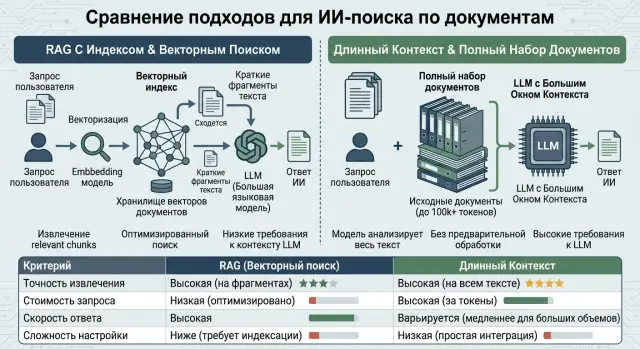
The same question over documents can be solved in two ways. The first is to find the relevant passages and give the model only those. That is RAG. The second is to pass the model a large chunk of text or the whole document, if the context window allows it.
The debate about what is "better" usually goes off track quickly. The user does not care about the scheme. They want an accurate answer for a reasonable price and without a long wait.
So you should look at four things right away: how often the system finds the right fact, how much one answer and the whole request stream cost, how quickly the result comes back, and how much effort the team spends maintaining the solution.
RAG and long context offer different trade-offs. If the documents are large, change often, and there are many requests, fragment search often wins on cost. The model reads fewer tokens, and the index can be updated without rebuilding the answer logic from scratch.
If there are only a few documents, they are easy to understand, and they change rarely, long context is often simpler. You do not need to build an index, tune text chunking, or figure out why the right paragraph did not make it into the result. For an internal knowledge base with 30–40 short instructions, that can be the most direct option.
The document type also has a big impact on the choice. Contracts, policies, and instructions with a clear structure usually work well in both setups. Chats, scans, tables, old PDFs with noise and duplicates often create problems. Fragment search starts to get confused, while long context can get buried in extra text and miss the key detail.
Request frequency changes the economics. If questions come up rarely, you can accept a more expensive model call in exchange for a simpler setup. If requests come in by the thousands each day, an extra 20,000–30,000 tokens per answer quickly becomes a serious line item.
The best way to choose is to compare both approaches on real questions, not on the preferences of architects. A test like that usually shows what works better for the product, not for a pretty diagram on a whiteboard.
How RAG handles document search
RAG does not make the model read the entire archive. First, the system finds the relevant passages, then it sends them to the LLM together with the question. In practice, documents are split into chunks, an index is built, the query and texts are turned into vectors, and the most similar passages are selected.
Because of that, the answer depends not only on the model, but also on the quality of the search. A strong model will not save a weak index. If a instruction is cut in the middle of a table, old and new versions of the document are mixed together, or a PDF is loaded with poor OCR, the search will bring back junk. The model will simply retell it in polished language.
Four things usually have the biggest impact: how you split the document into chunks, which fields and labels you store next to the text, how clean the text is before it reaches the index, and whether you use reranking on the retrieved pieces.
RAG is especially useful when the answer sits in a few paragraphs rather than spread across hundreds of pages. A product knowledge base, internal policies, contracts, FAQ pages, and support instructions all fit this pattern. If an employee asks how to calculate a plan limit, the system does not need to read the whole manual. It needs the section with the calculation rules and the nearby exception.
When the material is well structured, this approach often gives an accurate answer faster than reading the whole document. Another plus is that it is easier to show where the answer came from, because the prompt contains specific text chunks rather than the entire archive.
But RAG misses more often than people expect. The query may be too short. The term in the question may not match the wording in the document. The needed idea may be spread across different sections. Then search brings back almost relevant passages, and the model builds an answer on the wrong context. From the outside it looks plausible, but the answer is wrong.
That is why RAG should be evaluated in two separate steps. First, does search find the right passages? Then, does the model get the meaning right once those passages are in front of it? If the first step is weak, the second one usually falls apart as well.
What changes with long context
With long context, the setup is simpler. Instead of a separate search step, you place a large chunk of the knowledge base, contract, or conversation into the request, and the model reads it all at once. For the team, this is convenient: there is no need to build an index, tune ranking, or decide which fragment to fetch first.
This approach works well when there are not many documents, they do not change too often, and the answer depends on the relationship between several parts of the text. The model can immediately see the condition at the start of the policy, the exception in the appendix, and the deadline at the end of the document. In RAG, those pieces still need to be found and put together correctly.
Long context is often chosen for reviewing one large contract or tender package, answering questions about a short internal knowledge base, analyzing an email chain where message order matters, and checking a document for contradictions between sections.
But a large context window does not make the model attentive automatically. If 150 pages enter the prompt, it can still miss one line with a limit, date, or exception. It is like a person flipping through a thick folder in a hurry: the text is there in front of them, but the small detail gets lost.
The problem gets worse when extra text enters the context. The user asks about a return, but you send the entire help archive, old policies, and partner documents. The model spends tokens on pages that do not help answer the question. The response takes longer, and the price rises almost directly with the amount of text.
There is another effect too. Long context is easier to start with and helps you build a first working scenario quickly. But as the knowledge base grows, keeping quality at the same level gets harder. Each request starts carrying more noise. At that point, the winner is not the approach with the biggest window, but the one where only the necessary text reaches the model.
If the documents are compact and the question requires reading the whole package, long context saves development time. If there is a lot of material and the answers are usually hidden in two or three paragraphs, it quickly becomes expensive and slow.
Where you pay more
RAG creates costs in three places. First come the embeddings when documents are prepared for search. Then comes index storage and updates if the documents change often. After that comes the model request itself, but with a short context, because only the retrieved fragments go into the prompt.
Long context works differently. You do not need an index, but the model reads many input tokens on almost every request. If the user asks the same set of documents five times, the system pays for reading the same pages five times. Teams often add a safety buffer to the context window too, just in case.
In practice, the bill is often driven not by the model price itself, but by the amount of text you send again and again. If document search selects 5 relevant fragments instead of 200 pages, the savings are often bigger than switching to a slightly cheaper model.
A simple example: there are 3,000 articles in a knowledge base. The user asks a short question about one setting. RAG sends 6–10 fragments to the model. Long context pulls in a batch of articles or even a whole section. In the second case, you pay for extra reading, and you pay every time.
But long context has a strong side: a small set of documents. If you have 15 short instructions that together total 30,000–50,000 tokens, a separate index may not be worth it. There are no embedding costs, no pipeline to maintain, and fewer places where things can break. For an internal assistant or a pilot, that is often simpler and not more expensive.
So money almost always follows two numbers: how much text the model reads per answer, and how many times it has to read it again. If there are few documents, long context often wins on simplicity. If there are many documents and the questions are narrow, RAG usually cuts the bill noticeably.
What happens with speed
Speed depends on more than the model. The biggest factor is the amount of text you put into the request. That is why the winner in the RAG versus long context debate changes from task to task.
If the knowledge base is large, RAG is usually faster. The search layer finds 5–10 relevant fragments, and the model reads only those instead of hundreds of pages. Time is spent on search and sometimes reranking, but that extra step is often smaller than the delay caused by reading a large context.
Imagine a support system with thousands of instructions, policies, and PDFs. A user asks how to return a product under warranty. RAG pulls out a few paragraphs about returns, deadlines, and the right forms. The model answers directly and does not waste time on everything else.
Long context can be faster when the chain is very simple: one document, one question, no search, and no index. If you have an 8-page contract or a short brief, it is easier to give the text to the model in full. Fewer steps mean fewer places where the system slows down.
This option also works well when the question is tightly tied to the wording of the document. A lawyer asks to review one contract, not to search an archive of tens of thousands of files. The model reads the whole text at once and answers without an intermediate search step.
Problems start when documents grow. A large PDF, tables, appendices, and repeated blocks quickly inflate the token count. A table that spans several screens can add more latency than ten regular paragraphs. And if the same long file is sent to the model again and again, the system pays with time for repeated reading every time.
With repeated requests, RAG often behaves more consistently. The index is already built, search takes about the same amount of time, and the amount of text in the prompt stays similar. Long context has more variance: one request is fast, another suddenly runs into a long appendix or a badly compressed table.
Average speed in a report may look nice, but users notice something else: how often the answer takes longer than usual. For a product, that matters more than half a second on a perfect path. That is why it helps to look not only at average response time, but also at p95, p99, behavior on long documents, and stability on repeated requests.
How to choose step by step
It is better to start with the type of question, not the model. If the user needs an exact fact from a document, RAG often gives a more predictable result. If the user needs a general summary of a large report or a comparison of several sections at once, long context may be simpler because the model sees the whole material.
Rare details deserve special attention. If the answer depends on one line in a contract, a footnote in a PDF, or a note in a table, a search miss immediately breaks RAG. But long context does not guarantee success either: the model may simply fail to notice the right spot in a document that is too large.
Next, count the amount of text. You need two numbers: the average document size and how much text the model actually reads for one answer. If the base consists of short instructions that are 2–3 pages long, long context often looks reasonable. If you have long policies, conversations, reports, and attachments, the cost rises quickly, and RAG usually ends up cheaper.
Also look at user behavior. When people ask similar questions over and over against the same knowledge base, RAG usually pays off faster. The index is tuned once, and after that only the necessary fragments go into the model. If questions are different each time and often require reading the whole document, long context may mean less unnecessary engineering work.
A useful order is this:
- Split requests into types: fact, summary, comparison, rare-detail search.
- Measure the average document size and the real text volume per answer.
- Take 20–30 real user questions, not invented examples.
- Compare the two setups on three metrics: accuracy, cost, and latency.
- Keep a hybrid if one approach is better for facts and the other is better for summaries.
Tests are best done on a small set, but quality should be checked manually. Look not only at the overall percentage of correct answers, but also at the cost of a mistake. For an internal knowledge base, one wrong fact may be acceptable, but for a bank or a clinic it may not be.
A hybrid often turns out to be the calmest option. The system first identifies the question type: for exact search it goes through RAG, and for a document overview it sends more text to the model. If the team already works through a single OpenAI-compatible API, such as AI Router, these comparisons are easier to run on real questions without rewriting client code.
Example for a product knowledge base
Imagine a knowledge base for support. It contains instructions, pricing plans, response templates, internal policies, and PDFs from partners. On paper, that is one document pool, but in practice people ask two different kinds of questions.
The first type is short and precise. For example: "What is the limit on plan B?", "What response format is needed for a return?", "What is promised to the partner in appendix 2?" In those cases, fragment search usually gives a cleaner answer, because the model receives 2–5 relevant pieces of text instead of hundreds of pages at once.
If chunking and search are set up properly, RAG behaves more neatly. It is less likely to pull old conditions from a neighboring PDF into the answer and less likely to mix up similar wording from support templates.
The second type is reviewing one large document. An employee opens a 120-page contract or a quarterly partner report and asks: "Where are the late payment penalties?" or "Compare the responsibility and SLA sections." Here, long context may be simpler. You give the document in full or almost in full to the model and do not spend time on a complex search chain.
For a product knowledge base, it is rarely one approach alone that wins. It usually makes more sense to split the scenarios. Send short factual questions through a fragment-search chain, and send questions about one large file through a long-context chain. Store response templates and pricing plans as separate, well-labeled documents. Clean partner PDFs in advance to remove noise, headers, and duplicates.
This setup is especially useful when the system has both public help content and internal support documents. An operator does not need the full contract if they are looking for one rate or one rule. A lawyer or account manager, on the other hand, is often better served by an answer in the context of the whole document, not just in pieces.
If the product solves both tasks, do not force them into one chain. Let one path answer short questions quickly and cheaply. Let the other calmly handle long contracts and reports. That way, the knowledge base behaves predictably, and the team has a better sense of what it is paying for in tokens and response time.
The most common mistakes
Most teams do not fail at the big idea, but at the details of evaluation. The setup looks reasonable on paper, but in practice it breaks because of poor chunks, too much context, weak test sets, or bad load estimates.
The typical RAG mistake is simple: the index has already been built, but nobody checked the chunk quality by hand. A document is split into fixed 1,000-character pieces, tables fall apart, headings lose their connection to paragraphs, and metadata is empty or too general. As a result, search finds something nearby, but not the right section. The model answers confidently, but the source does not help.
With long context, the mistake is different. The entire archive is sent into the model window, even though the user needs one instruction section, one pricing plan, or one version of a contract. That quickly inflates cost and often makes the answer worse. When old and new versions of the text are sitting next to each other, the model can easily mix them into one answer.
Weak comparison is also very common. The team takes five easy questions where both setups look good and draws a conclusion. Such a test is almost useless. You need hard cases: similar documents with different versions, questions with rare terms, requests where the answer is hidden in a footnote or table, long questions with extra details, and situations where there is no answer in the base.
Another common mistake is about money. Many teams look only at the average cost of one request. But in real systems, peaks matter more. If thousands of requests arrive at 10 a.m., long context starts to cost noticeably more, and latency grows. RAG has its own peaks: embeddings, reindexing, repeated search passes. You need to count both modes.
There is also a quiet problem: the model is changed, but the rest of the system is left alone. After that, search and citation quality can drop even with the same base. One model handles long context better, another works worse with retrieved fragments, and a third cites sources differently. That is why this choice should not be made once and for all. After changing the model, the chunking method, or the retriever, you need to rerun the tests.
The most expensive mistakes almost always happen when the team trusts instinct more than hard checks on difficult questions.
A minimal set of checks
The debate between the two setups is best settled not by opinion, but by a short set of measurements. If you do not have these numbers, the choice is almost always made by gut feeling, and then the team spends months fixing cost, latency, and answer gaps.
Before launch, these five checks are usually enough:
- Build a control set of questions and documents. For each question, you need either a gold answer or at least a list of facts the model must return.
- Calculate the average token usage per answer. Look separately at short requests, long requests, and hard cases with comparisons, excerpts, and quotes.
- Measure latency in two modes: a normal day and peak load. One quick test does not show much.
- Check how often the search misses. You need two different metrics: the system did not find the right document at all, and the system found the document but missed an important fact in the answer.
- Define the scenario switching rule. For example, short questions go through RAG, while a long contract or policy goes into a model with a larger context window.
That is already enough to rule out the weaker option. If the same gateway gives access to different models and routes, comparison gets easier: you can run the same workload and look not only at quality, but also at the cost of a real user scenario.
If even two items on this list are still missing, it is too early to argue about the setup. First gather the measurements, then choose.
What to do next
Do not try to choose one approach for the whole base at once. Start with one real scenario: knowledge-base search, support answers, or contract work. If the pilot cannot stand on one clear use case, it will break even faster on the full document set.
When people discuss RAG and long context, the conversation often drifts into theory. It is more useful to build a small but honest test set and compare the approaches on the same questions. Include simple requests, rare terms, long documents, and a couple of similar answers where the model easily gets confused.
Run three setups on that set: RAG, long context, and hybrid. Do not look only at the average result. Sometimes long context performs well on a small set, but gets much more expensive on real documents. And RAG shows good numbers until the retriever runs into poor formatting or old file versions.
Before launch, define the thresholds the team is not willing to cross: cost per answer or per session, first-token and full-response latency, share of correct answers on the test set, behavior on long and noisy documents, and stability under real load.
Without those boundaries, the choice is almost always made based on the impression from a demo. That is a bad way to make a decision.
If you need to run these tests quickly across different models and providers, it is convenient to do it through AI Router. The service has one OpenAI-compatible API: the team only needs to change base_url to api.airouter.kz to compare options without rewriting the SDK, code, or prompts.
After the pilot, keep not the setup that looked best in the presentation, but the one that holds quality under your normal workload. If the knowledge base changes every day and users ask precise questions about document fragments, RAG often wins on cost. If there are only a few documents and the answer depends on broad context, long context may be simpler.
First prove the value on one scenario. Then expand the scope.
Frequently asked questions
When is RAG better than long context?
RAG usually wins when the knowledge base is large, the questions are narrow, and the answer sits in just a few paragraphs. In that case, the system finds the right passages and does not force the model to read the whole archive.
This approach usually keeps cost and latency under control at scale. But it only works well when the search step actually finds the right fragments.
When does long context make more sense?
If you have few documents, they are short, and they do not change often, long context is often simpler. The team gives the model the text right away and does not spend time on an index, chunking, or search tuning.
For a pilot or an internal knowledge base with a few dozen instructions, that is often enough. Later, when the base grows, it makes sense to revisit the setup.
What usually breaks quality in RAG?
What hurts accuracy most is usually not the model itself, but the quality of the search. If you did not clean the text well, split it into awkward chunks, or mixed old and new versions of documents, the model gets the wrong foundation for its answer.
First check whether the system can find the right passages by hand. Only then look at the answer quality.
Why does long context not guarantee an accurate answer?
Because text being inside the window does not mean the model will notice the right line. On long documents, it can still miss dates, limits, footnotes, and exceptions.
Extra noise makes this worse. If you put old versions, appendices, and unrelated sections into the prompt, the model spends attention on the wrong things.
What is usually cheaper with thousands of requests per day?
When there is a high volume of requests, RAG is often cheaper. The model reads fewer tokens per answer, and the difference quickly shows up in the bill.
Long context can be cheaper only on a small set of documents where an index simply does not pay off. So count not just the model price, but the amount of text per answer and how many times it gets read again.
What is usually faster for the user?
On a large knowledge base, RAG is often faster because the model reads 5–10 fragments instead of hundreds of pages. Search also takes time, but that extra step is often smaller than the delay from reading a long context.
If you have one short document and one question, long context can return the answer faster. Here, size of the real input matters more than theory.
How do you fairly compare RAG and long context?
Take 20–30 real user questions, not examples that are convenient on paper. For each question, write down the correct answer in advance, or at least the facts the system must return.
Then run the same set through RAG and long context and compare accuracy, cost, and latency. Look separately at hard cases: tables, footnotes, similar document versions, and questions with no answer in the base.
Does it make sense to start with a hybrid setup?
Yes, in many products a hybrid setup works best. You can send short fact-based questions through fragment search, and analyze one large contract or report through long context.
That way, you are not forcing one scheme to solve every task at once. It usually gives more consistent quality and makes costs easier to manage.
What mistakes are most common at launch?
A common mistake is preparing documents poorly for the system. In RAG, teams split text into random chunks, lose headings and tables, and in long context they simply send the entire archive without filtering.
Another common mistake is weak testing. If you checked the system on five easy questions, you have learned almost nothing about real-world behavior.
Where should I start if I do not have much time?
Start with one scenario where the pain is already clear: support, policy search, or contract review. Do not try to cover the whole base and every request type at once.
Build a small question set, measure accuracy, cost, and latency, and then choose the setup for that scenario. If the pilot cannot hold up on one clear case, it will only break more under the full workload.