Query Cache Payback: Formula and Calculation Examples
Query cache payback is easy to calculate with a simple formula. We show the repeat threshold for search, support, and email generation.
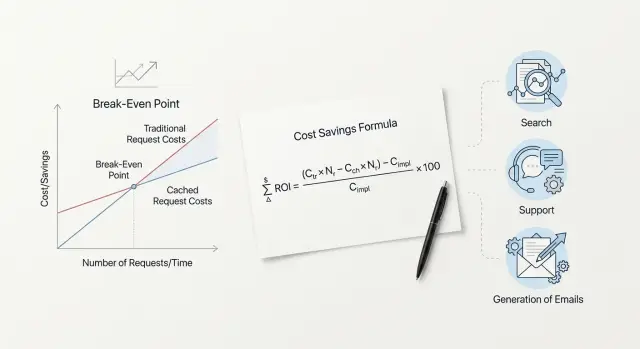
Why payback is not obvious at first
A cache looks like simple savings in theory. In practice, it does not always help. If requests rarely repeat, the cache stays mostly empty, while the team still pays for storage, match checks, and extra logic in the app. That is why query cache payback cannot be judged by eye.
The mistake usually starts with the thought: "if answers can be reused, then costs will go down." That only works where people or systems ask the same question often enough. If the wording keeps changing, the cache hardly ever hits.
The difference is easy to see in everyday scenarios. In support, questions about order status, returns, and working hours often repeat. There, the cache can already make a noticeable difference at moderate traffic. Search is more complex: one user types "running shoes 42", another types "black men's sneakers", and formally that is already a different request. In email generation, the result depends on templates. If the team sends similar emails based on one structure, repeats are common. If every email is assembled from scratch, the benefit is smaller.
So the argument "we need a cache" versus "we do not need a cache" usually goes nowhere. One person looks at a stream of similar support requests, another looks at rare and long search queries, and both are describing real things. The data is just different.
If a team works with several models through one gateway, the picture gets even messier. Requests go down different routes, prices differ, and the feeling of savings can easily be misleading. First you need to understand not the size of the cache, but the nature of the traffic. That is what tells you whether the cache will save money or just add another layer to the system.
What goes into the calculation
To understand when a cache pays off, you do not need a large finance spreadsheet. Usually five numbers for the same period are enough: a day, a week, or a month.
First, take the price of a normal request without a cache. For search, that may be a model call plus a database search. For support, it may be a model response with a system prompt and chat history. For email generation, it may be a full request with a template, tone, and customer data.
Then add the price of a repeat. It can vary. Sometimes a hit in your own cache is almost free because you simply return a ready answer. Sometimes a repeat still costs something, but less than a full call if the provider lowers the price for the repeated part of the request.
Next, you need the repeat rate. It is better to measure not "in general" but for a specific task type over a chosen period. In support, repeats are usually visible in common topics. In email generation, they are lower if managers change the input every time. In search, a lot depends on how often people ask the same query and how you normalize the wording.
Another parameter is the cache entry lifetime. If you keep an answer for too short a time, you will miss part of the repeats. If you keep it too long, you will start serving stale results. For catalog search, the TTL is often shorter. For standard support answers, it can be longer.
Finally, you need to include losses in the calculation. It is important to know how many requests miss the cache, how much the cache check itself costs before a normal call, and how often the system serves an old answer. The last point often breaks overly optimistic estimates. If a team caches support answers and the return policy has already changed, a cheap answer quickly turns into an expensive mistake.
A simple formula without heavy math
You can calculate it without advanced statistics. You need four numbers:
P- the price of a full model call without cacheH- the price of a request when it hits the cacheK- the one-time cost to write an answer into the cacheR- how many times the same request really repeats
Without cache, the average price of one request is always P. If the same request comes in 10 times, you pay the full price 10 times.
With cache, the price has two parts: the first miss and all later hits. Then the total cost for a repeated request looks like this:
C_cache = P + K + (R - 1) * H
The average price per request will be:
Avg_cache = (P + K + (R - 1) * H) / R
The cache pays off when the average price with cache is lower than the normal price without cache:
(P + K + (R - 1) * H) / R < P
If you simplify the expression, you get the repeat threshold:
R > (P + K - H) / (P - H)
That is the simple check for query cache payback. If K is close to zero, the cache starts saving money from the second identical request. If writing to the cache, similarity checks, or storage are noticeably more expensive, you need more repeats.
Example. Suppose a full call costs 0.10, a cache hit costs 0.01, and writing to the cache costs 0.02. Then:
R > (0.10 + 0.02 - 0.01) / (0.10 - 0.01) = 1.22
That means two repeats are enough.
Now take a cheaper model: P = 0.03, while H and K stay the same. We get:
R > (0.03 + 0.02 - 0.01) / (0.03 - 0.01) = 2
Here, two requests are not enough; you need at least a third request. The logic is simple: the cheaper the model, the smaller the savings from each hit.
How to calculate it step by step
It is better to calculate from fresh data, not from intuition. Take a sample from recent logs for 2-4 weeks. If traffic is high, a few thousand requests are enough. If traffic is low, take everything you have.
Then normalize the requests to one format. Remove case differences, extra spaces, obvious typos, and small add-ons like an order number if the meaning does not change. After that, group not only identical phrases but also requests that are very close in meaning. For support, this could be "where is my order" and "when will the order arrive". For search, it could be "nike shoes 42" and "nike sneakers size 42".
Then the process is simple. First count how many requests repeated at least once. Then split the repeats by time windows: the same day, 7 days, and 30 days. For each window, find the hit rate: hits / all requests. After that, plug in the money: the price of a normal model response, the price of writing to the cache, and the price of reading from the cache. The final check looks like this:
savings = hits * (model price - read price) - writes * write price
It is better to calculate separately by task type. Search has one repeat pattern, support has another, and email generation has a third. If you mix everything, the average number may look nice, but it will be useless.
After the calculation, do not roll out the cache to the whole stream right away. Run it on a small share of traffic, for example 5-10%, and check two things: whether the actual hit rate matches the estimate and whether answer quality has dropped. Sometimes the cache seems to save money but starts serving stale data. On paper it looks good, but in real use it quickly breaks.
If you route LLM traffic through a single gateway, it is convenient to take the model price from the route to a specific provider and calculate the cache cost separately in your own infrastructure. That makes it easier to see at what request repeat rate the cache really pays off.
What a simple example shows
An online store rarely lives with just one kind of request. One system handles catalog search, support chat, and emails that managers ask to generate for similar reasons.
On paper, all of this can be reduced to one average repeat rate. In practice, that number often gets in the way. During the day, shoppers keep searching for the same products: "iPhone 128 GB", "white sneakers 39", "cordless vacuum cleaner". At the same time, support gets the same questions about delivery, returns, and order status. At night, the picture changes: there is less traffic, queries match less often, and repeats drop.
Emails are even simpler. Managers often ask for the same texts with small changes: a reply to a complaint about a delay, an abandoned-cart email, a return confirmation.
If you look only at the total stream, you might see, for example, 28% repeats and decide that the cache is questionable. But inside that average, search may only have 12% repeats at night, support 40% during the day, and emails 65%, because templates repeat almost every hour.
That is exactly where the overall report hides money. The team thinks all three areas behave the same, although they do not. Even a small store should split requests into three groups and look at repeats separately for day and night. After that split, it usually becomes clear: the cache for emails pays off first, support follows, and search needs more careful calculation because it has many similar but not fully identical phrases.
How to calculate it for search
For search, it is better to calculate payback by request type and over a short period, such as days or weeks. Short queries repeat more often than people expect: delivery, returns, iphone 15, qwen. That is why cache in search sometimes starts working earlier than in longer scenarios.
The basic calculation is simple:
savings over the period = number of search requests * cache hit rate * (full search price - cache read price) - cache cost for the same period
For search, not only string repetition matters, but also normalization. If you remove extra spaces, standardize case, and merge common variants like iphone15 and iphone 15, the hit rate usually rises. But you cannot overdo it. Sometimes one word changes the meaning completely, and a cache entry will return the wrong result.
The search request usually includes the normalized text, filters and sorting, language or region, and the search type - site search or catalog search. These fields often decide whether two requests can safely be treated as the same.
A small example. Suppose catalog search gets 100,000 requests per week. A full search costs 0.12 tenge, a cache read costs 0.01 tenge, and cache support costs 1,800 tenge per week. If the hit rate reaches 28% after normalization, savings will be:
100 000 * 0.28 * (0.12 - 0.01) = 3 080 tenge
After subtracting 1,800 tenge, 1,280 tenge remains. That means the cache already pays off.
If you use the same numbers but without normalization and with only 12% hits, savings will be 1,320 tenge. That is below the cost. The idea is the same, but the result is already negative.
Site search and catalog search are better kept separate. Site search more often repeats queries like "delivery" or "payment". Catalog search is more affected by stock, prices, and promotions. Seasonality also changes the picture very sharply: school uniforms in August and gifts in December create very different repeats than an average month.
How to calculate it for support
In support, cache is calculated not by identical phrases, but by identical meaning. One customer writes "where is my order", another writes "when will it arrive", and a third writes "why is delivery silent". For the calculation, that is one type of question. If you compare only strings, the repeat rate will look too low.
Support has a clear advantage: answers are often built from the same templates. Returns, delivery status, plan changes, access recovery - these topics repeat every day. That is why cache in support often pays off faster than in free text generation.
A convenient way to calculate it is this: take the number of support requests for one scenario over a month, estimate the repeat rate after grouping by meaning, calculate the price of a full model response and the price of a cache hit plus a short freshness check. Separately estimate the cost of one mistake.
The formula looks like this:
savings = repeats * (full response price - cache hit price - check price) - wrong responses * mistake cost
Freshness checking is almost mandatory here. In support, answers go stale quickly after policy changes, promotions, limits, or return conditions change. If you do not include this check in the calculation, the numbers will look too pretty and be almost useless.
Example. The team handles 20,000 requests per month. After grouping, it turns out that 40% of questions repeat. A full model response costs 4 tenge, a cache response costs 0.5 tenge, and the freshness check costs another 0.7. Savings from one repeat are 2.8 tenge. Then a rough monthly saving is:
20 000 * 40% * 2.8 = 22 400 tenge
Now add risk. If 1% of cached answers is stale, and one mistake costs 30 tenge on average in follow-up and manual handling, the losses are:
20 000 * 40% * 1% * 30 = 2 400 tenge
The net savings still exist, but now they are 20,000 tenge, not 22,400.
For simple topics, cache is usually worth it. For payments, medicine, and legal rules, reduce the risk of error first, and only then count the tokens.
How to calculate it for email generation
A precise cache for the entire email request works less often than it seems. Usually, the team repeats the structure: the model role, tone, brand rules, email structure, and style limits. But the customer name, product, date, amount, and order history make the whole request unique.
So for cache in email generation, it is better to calculate not the whole prompt, but the shared part. If you cache only the full request as a whole, personalization almost always raises the payback threshold sharply.
A simple estimate works well:
savings = number of emails * repeat rate of the shared part * price difference between normal and cached input
Example. The team sends 6,000 emails per month. Each email has 2,000 tokens of shared structure and 400 tokens of variable data. The normal input for those 2,000 tokens costs 2 tenge, the cached one costs 0.5 tenge. If the same shared part repeats in 65% of emails, the calculation is:
6 000 * 0.65 = 3 900cache hits- savings per email =
1.5tenge - monthly savings =
3 900 * 1.5 = 5 850tenge
That is already a noticeable effect. But if you add deep personalization, the shared block may shrink to, say, 700 tokens. Then the savings per email will be lower, and the cache will only pay off at higher repeat rates.
Sales and service prompts are better calculated separately. Sales usually has more segments, offers, and personal inserts, so there are fewer matches. Service emails are more structured: order confirmation, delivery status, payment reminder. There, cache often pays off sooner.
A practical rule is simple: first move everything that does not change for weeks into a separate block, then measure repeats for that block only.
Where people make the most mistakes
Query cache payback is often calculated too roughly. On paper, the number looks good, but after launch, savings turn out to be much lower. Usually the problem is not the cache itself, but the way the team measures repeat rate, miss cost, and hit cost.
The most common mistake is using the average request price across all requests. The average hides long and expensive requests, and those often make up most of the spending. If search or support handles both short queries and large requests with chat history, calculate at least by groups.
Another mistake is counting repeats only by exact text match. In real life, people phrase the same thing differently: "Where is my order?", "When will the order arrive?", "Delivery status". For the business, that is almost one scenario. For simple string comparison, those are three different requests, and you understate the hit rate.
There are other common mistakes too. Teams often do not separate short and long requests, do not account for similar meanings, use the same TTL for catalog and support, mix cheap and expensive models in one calculation, and forget to include the cost of a stale answer. The last mistake is especially unpleasant. If the cache returns yesterday's stock level, an old tariff, or an outdated case status, you save on the API but lose on the product and support.
It is also risky to mix different models and different providers in one report. They have different token prices, different latency, and different cache benefits. If you work through a single OpenAI-compatible gateway, the temptation to put all traffic into one table is especially strong. It is better to build the calculation by routes: model, request type, cache lifetime, and repeat rate.
If, after this split, the economics get worse, that is not bad news. It is an honest number you can rely on.
Check before launch
It makes sense to turn on cache not when requests "look similar by eye", but when the numbers show it. If there are no clear repeats, the cache simply adds another layer of logic and will not deliver noticeable savings.
First, look at repeat behavior over different time windows. For search, that could be an hour or a day. For support, a shift or a week is often important. For email generation, it helps to look at template repeats over a day. If the same input keeps coming back, the cache may already pay off.
Then check the prompt itself. If half the traffic uses the same template with small substitutions like the customer name, city, or order number, that is a good sign. If every request differs greatly in structure, tone, and field set, do not expect a high hit rate.
Before launch, the team should agree on simple rules: what counts as a sufficiently identical response for the cache, who clears entries and after which events, how long to keep the result, and which metrics to review every day. Usually two are enough: hit rate and error rate. You also need a clear way to quickly turn off cache reads if quality drops.
The cleanup rule is better described through events, not vague wording. In support, the cache is cleared after an order status changes. In search, after the catalog is updated. In email generation, after the template or offer changes. Without such a rule, the team quickly gets stale responses and stops trusting the system.
An rollback plan is needed even for a small launch. The simplest option is a flag that disables cache reads but does not break the main request path. Then you can quickly compare quality, cost, and latency without a long investigation.
What to do next
Do not try to cache every request right away. Start with one stream where repeats are already visible in the logs: catalog search, support replies, or typical email generation. A week of logs is usually enough to see repeat frequency, average request cost, and normal latency without guessing.
Then compare before and after using three metrics: cost, latency, and cache hit rate. Do not look only at savings. Sometimes cache slightly lowers costs but adds extra complexity and barely speeds up the answer. That kind of setup is better stopped immediately.
The most common mistake at this stage is to lump everything together again. Search, support, and emails have different repeat patterns. The same is true for models: one model is expensive but called rarely, another is cheap but receives thousands of similar requests. If you mix these groups, the conclusions will be weak.
The practical order is simple: pick one stream, collect 7 days of logs, calculate cost and latency without cache, turn cache on for a limited share of traffic, and compare the result separately by model and task type.
If requests go through a single OpenAI-compatible gateway, the calculation is easier: logs and tariffs by route are simpler to combine in one place. For teams in Kazakhstan, this test can be checked quickly through AI Router at airouter.kz - just change base_url to api.airouter.kz, and leave the SDK, code, and prompts unchanged.
If one stream shows clear savings or noticeably faster responses, roll the setup out to nearby tasks. If not, do not scale the experiment. First fix the cache rules, entry lifetime, and request grouping by type.