Prompt Versioning for Releases Without Surprises
Prompt versioning helps ship changes without breakage: we’ll cover repo structure, testing, rollback, and a team workflow.
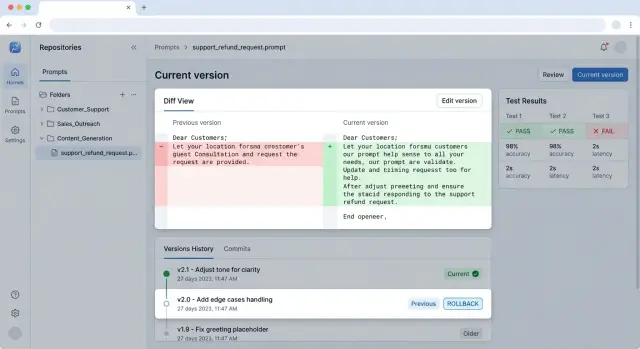
Why prompts break after release
A prompt does not break because the text "got worse." More often, one small edit changes the model's behavior in several places at once. You remove a clarification, move a paragraph, add a line about being brief - and suddenly the assistant asks follow-up questions less often, follows the response format less reliably, or starts skipping important details.
The problem is that a prompt affects not one reply, but the whole response flow. It sets the tone, the sequence of steps, the boundaries, and the format. If a team changes even one sentence before release, a lot can shift in production: how the model writes JSON, how it chooses a tool, how it handles exceptions, and how it reacts to an ambiguous request.
This becomes especially obvious when the same scenario is run through different models. If a team works through a single OpenAI-compatible gateway, such as AI Router, it can keep one client codebase and switch providers or models without rewriting the integration. But the same prompt on a neighboring model often behaves differently from what you saw in a local test. The change looks safe, and in production the answers are already drifting apart.
Another common reason is that the team loses track of the current text version. One person edits the prompt in chat, another tweaks a piece in a document, and a third drops a "temporary" version straight into code. A week later, nobody knows which text is actually running in production. Formally, the prompt exists, but there is no single source of truth.
Chats and documents speed up discussion, but they break order. They are fine for debating wording, but poor for storing the working version. Date of change, author, reason for the edit, related test, and the version you can return to all get lost very quickly.
Without rollback, even a small mistake becomes an incident fast. After a release, the support bot starts answering too generally, and the team cannot bring back the previous text in five minutes. While developers search for "that exact" version in the thread, users are already getting bad answers and the business is losing time.
Prompt versioning is not about making the repository look tidy. It is about making sure every change has an author, a test, a version number, and a clear way back.
What counts as a prompt version
A prompt version is not only a new text in the system field. If you change the temperature, the response format, or the set of examples, the model's behavior changes too. That means it is already a new version.
It is useful to think of a prompt as a contract between the application and the model. It usually includes:
- the system prompt with rules and role
- a user template with variables and places where data gets inserted
- response examples, if you use few-shot
- parameters and constraints: model, temperature, max_tokens, JSON schema, topic restrictions, or response length limits
If you keep all of this in one file, after a month nobody will understand what exactly broke the result. That is why system, user, and examples are better kept separately. It makes the diff easier to read, the change easier to verify, and rollback faster without guesswork.
What should live next to the version
Store the settings that affect the result alongside the prompt text. For the same wording, a switch from temperature 0.1 to 0.7 can change the tone, length, and accuracy of the answer more than a couple of lines of text ever would. The same goes for the model name.
Also record the response format separately. If the application expects strict JSON with status and reason, that is part of the version. If yesterday the model wrote free text and today it must return JSON, then you already have a different prompt release, even if the instruction's meaning barely changed.
You also need a short note for the change. Not a long report, just 1-2 clear lines: what changed and why. For example: "Removed extra explanations so the operator sees a shorter answer" or "Added a refusal example so the model does not promise what the service cannot do."
That way the team sees not just "new text," but the full set of conditions that can be checked, compared, and rolled back.
How to structure the repository
A bad repository is as confusing as a bad prompt. If drafts, working versions, tests, and notes from chat all live in one folder, the team starts to fear even small edits.
Organize the structure by product or by scenario, not by model or by author. Support chat, contract review, and field extraction from an invoice are different tasks. Each has its own errors and its own quality criteria. Even if you run one scenario across different models, the folder should still describe the task, not the provider.
This kind of structure usually works best:
prompts/
  support_chat/
    prod/
      system.md
      developer.md
      params.yaml
    tests/
      cases.yaml
      fixtures/
    rules.md
    drafts/
  invoice_extraction/
    prod/
    tests/
    rules.md
    drafts/
Keep templates, tests, and fixtures close together. When someone changes the prompt text, they should immediately see sample inputs and the expected output. That saves time and lowers the risk of breaking a rare but expensive scenario. If tests live somewhere else, people quickly stop updating them.
Put shared rules into separate files. These usually include response style, tone limits, PII masking, internal instructions, and content labels if they are required by law or internal policy. But do not put everything into one huge file. A few short files with clear roles are almost always easier to work with.
Do not mix drafts and production versions. The drafts and prod folders solve more problems than you might think. The editor immediately understands what can be changed freely and what is part of a release. If text has not passed review, it does not go into prod. And rollback becomes easier too: the team restores the previous working version instead of hunting for it among folders named final_final_new.
A good repository looks boring and predictable. For releases, that is usually a plus.
How to name files and versions
When a file is named after the author or the date, the team quickly loses the point. ivan_fix_v2.txt says nothing about the task, the risk, or where it is used. A name should answer a simple question: what does this prompt do and where does it live?
A good pattern usually looks like this:
support/refund_request/system.mdsales/lead_qualify/user.mdrisk/pii_redaction/system.mdrouting/model_fallback/policy.md
This makes the domain, scenario, and prompt role visible. If a prompt changes behavior in one narrow place, the name should show that. For a repository, that is more useful than the author's surname, the word new, or a date in the filename.
The same logic applies to versions. Do not overcomplicate it. For stable states, simple tags are enough: v1, v1.1, v2. If the team ships prompts together with code, it is convenient to tie the tag to the application release, but the prompt itself should still have its own clear version. Then it is easier to say: "production is running support/refund_request/system.md version v1.2" instead of searching through five files with a final suffix to see which one is actually live.
Urgent fixes damage order the most. People rush and create copy-final, final-2, really-final, and later nobody remembers what actually went to production. It is better to keep one main file and change only its version. If the fix is urgent, add a tag like hotfix-2026-04 or v1.2.1, but do not create clones.
In each PR, a short description of 3-4 lines is enough: which scenario was affected, what exactly changed, which risk you wanted to reduce, and which tests were used. A month later, that is still enough to understand the logic behind the change.
That makes it easier to compare versions and investigate failures. The team can see what changed: the text itself, the parameters, or the model choice.
How to change a prompt step by step
When a team edits a prompt without any process, a small change can easily turn into a long incident review. It is much calmer to treat a prompt like code: change it in small pieces, test it against the same set of examples, and keep a fast rollback nearby.
The workflow usually looks like this:
- First, write the goal of the change in one sentence. Not "make it better," but, for example, "shorten the answer to 5 sentences for support tickets."
- Then add tests for old failures. If the model used to mix up response language, skip a required field, or drift into extra explanations, those cases should be in the test set before the text is edited.
- Change only one thing at a time. If you rewrite the role, the output format, and the refusal rules all at once, nobody will know which change actually made the difference.
- Compare the old and new versions on the same input set. Otherwise you end up with two nice tables that cannot be compared honestly.
- First release the new version to a small slice of traffic. Even 5% of requests is often enough to spot rising errors, delays, or an unexpected response style.
This process only feels slow at the beginning. In reality, it saves hours: the diff stays short, validation goes faster, and rollback does not require guessing which of five changes broke the result.
A good example is a team changing the prompt for call summaries. The goal is narrow: remove extra details and keep only the operator's decision. The team adds several old calls to the test set, where the model used to invent actions, then changes one instruction about output format and runs both versions on the same set. If the new version is shorter but loses the ticket number, they do not ship the change.
If LLM traffic goes through a single gateway, canary rollout becomes easier: the same workload follows the same path, and you compare only prompt behavior. In AI Router, you can keep the same endpoint and code, and separate versions at the release and logging level.
The result of this process is straightforward: every change has a goal, a test, a small rollout, and a way back.
How to test before deployment
The same prompt can pass a manual check and still break production a day later. Usually the reason is simple: the team looks at the general meaning of the answer but does not check the things the rest of the flow depends on. If the answer must return intent, language, and a short summary, the test should verify those fields, not just the feeling that "the answer looks fine overall."
Before merge, a short smoke suite is useful. This is 10-20 requests that run in a couple of minutes and quickly catch obvious mistakes: empty JSON, extra text around the structure, a changed tone, or a missing required field. Such a suite does not prove the prompt is good. But it does catch breakage after a small edit very well.
Keep a separate regression suite. Put in it the cases the team has already been burned by: long user messages, mixed languages, toxic input, typos, and contradictory requests. If a bug happened once, its example should stay in the tests.
What needs to be fixed
If you compare prompt versions, change only one factor at a time. The model, temperature, and seed, if the platform supports it, should stay the same. Otherwise you are testing noise, not the prompt.
If you work through a single API gateway, it is better to lock a specific model and request parameters during testing. Otherwise routing may hide the difference between the old and new version.
What to save after the run
Do not save only the final passed / failed result. Save the successful and failed responses next to the test case. Then you can compare them with a diff and quickly see what changed: structure, completeness, tone, or length.
A minimal pre-release set looks like this:
- a smoke test on a small set before merge
- regressions on old problem cases
- validation of required fields and response format
- fixed model parameters for a fair comparison
- saved examples of good and bad responses
If one prompt takes 15 minutes to check this way, that is cheaper than investigating a night-time incident after release.
Where teams most often go wrong
The most expensive mistake is simple: the team changes the prompt and the model in the same commit. Then the answer gets worse, but nobody understands what actually changed the behavior. Text, temperature, system instruction, or the new model - everything gets bundled into one package.
This happens especially often where the model can be switched in a minute. If the team works through a gateway, the temptation to update everything at once only gets stronger. That is a bad habit for releases: one change per commit, otherwise the comparison loses its meaning.
The second common mistake is testing a new version on two or three convenient examples. On those, the prompt may look excellent, but on real traffic it can fail. What usually breaks are long conversations, rare phrasings, mixed languages, and cases where users write vaguely.
Worst of all is deleting old examples because they seem unnecessary. Along with them, the team loses memory of past failures. A month later, someone makes another change, brings the old problem back, and honestly thinks they found a good improvement.
Another trap is editing text in chat, in a document, or in personal notes and then copying it into production. It looks fast. In practice, nobody can see the change history, nobody knows who made the decision, and nobody can recover the exact version that worked a week ago. A prompt repository is needed not for neat shelves, but for an audit trail.
Rollback is also often remembered too late. The team ships a new prompt, sees a drop in quality, and starts looking for "that exact" old version through screenshots and chat threads. If rollback was not prepared in advance, the release turns into a manual incident review.
The risk usually grows when you see these signs:
- one PR changes the instructions, the model, and the parameters at the same time
- the test set has fewer than ten examples and no hard cases
- the working prompt version lives in chat or in an admin panel without history
- the team does not keep past failed cases
- nobody knows which commit can be restored in five minutes
Good discipline looks less exciting, but it saves the day more often. One commit for each change, a set of old and new examples, a version in Git, and a rollback that was checked in advance - that is ordinary protection against silent breakage in production.
A real release example
A team runs a support bot. After a sprint, product asks for one simple change: the bot should answer more briefly, without extra apologies and without long introductions. On paper, the task looks tiny, and those are exactly the kinds of changes that most often break a release.
The developer opens the system prompt and removes a few paragraphs. They shorten the general explanations, keep the tone rules, and make the response stricter. In the repository, it looks like a normal commit: a new file version, a description of the reason for the change, and a ticket.
The problem does not show up in production, but in tests. The bot has a mandatory rule: if it refuses a user, it must return not only the refusal itself but also the reason for the refusal in a separate field. After the prompt is shortened, the model still refuses correctly in terms of meaning, but the reason field sometimes disappears. For a support operator, that is already a failure, because the interface expects a specific response structure.
The team does not argue with the tests and does not patch it on a Friday evening. They roll the prompt release back to the previous version. If versioning is set up properly, rollback takes minutes: the service picks the previous tag or version number again, and the application keeps working without code changes.
After rollback, the team looks at the diff and quickly finds what went missing. Along with the extra text, the developer removed a short instruction that required the reason field to be filled in for every refusal. This was not "smart model behavior," just a plain editing mistake.
On the second attempt, the team changes only one fragment. They bring back the explicit rule for the reason field, but do not restore the old wordiness. Then they add a new test: if the model returns a refusal, the check looks not only at the text, but also at whether the reason appears in the right field. That test will not get lost in the next release.
That is the working scheme. The team changes the prompt in small pieces, catches the breakage before deployment, rolls back quickly, and ships a targeted fix instead of a nervous manual repair.
A quick check before release
One prompt can pass review, look neat, and still ruin the answer in production. Usually the problem is not the edit itself, but that the team never agreed on why they are making it and how they will know the result. Before deployment, it is better to spend 10 minutes on a short check than a whole day dealing with complaints afterward.
This stage matters for prompts just as much as it does for code. Especially if the same scenario is run through several models or through a shared API gateway: there, noise is easy to mistake for a real regression.
Check five things.
- The change has one owner. It is not "the whole team," but a specific person who can explain the goal in one sentence. For example: "reduce the number of refusals on requests with long context."
- The diff is clean. If the diff mixes a new instruction, file renaming, and a random change to examples, review loses its value. A good diff shows only what affects behavior.
- The reference test set is green. You need a clear run: the same inputs, the same expected response signals, and the same run conditions. If one test got better but two old ones got worse, it is too early to ship.
- The team knows the rollback point. The version number, tag, or commit should be written down in advance. In the middle of an incident, nobody wants to remember which of three
finalfiles was the last working one. - The metrics for the first 24 hours are chosen before release. Usually 3-4 are enough: success rate, average response length, number of manual escalations, and cost or latency. Otherwise everyone looks at something different after deployment and argues from impressions.
A good sign is that any team member can answer three questions in a minute: what changed, how it was checked, and where to roll back. If the answer is missing for even one of them, it is better to slow the release down.
In practice, this saves a lot of time. Suppose the team changes a customer support prompt and expects fewer unnecessary clarifications. If the first-day metrics are already chosen, it will quickly see not only fewer repeated questions, but also a side effect: answers became shorter and started missing details more often. Then rollback or a follow-up fix takes hours, not a week of debate.
What to do next
If you do not have a system yet, do not try to reorganize every prompt in the product right away. Start with one scenario that most often breaks after release. That could be a customer reply, a ticket breakdown, or field extraction from a document. Move that prompt into Git together with the model settings, input examples, and expected answer. After that, changes will stop living in private messages and verbal agreements.
That is how proper prompt versioning begins. Not with a big framework and not with a perfect process, but with one place where the team can see exactly what changed, who approved it, and how to bring back the previous version.
Before the next release, put together a small test set. You do not need a huge archive. To start, 10-15 examples are enough:
- 5 ordinary requests that come through every day
- 2 long or noisy inputs
- 2 cases with ambiguous wording
- 1-2 bad inputs where the model often slips
- 1 example that already broke in production before
That is enough to catch a major regression. If the new prompt text performs worse on old cases, the team will see it before deployment.
One more step often removes half the arguments: assign approval in advance. Usually two roles are enough. One person changes the prompt and writes why they did it. Another reviews the tests, reads the diff, and approves the release or asks for the change to be rolled back. When there is no such rule, prompts change too quickly, and nobody is left to answer for the failure later.
If you already run LLM integrations through AI Router, it is useful to keep the prompt versions, model, logs, and rollback rules together. That makes it easier to see which version went to production, on which model it ran, and when it was rolled back.
For the next week, a simple plan is enough: one scenario in Git, a small test set, and one approval rule. It is not a perfect system. But it helps you get through the next release without surprises.
Frequently asked questions
Why can a prompt break after one small edit?
Because a prompt affects not just one line, but the whole flow of the response. Even a small edit can change the JSON format, the refusal style, the tool choice, and the reaction to an unclear request.
What should count as a new prompt version?
Treat anything that changes behavior as a new version, not just new text in system. If you changed the model, temperature, the user template, examples, or the response format, it is already different. It is better to record that as a separate version so you do not have to guess what caused the failure later.
What is the best way to store system, user, and examples?
It is better to keep them close together but in separate files. When system, user, and few-shot examples live separately, the team can spot the diff faster and roll back only the part that broke the result.
Should drafts and production prompts be separated?
Yes, otherwise it is easy to ship rough text by mistake. A simple split between drafts and prod makes it clear what can be changed freely and what is already running in production.
How should files be named so they stay understandable later?
Name files by task and role, not by author or date. support/refund_request/system.md is much clearer than ivan_final_v2.txt, because it shows where the prompt lives and what it does.
How can you change a prompt without too much risk?
First write down one goal for the change, then add a test for the old failure, and change only one thing at a time. If you rewrite the instruction, the format, and the model all at once, nobody will know what actually made the answer worse.
What tests are needed before merge or release?
For a start, a short smoke suite and a set of regressions are enough. Smoke tests quickly catch empty JSON, extra text, and missing fields, while regressions check the cases where you have already failed before.
What should be saved after running the tests?
Save not only the passed or failed status, but also the model responses next to each case. Then you can immediately see whether the reason field disappeared, the answer got longer, or the model switched to free text instead of structure.
How do you set up a quick prompt rollback?
Prepare a return point before deployment: a tag, version number, or commit that you can roll back to in minutes. If the last working version has to be found through chats and screenshots, the rollback is already too late.
Does a single API gateway help with prompt releases?
Yes, because it removes extra variables at the integration layer. If the code and endpoint stay the same, it is much easier for the team to compare prompt versions and logs instead of debugging the prompt, SDK, and new provider all at once.