Separating access to prompts and data: a role scheme
Separating access to prompts and data reduces the risk of log leaks, helps you set team roles, and does not get in the way of everyday development.
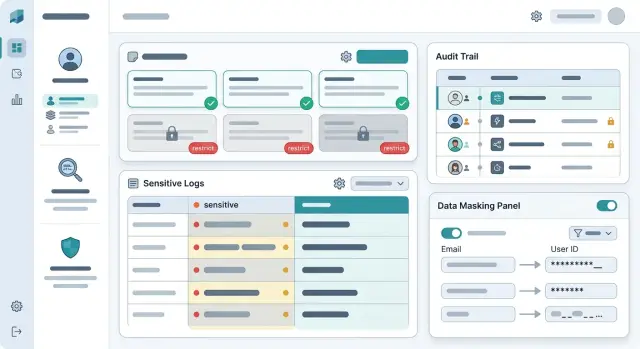
Why mixed access is risky
When one person can see both prompt templates and raw logs, the line between development and data access disappears. That feels convenient on incident day, but a month later it becomes a risk nobody remembers or controls.
Prompts store the product’s internal logic: response rules, system instructions, test scenarios, and workarounds for old bugs. Logs contain something very different: user text, ticket numbers, chunks of documents, and sometimes personal data. If you open both layers at once, an employee gets the full picture of the conversation, even though their task usually requires only one of them.
Most of the time, the problem starts without bad intent. Someone is given broad access “for now” to quickly understand why the model answered strangely, where the errors came from, or where the context disappeared. The incident gets closed, the access is not revoked, and then the same role is copied for the next person.
One imprecise role spreads fast through the team. Add developers to a group that is too broad, and the request history becomes visible to people who do not need it. If the company keeps audit logs for a long time, the mistake does not expose one episode but a large set of old interactions.
As the number of models, providers, and internal services grows, the confusion only gets worse. Test environments, proxies, shared keys, and separate dashboards appear. Then traffic is funneled into one LLM gateway, and one extra checkbox suddenly gives access to almost everything at once.
Separating access to prompts and data greatly reduces the damage even when something goes wrong. A developer can see the prompt version, request status, and technical markers, but not read the raw user text. Support or compliance can review the event log, while sensitive fields are masked for them. It is also more convenient: when a person sees only their layer, they understand the problem faster and ask for fewer extra permissions “just in case.”
What to separate from the start
If one role can open prompts, full logs, and customer files, a mistake is almost inevitable. A person goes in to fix a system instruction, and next to it sit conversations with personal data, attachments, and service tokens. That is how unnecessary views appear, and later they are hard to explain.
From the start, it is better to separate four access zones:
- prompt text and system instructions;
- request logs and model responses;
- customer data, files, and PII fields;
- API keys, limits, and call routing.
These zones are connected, but that does not mean the same person should see all of them. Product teams and ML engineers can edit prompts, but they rarely need full customer data. Support benefits from seeing request history, but in masked form. Access to keys, limits, and model selection is usually kept by the platform or an administrator, because one wrong setting can easily hurt both budget and traffic routing.
A simple rule is this: access to the meaning of a request and access to the customer’s identity should not come in one package. To fix a bad model answer, a developer almost always needs the prompt, technical markers, the error code, and an anonymized snippet of the conversation.
If traffic already goes through a single gateway, it is easier to keep these rules in one place. That lowers the chance that restrictions drift apart across different providers and internal services.
Which roles usually work
A working setup does not try to give everyone “almost full” access. It splits tasks so that each person sees only what they need today. For most teams, five roles are enough.
The prompt author changes templates, system messages, and routing logic. They need test data and anonymized examples, but not raw customer conversations. The application developer handles SDK errors, timeouts, limits, and invalid request parameters. For them, metadata, error codes, and traces are more useful than the content of the conversation.
The quality analyst reviews samples after PII masking. That is enough to assess repetition, hallucinations, and drops in performance across scenarios. The access administrator grants and revokes roles and regularly checks the audit logs. The incident responder receives temporary access by request when normal permissions are not enough. That access should expire automatically, not live for weeks.
This setup works because it matches real work. The prompt author rarely needs a customer’s account number. The integration developer almost never needs the full message text when they are looking for the cause of a 401 or 429 error.
A simple example is a bank complaint that the assistant has started replying more slowly. The developer checks the route, latency, and provider response. The quality analyst reviews an anonymized sample and notices the issue began after a new prompt version. The prompt author adjusts the template. None of them open raw customer logs.
The most common mistake here is one thing: the “developer” role is made too broad. If a person occasionally needs data access, it is better to grant it separately and for a short period. That keeps LLM access roles understandable and prevents them from turning into a pile of exceptions.
How to build the role scheme step by step
Start not with a table, but with people and their everyday actions. Who writes prompts, who fixes integration issues, who tracks answer quality, who handles incidents. At this stage, unnecessary permissions usually become visible right away. A developer often needs request templates and metrics, but not full customer conversations.
Then sort the data by type. Prompts, model responses, system messages, technical errors, log audits, and PII fields should be treated as different layers. That way you do not give access to “everything”; you build roles from clear parts.
First decide who really needs raw logs
Raw logs are almost never needed by the whole team. Usually one or two people look at them, and only when they need to find the cause of a failure, a disputed model answer, or a routing problem. Everyone else can work with a masked version: text without full names, phone numbers, account numbers, or other direct identifiers.
PII should be hidden by default. Exceptions should be documented separately: who can request disclosure, who approves it, for how long, and where the record stays. If traffic goes through a single gateway, these rules are easier to connect with PII masking, log auditing, and key limits instead of spreading them across several systems.
Give access for the duration of the task
Permanent permissions spread too quickly. It is much safer to grant extended access for a few hours or for one incident, and then close it automatically. That way, “temporary” access does not live for months and does not expose sensitive logs to half the team.
Before launch, test the scheme on one real scenario. For example, a developer looks for an error in a model response, while a support agent sees only the ticket, request status, and a masked snippet of the conversation. If people still have to ask for full access to do that task, the scheme is not ready yet.
A quick check takes only a few minutes:
- a person sees only the data they cannot do without;
- revealing PII requires separate approval;
- temporary access expires on its own;
- log auditing shows who opened a sensitive fragment and why.
If this scenario works without manual workarounds, the scheme is functioning in real life, not just on paper.
How to keep debugging convenient
Developers rarely need the full request text. To understand why a call failed, the service data is usually enough: which route was used, which model answered, how long the request took, and at what step the error happened. When that is visible right away, the team fixes failures faster and does not dig into sensitive logs without a reason.
A request card usually only needs the status and error code, request ID and call time, model, provider, route version, latency, token count, number of retries, and a PII masking flag plus validation result. For most incidents, that is enough. If a request started failing after a routing change, the engineer will see a timeout spike or a failure from a specific provider without reading the customer’s text.
Store request ID, trace ID, and prompt version separately. It is a simple approach, but very useful. If the team sees that the error appeared after prompt v17, they do not need to open every user message. It is enough to compare the template version, call parameters, and route.
For complex cases, prepare safe samples. These are not raw logs, but a set of records with masked fields, shortened snippets, and service markers. If the problem is in a JSON schema, field length, or date format, that is usually enough. In a bank, this is especially useful: the engineer can see that a field arrived empty or in the wrong format, but not the account number, name, or other personal data.
Full access is still sometimes needed. In that case, the team does not message the administrator in chat; they submit a short request stating the reason, the request ID or exact time range, who approved the access, how long it is needed, and which incident it relates to. Access should be granted for hours, not days. After the period ends, the system should close it automatically and record that in the audit trail. With this setup, debugging does not slow down, and there is less chaos.
An example for a bank support team
Imagine a bank with a chat assistant for cards, transfers, and blocking requests. One day the team receives three signals at once: the bot answered too sharply, one model call failed, and a customer submitted a complaint about a disputed conversation.
If everyone has the same log access, unnecessary noise starts immediately. The product manager sees personal data, even though they only need the prompt text and release version. The developer reads the customer conversation in full, even though for root-cause analysis they usually only need the error code, response time, and call route.
With a proper setup, each person looks at their own layer. The product manager updates the prompt, checks versions, and reviews anonymized conversation snippets. The developer inspects the call trace: status, latency, tokens, retries, selected provider, and masked fields instead of PII. The compliance specialist opens the disputed conversation in a separate environment and sees who requested access and why.
Suppose a customer wrote, “Why isn’t my transfer going through from my card?” The bot replied too confidently and suggested a step the bank does not allow through chat. The product manager adjusts the system prompt, adds an escalation rule to a human agent, and publishes a new version. They do not need the card number, transaction history, or the customer’s phone number.
At the same time, the developer investigates a second failure. They see that one request was sent to a different model, hit a timeout, and returned a truncated response after a retry. For that check, a technical log is enough: request ID, route, limits, masked arguments, and the provider’s response. The full customer conversation is not needed.
Compliance reviews the complaint separately. They read the disputed conversation, verify whether PII masking worked, and check the audit trail: who opened the record, who changed the prompt, and when the system showed that response to the customer.
This is how separating access to prompts and data works in practice: the team fixes the problem quickly without exposing sensitive logs to everyone.
Where teams most often go wrong
The most expensive mistake looks harmless. Someone gets the “admin” role for a while to fix a bug or check an integration, and then everyone forgets to remove it. A month later, it is no longer temporary help but a quiet gap in control.
Another common problem is using one log for both production and test requests. That makes failure analysis easier, but real personal data, pieces of conversations, and internal prompts get mixed in with test cases. If a company wants to separate access to prompts from access to data, a mixed log breaks that rule at its weakest point.
Another mistake appears in almost every growing team: everyone who helps with debugging gets the full log. The logic is understandable — the more you can see, the faster you find the cause. In practice, most errors are solved using metadata, response codes, prompt version, model name, and context length. Raw text is needed rarely and only for a clear reason.
People change tasks faster than companies review permissions. Access is usually checked carefully at hiring, but then forgotten when someone moves to another team, changes projects, or finishes an urgent task. In the end, an engineer keeps old permissions simply because nobody revisited them.
You probably already have a problem if you see these signs:
- temporary permissions last longer than the task itself;
- production and test records are stored together;
- everyone who fixes bugs can see raw sensitive logs;
- permissions are reviewed only at hiring;
- viewing raw logs does not require explaining the reason.
The last mistake pulls the others along with it. The company keeps an audit log, but does not record who opened raw logs and why. Then you can see that an employee entered the system, but you cannot tell whether there was a valid work reason. That is not enough for an incident review.
Even if you already have PII masking and log auditing, broad access is still a risk. These measures help, but they do not replace proper LLM access roles.
A quick check before launch
Before enabling LLM in production, run a short access check. It takes ten minutes and quickly shows where the scheme still leaks.
First check the owners. Every access path should have a specific person, not an abstract “platform team” or “developers” label. Set a duration right away: a week, a month, or a quarter. Permanent access almost always lasts longer than planned.
Then look at the logs themselves. PII should be hidden by default, not only after the first incident. For debugging, masked fields, the request ID, response time, and error code are usually enough. Full raw logs are rarely needed.
It helps to answer five simple questions:
- who can see raw logs right now;
- who approves temporary access to sensitive data;
- where the employee writes the reason for that access;
- is the access grant written to an activity log;
- can you tell who changed roles and when.
A common failure is hidden not in the product, but in service tools. The company carefully sets permissions in the interface, but forgets about logs, traces, and dumps. As a result, the person cannot see the data in the product, but can still read it in the technical environment.
For sensitive views, ask for a short, explicit reason. One line is usually enough: “investigating customer complaint for ticket 4821” or “finding the cause of a model response failure.” That builds discipline better than a long policy nobody opens.
If traffic goes through a single gateway, part of this check is easy to centralize. But even then, the team still needs to decide separately who sees raw data and for how long.
The final test is very simple. Take one developer, one analyst, and one support agent. Give them typical tasks and see whether anyone gets extra access “along the way.” If they do, the scheme still needs to be simplified.
What to do next
The first step is very practical: build one role table. Not in the team lead’s head and not scattered across different notes folders. One place should show who can change prompts, who sees raw logs, who works only with anonymized data, who grants temporary access, and for how long.
Next to it, define one clear approval process. If someone needs access to sensitive logs to investigate a failure, the team should know three things: who submits the request, who approves it, and when the access is removed. The simpler this process is to understand, the fewer accidental exceptions appear in daily work.
It is useful to hold a short 30–40 minute review with engineering, security, and product. Developers usually think about convenient debugging. Security looks at PII, audit, and retention periods. Product helps separate rare cases from everyday work. After that conversation, there are usually far fewer gray areas.
A minimal role set usually looks like this: prompt editor without access to raw logs; developer with test data and masked production logs; incident responder with temporary access by request; security staff with access to the full audit trail; service owner who checks for extra permissions once a month.
A monthly review is better put on the calendar than kept as a good intention. Focus first on temporary access, old accounts, and roles that were expanded for an urgent task and never rolled back. That is where the most risk usually appears.
If the team already uses AI Router on airouter.kz, it is easier to keep log auditing, PII masking, and key limits in one place. For companies in Kazakhstan, it is also a convenient way to avoid spreading access control across multiple providers when in-country data storage matters.
A clear sign of a mature scheme is simple. A new developer understands in five minutes which access they get immediately, what they can request temporarily, and why full data access is rarely granted. If that cannot be explained briefly, the role scheme still needs to be simplified.
Frequently asked questions
Why separate access to prompts and logs at all?
Because they serve different purposes and carry different risks. A developer usually needs the prompt text, version, route, and error code, not the full customer conversation. When access is separated, accidental exposure of sensitive data happens less often and incident resolution is faster.
Who actually needs raw logs?
Usually only an incident responder, compliance specialist, or security person needs them, and only for a short time. For day-to-day work, masked logs, request IDs, trace IDs, and technical markers are usually enough.
Can you debug an LLM properly without full request text?
Yes, in most cases it does. Timeouts, 401 and 429 errors, latency spikes, routing failures, and bad retries are visible through metadata without reading the customer’s text. Full logs are only needed for disputed cases and for a clear reason.
Which roles should we create first?
Start with five roles: prompt author, application developer, quality analyst, access administrator, and incident responder. This setup covers normal work without the habit of giving everyone near-full access.
How should temporary access to sensitive data be granted?
Give it for one specific incident and set an expiration time right away. The person should state the reason, the request ID or time range, and the system should close access automatically and record it in the audit trail.
What should be masked in logs by default?
Hide names, phone numbers, account numbers, addresses, documents, and other direct identifiers. It also helps to mask parts of free-text fields when they often contain personal data.
Why is it bad to keep test and production logs in the same place?
Because that mix breaks the line between safe debugging and access to real data. A person comes to inspect a test case and ends up seeing production conversations, attachments, and old customer requests.
How do you know developers already have too much access?
The warning sign is simple: a developer can read raw conversations without a separate request or an expiration date. Another bad sign is temporary access lasting for weeks while old roles are never reviewed after task changes.
How can you quickly check the scheme before production launch?
Take three typical tasks: a model response failure, a customer complaint, and a prompt update. If people constantly ask for full data access to handle them, the scheme is still rough. If they can solve them with masked logs and technical markers, you are moving in the right direction.
Does a single LLM gateway help keep access under control?
Yes, because it is easier to keep the rules in one place instead of across multiple providers and services. A single gateway makes it easier to connect roles, PII masking, log auditing, and key limits, especially when a company needs to keep data inside the country.