Planning-Based Agent or Scenario-Based Agent: How to Choose
We break down when a planning-based agent or a scenario-based one is the better fit for support, search, and internal automation, without unnecessary theory.
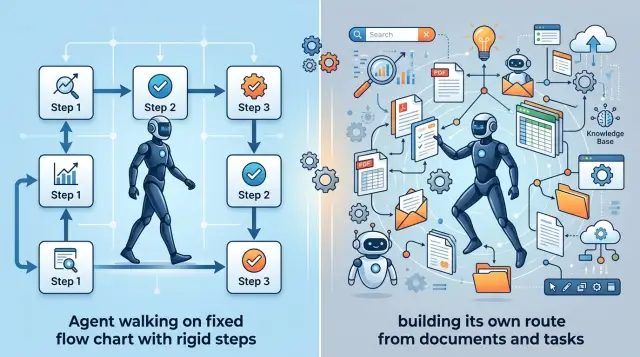
Why one approach does not fit every task
The same LLM agent rarely handles support, search, and internal workflows equally well. The tasks are simply too different. In some cases you need a predictable answer based on rules, and in others the request comes in rough and the path to the answer cannot be written in advance.
It is better to choose between a planning-based agent and a scenario-based one by looking at the task type, not the model or the trendy framework. If the steps are known and mistakes are expensive, it is better to limit freedom. If requests are vague and different every time, the agent will quickly hit a dead end without its own plan.
A scenario works well where the answer must stay within clear bounds. In support, this is especially noticeable: refunds, plan changes, ticket status, access resets. When the agent follows fixed steps, it is easier for the team to review the logic, agree on wording, and avoid unnecessary output.
But a scenario handles new cases poorly. A person writes outside the template, mixes two issues in one message, or asks for an exception that is not in the rules. Then the agent either loops through branches or gives an answer that is formally correct but useless.
Planning helps when the route to the answer is unclear. For example, an employee asks for the reason behind a mismatch between CRM, ERP, and a policy in the knowledge base. The agent has to break the task into steps, choose sources, compare versions, and, if needed, ask a clarifying question. Document search with LLM often wins in exactly these situations.
This approach has a different weakness: every extra step creates a new chance to make a mistake. The agent may pick the wrong document, draw an unnecessary conclusion, mix up the order of actions, or decide there is already enough data when there is not.
The cost of a mistake is different too. In support, one wrong answer goes to the customer. In internal automation, an error may change a record, send an email, or start a process in the wrong place. In search, a miss is usually softer: a person simply checks the result manually.
There is no universal mode. For stable and risky tasks, a strict agent scenario is usually the better fit. For unclear requests, planning is more useful, but with limits: which tools can be called, how many steps are allowed, and where human confirmation is required.
Support: when a scenario is better
In support, freedom often creates more errors than value. The customer writes to get a status, refund, or plan answer quickly, not to watch a bot choose a conversation path. If the answer is routine, it is better to define a clear route: what to ask, what to check, what can be said, and where to stop.
For support, a scenario is often more reliable. Support teams have little room for guesswork. One extra answer about a refund or connection time can easily turn into a complaint, a recalculation, or a conflict with an operator.
A strict agent scenario works well where the rules are already known. A customer asks, “Where is my order?” The bot asks for the number, checks the status system, returns only one of the allowed answers, and hands the conversation to a person if there is no data. The path is boring, but in support that is a plus.
Strict transitions are especially useful in topics where the answer affects money or timing. The bot should not promise “we’ll deliver today” or “we’ll refund the full amount” unless the system has confirmed it directly. A short accurate answer is better here than a nice but risky one.
The limits should also be explicit. The agent does not name a compensation amount without a system calculation, does not promise a date if the status only shows a range or an empty field, does not change the plan, and does not process a refund without a confirmed customer step. Disputes over penalties, blocks, limits, and charges should go straight to a person.
Planning is useful not in basic FAQs, but in more complicated cases. For example, a customer writes that the payment went through but the service was not activated. Then the agent needs to gather details from CRM, billing, and the event log, and then choose the next step. A single linear scenario breaks quickly here.
Even in that setup, it is better to keep planning inside a narrow corridor. Let the agent decide which system to check for the failure, but do not let it decide on its own whether it can promise a refund or give a new deadline. For support, that is a sensible compromise: let the model find the cause, but keep the final word on money and commitments with the rules.
Search: when the agent needs its own plan
Search in a knowledge base almost never starts with a perfect question. People write briefly, mix up terms, forget the document name, and often combine several topics in one sentence. Because of this, a simple scenario often searches for the wrong thing.
When deciding whether you need a planning-based or scenario-based agent, look at how requests are phrased. If an employee asks, “show me the form template for March” or “find contract No. 154,” a strict scenario usually handles it. The request is short, the structure is clear, and the path to the answer is almost always the same.
A different picture appears when the question sounds like this: “Can we send customer data to an external LLM for a pilot?” One search by keywords is not enough. The agent needs to break the question into parts: what data is meant, whether there are internal rules on PII, what the security policy says, and whether there are restrictions on storing data inside the country. For teams in Kazakhstan and Central Asia, this is a common example: they need to check not only the knowledge base, but also internal requirements for data residency, logs, and data masking.
A planning-based agent works more carefully in such cases. It can rephrase the question, run several search queries, narrow down the set of documents, remove old versions, and only then assemble an answer. This approach is slower, but it handles real, imperfect requests better.
When a scenario is enough
A scenario is still a good choice if the request has a number, date, or exact title, the documents are in one place, the answer comes from one source, and the error is easy to spot and fix. In that situation, there is no need to make the system more complex.
What to check in the answer
Even a good agent can confidently produce a wrong conclusion. That is why the team should see not only the final text, but also the path to it. It is useful to check which documents the agent found, which passages it used in the answer, whether it mixed different versions of the same policy, and why it rejected other sources. If this is not visible, document search with LLM quickly becomes a convincing summary that is hard to trust.
Internal workflows: where the middle ground matters
For internal tasks, one pure approach rarely works. If an employee submits a request for vacation, a certificate, or access, the system needs order: check the form, verify the fields, send it for approval, and save the status. A strict scenario is useful here because the steps are known ahead of time and mistakes immediately affect people and deadlines.
But there is another type of work. Preparing reports, collecting incident reasons, and finding mismatches between emails, spreadsheets, and internal notes almost never follow the same path twice. In these tasks, an LLM agent for support teams or analysts often needs to decide on its own what to read first, what to compare, where to ask for clarification, and how to assemble a draft answer.
A mixed approach usually gives the best result. Mandatory steps are best fixed strictly, while everything related to search, reading, and draft building can be left to planning. That way the agent does not break the process, but it also does not get stuck in a template that is too narrow.
The rule here is simple: define in advance which sources the agent may look at, require mandatory checks before the final action, allow it to choose the order of search and analysis on its own, and require separate confirmation before writing to the system.
This is easy to see in a monthly report. The agent can find the emails on its own, pull figures from the spreadsheet, compare them with CRM, and prepare a draft. But sending the report to a manager, changing the request status, or writing new data into the accounting system is better left to a person. Otherwise, one misunderstood line creates extra work for the whole team.
For internal automation with LLM, it helps to separate actions into two layers. The first layer is reading, searching, comparing, and drafting. The second is changes in operational systems. The first can be flexible. The second is better kept under control.
If the team uses a single LLM gateway like AI Router, this setup is easier to build in practice. One model can handle search and planning, another can prepare the final text, and the right to change records can be left behind a separate confirmation. This does not slow things down and makes it easier to see where the agent is taking extra steps.
How to choose the approach step by step
The choice is rarely made at the level of ideas. To understand whether you need a planning-based or scenario-based agent, take one real process and break it down into simple actions. Not “customer handling” or “knowledge search,” but something like: “an employee answers a refund question, checks the order, reviews the rules, and writes the final response to the customer.”
Then walk through the process manually and note where everything follows the same rules and where a person thinks again each time. First describe the steps without vague language: who receives the request, what they check first, where they get the data, when they answer directly, and when they pass it on. Then separate the stable parts. If a rule does not change for months, it is better to express it as a scenario. Checking order status or a request limit usually does not require freedom of action.
After that, list the steps where the employee searches for information, compares multiple sources, or asks a clarifying question. This is where planning often helps. Then run the process on 20–30 real requests, not on nice examples. Look at where the scenario breaks, where the agent gets confused, and how often a person has to step in. Only after that should you add planning to the narrow places where it is impossible to define one correct route in advance.
Usually the picture becomes clear quickly. If 80% of requests follow the same pattern, there is no need to build a complex agent. A scenario will give you a steadier result, it is easier to test, and mistakes are easier to find.
If, however, in almost every second request the employee opens different documents, clarifies context, and chooses between several actions, a strict scenario will start to fail. In that case it is better to keep fixed boundaries: which systems can be touched, which data can be shown, when to ask for confirmation. Then give the agent the right to build its own plan within those boundaries.
A good sign of a mature solution is simple: the team can show which steps need control and which need freedom. If that separation is missing, the launch almost always ends up more expensive and noisier than expected.
One request, two ways of working
The same customer question can follow two very different paths. The message “Where is my refund and why is the amount different?” shows this well because it contains two tasks at once: find the status and explain the money difference.
If the team chooses a scenario, the system follows a fixed chain. It checks the order number, looks at the payment status, compares the refund amount with a prepared set of reasons, and returns a template response.
That path is good when the data lives in clear fields and the number of reasons is small. For example, a store refunds the item price but not shipping, or the customer returned only part of the order. The scenario answers quickly and makes very few mistakes if the business rules were written in advance.
A planning-based agent works differently. It decides on its own what to check first: the customer email, the order card, the refund history, the rule in the knowledge base, and sometimes an operator note. Then it assembles the answer from the pieces it found and writes it in normal language.
This is more convenient when the truth is spread across several systems. In support, that happens often: the status is in CRM, the amount is in billing, and the reason is in a refund policy document. A fixed scenario quickly runs into exceptions in that situation.
The difference is simple. A scenario is faster, cheaper, and easier to control. A planning-based agent handles incomplete and messy cases better. But both approaches fail if the data sources disagree with each other.
That is exactly where a hard stop is needed. If the payment system shows one amount and the refund rule gives another, the system should not invent a reason. It is better to hand the conversation to a person immediately and include the facts found: the order, the refund status, the amount calculation, and the source of the rule.
In practice, the choice between a planning-based or scenario-based agent is rarely final. Routine requests usually go through a scenario, and anything that fails a confidence check is sent to a planning-based agent or an operator. This makes the launch calmer: fast answers for simple questions and fewer strange explanations where the cost of a mistake is higher than a few saved seconds.
Where teams most often go wrong
The mistake is usually not the model, but how much freedom it was given. Teams often allow improvisation where the order of steps is already known and cannot change.
If a support bot processes a refund, changes a plan, or opens access, too much freedom gets in the way. A planning agent can make an unnecessary call, choose the wrong tool, or ask a question that an operator would never ask. Where there is a strict policy, limits, and mandatory checks, a scenario is almost always more reliable.
The opposite extreme is also expensive. A team builds a scenario with hundreds of branches, and then real life takes the bypass route: the request form changes, a CRM field changes, the policy wording changes, and the rule tree quickly grows old. A month later, that scenario understands the previous version of the process better than the current one.
Another common mistake is giving the agent too many tools. It sees the knowledge base, CRM, email, file search, and internal APIs all at once, even though the task needs only two steps. Then it wastes time and tokens on unnecessary actions.
It is better to define the boundaries in advance: which tools are available for this request type, how many steps the agent can take, which actions need human confirmation, and when the agent should stop and hand the task off.
Many teams look only at the final answer. That is a trap. The same answer can be produced in 2 steps or 7, and the difference in cost becomes obvious under real load. If the team works through a unified LLM gateway, it is easier to see how much each model call costs and where the agent is spending budget without benefit.
Tests also tend to deceive. Everything works on clean examples: the request is short, the document is in the right folder, the user phrases the thought clearly. In production, people type with typos, mix Russian and English field names, send extra context, and expect an answer in a few seconds.
That is why you need to test on live requests, not on a tidy set of demo examples. If the system falls apart on that kind of traffic, the problem is usually not the model. Most often it means the wrong way of controlling the agent was chosen for the task.
A short checklist before launch
Before the first release, run the agent on 10–20 live requests. Do not use pretty examples; use ordinary ones: confusing wording, incomplete data, urgent requests, irritated messages. On a set like this, it quickly becomes clear where the system is solid and where it needs a person.
The debate over whether you need a planning-based or scenario-based agent is often settled right here. If, in simple checks, the agent starts acting on its own and making extra moves, it is better to begin with strict rules. If it searches carefully, compares, and stops before a risky step, you can give it more freedom.
Before launch, it is useful to check five things. The agent should not guess when it can answer on its own and when it should hand the conversation to an employee. The team should define the list of allowed data and actions in advance. For every request, there should be a clear trace: which steps the agent took, which sources it used, and what answer it showed the user. Mistakes should not damage data, so any changes in CRM, the customer card, or ticket status are better confirmed manually. And before launch, you should also calculate the cost of one typical request, including knowledge-base search, repeat calls, long context, and retries.
Even one short test often gives an unpleasant but honest result. For example, a support bot can confidently answer common questions, but when it sees “fix my address and reissue the document,” it should already stop and call an operator. That is a normal boundary, not a failure.
If you work through AI Router, it is useful to look not only at the final answer, but also at the audit log for the request. It makes the route, model choice, tool calls, and cost easier to understand. Sometimes one such log saves more time than a week of arguing in chat.
If even one of these items is still not closed, do not release the agent on real data. First remove write access, turn on logging, and calculate the request cost for three common scenarios.
What to do next
Do not try to solve everything with one approach at once. Take one flow where mistakes show up quickly: support answers, knowledge-base search, or one internal routine such as handling requests. That will show you where a planning-based or scenario-based agent brings more value, and where it only adds unnecessary steps.
Then collect not invented examples, but real requests from at least one week. You need ordinary cases, edge cases, and a few unpleasant requests where the team has already made mistakes. If the sample contains only simple questions, the test will show very little.
The easiest way is to test both approaches on the same sample:
- First, describe a simple scenario with fixed steps and strict limits.
- Then let the agent build its own plan, but keep the same tools and the same data set.
- Compare the results on four things: answer accuracy, time to result, request cost, and number of failures.
- Separately note where the scenario breaks on an unusual request and where planning takes unnecessary steps.
Look at more than the average result. One wrong answer in support can cost more than ten slow answers in an internal process. And in document search, completeness and the ability to gather context are often more important than perfect speed.
If the team needs to quickly try several models without changing the current integration, one OpenAI-compatible endpoint is convenient. With AI Router, this lets you compare approaches on the same process without changing the SDK, code, or prompts. This is especially useful during testing: it is easier to separate the effect of the model itself from the effect of the scenario and planning.
After such a run, the decision is usually clear without long debates. If the scenario gives a stable answer and few errors, keep it. If requests branch often, require search, and need several sources checked, try planning, but set strict limits on steps, time, and cost.
Frequently asked questions
When is a strict scenario the better choice?
Choose a scenario when the steps are known in advance and mistakes are costly. It fits order status, refunds, plan changes, access resets, and similar requests where the answer must follow clear rules.
This mode is easier to test and inspect in logs. It also keeps boundaries better: the agent does not promise a price, deadline, or action unless the system has confirmed it.
Which tasks benefit from a planning-based agent?
Planning is useful when a person has to find the route from scratch every time. This usually includes document search, investigating mismatches between systems, gathering incident causes, or handling vague requests.
If the question cannot be answered well with one template, it helps for the agent to choose the search order, clarify context, and compare several sources on its own.
Can scenario-based and planning-based approaches be combined?
Yes, and in most cases this is the calmer option. Lock down the mandatory steps and all risky actions, while letting planning handle search, reading, and draft creation.
For example, the agent can find the cause of a failure in CRM and billing on its own, but it should not update a record or promise a refund without separate confirmation.
What should you do if data sources conflict?
Do not let the agent guess. If CRM, billing, or policy documents show different information, stop the process and send the case to a person together with the facts you found.
That way you avoid a confident but wrong answer. For disputed amounts, deadlines, and statuses, this is safer than any polished wording.
Which actions should never be left to the agent without human approval?
Without confirmation, do not let the agent write to production systems, change statuses, issue refunds, change plans, open access, or send messages on behalf of the company.
Let the agent read, search, compare, and prepare a draft first. The final action on data and commitments is better left to a person.
How do you test the approach before launch?
Use 10–20 real requests instead of polished demo examples. You want messy wording, missing data, borderline cases, and messages where the user is rushed or frustrated.
Look at more than the final answer. Check the route, number of steps, source calls, request cost, and the moments where the agent should have stopped.
How many tools should you give the agent?
Expose only the tools that are truly needed for that request type. If the task can be solved with the knowledge base and CRM, do not connect email, files, and internal APIs just in case.
The broader the access, the more often the agent takes extra steps, burns tokens, and chooses the wrong next action.
What matters more in support: agent freedom or predictability?
In support, predictability is usually more important. Users want an exact answer about status, refunds, or plans, not a long search with the risk of extra promises.
If the request is simple and routine, a scenario almost always wins on quality. More freedom is worth giving only when the agent gets stuck without it.
How do you know a scenario no longer works?
You can see it in live requests. If the team keeps adding branches, exceptions, and manual workarounds, while people still write outside the template, the scenario has started to age.
Another sign is that in almost every second case, the employee opens several documents and decides what to check first. At that point, the rigid flow is already getting in the way.
How do you fairly compare scenario-based and planning-based approaches in one process?
Run the same set of requests in both modes with the same data and tools. Then compare accuracy, response time, request cost, and the number of cases where human intervention was needed.
If you use a unified OpenAI-compatible gateway like AI Router, this test is easier: you can switch the model and operating mode without changing the SDK, code, or prompts.