Pairwise model comparisons: where A beats B without an average score
Pairwise model comparisons show where one LLM wins at data extraction and another wins at chat, summarization, and long answers.
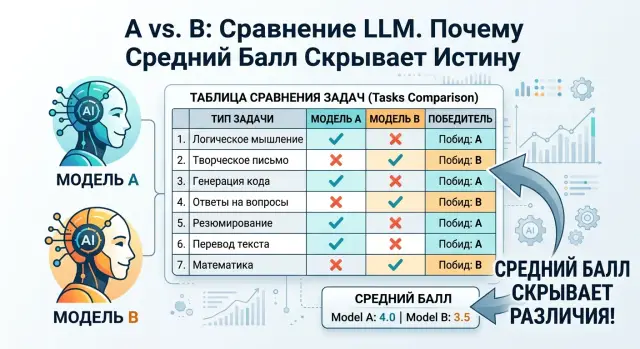
Why the average score is misleading
One overall score looks convenient. You open the table, see 84 versus 81, and it feels like the choice is obvious. In practice, that is often a bad signal.
An average rolls very different errors into one number, even though their cost is not the same. If a model writes slightly less friendly answers, that is unpleasant but manageable. If it confuses the payment amount, contract number, or case status, the consequences are very different.
This is especially clear in bank support. Model A may be better at conversation: calmer, clearer in explaining terms, and gentler when asking the customer to clarify something. But the same model may be worse at filling in CRM fields, more likely to lose the transaction date, or more likely to insert the wrong product type. Model B may sound drier, but it extracts facts from the dialogue more accurately. If you compress all of that into one number, the difference almost disappears.
An average also mixes easy and hard cases. Suppose 70% of the test consists of simple questions about working hours, limits, and basic plans. Almost any strong model will handle those well. The remaining 30% are tricky situations: a double charge, a fraud escalation, or a request with incomplete data. That is exactly where a real workflow breaks, but the overall score does not show it.
Sometimes a model wins because it has more easy examples in its favor. It collects points on simple tasks and loses where mistakes are expensive. In the report it looks better. In the real system, it does not.
That is why pairwise comparisons are more useful. They force you to look not at a nice average, but at specific A-versus-B matchups across task types.
Before choosing a model, it is enough to ask a few direct questions:
- where does the model lose meaning, and where does it only affect the style of the answer;
- which errors can be fixed with a rule, and which ones directly hurt the process;
- which tasks are rare but expensive for the business.
A decision based on the average score often breaks not the test, but the workflow. The team chooses the model with the better overall score, rolls it out to production, and then gets more manual checks, missed fields, and extra escalations. The table promised one thing, but daily work shows another.
What to compare in A and B
If you change several parameters at once, the comparison loses meaning. Model A and model B should be tested under the same conditions: one prompt, one temperature, one response format, the same system instructions, and the same token limit. Otherwise you are comparing not the models, but everything around them.
The same principle applies to the task set. Use a fixed list of examples and do not add new ones halfway through the test. If the first half contains short questions and the second half contains long, messy ones, the conclusions about A and B will be noisy.
The evaluation criteria also need to be fixed in advance. Before you start, decide what counts as a good answer: factual accuracy, format compliance, completeness, brevity, and avoiding unnecessary guesses. When the team changes the rules after seeing the answers, the comparison quickly turns into a matter of taste.
It is more useful to look not only at the total score, but at the result of each example. For every task, assign one of three outcomes: A wins, tie, or B wins. This immediately shows where one model is consistently stronger and where the difference almost disappears.
It also helps to track operational metrics alongside quality. Sometimes a model answers a bit better, but costs three times more or adds two extra seconds of latency. For production, that is not a small detail. Track at least four things: answer quality, price, latency, and answer length in tokens.
Mark the type of error separately. The same loss can mean different things:
- fact — the model invented or mixed up data;
- format — it broke JSON, a table, or the response structure;
- omission — it failed to answer part of the question;
- extra text — it added fluff, explanations, or guesses;
- refusal in the wrong place — it played it too safe and did not complete a normal request.
This kind of tagging quickly shows the model’s character. One model may more often make factual mistakes, while another almost always keeps the format but drops details. That helps you choose a model for a specific job, not by a pretty average number.
If you run tests through one OpenAI-compatible gateway, keeping the settings the same is easier. For example, in AI Router you can switch models without rewriting the SDK, code, or call format. That removes part of the random variation that often ruins the evaluation.
Where to score separately instead of together
One overall rating almost always hides the difference between tasks. Model A may write more smoothly in chat, while model B is more accurate at pulling details out of a long document. If you reduce everything to one number, you lose exactly the signal you need to choose a model for production.
Start by splitting the task set by work type. Usually five groups are enough: chat, extraction, summarization, classification, and code. This is not just a formality. Each group has its own rules for winning, and a strength in one can easily mask a weakness in another.
A good chat answer can sometimes be forgiven for having a slightly looser format. That is not true for extraction and classification. If the model mixed up the IIN, request type, or customer status, a pleasant style does not change anything.
Do not mix short and long contexts. On a short prompt, both models may run almost neck and neck, but on 20 pages the gap becomes visible: one keeps the facts to the end, while the other starts dropping details, repeating itself, or filling gaps with guesses.
The same goes for language. Russian, Kazakh, and English prompts should be scored separately, even if the task itself is the same. Many teams see a strong average score in Russian and then get weak answers in Kazakh exactly where they cannot afford to miss.
It also helps to create a separate group for tasks where format matters more than style. For example:
- JSON with a strict schema;
- classification with only one allowed label;
- extraction of fields without extra text;
- SQL or code that must run;
- answers with mandatory tags and service fields.
In these cases, do not judge how nice the text sounds. Judge whether the answer can go straight into the system. A model with a drier style often wins because it breaks the pipeline less often.
Keep rare cases separate too. There are fewer of them, but the cost of failure is higher. For a bank, that may be a disputed transaction; for a clinic, a red flag in a complaint; for retail, a return with legal risk. If you mix these with the normal flow, they disappear into the average score.
Pairwise comparisons work better when each group answers one clear question: who handles the conversation better, who extracts fields more accurately, who keeps the long context intact, who does not break the format. After that kind of split, the win-loss matrix starts saying something useful.
How to build a test set
A good test set looks like what the model will see in everyday work. If you use only made-up examples, the comparison quickly drifts: one model gives polished answers on training-style prompts but fails on real user wording.
Start by gathering real requests from the product, support, and internal runs. It is better to take a short slice from several sources than a hundred nearly identical phrases. If the team already routes traffic through an API gateway, it is more useful to export anonymized pilot requests than to write tests by hand.
Then clean the set. Remove personal data, customer names, account numbers, phone numbers, and anything that cannot be shown in a test environment. After that, remove duplicates. Ten identical password-change questions do not add new information, but they distort the result a lot.
The set should almost always be split into three groups: easy, medium, and edge cases. Easy tasks usually have a short question and little context. Medium tasks already include several conditions, a table, a conversation snippet, or a rule. Edge cases include long input, noise, contradictions, rare formats, or mixed languages.
This mix quickly shows the difference between models. One keeps a steady level on easy tasks, another handles long context better, and a third makes more mistakes specifically on rare cases. The average score smooths that out.
For each task, write down in advance what counts as a good answer. If the task is exact, you need the expected result. If the task is open-ended, define simple checks: the model does not invent facts, follows the format, does not skip an important condition, and does not reveal extra data. Otherwise the argument will be about the reviewers’ preferences, not the models.
And one more thing: look at group sizes. If you have 60 easy requests and 5 edge cases, the result will look neat but weak. It is better to shrink the overall set while keeping good coverage. In practice, 15-20 examples per group is often enough, and then you can expand the areas where the models are close or keep trading places.
How to run a pairwise comparison step by step
A pairwise comparison works best when it has a clear goal. First describe what the model does in the product every day: writes a reply to the customer, fills fields from a document, checks tone, or finds a fact in a long text. If the goal is vague, the conclusion will also be vague.
Then split the work into task types. For each type, build a separate set of examples, usually 30 to 100. Fewer than 30 often creates noise, while more than 100 is not always necessary. If you have ticket classification, knowledge base search, and short summaries, test them separately instead of mixing them together.
One run for two models
A and B should be run under the same conditions. The same prompt, the same system message, the same parameters, the same output format. If one model has temperature 0.2 and the other 0.8, you are no longer comparing the models — you are comparing the settings.
It helps to save the entire test set in advance and run it in batches. If the team works through AI Router, it can quickly run different models through one OpenAI-compatible endpoint without changing the rest of the setup. It is a simple thing, but it removes a lot of unnecessary mistakes.
Then compare the answers pairwise. For each example, assign one of three outcomes:
- A wins;
- tie;
- B wins.
It is better to review answers blindly, without the model name attached. Otherwise people start unconsciously favoring the brand they know better. If the task is formal, like extracting a contract number or amount, the win rules should be written down beforehand. If the task is open-ended, like replying to a customer, give reviewers a short scale: accuracy, completeness, extra text, and risk of error.
After that, calculate the result by task group. One final score almost always hides the useful picture. It may turn out that A wins more often at data extraction, while B writes clearer answers. Alongside wins, always look at price and latency. A model that gives 3% more wins but responds four times slower is not always right for production.
Check borderline cases a second time by hand. A useful trick is simple: set them aside for a day and review them without the first decision in front of you. That is usually where weak criteria, bad examples, and tasks that should never have been mixed show up.
Example for a bank support team
A bank usually has more than one task — it has a whole chain. A customer writes in chat, then submits a request form, and an employee checks long rules and exceptions. If you give the models one overall test and reduce everything to an average score, the picture will be too smooth.
Imagine two models. Model A is better at customer conversation. It keeps a calm tone, does not lose the thread after 6-8 messages, and remembers that the customer has already given the city, card type, and previous resolution attempt. In a live chat, you notice this immediately: the customer does not need to repeat details, and the answer feels organized.
But in a request form, the picture changes. There is no long dialogue there, but there are fields, embedded text, and lots of small details. Model B is more likely to correctly extract the contract number, transaction date, and amount from a messy description like: "The charge was on 14.02, contract 4571/22, maybe on the old card." In that mode, A is more likely to confuse the date with the request date or lose one detail.
The difference becomes even clearer with bank rules. When the answer depends on a long document full of exceptions, A sounds more confident, but sometimes misses an exception. For example, it may say that card reissue is free and fail to notice the fee for urgent issuance in another city. B sounds drier, but it more often gets the rule right end to end and is less likely to invent extra details.
If you look at the process in parts, the picture becomes clear:
- in customer chat, A gives a smoother and more polite answer;
- in form processing, B extracts facts better;
- in rules and policies, B is often more accurate;
- in one average score, this difference is almost invisible.
That is why the choice depends not on the abstract question of “who is stronger,” but on where the model sits in the process. If the model is on the front line in chat, A may be the better fit for the bank. If the model processes requests, fills CRM fields, or helps the operator with policy, B is often more useful.
Task-based evaluation gives a fairer result than one table with a single average number. For production, you do not need one overall winner — you need the model that makes fewer mistakes in your specific weak spot.
The mistakes that most often ruin the conclusions
The most common reason for bad conclusions is simple: the team changes several conditions at once and then says it compared two models. On paper, it looks like a fair test. In reality, you are comparing different settings around A and B.
A mistake in test design
The first failure happens when different prompts are written for the models. One gets a short and strict instruction, the other a more detailed version with examples, and then people look at the answer and judge the model quality. In that case, you are testing the prompt writer, not the models themselves.
Unequal context breaks the result in almost the same way. If model A received the full customer dialogue, the rules, a response template, and a second regeneration attempt, while model B saw only part of the data and answered on the first try, the comparison is already ruined. Fix the context length, number of attempts, temperature, max tokens, and retry rules. If you run tests through a single gateway, it is better to lock those parameters in config and logs, otherwise nobody will later understand why the model suddenly got better.
A mistake in how victory is interpreted
Another trap is treating a nice style as a win where a strict format is required. For a front-end display or a chat reply, a pleasant tone can be a plus. But if the task asks for JSON, CRM field filling, or routing labels, one extra word already hurts the result. A model can sound more natural and still lose on the actual job because it breaks the schema or skips a required field.
Many teams do not count the cost of an error. That is a mistake. Suppose a model is slightly better in tone, but in 8 out of 100 cases it mixes up the request status, and an operator spends 3 minutes fixing it each time. In the end, the friendlier model consumes hours of manual work per week. The evaluation should include not only test wins, but also the cost of rework, the number of escalations, and the risk of a wrong action.
And finally, bad conclusions often come from a sample that is too small. Five good examples prove nothing. Model A may win on short FAQs, while model B may be better on long instructions, field extraction, and answers about bank policy. That is why you cannot choose a production model based on a few pretty examples. You need dozens or hundreds of tasks, split by type; otherwise the win-loss matrix becomes a random snapshot.
A quick check before choosing a model
You only need ten minutes before launch to rule out a bad choice. If you look only at the average score, it is easy to pick a model that looks great in the report and performs poorly on the main request flow.
A short filter usually works better than one overall number:
- split the tests into task groups and do not mix extraction, summarization, classification, dialogue, and strict-template work;
- look at wins and losses for each example, not just the final score;
- count cost, latency, and error rate separately;
- review borderline answers by hand;
- compare the result with the main scenario that carries most of the load.
This kind of filter quickly removes false leaders. Suppose model B wins on the average score, but loses on short answers with a precise structure, and those are exactly what make up your main flow. Then first place means very little.
Counting cost, latency, and error rate separately often changes the decision more than the final score does. For support teams, the difference between 1.8 and 2.4 seconds of response time is immediately noticeable. If that comes with even a 3-4% increase in bad answers, the team pays for it later with manual checks.
Borderline examples should not be left in a gray zone. Take 20-30 answers where the win-loss matrix looks strange and review them by hand. After that, it usually becomes clear where the model really fails and where the test simply mixed different kinds of work.
If, after the quick check, one model is better on the main scenario, stays within budget, and does not break the response format, that is already enough for a pilot. The rest can be done in the next testing round instead of stretching the choice over weeks.
What to do with the results next
Pairwise comparisons rarely produce one winner for every case. After the test, it is better not to search for a perfect model, but to make a working decision: keep one model as the default for the main flow, and keep the other as a backup for tasks where it is consistently stronger.
In production, that is especially useful. One model may answer typical questions faster and cheaper, while the other writes long explanations better, extracts fields more carefully, or makes fewer mistakes on contentious cases. This approach is usually fairer than choosing based on one average number.
Store the results so that anyone on the team can understand why you made that choice. It is better not to stop at one overall score, but to save a short decision card:
- which model became the default and which one is the backup;
- which task set you used for the comparison;
- which prompt version and data version were part of the test;
- where each model wins and where it loses;
- which constraints matter for launch.
That kind of log saves time. A month later, no one will remember why the team rejected the cheaper option if the reason was not written down next to the error examples.
The comparison should be repeated whenever at least one of three things changes: the model, the prompt, or the data. Even a small edit to the system message can change the winner on some tasks. The same happens after a provider updates the model or after the real user traffic changes.
If you work with sensitive data, check the requirements in advance, not after the pilot. You need clear audit logs, PII masking, key-level limits, and data storage inside the country if company policy or the law requires it. For teams in Kazakhstan, these conditions can be treated as equally important as answer quality. AI Router supports this, so it is convenient not only for comparing models through one endpoint, but also for checks where local data storage and unified access rules matter.
A good test result looks simple: a default model, a backup model, clear switching rules, and a saved reason for the choice. Then the next release starts not with a new debate, but with a repeatable check.