Online and Offline Quality Evaluation: When to Trust Which
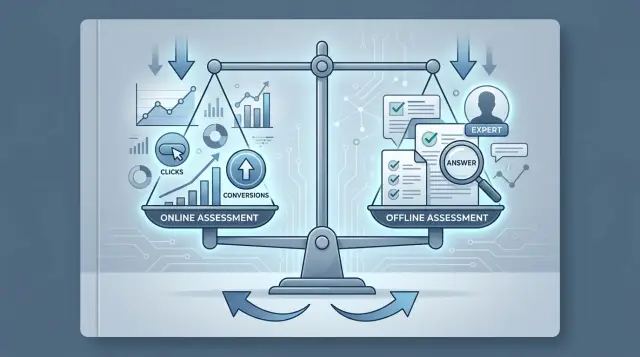
Online and offline quality evaluation answer different questions: clicks and conversions catch the effect in production, while labels and expert review surface mistakes earlier.
Where the confusion starts
Confusion starts when a team mixes two different things: answer quality and business impact. A model may write neatly, without obvious mistakes, but still fail to move conversion. The opposite can happen too: product numbers go up even though the answer is weak and sometimes risky.
Online and offline evaluation do not disagree because one is better than the other. They answer different questions. Online metrics look at behavior after the answer: did the person click, did they get to payment, did they come back later. Offline checking looks at the answer itself: did it help, did it get the facts wrong, did it break the rules.
Because of this, teams can easily draw the wrong conclusion. If CTR goes up after a new version, it is tempting to say, "it got better." But a click is not the same as value. A person may click out of curiosity, frustration, or because the answer was vague and pushed them to keep searching.
The same goes for conversion. Sometimes it rises not because of the model, but because of a discount, a new screen, seasonality, or simply different traffic. At that point it is easy to praise the answer for the wrong reason. And the mistake inside the answer is still there.
On the other hand, a single labeled set also does not tell the whole story. It shows well where the answer is accurate, polite, and safe. But it does not show whether people will actually read it, trust it, and complete the desired action.
Usually the debate comes down to two questions:
- Is the answer useful to the person in a real task?
- Does the answer fail in places where failure is expensive?
If a team answers only the first question, it chases clicks and may miss harmful mistakes. If it answers only the second, it risks shipping a "correct" answer that nobody finishes reading and that barely affects the outcome. That is why online and offline evaluation are needed together: one shows how people react, the other checks the answer itself.
What online metrics show
Online metrics do not show how smart the answer sounds. They show how it changes user behavior. If a person pressed the right button after the answer, completed the action, and did not come back with the same question, the model probably helped. If they closed the window, contacted a human, or started the conversation again, the answer did not work.
Clicks usually measure interest in the next step. For an assistant in a banking app, that could mean moving to card reissue or opening the right section. But a click on its own is a weak signal: sometimes the user clicks just out of curiosity. Conversion is stricter. It shows whether the person reached the goal: sent an application, confirmed a transaction, paid an order, booked an appointment. Retention answers a different question: did the user want to come back later and use the same flow again.
These signals work best where the path is short and the goal is visible right away. Knowledge-base search, form hints, support responses, case routing, simple self-service in a personal account — here the link between the model's answer and the user's action is usually direct.
But the reaction does not always come immediately. A user may read the advice during the day and act in the evening. In corporate scenarios the delay can be even longer: an employee got the answer today, aligned on the decision with the team tomorrow, and submitted the request several days later. So looking only at the next 10 minutes of data is risky. Sometimes a good answer pays off later.
It helps to watch not only positive metrics, but also signs of friction. They often reveal a problem before conversions start to fall:
- complaints after the conversation
- escalations to a human agent
- cancellations of actions already started
- repeat contacts on the same topic
- a rise in time to resolution
For LLM evaluation in production, online signals are needed first and foremost where the model's answer should lead to a clear action. They do not explain why the model failed. But they do honestly show whether it became easier for people to take the next step.
What offline checking gives you
Offline checking is needed before release for a simple reason: clicks and conversions appear later, while the model makes mistakes right away. If the team first builds a labeled set, it sees weak spots before the first user does. That is cheaper than fixing the prompt, rules, and routing after complaints.
A good labeled set answers real questions, not polished demo scenarios. It is better to build it from live logs, where people write briefly, mix up terms, send fragments of sentences, and ask the same question in different words. If the logs contain personal data, it should be masked before labeling.
Expert review catches what product metrics often miss. A user may press "helpful" because the answer sounds confident, even though it includes a made-up plan, a wrong rule reference, or a missing limitation. An expert spots these failures immediately. They can see where the model invented a fact, where it mixed up the steps, and where it gave dangerous advice in an overly confident tone.
It is useful to break offline evaluation into four parts:
- Accuracy: are there factual errors in the answer?
- Completeness: did the assistant answer the whole question, not just part of it?
- Style: is the text clear, without extra fluff or ambiguity?
- Rule compliance: did the model follow instructions, tone limits, policy, and safety rules?
This kind of breakdown helps you stop arguing about whether the answer is "good or bad" and instead see what exactly broke. Sometimes the model is accurate but incomplete. Sometimes it answers fully but breaks a rule and reveals too much. For LLM evaluation in production, these are different risk types, and they are fixed differently.
Another advantage of offline checking is repeatability. The same set can be run before and after changing the model, prompt, or base_url, and the result can be compared without noise from seasonality, traffic, or ad campaigns. If the team uses a single gateway like AI Router and often switches providers or models, this kind of test is especially useful: it quickly shows where the new configuration got worse on real tasks, not on a demo.
When online signals mislead
Online and offline evaluation often diverge, and that is normal. Clicks, conversions, and session depth show user behavior in the product, not the pure quality of the answer. If the context changes around them, the numbers can easily pull the team in the wrong direction.
The most common failure is promotions and seasonality. Imagine a bank assistant: in a normal week it helps with cards and transfers, and then the bank launches a refinancing campaign. Clicks on hints and applications go up, but that does not mean the model started answering better. People were already coming in with a strong intent to use the service.
The same happens during seasonal peaks. In December users are more likely to accept quick solutions, while at the start of the month they check balances and limits more often. If you compare two assistant versions only by conversion at that time, you may praise the wrong model.
Sometimes it is not the answer at all, but the screen. The team changes the interface: makes the button more visible, moves the recommendation block higher, or removes an extra step. After that, clicks on the assistant's suggestion rise. But what changed was not the text quality, only the visibility of the action. The new screen changes the user's path more than the model itself.
A small sample also distorts the picture. On 150-200 dialogs, any difference looks loud even though it is just noise. One day with good traffic, one big customer, one mass mailing — and the metric jumps. If the team is in a hurry, it easily mistakes randomness for improvement.
Worst of all is when conversion rises together with complaints. That can happen if the assistant became more pushy: it drives more users toward an application, pushes harder to take action, and admits uncertainty less often. Formally, the business metric goes up. Then human-agent contacts, user dissatisfaction, and manual fixes increase.
Be cautious if traffic changed sharply because of a promotion or season, the screen or funnel changed at the same time, the test used too few dialogs, or conversion rose together with complaints, escalations, and cancellations.
Online metrics are useful when you measure the business outcome. But if you need to understand whether the answer became more accurate, safer, and more honest, online data alone often misleads without a labeled set and expert review.
When offline also gets it wrong
A labeled set is useful, but it can quickly lose touch with real work. Teams often build it once and then compare new model versions against it for months. During that time, request wording, products, rules, and even user tone change. The test still looks neat, while production is already receiving very different questions.
Stale sets are not obvious at first. Suppose the test contains many short requests like password recovery or plan changes. Later people start sending long messages with a problem history, screenshots inside the text, and two or three follow-up questions at once. Offline evaluation still shows good scores because it is measuring an old reality.
Several signs usually point to a stale set: new logs contain many phrasings that are missing from the test; users write longer and less clearly; new products, rules, or exceptions have appeared; the model performs worse on topics that used to be rare.
Even a fresh set does not always save you. Experts often disagree where there is no single perfect answer. One person thinks the answer is useful because it is accurate. Another gives a lower score because the tone is dry or because a clarifying step is missing. These differences do not mean someone is wrong. They show that the rubric itself is too vague.
Another common problem is simpler: the team builds examples that are too easy. This happens almost all the time. People choose clear requests where the right answer is obvious. That makes it easier to label 100 examples in a day, but such a test does a poor job of separating an average model from a good one. On it, almost every version looks decent.
Offline tests also miss long dialogs poorly. On one turn the answer may be excellent, but on the eighth the model forgets a limitation, confuses the customer with the agent, or starts repeating itself. Rare edge cases also fall through: mixed languages, conflicting instructions, unusual dates, long numbers, ambiguous requests. A static set has few of these because they are hard to collect and even harder to label.
So it is better to treat offline checking as a lab, not as a full copy of real life. It does a good job showing the shift between versions if the set is updated often, disputed cases are reviewed separately, and difficult long scenarios are added manually from live logs.
How to build the evaluation step by step
Online and offline evaluation work when the team answers one specific question instead of trying to measure everything at once. Instead of asking "did the model get better?" it is better to ask: "Does the assistant send fewer cases to a human for rule checks?" or "Does the answer help close a standard request without escalation?" One scenario immediately makes the check more honest.
- Formulate one working question for one scenario. Do not mix refunds, knowledge-base search, and document checks into one test. Each case needs its own criteria.
- Choose a pair of metrics. One should show the effect in production: the share of solved contacts, average handling time, or the number of repeat contacts. The second should measure quality outside traffic: rubric accuracy, answer completeness, factual correctness, policy compliance, and lack of PII leakage.
- Build a fresh set from real contacts. It is better to use recent dialogs, not old examples the team has already grown used to. Include both ordinary cases and hard ones: missing context, ambiguous questions, conflicting rules. Send disputed examples to expert review. That is where you see whether the rubric is weak or the model is wrong.
- Run an A/B test on a small share of traffic. That lets the team catch problems more cheaply and avoids risking the whole flow at once. Watch not only clicks and conversions, but also complaints, escalations, manual edits, and rare but expensive errors.
- After the test, put every new miss back into the set. If the model failed on a new request type, that example should enter offline evaluation before the next release. That keeps the set from freezing and helps it reflect how the system actually works.
If you compare several models, keep the prompt, parameters, and example set identical. Otherwise you are comparing noise, not models. This cycle looks boring, but it quickly resets expectations after a nice dashboard with good clicks.
Example: a bank support assistant
A bank changes the model that answers customers on two common topics: card charges and transfers between accounts. The old model wrote dryly, but it rarely got facts wrong. The new one sounds more lively and gets more clicks on the "this helped" button. Looking only at clicks makes it easy to conclude the replacement worked. In a case like this, online and offline evaluation only work together.
First, the team runs the new model on a labeled set of dialogs. It includes simple questions about limits, disputed cases with duplicate charges, delays in interbank transfers, and messages from an irritated customer. The team does not look only at accuracy. It also checks whether the model invented the transaction status, gave a dangerous recommendation, and kept a calm, polite tone.
Offline
If the model writes nicely but invents phrases like "the transfer is already being processed" when the data does not show that, such an answer cannot go live. For a banking scenario, it is useful to tag failures by type: factual error, overpromising, wrong tone, avoidance of the question. That way you can see where the new model improved and where the risk increased.
Sometimes offline testing catches a problem immediately that online review will only notice later. For example, the model confidently tells the customer to "wait one more hour," although the rules say a human agent is already needed in that case. The click on the answer may be positive, but the advice is still wrong.
Online
After offline testing, the bank launches an experiment on part of the traffic. Now it looks at the share of requests that the customer closed without a human agent and the share that were transferred to a live employee. If clicks and conversions increase, but escalations rise at the same time, the test cannot be called successful. Usually that means the assistant sounds convincing, but does not resolve the issue fully.
It is also useful to check for repeat contacts on the same topic after 10-30 minutes. The customer may have pressed "helpful" and then returned with the same question about a card or transfer. For support, that is a bad sign.
After the test, disputed dialogs should not be sent to the archive. It is better to put them back into the labeled set, add tags for the reason for the dispute, and run the next model on the same cases. After a couple of iterations, these dialogs are often the best indicator of which model truly helps the customer and which one just gets more clicks.
Short pre-release checklist
Before launching a new answer, prompt, or model, teams often rush and look at everything at once. That makes it easy to drown in numbers and miss a simple thing: the test should give one clear answer — did it get better or not?
For online and offline evaluation, one discipline helps a lot: agree on the rules before you start, not after the first charts.
- Choose one main metric for the test. If the assistant works in support, this could be the share of dialogs without transfer to a human agent. Keep the other numbers as supporting metrics.
- Check that the offline set was built from fresh requests from the last few weeks. An old set often misses new phrasings, seasonal topics, and recent user mistakes.
- Give experts one instruction and a few equally worked examples. Otherwise one person lowers the score for a cautious tone while another treats it as normal.
- Run the experiment on a stable traffic segment. If you have a promotion, an outage in a neighboring service, or a sudden influx of new users during those days, clicks and conversions will be noisy.
- Write down the stop condition before launch. You need the test duration, the minimum traffic volume, and a clear threshold after which the team stops the experiment or ships the release.
This is especially important where the model can be changed in a few minutes, for example in an LLM app through a single API gateway. If the team changes the prompt, limits, or route to another provider in the middle of the test, the comparison breaks. Then everyone argues about the charts, even though they were no longer comparing the same version.
A good quick test sounds boring, and that is normal. One goal, a fresh set, experts judging in the same way, steady traffic, and a stop rule written in advance. In that mode, the release gets discussed less and decided faster.
What to do next
Turn online and offline evaluation into a regular working cycle, not a one-time check before release. When the team looks at metrics on a schedule, there is less arguing and decisions feel calmer.
A good start is not trying to cover everything at once. Pick one scenario where the error matters for the business: for example, a bank support assistant answering requests about application status. For that, build one labeled set and one online test with a clear goal, such as the share of requests resolved without transfer to a human agent.
Then keep the same rhythm:
- run the offline test before every meaningful model or prompt change
- after release, watch the online metrics on limited traffic
- review cases where offline and online sent different signals
- record the team's decision and why you trust it
It is better to store disputed dialogs next to the labels and the final decision. Otherwise, two weeks later no one will remember why a particular answer was considered good or bad. One shared archive quickly reveals repeated problems: the model sounds confident but gets the facts wrong; or, on the contrary, it asks one too many clarifying questions and loses clicks even though the final answer is more accurate.
If you are comparing several models, do not change the test scenario along the way. The same set, the same prompts, the same evaluation rules, and the same period of online observation give a fair comparison. If the conditions keep shifting, you are comparing noise, not models.
For production teams, this is especially convenient when models can be switched quickly without rewriting the integration. In AI Router, this is done through one OpenAI-compatible endpoint, and audit logs later help check which model, setting, or route failed in a specific dialog.
Usually that is enough to get started: one scenario, one set, one online test. After a couple of cycles, the team has its own trust map: which offline signals can be trusted right away, and which metrics should be confirmed only on live traffic.
Frequently asked questions
When is it actually worth looking at clicks and conversions?
Look at clicks and conversions where the answer is supposed to lead to a clear action. This works in support, self-service, form guidance, and knowledge-base search.
If the path is long or the effect comes later, do not draw conclusions from the first few minutes. Give the metric time and check it together with complaints, escalations, and repeat contacts.
Why does a high CTR not mean the answer got better?
CTR measures interest in the next step, not the usefulness of the answer. A person may click out of curiosity, frustration, or because the answer was vague.
If you want to understand the quality of the answer itself, check facts, completeness, and rule compliance on a labeled set.
When do online metrics become misleading?
Do not rely only on online signals when the context is changing around you. Promotions, seasonality, a new screen, different traffic, and a small sample can easily create false growth.
Another bad sign is when conversions rise together with complaints or transfers to a live agent. In that case, the assistant may sound convincing but solve the issue worse.
Why do I need an offline set if I already have product metrics?
Offline evaluation catches errors before release. The team sees made-up facts, dangerous advice, missed constraints, and policy violations before a user ever sees the answer.
That is cheaper than fixing the prompt and routing after complaints. This kind of test is especially useful when models change often.
What exactly should expert review check?
An expert usually looks at four things: accuracy, completeness, clarity, and rule compliance. That way the team sees not just the final score, but the reason for the failure.
For example, a model can be polite and clear, yet still invent a transaction status. Or it can avoid factual mistakes, but miss an important step.
How do I know an offline set is stale?
The first sign is simple: new logs no longer look like the test set. People write longer, mix up terms, ask new questions, and the set still revolves around old topics.
If offline scores look good but production errors are growing on new scenarios, update the set. Use fresh dialogs and add difficult cases manually.
How do I combine online and offline evaluation without extra bureaucracy?
Start with one scenario and one question. Then choose one business metric for live traffic and one offline metric for answer quality.
After release, put new failures back into the set. That keeps the cycle short: check before launch, observe product behavior, review mismatches, update the test.
What should I do if conversion went up but offline quality got worse?
Do not rush to ship the release, and do not cancel it automatically either. First find where the signals disagree: the model may have become more convincing but factually wrong, or more accurate but too long and not action-oriented.
Then review the disputed dialogs by hand. After that, teams often change not the whole model, but the prompt, the escalation rule, or the route for risky topics.
How do I compare two models fairly?
Keep the prompt, parameters, rubric, and sample set the same. In online testing, use a steady traffic segment and write down the test duration and stop threshold in advance.
If you often switch models through one API gateway, do not change the base_url, limits, or route in the middle of the experiment. Otherwise you are comparing noise, not models.
What is the minimum needed before changing a production model?
A simple minimum is enough: a fresh offline set built from real logs, one shared instruction for experts, one main online metric, and a small share of traffic for the A/B test.
If you switch providers or models quickly, keep audit logs and disputed dialogs. Then the team can quickly see which configuration failed and on what kind of request.