LoRA Adapters for One Model: Storage and Switching
We look at how to store LoRA adapters for one model, quickly pick the right variant on demand, and avoid running a separate server for every scenario.
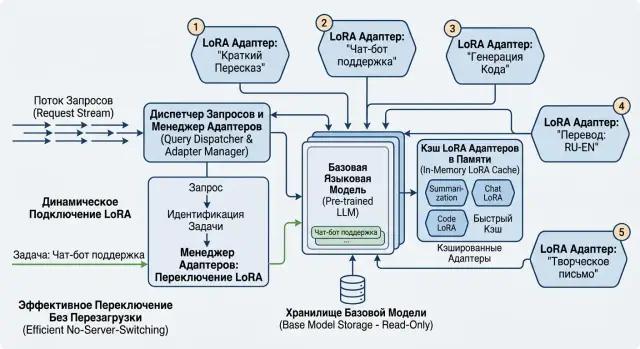
Where the problem starts
The problem usually starts not with the model, but with the growing number of tasks. The team takes one base model, tests it on one scenario, and quickly gets new requests: a separate tone for support, a different style for lawyers, another option for scoring, and one more for internal search. That is how LoRA adapters for one model appear. At first, it really is convenient.
The first two or three adapters rarely cause problems. Then the setup starts to sprawl. Each variant gets its own config, file names, access rights, and sometimes its own way of running. A month later, it is no longer clear which adapter is needed for production, which one was left over from an experiment, and which one cannot be shown to another team at all.
Many solve this in the most direct way: they spin up a separate server for each variant. On paper, everything looks simple. In reality, GPUs sit idle, the budget goes to copies of the same base model, and support quickly turns into routine maintenance. If you have six adapters for one model, six separate instances are rarely justified.
The confusion quickly shows up in small things. The same adapter sits in several folders under different names. Test and prod versions do not match. Access rights live separately from the artifacts themselves. No one knows what can already be deleted and what is still in use.
Then the second problem arrives - latency. If the system loads adapters without order, every new request pulls extra work: reading from disk, moving into memory, warm-up, clearing the previous state. The user does not see clean routing, but jumps in response time. One request goes through quickly, another suddenly waits another 2-3 seconds.
This is especially noticeable where one service serves many internal teams. In a bank or retail company, the same base model may both classify requests, label documents, and produce short summaries for operators. If you do not organize LoRA storage from the start, the infrastructure will start slowing down before the model stack grows.
When one base model is enough
One base model often covers several scenarios at once. This works when you do not need a new "brain" but a tune-up on top of an already strong base. LoRA changes the tone, response format, domain vocabulary, or output template, but it does not turn the model into a completely different tool.
It helps to separate a new skill from a new style right away. If one adapter makes answers shorter, another adds legal phrasing, and a third keeps JSON format without extra text, one base is usually enough. If a new variant solves a task that the base can hardly handle without it, the boundary is worth checking more carefully.
The easiest way to see this is on a small test set. Take 20-30 prompts and compare the base with each adapter for accuracy, format, and stability. If the base already understands the task and the LoRA only adjusts behavior, a separate server for each variant is usually unnecessary.
A separate instance appears not because you have LoRA, but because of traffic and adapter weight. Heavy and constantly busy variants quickly consume memory and block the rest. If one adapter is needed in almost every request and another is called once an hour, there is no point in serving them the same way.
Usually one base is enough in cases like these:
- all variants solve the same task
- adapters change style, format, or terminology
- the base already gives an acceptable result without the adapter
- rare adapters can be loaded on demand
Look not only at request count, but also at memory. The base takes up most of VRAM, while adapters add their own layer of costs in RAM, VRAM, or disk cache. Sometimes there are few requests, but the adapter set is large, and memory breaks first, not QPS.
The rule of thumb is simple: if one base reliably handles the general class of tasks and the LoRAs only bring behavior into the right shape, it is too early to split everything across separate servers. It is much more reasonable to keep one base, a tidy adapter cache, and move only the heaviest or hottest variants out separately.
How to store adapters without chaos
Disorder starts not in the GPU, but in folders. If a team keeps dozens of LoRA adapters for one model without a shared rule, after a month it is already hard to tell which file is needed for production and which one was built for testing last week.
The simplest rule is to give each adapter a short name and a version number. The name should answer what it is for, not who trained it at some point. For example, support-ru-v3 is much clearer than final_new_last_ok2.
A name alone is not enough. Next to each adapter, it is better to store metadata in a separate file and not rely on the team's memory or chat labels. Usually a few fields are enough: base model, build date, owner or team, task, language, and constraints.
Constraints are more useful than they seem. One adapter writes support replies in Russian, another is only suitable for short classification, and a third cannot be used on legal texts without manual review. If that is not written next to the files, teams start mixing up scenarios.
A simple folder structure also works well. Do not mix staging and production in one place. Otherwise, a test build may one day end up in live traffic simply because the names are similar.
lora/
  staging/
    support-ru-v3/
      adapter.safetensors
      meta.json
  production/
    support-ru-v2/
      adapter.safetensors
      meta.json
In meta.json, it is useful to store not only service fields but also a short task description in plain language. A couple of lines often saves hours of back-and-forth. For example: "Replies for first-line support, Russian language, do not use for financial advice".
Old builds also need to be cleaned up by rule, not mood. Often it is enough to keep the current and previous versions in production, the last 3-5 builds in staging, and delete the archive on a schedule, for example every 30 or 60 days. If a version is tied to an important release, mark it separately and leave it alone.
This order has a nice side effect. When a request comes in to switch adapters by task, the server does not have to guess. It sees the short name, version, environment, and metadata, then picks the right file without manual checks and without a separate server for each case.
How to switch an adapter on request
The request should say which model variant is needed. If the server chooses an adapter by hidden rules, the team quickly loses control: it becomes hard to reproduce the answer, find the failure, and understand why one client got the wrong style or the wrong domain tuning.
When you keep several LoRA adapters for one model, it is better to accept an explicit adapter_id. Often you also need three more things with it: the name of the base model, the adapter version or a stable alias, and a fallback mode in case of error - return an error or send the request down a backup path. If adapters are split by teams, a client or service identifier is also useful.
Then the server should check compatibility before loading. An adapter built for one base checkpoint cannot be blindly attached to another. Check at least the exact base model name, its version, and the adapter format. If you have Qwen 3 8B, do not connect an adapter from a different size just because the names look similar.
After the check, look for the adapter in a simple order: first in memory, then on the local disk, and only then in external storage. That path usually gives the lowest latency. It makes sense to keep popular adapters warm in RAM and load rare ones on demand. Otherwise the server will spend time not on generation, but on reading files.
When the server finds the adapter, it should load the needed version and write the choice to logs. A log without a version is almost useless. A week later no one will remember which exact variant answered the user. It helps to save adapter_id, version, base model, load source, load time, and request id.
If the adapter is not found, do not stay silent. There are two normal options: return a clear error or send the request down a backup route you defined in advance. Quietly swapping one adapter for another almost always backfires.
A simple example: the team has one base LLM for support, and on top of it two adapters - one for banking and one for retail. If a bank request accidentally goes to the retail adapter, the answer may be polite but wrong in terminology and internal rules. That is why switching must be strict and the error must be readable. If you have two adapters today, design the scheme as if there will be fifty next month.
How to keep latency under control
Latency in a LoRA setup usually grows not because of generation itself. Most of the time the bottleneck is adapter loading: it has to be read from disk or storage, placed in memory, and attached to the base model. If that step takes 400-800 ms, the user still sees a slow response, even when the model itself is fast.
The easiest way to remove sharp spikes is to keep the adapters that arrive most often in memory. Not all of them, only the "hot" set based on real traffic. In practice, 3-5 adapters often cover most requests, and that is already enough to noticeably smooth out p95.
Do not let the system load too many adapters at once. When the server receives a batch of requests for different rare variants, it starts thrashing memory, the queue grows, and the GPU spends time not on tokens but on constant switching. Usually it is better to allow 1-2 simultaneous loads per instance and put the rest of the requests in a short queue.
What to watch in metrics
Look separately at adapter load time and generation time. These are two different problems, and they are fixed differently. If generation stays at the same level while total latency fluctuates, the cause is almost always cold starts, cache misses, or too many evictions.
To begin with, four metrics are enough:
- average and p95 for adapter loading
- average and p95 for generation
- share of requests served from cache
- number of evictions per hour
If you only see total response time, the cause is quickly lost.
Before peak traffic, it is better to warm up the popular variants. Suppose the support team usually gets requests to the same adapter for classifying tickets from 9:00 to 11:00 in the morning. Load it ahead of time at 8:55, and the first users will not pay for a cold start.
The cache should have a hard memory limit. Without a limit, the server will sooner or later hit OOM, and with a limit that is too small, it will keep reloading the same adapters. Complex logic is rarely needed here. A normal LRU cache is often good enough, if you also pin 1-2 most needed adapters separately and do not let them be evicted.
Watch not only the cache size, but also who it evicts. If the same adapter is loaded 20 times a day, that is no longer a rare case but a configuration error. In that mode, the server wastes resources and latency becomes unpredictable.
If you are already bringing external models and your own instances into one stack, it is more convenient to keep a single entry point and shared routing rules. In this place, AI Router on airouter.kz can be a practical option: one OpenAI-compatible endpoint, shared audit logs, rate limits, and unified access rules without changing the SDK or existing code.
A simple example for one team
The support team has one service with one base model. On top of it sit three LoRAs: for general requests, for financial questions, and for internal help desk. The case is simple, but it shows well why model-specific adapters matter. The team does not spin up three identical servers for three scenarios. It keeps one base model in memory and changes only the adapter.
The request route looks at the channel or department field. If the request comes from the customer chat, the service usually picks the adapter for general support. If the ticket is marked as billing, the financial variant is turned on. If the request comes from employees through the internal portal, the help desk LoRA is attached. The selection logic is short and clear, without extra orchestration.
In practice, the flow looks like this: the request arrives at the common API, the service reads the metadata, finds the right adapter, and attaches it to the already loaded base. A second later the next request may go through a different adapter, but the base stays the same. Because of this, the LoRA server does not grow into a fleet of almost identical machines, each occupied with its own rare scenario.
At night, a rare variant can be unloaded from memory. Suppose help desk is almost never needed after midnight. The service keeps only two frequent adapters in RAM and moves the third one to storage. If a new internal ticket arrives in the morning, the process loads that adapter again, adds it to the cache, and writes an event to the log: which adapter was loaded, how long the operation took, who triggered the warm-up.
This mode is usually cheaper and easier to support. The team watches not three separate environments, but one base, routing rules, and how LoRA adapter storage is organized. If traffic grows, it first expands the cache and warm-up rather than copying the whole stack for each department.
Mistakes that quickly break the setup
The first common failure is simple: the team trained an adapter on one revision of the base model, but in production connected it to another. On paper it is still the same model. In reality the weights change, behavior changes, and sometimes tokenization too, and the answers start to drift. The bug looks random, so it takes a long time to find.
With LoRA adapters, it is better to be strict: each adapter should know the exact ID of the base, its revision, and the launch parameters. Without that, you are not switching adapters on request, but playing roulette.
Names like final, new2, or prod_fix create no less confusion. A month later no one remembers what is inside. One engineer loads final, another is sure the working version is in final_new, and at night they roll back the wrong version entirely.
A normal name is boring but useful: product, task, date, base revision. For example, support-kz-2025-04-12-base-r17. There is little beauty in it, but it saves hours during incident review.
Another common mistake is to let the application call any adapter from a string in the request. At first this is convenient, but after a week it becomes dangerous. One service accidentally calls a test adapter, another gets a model for someone else's domain, and a third opens access to a draft that no one checked.
It is better to keep an explicit list of allowed adapters. The application does not choose an arbitrary name, but a clear mode: "support", "summarization", "complaint analysis". The server then maps that mode to a specific adapter and its version.
Many people measure average latency and forget about cold starts. And that hurts the most. If the adapter lives in object storage or on a slow disk, the first request can wait seconds while the weights are moved into memory and onto the GPU.
An SLA that does not account for cold starts almost always paints too rosy a picture. Measure the warm and cold paths separately. Warm up popular adapters in advance, and keep rare ones in a more honest service class.
It is also a bad idea to store only the weights without context. Then after two months it is no longer clear:
- on which base the adapter was trained
- which dataset or data slice was used
- whether it passed a smoke test
- what metrics it showed
- who approved the rollout
Without metadata and tests, any adapter directory quickly turns into a file dump. Each adapter should have a short passport: base revision, hash, format, build date, author, status, minimum test set, and verification result.
A practical approach here is very simple: do not load an adapter into the registry until it passes a small test set. Even 20-30 prompts already catch major errors. This is especially useful when all traffic goes through a single entry point: the gateway itself simplifies routing, but it does not save you from version chaos.
If the setup starts wobbling, the reason is usually not the GPU or the network. Most often the problem is discipline around versions, names, and access.
A short checklist before launch
Before launch, it is useful to check not the hardware, but the order around the adapters. Most failures happen not because of LoRA itself, but because of confusion in names, versions, and loading rules.
If an adapter has no owner and no version, after a month no one will understand what exactly is running in prod. The same file will quickly end up in three folders with names like final, new, and final2. A working scheme is simpler: each adapter has a stable adapter_id, a version number, and the team or service responsible for it.
The API should not guess either. The client explicitly passes adapter_id in every request. Otherwise the server will start choosing a similar adapter by default, and that is almost always a bad idea. If the adapter is not specified, it is better to return a clear error right away or send the request through a predefined fallback rule.
Before launch, five checks are usually enough:
- each adapter has an owner, a version, and a short description of its purpose
- the API accepts an explicit
adapter_id, not a file name or an implicit flag - logs record the base model,
adapter_id, version, and load time - monitoring shows cache hit rate, the number of cold starts, and average loading latency
- there is a fallback path if the adapter failed to load or is corrupted
Logs are worth checking by hand on a real request. After one call, you should see which base model answered, which adapter was attached, and how many milliseconds loading took. Without this, it is hard to tell whether the network, disk, cache, or inference itself is slowing things down.
It is better to decide on the fallback path in advance, not during an incident. For an internal draft, you can temporarily fall back to the base model. For a banking or medical scenario, it is usually safer to return a controlled error than to silently change model behavior.
If such calls go through a common API gateway, the rule does not change: the route must be explicit and the state observable. Then one base model with a set of LoRA adapters does not turn into a collection of random configurations.
What to do next
Do not expand the scheme to dozens of adapters right away. First take the 2-3 most frequent cases and test them under live load, not just locally. That way it becomes faster to see where the weak point is: in memory, in weight loading, or in request routing.
For the first run, it is better to choose different profiles. For example, one LoRA for short classifications, a second for long answers, and a third for a narrow domain task. This mix will show faster how adapters of one model behave with different context lengths and different request frequencies.
Then look not only at answer quality. If an adapter gives a good result but takes 2-3 seconds to cold start, that will quickly become a problem in production. The same goes for memory: one successful test does not mean the server will survive the evening peak.
Check four things:
- how much memory the base model uses together with each adapter
- how long the cold start and cache loading of the adapter take
- how p95 latency changes when switching often
- how much one request costs including GPU time and idle time
These numbers are more useful than any pretty diagram. After that, you already know how many adapters to keep in the hot cache, which ones to unload first, and where the load limit per LoRA server lies.
One more step that people often delay for no good reason: set a naming and versioning rule from the start. A simple pattern like base-model / task / locale / v3 saves many hours when the catalog grows from 5 adapters to 50. At the same time, it is worth defining the release process: who publishes the new version, how it is checked, who moves traffic and when, how to roll back.
If your stack already mixes external models, your own GPU instances, and several LoRAs on top of open-weight models, decide in advance where the routing logic will live. Keeping it inside each service is possible, but that setup quickly spreads out. In this case, a unified gateway really makes life easier, especially if you need to bring providers, your own instances, auditing, and access rules into one place.
A good next step is very simple: take one server, one base model, and 2-3 adapters, then send real traffic through them for at least a day. After that, you will have not guesses but numbers, and those numbers are enough to build a proper setup.
Frequently asked questions
When is one base model really enough?
Yes, if the base model already handles the general class of tasks and LoRA only changes the tone, response format, language, or domain vocabulary. In that case, keep one base model in memory and switch adapters on request.
When is it better to move LoRA to a separate instance?
A separate instance is needed when an adapter is very heavy, receives almost constant traffic, or clearly interferes with other requests because of memory use or latency. If a rare adapter is called once an hour, it is usually easier to load it on demand instead of keeping a whole server for it.
How should LoRA adapters be named so they do not get mixed up?
Start with a short, clear name that describes the task, not the history of the file. A format like support-ru-v3 or billing-kz-v2 works better than final_new_last.
Also separate staging and production. That way, a test build will not end up in live traffic because of a similar name.
What should be stored next to the adapter besides the weights themselves?
In meta.json, keep the minimum needed for the team to use the adapter safely. Usually that includes the base model name, its revision, build date, owner, task, language, constraints, and status.
It is also useful to add a short plain-language description. One sentence like “for first-line support, Russian language, do not use for financial advice” makes life much easier.
How should the adapter be selected in the API?
It is better to pass an explicit adapter_id in every request. You can also pass the base model name, version, or a stable alias if you have several branches of the same adapter.
Do not let the server guess using hidden rules. An explicit choice is easier to debug, repeat, and verify in logs.
What should we do if the needed adapter did not load or is missing?
If the adapter is not found, return a clear error or send the request through a fallback rule you defined in advance. Do not silently replace one adapter with another.
Silent substitution quickly leads to wrong terminology, wrong format, or wrong internal rules. After that, the failure is hard to trace.
How can we reduce latency when LoRA switches often?
The fastest fix is a cache of hot adapters. Keep in memory the variants that come up most often and load the rare ones on demand.
Also limit the number of simultaneous loads per instance. Otherwise the server will spend time switching instead of generating.
Which metrics do we really need for this setup?
Look separately at adapter load time and generation time. If total latency moves around while generation stays stable, the problem is usually cold starts, cache misses, or evictions.
At the start, cache hit rate, average and p95 load time, average and p95 generation time, and the number of evictions per hour are enough.
How do we avoid losing control over versions and compatibility?
Bind each adapter tightly to the exact base model and its revision. Do not connect a LoRA to a similar checkpoint just because the names match.
Keep the current and previous versions in production, the last few in staging, and delete old builds on a clear schedule. Then rollback takes minutes, not half a day.
Where should we start if we only have a few LoRA adapters?
For a start, take one server, one base model, and 2–3 adapters with different load profiles. Run real traffic through them for at least a day and look at memory, cold starts, p95, and request cost.
After that, you will know which adapters to keep in the hot cache, which ones to unload first, and whether the busiest variant needs a separate instance.