OCR or a Vision Model for Documents: How to Choose
OCR or a vision model for documents — the right choice depends on scan quality, tables, stamps, and page structure. We break down the signals and a simple testing process.
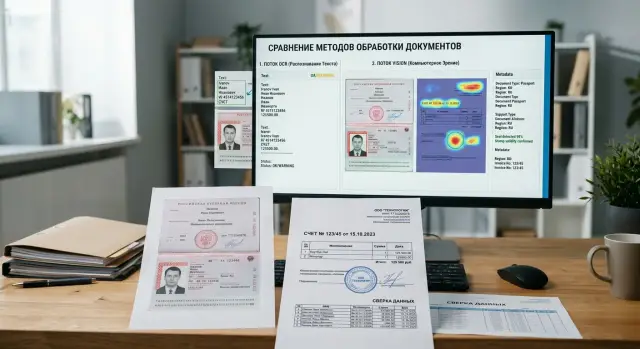
Where the problem starts
The problem usually begins with a simple mistake: the team assumes that any PDF is just text inside a container. In reality, one file can contain a normal text layer, a scan after printing, a phone photo of a page, a stamp over a table, and a handwritten note in the corner.
Because of that, the same PDF can produce different results in different pipelines. A contract exported from an accounting system is almost lossless for OCR. The same contract after printing and rescanning already loses letters, mixes up numbers, and shifts lines.
The difference is visible even between similar documents. One form has neat fields and a clean font, while another is slightly tilted, part of the text is faint, and a stamp covers the date. For OCR, that is a completely different level of difficulty, even though a person sees almost the same document.
The problem gets worse when OCR splits the page into blocks, lines, words, and sometimes individual characters. This kind of parsing is useful for text search, but it often breaks the meaning of the page. The model gets fragments without proper context and no longer understands which cell a number belongs to, which signature sits under which field, or whether the stamp covers the surname or just sits nearby.
At that point, the OCR vs. vision debate stops being theoretical. If the meaning lives not only in the words, but also in the layout, a plain text output becomes poorer than the original document. This is especially clear with tables, forms, multi-page applications, and scans with notes.
The wrong choice shows up in the very first tests. The team takes twenty documents, fifteen work well, and five suddenly fall apart: fields are mixed up, amounts move to neighboring rows, and the client name gets glued to the document number. Usually, the prompt is not the issue. The problem appears earlier — in how the document was fed into the model.
A good early signal is instability on nearly identical pages. If one page is extracted accurately and the next one with the same template produces a different JSON, the reason is often not the LLM, but the fact that OCR has already lost part of the structure. In some files, the image is the data.
When OCR is enough
OCR works well on boring documents. If the page has neat printed text, good contrast, and a familiar structure, running the image through a vision model is often unnecessary.
A common case is invoices, acts, applications, and forms with a predictable layout. The text runs in lines, the fields sit where expected, and the system needs a date, amount, IIN, BIN, contract number, or address. In such tasks, OCR is usually faster, cheaper, and easier to verify.
Another good sign is a stable flow. If files come from the same scanner or the same PDF generator, errors rarely repeat. In production, that is convenient: it is easier to set up templates, mask checks, and empty-field validation.
OCR is usually enough if the text is printed neatly, there are few tables on the page or they are very simple, stamps and signatures do not cover the fields you need, the layout barely changes from file to file, and you need not the meaning and structure of the whole page, but only a few specific values.
There is also a very practical criterion. If you can verify the OCR result confidently with rules, the setup probably fits. The amount should be a number, the date should follow a known format, the IIN should have 12 digits, and the account number should match a known pattern. When those checks catch almost all mistakes, adding a vision layer is usually not necessary.
On standard forms, OCR often wins. It gives a more predictable output and does not waste extra tokens on background noise, empty fields, and decorative page elements.
A simple example is a stack of monthly invoices from one vendor. The layout is the same, there are only five or six important fields, and scan quality is steady. In that situation, it is more reasonable to use a good OCR engine, add post-checks, and avoid making the system more complex. If only a couple of out of 100 files need manual review, that is usually enough.
When it is better to send the full scan
A vision model is better than a standard OCR-plus-parsing setup when meaning lives not only in the words, but also in how the page looks. For such documents, text alone is no longer equal to the document.
This is most often visible in forms, contracts, and applications. OCR may honestly extract almost all the words, but still lose what matters more than the words themselves: where the signature is, which block the stamp fell on, which line the handwritten note belongs to, what was in the left column, and what was in the right one.
If there is a stamp, a signature, or handwriting on the page, the scan should be sent as a whole. OCR usually turns such a page into a set of noisy fragments. A vision model reads not only the symbols, but the scene itself: it sees that the signature sits under the consent section and that the stamp covers part of the details instead of floating somewhere nearby.
The same applies to tables. When recognition breaks the grid, a row easily merges with the next one, and a column shifts to the right. For an invoice, statement, or act, that is not a small mistake — it becomes a different amount, a different item, or a different number. If the document depends on structure, the image is often more reliable than text.
Problems also appear where the order of blocks affects meaning. Footnotes, two columns, stamps in the margins, small notes at the top or side often disappear after OCR or end up in the wrong place. A vision model preserves the geometry of the page better and is less likely to confuse what belongs where.
Another case is a poor scan. If the page was photographed at an angle, the edge was cut off, a shadow fell across the paper, and the background is noisy, OCR gives up quickly or starts guessing letters. A vision model often performs better in those conditions because it looks at the whole page instead of broken text fragments.
The practical rule is simple: if you need to understand not only "what is written" but also "where it is and how it relates," send the image.
What an image gives beyond text
OCR is good at pulling out words. But it almost always makes the page flatter than it really is. After recognition, you see a set of lines, while the document often lives not in lines, but in the relationships between them.
An image preserves context: where the signature is, which block the stamp belongs to, which field was checked. For an application, contract, or form, that changes the meaning. The same phrase at the top of the page and at the bottom next to a signature is already a different context.
A good example is a form with columns. OCR can recognize all the words, but mix up the reading order: first the left column, then part of the right one, then a footnote. A person still understands the page by appearance. A vision model also looks at the layout and usually keeps the whole form together better.
This is especially noticeable in tables. OCR will extract the text from cells, but it often loses which row and column a number belongs to. If the document contains merged cells, nested tables, or small-font notes, the image gives the model more reference points.
There are also visual markers that do not live well as plain text at all: checkmarks in checkboxes, stamps and round seals, crossed-out fields, handwritten notes in the margins, or labels like "do not fill in" across a block. OCR either misses such things or turns them into noise.
For a bank, insurer, or HR team, that is not a small issue. A check in one box and an X in another can change the decision on the document.
Page layout also carries meaning. Indents, frames, labels above fields, side notes in small print, and the top-to-bottom order of blocks all help show what is a heading, what is a comment, and what is a field value. OCR often simplifies the document into linear text and loses those layers.
In practice, the difference is easy to see on a simple client form. OCR will return the name, IIN, address, and consent text. A vision model is more likely to understand that the consent belongs to a separate block, the stamp is only on the last page, and the address field was crossed out and rewritten by hand.
If the answer depends not only on the words, but also on exactly where they are, the image gives more meaning than plain text.
How to make the decision
Do not argue about the approach in theory. Take 30–50 real documents from your flow and test both options on the same set. That is the fastest way to remove guesswork.
First, split the documents into three groups: clean, noisy, and complex. Clean means neat PDFs and good scans with readable text. Noisy means crooked scans, shadows, heavy compression, and phone photos. Complex means tables, stamps, signatures, handwritten notes, and pages with multiple meaningful blocks.
How to run the test
Do not compare systems on different tasks. Give OCR and vision the same list of fields: full name, IIN, contract number, date, amount, company name, presence of a stamp, and table rows. Then the difference becomes obvious right away.
Do not look only at the overall error rate. OCR may be better at pulling ordinary text, but fail on a table or miss a stamp. A vision model may be slower and more expensive, but preserve the page structure without separate parsing.
It is useful to track five metrics:
- accuracy for each field;
- the share of documents that need no manual correction;
- average response time;
- cost per document;
- the number of cases where the model was confident but wrong.
The last point is often underestimated. A silent error is worse than a clear failure because it keeps moving through the process.
When to keep a mixed setup
If OCR handles clean documents quickly and cheaply, there is no need to send everything to vision. But if your flow contains many photos, forms with stamps, or complex tables, it is worth keeping a second route for difficult cases.
A common working setup is this: first a simple file-quality check, then OCR for clean pages, and vision for noisy or questionable documents. This route often gives the best balance between cost and quality.
If you are already comparing several models through a unified gateway like AI Router, this kind of test is easier to set up. On airouter.kz, you can run the same set of documents through different providers via one OpenAI-compatible endpoint without changing the SDK or the core integration. For a pilot, that is simply convenient.
Where the mixed setup works
In practice, you rarely need to choose between "only OCR" and "only vision." More often, a two-layer approach works better: first extract text where the page is clean and readable, then use the image only for hard cases.
Good scans, digital PDFs, and simple forms are almost always worth sending to OCR first. It is cheaper, faster, and easier to verify afterward. OCR text is convenient as a base layer for finding fields, normalizing dates, amounts, and document numbers.
Problems begin where the answer depends not only on the words, but also on where they sit on the page. A table can break in ordinary OCR, a stamp can cover part of a line, and a checkbox mark may not turn into proper text at all. On such pages, the image gives the model context that OCR loses.
A mixed setup is useful when you have clear switching rules. It is better to write them down in advance instead of guessing by eye after the first mistakes. For example: enable vision if OCR gives low confidence or lots of strange characters; pass the page image if layout affects the answer; switch to vision if OCR removed required fields; use vision for multi-column pages and forms with small notes in the margins; keep OCR as the default for ordinary pages without complex layout.
Even when you enable vision, do not throw away the OCR text. Often it is cheaper and more accurate to pass both layers: text as a quick draft, and the image as a way to verify structure and disputed parts. The model can take the contract number from OCR and use the image to understand that the nearby mark is a stamp from the office, not the client’s signature.
For a team, this usually looks like a simple routing policy. Clean form pages go into the text pipeline, while pages with an income table and a scanned stamp go to the vision model. If you use AI Router, it is convenient to keep such rules in one place and switch models without rebuilding the whole codebase.
This approach lowers costs and reduces the number of silent errors. You pay for vision only where the image truly changes the answer.
Example on one form
Imagine a client application in a bank: one page, a printed form, with some fields filled in by hand. At first glance, the task looks simple. You need to extract the full name, document number, date of birth, and a couple of answers from a table with checkboxes.
OCR handles such a form only partially. It reads the full name and document number confidently because those fields are printed in a large font and sit in the expected place. If the only goal is to pull text from neat lines, that may already be enough.
Problems start where meaning lives not in the words themselves, but in their placement. The form contains a table with answer options, and OCR mixes up the rows: the value from one column sticks to the neighboring one. Checkboxes are even worse. It sees the text next to them, but may miss the checkbox itself or treat it as noise.
For a bank, that is already a serious error. If the system missed the marked consent, employment type, or residency status, the next step in the process will use the wrong application. A person will later have to check the scan manually even though the text seemed to be recognized without obvious problems.
A vision model looks at such a page differently. It sees not only the words, but the whole form: where the field is, which block the signature belongs to, whether a checkbox is marked, whether a stamp covers part of the table, and whether a line shifted during scanning. The stamp is also part of the meaning for it, not just noise over the text.
On the same form, the result can differ noticeably. OCR returns neat text, but loses the relationship between fields. A vision model is more likely to preserve the page context and understand that the checkmark belongs to the right item and that the stamp partly covers the cell but does not change the answer.
So the choice does not depend on how much text the document has. It depends on where the meaning is stored. If the meaning lives in lines and paragraphs, OCR is usually cheaper and simpler. If it lives in form layout, marks, stamps, and relationships between page areas, it is better to choose the image or a mixed setup.
Common mistakes
The most expensive mistake is looking only at the average accuracy across the whole file set. An average number is comforting, but it hides failures on rare and difficult documents. If 90% of invoices are read well and 10% of forms with stamps and crooked scans break the pipeline, in production you will be dealing with exactly those 10%.
Teams often test the approach on examples that are too clean: neat PDFs, strong contrast, no shadows, no handwritten notes. That almost never looks like the real flow. In real life, you get smartphone photos, faded copies, tilted pages, tables with small fonts, and signatures that overlap the text.
There is also another quiet cost item: reruns. One uncertain answer rarely stays alone. The team restarts OCR with different settings, splits the page into parts, then sends the same document to a vision model, and sometimes asks an operator to check the disputed fields manually. On paper, one document seems cheap, but in practice the price grows by two or three times.
Most often, mistakes look like this: people measure only the total match rate and do not look at failures by document type; they compare models on pretty PDFs instead of real scans; they do not count the cost of repeated requests and manual review; they do not separate tables, signatures, stamps, and seals; they put contracts, applications, invoices, and delivery notes into one prompt.
The last point hurts more than it seems. When you mix different document types into one prompt template, the model loses its bearings. For an application, it needs to find fields and handwritten notes; for an invoice, table rows; for a contract, section structure. One request for all of these cases almost always gives a noisier result.
A good check looks boring, but it works better. Split documents into 4–5 classes, collect bad examples, and measure not only accuracy but also the cost of fixing errors. If the task is about tables and stamps, test exactly those. Then the choice will be based on real risk, not a pretty demo metric.
Quick checklist
When deciding how to process documents, take 20–30 real files from your flow and check them with a few questions. That is usually enough to remove unnecessary arguments within the team.
- Does the page contain things OCR reads badly: stamps, handwritten signatures, checkbox marks, seals, or photos inside the form?
- Does OCR break the structure: mix up columns, tear tables apart, move field labels to the wrong place, or change the order of blocks?
- Do you need an answer based on the layout, not only the words?
- Can you use vision only for complex files?
- Are the latency and cost acceptable?
The rule is simple. If you answer "no" to the first two questions most of the time, start with OCR. If "yes" appears often, use a mixed setup. If the document depends on layout, marks, and visual cues, vision should come first.
What to do next
Do not argue at the level of opinions. Take 50–100 real documents from one flow: for example, applications, invoices, or forms. The set should include clean PDFs, crooked scans, pages with stamps, and documents with tables.
Decide right away how you will measure quality. Otherwise, the discussion will quickly turn into a matter of team taste instead of results. Usually four metrics are enough: accuracy of the fields you need, errors in tables, dates, and amounts, the share of documents sent to manual review, and the cost and processing time per file.
Do not try to test all document types at once. One process gives a fair picture faster than a huge archive that mixes contracts, forms, and invoices. If you are automating applications, test only applications.
After that, write down simple rules that tell the system which route to choose. A text PDF with a neat layout can often go to OCR or straight into a text pipeline. A bad scan, a stamp over text, a signature, a table with a complex grid, or a phone photo of a document is better sent directly to vision.
Do not guess about edge cases manually. Set explicit conditions: if OCR gives low confidence, misses fields, or breaks the table structure, the page goes to the second step. This kind of mixed setup is usually cheaper than sending everything to vision.
It is better to run the pilot on a live but narrow scenario. A one-week stream of applications or one type of incoming back-office document is a good fit. That way you quickly see how many corrections operators make, where the cost grows, and which errors repeat.
If you want to compare several models and routes without rewriting the integration, you can run the pilot through AI Router. It is a single OpenRouter-compatible gateway with an OpenAI-compatible endpoint, so the team only needs to change the base_url and keep the existing SDKs, code, and prompts. For some teams, it is also a way to account for in-country data storage, PII masking, and audit logs right from the start.
Frequently asked questions
How can I tell quickly that OCR is no longer enough for me?
Look at nearly identical pages. If one page gives a correct JSON and the next one with the same template mixes up fields, OCR is already losing the structure.
Another sign is errors around tables, stamps, checkboxes, and handwritten notes. In that case, the problem is usually not the prompt, but the fact that the text layer has stripped too much context from the document.
Which documents are OCR usually enough for?
OCR is usually enough for clean PDFs and neat scans where you need a set of clear fields: date, amount, IIN, BIN, contract number, address. It is especially useful when files come from one source and the layout hardly changes.
If you can then verify the result with rules such as date format or IIN length, this approach often solves the task without extra cost.
When is it better to send the page directly to a vision model?
Send the whole scan when meaning depends on page layout. This is common for forms, contracts, applications, tables, and pages with a stamp or signature.
If you need to understand not only the text, but also which block a mark belongs to or which line is covered by a stamp, the image is usually more reliable.
What does an image give you beyond ordinary OCR text?
Vision keeps the page geometry. The model can see where the signature is, which checkbox is marked, what belongs to the left column, and what belongs to the right one.
OCR usually returns flat text and breaks the links between elements. Because of that, an amount can end up in the wrong row and a note can land in the wrong field.
Should I send all documents to vision just to be safe?
No, that will quickly increase cost and latency without helping on simple files. Clean PDFs and standard forms are better left to OCR.
It is better to use vision based on clear rules: low OCR confidence, missing required fields, a broken table, a multi-column page, or noticeable noise on the scan.
How do I fairly compare OCR and vision on my own flow?
Compare both approaches on the same set of 30–50 real documents. Include not only nice PDFs, but also bad scans, phone photos, pages with stamps, and tables.
Give both routes the same task and the same set of fields. Then the difference becomes obvious without guesswork.
What metrics should I look at besides overall accuracy?
Besides overall accuracy, look at the share of files that need no manual edits, the cost per document, response time, and silent errors. Silent errors are more dangerous than a clear failure because the system looks confident and still gets it wrong.
It is useful to measure quality for each field separately. A single overall percentage often hides failures on dates, amounts, or table rows.
What should I do with tables, stamps, and checkboxes?
On such pages, do not try to rescue everything with one OCR pass. Tables, stamps, and checkboxes are better sent straight to vision or at least to a second step after a quality check.
If OCR stays first, add strict checks: missing fields, mixed-up columns, strange symbols — then the page goes to another route.
How can I build a mixed setup without too much complexity?
The simplest setup is two routes. Clean pages go to OCR, and questionable ones go to vision.
Do not throw away the OCR text either. It is useful as a draft for the model, while the image acts as the source of structure. This often reduces errors without blowing up the budget.
Where should I start if I do not have much time?
Start with one narrow flow, such as applications or invoices from one week. Do not mix contracts, waybills, and applications in the pilot.
Take 50–100 files, agree on the evaluation rules in advance, and count how many documents needed manual review. If you run the test through a single gateway like AI Router, it is easier to switch models and routes without changing the integration.