OCR Errors in RAG: 5 Signs of Dirty Text Before Indexing
OCR mistakes in RAG break search, citations, and answers. We look at 5 signs of dirty text, quick checks, and the cleanup order before indexing.
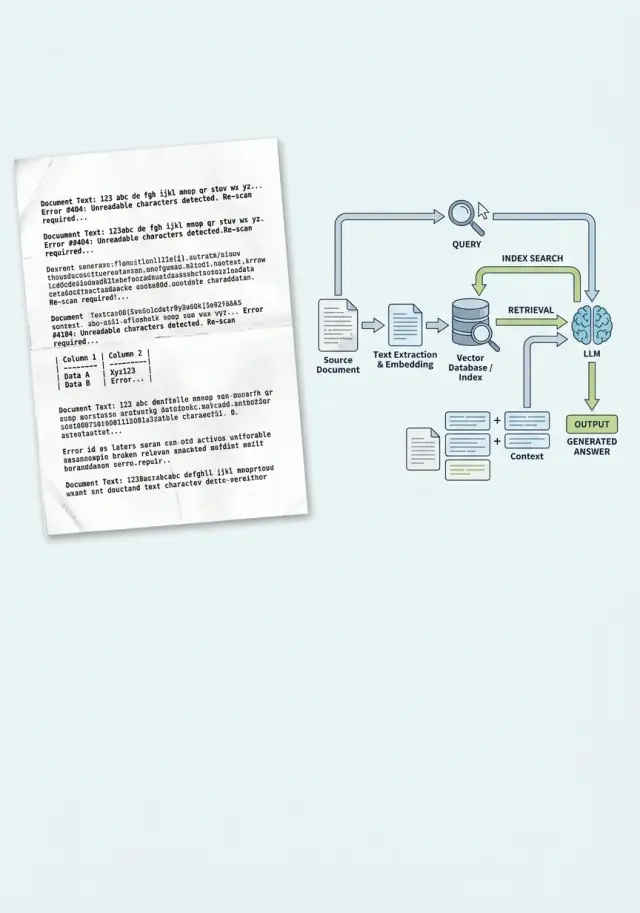
Why the problem starts before indexing
RAG usually breaks not when the answer is generated. The failure happens earlier, when the system first reads the document as text. If OCR makes a mistake, the index remembers not the meaning of the document, but its corrupted copy. After that, search faithfully finds exactly that noise.
This is especially noticeable in scans of contracts, invoices, and acts. OCR confuses similar characters: "O" and "0", "l" and "1", "S" and "5", and it loses the percent sign, a fraction, or a clause number. For a person, that is a small issue. For search, it is already a different token, and sometimes a different fact.
There is also a quieter problem. A scan breaks paragraph boundaries, merges neighboring lines, and turns a table into a set of words and numbers. A clause about payment terms can get glued to the company details, and the column with the amount can drift into the middle of another block. When you split such text into chunks, each piece is already damaged.
The index receives not a document, but a set of fragments with noise and lost structure. Embeddings do not "guess" where OCR went wrong. They are built from the text they got. If the system sees "rate l2" or a broken line instead of "rate 12%", search pulls the wrong fragment.
That is where plausible but wrong answers come from. The model sees text that looks official and answers confidently. This is not always a "hallucination". Often it was simply given poor grounding.
A practical scenario is simple: an employee uploads a scanned contract, OCR merges two clauses, the index saves that fragment, and then a question about penalties returns the block about delivery terms. The model uses it as the basis and writes a neat answer. The error appeared before indexing.
That is why OCR in RAG is dangerous not only because of recognition quality. It changes what the system even considers knowledge. If you do not check the text before upload, you end up with a neat pipeline that reliably relies on corrupted data.
Five signs of dirty text
Dirty OCR is usually visible even before indexing. The trick is that the text often looks "almost normal". That is enough for a person, but not for search. RAG depends on tokens, neighboring words, and document structure. If OCR breaks at least two of those layers, answers start drifting.
- Letters and numbers get mixed up. The most common case is O and 0, I and 1, S and 5. In contracts, this breaks invoice numbers, dates, amounts, and item codes.
- Words are split or run together. "Responsibility" and "contractterm" look familiar, but search works worse on them, and embeddings get noise instead of a proper phrase.
- Tables lose their shape. Rows, columns, and labels get mixed together, and the model no longer understands what the amount, term, or rate refers to.
- Boilerplate creeps into the main text. Headers, page numbers, and signatures suddenly appear in the middle of a paragraph. In the end, every other fragment begins with "Page 4 of 12," even though it is just empty noise.
- Text fragments are duplicated. OCR often repeats a line at a page break or reads the block with a seal and background again.
Each of these defects alone is still manageable. Together, they quickly break retrieval. In a scanned contract, the tariff table falls apart, the page number lands in the middle of a paragraph, and "10,000" becomes "I0 OOO". A person can infer what was meant. The index cannot always do that.
These failures are especially noticeable with precise questions: about a limit, a term, a rate, or a specific clause in the contract. The system pulls a neighboring fragment because the needed words have broken apart or mixed with noise. Sometimes the answer sounds confident but refers to the wrong section. That is worse than an obvious mistake.
A simple check: open the raw text without formatting and read 20–30 lines in a row. If your eye stumbles every couple of sentences, it is too early to index. When a document shows at least two signs from the list, it is better to clean it first and only then split it into chunks.
What breaks in RAG answers
Users rarely see "bad OCR" as the cause of a problem. They see something else: an inaccurate answer, a strange citation, a contract number that does not match the original. The failure almost always hides behind weak search or a model "hallucination".
The first symptom is that search does not find the right paragraph. The document is in the index, but OCR split a word, merged lines, or damaged a table. For a person, the phrase is still readable; for search, it is already different text. Instead of the paragraph about the payment term, the system lifts a neighboring block with general terms, and the answer drifts off course.
Then citations start breaking. The model refers to a fragment that looks like the original but does not match it word for word. The contract says "payment within 15 calendar days," but the answer suddenly mentions "10 days" or drops the word "calendar." For a lawyer, a bank, or procurement, that is already a real error.
OCR does the most damage to entities where every symbol matters: amounts, dates, IIN, contract numbers, and annexes. "8,000,000" becomes "800,000", the date 03.06.2024 moves into the next line, and the contract number picks up a piece from the page header. The model answers based on the text it received, but the answer is already wrong.
In practice, this looks ordinary. A team uploads a scanned contract and asks the system to find the penalty for late delivery. If OCR recognized the same page twice, duplicates crowd the top of the results. Search returns nearly identical chunks instead of different relevant paragraphs. The model sees a narrow and noisy context, so it repeats the same fragment even though the right answer is lower down.
There is another trap. The model starts filling in missing words. If OCR ate part of the phrase "no later than 5 business days," the context may be left with "no later than ... days." A language model can easily fill that gap from a template. Sometimes it is right. Sometimes it takes the number from a neighboring paragraph.
Usually the failure shows up right away through several signals: the answer sounds confident, but the citation does not match the PDF; search returns almost identical chunks; amounts and dates change from answer to answer; the system ignores a precise question and falls back to general phrasing.
If you already see that in tests, a new model rarely saves the situation. Check the text before indexing first. Otherwise, RAG will fail quickly and neatly.
Quick checks before uploading
Before indexing, 15–20 minutes is enough to catch most problems. If you skip this step, the team ends up fixing not RAG, but noise in the source.
Start with a manual sample. Do not take one successful PDF, but 20–30 pages from different documents: the first page, the middle, the end, a page with a table, with footnotes, with a stamp, with poor contrast. OCR rarely breaks everywhere in the same way. Usually it fails in the most inconvenient places.
First check exact entities. Contract numbers, IIN, amounts, dates, item codes, and percentages must be readable without guessing. If "12.03.2024" becomes "12.O3.2024" and "No. 451-7" turns into "N 45l-7", search and answers will start lying very confidently.
Then quickly scan the pages for junk symbols: sequences like "@#|", random Latin letters inside Cyrillic text, broken words, repeated lines, or text fragments without spaces. One bad paragraph is not a disaster. If such spots appear on every fifth page, the index can no longer be considered clean.
Also check the layout separately. In two-column documents, OCR often merges the left and right columns into one line. Footnotes are similar: the main text drops down, and then a note in small print suddenly appears in the middle of a paragraph. For RAG, that is especially unpleasant because the chunk looks coherent, while the meaning inside is already broken.
You can build simple automated tests without a complex system. It is enough to count the share of pages with unusually short or too long text, find lines with a high share of strange characters, check for repeated paragraphs, and compare neighboring chunks for frequent duplicates.
Duplicates are especially harmful. If the same fragment entered the index three times, retrieval will pull it more often than other fragments, and the answer will seem "convincing" even though it is based on repetition.
A useful minimum looks like this: review a sample by hand, check exact numbers and dates, catch junk symbols, make sure columns and footnotes are not mixed together, and remove duplicates before chunking or right after it. If the document does not pass this set, it is too early to load it into the index.
How to clean the text step by step
Dirty OCR is rarely fixed by one setting. It is safer to follow a short chain: separate bad files, remove obvious noise, restore normal text shape, and only then send it to the index. Otherwise the system will remember the noise and confidently cite it in answers.
First, separate the bad files
Do not throw all documents into one pile. A contract, an invoice, a letter scan, and a table break in different ways. If you mix them in one flow, it is hard to tell whether the issue is in the template or in the source scan.
A simple grouping by two traits is enough: document type and image quality. For type, categories like "contracts," "acts," "forms," and "tables" are enough. For quality, it helps to keep three buckets: good scan, acceptable, and bad. Bad files are better kept out of the automatic flow. It is cheaper to send them for a new scan than to untangle strange RAG answers later.
Before OCR, check the page itself. If the text is tilted even by a couple of degrees, the system often merges lines. If the PDF has blank pages, separators, black margins, or duplicates, remove them right away. On a large batch, that saves more time than it seems.
Then restore the text structure
After recognition, remove repeated pieces OCR likes to drag in from every page: headers, page numbers, boilerplate, scanner marks. Otherwise search will start treating them as important words and will surface the wrong fragment.
Then restore paragraphs. OCR often tears one thought into five lines or, on the contrary, glues an entire section into one solid block. That is bad for RAG: chunks are cut in random places, and meaning spreads out. The basic rules are simple: merge lines within one paragraph, leave a blank line between paragraphs, keep numbering and list markers, and turn tables into a clear text form.
It is best to be realistic about tables. If OCR turns the columns into a mess, rewrite them as "field - value" pairs or as short lines for each entry. Such text indexes much better.
Check the result before reindexing. Take 10–20 documents from each group and see whether the paragraphs are readable, whether the header repeats, and whether lists and tables have broken. If even one of those parts is drifting, it is too early to update the index.
On a single contract, it looks straightforward: align the pages, remove two blank ones, cut off the page numbers, merge the paragraphs, convert the details table into "field - value" form, and check the text again. Only then should it go into the index. Otherwise you are just loading the error faster.
Example with one contract
The team uploads a 24-page supply contract scan into RAG. Every page has a stamp, a signature at the bottom, and a small footer: page number, date, template number. The main text reads fine, but the liability section looks the worst: thin font, dense paragraphs, short numbers next to clauses.
OCR extracts the text unevenly. In clause 8.4, it reads the beginning of the line together with the page footer and merges them into one fragment. Instead of "8.4 The supplier must notify the customer 10 business days in advance," the index gets something like "8.4 24/24 form D-17 The supplier must notify the customer..." On the next page, a similar artifact attaches to clause 8.5.
The issue shows up later. When the user asks how many days in advance they need to give notice of termination, search finds not 8.4, but the neighboring clause 8.5. It also talks about notification, but now it is about price changes, and the term there is different - 5 days. The model answers confidently, the citation looks plausible, and the real cause is dirty OCR text.
This is how many RAG mistakes look: the answer itself is not broken, but the fragment the system considered the closest one is.
A short check helps here. Open 3–5 pages with small print and compare the image with the OCR lines. See whether the footer repeats in the middle of paragraphs. Check whether clause numbers follow one another in order, without jumps or merges. Then ask a test question about the two disputed clauses and see which fragment search surfaced.
In this example, the problem was found quickly: the text had noise near the section number and a repeated footer line. After that, the document was cleaned without complex magic: the top and bottom page areas were cut away, OCR was run again, blocks with small print were checked separately, and only then was the text sent to the index.
After cleaning, search returns the right excerpt - clause 8.4 without foreign numbers or boilerplate. The model cites the correct fragment and answers accurately: notice must be sent 10 business days in advance. The difference seems small, but for a contract it is not cosmetic - it is meaning.
Where teams most often make mistakes
Mistakes usually start not in the model and not in the index. More often, the team simply decides too early that the text is "clean enough" and loads it into the pipeline as is.
The first common mistake is taking raw OCR without a manual sample. People look at a couple of good files, see readable text, and decide the whole batch is fine. Then it turns out that in half the documents, columns merged, line breaks broke, and clause numbers turned into a string of symbols. Even a sample of 20–30 files usually shows the picture more honestly than the overall "recognition success" rate.
The second mistake is treating all document types the same. A contract, an invoice, and a form are only similar at the level of "there is text in them." In reality, the structure is different: in a contract, clauses and appendices matter; in an invoice, lines, amounts, and dates matter; in a form, question-answer pairs and checkboxes matter. If you run everything through one cleaning and chunking template, meaning breaks before search even starts.
Another bad habit is cleaning text too late, after embeddings are already built. If the index received noisy fragments, it has already learned them. Later the team fixes the source, but answers still pull the old noise until the index is rebuilt.
A separate problem is duplicate pages and different versions of the same document. A draft, a signed copy, a scan of the same copy from another folder, and yet another duplicate with a different page orientation all get into the index. RAG starts to "vote" for what appears more often, not what is correct. As a result, the answer may cite an older version of the contract simply because it was uploaded three times.
And finally, teams often lose the connection between text and source. A clean fragment is stored separately from the page number, file name, and document version. While the system is in demo mode, that is not visible. As soon as a lawyer, auditor, or analyst asks to show the source of the answer, manual searching through folders begins.
For a bank, clinic, or government sector, that is especially unpleasant. If the system cannot show the page and the document, people do not trust the answer, even when it is formally correct.
That is why each fragment should store at least the document type, page number, file or version ID, and a duplicate or near-duplicate flag. It seems minor, but later it saves hours of investigating strange answers. If the index got text without version, page, and duplicate checks, the problem often has to be fixed in the live system.
What to do next
Do not upload the whole archive in one go. First set a simple page quality threshold before indexing: the text reads continuously, boilerplate does not clog the paragraphs, tables do not fall apart, and the page does not contain long strings like "s1gnature/s1gnature/s1gnature." That threshold is not for decoration. It lowers the risk of confident but wrong answers.
It helps to split documents into two flows. Those that pass the threshold move on. Those that do not go into a separate review queue. Do not mix them, otherwise it becomes hard to tell whether the error came from the model, chunking, or the text itself.
At the start, a small sample is enough, not the whole database. Take 30–50 documents of one type, for example contracts or acts, and compare them before and after cleanup with the same set of questions. The difference is usually visible quickly: the model confuses dates less often, loses fewer amounts, and cites the right fragment more accurately.
If the team is already testing several models for RAG, it helps to keep one index and change only the model. Then you can see where the problem is in the index and where it is in the model’s behavior. Compare the answers of at least two or three models on the same questions and the same context: how accurately they find the needed fragment, whether they invent extra details, whether they can honestly say "not found," and whether they fail on tables and footnotes.
For this kind of check, it is useful when models can be switched without changing the SDK or current prompts. This is where AI Router can help: the service has one OpenAI-compatible endpoint, so the team does not need to change code when comparing different models. For teams in Kazakhstan, this is also a practical option if it is important to keep data inside the country and handle B2B invoicing in tenge.
Do not wait for a perfect pipeline. It is enough to set a quality threshold, send bad pages to a separate queue, and run a short A/B test on a small sample. After that, the team gets not an abstract feeling that dirty OCR is causing problems, but a concrete list of pages, cleaning rules, and questions where the index breaks.
Frequently asked questions
How can I tell whether OCR is failing, not the model?
This is usually visible in the source. The answer sounds confident, but the quote does not match the PDF, amounts and dates drift, and the search brings up a neighboring paragraph instead of the right one.
Open the raw text without formatting and compare 20–30 lines against the original. If OCR is mixing up characters, merging lines, or pulling the page footer into the middle of a paragraph, the failure started before the model.
Which documents does OCR break most often?
The hardest hit are usually scans of contracts, invoices, acts, and forms. Every symbol matters there, and OCR often breaks numbers, dates, percentages, and short clauses.
Pages with tables, footnotes, stamps, small print, and poor contrast are especially vulnerable. Those are the ones where search most often jumps to a neighboring fragment.
Do we need to check the whole archive manually?
No, you do not need to review the entire archive by hand. Usually a sample of 20–30 pages or 30–50 documents of one type is enough.
Do not pick only the good files. Check the beginning, middle, end, tables, stamped pages, and pages with small print. That will show you much faster where OCR regularly fails.
What should be checked in raw text before indexing?
Look at the things that change meaning: dates, amounts, contract numbers, IIN, percentages, and part numbers. If you already see confusion here, like "O" instead of "0" or "l" instead of "1", the index will start making mistakes.
Then quickly assess the structure. The text should read continuously, without stray symbols, repeated lines, merged columns, or page numbers suddenly appearing inside a paragraph.
Why do tables so often break RAG answers?
Because a table loses the relationship between its columns after bad OCR. The amount, term, and rate are still in the text, but it is no longer clear what belongs to what.
If the table has fallen apart, do not index it as is. It is better to rewrite the rows as a clear "field: value" format or keep each record as a separate text block.
When should a document be stopped and not indexed?
Do not let the document into the index if your eye trips over the text every couple of sentences. It is a simple but honest test.
If columns are mixed together, the footer repeats, numbers are only readable by guesswork, or the same paragraph appears several times, clean the document first or request a new scan.
Should text be cleaned before chunking?
Yes, clean first, chunk second. If you split dirty text into pieces first, each chunk already carries the error into search.
First remove repeats, headers and footers, blank pages, and line merges. Only after that should you split the text into fragments and build the index.
What should I do with duplicate pages and different versions of one document?
You need to deal with duplicates right away. Otherwise search will keep pulling the fragment that appears most often, not the one that is actually correct.
Store the page number, file name, and document version with each chunk. Then you can quickly see where the answer came from and avoid mixing a draft with a signed copy.
Will a new model help if OCR has already made mistakes?
Usually not. A new model may sound more polished, but it still relies on the text stored in the index.
Test it simply: keep the same index and ask the same questions to two or three models. If they all stumble in the same places, the problem is in the source or the search, not in the model.
Where should we start if the team is just implementing RAG on scans?
Start small: take one document type, set a page quality threshold, and create a separate queue for bad scans. That is already enough to remove most major failures.
If you are comparing several models, keep the same index and change only the model. For this kind of test, it helps when you can switch models through one OpenAI-compatible endpoint without changing the SDK or your current prompts.