Normalizing Dates, Currencies, and Numbers After LLMs Without Confusion
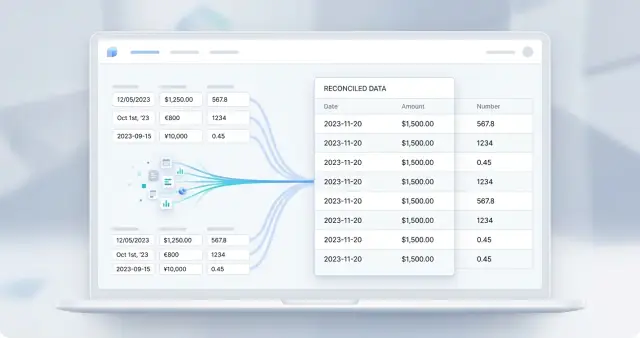
Normalizing dates, currencies, and numbers helps bring LLM outputs into one format by removing inconsistency in dates, amounts, separators, and currency codes.
Where format inconsistency comes from
LLMs do not know that your system has only one allowed format unless you state it clearly. For the model, entries like 01/02/24, 2024-02-01, and 1 February 2024 often mean the same thing.
The problem starts in the training data. The model has seen texts from different countries, tables, emails, and CRMs, where dates, amounts, and numbers are written according to local habits. That is why it can easily mix an ISO date, a casual written date, and the form from the source document in a single answer.
Money works the same way. The same amount can arrive as 1,200.50, 1 200,50, or 1200.50 KZT. For a person, the difference is small. For code, these are three different strings.
In most cases, inconsistency comes from four reasons:
- the prompt asks to extract data but does not define an exact output template
- the model copies the format from an email, invoice, or PDF
- locales use dots, commas, and spaces differently
- different models return the same meaning in different forms
If a team runs the same query through several models, the spread gets even larger. This is especially noticeable in LLM gateways, where responses come from different providers: one model returns the date as text, another as a number, and a third adds the currency at the end of the string.
Without a shared rule, errors are not always visible right away. An import may silently skip part of the rows, a date filter may miss the right records, and a search by amount may return an incomplete set. Visually, the rows look similar. The system compares symbols, not meaning.
What is worse is that the failure often shows up later. At first everything looks fine, and then the monthly report does not add up, the payment reconciliation shows extra discrepancies, or an alert fires on the wrong amount. One misunderstood separator or date format can break the entire chain.
Normalization is not about making the output look neat. It is needed so the system understands the same value in imports, filters, search, and reporting in the same way.
What should be brought into one format
If a model reads emails, invoices, forms, and chats, it almost always returns mixed formatting. One source writes 03.04.2025, another April 3, 2025, and a third just yesterday. The same happens with amounts, percentages, and empty fields. If you do not normalize this, the code later has to guess what was meant.
Usually, four groups are enough: dates and time, amounts together with the currency code, ordinary numbers and percentages, as well as empty values and service words like not specified.
For dates, it is best to store one internal format right away. For a date, that can be YYYY-MM-DD; for time, HH:MM:SS; for a timestamp, ISO 8601 with a time zone. Otherwise, 05/06/24 will become June 5 for one team and May 6 for another.
If the source says tomorrow or last Friday, mark that value as relative, not exact. That makes it much easier to keep the data honest.
It is usually worth splitting an amount into two parts: number and currency. Do not store 1 250 000 KZT as one string if you later need filters, calculations, or reconciliation. It is better to have amount: 1250000 and currency: KZT. That way, it is easier not to lose the sign, not to confuse tenge with rubles, and not to break reports when one model writes $1,200 and another writes 1 200 USD.
Regular numbers also need order. Choose one decimal separator, remove extra spaces, and keep units of measure separately. Percentages need one approach too: either 12.5% as a string or 0.125 as a number. Ranges like 10-15 or from 10 to 15 are easier to split into min and max.
Empty values are a separate trap. Not specified, n/a, -, an empty string, and 0 do not mean the same thing. Zero means the value exists and is equal to zero. Not specified means there is no data. If you mix those cases, you get strange totals, wrong fill rates, and noise in analytics.
A simple rule works best: anything that goes into search, calculations, filters, or exchange between systems should be converted into one format immediately. You can keep the original text next to it. That makes checking much easier and helps you find the source of an error quickly.
Lock the canonical format first
If you do not have one internal format, normalization quickly turns into a patchwork of fixes. The model may return 01.02.2024, 2024/02/01, or 1 Feb 2024, and all three entries are only equal to a person. For code, they are three different cases.
One format is not needed for looks. It is needed to compare values, find duplicates, build reports, and avoid quiet calculation errors. The sooner you lock it in, the fewer edge cases remain after the model answers.
For dates, ISO 8601 usually works well: 2024-02-01. It is short, unambiguous, and moves cleanly through databases, APIs, and tables. If your data includes time, decide this up front: store it in UTC, in local time, or together with an offset, for example 2024-02-01T14:30:00+05:00.
For money, the rule is simple: amount and currency should not live in one field. Store the number separately and the currency code separately, for example 15000.50 and KZT. Otherwise, a string like 15 000 KZT, $15,000, or 15.000,00 will start breaking both parsing and calculations.
Numbers are better not left free-form either. Choose one decimal separator, usually a dot, and remove thousand separators when storing the value. Then 12,5, 12.5, and 12 500 will not get mixed up in the same processing flow.
In your schema, it is worth fixing a few things in advance:
- date format:
YYYY-MM-DD - time rule: UTC, local time, or offset time
- money field: number separately, currency code separately
- one number format without spaces and without thousand separators
- a separate status for unknown and doubtful values
The last point is often underestimated. If the model is not sure, do not make the system guess. It is better to store a status like unknown, missing, or ambiguous than to insert the wrong date or currency and then fix the entire chain later.
A good internal format looks boring. That is normal. A boring format survives in production much better than a readable string that every source writes differently.
How to build post-processing after the model response
Reliable normalization starts not with the parser, but with the response format from the model. If you leave free text, you will almost immediately get a mix of formats: 01/02/24, 1 February 2024, 1,250.00, and 1 250,00 in the same flow.
The working pattern is simple.
First, ask for JSON. The model should return fields with clear names: invoice_date, amount, currency, raw_text. That separates data from extra words and saves time on parsing phrases like the amount due is.
Then split the process into two steps. First, extract the value; then convert it to your format. This is an important point. The model may correctly extract the string 03/04/2025, but your code should convert it to ISO date according to clear rules.
Determine locale from context, not from one symbol. One comma proves nothing. Look at the language of the email, the counterparty's country, the currency code, the format of other fields, and the document signature. If the email contains tenge or KZT, and the amount is written as 1,250.50, do not rush to assume an American format without other signs.
Before writing to the database, validate the type and the range. The date must exist on the calendar. The amount should not become a value a thousand times larger because of the wrong separator. For a discount, refund, or debt, define the rule for negative values in advance. If a field expects an integer, do not accept 12.5 silently.
Keep the original fragment next to the normalized value. For example, save raw_amount: "1 250 000,50 ₸" and separately amount: 1250000.50, currency: "KZT". Then the team can quickly see whether the model made a mistake or whether the normalizer did.
In practice, this is enough for most tasks. If you run documents through several models and one common API, this pipeline is easier to maintain than a set of exceptions for every new format. For teams working through AI Router and changing providers behind one OpenAI-compatible endpoint, a single normalization layer is especially useful: the model changes, but the parsing rules stay the same.
Where dates most often break
Dates that look familiar to people and dangerous to code cause the most errors. The string 03/04/2024 can mean April 3 or March 4. Until you know the language of the email, the sender's country, or the source format, it is better to treat such a date as unclear.
This shows up constantly after an LLM response. The model may copy the format from an email, from a table, or from user text. In one place it writes 2024-04-03, in another 03.04.24, and nearby it adds Apr 3, 2024. If the parser silently chooses one version, the error goes into the database and later becomes expensive.
With dates, it helps to keep a few rules:
- store the original string separately from the normalized value
- do not parse
03/04/2024without country or language context - if you only have month and year, do not invent the day
- handle time and time zone separately from the date itself
- convert words like
today,yesterday, andtomorrowinto a date only when you have a reference date
A common trap is an incomplete date. If the model returned February 2024, that is not 2024-02-01. It is a month and year without a day. Keep that exact level of precision. Otherwise, a report or payment deadline will shift to the beginning of the month even though the source never said that.
Month names also need order. People write февраль, февр., Feb, February, 02. It is better to prepare one dictionary of abbreviations and names in advance and map all variants to the same form. Then Russian and English text can pass through one scheme.
Time is a separate topic. 03.04.2024 10:00 without a time zone and 2024-04-03T10:00+05:00 cannot be treated as the same value. For a bank, call center, or delivery service, a difference of a few hours already changes the order of events. If the zone is not specified, mark it that way: time is present, zone is unknown.
When the date remains unclear, do not guess. It is better to return a parse error or the status ambiguous_date than to invent a day and create a quiet failure in calculations, deadlines, or documents.
Currencies and numbers: where the sign and scale get lost
With numbers, the model makes quieter mistakes than with text. The response looks plausible, but one dot, one comma, or a sign in parentheses can change the amount by ten, a hundred, or even a thousand times. That is why strict parsing rules are needed here.
The $ symbol by itself does not guarantee anything. It can mean USD, CAD, AUD, and more. If the model returned $ 1,200, do not guess the currency from the symbol. Look for a currency code nearby, the country of the document, the language of the email, the seller's invoice, or an explicit currency: "USD" field. If none of those signs exist, it is better to mark the value as ambiguous.
The same is true for separators. 1,234 in one document means one thousand two hundred thirty-four, and in another it means 1.234. Spaces matter too: 1 234,56 and 1 234.56 look similar, but they follow different writing habits. The parser needs a clear order of checks. Otherwise, it starts guessing.
Usually, the following sequence helps: first remove regular and non-breaking spaces, then determine the currency and locale from context, then parse the decimal separator, and finally check the range and the common sense of the amount.
Negative amounts are often hidden in more than just -1000. Accounting documents like the format (1 000,50), and some models return the − symbol instead of a normal -. If you check only one variant, the system can easily turn an expense into income.
Scale breaks even more often. 1.2 mln, 1,2m, and 1200000 should become the same number if the context is the same. But m does not always mean million: in technical data it may mean meter, and in finance MM is sometimes used for millions. That is why it is best to always keep the original string.
Percentages also need one rule before release. If the model writes 12,5%, the system should always convert it either to 12.5 or to 0.125. Both are valid. The only bad thing is when both live in the same table.
If you run responses through several models, different forms of writing will appear more often. One model returns KZT 1 200 000, another 1.2 mln KZT, and a third gives JSON with the number 1200000. Until there are shared rules for sign, currency, and scale, these responses cannot be compared honestly or sent into calculations.
Example with invoices and emails
The same supplier can write differently even within one week. In the invoice it says pay by 15.03, in the email the manager writes March 15, and in the chat 15/03/24 appears. The model usually understands the meaning, but that is not enough for accounting. Accounting needs one format.
The same is true for amounts. One message contains 125 000 KZT, another $3,500.00, a third 1.250,00 EUR, and sometimes the amount arrives without a currency code at all. If you leave everything as is, reports will start to diverge: in one place the number will be read as 1250, and in another as 1.25.
A simple flow looks like this. The model reads the invoice, the email, and the supplier chat, and then extracts three fields: due date, amount, and currency.
On input, it may see:
Pay by 15.03, amount 125 000 KZTInvoice total: $3,500.00, due March 15To pay 1.250,00 EUR, due 15/03/24
After normalization, the system brings this into one format:
- date:
2024-03-15 - amount:
125000.00,3500.00,1250.00 - currency:
KZT,USD,EUR
If the currency code is not specified, it is better not to guess. The system can store the amount as a decimal number and leave the currency empty, then send the record for review. It is a boring rule, but it saves you from costly mistakes.
After that, everything gets easier. Accounting loads the data without manual edits, analytics builds reports without separate rules for each source, and document search works more consistently. When all records use YYYY-MM-DD, one number format, and ISO currency codes, arguments about what the supplier meant disappear.
Errors that break the result
The most common mistake is simple: the team believes a strict prompt will keep the format on its own. In practice, the model may return 01.02.2025 once, then 2025-02-01, and in the next answer write 1 Feb 2025. If you then just store the string as is, inconsistency is almost guaranteed.
The second mistake is more expensive: taking a neat-looking string for a correct value. Visually, 1,250 and 1.250 look similar, but in one case it is one thousand two hundred fifty, and in the other it is one point two five thousandths. That small difference breaks reports, limits, and reconciliation.
Currency data often gets damaged even earlier. The team removes the ₸, $, or € symbol and then tries to guess the currency code from the number and context. It is better to do the opposite. First, determine the currency as a separate field: KZT, USD, EUR. Only then clean the amount for parsing. Otherwise, $ 5,000 and 5 000 KZT become the same string 5000, even though they are different money.
Another common failure is blind replacement of separators. A developer writes a simple rule: replace all commas with dots, remove spaces, and you are done. But the string 1.234,56 after such cleaning can become 1.234.56, which is just garbage. First you need to understand the locale, or at least check which symbol acts as the decimal separator in that specific string.
A short set of rules helps here:
- keep the original value next to the normalized one
- validate the date, number, and currency code separately
- mark doubtful cases with a flag instead of guessing
- run tests on examples from different locales
Do not delete the original value too early. You need it when parsing fails, when a user disputes the final amount, and when you fix a rule a week later. A simple schema looks like this: raw_value, parsed_value, currency_code, parse_status, error_reason.
These small details are usually where the pipeline breaks. The main problem is usually not the model. It is the code that decides too quickly that it already understood everything.
Pre-release checks
Before launch, check not only the prompt, but also the output rules. If you do not have one format for dates, amounts, and percentages, confusion will appear in the very first week: one model will return 03/04/2025, another 2025-04-03, and a third will write 3 Apr 2025.
For production, the storage format should be one and the same. Date, amount, and percentage should all have a single form, even if the user or the model writes them differently. For dates, YYYY-MM-DD is usually enough. For money, you need not only the number format but also a separate currency field. For percentages, decide in advance whether you store 12.5 as 12.5% or as 0.125.
Before release, it helps to go through a short checklist:
- every date has one storage format and one time zone rule
- every amount has a number, a currency, and a sign, not one string like
USD 1,200 - tests catch ambiguous dates separately:
04/05/2025,05/04/2025, and similar cases - empty and partial values are not disguised as normal ones
- the system keeps the original string and logs why a record failed validation
Partial data is especially easy to break. The model may return only the month and year, an amount without a currency, or a percentage without a sign. Do not try to fill in the blanks for it. It is better to save the status partial than to silently turn 05/2025 into 2025-05-01 and then argue with accounting or legal teams.
You also need a manual review threshold in advance. For example, a record goes to a person if the date is ambiguous, the currency is not recognized, the number contains two different separators, or the amount is far outside the normal range. This simple rule pays off well.
If normalization happens right after the LLM in your pipeline, keep two fields nearby: normalized_value and raw_value. The first is for the system, the second is for people. When something goes wrong, the team will see not only the fact of the error, but also the source text it came from.
A good release test looks boring, and that is normal. Take 30-50 real rows from emails, invoices, and forms, run them through the parser, and check the ambiguous cases by hand. If everything is clear on that set, things will be much calmer later.
What to do next in production
Manual checks stop working quickly when the number of responses grows. You need one clear path: the model returns text, the normalization layer converts it into your format, and the validator either accepts the result or returns a clear error.
Start not with a big architecture, but with a set of real examples. Take 30-50 fragments from real invoices, emails, requests, and tables. Mix clean cases with difficult ones: dates like 03/04/25, amounts with spaces, commas, and currency symbols, negative numbers in parentheses, abbreviations like k and mln.
Then run the same set through several models. Compare not the style of the answer, but the final output: which date was produced, which currency code was chosen, whether the minus sign was lost, whether the scale of the number shifted. That quickly shows where normalization breaks and where the model is simply writing differently.
For the first sprint, four things are usually enough:
- build a small golden set from real documents
- fix one format for dates, currencies, and numbers
- add schema validation after normalization
- create short error codes and log the raw fragment
Error codes should be easy to understand: DATE_AMBIGUOUS, CURRENCY_UNKNOWN, NUMBER_SCALE_CONFLICT, SCHEMA_MISSING_FIELD. Then the developer immediately sees what to fix, and the analyst understands why the record went to manual review.
Do not spread this logic across different services. One service cleans the date, another the amount, and a third rewrites the currency again, and after a month the rules start to drift apart. Keep normalization in one place: in a separate module, library, or service that all model responses pass through.
If you use several models through AI Router on airouter.kz, this layer is especially useful. The service has one OpenAI-compatible API for different providers, so you can change models without rewriting the integration, while normalization and validation stay shared across the whole flow.
And one thing people often delay for no good reason: add the golden set to CI. If after a parser change 05.06.2025 suddenly turns from May into June, the test will catch it before release. For tasks like this, that is ordinary insurance, not a luxury.