Multi-tenancy in an AI platform without extra services
Multi-tenancy in an AI platform helps teams separate keys, limits, logs, and spending without a separate stack of services.
Why shared access quickly breaks order
At first, shared access looks convenient. One API key, one limit, one stream of logs. With only a few requests, it barely gets in the way.
Problems start when several teams use the platform. Support handles production load, analysts run a pilot, developers fire off tests. Everything goes through one key, and the source of an error disappears.
If the number of 429s or timeouts grows, no one understands who caused the spike. You end up writing in chats, checking times manually, and arguing over whose requests clogged the queue. One shared key does a great job of hiding the person behind the problem.
Limits are even worse. One team can run new prompts overnight and burn through someone else’s daily token budget before morning. For a production service, this looks like a random outage, even though the reason is simple: tests and live traffic are operating without boundaries.
Finance has the same problem. The bill shows a total amount, but there is no answer to a simple question: who spent the budget — the product team, the internal pilot, or the department that was just experimenting. After that comes manual reconciliation in spreadsheets, and that almost always introduces errors.
Logs also quickly turn into noise. Production, tests, executive demos, and one-off experiments all live in one place. When an incident happens, engineers spend time not on finding the cause, but on separating useful events from junk.
This is especially noticeable if a company builds an internal AI platform on a single gateway. One OpenAI-compatible endpoint really does simplify integration. But without boundaries between tenants, that simplicity breaks accounting, control, and incident analysis.
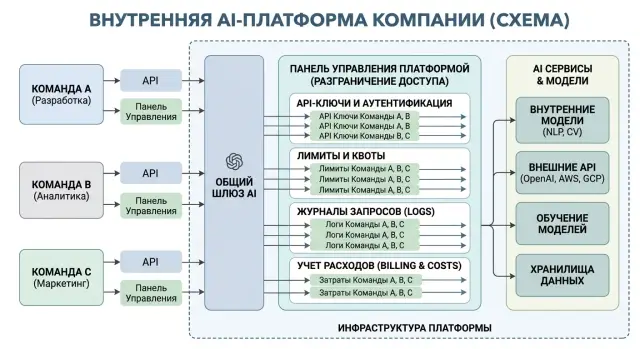
That is why multi-tenancy is not about fancy architecture. It is there so each team has its own keys, its own limits, its own logs, and clear cost tracking.
What should be separated from day one
If everyone shares one API key, order ends at the first argument about spending. It is better to start not with a dashboard, but with basic separation of access and accounting.
Keys should belong not to the platform in general, but to a specific team and a specific service. One key for the web app, another for background processing, a third for tests. Then it becomes immediately clear who created the load, who hit the limit, and which service started sending extra requests.
Even if you have one OpenAI-compatible gateway, you still need a tenant boundary inside it. Otherwise, any successful pilot quickly turns into a common pool where nobody can tell who is spending what or who is responsible for a traffic spike.
At the start, a simple setup is usually enough. Give each team and each service a separate key. Set limits not only for request count, but also for tokens and money. In logs, store tenant_id, project_id, and the environment, such as prod or test. Collect a daily and monthly spending report. Keep roles to a minimum: team owner and platform admin.
It is best to set limits on three levels right away. A request-count limit catches noisy integrations. A token limit protects against overly long prompts and responses. A spending limit keeps the budget under control, because even a small traffic increase on an expensive model can quickly turn into a significant amount.
Logs do not need to be complicated. If a record does not contain tenant_id, project_id, and the environment, any investigation turns into manual digging. The team should see its own calls, the admin should see the full picture, and audit should have a complete history without searching in different places.
Roles are better kept simple too. The team owner issues keys for their team, reviews spending, and changes limits within the budget. The platform admin manages shared rules, models, routing, and access between tenants.
This framework may look boring, but it saves weeks. When the question appears a month later — "why did the bill grow by 38%" — the answer is already in the system, not in a spreadsheet someone filled out at night.
How to choose tenant boundaries
A bad tenant boundary breaks accounting almost immediately. Keys start moving between people, test requests reach production, and the model bill comes as one shared total.
Usually, the best top-level boundary is the team. That is easier than building a tenant around an individual person or the entire company at once. The team is already responsible for its budget, access, deadlines, and support for its AI scenario. If marketing, fraud prevention, and the contact center run through one platform, each team should have its own limits, logs, and set of keys.
Inside the team, add a project. It separates one product from another without extra bureaucracy. One team may have a support chat, RAG search over documents, and an internal assistant for analysts. If you keep all of that in one project, the picture of costs and errors quickly becomes blurred.
A practical setup usually looks like this: team as the top level for accounting and access, project as the product or scenario level, environment as the split between prod, test, and sandbox, and service account as a separate entity for each bot, pipeline, or integration. Keep shared rules only where security is concerned.
Service accounts are almost always required. A bot, ETL pipeline, cron job, or internal agent should not call the LLM API with a developer’s personal key. Otherwise, one person leaving or a routine access rotation can break half the processes, and audit turns into manual investigation.
Prod, test, and sandbox should also be clearly separated. Even if the model is the same, the operating modes are different. Prod needs strict limits, full audit logs, and stable settings. Test can have softer restrictions. Sandbox is where people try new prompts and routes without risking live traffic.
Shared rules should be kept only for security and compliance. For example, PII masking, audit logs, AI content labels, and basic rate limits can be set at the platform level. Everything else is better left to the teams. This approach is especially convenient when you have one shared gateway and need to keep access, logs, and spending separate.
How to roll out the setup step by step
Multi-tenancy is easier to introduce in one gateway than to maintain a bunch of separate proxies, loggers, and scripts. If you already have one OpenAI-compatible entry point for all LLM requests, the rest comes down to discipline: who calls the model, under which key, with which limit, and how it is checked later.
Start with a table, not code. It usually needs five fields: team, project, owner, service, and budget. The owner is not just a formality. When spending rises sharply or a service gets stuck in a retry loop, you immediately know whom to contact.
After that, issue a separate API key for each service, not for the whole department and not for a person. The support chat, internal copilot, and batch document processing should use different keys, even if one team owns them all. That way, you can find the source of a token spike faster and avoid shutting everything down because of one failure.
Next, set two types of limits: daily and monthly. The daily limit catches outages and endless repeated requests. The monthly limit keeps the budget within plan. At the beginning, it is better to set the limits a little below the expected volume and watch for a week where the estimate was too optimistic.
To avoid manual log review later, add team and project tags to every request. A simple scheme like team=search and project=faq-bot is enough. If the gateway supports rate limits and key-level audit logs, that is already enough for proper separation without a pile of extra services.
During the first week, review spending and logs every day. Look not only at the total amount, but also at the details: which service used the most tokens, where the number of errors and retries increased, which requests were sent without a project tag, whether two services are sharing the same key, and whether the service owner matches the person receiving the report.
Usually, the setup breaks not because of architecture, but because of small things. One shared key for two integrations, a missing tag, or a limit that is too high can quickly ruin accounting. If you catch it in the first week, everything runs much more smoothly after that.
Example for three teams
In a bank, one internal AI platform often serves several tasks at once. Suppose it is used by a customer chatbot, fraud prevention, and the contact center. If all three teams use models through one shared key and one shared budget, order disappears quickly: nobody knows who used the limit, whose requests are slowing down, or why the bill increased.
Proper multi-tenancy is simpler than many people expect. The teams use one gateway and one set of SDKs, but the platform sees them as different tenants. Each tenant has its own keys, limits, routing rules, and request history.
For such a bank, the setup can be straightforward. The chatbot gets a separate key, a daily limit, and a predictable set of models. Its job is to stay stable all day. Fraud prevention runs in its own environment with a strict latency threshold. If the model response exceeds the limit, the platform cuts the request or sends it only to fast models. The contact center lives in a separate test tenant and can try new models and prompts without risking the chatbot or fraud prevention production load.
Log separation matters just as much as access separation. A chatbot usually only needs logs for errors, tokens, and response time. Fraud prevention almost always needs a more detailed trail: which route the platform chose, how long each step took, and which limit was triggered. The contact center more often looks at answer quality in new scenarios than just latency.
Finance does not need a complicated end-of-month cleanup. If each request carries tenant_id, cost center, and team name, spending is collected automatically. The report stays clear: this much went to the customer chat, this much to fraud prevention, this much to contact center experiments. If the contact center team runs an expensive model on a thousand conversations in one week, it will not disappear into the bank’s overall bill.
The practical effect is very down to earth. The chatbot does not go down because of someone else’s tests. Fraud prevention does not wait in a shared queue. Finance sees spending by department on the same day, not after manual reconciliation of logs and invoices.
How to calculate costs without manual reconciliation
Manual reconciliation usually breaks in two places: the same request goes through a retry, and some traffic goes to external models while the rest runs on your own GPUs. If there is no common accounting scheme in the journal, finance sees one number and the team sees another.
The base for calculation is simple. Every call should receive tenant_id, project_id, model_id, provider_id, hosting type, number of input and output tokens, request status, and cost. Then spending can be collected from actual usage: separately by team, separately by project, and without manual log review.
What should count as separate line items
A successful response, an error, and a retry should not live in the same bucket. Otherwise, one bad series of requests will inflate the report.
A practical rule is usually this: a successful request goes into usage and cost, an error without a model response goes only into the technical log, a retry gets its own request_id and a link to the original call, and billing is counted only for the event where the provider actually charged you.
This is especially important if the team routes traffic through one gateway. For example, an external call to Anthropic and a request to your own hosted model should be counted by the same scheme, but with different cost sources. For external models, the price comes from provider billing. For your own models, it is calculated using internal rates: GPU, storage, network, and support.
How to show the report
The daily report is needed to find spikes. The weekly report helps reveal which team started spending more after a release. The monthly report is needed for budget planning and billing.
Usually, three views are enough: by team, by project, and by model. If spending increases, the report should immediately answer two questions: who spent it, and on what exactly.
The last step is reconciliation with actual billing. Once a day or once a month, compare the internal report with the provider invoice and your own hosting costs. If the difference is above the agreed threshold, look for the reason right away: duplicates, wrong prices, missed retries, or cache tokens that your system counted differently from the provider.
Which logs you actually need
In multi-tenancy, a log is not for archives, but for day-to-day team work. If a record does not include tenant_id and project_id, after a few days it is already hard to tell who burned the tokens, which service caused the latency spike, and where to look for the error.
A good log answers three simple questions: what was sent, who sent it, and how much it cost in time and tokens. For that, each record should include request_id, model, tenant_id, and project_id. That is already enough to connect one model call to a specific team, product, and incident.
What should be in each record
The minimum field set is small: request_id to find one request across the whole chain, tenant_id and project_id to separate teams and products, model to understand which model replied, response time and token count to control latency and spending, and also the key identifier, the key owner, and the person who used it.
The last point is often skipped. One developer creates a key for an integration, another puts it into a service, and a third runs tests at night. If the log stores only the key itself or its hash, too little is visible. If it stores the key owner and the actual user, the picture becomes much clearer.
Also pay attention to what ends up in the record. Raw prompt text, email addresses, phone numbers, national ID numbers, or card numbers should not be stored in logs as-is. First mask PII, then save the cleaned record. For companies in Kazakhstan, this is normal practice, especially if security or legal teams later review the logs.
Another common problem appears when prod and test are mixed in one stream. Test runs create noise, distort latency data, and make it harder to calculate spending for live services. Separate these logs right away, at least by using different indexes or an explicit environment field.
If you have one OpenAI-compatible gateway, this log set is usually enough for almost all disputed cases without an extra zoo of services. An engineer finds the request_id, sees the model, tenant, project, tokens, latency, and key owner. That is enough to quickly understand what happened and whom to contact.
Where people most often make mistakes
The first mistake is almost always the same: a company gives one API key to all teams. At first, it feels convenient. Then nobody understands who burned the budget overnight, whose prompt caused the limit to drop, or where to look for a request with personal data.
One shared key breaks three things at once: accounting, access, and incident analysis. If the support team tests a new scenario while the product team is running batch jobs, everything gets mixed up in the logs. After a week, the argument is no longer about architecture, but about who is to blame for the bill.
The second common mistake is one shared limit for the whole company without quotas by team. Then the most active team uses up the entire daily or monthly allowance, and everyone else gets 429s at the worst possible moment. For an internal AI platform, this is especially painful: an employee bot can stop working because of experiments in another department.
No less trouble comes from missing simple tags. If requests are not marked by environment and project, dev and prod quickly turn into one pile. Then test traffic ends up in production reports, and pilot costs look like production costs. A basic set is usually enough: tenant, team, project, environment, cost_center.
Another typical mistake is counting only successful model responses. The picture looks neat, but it is false. Costs and load need to show everything: errors, timeouts, canceled requests, rate-limit hits, and refusals due to security policy. Otherwise, the team sees one number in the dashboard and gets a different one in the invoice.
There is also a quieter problem: test keys are given too many permissions. A developer takes a key for a staging environment, and that same key can call an expensive model, read shared logs, or bypass project limits. That is how accidental spending and unnecessary access appear.
If you reduce everything to the minimum, the rules are simple: a separate key for each team and service, quotas by team, mandatory project and environment tags, accounting for all requests, not just successful ones, and restricted permissions for test keys.
Quick check before launch
Before launch, it helps to go through a few simple points. If even one does not line up, in a few days there will be arguments about who set the limit, whose service sent requests at night, and why the numbers do not match the report.
Each team should have an owner. Not a chat group, but a specific person who approves access, limits, and new services. Each service needs its own API key. If the mobile backend, batch job, and internal bot all use the same key, you lose control that very day.
Each key should have its own limit, separately for prod, staging, and dev. Otherwise, the test environment can easily eat the production budget. Logs should include at least three tags: team, project, and environment. Without them, you only see a stream of requests, but not who they belong to.
The spending report should match external billing. If you use a shared gateway, the internal breakdown by team should match the monthly invoice and the provider numbers.
There is also a simple test. Ask three teams to send one request each from dev and prod, then check whether separate log records were created, whether costs were charged to the right project, and whether the limit triggered where you expected it to.
If even one item fails, do not open shared access. One day of delay before launch is almost always cheaper than a week of manual reconciliation of logs, limits, and bills.
What to do next
Do not roll the scheme out to the whole company all at once. It is better to start with two or three teams that have different scenarios, such as internal search, support, and analytics. That way, you will see more quickly where accounting breaks and you will not drown in approvals.
The first thing that needs order is not the reports, but access. If several teams share the same token and the same tags, you will not understand who is spending the budget, who hit the limit, and where to look for the problem in the logs. Start with separate API keys, one clear tenant identifier, and mandatory tags for every request.
Then move in a simple sequence. First, give each team its own key and record who is responsible for it. Then add tags without which a request cannot pass: tenant_id, project, environment, budget owner. After that, turn on team-based limits so one mistake does not consume the shared budget. Then collect spending reports at least by day and by model. At the end, check that the logs let you find a specific request without manual reconciliation across five systems.
If you do not have that, pretty dashboards will not help. First API key separation, then team limits, then cost tracking.
Also leave room for growth. New teams usually appear sooner than expected. New models do too. So do not tie the tenant to one provider, one model, or one billing method. The tenant should outlive the current stack.
If you need one OpenAI-compatible gateway with audit logs, key-level rate limits, data storage inside Kazakhstan, and monthly B2B invoicing in tenge, AI Router fits naturally into this setup. It does not replace tenant separation, but it removes some of the surrounding pieces you would otherwise have to build yourself.
A good result after a few weeks looks simple: on any day, you can say which team spent how much, what its limits are, and which request caused the failure.
Frequently asked questions
When does one shared API key stop making sense?
A shared key only works for a short pilot with one team and no production load. As soon as a second team, a separate budget, or overnight testing appears, introduce tenants and separate keys for each service.
What should be separated on day one?
At the start, separate teams, projects, and environments. Issue each service its own key, assign an owner, and set limits for requests, tokens, and money.
How do you choose a tenant boundary?
Usually the top level is the team, below that the project, then the environment prod, test, or sandbox, and then the service account. This setup avoids unnecessary bureaucracy and gives you clear tracking by product and service.
Do you need a separate key for each developer?
No, use service keys for services, not personal ones. A personal key can be useful for short-term debugging, but production and background jobs should run under separate accounts.
What limits should you set at the beginning?
Set two horizons right away: daily and monthly. The daily limit quickly catches retry loops and noisy tests, while the monthly limit keeps the budget within plan.
What should you log for each request?
At minimum, use tenant_id, project_id, environment, request_id, the model, token count, response time, and the key identifier. With that set, you can quickly find the cause of a spike, calculate spend, and separate test from prod.
How do you account for errors and retries without inflating costs?
Do not mix them into one cost line. Send a successful call to usage and cost, store an error without a model response in the technical log, and tie retries to the original request_id, charging only where the provider actually billed you.
Why split `prod`, `test`, and `sandbox` separately?
Separate the environments clearly, even if the model is the same. In prod, keep strict limits and full audit logging, in test use a softer mode, and leave sandbox for new prompts and routes without risking production traffic.
How do you test the setup before launch?
Start with a simple check. Send one request from two or three teams in dev and prod, then verify the logs, spending, tags, and limit enforcement for each service.
Can you really do multi-tenancy on one OpenAI-compatible gateway?
Yes, if the gateway can work with different keys, limits, audit logs, and request-level tags. One entry point simplifies integration, but order is still maintained by tenants, service accounts, and proper accounting.