Multi-provider LLM access without rewriting the SDK
Multi-provider LLM access: how to build a single endpoint, shared authentication, and fallback without changing SDKs or adding extra logic to your code.
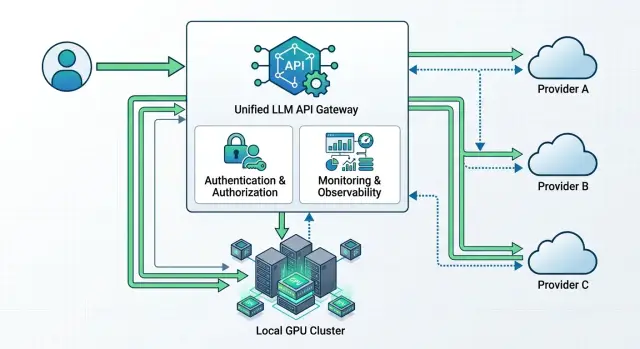
Where multi-provider setups break down
Problems do not start when you pick a model. They start when you integrate it. As long as the team works with one provider, being tightly tied to a single base_url seems harmless. Then a second provider appears, or a backup route, or a locally hosted model, and it becomes obvious that addresses, headers, model names, and error-handling rules are scattered across different services.
Most often, the team locks the code to one API too early. SDKs are initialized directly inside business logic, base_url values are hardcoded into each service config, and the response format is treated as a universal standard. In the end, even a simple change of the entry point requires edits in several repositories, new environment variables, and a long round of checks. For production, that is a bad trade.
The next problem is authentication. Every provider has its own keys, limits, and rules. One key gets burned quickly by a batch job, and suddenly the support chat fails. One provider counts limits by tokens, another by requests per minute, and a third cuts traffic by IP. If there is no common access layer, nobody sees the full picture. Logs are scattered, and the cause of the failure looks random.
Then the network errors start. One provider holds the connection too long. Another returns 429 quickly. A third sends 5xx responses in bursts for a couple of minutes. If the application handles timeouts, retries, and fallback differently, strange things begin to happen: a request hangs, the user clicks again, the system sends a duplicate, and costs rise without any benefit.
Against this background, teams almost always write the same wrapper again and again. Someone adds retry logic, someone masks PII, someone tracks cost, someone keeps audit logs. The logic is similar everywhere, but the details drift apart. After a couple of months, multi-provider LLM access turns into a set of incompatible rules instead of a manageable architecture.
A good example is a support chat with two providers. The primary route is fast, and the backup is needed only for 429 and 5xx. On paper, it is simple. In practice, one service only knows one endpoint, another uses a different key format, and a third cannot switch without a new release. During an incident, that shows up immediately: requests hang, limits are exhausted, and every team fixes only its own part.
What a single gateway should do
A single gateway removes the chaos that appears when one service talks to OpenAI, another to Anthropic, and a third to a local model through its own client. Internal applications send requests to one LLM endpoint and receive one response format. The code above becomes much simpler.
Usually, such a gateway is made OpenAI-compatible. Then the team changes only base_url and the token, while the SDK, prompts, and most of the integration stay the same. That is the shortest path to a multi-provider setup: fewer changes, fewer surprises after release.
A proper gateway does several things at once. It accepts a single request format for chat, streaming, and tools, normalizes provider differences into one schema, chooses a route based on a set of rules, collects logs on latency, failures, and spending, and applies timeouts, retries, and rate limits. If needed, PII masking and audit logging can live in the same place.
The center of such a setup is the routing table. It usually stores the model alias, provider list, selection order, backup route, and budget limits. For example, the support-chat route first goes to a stronger model, and if latency rises or a 429 error appears, it quickly falls back to the second option without any app changes.
A common request format solves many small but annoying issues. One provider names a field one way, another uses a different name, and a third handles streaming or tools in its own way. The gateway smooths out those differences so the team does not have to remember each API’s rules separately.
Without logs, this layer is almost useless. You need data on latency, error rates, tokens, and cost for each route. Then the team can quickly see that the entire service is not slow, only a specific provider or a particular model is.
Timeouts and retries are also better when they are set by scenario. A support chat usually waits 2 to 4 seconds, while batch processing can wait longer. It makes sense to retry network errors, 429, and some 5xx responses. Requests with tools that trigger external actions are better not duplicated unless there is protection against repeated execution.
In practice, this layer is often moved into a separate API gateway. This is how AI Router works too: the application sees one OpenAI-compatible endpoint, while routing, usage tracking, and limits are handled in one place.
How to build the setup without rewriting the SDK
A multi-provider setup only runs smoothly when the application sees the same request contract every time. If one service sends OpenAI Chat Completions today and another talks to a different provider in its own format, fallback quickly turns into a pile of workarounds.
Start with one internal contract. In practice, the easiest choice is an OpenAI-compatible format: the same request fields, the same response schema, the same error handling. Then the team does not have to rewrite the client for every new provider or fix the parser every time the model changes.
After that, the order is simple:
- Choose one endpoint and one request format for all services. The application should know only this interface.
- Move
base_urland the API token out of the code into config or environment variables. Then you can change the route without a release. - Put a routing layer in front of the providers. It decides where to send the request based on the model, price, latency, data storage requirements, or availability.
- Set short timeouts and clear retry rules. One stuck provider should not hold a user request for 30 seconds.
- Run a test where the SDK, prompts, and response parsing stay the same. If you had to change the client code, the setup is not ready yet.
A good rule is this: the application does not choose the provider directly. The gateway does. The application sends the same request and receives the same response type. If the main provider does not answer within 2 to 3 seconds, the gateway moves traffic to the backup route according to predefined rules.
That is why base_url is better kept in one place. For the team, it is a small detail, but it saves hours. If the company already uses the OpenAI SDK, it often only needs to change the API address and token to an OpenAI-compatible gateway like AI Router with the api.airouter.kz endpoint, while keeping the calls and prompts unchanged.
Test this on a small scenario: one chat request, one SDK, and two providers behind the gateway. If the responses arrive in the same schema, timeouts behave predictably, and the application does not notice the route change, the foundation is built correctly.
How to set up shared authentication
In a multi-provider setup, the application should not know the secret for every provider. It needs one internal key or service token, which it uses only to talk to your gateway. The gateway then decides which external key to use for OpenAI, Anthropic, Google, or another model.
That makes support much easier. Developers keep one authorization scheme in the code instead of a set of different tokens, headers, and refresh rules. If you switch providers tomorrow or add a backup route, you do not have to touch the application.
Store external secrets separately from the code. A secret manager, KMS, or at least a protected environment-variable store with role-based access will do. Secrets should not live in the repository, in CI logs, or in a config that gets copied to every server without checks.
Separate access by environment and by team. Production, staging, and dev should have different internal keys and different limits. If the analytics team is testing prompts, it does not need the same access as the service that answers customers in production.
A practical setup looks like this: the service gets one internal API key, the gateway uses it to identify the sender, injects the external secret for the right provider, and sets limits and permissions at the level of the internal key. The provider keys themselves live outside the application.
Secret rotation should also happen without code changes. You update the secret in the store, the gateway picks up the new version, and the service keeps sending requests to the same unified endpoint. This is especially useful when a provider asks you to reissue a key quickly after an incident or when part of the traffic needs to move to another account.
Do not save on audit logs. The log should answer four questions: who sent the request, where it went, which internal key was used, and how it ended. In AI Router, this approach is already supported at the key level: there are audit logs and rate limits, so a bank, a SaaS team, or an internal platform does not have to piece together the picture from several vendor dashboards.
How to set up fallback without surprises
Fallback breaks not when a failure happens, but earlier, when the team treats any error as a reason to immediately switch to another provider. That is not the right approach. Every route needs a clear order: primary provider and backup. If a chat runs on one model across two providers, define that in advance and do not change the route on the fly without a reason.
First, divide errors by type. A general HTTP status alone does not say much. 429 usually means overload or a limit, a timeout means a network issue or latency, and 5xx points to a provider-side failure. But 401, 403, a request-format error, or a policy block should not trigger fallback. If the request itself is invalid, the second provider will usually return the same issue.
For most scenarios, simple rules are enough:
- timeout above the threshold - one retry, then switch to the backup route
429and5xx- fast switch to the backup route- authentication, policy, and validation errors - do not switch, return a clear error to the client
- empty or broken response - treat it as a provider failure and enable the backup route
After switching, the client should not notice that the response came from somewhere else. For this, the gateway brings responses into one schema: the same fields, a unified usage format, one error structure, and the same role and message names. Otherwise, the old SDK may still work on paper, but the application will start breaking on parsing, token counting, or tool call handling.
It is also useful to set latency thresholds. If the primary provider answers in 2 seconds and the backup in 12, switching blindly may hurt the product more than a short pause. In practice, simple conditions work better: switch after two failures in a row over a short interval or after a clear rise in latency above your normal range.
Then test the setup under load. One manual request with the provider turned off is not enough. You need a test where some requests get a timeout, some get 429, and some get broken JSON. If the application still receives the same response format and does not lose the session, fallback is configured correctly.
Example: a support chat with two providers
A support chat is easiest to build when the application itself knows only one endpoint. The web chat, mobile app, and CRM all send requests to one place, and the gateway then chooses the model and provider according to simple rules. For the team, that is what proper multi-provider LLM access looks like: one API instead of a set of separate integrations.
Imagine a delivery service. Most requests are boring, but high-volume: order status, time changes, refunds, and address updates. There is no reason to send those to an expensive model. A fast model from the first provider handles them, responding in 1 to 2 seconds and keeping the cost low for the usual traffic.
If the customer writes a longer message, asks for help with a disputed case, or the first provider starts slowing down, the request goes to the second one. The application does not notice. It still calls the same OpenAI-compatible endpoint, and the fallback logic lives inside the gateway.
The route usually looks predictable: short FAQ and status questions go to the fast model, timeouts and 5xx errors immediately move the request to the backup provider, and traffic spikes during a promotion partly go to the second channel. If the message contains an IIN, phone number, address, or contract number, that text is better sent to a locally hosted model inside your own boundary.
That last point often solves more problems than it seems. When an operator asks to check customer data, there is no reason to send such text to an external service unless you truly need to. If the company needs data residency in Kazakhstan, it is wiser to keep sensitive requests inside the country. AI Router has 20+ open-weight models on its own GPU infrastructure for that, and they can be used through the same OpenAI-compatible API.
After launch, the support team and engineers stop guessing and start looking at facts. In the log for every request, you can see which provider answered, which model was used, how long the response took, and how much it cost. After a week, one simple thing becomes obvious: routine questions can stay on a fast, inexpensive model, and the backup provider is needed not for every request, only for failures and overload.
Mistakes that most often break the setup
A multi-provider setup usually breaks not because of the models themselves, but because of small routing decisions. From the outside, it looks simple: one endpoint, one SDK, one token. In practice, the failure usually hides in switching rules, access rights, and logs.
The first common mistake is switching providers after any 429. That response does not always mean the provider is unavailable. Sometimes you have hit the limit for a specific key, model, or request type. If you blindly forward traffic elsewhere, the system starts bouncing between providers and latency grows. It is better to separate the causes: where a rate limit was hit, where the quota ran out, and where the provider really failed.
The second mistake is keeping different teams on one token. Then the support bot, the internal copilot, and the test environment share one limit and one history. After that, one team hits 429, and another team seems to be at fault. The normal setup is simpler: separate keys, separate limits, separate logs.
A lot of trouble also comes from comparing models only by name. The same model from different providers can differ in version, context length, streaming quality, tool call support, and even error format. If you test only a short text request, the setup looks fine. In production, the first scenario with functions or a long conversation breaks.
The minimum worth testing is a normal non-streaming answer, token streaming, tool calls with a real schema, and a long request with your typical context. That is already enough to catch most unpleasant mismatches before release.
Another mistake looks boring but hurts more than many others: the log does not record the actual route of the request. Then nobody can answer which provider processed the request, why fallback was triggered, how long the response took, or where the price increased. Logs should include at least the provider, model, reason for route selection, status code, and latency. Without that, fallback turns into guessing.
Checks before launch
Before production, it is better to catch boring failures than to find them later in night-time logs. For a multi-provider setup, it is usually not one big error, but several small ones: a different endpoint in staging, a broken stream, extra latency during switching, or unclear costs.
If you have an OpenAI-compatible gateway, it helps to keep one request format for all environments. What should change are the secrets, limits, and list of available models, not the client code and not base_url in every service.
A quick check takes about 15 minutes. Run the same request through dev, stage, and prod. Compare not only the response text, but also headers, timeouts, and error codes. Check three modes separately: normal response, stream, and tools calls. Very often, the basic chat works, but the stream breaks at the proxy or tools lose the argument schema.
After that, simulate a provider outage and measure the switch time. If your limit for a user request is 3 seconds, switching to the backup should not consume almost all of that budget. Then open the logs and make sure they show the model, provider, environment, request route, and final status. Otherwise, incident analysis will again turn into guesswork.
At the end, look at the spending report. It should separate services, teams, and environments so that test traffic does not mix with production traffic. If you use both external providers and locally hosted models, it is helpful to see both in the same billing view and in the same route history.
A good short test is simple. One service sends 20 to 30 identical requests, then you manually turn off the primary provider and check what changes: response time, data format, error rate, and cost. Users do not care which provider answered. They care that the chat did not hang, the stream did not break, and the tool did not run twice.
What to do next
Do not move all LLM scenarios to the new setup at once. Take one service with a clear workload, such as the support chat, and connect two providers through one endpoint. That way the team quickly sees where timeouts, limits, and response formats break.
Before splitting traffic, collect the baseline. Measure average latency and p95, calculate the cost per request and per 1,000 tokens based on real usage, save the error rate by type, and separately note which requests require strict data storage and which can be sent to an external environment. It is better to collect these numbers for at least a few days. Otherwise, it will be hard to tell whether things improved or whether the workload profile simply changed.
After a week, compare two things: where users wait longer and where you pay more for the same task. If one model writes a little better but responds twice as slowly, that already affects the product, not just the engineers’ preferences.
Also check the rules for data and logs. Where prompts and responses are stored, who can see the audit logs, how PII is masked, how long logs are kept, and whether external hosting is allowed for each scenario. For a bank, telecom, retail business, or government sector, this often affects the architecture more than model price.
If you work in Kazakhstan, it is convenient to use a gateway that already covers local requirements. On airouter.kz, AI Router offers one OpenAI-compatible API, routing between external providers and 20+ locally hosted open-weight models, data storage inside the country, PII masking, audit logs, and rate limits at the key level. For B2B teams, it also simplifies billing: invoicing is monthly in tenge, without API markup.
Then the order is simple: first send 5% of requests through the new layer, then move one class of tasks over completely, and only after that add a third provider or more advanced routing rules. It is a boring approach, but it is usually the one that saves weeks of debugging and unnecessary bills.
Frequently asked questions
Do we need to rewrite the code if we already use the OpenAI SDK?
Usually not. If the gateway supports an OpenAI-compatible format, you most often change only base_url and the token, while keeping the SDK calls and prompts as they are.
Then test streaming, tools, and error handling. That is where differences usually show up.
What actually changes in the integration when we move to a single gateway?
The service should know one API address and one internal token. Move base_url and secrets into config, and let the gateway handle provider selection.
That way you can change the route without a release and without touching several repositories.
What API format is best to use as the common one for all providers?
Use one internal contract for all services. The easiest option is an OpenAI-compatible schema, because it already works with familiar SDKs and a clear response format.
Then keep the request fields, error structure, and usage consistent. Otherwise, fallback will break quickly at the parsing stage.
How do we set up fallback without creating duplicate requests?
Set a short timeout, one retry for network errors, and a fast switch to the backup route for 429 and some 5xx responses. For tools calls, add protection against repeated execution, or you may trigger the same action twice.
The simple rule is this: the client sends one request, and the gateway decides when and where to switch.
When should we avoid switching to the backup provider right away?
Do not switch routes on 401, 403, validation errors, or policy blocks. If the request itself is wrong or access is broken, the second provider will usually return the same problem.
Fallback makes sense for timeouts, 429, some 5xx errors, and broken responses from the provider.
How should provider tokens be stored and changed properly?
The application should keep only one internal key for accessing the gateway. Store external provider secrets in a secret manager or another protected store, and do not put them in code or CI logs.
Rotate them on the gateway side too. Then the service keeps working without changes and without a new release.
How do we separate access between prod, test, and different teams?
Separate keys by environment and by service. Prod, stage, and dev should have different limits and separate logs so that test traffic does not interfere with production.
The same approach should apply to teams. The support chat, the internal copilot, and analytics experiments should not share one common token.
What logs do we need to understand the cause of a failure and cost growth later?
Log who sent the request, which route the gateway chose, which provider and model answered, how long the response took, and how it ended. That is enough to investigate most incidents.
If you also add tokens and cost, the team can quickly see where prices are rising and where a specific route is slowing down.
When does it make sense to send requests to a local model instead of an external service?
A local model is useful where the text contains sensitive data or the rules require data to stay within the country. For a support chat, that is often an IIN, phone number, address, contract number, and similar fields.
In this setup, a shared gateway is especially convenient: the application sends the same request, and the gateway routes sensitive traffic to the internal environment.
Where is the best place to start if we do not want to risk the whole production system right away?
Start with one scenario that has a clear workload, such as the support chat. Send a small share of traffic through the gateway, compare latency, errors, and cost, and then expand the setup.
If you need a ready-made layer for Kazakhstan, AI Router already gives you one compatible API, routing, audit logs, PII masking, and local models without changing the SDK.