Moderating Outgoing Replies: Where to Place Filters and a Second Model
Outgoing response moderation helps prevent risky text from slipping into chat, email, and CRM. We will look at where to place rules, filters, and a second model call.
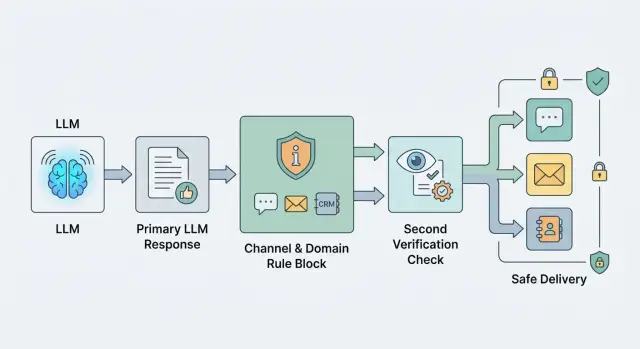
Why one general filter is not enough
The same text changes meaning depending on where a person sees it. In chat, a questionable reply can be clarified quickly. In email, the same text already looks like an official company position. In a CRM record, it stays in history and later affects another employee’s work.
Because of that, the risk changes too. A mistake in e-commerce support usually just annoys the customer and adds one more message. A mistake in banking, insurance, or healthcare can end with a complaint, an internal review, or direct harm to a person.
A general filter usually looks at a reply as one type of text. It does not care whether the message goes to chat, email, or an internal system. That is convenient at the start, but it becomes a problem later. Such a filter cuts useful phrases where the risk is low and lets dangerous wording through where the cost of a mistake is higher.
Promises and recommendations are a good example. In chat, the phrase “we will definitely solve this today” may just be an operator’s bad wording. In email, it already sounds like a commitment. In a banking or medical scenario, that kind of confidence should not go to the customer at all without checking the facts first.
There is another problem too. A general filter often catches only the obvious things: toxicity, clear policy violations, personal data leaks. But real risk usually hides in domain details. For a bank, that can be product advice without the right disclaimer. For a clinic, a hint of a diagnosis. For CRM, a note with an opinion about the customer instead of a plain fact.
One threshold and one rule set almost always create bias in both directions. The team gets false positives in safe channels, gets annoyed by moderation, and starts working around it. Meanwhile risky replies still slip through where stricter checks are needed.
If your system runs through a single LLM API gateway, it is especially tempting to place one check at the end. That does simplify integration. But the working setup is usually different: the channel defines the response shape, and the domain defines the risk level and depth of checking.
Where to place filters in the response chain
One filter at the very end is almost always too late. By that point, the reply has already gone through templates, data insertion, text shortening, and formatting for the channel. Risk grows at every step, so checks should follow the chain instead of sitting in one place.
Right after generation, check the model draft. That is the easiest place to catch dangerous advice, personal data leaks, a toxic tone, or instructions being bypassed. If the system sees a problem early, it can regenerate the reply, simplify it, or hand the conversation to an agent.
Special attention is needed for fields the customer will see without editing. That usually includes the email subject, short push text, SMS, signature, CTA button, or a ready JSON payload for an external system. These text fragments are often never reviewed manually, so the rules for them should be stricter than for the internal draft.
A practical flow usually looks like this: first the system checks the raw model output right after generation, then it separately checks the final fields that go out as-is, and before sending to the channel it checks the assembled message as a whole. If a reply is blocked, the system should save the reason, the rule ID, and the stage where it happened.
A final check right before sending is needed even when the draft was already clean. The reason is simple: later the reply may receive the customer’s name, an order number, CRM data, or a fragment from the knowledge base. The model text itself was safe, but the final email or chat message is no longer safe.
A simple example is bank support. The model generated a neutral reply, but the template later added the full card number to the email. An early filter would not have seen that, because the number was not there yet. The last check before the channel catches the problem and stops delivery.
Logs are not for reporting. They are for tuning the system. If the team sees that one rule often blocks email subjects while another only triggers in chat, they can fix a specific part instead of rewriting the whole policy.
How to split rules by channel
The same reply should not be checked the same way for every channel. A short chat message, a customer email, and a CRM note live in different contexts, so their risk is different too. If you keep one shared filter, it will either miss things or start cutting useful replies.
For chat, three things matter most: tone, length, and extra detail. The reply should stay calm, without sharp wording and without long explanations the customer never asked for. If the bot starts listing internal review steps, system limits, or details from other cases, that reply should usually be stopped and shortened.
Email rules are stricter. People read emails longer, forward them inside the company, and often treat them as a promise from the business. So do not only check for toxicity or data leaks; also check wording about timelines, guarantees, discounts, compensation, and obligations. The phrase “we will definitely solve this today” may pass almost unnoticed in chat, but in email it can quickly become a problem.
CRM has a different job. It does not need a polished customer-facing answer, but it must not keep internal comments, extra personal data, or an employee’s guess. If the model writes “the customer seems nervous” or copies the full document number where the last four digits would be enough, that text is better cleaned before saving.
It helps to keep the rules in one matrix by channel. For chat, set a length limit, acceptable tone, and a ban on unnecessary detail. For email, add checks for promises, deadlines, and legally sensitive phrases. For CRM, enable removal of internal comments and minimization of personal data. And decide right away what the system can fix on its own and what must go to manual review.
A simple example: a bank support bot answers a customer about a disputed transaction. In chat, it keeps it short, confirms the request was received, and does not name an exact refund deadline. In email, the same meaning goes through a separate check that removes any promise about the decision date. In CRM, only a compact internal note is saved, without extra customer details.
It is better to keep the rule matrix in one place instead of stitching it into different services. Then the team can see why chat cuts one thing, email another, and CRM a third. If traffic already goes through a single gateway, it is convenient to keep that matrix next to routing, logs, and moderation settings.
How to split rules by domain
The same reply can be safe for a SaaS product and unacceptable for a bank or clinic. That is why outgoing reply moderation works better not as one general filter, but as a set of domain policies. Otherwise the model either becomes too dry everywhere or lets through things that should never be sent in sensitive scenarios.
To start, create separate rules for at least four domains: banking, healthcare, retail, and SaaS. Do not mix them into one long list. When the rules are separated, the team understands more quickly why a reply passed or got blocked.
In banking, the filter should more strictly check promises about rates, deadlines, penalties, limits, and contract terms. In healthcare, it should immediately block advice that sounds like a diagnosis, a treatment plan, or a replacement for a doctor. In retail, the main concerns are usually price, availability, returns, and delivery terms. In SaaS, the risk is often lower, so you can allow more technical detail if the reply is not promising something the product does not do.
A useful rule here is simple: do not forbid the topic, forbid the type of action. The phrase “go to court and demand this amount” already sounds like legal advice, even if the conversation started with e-commerce support. The phrase “increase the dosage by double” is not acceptable in any medical scenario, even if the user insists.
Check not only words, but the structure of the reply. Mistakes are often hidden not in terms, but in combinations of numbers and promises. If the model writes an amount, deadline, percentage, penalty, or date, the validator should understand what those values refer to. Otherwise a reply like “0% penalty, 90 days” can pass as neutral text, even though it is already almost a contractual term.
Domain rules are easiest to define along four dimensions: which statements are fully forbidden, which numbers and deadlines must be checked separately, how much detail is allowed, and when the reply should bring a human into the conversation instead of giving a direct answer.
Detail level should also be divided by domain. For banking, give a general procedure without exact promises if the system has not confirmed the conditions from the customer’s data. For healthcare, stick to reference information and advise the person to see a doctor. For retail, you can answer more precisely if stock and return rules are current. For SaaS, step-by-step instructions, API examples, and error explanations are usually fine.
If you build an LLM flow through one gateway, it helps to keep domain policies next to routing and logs. Then the team can see which model generated the reply, which rule triggered, and at which step the text became risky.
When a second model is needed
A second call is worth it where a mistake costs more than an extra 300–800 ms of latency and one more request. Usually that means customer replies in banking, healthcare, insurance, government services, and B2B support, where one sentence can give bad advice, reveal personal data, or break internal rules. For a simple FAQ in chat, this layer is often unnecessary. For an email with contract terms, it is not.
In many teams, the second model is added too early and asked to “check everything.” Then it starts arguing about meaning, catching noise, and slowing the flow. It is much better to give it a narrow task: find a specific risk and return a label. For example: “PII”, “medical advice”, “discount promise outside policy”, “manual review needed”. Sometimes it is useful to return a short reason and the fragment of text that triggered the match.
The worst setup is when the second model is expected to rewrite the reply “the right way” without a template. In that mode, it can easily change the meaning, invent disclaimers, and damage the tone. If you need an automatic fixer, give it hard limits: what it can change, what it cannot change, which template is required, and which fields must stay untouched.
A second model is usually justified in four cases: when the reply goes to a high-risk channel, when the domain is sensitive, when the main model struggles to follow strict rules in long replies, and when you already have incident history that a simple rule set does not catch.
Borderline cases are better not sent into full automation. If the model is unsure, let it flag the case for a human instead of blocking the whole flow. In practice, it is often enough to send only 1–5% of replies to manual review, not every second one.
If traffic already goes through a gateway, this step is easy to move into a separate call: one model writes the reply, the other checks it against a narrow list of risks. Then you can change the checking model by price, speed, or domain without touching the main application logic.
How to build the moderation flow step by step
The setup works when it looks like a decision table, not one big filter. That is especially clear for outgoing replies: the same text can be allowed in support chat but held back before being sent by email.
Start with real risks, not abstract categories. Usually 5–10 items are enough: personal data leaks, dangerous advice, promises made on behalf of the company, toxic tone, wrong amounts, prohibited content, and legally risky wording.
Then define the context for each risk. Where is it more dangerous: chat, email, voice, or a CRM note? In which domain is it critical: finance, healthcare, returns, HR, public services? A mistake in a friendly chat about order status and a mistake in an email about a credit limit are not the same level of risk.
After that, assign a system action. Each rule should have one clear outcome: allow the reply, rewrite a fragment, hide part of the text, or send it to manual review. If a rule has two or three outcomes without a clear priority, the team will start arguing in production.
A small matrix might look like this:
- PII in support chat - mask and send
- PII in email - block and hand off to an agent
- Financial advice without the required disclaimer - rewrite
- Confident answer when the model confidence is low - manual review
Then run the flow on old dialogs and emails. Do not use only good examples. You need borderline cases where the model answered sharply, mixed up the return policy, or inserted extra customer details. That kind of set quickly shows which rules stay silent and which ones cut too much.
Raise the threshold only after reviewing false positives. Otherwise you are just making the filter softer without understanding what it is actually catching. It helps to look separately at three groups: what is blocked by mistake, what passes by mistake, and what the second model rewrites without adding value.
If replies go through a single gateway, common checks are best kept in one place: PII masking, audit logs, and basic limits. But channel and domain rules should still be stored separately. That way chat does not inherit email restrictions, and banking scenarios do not interfere with retail.
Example of different risk in chat and email
The same reply can be acceptable in chat and dangerous in email. In chat, a bank customer expects a fast answer, and the agent or bot often replies within seconds. An email lives longer, gets forwarded, and later is reviewed as an official text.
Imagine this request: the customer asks why the bank rejected the application. The base model tries to be helpful and writes politely, but adds a phrase like “the system may have seen high credit risk based on internal scoring.” Formally, that sounds careful. In practice, it is a guess about the reason for the rejection.
That kind of reply should be removed at the domain level, not only by a general filter. A domain filter for banking scenarios should remove any assumptions about scoring, internal rules, anti-fraud systems, and limits if the system did not get that from a trusted source. Otherwise the model will quickly start inventing plausible explanations.
Then the channel filter kicks in. For chat, it shortens the reply to two brief sentences without extra detail. For email, you can keep a little more text: a general rejection statement, a safe explanation that internal parameters are not disclosed, and a clear next step for the customer.
The flow here is simple: the base model drafts the reply, the domain filter removes the guess about scoring, the channel filter compresses the text for chat or email, and the second verification model looks for promises the bank should not make.
The second model is not there for decoration. It catches phrases like “after we clarify the data, we will reconsider the decision” or “the rejection can be quickly canceled after review.” Even if the first model did not invent a reason, it may still accidentally promise an action the support team is not allowed to make.
In the end, chat gets a short response: the bank does not disclose internal application review parameters, but the customer can contact support for next steps. In email, the text can be a little longer, but without guesses and without promising a reconsideration.
If you build this moderation through a gateway with audit logs, it helps to save the reason for every edit. The log should say things directly: “removed an unverified rejection reason”, “reply shortened for chat”, “promise of reconsideration removed”. Then the team can more easily see where the model makes mistakes most often and which rule needs to change.
Where teams usually make mistakes
Most teams break moderation not on complex cases, but on basic setup. They take one universal checking prompt and send everything through it: chat, email, customer portal, internal tools. For outgoing replies, that is a bad idea, because the risk depends on where the person will see the text and what they will do next.
If different products and channels go through one API gateway, the mistake quickly becomes expensive. In chat, you can ask the model to clarify the answer after 10 seconds. A customer email lives longer, gets forwarded, and the dispute is later handled by a lawyer or quality team.
The most common misses are pretty ordinary. The team uses the same checking prompt for every channel, even though in a live chat a soft or incomplete answer asking for more details may be acceptable, while in email the same text looks like a promise. Or they mix security, tone, business bans, legal requirements, and editing rules into one list. Then the checking model confuses priorities and blocks a style issue as if it were a serious risk.
Another typical mistake is to block the whole reply when the problem is only one line. If the model accidentally exposed a piece of PII or added an extra promise-like phrase, it is usually better to teach the system to mask, remove, or rewrite that specific fragment. Full blocking is needed only when the whole reply is built on the wrong assumption.
The opposite imbalance happens too. The team relies too much on the model prompt itself and forgets about the final check after templates and data insertion. The draft passes moderation, but the risk appears at the last step, when the email gets the customer’s name, contract number, or wording that sounds like an obligation.
And one more common failure: the rules live in the heads of a few people instead of in the system configuration. While traffic is small, that is barely noticeable. As soon as there are more channels and teams, chaos starts: one service cuts deadlines, another lets them through, and a third does not even write down the reason for the block.
Short checklist before launch
Before the first release, check not only reply quality but also the last barrier before sending. Teams often place moderation next to the model and stop there. That is too early: an email template, a knowledge base insert, or post-processing can add a new risk after the first check.
Before launch, a short checklist is useful. It should be easy to go through in one call and just as easy to verify in logs:
- The final check sits immediately before sending to the customer. After that, the channel no longer changes the text.
- Moderation receives channel and domain as separate fields. It does not infer them from the prompt, bot name, or reply text.
- The system writes the block reason, rule ID, and the fragment of the reply that caused the trigger.
- The team can see the share of edits, blocks, and manual reviews by channel and domain.
- Borderline cases go to a manual queue instead of reaching the customer.
It sounds small, but these are the details where systems break most often. The same text may be acceptable in support chat and unacceptable in email. In banking, a short clarification in chat may still pass, while the same meaning in an outgoing email needs a stricter rule because of promises, personal data, or wording that sounds like advice.
Look not only at the blocks themselves. If there are almost none, but many manual reviews, the system is letting borderline replies go too far. If there are too many edits, the filters start damaging tone and meaning, and users notice that quickly.
If even one point still depends on a team chat agreement instead of a clear rule, a request field, and log entries, the launch is still too rough. In this area, a mistake usually costs more than one extra day of review.
What to do next
If your system already replies to customers, do not try to close every risk at once. Pick one channel and one domain where the cost of a mistake is higher than usual. For example, support chat for a bank or emails with medical recommendations. That way you will quickly see real failures: too much confidence, a missed prohibition, the wrong tone, or a personal data leak.
A good first step is simple. Choose one risky scenario, write down 5–10 rules that must not be broken, turn on logging for every trigger and manual labeling for borderline replies, then run the flow on real examples from the last 2–4 weeks.
If you have several models, keep generation and checks on the same route. Otherwise the team quickly loses control: one model writes the reply, another sits behind a separate proxy, and a third checks it in yet another environment. Then it becomes hard to understand where the logic broke, why latency increased, and which provider produced the questionable result.
For teams in Kazakhstan, this setup is convenient to build with AI Router and the endpoint api.airouter.kz: you can keep your current SDKs, code, and prompts almost unchanged, while keeping routing, audit logs, and PII masking in one place. That is especially useful where data needs to stay inside the country and borderline cases must be reviewed through logs.
Rules do not stay useful forever in their original form. What seemed reasonable at the start, a month later either gets in the way of useful replies or lets a new type of mistake through. So review rules based on incidents, not feelings. Once a month, open the log, gather repeated cases, and decide three things: what to remove, what to clarify, and what to move into a second check.
If you want a simple plan for the next two weeks, here it is: first turn on basic filters for one channel, then add domain rules, and after that send borderline replies to manual review. When you see frequent mistakes of one type, then add the second verification model. This order usually saves time and does not break the product at the start.
Frequently asked questions
Why is one general filter usually not enough?
Because the meaning of a reply changes with the channel. In chat, a risky phrase can be clarified right away, while in email the same text already looks like the company’s position. One shared filter usually creates imbalance: it removes too much in some places and lets risk through in others.
Where should filters be placed in the response chain?
Put checks in at least three places: right after the draft is generated, after fields like the email subject or CTA are assembled, and immediately before sending. That way you catch risk in both the model text and the data added later from templates or CRM.
Why do we need a final check before sending to the customer?
Because dangerous fragments often appear at the very end. The model may write a safe reply, and then a template adds the customer’s name, contract number, or an overly confident phrase. The last check stops those cases before delivery.
How are chat rules different from email rules?
For chat, the main things are a short calm tone and no unnecessary details. Email rules are stricter: you need to catch promises, deadlines, discounts, compensation, and phrases that sound like a company commitment.
What should be checked separately in CRM records?
In CRM, it is better to store a dry fact, not a polished customer-facing reply. Remove employee guesses, internal notes, and extra personal data. If the last four digits of a document or card are enough, do not store the full value.
How do you separate rules by domain?
Separate policies by real risk. For banking, check rates, deadlines, limits, and penalties more strictly; for healthcare, block diagnoses and treatment plans; for retail, watch price, returns, and delivery; for SaaS, you can leave more technical detail if the reply does not promise something the product does not do.
When do you actually need a second model?
Add a second model where a mistake costs more than a bit of extra latency. Usually that means banking, healthcare, insurance, government services, and emails with sensitive terms. For a normal FAQ in chat, this layer is often unnecessary.
Should the second model rewrite the reply by itself?
Do not give it complete freedom. Let it find a specific risk and return a label like PII, promise, or manual review. If you ask it to rewrite the reply without strict limits, it can easily change the meaning and ruin the tone.
How can you reduce false blocks without breaking useful replies?
First, reduce the number of rules to clear actions and review old dialogs with mistakes. Then send doubtful cases to a person instead of blocking the whole flow. Usually a small share of manual review is enough if the rules are tied to channel and domain, not everything at once.
What should be checked before the first release of this moderation setup?
Before launch, check three things: the moderation gets channel and domain as separate fields, the final check sits right before sending, and the logs save the trigger reason and the text fragment that caused it. If even one of those points depends only on team agreement, the system should be tightened into explicit rules first.