Model Routing: Why the First Setup Doesn’t Pay Off
Model routing often does not pay off on the first try: teams introduce complex rules too early. Here is how to start with a small set of signals.
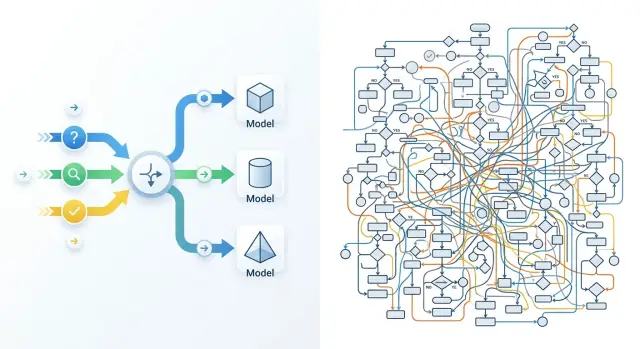
Why the first setup rarely pays off
The first version of model routing usually fails not because of the models, but because of the team’s appetite. Everyone wants to account for everything at once: short questions, long conversations, complaints, sensitive topics, Russian and Kazakh, premium customers, night-time spikes, answers with search and without it. On paper, it looks logical. In practice, it quickly turns into a mess of conditions.
The problem is not the idea of model routing itself, but the scope of the first version. When a team has access to dozens or hundreds of models through one API, a simple thought appears: if the choice is so broad, we should use it to the fullest. In the end, instead of 2-3 clear branches, you get 10-15 rules, thresholds by request length, exceptions, and manual overrides.
The benefit grows slowly, while complexity grows immediately. The main traffic is almost always repetitive. In many cases, 70-80% of requests can be routed reliably through two paths: a cheap one for simple tasks and a more accurate one for complex ones. Everything else is a rare branch. It triggers infrequently, but it needs the same attention: logs, tests, error analysis, and threshold updates after a model change.
At that point, the team starts paying not in tokens, but in engineering time. Someone is trying to figure out why a short request went to the expensive model. Someone else is hunting for a conflict between the length rule and the topic rule. Another person is fixing reports because the metrics no longer show which branch actually saved money. One extra if feels like nothing. Ten such conditions can eat up a week.
Rare scenarios work the worst. Suppose a separate branch catches 2% of requests and, in the best case, saves a few percent of the budget on those requests. If the team spends even 4-5 hours a month debugging it, the point disappears quickly. Formally, the scheme is smarter. In money and speed, it is weaker.
A good first route is usually boring. It uses very few signals, covers the common cases, and sends ambiguous requests to one reliable model. It may not look as impressive on a diagram, but it is easy to understand, test, and adjust without constant manual fixes.
When routing is actually needed
Routing is needed not when the team has simply heard about the idea. It is needed when there is already a noticeable difference between models in price, latency, or quality on real tasks. If one model consistently handles almost all traffic and stays within budget, extra logic only adds work.
The first clear signal is that requests differ a lot in cost and speed. In production, this is visible right away: a short customer question can be answered by a cheap model in a second, while reviewing a contract or a long thread needs a stronger, slower model. If you pay the same high price for both, the room for savings is usually obvious.
The second signal is that the traffic itself already splits into at least two types. Not ten — that is exactly what you do not need. A simple boundary is enough: normal requests and complex ones. In support, this often looks like repeated questions about order status, pricing, or refunds going one way, while edge cases with long context and several conditions go another.
The third signal is that one model does a poor job with the required response format. Teams often look only at the “smartness” of the text and miss a more basic issue: JSON breaks, fields disappear, a tool call fails, categories get mixed up. In that case, LLM request routing gives results even without complex logic: one model handles strict structure, another handles long explanations.
There is also a stricter criterion: logs. Without them, routing quickly becomes a debate of opinions. For every request, you need a trace: what type of task came in, where it was sent, how long it waited, how much it cost, whether the format passed, and whether there was a retry.
If that is missing, the team will not understand what actually worked: the route itself, a lucky traffic day, or a random sample. If logs exist, even a simple two-model setup can be tested well.
Routing is usually worth introducing when at least three of these conditions match:
- the models differ noticeably in price or response time;
- the traffic splits into simple and complex requests;
- one model has a clear failure with format or stability;
- the team compares routes through logs, not gut feeling.
If only one item matches, it is better to simplify the system first and gather data on a single model.
Which signals to use in the first version
For the first version, five signals are enough. More usually means unnecessary branches, internal debates, and zero savings. Routing pays off when the rule is easy to explain and test on a hundred real requests.
Start with input length and expected answer size. A short request like “summarize this review in one sentence” does not need the same model as a 12-page contract review with a detailed conclusion. This is a simple way to separate cheap, fast requests from heavy ones.
Then decide whether strict JSON is needed. If the system must return fields, statuses, or categories without extra text, do not mix such tasks with normal chat. For JSON, it is better to send the request directly to a model that reliably keeps the structure. Otherwise, you will “save” on the call and then lose time on retries and parsing.
The type of task also affects the route. A draft reply to a customer, extracting details from a document, and simple classification are different modes of work. For a draft, you usually need a model that writes smoothly and naturally. For extraction and classification, a simpler model is often enough if the format and instructions are clear.
The language of the request is something teams often notice too late. If you have a lot of Russian and Kazakh text, test it separately on your own data. A model that writes well in English may handle terminology, inflections, or the right style worse in another language.
Speed is also better treated as a separate signal. If a support agent is waiting for a suggestion during a conversation, even an extra two seconds becomes annoying. Night-time ticket processing can be slower, though, and that makes savings easier.
For a start, this set is usually enough: send short requests to a fast, low-cost model; send strict JSON and field extraction to a model with reliable formatting; send text drafts to the one that writes naturally; and test Russian and Kazakh requests on a separate branch using your own data. If the answer is needed right away, latency becomes as important a signal as price.
If the team works through a single OpenAI-compatible gateway, rules at this level are easier to change without rewriting the SDK and the core integration. For teams in Kazakhstan, this is often one of the practical benefits of AI Router: you can use one endpoint and compare different models without rewriting the application.
How to build the first version
The first setup almost always wins not because of clever rules, but because of discipline. If you add a dozen conditions right away, the team quickly loses control: why did the request go to the expensive model, where did the latency increase, why did the response break. A good first step is much simpler.
Start with two models. One is the baseline: cheap and good enough for most requests. The second is stronger and more expensive, but only for the cases where the baseline clearly makes mistakes or answers too weakly.
A first-version framework usually looks like this:
- Normal short requests go to the baseline model.
- Long requests, complex instructions, and high-risk tasks go to the stronger one.
- There is one fallback route in case of a timeout or failure.
- For each request, the route, price, and response time are saved.
There should be few rules, usually 2-4. Prompt length, task type, and timeout already give a clear structure. If the team adds tone, language, customer priority, conversation history, department limits, and several more internal flags, the scheme stops being testable.
A fallback route is needed almost always. Not for savings, but for stability. If the baseline model is unavailable or takes too long to answer, it is better to quickly send the request to a backup model than to keep the user waiting.
After that, do not try to prove the value of routing on all data at once. Take the same set of tasks and compare two modes: only the baseline model versus a routing setup. Look not only at average cost, but also at the share of good answers and the time to first response.
A small example. A support team has 1,000 tickets: short questions about order status, returns, and plan changes. The baseline model handles most of these conversations. The stronger model is needed when a customer describes a long problem, sends several conditions, or asks to check exceptions in the rules.
If you build this through a single gateway, such a test is easier to launch without rewriting the application: just keep the default route, a separate route for complex cases, and a fallback path for failures. For the first version, that is usually enough.
How to measure the effect without a complex table
The effect of routing is rarely visible in the total monthly bill. Look at the price of a useful answer. If a model is cheaper but more often asks for clarification, breaks the format, or pushes the task to a human, the savings disappear fast.
It is easier to measure not the whole stream, but one task type. For example, take 500 similar support tickets: short questions about order status, returns, or plan changes. Then it becomes clear whether the setup helps or just mixes easy and hard requests into one pile.
For a first estimate, four numbers are enough:
- how much one useful answer costs;
- how many seconds the user waits;
- how often the answer breaks the required format;
- how much manual work the setup itself adds.
It is better to define a “useful answer” in advance. For support, that could mean an answer that did not require a follow-up and did not need a human edit. If 82 out of 100 answers were useful, divide the cost by 82, not by 100. That comparison is very grounding.
Measure latency and format errors separately from price. A cheaper model may answer two seconds slower. For an internal tool, that is acceptable; for a website chat, it is not. The same goes for format: if JSON breaks in 7% of cases, the team pays not in tokens, but in developer and operator time.
Manual work should also be included in the calculation. If an engineer checks logs once a week and slightly adjusts thresholds, that is normal. If the team fixes rules every day, adds exceptions, and sorts out strange routes, the setup has become too expensive to maintain.
Even if you switch models through one endpoint, the effect should be measured on the same tasks, not by the average invoice for the whole system. Otherwise, you get a nice number that says nothing about real value.
It helps to set a simple stop signal. If the setup saves little but requires a lot of manual fixes, stop and simplify it. One clear route with a couple of signals often brings more value than clever logic that nobody wants to touch after a month.
Example: a support assistant
A good test for the first setup is a support bot that answers questions about orders and complaints. It has lots of repetitive conversations, so routing quickly shows whether the rules make sense or whether the team has just made life harder for itself.
Imagine an online store. Half of the requests are short: “Where is my order?”, “How do I cancel delivery?”, “When will I get my money back?” These requests can go straight to the cheap model. It reads little context, answers from the knowledge base, and does not waste extra tokens.
The other half of the requests are longer. The customer explains the order history, adds details, and asks to check several actions at once. In this case, the weaker model is more likely to mix up the steps, miss dates, and write too generic an answer. That is why longer requests are better sent to the stronger model, even if it costs more. It pays for itself where a mistake would otherwise go to a human operator.
A separate case is tasks with a strict response shape. For example, the bot must return JSON for the CRM with the fields intent, priority, order_id, and next_action. In this flow, the best result often comes not from the smartest model, but from the one that reliably keeps the format. If JSON breaks even in 8% of cases, all savings disappear on retries and manual cleanup.
The first version of the rules can be short:
- up to 25 words and no nesting - cheap model;
- a long request or more than one question - stronger model;
- strict JSON needed - the model with the most stable format;
- timeout, empty answer, or broken JSON - retry through the baseline model.
If the team connects models through an OpenAI-compatible gateway, this fallback is usually set up without changing the SDK and without separate logic for each provider.
After a week, there is no need to draw a large diagram. It is enough to see where the rules actually helped. Usually, three things become clear: how many short requests went to the cheap model without a drop in quality, how often the stronger model saved long requests, and how often the fallback returned a normal answer after a failure. If the benefit is visible in only one rule, the rest are better removed. For support, that is a normal result, not a failure.
Where teams break the setup themselves
The problem is rarely the routing itself. More often, the team breaks it with its own hands: rushing the rules, measuring the wrong things, and then no longer understanding what created the effect and what just added noise.
When you have hundreds of models available through one API, the temptation is obvious. The team immediately writes a long matrix: if the request is shorter than 300 characters, one model; if there is a table, another; if the customer is VIP, a third; if it is night, a fourth. Before the first measurements, this is almost always unnecessary work. Rules start fighting each other, and the difference in price and quality gets lost.
Another mistake is confusing the business goal with a convenient technical metric. The business needs the answer to help the operator close the ticket faster, for the bot to make fewer mistakes on refunds, or for costs not to grow every month. The team, meanwhile, looks at latency, tokens, and the average score in testing. These numbers matter, but they do not answer the question of whether routing paid off.
Sometimes the team celebrates that average latency dropped from 2.4 to 1.6 seconds. Sounds good. But if the operator still edits every second answer manually, the value is small.
It gets worse when everything changes at once. Today one group of requests goes to a new model. Tomorrow the length threshold changes. The day after, a new prompt and cache are added. A week later, no one can say what exactly lowered LLM costs and what only moved the numbers on the dashboard.
Rare cases also often break the setup. Teams spend days on a branch for 2% of requests because it looks nice on a diagram. Meanwhile, the main stream still has no clear rule. For the first version, two routes are often enough: simple FAQ to a cheap model, long document-based requests to a stronger one.
It is better to keep the first version boring: use 2-3 signals instead of twenty, keep one business metric and a few technical ones, change either the model or the rule at a time, and put rare cases in a separate list instead of the main router. Another useful habit is to review old branches on a schedule.
Old branches are usually forgotten. A rule gets added for one incident, the problem goes away, but the branch lives for months. Then the team pays for extra checks, gets strange transitions between models, and concludes that LLM request routing is too complicated. Usually, people created that complexity themselves.
Pre-launch check
Before launch, the setup should pass a short common-sense test. If the team cannot explain in 10 minutes why each route exists and how to tell whether it works, it is too early to ship the router to production.
First, choose one metric that makes business sense. Not five, and not ten. For support, it could be the cost of one successfully closed conversation. For an internal assistant, it could be the share of answers accepted without edits. If you pick a whole set of metrics at once, the team will quickly start arguing over details and lose the goal.
Then leave a control group without routing. Let at least 10-20% of traffic go through the old path, where the same model is always called. Otherwise, you will only see pretty charts inside the new setup, but you will not know whether the system actually became cheaper or faster.
A good rule can be explained in one sentence. If the sentence does not fit into one sentence, the rule is probably still rough. For example: “Send short simple requests to the cheap model,” “Send long requests with files to the model with a larger context,” “If the first model is unsure, give a stronger second chance.”
That kind of check quickly removes the unnecessary. Rules like “if the request looks legal but is not too urgent, and the customer is in the premium segment” sound smart, but they often break on real traffic.
Before launch, set up logs so that for each request you can see three things: cost, latency, and an error if one happened. Without that, you will not find the cause of a failure. If the team is testing many providers through one gateway, a single log format and a single endpoint make comparison much easier. In this area, AI Router has a practical advantage: you can change base_url to api.airouter.kz and keep using the same SDKs, code, and prompts.
And one more rule: assign one person who can shut the setup off immediately if something breaks. Not “the team,” not “the on-call channel,” but a specific name. If latency doubles, errors come in a series, or the bill suddenly jumps, someone should switch traffic to a simple fallback route without a half-day call.
If these items are ready, the first version usually survives launch calmly. If not, it is better to delay release by a day than to spend a week untangling a quiet production failure.
What to do after the first month
After a month, you will already have numbers, and they will quickly show what works and what was unnecessary. At that point, do not expand the setup. On the contrary, it is better to simplify it down to the rules that actually produced an effect on cost, answer quality, or speed.
If a rule triggers rarely or barely changes the result, remove it. An extra branch in routing only looks smart on a diagram. In real work, it usually adds confusion, debatable bugs, and extra hours of analysis.
A good pace after the first month is simple: add only one new signal at a time. For example, first test request length. Then, in a separate cycle, add task type such as “classification” or “free-form answer.” If you change everything at once, you will not understand what actually made the difference.
You do not need to automate ambiguous cases at any cost. If the team sees that some requests keep bouncing between two models, send those cases for manual review. Even 30-50 examples are often enough to spot the problem: the signal is weak, the rule is too broad, or the metric is the wrong one.
After a month, it is useful to answer four questions:
- which rules lowered average cost without hurting quality;
- which rules barely affect the result;
- which request types the team still cannot route confidently;
- how much time goes into tests and comparing new models.
The last point is often underestimated. When there are few models, manual testing is manageable. When the team compares five, ten, or more options, the infrastructure itself starts to get in the way: different providers, different keys, different limits, different log formats.
At that point, it may make sense to decide whether you need a single gateway for tests and comparisons. If you often run the same request set through many models, it is easier to keep that in one place. For such tasks, AI Router can remove some of the routine: one OpenAI-compatible endpoint, monthly B2B invoicing in tenge, and the ability to work with different models through a familiar integration. But even such a gateway will not fix bad rules. It only makes model comparison and route maintenance easier.
If the setup becomes shorter and clearer after a month, that is a good sign. The first routing setup should be boring, predictable, and cheap to maintain.