Model Quantization: Checks Before Moving to 8-bit and 4-bit
Model quantization requires quality checks on your own dataset: choose the right metrics, find failures, and compare FP16, 8-bit, and 4-bit before release.
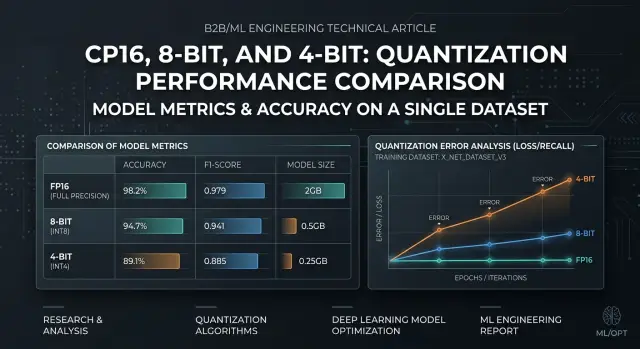
What is the risk when moving away from FP16
Moving from FP16 to lower precision rarely breaks a model evenly. The average score may barely change: latency is lower, less memory is needed, and the answers look similar. But some requests start failing much more often, and those are the ones that later turn into complaints in production.
8-bit usually stays close to FP16 on simple tasks: short answers, fact extraction, classification, and template-based summaries. With 4-bit, the difference shows up faster. The model may handle everyday examples just fine, then lose meaning on a long instruction, multi-step logic, mixed languages, rare terms, or a strict answer format. An average score hides that very easily.
Users and teams see different symptoms. Users notice broken meaning: the model missed a negation, mixed up a sum, returned the wrong class, or lost a condition in a contract. Teams usually notice something else first: answers got longer, refusals increased, JSON became unstable, and repeatability dropped on the same runs. Both are dangerous, just in different ways.
In most cases, the drop shows up in narrow spots:
- long context with several constraints in one prompt
- tables, numbers, article numbers, codes, dates
- answers in strict JSON or a fixed schema
- rare domain words and mixed Russian, Kazakh, and English
- tasks where the mistake looks plausible
The last point is especially unpleasant. If the model writes smoothly but changes one fact, automated checks may notice almost nothing. For a bank, clinic, or support team, even one such substitution already creates real risk.
In this situation, outside benchmarks only help as a rough filter. You have a different request set, a different prompt style, different error thresholds, and a different cost of failure. A model that performs well on public tests can still drop exactly on your documents, short operator commands, or dialogs with missing context.
The risk of model quantization is not the move to 8-bit or 4-bit itself. The risk is that failures first look small, then appear in the most expensive scenarios.
How to build your own check set
A good test set for a model should look like normal traffic, not a collection of pretty demo requests. If the sample is too "clean," the move from FP16 to 8-bit or 4-bit will look safe, and the drop will show up only after release.
Take real requests from production, a pilot, or an internal testing environment. If your team already sends models through a single gateway, for example AI Router, it is convenient to export anonymized requests from the last few weeks and build a live sample without changing the integration. Remove personal data, internal noise, and technical repeats that do not change the meaning.
Do not split the sample randomly, line by line. It is better to group it by scenario: summarization, field extraction, classification, answer generation from a knowledge base, and long-dialog parsing. Then you can see where the model truly loses quality and where the difference between FP16 and 8-bit is barely noticeable.
Within each scenario, keep examples of different difficulty. You need short requests of 1-2 sentences, long inputs with lots of context, borderline cases with typos and noise, and tasks with a strict response format. These contrasts are exactly where 4-bit model quality most often breaks. It may pass short requests without trouble, but on a long document it will start missing fields, mixing up steps, or following the instruction less reliably.
Mark the examples where a mistake is costly. For a bank, that might be the wrong request category or a missing amount. For retail, it could be a mixed-up article number. For healthcare, it may be a missed symptom or an incorrect fragment in the summary. These requests should not get lost among hundreds of safe examples where a miss changes almost nothing.
In the end, remove duplicates and nearly identical requests. If your set contains twenty similar support tickets, the LLM quality check will give you a false sense of stability. Better fewer examples, but wider in meaning. A small set of different scenarios is usually more useful than a large table of repeated rows.
Which metrics to watch
A score based on one number almost always misleads. When moving to 8-bit or 4-bit, a model may answer almost the same in meaning, but break JSON, mix up numbers, or add extra text more often. For a working scenario, 2-4 metrics are usually enough; you do not need a long table just for reporting.
For most teams, this set is enough:
- task accuracy: correct class, correct fact, or match to the reference
- format compliance: valid JSON, required fields, order, answer length
- share of critical errors: failures after which the answer cannot be used
- latency and token usage: average value and the 95th percentile alongside quality
Measure accuracy in the form closest to the product. For classification, that is the share of correct answers. For field extraction, it is the match for each field. For text generation, manual review with a simple checklist on 50-100 examples is often more useful than an abstract overall score. Model quantization often does not affect all answers equally; it hurts narrow cases: long context, tables, numbers, and mixed languages.
Check the response format separately. This is a common trap. The model may understand the task, but if it adds an explanation before the first brace instead of clean JSON, your pipeline is already broken. For such tasks, it is better to set a threshold in advance. For example: valid JSON no lower than 99%, all required fields no lower than 98%, empty fields no higher than 1%. Below that threshold, the option does not pass, even if overall accuracy barely changed.
Count critical errors in a separate column, without averaging them together with ordinary mistakes. A wrong payment amount, a mixed-up customer, a missed restriction, or a made-up document reference is not "minus one point". It is a separate failure type. One such answer can cost more than ten mild style mistakes.
Look at speed and tokens next to quality, not after it. A 4-bit version may answer faster, but make more format errors. Then the system retries the request, and total latency goes up. Sometimes the model writes 15-20% longer, and part of the inference savings disappears.
How to test
If you change only precision, change only precision. Any other difference blurs the result: a different prompt, a different temperature, and then it is no longer clear whether quantization is to blame.
- Build one fixed run. Freeze the system prompt, the user prompt template, few-shot examples, max_tokens, temperature, top_p, stop sequences, and any post-processing after the model. If your stack supports a seed, set it too. Do not change request order either.
- Run FP16 and save that run as the baseline. Do not edit the answers by hand, even if they look "almost right." You need the baseline for a fair comparison.
- On the same set, run 8-bit, then 4-bit. Do not change the model, provider, routing, or context length between tests.
- Save the raw answers in full. Keep both the text and the metadata if there is any: token count, stop reason, errors, timeouts. Later, the raw output will show where the model started cutting off answers, mixing up numbers, or drifting into extra explanations.
- Break down the differences by task type, not by one overall number. Look separately at field extraction, classification, summarization, long context, code, and Russian or Kazakh text, if it exists in production.
After that, manual review usually gives more value than the average score across the whole set. If 8-bit barely changes the answers and 4-bit only hurts long explanations, the decision is already clear. An overall 2% drop will not show that.
A simple example: a team has 120 tests. Forty are for extracting details, forty are for short user replies, and forty are for parsing a long document. FP16 and 8-bit give almost the same result on the first two groups, but 4-bit starts missing amounts and dates in long texts. In that case, there is no point arguing over the average score. It makes more sense to keep 8-bit for the general flow and keep 4-bit out of long-context tasks.
A good check looks boring. That is a normal sign. The fewer random differences there are in the run, the easier it is to explain the decision to the team later and the cheaper the wrong choice becomes.
Where quantization hurts most
Model quantization hurts most on tasks where the answer must be not just similar, but exact. The less freedom the model has, the faster the difference between FP16, 8-bit, and 4-bit becomes visible. On ordinary chats, the drop may look moderate. In business scenarios, it often appears right away.
One common example is contact center ticket classification. On similar topics, the model starts mixing up classes more often, especially if the text is short, emotional, or written with mistakes. In field extraction from contracts and forms, exact values suffer: document number, start and end date, field format. In knowledge-base answers with a strict format, failures show up even faster: instead of JSON, the model adds an explanation, changes field names, or inserts extra text.
Even short summaries for operators are not always safe. The text still reads well, but the model may drop a detail that changes the meaning. For example, the customer is not just waiting for delivery; they are already asking for cancellation and a refund. Draft emails and internal notes also suffer in their own way: the wording becomes more general, and required facts start disappearing.
In banking, telecom, or the public sector, such mistakes quickly become expensive. If the model misses an ID number, mixes up an amount, or adds an extra line in a template, the operator spends extra minutes fixing it by hand. At scale, that adds up very quickly.
There is also a less obvious risk area. Quantization hits tasks with long context, mixed languages, and rare terms harder. If one request includes Russian, Kazakh, and a contract fragment, 4-bit is more likely to lose accuracy than on a short everyday question.
If you have even one such scenario, do not look only at the average score across all tests. Compare FP16, 8-bit, and 4-bit separately for each real use case. That is usually where the unpleasant surprise hides.
What failures to look for in answers
After moving to 8-bit or 4-bit, the model often looks "almost the same." That is a dangerous illusion. On simple requests, the difference may be zero, but in working scenarios you start seeing failures that the average score easily hides.
The first common signal is a gap between short and long examples. On one paragraph the model performs fine, but on a long thread, contract, or product card it starts losing details from the beginning of the context, mixing facts, and answering too confidently. If you test only short examples, that drop is almost invisible.
Watch the format separately. The meaning of the answer may still be acceptable, but JSON breaks much more often: the closing brace is missing, field types change, numbers turn into strings, and some keys disappear. In production, that is usually worse than a small drop in text quality. The app does not fail because the answer is slightly worse; it fails because the parser cannot read it.
Model quantization often hits rare cases harder than the average flow. If you have classes that appear in 2-5% of requests, check them separately. The average score may only drop a little, while the rare class may fall enough for the model to start mixing up similar categories or pulling the answer toward the most common one.
Another weak spot is exact entities. Watch how the model handles numbers, dates, names, codes, article numbers, and sums. On FP16 it may correctly extract "15.04.2024" and "12,450", but in 4-bit it may start changing digit order, rounding, dropping zeros, or pulling a name from the next line. For reports, claims, and support, that is no longer a small issue.
The system instruction is also harder for the model to keep. It more often forgets constraints on style, language, length, no guessing, or the requirement to answer strictly from the document. This is especially visible in multi-step scenarios where the model needs to understand the text and still stay within the format.
A quick filter before the decision looks like this:
- compare short and long examples separately
- count JSON breakages separately from meaning errors
- isolate rare classes in their own slice
- check dates, amounts, names, and identifiers
- mark cases where the model breaks the system instruction
Mistakes that ruin the conclusions
The most common mistake is simple: the team takes a convenient set of 20-30 requests that the model can already solve easily. After that, FP16 and 8-bit look almost identical, and 4-bit seems "almost lossless." Then the model goes into production, gets a long dialog, a table in text, or a chain of rules, and starts cutting corners.
This test is misleading not because the metrics are bad. It is misleading because the set is too clean. If there are no borderline cases, rare formulations, long inputs, and tasks that need precision, you are measuring not real load, but a demo version of your system.
Another mistake is comparing options with different generation settings. One run uses temperature 0, another 0.7, somewhere top_p changes, and elsewhere max_tokens changes. Then people argue about quantization, although in reality they compared two different generation modes. The parameters, prompt, response template, and stop sequences must match exactly.
Long context is tested less often than it should be. And that is exactly where 4-bit often performs worst. The model may answer a short question well, but lose part of the instruction at 8-10 thousand tokens, mix up constraints from the beginning of the dialog, or forget the output format.
A good test usually includes:
- a short simple request
- a long document with exact extraction
- a layered instruction with rules and exceptions
- a multi-turn dialog where memory matters
- a task where the mistake is costly
There is also a more practical mistake: the team moves to 4-bit only because of cost. The savings are understandable, especially when there are many requests. But without a quality threshold set in advance, this quickly turns into a matter of taste. It is better to define the rule before testing: for example, 4-bit is acceptable only if it does not break answers on critical scenarios and does not increase manual review.
Short checklist before the decision
A move to 8-bit or 4-bit is better decided after a short but strict check. Model quantization often gives a normal average result and then fails on rare and costly mistakes. So look not only at the overall score, but also at the cases where a miss really hurts the work.
- Run 100-200 of your own examples. That is usually enough to see the general trend.
- Build a separate set for expensive mistakes. For a bank, that may be a wrong amount or a mixed-up limit; for support, a dangerous recommendation; for search across a knowledge base, a missed document.
- Compare FP16, 8-bit, and 4-bit under the same conditions: the same prompt, temperature, top_p, system message, context length, and post-processing rules.
- Put questionable answers into a separate set and review them manually. An automated metric does not always catch the moment when the model starts losing numbers more often, drifting into vague wording, or making things up.
- Set a decision threshold in advance. For example, 8-bit is acceptable if the drop stays within 1-2% and the number of dangerous errors does not grow, while 4-bit is allowed only if it passes the same test on the risky set.
Relying on intuition is dangerous. On normal examples, 4-bit may look almost the same as FP16, but on a few dozen difficult requests it can suddenly produce several extra errors. That is already enough to roll back the idea or keep 4-bit only for part of the scenarios.
Manual review is needed even when the numbers look calm. If the team spent half an hour reviewing questionable answers and agreed on what counts as an acceptable error and what does not, the decision becomes much cleaner.
What to do after the check
If the tests show differences only in some scenarios, do not switch everything at once. After the check, model quantization should be rolled out by scenario, not with one button across the whole stack. Start by separating tasks by the cost of an error.
Where the model talks to a customer, extracts data from a contract, fills fields for the next step, or writes text without manual review, it is better to keep FP16. In those places, even a rare mistake is costly. One missed amount, date, or negation quickly eats up all the benefit of saving memory and cost.
8-bit is usually the first candidate for migration. If your test set shows stable quality, you can move steady tasks there: short summaries, draft emails, simple classification, and finding similar fragments. Start with part of the traffic, watch the real answers for a few days, and only then expand the share of requests.
With 4-bit, it is better not to rush. Test it separately on risky cases where the drop shows up first: long context, numbers, tables, strict JSON, mixed languages, and rare terms. If that is where missing details, made-up facts, or broken formatting start, do not try to fix it with a better prompt. It is simpler to keep those routes on FP16 or 8-bit.
The basic rule looks like this:
- FP16 - for sensitive scenarios
- 8-bit - for tasks with stable quality
- 4-bit - only after a separate check on difficult examples
Do not throw away the test set after the first decision. Any replacement of the model, system prompt, provider, or response template can produce a new result. The same request often behaves differently with two providers, even if the model name looks similar. That is why you should rerun the test after every meaningful change.
If you compare several models and formats at once, it is convenient to keep the same code and change only the call route. In that sense, AI Router is useful as a single OpenAI-compatible gateway: you can run one set through different models and providers without rewriting the SDK, code, or prompts. That makes fair comparisons easier and helps you see faster where 8-bit is already enough and where 4-bit is still too early for production.
Frequently asked questions
Can I look only at the model’s average score?
No. The average score often hides rare but expensive failures. Look at results by scenario separately: long context, field extraction, classification, strict JSON, mixed languages, and rare terms.
Is 8-bit already safe, and 4-bit not?
Usually 8-bit stays close to FP16 on simple tasks and gives a memory win. 4-bit needs much tighter checks because it fails more often on long instructions, numbers, tables, and strict output formats.
Which requests are best for the test set?
Use real anonymized requests from normal traffic, not polished demo examples. Add short and long inputs, noisy phrasing, expensive mistakes, and tasks where the answer must match the schema exactly.
How many examples do I need for the check?
For a first decision, 100–200 examples is often enough if they cover different scenarios. Also collect a small set of cases where mistakes are costly, otherwise they will get lost among the simple requests.
Which metrics should I look at first?
In practice, four things are enough: task accuracy, format compliance, share of critical errors, and latency together with token usage. If the model is a bit faster but breaks JSON more often or triggers retries, the gain disappears quickly.
Should I check JSON separately from answer quality?
Yes, and separately from the meaning. The model may understand the task but still add extra text before the first bracket, change a field type, or skip a required attribute. For the pipeline, that is already a failure even if the answer looks reasonable.
Why do long context and numbers fail first?
Because the model has to keep more constraints in mind at once. On long inputs it more often loses details from the start of the context, and with numbers and dates it starts mixing up order, rounding values, or dropping part of the value.
How do I compare FP16, 8-bit, and 4-bit fairly?
Freeze every condition and change only precision. Keep the same prompt, temperature, top_p, max_tokens, request order, context length, and post-processing. Then save the raw outputs and compare them using the same rules.
When can a quantized model be sent to production traffic?
You should not move all traffic at once. First set a quality threshold, then send the variant to part of the requests and watch real responses for a few days. That step is especially important for 4-bit, even if the offline test looked fine.
What should I do after the check and first release?
Do not throw away the test set after the first decision. Any change in the model, provider, system prompt, or response template can produce a different result, so it is worth rerunning the test after every meaningful change.