Model fallbacks without extra cost: how not to pay twice
Model fallbacks help you survive failures, but without rules they quickly double the bill. Here we break down the chains, limits, and checks that keep costs under control.
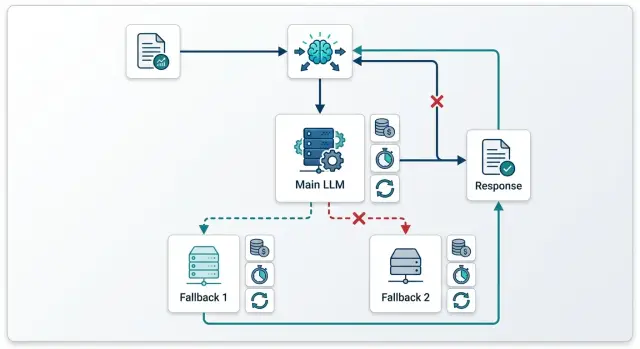
Where fallbacks eat the budget
Costs start rising at the exact moment the first failure has already become billable. If the initial request reached the provider, that provider will often charge for the input tokens even if the response was cut off, timed out, or returned in the wrong format. Then the team sends the same prompt to a backup model and gets a second bill for one user request.
This most often happens with timeouts. Your service sees that the response did not arrive on time and marks the call as failed. But by that point, the provider may already have accepted the request, started generating, and spent tokens. If you retry right away or switch to fallback, you pay twice and may also get two similar answers.
Retry and fallback are different actions. Retry is for when you suspect a short network issue between your service and the API. You repeat the same call to the same model because the model itself was probably working fine. Fallback is for a different situation: the provider is unavailable, has temporarily hit a limit, responds too slowly, or consistently breaks the format on the same kind of task.
Not every error code should send the chain further. If the prompt is too long, the JSON schema is broken, required fields are missing, authorization failed, or a safety rule fired, a backup model will not help. It will get the same bad request and charge you again.
Fallback is usually justified when the cause is outside the request itself. For example, the provider returned 429 because of a temporary limit, a 5xx error, the network connection dropped before processing began, or the model regularly misses the allowed time. Then you can move to backup, but by one clear rule, not by a long chain of three or four attempts.
One useful question matters most here: did the first call actually start on the provider side? If yes, treat it as billable and do not automatically launch a new call without a clear reason. If no, you can do one retry or one fallback. Doing both back to back is usually expensive.
In a real system, this is easiest to see in a log of attempts with one request_id. When the team can see the request route and the status of each step, it is easier to understand where the failure happened: before the provider, at the provider, or after partial generation already started. That does not reduce errors by itself, but it does remove a lot of unnecessary duplicate charges.
When you need a backup model, and when you do not
Fallbacks are not needed for every failure. Teams often mix up two different problems: the request did not reach the model because of the network or a limit, and the model answered but the answer itself was bad. These are different cases, and they burn money in different ways.
If you got a timeout, 502, 503, or 429, do not jump to another model right away. First check whether it was a delivery failure rather than a quality failure. When the request usually works, one repeat of the same call is often cheaper than an instant move to backup. You do not change the app’s behavior, you do not risk a different token price, and you do not spend time on a new answer check.
If the model answered but broke the JSON, skipped a field, drifted into extra text, or gave a weak result, repeating the same call rarely helps. You are just buying almost the same answer a second time. In that case, a backup is needed, but it should be chosen based on the failure reason.
A cheaper backup works when availability matters more than maximum quality. This is common for simple tasks: short summaries, classification, paraphrasing, or a draft reply for an agent. If the main model is temporarily unavailable, a cheaper replacement keeps the service running and does not blow up the bill.
A stronger backup is needed when the first model cannot handle the task itself. For example, it regularly mixes up fields in the output structure, loses steps in the logic, or cannot keep the format on a long context. Then switching to a more expensive model can be more profitable: you pay more for one call, but you do not pay for repeated mistakes, manual review, and rework.
If you use a single gateway, these cases should be split into different rules. For network codes, set retry on the same model. For content failures, use fallback to another model with a clear role: either cheaper or stronger.
A simple rule
For one user request, two steps are usually enough: the first call to the main model and one extra step on top. That is either a repeat of the same model for a network failure or a switch to backup if the answer failed your checks.
A third attempt is often more expensive than it is useful. If the answer is still bad after two steps, it is better to simplify the task: shorten the context, return a templated response, put the request in a queue, or hand it to a person.
A good rule is simple: fix the network with a retry, fix the quality with a model switch. That way, fallbacks reduce risk instead of turning every failure into a double charge.
How to build a chain without double charging
A chain with fallback only works when the main model handles almost all normal traffic and the backup is used rarely and for clear reasons. If you put a model that is too expensive first, there will be no savings. If you send almost every second request to backup, the team just pays for two full runs instead of one.
Start by choosing a main model for everyday load. Usually this is the cheapest model that still delivers the quality you need for your typical tasks. For a support chat, that might be a fast answer from the knowledge base, a short conversation summary, or a simple ticket classification.
It is better to tie fallback to one or two reasons, not a long list. In practice, three conditions are often enough: the first model did not answer within the set time, the answer is empty or fails a simple format check, or the provider returned an error that should not be retried right away.
After that, set a hard limit for the whole chain. You need not only a limit on the number of attempts, but also a total budget for one request. For example, one retry and no more than 12,000 tokens for the whole process. If the first attempt has already used up almost all of the limit, do not start backup.
A common mistake is to send the entire accumulated context to the second model: the full log, internal fields, intermediate answers, and old messages that no longer affect the result. That drives the bill up in two places at once: you pay for extra input tokens and you give the backup model more reasons to answer at length.
Send only what the backup truly needs to solve the task: the last user request, a short system prompt, the necessary facts, and the technical response parameters. That is usually enough.
If routing goes through a single gateway, such as AI Router, it is convenient to keep these rules in one place instead of spreading them across different services. But the logic does not change: the first model handles normal traffic, and the second model only steps in on failure or a clear quality miss.
Before release, run the chain on 10-20 typical requests. Take short, long, ambiguous, and deliberately awkward examples. Look not only at answer quality, but also at three numbers: how often backup is used, how many tokens go into the second step, and how much one successful answer costs.
If backup triggers too often, do not fix it with a third model. First simplify the handoff rules, shorten the context, and check whether you picked a main model that is too weak.
How to calculate the cost of one request
Teams often count only the price of a successful first attempt. For a fallback chain, that is not enough: one user request costs the average of all branches that actually run. This is where fallbacks quietly inflate the bill.
First, calculate the baseline without backups. Take the first model and estimate its input tokens, output tokens, and the pricing for both token types separately. If an average support request carries 1,800 input tokens and usually gets 350 output tokens, calculate with those numbers, not with a short test example.
It is convenient to keep the calculation in this form:
C1 = Tin1 × Rin1 + Tout1 × Rout1
E_fallback = C1 + Pfb × C2
E_retry = C1 + Prt × Crt
Here C1 is the price of the first attempt, Pfb is the probability of falling back, C2 is the backup model price, Prt is the probability of a retry, and Crt is the price of the repeated call. If after an error you first retry and only then go to backup, add both branches separately instead of combining them into one line.
It is better to take the fallback probability from logs over a live period, such as the last 2-4 weeks. And you should calculate it separately by request type. A short FAQ and a long legal thread fail in different ways and cost different amounts.
Prompt length and expected answer length change the final cost a lot. A backup model may be cheaper by tariff, but if you send it the same long context and allow the same long answer, the savings disappear quickly. Sometimes it is easier to reduce max tokens for the backup or send it a shorter system prompt.
It is better to compare retry and fallback in money terms, not by habit. If the first error is a brief 429 or 5xx, repeating the same model is often cheaper than switching to a more expensive backup. If the main provider regularly hits timeouts on long requests, retry simply duplicates the input token cost. If the backup gives an acceptable answer with a lower output limit, it can be cheaper even with a higher per-token rate. And if the provider charges for input even on a failed call, that has to be included in the calculation explicitly.
Finally, set a hard limit for one user request. For example, no more than 6-8 tenge for a normal support chat and no more than 20 tenge for a complex case with a large context. When the chain hits the limit, stop it: it is better to return a short answer or ask for clarification than to launch another expensive call.
If you use one gateway for request routing, this is much easier to calculate: all attempts are visible in one place, and the request price does not get lost between providers.
A simple support chat scenario
An online store usually gets many short questions in chat. People ask where their order is, how much delivery costs, how to return something, or why payment failed. For these messages, an expensive model is usually not needed.
The basic setup is simple: a low-cost model answers normal requests, and the backup only steps in when the first one does not answer in time or returns a clear API error. That is much cheaper than sending every conversation to two models right away or automatically duplicating the call after any failure.
The main model can comfortably handle order status, delivery times, return rules, payment methods, and address or contact changes. If the question is short and based on the store’s existing rules, an expensive model rarely gives enough of a difference to justify the price.
Problems start when the team makes fallbacks too generous. A common mistake looks like this: the first model gets a long chat history, misses the timeout, and the system immediately sends the same full history to backup. At that point, the company has already paid for the input tokens once and almost immediately pays again.
For support, it is better to cut the context hard. If the customer asked, “Where is my order 54128?”, the backup model usually does not need the entire last 20-message thread. The last window is enough: the current question, one or two recent turns, and the needed fields from the CRM or order database. This lowers token usage without losing quality.
What the savings look like
Before the chain was tuned, the store might have sent every complex or stalled request to the expensive model in full. Let’s say the average response price was 18 tenge because the call always carried a long history.
After tuning, the picture changes. The main model handles, for example, 88 out of 100 requests at 4 tenge. Another 12 requests go to backup after a timeout or an error, but with a short context, and cost 14 tenge each. The average price then looks like this:
(88 x 4 + 12 x 14) / 100 = 5.2 tenge per request
That difference is meaningful: not 18 tenge, but 5.2. At a volume of 50,000 chats per month, that is no small thing.
If you build this logic through an OpenAI-compatible gateway, it is better to keep the rule at the routing level: first the cheap model, then backup only on timeout or a clear error, without resending the whole conversation. For support chat, this is one of the most direct ways to cut the bill without hurting the user experience.
Mistakes that make the bill grow
Money usually does not go to the model itself, but to the logic around it. One extra hop in the chain, one repeated long context, and the request already costs two or three times more even though the user did not get a better answer.
The first common mistake is to run both retry and fallback for the same issue. For example, the service got a timeout from the first model, immediately sent a retry to the same model, and almost at the same time moved the same request to a backup model. In the end, the team pays for two or three calls where one decision would have been enough.
It is better to separate failure types in advance. For 429 and short network glitches, one retry is usually enough. For 5xx, a long timeout, or clear provider degradation, use fallback. For 400 and validation errors, neither retry nor fallback is needed - the request needs fixing, not another trip down the chain.
The second mistake is sending the full long context to every next model. This is especially expensive in support chats and internal assistants, where the history quickly grows to dozens of messages. If the first model has already read 12,000 tokens and the second and third read the same amount again, the bill rises very quickly.
Usually the next step only needs a short data package: the user’s last question, a compressed conversation summary, one or two relevant knowledge base snippets, and the technical reason for the switch to another model.
Another costly habit is switching after a slow but already useful answer. This happens when the system looks only at time, not at answer quality. If the first model produced a normal draft in 8 seconds and the rule requires fallback after 6 seconds, the service may launch a second model for no reason and pay for both answers.
It is better to check not only the timer, but also the state of the answer. If the model has already started producing meaningful text, finish the request and show it to the user. A hard fallback is needed when the model is silent, cuts off the response, or writes obvious junk.
Another problem is not recording the reason for switching between models. Without that, the team only sees a general rise in costs and cannot quickly tell what broke: the network, limits, a bad prompt, or a timeout that is too strict. You need a simple log: which model accepted the request, why the system moved to another one, and how many tokens were spent at each step.
If routing goes through AI Router, these attempts and audit logs are easy to keep in one place. That helps you quickly find chains where fallbacks trigger too often and just burn budget.
One more typical mistake is not setting limits at the API key level. Without them, one retry loop or one bad release can create thousands of expensive calls in an hour. Key limits, rate limits, and a simple daily budget stop these failures before the nasty bill arrives.
One practical scenario looks like this: the team released a new support prompt, and it started causing long answers. The first model slows down, the orchestrator launches a retry, then a fallback, then another fallback with the same full context. If the team were logging the reason for switching, cutting the context, and setting a key limit, the overspend would have been found the same day, not at the end of the month.
A quick check before release
Before launch, set a hard price ceiling for one request. Without that, fallbacks quickly damage the economics: the first call fails, the second succeeds, and the money is spent on both. It is better to count the limit not “on average per day,” but at the level of a single user action. If a support chat reply should not cost more than 4-5 tenge, that rule should stop the chain the moment the next step goes over the line.
After that, lock down which errors are even allowed to trigger the backup model. The list should be short and clear. It usually includes timeout, 429, provider 5xx, and a clear response cut-off. Bad wording, a strange tone, or the situation “the model answered in the wrong way” should not automatically turn on an expensive backup. Otherwise the team will start treating quality problems where the prompt or validation needs fixing.
A separate log for retries and fallbacks is needed almost always. In a normal request log, these handoffs get lost, and later nobody can quickly say how much the failed route cost. The log should show the original model, the reason for switching, the input length, the cost of each attempt, and the final status.
Before release, it is useful to run two unpleasant tests that are often skipped. The first is a long context close to the window limit. This is exactly where backup models often behave differently than the team expected: one model accepts the request, another trims it or answers at a noticeably higher cost. The second test is an empty response. It looks harmless, but it often triggers a repeat call and then a fallback, even though in practice nobody answered the user.
Check this with a short scenario. A user writes to support: “Where is my order?” The request goes to a fast model. If the provider times out, the system tries a second model. But if the first one returns an empty string without an error and your code treats that as success, the agent will see silence and the metrics will not show the problem. If the code treats an empty answer as a failure but does not write a separate log, finance will only see the higher bill.
Before shipping, look at at least two metrics: the average request cost by route, not by model alone, and the share of fallback transitions. If the average cost is rising and the transition share is above 3-5% without a clear reason, the chain needs work. Sometimes removing one unnecessary retry is enough to save a noticeable amount over a month.
A proper release checklist does not need to be long. You need a clear price limit, a short list of switch errors, a separate log, two stress tests, and a couple of metrics the team checks every week.
What to do next in production
After testing, do not roll the chain out to all traffic at once. Start with 5-10% of requests and let the setup run for a few days. That way the team sees not only errors, but also hidden losses: where the first model is too slow, where fallback triggers more than usual, and where an expensive provider turns on without adding value.
It is worth watching fallbacks every day, not just at the end of the month. The overall fallback share does not tell you much on its own. It is more useful to break it down by model, task type, and time of day. If the same backup model suddenly grows in share in the evening, the problem is often not the app logic, but limits or outages with a specific provider.
For daily operations, a simple set of metrics is enough:
- the share of requests that went to the backup model
- the average cost of one successful answer including retries
- time to first token and full response time by model
- the share of empty, cut-off, and overly long responses
- the number of chain transitions per user request
Once a week, clean up the chain manually. If a transition almost never saves requests, remove it. If a model responds slowly but does not give a noticeably better result, do not keep it in the middle of the chain. Often two carefully chosen steps work better than four just in case.
Also look at live examples. Say support chat first goes to a fast, low-cost model, and then on timeout switches to a more stable one. If the reports show fallback is used in 18% of cases and the average ticket cost has risen by 40%, this is no longer insurance; it is extra spend. In that situation, it is better to shorten the first model’s timeout, replace the provider, or remove one handoff entirely.
For teams in Kazakhstan and Central Asia, this setup is easy to test through AI Router at airouter.kz: it is a single OpenAI-compatible API gateway where you can keep routing in one endpoint, see attempts across different providers, and set limits at the key level. If you already have an OpenAI-compatible API integration, you usually only need to change base_url to run the same logic without rewriting the SDK, code, or prompts.
If you have multiple teams or services, give each one its own spending cap and reporting. Then the marketing bot, internal search, and support will not get in each other’s way. In production, the best setups are not the cleverest ones, but the ones that are easy to count, quick to fix, and simple to explain to finance.
Frequently asked questions
What is usually cheaper: retry or fallback?
Usually it is cheaper to start with one retry if you are seeing a short network glitch or a one-off 429/5xx. In that case, the same model often succeeds on the second attempt without changing the route.
Fallback makes sense when the provider has been failing for longer than usual or the model consistently fails your check. Do not stack retry and fallback by default: one question can quickly turn into two charges.
When is it better not to run the fallback model at all?
Do not enable fallback if the request itself is already broken. A prompt that is too long, invalid JSON, missing required fields, an authorization error, or a safety rule will not be fixed by a second model.
In that case, you are just sending the same bad request again and getting a new bill. Fix the input first, then retry the call.
How do I know the first call has already become billable?
Check the attempt log with a single request_id. If the provider has already accepted the request and started processing it, it often charges input tokens even when the response is cut off or never reaches you.
If the log shows the failure happened before processing on the provider side, you can do one repeat or one fallback. If processing has already started, count the first attempt as paid and do not duplicate it without a clear reason.
How many attempts should you keep in the chain?
For one user request, two steps are usually enough. The first step is the main model, and the second is either a retry of the same model for a network issue or a fallback when the answer fails.
A third step rarely pays off. If the answer is still bad after two attempts, it is better to shorten the context, return a short template, ask for clarification, or hand the case to a person.
What context should you send to the fallback model?
Send only what the second model needs in order to solve the task. In most cases, the last user question, a short system prompt, the key facts, and the output format requirements are enough.
Do not carry over the full chat log and extra internal noise. Too much context inflates input tokens and often leads to a longer response, which means more cost again.
When should you choose a cheaper fallback, and when a stronger one?
Choose a cheaper replacement when availability matters most and the task is simple. That works well for short answers, classification, paraphrasing, and drafts.
Choose a stronger model when the first one breaks the format, mixes up fields, or loses the logic in a long context. One call costs more there, but you save on retries, manual review, and rework.
How do you calculate the real cost of one request with fallback included?
Do not count the price of the successful first attempt only. Count the average price of all branches that actually run. A useful formula is E = C1 + Pfb × C2 + Prt × Crt, where C1 is the first attempt, Pfb is the share of fallbacks, C2 is the fallback price, Prt is the share of retries, and Crt is the retry price.
Take the probabilities from live logs over several weeks and split them by task type. A short FAQ and a long support conversation cost different amounts even on the same model.
Which errors should be tied to fallback?
Keep the set of reasons short. Usually timeout, 429, 5xx, a connection drop before the response, and an empty response are enough if your code treats it as a failure.
Do not route to fallback just because you did not like the tone of the text. In that case, it is better to fix the prompt, the response schema, or the validation, not buy another run.
Which metrics help you avoid overspending in production?
Every day, look at the share of requests that go to fallback, the average cost of one successful answer including retries, the time to first token, and the full response time by model. It also helps to keep an eye on the share of empty, cut-off, and overly long responses.
If fallback suddenly starts triggering much more often than normal, find the cause right away. The usual suspects are provider limits, an overly strict timeout, or a bad prompt release.
How can you reduce fallback costs in a support chat?
In support, it is best to use a low-cost main model and enable fallback only for a timeout or a clear API error. For most short questions, that is enough, and the bill drops noticeably.
The biggest savings come from a short context on the second step. If the customer asks about an order, do not resend the full conversation to the fallback model; send the current question, a couple of recent messages, and the order data.