Model access policies for single requests without unnecessary risks
Model access policies help set rules by role, data, and environment so you can control costs and keep sensitive data from leaving your systems.
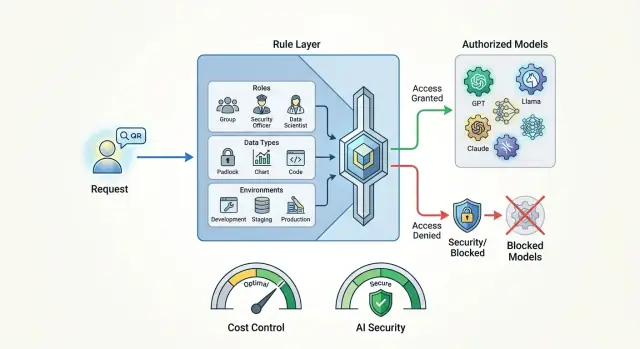
Why you should not send the same request to every model
The same request can cost a team very different amounts depending on the model. A short user question often turns into a long data package: chat history, system prompt, attachments, and internal fields. On a cheap model, this is barely noticeable. On an expensive one, the bill grows fast. Usually people do not notice the problem right away, but only after the first big invoice.
Costs grow for reasons other than token price. Strong external models are often chosen out of habit even for simple tasks: classifying an email, extracting a date from text, writing a short summary, or drafting a reply. A simpler model is often enough for that. If you send all traffic to the most expensive option, the extra spend piles up every day and stays hidden for a long time.
There is a second risk too. A request may contain a contract number, phone number, diagnosis, customer complaint, or internal document. Even if the employee did not intend to share sensitive data, the model receives it in full. For a bank, telecom, clinic, or public-sector team, this is no longer a matter of convenience, but a matter of data rules. In Kazakhstan, this is also tied to requirements for storing data inside the country and handling PII.
Another factor is the employee’s role. An analyst or ML engineer may sometimes need access to a strong external model for experiments. A support agent often does not need that access at all. Their risk, budget, and consequences of mistakes are different. One rule for everyone almost always hurts either cost or security.
Environment also changes the decision. In development, the team runs test scenarios and can tolerate mistakes more easily. In production, real customer requests are going through, and the cost of a mistake is much higher. What is acceptable in a sandbox should not automatically be allowed in the live flow.
Before sending a request, it is usually enough to check four things:
- who is sending the request
- what data is in the text and attachments
- which environment the traffic came from
- how much the team is ready to pay for this class of tasks
When these checks are combined into one rule, model choice stops being random. Some tasks can go to a strong external model, some to a local one, and some requests should not leave your environment at all.
What to check before every call
It is better to choose the request route based not on a single model field, but on the full context. The same prompt can be safe in a demo and too risky in production.
First, check who is making the call. The internal team may have one set of models, a service account another, and a contractor the narrowest set. This is not a formality. Different senders have different trust levels and different areas of responsibility.
Then look at the data itself. Plain text, internal documents, and personal data should not be handled the same way. If the prompt contains a full name, phone number, contract number, or medical information, the rule should trigger before sending. There are usually three options: mask the fields, block the external model, or switch the request to a local route.
Next, check the environment. In development, you can allow more freedom, but even in staging it is useful to turn on limits and keep request logs. In production, any policy bypass should be treated as an error, not a normal exception.
Also count the model cost for this specific task. Short classification, extracting fields from a form, or simple paraphrasing rarely need the most expensive model. If there are thousands of calls per hour, even an extra 2-3 cents quickly becomes a visible budget item.
And one last question: do you need an external model at all? For summarization, tagging, short draft replies, and other standard tasks, a local model is often enough. For teams in Kazakhstan, this also lowers the risk when processing has to stay inside the country.
A good rule is simple: first understand who sent the request and what it contains, then check the environment and price limit, and only then choose the model.
How to split access by role
Role-based access works better when you manage clear roles, not a list of people. Today an employee helps support, tomorrow they test a new scenario, and a set of personal permissions quickly falls apart. A role lasts longer than a specific person, so the rules are easier to read, change, and review.
Usually it makes sense to give every team a basic set of models. These are fast and inexpensive options for drafts, short replies, classification, and searching internal materials. This set covers most everyday tasks and does not push people toward expensive models without a reason.
After that, access is better expanded by the real complexity of the work, not by job title in the HR system. A support agent, catalog editor, or back-office employee rarely needs manual choice from dozens of models. If you leave it open, people will start picking the strongest model “just in case,” and costs will rise before anyone notices.
A basic scheme can look like this:
- standard roles get only the default set of models
- roles with analytics and complex text get 1-2 stronger models with limits
- narrow teams with rare and expensive tasks get access by approval and for a limited time
- service accounts work only along a predefined route
Exceptions are needed too, but each exception should have an owner and an expiration date. If the fraud team asks for access to an expensive external model for two weeks to test a hypothesis, that should be written down immediately. Otherwise a temporary permission will stay forever.
In practice, it helps to store the role name directly in the request or in the app profile, for example support-agent, risk-analyst, ml-team. Then the rule is clear in a second. When a system uses a list of individual people instead of roles, it quickly turns into a table of exceptions that nobody wants to touch.
How to account for data type and storage location
One rule for every request breaks almost immediately. One request contains public text, another an internal report, and a third a customer name, phone number, and contract number. If the system does not tell these cases apart before calling the model, the policy loses its meaning.
Usually the most value comes from simple input data labels. In many cases, three labels are enough: public, internal, and personal. That is already enough to make the first decision without long debates.
The approach can be like this:
- public data goes to approved models without extra restrictions
- internal documents follow a separate route, with a narrower model list and stricter logging
- personal data does not go to external models without a clear reason and separate approval
The most common mistake is simple: fields are masked after the model responds. That is too late. If full names, ID numbers, addresses, or account numbers already went into the prompt, the problem happened at the sending stage. Those fields need to be masked before the call, even if the request seems harmless.
For internal documents, it is better to create a separate route rather than rely on a general rule. Employee instructions, contracts, and reports may not contain personal data, but the company may still not want to send them to external services. In that case, the request should go only to a predefined set of allowed models.
Storage location should also affect the route. If the data has to remain in Kazakhstan, the request should not go to an external model just because it is cheaper or writes a little better. Storage rule first, convenience second.
How dev, stage, and prod should differ
The same rules for every environment usually create either extra cost or extra risk. In development, people need speed and room to make mistakes. In production, you need a predictable route, clear limits, and no random changes.
What to keep in development
For dev, cheap models, short timeouts, and a small token limit are usually enough. If a developer accidentally sends a very long prompt or runs dozens of requests in a row, the loss will be small.
The practical approach is simple: by default keep 1-2 inexpensive models for draft checks, and close off expensive and external options. If the team needs access to a strong model, it is better to grant it separately and for a short period.
Access keys should also be separated by environment. A test service should not have the same API key and the same permissions as production. Otherwise one old secret in CI or one wrong base_url can send test traffic to the wrong place.
What to check in stage
In stage, it is useful to check not only the model response itself, but also every service trace: request logs, PII masking, content labels, limit triggers, and the fallback route. If this does not pass in the test environment, it is too early to release to production, even if the response text looks fine.
Stage is useful because it lets you run real rules on safe data. This is usually where teams see that the policy looks clear on paper, but in practice it is either too strict or too loose.
What to tighten in production
In production, the model route is better fixed by policy instead of being left to the developer’s choice. The app should not suddenly switch from one model to another after each deployment. Otherwise the team quickly loses control over cost, latency, and data processing location.
A working setup usually looks like this:
- dev: cheap models, short limits, reduced context
- stage: the same routes as prod, but on test data and with full log validation
- prod: fixed model list, separate keys, strict role-based limits
- emergency mode: a preapproved replacement in case of failure or a sudden latency spike
The fallback route is better prepared in advance. If the main model is unavailable, the system should switch to a preapproved replacement, not to any available model.
How to build a one-request policy
A policy works better when you describe real work tasks instead of abstract models. Start with 5-7 common scenarios: customer reply, call summary, knowledge-base search, contract review, SQL generation, and checking text for risky phrases. That is usually enough to see both extra cost and weak spots in data handling.
- For each request type, define the goal. What matters most here: low cost, fast response, large context, accuracy, or keeping data inside the country?
- Choose the allowed models for each scenario. Usually you only need a main model, a fallback, and a local option for sensitive data.
- Set hard limits: maximum cost per call, maximum timeout, and context size. Without this, even a good policy breaks quickly under real load.
- Add rules for role, data, and environment. An analyst in dev may test an external model on anonymized data, but the same request in prod with personal fields should go only through the allowed route or be denied.
- Do not leave refusals unexplained. The system should return a clear reason: “this model is not available in production,” “the request exceeds the price limit,” or “only local models are allowed for data with PII.”
A good policy does not look complicated. It simply answers five questions: what kind of request this is, who sent it, what data it contains, which environment it came from, and how much you are willing to pay for it.
Example for a bank support team
A bank agent opens a customer case and wants to quickly draft a reply. The request already contains a contract number, product details, and chat history. That is convenient for the work, but sensitive data for the model.
So the rule should look not only at the text, but also at the context. The system sees the employee’s role, the type of data, and the environment where processing takes place. If the request comes from production and contains personal fields, a stricter route is triggered.
In this scenario, the logic is usually simple:
- the contract number, full name, phone number, and other fields are masked before sending
- the request is marked as containing PII and internal instructions
- external models are blocked for this request class
- a local model inside the allowed boundary creates the draft reply
The agent gets a draft answer, links to the relevant policy, and a hint about what to check manually. For simple cases, this saves time and does not create unnecessary risk.
If the dispute is complex, for example a customer is challenging a fee and referring to a previous promise from the bank, the policy may give a senior employee a different access level. They can run a second check with a stronger model, but only within the allowed boundary and with an audit-log entry.
This is where a one-request rule works best. The ordinary agent does not need to think about which model to choose or whether the text can be sent there. The system decides that in advance and under clear conditions.
Where teams make mistakes most often
The most common mistake is one rule for everyone. Marketing, analysts, support, and development are given the same access to models, even though their tasks, data, and limits are different. As a result, some people get too many permissions, while others hit a block where it is not needed.
The second mistake is manual choice of any model in production. On a test bench, this may still be tolerable. In a live environment, this approach quickly leads to extra costs and data mistakes. One employee chooses an expensive model for a simple task, while another sends sensitive text to a place where storage does not match company rules.
The third mistake is looking only at token price. Teams often forget to ask where the request goes, where the data is stored, whether the external provider keeps logs, and whether this type of text can be sent there at all. A cheap model can easily be the wrong choice if it violates storage requirements or internal rules.
Another common problem is endless temporary exceptions. Someone asks for access to an external model “for a couple of days” for a pilot, the rule is added manually, and then everyone forgets to remove it. A month later, the exception is already being used in normal work.
And finally, the fallback route is often tested worse than the main one. The primary model gets strict limits, while the backup option is left almost unfiltered. When the main model fails, requests go to the other model, and all the careful restrictions disappear at the worst possible moment.
If the policy seems ready, ask yourself three simple questions:
- who is sending the request and which environment are they working in
- what data is inside the request
- do the same restrictions apply to the fallback route
If you do not have a precise answer to any of these, the rule is still rough.
What to check before launch
Before launch, it is worth going through a few things manually. In diagrams, a policy often looks logical, but in real work it creates extra cost or too much access.
Check at least the following:
- roles match real access, and support, analyst, and developer do not all have the same model set
- personal data has a separate rule and a separate route
- test and live environments are separated by keys, limits, and allowed model lists
- audit shows not only a refusal, but also model replacement if the system chose a safer or cheaper route
- the policy has an owner who can see who changed the rule, when, and why
A simple example: a contact-center employee opens a customer card and asks a helper a question. If the text contains personal data, the system should apply a separate rule right away, not decide it “by default.” If the employee is working in a test environment, the same request can go to a cheaper model with a lower limit.
What to do after launch
After launch, two things almost always show up: too many refusals and quiet rule bypasses. If the team does not review this regularly, the policy quickly becomes a formality. People start asking for one-off exceptions, and costs rise again.
Track not only the number of blocks, but also the reason for each one. Keep a separate log of manual exceptions: who requested access, for which task, which model was needed, and how it ended. After a few weeks, you can already see where the rule protects budget and data, and where it just gets in the way.
Every month, it helps to review a few slices:
- how many refusals happened by role, environment, and task type
- how often teams asked for manual exceptions
- which rules never triggered
- where costs rose more than usual
- whether there were attempts to send sensitive data to external models
Dead rules are better removed. If a restriction has not been used for months and does not cover a clear risk, it only confuses people. A good policy is usually shorter than it looks.
It is also useful to look at costs not only company-wide, but by role, environment, and task type. One department may spend almost nothing, while another quietly drains the budget on expensive models in the test environment. That view quickly shows where the rule should be tightened and where it should be relaxed.
If a team has several providers and many routes, it is easier to keep control in one place. For example, AI Router on airouter.kz gives you one OpenAI-compatible API address, audit logs, PII masking, and local model hosting in Kazakhstan. This helps keep rules, routes, and limits under one layer, especially when some requests cannot leave the country.
If after a month there are fewer manual bypasses, costs are clearer, and rules are no longer growing for no reason, then the policy is working as it should.
Frequently asked questions
Why not just give everyone the same model?
Because the task, risk, and cost are different for everyone. A support agent often only needs a cheap or local model, while an analyst may temporarily need access to a stronger external model for a complex check. If you give everyone the same set, the team will either overpay or leak sensitive data outside.
When is an expensive external model really needed?
Use it for tasks where a simple or local model is no longer good enough. That usually means complex long-document review, tricky customer cases, SQL generation with a high risk of mistakes, or work that needs a very large context window. For short classification, summaries, and draft replies, this choice often does not pay off.
What should you check before every model call?
Look at the sender’s role, the data type, the environment, and the cost limit for that class of tasks. That is usually enough to filter out random and expensive routes. Then choose the model, not the other way around.
What if the request contains a full name, ID number, or contract number?
First mask those fields, not after the response. If the data cannot leave your environment, send the request only to a local model or block the external route. In prod, this rule should work automatically, without manual choice from the employee.
How should dev, stage, and prod be different?
In dev, keep cheap models, short limits, and separate keys. In stage, run the same rules as in prod, but on safe data and with full log checks. In prod, lock the route with policy and do not let the app freely switch models after deployment.
How do you split access by role without manual confusion?
It is easier to manage roles, not a list of people. Set a basic model set for common tasks, and open stronger options only to the roles that truly need them, ideally for a limited time. That makes the rules easier to read, change, and audit.
Why do you need a fallback route for the model?
Yes, otherwise during an outage the system may fall back to any available option and bypass your restrictions. Prepare the backup model in advance and give it the same rules for role, data, environment, and price. That way the emergency switch will not break your policy at the worst possible moment.
What should you show the user if policy blocks the request?
Give a short, clear reason. The person should immediately see what failed: the environment, the price limit, the external route for PII, or the role-based restriction. That reduces manual workarounds and helps them fix the request or choose an allowed path quickly.
How do you know the policy is wasting money or getting in the way?
Do not look only at the total bill. It is more useful to break down spending by role, environment, and task type, and keep a log of refusals and manual exceptions next to it. If simple scenarios often go to expensive models or people keep asking for bypasses, the rule needs work.
Can rules, audit, and routing live in one API layer?
Yes, that is the most convenient setup for teams with several providers and different routes. One API layer keeps audit, PII masking, limits, and the choice between local and external models in one place. For teams in Kazakhstan, it also makes it easier to keep data inside the country.