Migrating to an OpenAI-Compatible Endpoint Without Surprises
Migrating to an OpenAI-compatible endpoint looks like a simple base_url swap, but it often breaks on SDKs, timeouts, streaming, and JSON responses.
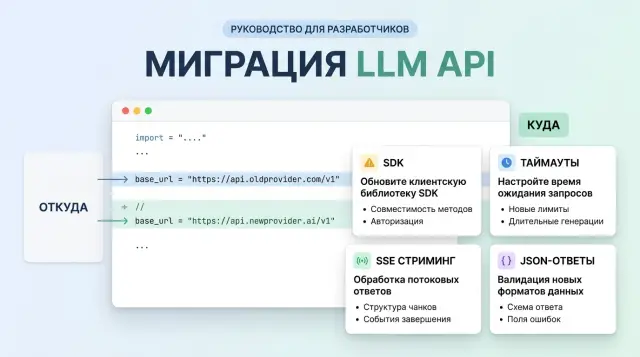
Why changing base_url alone is not enough
On paper, it all looks simple: change the API address, keep the same SDK, and the client goes to the new host. In practice, some of the logic does not live in your code. It is hidden in the library, an internal wrapper, or an old network layer that nobody has touched in a long time.
Because of that, migration to an OpenAI-compatible endpoint often breaks not in the model itself, but around it. One SDK appends the request path and API version on its own. Another changes headers, error formats, or streaming behavior. On the surface, you made one edit, but in reality you changed a chain of several things.
This usually shows up like this: the client reaches the new host, but builds the wrong route; the SDK timeout is shorter than the model’s real response; the parser expects familiar fields and crashes on a different JSON shape; the quick test passes, but the real workflow does not.
This is especially common when a team checks only one simple prompt. In the test, the model answers in two seconds with plain text, and everything looks fine. In production, the same service asks for a long answer, enables streaming, expects JSON for the next step, and suddenly gets a dropped connection or a parse error.
A good example is moving to an OpenAI-compatible gateway like AI Router. The idea of replacing the API address really does reduce the amount of work, because you can keep your current SDKs, code, and prompts. But that does not remove the need to check the client: what path it builds by itself, how long it waits for the first token, how it reads the stream, what it does on 429, and which JSON shape it treats as valid.
One green request is not enough. You need at least a short run on a real scenario: a long response, streaming, a retry after an error, and response parsing exactly the way your code reads it. That is usually where the surprises are.
What to check before the first request
If you are changing only base_url, first find every place where the code talks to the LLM API at all. Teams often remember chat, but forget embeddings for search, images for marketing, or audio for transcription. Then the main flow works, but a supporting service fails on day one.
Start with a simple inventory for each service. You need exact details, not vague labels: which SDK is installed, which HTTP client sits underneath it, which methods are called, and how the service reads the response.
The problem is often not in the gateway, but in an old client version. One service runs on a recent SDK, another uses a library from two years ago and handles headers, timeouts, or streaming differently. If you have multiple languages in the stack, such as Python for the backend and Node.js for workers, mismatches are almost guaranteed.
Before the first request, check four things:
- the SDK and HTTP client versions in each service
- which request types are actually used: chat, embeddings, images, audio
- where the code reads the stream in chunks and where it waits for a full JSON object
- where there are checks for specific response fields instead of just success
Even this list removes part of the risk. A chatbot may read a stream, while a summarization service waits for one finished object. After replacing base_url, both go to the same endpoint, but they behave differently.
Where fragile rules are baked into the code
Next, look for places where developers once added convenient but brittle assumptions. The most common examples are a whitelist of models, a hard requirement for usage in every response, expecting only one finish_reason value, and reading only choices[0].message.content.
These checks can live for a long time without being noticed. Migration exposes them immediately, because compatibility usually applies to the request interface, not every tiny detail in the response. If a service treats missing usage as an error or rejects a new model identifier, it will fail before any proper quality test.
If you use AI Router, it is better to check this before the first call to api.airouter.kz, not after. The most boring work before launch often saves a day of log digging and an overnight rollback.
How to migrate without unnecessary pain
The safest path is not to switch all traffic, but one small service with a clear workload. It is better to choose an internal scenario where an error will not stop the business process: for example, generating short replies for agents or draft emails.
If you are moving to an OpenAI-compatible endpoint through AI Router, start with a simple replacement of base_url with api.airouter.kz only in that service. After that, order matters more than scale. One successful request proves almost nothing. The SDK may handle a short call and then break on streaming, a long response, or a retry after a timeout.
Go step by step:
- Send a short request without streaming. Check that the client really reaches the new endpoint, gets the expected status code, and does not lose headers.
- Run a long request. It quickly reveals problems with timeouts, response size, and differences in handling
usage,finish_reason, and errors. - Turn on streaming. Watch not only the text, but also how the SDK reads chunks, closes the connection, and assembles the final response.
- Compare responses in pairs: old provider and new one. Compare status codes, headers, JSON, and the fields your code depends on.
At this stage, it helps to save a few raw responses in full. Very often the problem is not in the main text, but in a small detail: an empty field, a different value type, or an unexpected error message.
When the test service passes these checks, send a small share of production traffic to the new route. Usually 5-10% for a few hours is enough. Do not look only at the success rate. The more important signals are retry logs, response time, streaming drops, and cases where the app received 200 but could not parse the body.
If everything is clean at this stage, move the next service. That way you spend a little more time on the rollout and a lot less on incidents.
Where SDKs break most often
Problems usually do not appear in the first request, but in the second or third scenario. The team changes base_url, gets a successful chat completions response, and decides the migration is done. Then 404s, empty streams, and parse errors arrive, and at first glance they seem unrelated to one setting.
Older SDK versions often do not read the new address everywhere. The main client may go to the new gateway, while separate methods for models, files, or embeddings pull the old host from a default value. The same happens in internal wrappers: a developer passed base_url to one constructor, but part of the calls creates a new client with the old settings.
Another common failure is an extra path in base_url. If the library adds /v1 on its own and you already included that suffix, the request goes to /v1/v1/... and gets a 404. The reverse also happens: the SDK expects the full API path, but the team passes only the domain. It looks like a small thing, but finding that mistake can easily take half a day.
Typical symptoms usually look like this:
- a normal response arrives, but the stream drops after a few seconds
- chat completions work, but embeddings or models fail with 404
- the wrapper sees empty
content, even though the JSON has data - some requests go to the wrong host, even though
base_urlis set
A separate issue is old SDK wrappers. They rigidly expect the OpenAI format from an earlier version: a string in choices[0].message.content, usage in one place, and the same error structure. As soon as the response comes back with content as an array of parts, with tool_calls, or with a slightly different error field, the code breaks not on the network, but while parsing the response. From the outside, it looks like the provider is broken, even though the client is what failed.
Streaming is even trickier. The endpoint may work fine, but the library cuts SSE off on read timeout if the first token takes 15-30 seconds. Some HTTP clients also buffer the stream instead of delivering events as they arrive. On an OpenAI-compatible gateway like AI Router, this becomes obvious quickly: the basic request passes, but a long stream suddenly stalls because of client settings.
Before launch, it is worth running three separate tests: a normal chat completions call, an SSE stream at least 60 seconds long, and any secondary method such as models or embeddings. That set quickly shows where you really have a compatible client and where old assumptions remain.
What to do about timeouts, retries, and streaming
The same API format does not mean the same network behavior. The team changes base_url, the first request passes, and a day later production hits dropped streams, repeated POSTs, and responses that take 65 seconds where the old provider took 20.
Immediately separate connection timeout from read timeout. Connection shows how quickly the client reached the server at all. Read timeout shows how long you are willing to wait for the first byte and the next chunks. If you keep one shared timeout for everything, you will not know where the problem is: network, proxy, model, or just a long response.
It helps to watch at least four numbers:
- connection setup time
- time to first token
- time between stream chunks
- total response time
Time to first token is often more important than total duration. Users are fine with a long answer if they see the model start writing within a second or two. If the first token arrives after 15 seconds, the interface already feels broken.
Retries are where POST requests fail most often. Many SDKs retry automatically on 429, 500, socket drops, or read timeout. That is dangerous for chat completions: the model may have already started processing, and a retry creates a second identical request and extra cost. It is better to disable blind retries on POST and only keep them where you have protection against duplicates, such as request_id or your own deduplication.
If you are moving the client to an OpenAI-compatible gateway, check the normal response and stream=true separately. These modes break in different ways.
What most often breaks streaming
The SSE channel lives longer than a normal JSON response, and that is exactly why intermediate components break it most often. The frontend may expect one event format, while the proxy buffers the stream instead of passing it through immediately.
Check a few places:
- whether the ingress or reverse proxy closes long connections because of idle timeout
- whether the proxy enables SSE buffering
- whether the frontend waits for a full JSON object instead of processing chunks
- whether the stream completion event is lost
One simple test reveals the problem quickly: run a long stream for 2-3 minutes and collect logs on the client, proxy, and backend. If the server sent the first chunk immediately but the browser received it 20 seconds later, the model is not the issue. The delivery chain needs fixing.
Where response formats diverge in practice
The same text response does not mean the JSON is the same too. After replacing base_url, teams often look only at the content field, while the problems hide nearby: in usage, metadata, and the tool-call structure. That breaks billing, logs, analytics, and automated tests.
The most common differences look like this:
usagecomes in a different place or only in the final stream eventfinish_reason,refusal,model, andidsit somewhere different from where your code expects themtool_callsarrives as an array, while old code expects a singlefunction_call- tool arguments come as a JSON string, not a ready-made object
- empty arrays and
nullchange the handler logic
Confusion around usage is constant. One provider returns it immediately in the main response, another only after the stream ends, and a third does not return token details for cached or internal tokens. If a service writes the request cost right after the first chunk, it can easily calculate zero or save incomplete numbers.
Metadata fields also drift. In some places finish_reason lives inside choices[0], in others some metadata comes separately, and in others it is missing when filtering errors happen. That is why, at the start, it is better to save the raw response in full, at least in a test environment. It quickly shows where the schema has already drifted.
A separate pain point is tool_calls versus the old function_call. New implementations often return an array of calls, even if there is only one. The arguments field may be a regular string, a JSON string with escaping, or already a parsed object. If the runtime expects only one variant, the failure will appear not immediately, but the moment the model first decides to call a tool.
null and empty arrays also cannot be treated as trivial. content can be null if the model returned only a tool call. tool_calls may be missing entirely, or it may arrive as an empty array. For code, these are different cases. A check like if tool_calls often hides the mistake, and then the team spends a long time figuring out why the orchestrator silently skips a step.
With response_format and structured output, you need testing on real examples, not just the happy path. Even if the API accepts a JSON schema, the model may return plain text on refusal, length truncation, or a validation problem. If you are moving to a single compatible endpoint, it is worth running several real scenarios: a successful answer, a tool call, a refusal, a long answer, and a stream.
What this looks like in a live service
A team moves an internal chat assistant to the new endpoint and starts with what seems most logical: they change only base_url. If the service uses an OpenAI-compatible gateway like AI Router, this step often really does make the first successful request appear quickly.
The check looks promising. A short question like “summarize this email” passes, the answer comes back quickly, the status is 200, and the logs stay calm. At that point many people decide the migration is almost done.
Problems begin with a long conversation. An employee opens an old thread with 30-40 messages, asks the assistant to continue, and the interface freezes after about a minute. The backend does not see an obvious error, because the request does not always fail on the network. More often the timeout is triggered in the SDK, in the reverse proxy, or in the browser client waiting for a full JSON object instead of a chunked stream.
Then a second oddity appears: the logs still show 200, but the UI fails while parsing the response. The cause is usually boring, but annoying. The frontend expects one chat.completions format, but gets something slightly different: empty content in one chunk, tool_calls in another, usage only in the final stream event, or text with line breaks that the code tries to parse as a ready-made JSON object.
Usually the team fixes this in several steps: increases timeouts for long responses and streaming, checks that the client can read SSE in parts, relaxes overly strict response schema checks, and adds tests for long conversations, tool calls, and empty intermediate chunks.
After the fixes, they no longer run just one lucky prompt. They take about twenty typical requests: a short question, a long context, a structured JSON answer, a tool call, streaming mode, a canceled request, and a retry after a timeout. If all of that passes consistently, they move traffic over in stages.
That approach is less glamorous than a simple base_url swap, but it quickly shows where the real service breaks, not the demo script in a local console.
Errors that show up too late
Most migrations look successful until the team tests only “hello world.” A short request passes, a simple response arrives, and everyone thinks the base_url swap is done. Then production gets a long conversation, the response takes 40-60 seconds, the SDK cuts the connection on timeout, and the service suddenly starts returning errors.
These failures are especially unpleasant because tests do not catch them. The team checked one scenario with 200 tokens, but a real user asks for a summary over several pages, a table, or a long document analysis. Short answers stay calm. Long ones reveal timeouts, response size limits, streaming issues, and differences in data structure.
Another common mistake is changing both the SDK and the endpoint in the same release. After that, nobody knows what actually broke behavior: the new client, the new error parser, different retry settings, or the gateway itself. If the old code worked with one SDK, first leave it as it is and change only the address.
A drifting client version hurts too. One environment pulls a recent SDK release, another stays on a version from last month, and the developer’s local machine installs the package without pinning. As a result, the same request behaves differently: in one place the tool call is parsed, in another it is not; in one place streaming is assembled correctly, in another the library expects a different event format.
Logging is another place where teams often make mistakes. When the integration starts failing, developers enable detailed debug and write the entire prompt to logs. That is how phone numbers, addresses, contract numbers, and other personal data quickly end up in logs. If you work through a gateway like AI Router, it is better to check PII masking and audit logs in advance, especially if you have requirements to keep data inside the country.
These four things are usually noticed too late:
- tests do not cover long responses and long sessions
- one release changes several variables at once
- the SDK version is not pinned across all environments
- logs collect sensitive data without filtering
If you check these areas before launch, the migration becomes boring. That is a good sign. The most expensive incidents almost always start with the phrase “but we already had a successful test.”
A short check before launch
If you have already changed only base_url, that is not enough. Before launch, you need a short run that catches not theoretical issues, but the most expensive ones: streaming drops, extra retries, empty fields, and unexpected 429s under load.
Start with two requests. The first should be short, 20-50 tokens, without streaming. It will show that authentication, routing, and the basic response format are alive. The second should be long, with a large answer or generation that takes 1-2 minutes. That is the one that usually exposes proxy timeouts, load balancer buffering, and the difference between local testing and production traffic.
If you are moving the client to an OpenAI-compatible gateway, do not check only the application code. Look at the whole response path: SDK, backend, reverse proxy, frontend, and logs. Very often the backend receives the stream correctly, but the browser sees pieces with a 10-20 second delay, or waits for the whole answer at once.
Minimum test run
- send one short and one long request with the same SDK and the same settings that will go to production
- enable streaming and make sure chunks arrive without drops and do not get merged into one large block
- check 429 and 500 separately: the code should retry where it is safe, and not enter an infinite loop
- send a response with empty
content, missingusage, or an unexpectedfinish_reasonand check whether the parser crashes
A good test takes half an hour. A weak test takes five minutes, and then it eats half a day for the on-call team.
Before rollout, agree on who rolls back the change and how. You need a simple plan: restore the old base_url, disable streaming with a flag, or temporarily move part of the traffic back. If rollback requires manual edits in three services, that is not a plan.
For the first few hours after launch, keep four metrics in front of you: error rate, p95 response time, retry count, and the share of broken streams. If 429s rise sharply and latency jumps, do not argue with the charts. Lower the load, reduce parallelism, or roll back the route immediately.
What to do after switching
Do not remove the old route right away. During rollout, keep it as a backup and give the service a quick way to roll back. When the new path starts failing under real load, that saves hours, and sometimes an entire release.
Compare not by feel, but on the same set of requests. Take 50-100 typical prompts: short, long, with streaming, with tool calls, with a large context. Run them through the old and new routes and look at latency, error rate, and cost.
For this kind of check, a short checklist is enough:
- measure average response time and separately track slow requests
- record timeouts, 429s, 5xxs, and parse errors
- compare total cost on the same traffic volume
- check whether the answer quality changes on the same prompts
There is one subtle point that often gets missed: cost cannot be judged only by the model price. If the new route retries requests more often, holds connections open longer, or breaks streaming, the final cost for the service rises even if the per-token rate stays the same.
If you need one OpenAI-compatible gateway for different models, it makes sense to send only a small slice of traffic through it first. In that scenario, AI Router is a practical pilot option: it gives you one OpenAI-compatible endpoint, works with current SDKs, and lets you avoid rewriting the client when the route changes. For teams in Kazakhstan and Central Asia, practical things also matter, such as keeping data inside the country, PII masking, audit logs, and B2B invoicing in tenge. It is better to include those in the comparison from the start, not after release.
A good migration ending looks boring: the new route handles the load, the old one stays as temporary insurance, and the team has numbers instead of guesses.