Metadata in RAG: Which Filters Actually Improve Answers
Metadata in RAG helps narrow search by date, document type, and access rights, but extra filters often hurt recall and degrade the answer.
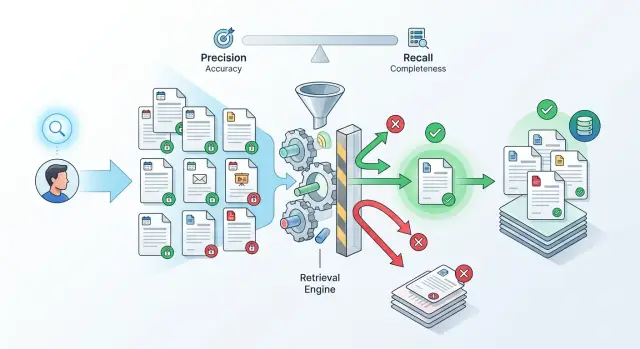
Why RAG answers the wrong question
RAG misses not because the model is "stupid." The mistake usually starts earlier: search finds pieces of text that look similar to the question in wording, but not in meaning. A person asks about the current rule, while the retriever brings back every document that happens to use the same terms.
This is a common story in internal knowledge bases. One index may contain policies, drafts, exports, email templates, and team notes. Search latches onto text matches and puts them near the top, even though those files are not equally useful.
Old versions are often the biggest problem. An employee asks how to approve a contract today, and the system pulls an instruction from last year together with the new policy. Both documents look relevant because they cover the same topic. For the model, that creates a conflict: it sees two similar answers and does not always know which one is current.
In an internal assistant for a bank, retail company, or SaaS product, this becomes obvious fast. A person asks a simple question about a limit, deadline, or approval process. Instead of one exact fragment, search returns five pieces: an old policy, a new order, a technical template, a lawyer's comment, and an internal file with a similar name. Then the model does what it does best: it turns the context into a coherent text.
The problem is that coherent text is not the same as the correct answer. If the context contains too much extra material, the model averages out the meaning, carries details from one document into another, and answers confidently even where the sources disagree. From the outside, it looks plausible. Inside the answer, there may already be a mix of incompatible rules.
This is where metadata stops being a minor detail. Without it, search cannot tell a fresh document from an archive, a working policy from internal noise, or a general text from material meant for a narrow group. Until the retriever learns to cut out this noise, recall falls in the most painful place: the system seems to find a lot, but not the thing the person actually needs.
Which metadata to store in the index
An index without proper metadata quickly turns into a warehouse of text. Search grabs similar words, but not the right meaning. So it is worth storing only the fields that really help narrow down the set without losing too much.
The first important pair is publication date and effective date. These are not the same thing. A policy may have been approved in January but take effect in March. If the system does not see the difference, it can easily return an outdated answer as if it were current.
Next comes a clear document type. It is best to define a short closed set of values right away: policy, instruction, contract, ticket. When types spread into "internal policy", "policy 2", "working document", and dozens of similar variants, filters start creating almost as much noise as having no filter at all.
Access level should also be stored with the document, not added later. For an internal assistant, this is a basic requirement: an employee may ask a perfectly normal question, but the system should not even consider documents they are not allowed to read. It is also useful to store the owning team. If legal, finance, or HR manages the text, that helps both search and the handling of disputed answers.
Another useful field is version status. Draft, active, archive sounds boring, but this field often affects quality more than a complex ranker. If the index contains three versions of the same instruction, the model needs to understand which one is the working version and which one exists only for history.
The source also matters when the same fact lives in several systems. A payment deadline may appear in a contract, in a CRM, and in an approval ticket. If you store source_system and source_id, it becomes easier to remove duplicates, understand where the answer came from, and avoid arguing with the user at the level of "search found it this way."
A good rule is simple: each field should answer one question. Is the document active yet? What type is it? Who can access it? Who owns it? Where did it come from? If a field does not help make one of these decisions, it usually just gets in the way in the index.
When date helps and when it hurts
Date works well where the answer becomes outdated quickly. These are questions about pricing, limits, deadlines, payment rules, or application deadlines. If someone asks "what limit applies now" or "by what date can I send the report", an old document almost always gets in the way.
But date does not always improve search. Many teams immediately narrow results to a 30-day window and expect a more accurate answer. In practice, recall often drops. Security policy, a contract, an onboarding guide, or a procedure may not change for months. A hard filter simply removes the needed text.
It is usually better to separate active versions from the archive first. That is more useful than a blunt freshness filter. If a set contains both current and old editions, the model can easily take an old paragraph simply because its wording is closer to the question. It is much safer to search among active documents first and bring in the archive only in two cases: if the question is clearly about history, or if there is nothing in the current set.
For this, a creation date is not enough. You need a separate effective date. A document may have been created on March 12, approved on March 20, and only entered into force on April 1. If you look only at created_at, search will produce a strange result.
Usually four fields are enough:
status:activeorarchivevalid_from: the start date of validityvalid_to: the end date, if there is onecreated_at: the technical creation date
The difference is easy to see in a simple example. The finance team updated travel limits, but the file was uploaded to the system a week before the new rules started. A user asks about tomorrow's limit. By creation date, the document is already "fresh", but it is still too early to rely on it. By effective date, it already works.
If the request does not require strict freshness, do not use a hard filter. It is better to reduce the weight of older documents in ranking and still give them a chance to appear in the results. This approach more often produces an honest answer: the model sees the current version first, but does not lose a rare and still relevant document that has been in the database for six months.
You should add date to the index almost always. You should only filter hard by date where a mistake in timing or a limit immediately affects the case.
How document type changes the results
The same question can produce a very different result if search understands document type. It is not enough to know the topic of the text. It is useful to know what it is: a policy, an instruction, a log, a ticket, or support chat.
The difference is visible right away. If an employee asks whether client data can be sent to an external service, it is better to surface the policy and the rule, not a support chat where someone once gave a one-off answer. The chat may sound convincing, but for this question it only leads the answer away from the point.
The opposite situation is common too. When a team investigates a failure after a release, instructions help very little. What is needed are logs, tickets, and incident notes. If search looks only in the knowledge base, the answer will sound smooth but be useless: it will describe how the system is supposed to work, not what actually broke.
That is the value of document type: it helps choose not just a similar text, but the right source. For some requests, type is better used as a hard filter. For others, it should be a ranking signal so it does not cut off useful fragments too early.
The list of types should stay short. Usually 5-8 clear categories are enough: policy or procedure, instruction, ticket, log or event, support thread. If there are too many categories, the team will get confused quickly. Then the same file ends up as a "policy" one day and a "rule" the next, and search starts behaving randomly. Names that are too close almost always hurt. Pick one word and agree on what it means.
A simple rule: types should reflect the reading scenario, not the folder structure. A person usually looks for either a rule, steps, traces of an error, or a previous decision. That is what the categories should be built around.
In practice, it helps to check a few typical queries manually. Take a question about access policy, then a question about a service outage, and see which document types appear in the top ten. If tickets rank highest in the first case and only instructions in the second, the types are defined poorly or search is using them in the wrong place.
If you are unsure, start with a soft rule: boost document type in ranking instead of using it as a hard cutoff. When you see that the request intent is detected reliably, you can turn on strict filtering for part of the scenarios.
How to account for user access
Access rights should be checked before the model sees the context. In practice, this is where metadata often has the biggest effect. It does not improve answer style. It keeps the system from pulling in extra material.
Set the access filter right after search or directly inside the query to the index. If search found 20 chunks and the user has the right to see only 12, only those 12 should go into the model. If nothing remains after filtering, it is better to say honestly that there is not enough accessible data than to build an answer from someone else's documents.
Checking only at the file level often does not help. The same document is often read differently by different roles: the whole team sees the general part, the contract appendix is for lawyers only, and the table with limits is for managers only. In that case, rights should be stored for each chunk, not just for the file as a whole. Otherwise search will return an "allowed" file, but it will also carry a restricted fragment along with it.
If the model has already received a restricted chunk, you have already lost. Do not rely on an instruction like "do not use secret data in the answer." The model can still mix facts from restricted and open text and then present them in neutral wording without an obvious quote. It is better to lose one strong fragment than to get a leak in a perfectly reasonable-sounding answer.
What to write in the log
A log is not there just for show. Without it, you cannot tell why an answer was too short or why the system "could not find" a document that is definitely in the database.
Usually four fields are enough:
- who made the request and with what role
- which access filter was applied
- how many chunks it cut off
- which sources remained after filtering
A simple example: a bank employee asks the internal assistant about credit approval limits. Search finds both the department policy and an internal appendix for managers. If the assistant sends both chunks into the model, the answer will be fuller, but also have extra detail. If it removes the restricted appendix first, the answer becomes shorter, but safer.
If the team runs such an assistant through AI Router, audit logs make it easier to check later which documents entered the context and what exactly the filter removed. That makes it much easier to investigate disputed answers and to find the places where recall is dropping not because of the retriever, but because of access rights.
How to set up filters step by step
Filters are rarely worth turning on "by default" for all requests. If they are too broad, the answer will stay noisy. If they are too strict, recall will quickly drop, and the model will start answering from random fragments.
A proper setup starts not with the index, but with real questions. Take 20-30 requests that people actually ask: about policies, contracts, instructions, old decisions, access rights. It is better to mix simple and disputed cases where the system has already made mistakes.
For each question, record three things: whether a fresh version of the document is needed, what type of source fits, and whether the answer should depend on the user's role. It sounds boring, but this kind of list quickly shows where filters help and where they only cut down search.
Then go one step at a time:
- first run all questions without filters and save the top-k results;
- then turn on only the date filter and check where the results improved and where needed documents disappeared;
- then test document type separately;
- after that, add the user's role or access level;
- in the end, compare not only the first relevant document, but the entire top-k.
Looking at a single metric is not enough. You need at least two: how often the system finds the needed document, and how often the filter hides it completely. If the answer became cleaner in five questions but the document disappeared altogether in eight, that filter is getting in the way.
Date is a good example. For a question about the current version of a policy, it helps. For a question like "why was such a process approved last quarter," a freshness filter hurts the result, because it removes historical versions.
Keep a filter only where it gives a noticeable gain on real requests. Often the best setup is very simple: always check user access, use document type only for part of the scenarios, and apply date only to questions about current rules and pricing.
Example for an internal assistant
A bank employee asks: "What limit is currently in effect for product X for new customers?" The question is simple, but without filters search often pulls the wrong fragment. An old order contains the same words as the new one, and the system grabs it just because the text is similar.
The problem gets worse if the index contains orders, emails, meeting notes, and drafts side by side. Then email threads easily appear in the results, where the team discussed a possible limit change. For search, that looks similar to a useful document. For the user, it is noise.
Access creates a separate risk. The same question may be asked by a sales employee and a risk specialist. If the system does not check user role, the model may see a note meant for another team and repeat it as a general rule. The answer looks convincing, but it confuses the person and breaks internal rules.
In such a scenario, three filters are usually enough:
- effective date or publication date;
- document type;
- user role or access group.
After that, search changes noticeably. The assistant first picks fresh documents, then keeps only policies and orders, and finally checks what this employee is allowed to see. Email discussions and old versions do not disappear, but they no longer get into the answer first.
Before filtering, the model may produce a long paragraph that mixes last year's limit, an argument from a thread, and a note for another team. The user reads that answer and still goes back to check it manually.
After three filters, the answer is usually shorter and cleaner: "For new customers on product X, the limit is 3 million tenge. The basis is the order dated February 12, 2025." One fact, one suitable document, no extra noise.
That is how metadata helps in practice. It does not decorate search. It removes documents that look similar in words but do not fit by time, type, or access rights.
Mistakes that reduce recall
Most often, search is broken not by embeddings, but by dirty filters. If the metadata is inaccurate or too strict, the system simply does not see the needed text chunks and answers from what is left.
One common mistake is filtering by creation date instead of the document's effective date. For an order, tariff, or policy, these are different things. The file may have been uploaded in March, while the document itself has been effective since January. If a user asks about the rules for February, a filter based on upload date can easily cut out the correct answer.
Document type causes no fewer problems. In one system a document is labeled "policy," in another "procedure," and in a third "internal act." To a person, these are almost the same. To a filter, they are three different values. As a result, search looks only in a narrow part of the index and loses useful fragments.
There is also a more annoying failure: access rights are stored only at the file level. Then the file is split into chunks, but the rights are not copied to each chunk. After that, the system either shows too much or, more often, throws away safe fragments because it cannot tell who is allowed to see them.
Recall usually drops for five reasons:
- the team filters by the wrong date;
- the same document type is recorded in different ways;
- chunks lose access rights after splitting;
- strict filters are turned on for all requests at once;
- empty fields and metadata errors are never checked.
The most expensive habit is applying hard filters all the time. If someone is looking for "vacation rules," they do not need an immediate filter by department, document status, country, date, and role. It is better to find a broad set of candidates first and narrow the results only where it truly matters. Otherwise the system cuts recall too early.
Another quiet problem is empty and wrong fields. If some documents have no type, and others store the date in a different format, the filter starts behaving randomly. That is why it is useful to run a simple check before launch: how many chunks have no date, how many have no type, how many have an unknown access level. One such report often explains why search sometimes works and sometimes does not.
A good filter does more than restrict results. It removes noise without throwing away needed documents.
A quick check before launch
If RAG already answers tests reasonably well, before launch it is worth checking not the demo polish, but the boring things. Usually those are what decide whether a person gets the fresh policy or the old version, sees a restricted document or a blank answer.
A quick test is simple: take one question where there is a new policy, an old policy, and a document with limited access. Then look at what the system put into top-k and why. If the team cannot explain that in a couple of minutes, the filters are still rough.
Each chunk in the index should have at least three clear fields: date, document type, and access level. Without this, metadata quickly turns into noise. The system searches by text, but does not understand that an order from last year and a draft without approval should not sit next to the active instruction.
Before launch, it helps to go through a short checklist:
- make sure every chunk has a date, not just the file as a whole;
- confirm that document type is set consistently;
- compare results for fresh questions, archive requests, and mixed cases;
- review the logs for each miss and understand which filter cut out the needed document;
- agree on who can relax a filter manually and when.
Access is especially likely to break. An employee asks for a contract template, the needed document is in the database, but the access filter cuts it off too early. Then the system grabs a less suitable open file and answers confidently, but wrongly. That kind of miss is worse than an honest "I could not find it."
If you use a shared API gateway and keep audit logs, investigation becomes much easier. For example, in AI Router you can check not only the final answer, but also the path to it: which chunks entered search, which ones were removed, and where exactly recall dropped.
The last check is very simple: the team should know when a filter can be relaxed and when it cannot. Date can sometimes be widened. User access cannot.
What to do next
If you are just setting up metadata, do not try to cover every case right away. For the first pass, three fields are enough: date, document type, and user access. That is usually enough to remove old versions, avoid mixing policies with drafts, and avoid showing restricted material to people who should not see it.
Then choose one narrow scenario and test the filters only there. For example, the assistant answers questions about vacations and business trips. This kind of test quickly shows where the filter helps and where it cuts recall and hides the needed fragment.
Do not look only at the final answer. First check the retrieval before generation. It is useful to compare search with and without a filter on the same set of questions:
- how many relevant fragments the system found in both modes;
- how often the fresh document ranked above the old one when that really mattered;
- how many useful results disappeared because of document type;
- whether there were cases where user access hid the only correct source.
When the basic setup is working, add simple evaluations. Track source freshness, permission errors, and misses in retrieval. If the answer sounds confident but retrieval did not bring the needed document, the problem is not the model. Usually the cause is a filter that is too strict or bad labels.
A good practice is to keep a short set of control questions, around 20-30. That is enough. After every change to the filters, run them again and see what got better and what broke. That way the team sees the real effect instead of arguing from gut feeling.
If you are comparing several models on the same question set, a single gateway like AI Router also saves time. You can send identical requests through one OpenAI-compatible endpoint, avoid rewriting the integration, and then review the audit logs for the same cases.
Start small, measure each step, and do not make the setup more complex too early. Three fields, one scenario, a short test set. For the first cycle, that is more than enough.