Manual Review Queue Without Backlog: How to Set SLA
The manual review queue should not grow on its own. We break down case priorities, SLA, escalation rules, and a reviewer-friendly interface.
Why manual review quickly goes negative
A manual review queue rarely breaks because of one big failure. More often, it gets worse gradually, while the incoming flow still looks normal. The number of incoming cases did not go up, but the team has less real time for each case.
That happens when too many repetitive and weak signals enter the queue. Some tasks are duplicated, some arrive without context, and some do not need a human at all. The operator spends minutes not on the decision itself, but on figuring out why the case was opened in the first place.
Usually, it is not the hardest cases that blow up the queue, but the small losses at every step: repeated escalation of the same incident, false triggers from rules and models, cases with no history or flag reason, manual review where the risk is almost zero, and constant switching between different task types. Each one looks manageable on its own. Together, they eat the shift.
Even an extra 20-30 seconds per case quickly turns into backlog. It gets worse when all tasks look the same. An urgent customer complaint, a borderline model answer, and an almost obvious false positive sit in the same list. People pick what is easiest to close, because that is how they keep the pace up. As a result, easy cases move forward, while risky ones age in the queue.
That is why average metrics often lie. A dashboard may show an acceptable average processing time, but hidden behind it are old tasks with high risk. For a bank, a telecom team, or retail, that is a bad imbalance: formally the process is alive, but in reality the dangerous cases wait the longest.
Backlog is also dangerous because it hides the makeup of the work, not just the volume. One hundred cases in the queue do not say much by themselves. It is far more useful to know how many are older than SLA, how many involve money, personal data, or complaints, and how many never should have been sent to a human.
As long as the queue is treated as one big mass, the team cannot see where time is lost and where risk is growing. That is why manual moderation goes negative even when intake is stable: the flow is the same, but useful throughput drops every day.
Where to start with case prioritization
The best place to start is a simple rule: sort the flow by cost of error, not by arrival time. If a harmless case waits 40 minutes, the loss is almost zero. If a risky case slips through without review, the cost of the mistake is much higher: a customer complaint, a data leak, a wrong decision, or a fine.
That is why the manual review queue should be built around damage, not around the idea that "first come, first served." FIFO sounds fair, but it almost always mixes urgent and non-urgent work into one stream.
In practice, 3-4 risk classes are enough:
- Critical risk. The mistake affects money, personal data, security, or regulatory requirements. People should see these cases right away.
- High risk. The mistake is expensive, but not something that needs a reaction within the same minute.
- Medium risk. Borderline cases where sample manual review is useful.
- Low risk. Routine cases with a clear pattern. These are better sent to automation, with only a small sample left for quality control.
The rules for these classes should be short and observable. Not "a difficult request" and not "a suspicious case," but concrete signs: PII is present, there is a complaint about a charge, the model answer concerns medical advice, the required AI-content label is missing. If the team works with LLMs in production, these signs are usually visible already at the routing stage.
Another common mistake is confusing urgency with complexity. A long or rare case is not always urgent. And the reverse is also true: a simple case may need a response within 5 minutes if it involves account blocking or a risk of data leakage.
That is why it is better to split priority into two separate signals: risk and deadline. Then a "complex but can wait" case will not push out a "simple but on fire" case.
Low-risk cases should not be pulled into the manual queue "just in case." It is better to let them run automatically, add limits, logging, and sample audits. That is usually what frees up time for the tasks where a person is truly needed.
How to set SLA without extra bureaucracy
SLA only works when the team has the same understanding of what counts as overdue. For manual review, this is not an abstract "the case has been sitting too long," but a concrete process failure: the operator did not open the case within 15 minutes, the moderator did not give an initial decision before publication, the disputed model answer did not reach a senior reviewer before the end of the shift. The more precise the definition, the fewer arguments and the fewer pretty but useless reports.
Agree right away on which moment you measure. Usually it helps to track not one number, but three points: when the case entered the queue, when it was taken, and when it was closed. If a task was handed off five times and the report counts only the last step, SLA on paper will look fine, but the tail of the queue will still grow.
One SLA for all cases almost always breaks the process. It is easier to split the flow by risk and give each class its own response time:
- High risk: 10-15 minutes to the first decision.
- Medium risk: up to 2 hours.
- Low risk: by the end of the shift or by the next business day.
That way the team does not spend an urgent slot on a harmless case while something nearby could lead to a complaint, a fine, or a lost customer.
Escalation should trigger before a breach, not after it. Often a simple rule is enough: when a case has lived through 70-80% of its SLA, the system pushes it higher in the queue, sends a signal to the shift lead, or moves it to a backup group. If you wait for a red status, the time is already gone.
SLA control should also be viewed across the whole process. Say a bank checks model answers where a personal-data flag was triggered. If the first moderator is unsure and sends the case to legal, the clock should not reset. Otherwise the report will show everything is fine, even though the customer waited twice as long.
It is more useful to track the share of cases that met SLA at each stage, the median time to first action, and the number of escalations before breach. These metrics do not look flashy, but they show immediately where the process is slowing down: at intake, during handoff between roles, or at the final decision.
What the reviewer interface should look like
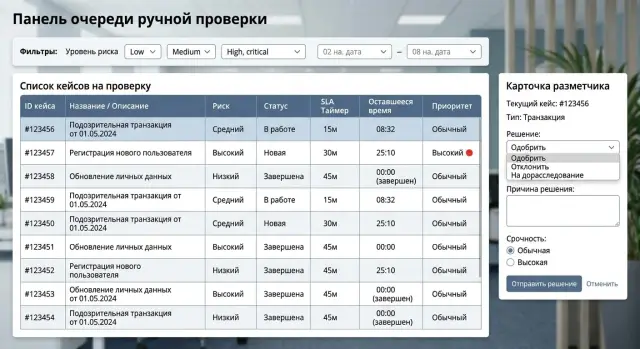
A reviewer should not spend time looking for the right data. A good screen helps them make a decision in 10-20 seconds. If a person opens five tabs every time, the queue grows even when the team works quickly.
On the case card, keep only what affects the decision: the fragment itself, short context, the reason it entered the queue, the priority, and the SLA deadline. Everything else is better collapsed. Long logs, system fields, internal IDs, and full technical parameters are rarely needed in the first seconds of review.
What the reviewer should see immediately
A case should have one clear next step. Not a set of buttons with equal weight, but the main choice for this type of review. If the operator usually either approves or escalates the case, those are the actions that should be in front of them. Rare scenarios can go into a menu.
On one screen, it is usually enough to show the item under review, short context, a risk label or reason for being queued, the remaining time before the SLA is breached, the history of past decisions on similar cases, and ready-made rejection reasons or response templates.
Templates save a lot of time if they are written in normal language. The operator should not type the same explanation again, such as "a better-quality document is needed" or "the model response needs to be checked again." Two clicks instead of ten make a noticeable difference by the end of the shift.
What slows work down the most
The biggest problem is usually moving between screens. The reviewer opens the card, then the filter, then the user history, then goes back and loses their place in the queue. That kind of interface is frustrating and keeps stealing minutes.
A stream mode works better: finish the current case, then get the next one right away, without reloading the list or choosing the filter again. If the team reviews LLM answers in production, it is useful to show past decisions for the same rule next to the current case. That keeps the standard consistent and reduces arguments about borderline cases.
A good interface removes doubt and unnecessary movement. If the operator immediately understands what to look at, what to click, and what to rely on, the queue stops building up even without growing the team.
Step-by-step process setup
If you send every disputed answer to people, the queue will start growing almost immediately. A healthy process is not built around the average number of cases per day, but around risk and the actual speed of the shift.
Start with at least two weeks of history. You do not need a perfect setup here. It is enough to answer a few simple questions: which types of cases come in most often, where the automation gets it wrong, how many minutes one review takes, and at what hours the flow spikes.
Then move step by step.
-
Split the flow into 4-6 clear classes. Usually groups like personal data, payments or contracts, complaints, toxic content, low model confidence, and everything else are enough. For each group, calculate its share of the flow and error rate. If one class with almost no risk makes up 40% of the queue, it does not need manual review as quickly as complaints or data leaks.
-
Add simple auto-routing rules. The simpler the rule, the easier it is to maintain. For example, send all cases where the model found PII, all answers about financial operations, and cases where two signals fired at once: low confidence and a user complaint. If a safe pattern has passed many times without errors, do not send it back into the queue again.
-
Assign SLA by risk level and name the owner right away. High risk can be reviewed in 15-30 minutes, medium risk during the shift, and low risk once a day by sample. The owner is not there for reporting, but for action: who handles the overdue case, who changes the rule, who removes false positives.
-
Test the setup on a real shift. Average numbers often mislead. On Tuesday afternoon the team may keep up, but by evening the queue may already be growing. Replay the history by hour and see how many cases one reviewer can actually close per hour without rushing or losing quality.
-
Change only what the numbers show once a week. Watch the incoming flow, the share of cases going to manual review, false positives, and missed risky cases. Change 1-2 rules at a time, otherwise you will not know what actually worked.
If an LLM application goes through AI Router, this kind of review is usually easier. Audit logs, PII masking, and AI-content labels are visible in one place, so it is easier to see which events truly need a human and which are better left to automation. That is often what clears the backlog: people review not more, but more precisely.
Where teams most often go wrong
Usually the queue grows not because there are too few people, but because the flow rules are bad. The team sees dozens of "urgent" tasks, but does not understand which of them really affect risk, customers, or money. There is no order in such a queue, even if the process looks set up on paper.
The first common mistake is simple: everything urgent is put into one stream. A customer complaint, fraud suspicion, a disputed model answer, and a normal rare case all get almost the same status. After a couple of days, the word "urgent" stops meaning anything. Reviewers pick what is easiest, not what is most dangerous.
The opposite extreme is just as harmful. The team spends too much time on rare but safe cases simply because they look unusual. In manual moderation for LLM applications, this happens all the time: the system carefully flags the answer as questionable, but the actual risk is low, and the person still spends five minutes on it instead of thirty seconds. If there are many such cases, the truly important reviews wait too long.
SLA is also often measured from the wrong starting point. If the clock starts when the event is created, the number only looks good on paper. In practice, the case may not yet have reached the working queue, may be waiting for batch processing, or may be waiting for filtering. The team feels like SLA is being breached all the time, even though the problem is not the people, but the wrong start point.
Another common time sink is the operator gathering context piece by piece. They open CRM, a separate log, the conversation history, escalation rules, and another internal table. One decision takes not a minute, but three or four. At a volume of 500 cases per day, that is already hours lost.
From the outside it usually looks the same:
- the case waits too long before the first view;
- simple tasks are reviewed too carefully;
- complex tasks go to a second review;
- reviewers interpret the same case differently;
- priority rules are not revisited for months.
The most expensive mistake comes later. The volume doubled, new case types appeared, but the rules stayed the same. What worked for 50 reviews a day breaks at 500. If the team does not adjust risk thresholds, SLA, and the review screen itself, the backlog comes back very quickly.
An example of a queue with less manual work
An online store receives hundreds of return requests every day. If all of them are sent to manual review, the team quickly drowns in routine work. A much better setup is simple: normal returns are closed automatically, and people look only at cases that can truly cost money or lead to a dispute with a customer.
Requests pass automatically when the amount is small, the product is standard, the buyer’s history is clean, and the return reason matches common scenarios. These cases do not stay in the queue even for a few minutes. The system checks the rules, sets the decision, and writes a clear status.
The manual queue stays short because only disputed cases get into it: an expensive item, repeated returns in a short period, a serial number mismatch, unusual account activity, or a conflict between the warehouse and support.
In a live process, it may look like this:
- a standard return up to 20,000 tenge goes to auto-processing;
- a return for expensive electronics goes to review within 10 minutes;
- a case with a fraud signal gets a 5-minute SLA;
- the senior employee sees only expensive or disputed requests.
This setup reduces the load in two places at once. Frontline staff do not waste time on safe requests, and the senior employee does not have to scroll through the whole flow just to find a couple of difficult decisions. They only step in where the mistake is costly: a large amount, chargeback risk, a customer complaint, or an obvious factual dispute.
The effect is usually visible within a week. The team starts noticing which cases keep ending up in the short queue again and again. Often it turns out the problem is not too few people, but weak rules. For example, the system sends all headphone returns for review, even though only cases without a packaging photo are truly disputed. In that case, there is no need to expand the shift; the rules and request form just need to be tuned more precisely.
Good manual moderation looks boring, and that is normal. Operators have few tasks, but almost every one needs attention. If the queue contains many simple cases, the process is already broken.
A short daily control checklist
If the team looks at the queue only by the total number of cases, the problem is almost always noticed too late. In the morning everything may look tolerable, and by lunchtime some tasks are already past SLA and pulling the rest of the flow with them.
Daily control is better built around five questions:
- How many cases are already older than their SLA right now. Look not only at total volume, but at the share that is overdue.
- What percentage of the flow goes into manual review. Even a few points of growth often means the rule has become too strict or the model is more uncertain.
- How much time is spent on each common case type. One difficult class can eat half a shift even if it is not the biggest by volume.
- Which decision reasons appear most often. If reviewers keep setting the same final outcome, part of that work should be removed from the manual loop.
- Where the queue depends on one person. If only one employee can handle disputed complaints or medical cases, you already have a bottleneck.
It is better to look at these numbers together. For example, the share of manual moderation may not be growing, but the average time for one case type has risen from 2 to 7 minutes. For a shift, that is a very different workload, and backlog will appear by the end of the day.
It also helps to record the reason for the deviation from normal. Not just "84 cases overdue," but "overdue because of a new category, a rule change, or the absence of a second reviewer in the evening window." Then the manager changes the task route, the rule, or the schedule, instead of just asking the team to work faster.
A good daily report fits on one screen. If overdue cases, the share of manual tasks, average time by type, and dependence on specific people are all visible at once, the problem can be spotted the same day, not at the end of the week.
What to do next
Do not try to fix all manual moderation at once. Pick one process where the mistake is truly expensive: a disputed payout, a reply to a customer containing personal data, a rejection of an application, or the publication of sensitive content. It is easier to see on one such flow why the queue is growing and where people waste time.
Then review the thresholds that send a case to a human. In many teams they are too cautious: the model hesitates by 1-2 points, and the task immediately goes to manual review. It is usually better to make the rules sharper at the high-risk end and let low risk through without operator involvement.
A practical plan is pretty down to earth:
- choose one scenario and measure the current volume of manual reviews over 1-2 weeks;
- look at the three reasons that most often send a case to the queue;
- tighten checks only where the mistake affects money, risk, or complaints;
- reduce the reasons for manual review to 5-7 clear groups;
- after a week, check whether there are fewer disputed cases and repeat reviews.
It is better to keep the reason groups short and clear. For example: low model confidence, rule conflict, PII suspicion, policy risk, incomplete data, disputed outcome. If there are twenty reasons, reviewers start getting confused and the reports stop explaining anything.
If you run an LLM process, reducing the manual queue often does not require hiring more people, but more accurate routing. You can leave the fast and cheap model for simple requests and send the hard and risky ones to a stronger model. Audit logs also help: they show which prompt, model, or rule creates the most unnecessary reviews.
For many teams, a single gateway like AI Router on airouter.kz is convenient for this. It provides one OpenAI-compatible endpoint, helps you switch models or providers without rewriting the current integration, and keeps the audit trail in one place.
If the queue does not shrink after these steps, do not expand the staff first. First make sure of two clear changes: fewer cases per person per day and fewer returns for a second review. That is a good sign that the process is actually working better, not just getting more expensive.
Frequently asked questions
How do I know when the manual queue is already turning into a backlog?
Look at more than the total volume. If the share of cases older than SLA is growing, urgent items are sitting next to safe ones, and people spend time gathering context, the queue is already slipping even if incoming traffic barely changes.
What should come first when triaging cases: arrival time or risk?
Start by sorting by cost of error. A safe case can wait, but a complaint about a charge, a data leak risk, or a disputed model answer should be shown to a person right away. Keep arrival time as a second factor, not the main one.
How many priority levels do we really need?
Usually 3-4 classes are enough. That is enough to separate money, personal data, complaints, and regulatory cases from the normal flow without drowning in rules. If there are too many classes, the team will start arguing about names instead of doing the work.
When is it safe to remove low risk from manual review?
Move low-risk cases into automation if you have a clear pattern, limits, logging, and sample audits. If the same type of case has passed many times without errors, there is no reason to put it back into the manual queue.
How do you set SLA without extra bureaucracy?
Take three points: when the case enters the queue, when a person starts working on it, and when it is closed. Then set different response times for different risk levels. That way the team stops spending urgent slots on calm cases.
When is the best time to escalate a case?
Do not wait for a breach. As soon as a case has lived through about 70-80% of its SLA, move it higher in the queue or send it to the shift lead. That threshold usually protects the tail of the queue better than handling already red items.
What should a reviewer see on one screen?
On the card, keep only what affects the decision: the fragment itself, short context, the reason it was flagged, the risk level, the deadline, and similar past decisions. If the operator keeps jumping between tabs and searching the history again, you lose minutes on every case.
Why does average processing time often lie?
Averages hide the tail. The dashboard may look fine even though expensive cases are aging in the queue. That is why you should look at the median, the share of tasks older than SLA, and the time to first action for each risk class.
How can we reduce false positives without breaking the process?
Start with the most common reasons for manual review. If a rule keeps producing safe cases, narrow it or add one more signal, such as a user complaint, PII, or low model confidence together with another signal. Change one or two rules at a time so you can see the effect.
When should we hire people instead of fixing the rules?
First check the routing rules, the interface, and repeat reviews. If people still do not have enough hours for risky cases after that, then it is time to think about hiring. Expanding the shift earlier is often expensive and does not change much.