LLM Structured Output: Why It Breaks in Production
LLM structured output often breaks in production because of malformed JSON, schema drift, and tool-calling failures. We'll cover checks and retries.
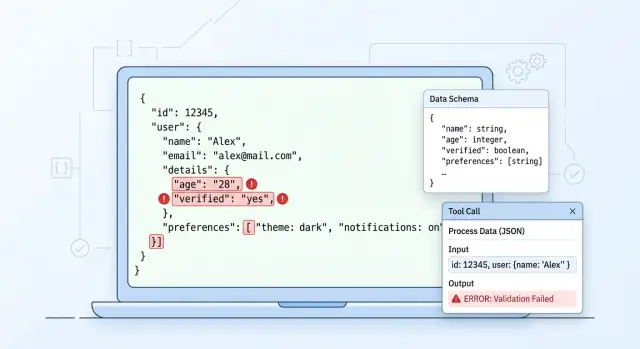
What actually breaks in production
In a test environment, everything often looks fine. The team runs a dozen clear examples, the parser reads the response, and it feels like the model is ready to ship. Then real input arrives, and the contract between the model, the schema, and the code starts to crack.
The most common failure looks almost funny: the model writes one sentence before the JSON. For a person, that is minor, but for the parser it is already an error. Instead of a clean object, you get a short explanation, then the opening brace, and the whole pipeline stops at the first character.
Then come the quieter, nastier failures. A field that was a string yesterday arrives as a number today. order_id changes from "00125" to 125, and the system loses the leading zeros. An array may be cut off halfway through the response if the model hits the token limit, the provider stops generation, or the app closes the stream too early.
The problem is that these errors stay hidden for a long time. The response passes ordinary tests and then fails on rare input: the user pasted a table from an email, mixed Russian and English, sent an empty field, or added a very long comment. One unusual request breaks a branch the team barely tested.
A small example: a service extracts application data and expects JSON with the fields customer_name, amount, and currency. On simple examples, the model answers cleanly. On a real application, it starts with a short explanation, returns amount as a string with spaces, and skips currency because it could not find it clearly in the text. The meaning is there, but the code can no longer use it safely.
If the team routes requests between different models through one API, the spread becomes more obvious. One model keeps the format strictly, another likes to add comments, and a third mixes up types more often. That is why structured output does not break in just one place. Usually the problem appears on three levels at once: JSON syntax, schema match, and the business meaning of the fields.
Where the response chain breaks
A structured response rarely fails in just one place. More often the whole chain breaks: prompt, model, parser, transport, and the service that reads the result. In tests, this is hard to notice because requests are short, responses are neat, and everyone in the chain expects the same format.
The first crack often appears between the instruction and the schema. The prompt asks the model for a "short explanation and a list of reasons," while the JSON Schema expects a strict reason_codes field as an array of strings with no extra text. The model tries to satisfy the prompt and writes an explanation where the parser expects only an array. The response is almost right. In production, that is already enough for everything to break.
Then post-processing gets involved. The team asks the model to return JSON inside a markdown block, and the parser strips ```json and cleans up line breaks. At that step, it is easy to damage escaping: the backslash disappears, the quote closes too early, and the string with a line break becomes invalid JSON. In logs, this looks like "the model returned garbage," even though your code introduced the error.
Another common failure comes from the transport itself. If the server or proxy cuts off the response because of a timeout, you get half an object: an opening brace, an unclosed array, an unfinished field. This is especially visible with long responses and when routing through several providers. If you work through a single OpenAI-compatible gateway, such as AI Router, it is worth checking timeouts, response size, and request logs for each call instead of looking for the problem only in the app.
The last break happens after parsing succeeds. One service starts sending customer_type, while the next still expects the old segment field. The JSON is valid, the local schema passes, but the business logic fails later or silently falls back to a default value. These are the most annoying errors. They do not make noise right away and quietly corrupt the data.
That is why it is better to check the chain layer by layer: what the prompt actually asked for, what the model really returned, what the parser changed, whether the server cut off the response, and which version of the fields the next service expects. If you only look at the final parsing error, you are almost always fixing the wrong part.
Which JSON errors happen most often
In production, JSON usually breaks not because of rare bugs, but because of small details. A person reads the response and thinks everything is fine. The parser does not.
The most boring error is a trailing comma at the end of an object. The model writes {\"status\":\"ok\",} out of habit because it often sees similar examples in code. For standard JSON, that response is invalid.
Single quotes are no better. The model can easily return {'status':'ok'} instead of {\"status\":\"ok\"}. For a Python dict, that looks close enough. For JSON, it is wrong. If the team looks at the response by eye, this difference is often missed.
Another break involves strings. The model inserts a real line break inside a value, for example in a comment or an address. Visually, the text reads fine. The parser sees a broken string and stops. If a line break is needed, the model must return \\n, not break the string directly inside the value.
Another annoying case is when the model wraps the response in markdown and adds ```json. That is convenient for chat. For an API, it is junk. The parser expects a clean object and instead gets formatting together with the useful data.
Sometimes the model goes even further and prints two objects in a row. For example, first a draft, then a corrected version: {\"amount\":1000}{\"amount\":1200}. It can be softer: an object, followed by a short explanation in text. For the system, it is the same problem either way - the response is no longer one valid JSON document.
In practice, these errors show up in ordinary tasks: application classification, tool calls, form filling. If a response fails "sometimes," the first step is almost always to look at the raw model output, not to blame the schema or the client code right away.
Why the schema stops matching the response
A schema rarely breaks all at once and loudly. More often it drifts little by little, until one part of the system already lives by new rules while another still expects the old response. That is how schema mismatches start causing failures in production.
A common story: a field is first treated as optional because the model "usually" sends it. A few sprints later, the business logic starts using that field, and in practice it is now required. The schema was never updated, the tests stay quiet, and then some responses arrive without it and the chain fails in the worst possible place.
The same thing happens with enums. Today the status is approved, rejected, or review. Tomorrow needs_info appears in the prompt or post-processing, but nobody updates the schema version. For a person, that is a small change. For the parser, it is a new value it does not understand.
Dates are even duller, and therefore more dangerous. One release returns 2025-04-27, another returns 27.04.2025, and a third adds time. If the team has not fixed one format, the mismatch only appears on real data, when sorting, filtering, or importing into a CRM produces strange results.
Another common failure is that a nested object disappears in some responses. For example, the model used to return customer.contact.email, and then for certain records it only returns customer.name. If the code expects the full object without checking for null or a missing field, the error does not appear at generation time, but much later.
Another cause of drift is when the code and schema live in different repositories. One team updates the DTO, another does not pull the JSON Schema, and a third changes the prompt. Formally, everyone made a small change, but together they created an incompatibility.
This is more visible in systems with multiple models and providers. If the team sends the same contract through a single OpenAI-compatible endpoint, the differences surface quickly. In AI Router, for example, you can run the same SDKs, code, and prompts across different models by simply changing base_url to api.airouter.kz. That is useful for comparison, but these runs quickly show where the schema is too optimistic.
A good schema does not guess what the model will "probably" return. It locks down required fields, date format, allowed values, and behavior for empty nested objects.
Where tool calling fails
With tool calls, the model often breaks on simple things. It chooses the wrong tool if the names are similar or the descriptions overlap. If one tool looks up a customer and another checks their limit, the model can easily confuse them, especially when the request is short and missing context.
Incomplete arguments are just as common. The model sends customer_id but forgets region or document_type. This is easy to miss in tests: examples are usually clean, while real users write shorter messages with typos and omissions.
Another failure happens when the tool expects an object and the model returns a string. For a person, "customer_id=123" looks almost fine. For the service, it is already the wrong data type, and the handler fails before the business logic even starts.
Sometimes the model tries to do two things at once and returns normal text together with a tool call in the same response. The orchestrator expects one action but gets two. As a result, some systems show text to the user, some launch the tool, and some do both.
Even with a single OpenAI-compatible API, this does not disappear. If the team changes models or providers through one gateway, the tool-call format can behave slightly differently under the same contract. A small difference quickly turns into a chain failure.
Simple restrictions usually help. Tool names should differ in meaning, not just in wording. Types and required fields should be checked before execution. The response mode is better kept to one: either text or a tool call. After a model error, return the exact reason, not a generic invalid arguments. And one practical step: block repeated calls with the same parameters. If a tool returns an error, the model often repeats the same call without changes, and the system burns tokens in a useless loop.
How to check the response step by step
Structured output rarely breaks in only one place. Usually the error appears earlier and is noticed later, when the app has already tried to parse, fix, and use the response all at once. That is why the order of checks should be strict and the same for every request.
The approach is simple:
- Save the raw payload and request metadata.
- Try strict parsing with no auto-fix.
- If parsing fails, fix only by explicit rules.
- If the JSON is parsed, check the schema and types separately.
- Only then run business checks.
The raw response must be saved before any cleanup. Do not trim spaces, remove markdown, or rewrite quotes. If you keep only the "fixed" version, you lose the source of the failure and no longer know what the model actually returned.
Strict parsing is not about being picky. It shows the real error rate in JSON: a trailing comma, text before the object, an array instead of an object, a string instead of a number. If you enable smart repair right away, you hide the break and start treating the symptoms.
Auto-fix should also stay narrow. You can remove outer triple backticks or extract JSON from a code block. But do not guess which field the model "probably meant." The looser the repair, the more silent errors end up in production.
Schema and type checks are better separated. The schema answers one question: are these fields allowed at all? Type checking answers another: is price a number, not the string "1000"? This separation makes logs and retries much easier.
Business checks come last. The schema may accept an order with a negative amount, a date in the past, or an empty list of items. For JSON, that is a valid object. For the product, it is not.
Log not just the rejection, but the exact reason: parse_error, schema_error, type_error, business_rule_error. Keep the raw payload alongside it. Then the team can see exactly what needs to change: the prompt, the schema, the retry logic, or the handling code.
How to tune retries
The same retries for every failure quickly turn an error into a loop. If the response broke because of a missing quote, the model does not need to solve the whole task again. If the JSON parses but fails the schema, it needs to fix one specific field, not rewrite the entire object.
For a syntax error, a short instruction works best: "Fix only the JSON. Do not change fields, and do not add text outside the object." For a schema error, the request should be specific: "The amount field must be a number; it is currently the string 12 000." For a tool-call error, it helps to return a short message from the tool itself so the model can see which parameter is missing. Temporary issues like a timeout, 429, or a brief network drop should be handled by the orchestrator, not by the model itself.
It is better to set limits in advance. Usually 2–3 attempts are enough for format issues and one extra attempt after a tool failure. A total time limit is just as important. If the chain takes more than 5–10 seconds, the user already feels the delay, and the quality rarely improves enough to justify it.
Before any external action, set an idempotency key. Otherwise, a retry after a timeout may create two payments, two orders, or two CRM records. This is a common mistake: the team fixes JSON but forgets the tool may already have run once.
A good rule is simple: fix the format first, then the schema, and only then repeat the tool call.
A simple example
A bank has a chatbot that takes a loan application. The model must return four fields: name, IIN, amount, and application date. At first glance, everything looks fine because the response arrives as JSON.
{
  "name": "Алия Садыкова",
  "iin": "",
  "amount": "500000 тенге, желательно на 12 месяцев",
  "date": "2026-04-27"
}
The problem is that this response only looks usable. The JSON is formally valid, but the schema is already broken. The amount field must be a number, not a string with an explanation. The iin field is empty, even though the CRM expects a 12-digit string. If the system checks only JSON syntax, the error moves further down the chain and appears later at the CRM call.
Usually it ends simply: the bot tries to create the application, the CRM rejects the request, and the user gets a strange response or silence. It is worse when the system loses the collected data and starts asking everything again. For a bank customer, that becomes annoying very quickly.
In such a scenario, the check should happen in order: first parse the JSON, then verify types against the schema, then check the business rules - IIN as 12 digits, amount as a number within the allowed range, and date in one format. Only then call the CRM.
If the check fails, the system does not need to repeat the entire conversation. It should keep the valid fields and ask only for what is broken. For example: "Please enter your 12-digit IIN." The name and date are already there, so there is no need to ask again.
It is a simple but very revealing case. The problem is rarely one big failure. More often it is small cracks: valid JSON, the wrong type, an empty required field, and then a failure in the tool or CRM call. If you place validation before the external system and use narrow retries only for the broken field, the chain becomes much calmer.
The mistakes teams keep repeating
Many failures start not with the model, but with team habits. The most common mistake is simple: if the response looks like valid JSON, people assume it is good enough to use. But the syntax can be correct while the meaning is wrong. The status field is there, but the value is not in the list. The array arrived, but with the wrong objects. tool_name is filled in, but the arguments are empty.
The second typical problem is sending the same prompt to every model and every task. On paper, that is convenient. In production, it breaks the response format because models understand limits, date formats, empty fields, and tool calls differently. A prompt that holds up on one model starts adding explanations, changing field names, or skipping required values on another.
Another weak spot is logging. The team keeps only the final parsed result and does not save the raw output, tool_call.arguments, or the response after a retry. Then an incident cannot be reviewed honestly. All you can see is that the CRM rejected the application, but not what the model returned, what the parser changed, or at which step everything drifted.
Overly aggressive auto-repair is also common. The parser fixes quotes, adds missing braces, swaps types, and tries to guess missing fields. In the short term, this reduces error counts in logs, but in reality it only hides them. A week later, the team no longer knows where the real problem is - in the model, in the schema, or in its own repair layer.
A short pre-release checklist
Before release, run the system on real examples where failures have already happened. Format usually breaks on small things: the model adds ```json, forgets a field, changes a type, or writes an explanation before the object.
- Keep raw logs for every failure: the prompt, the raw model response, the tool payload, the request id, the selected model, and the error code.
- Add the schema version to the response, for example
schema_version, so old responses are not confused with new ones after a release. - Set a clear retry budget: how many retries are allowed, for which errors, and whether the model or prompt changes on the next attempt.
- Track metrics separately: parse rate, schema rate, and tool success rate. One overall success percentage almost always hides the real source of failure.
If you have several models or providers, review these metrics separately for each one. One route may consistently return clean JSON, while another breaks tool calls more often with the same code.
A good sign of readiness is simple: any failure can be found quickly in logs, reproduced locally, and assigned to a clear error class. If that takes half an hour of manual digging, it is better to slow the release down.
What to do next
Start with one scenario where the error affects money, deadlines, or manual work. A good candidate is field extraction from an application, where the model must return JSON and then call a tool without a human involved. If one response out of twenty breaks there, the team is already losing time to investigation and fixes.
First, measure the baseline. Without numbers, a debate about model quality quickly becomes a debate about impressions. Three metrics are enough: how many responses are parsed as JSON at all, how many pass schema validation, and how many tool calls actually run without manual fixes.
Then run the same contract on several models. Do not change the prompt, schema, or post-processing between tests, or the comparison loses meaning. Often one model writes a little more elegantly, while another breaks enums, dates, or required arrays much less often.
If you are comparing providers, it is easier to keep one OpenAI-compatible endpoint and change only base_url. In that setup, AI Router can be a neutral layer: the team uses the same SDKs, code, and prompts, and switches routes between models without rewriting the integration. For quick comparisons, that cuts out a lot of extra work.
After the tests, lock the rules into code, not a presentation. Add automatic validation, a retry limit, clear rejection reasons, and raw response logging for incident review. Separately write the operating procedure: what counts as a schema error, when to retry, and when to send the request to a manual queue.
If the team already has a pilot, do not expand it to ten scenarios at once. Bring one flow to a stable state where the parse rate and successful calls stay at a clear level for at least a week. After that, scaling becomes calmer and cheaper.
Frequently asked questions
What breaks first in structured output?
The most common failure is something tiny: the model adds one sentence before the object, wraps the response in ```json, or leaves a trailing comma. A person can read it just fine, but a strict parser stops immediately.
Always look at the raw model output first. If it is already messy, do not look for the cause in the CRM or database.
Why is valid JSON still not good enough for production?
Even valid JSON can still be useless. The amount field arrives as a string instead of a number, order_id loses its leading zeros, a required field is empty, or the status is not in the allowed set.
Check not only syntax, but also types, required fields, and product meaning.
Should I ask the model to return JSON in a markdown block?
No, it is better not to ask for a markdown block. It is convenient for chat, but it adds extra clutter for an API and is easy to break during cleanup.
Ask for one clean JSON object with no explanation before or after it.
What is the best order for checking the model response?
First, save the raw payload without cleaning it up. Then run strict parsing, check the schema and types separately, and only after that run business checks and external calls.
That way you can quickly see where the chain broke: in JSON, in the contract, or in the product rules.
When does a retry help, and when does it just get in the way?
A retry is not always useful. If only the JSON is broken, ask to fix the format and keep the fields unchanged. If the schema does not match, point to the exact field and required type. If the network returned a timeout or 429, the orchestrator should handle it, not the model.
One generic retry for every error usually wastes time and tokens.
How many retries should we set by default?
Usually 2–3 retries are enough for format issues, plus one extra attempt after a tool failure. There is rarely a point in stretching the chain any longer: latency grows, and the answer does not get noticeably better.
Set a total time limit right away so the user does not wait forever.
How can we reduce errors in tool calling?
To reduce tool-call failures, give tools different names based on meaning, and check arguments before execution. If a tool expects an object, do not accept a string that merely looks similar.
A simple response mode also helps: either text or a tool call. Then the orchestrator does not have to guess what to do with a double response.
What should we log to debug failures?
Keep the raw model response, the prompt itself, tool_call.arguments, the selected model, the request id, and the exact rejection reason such as parse_error or schema_error. Without that, you will have to debug the incident manually in pieces later.
If you only have the already "fixed" JSON, you have already lost the source of the failure.
Why does the same contract work on one model and fail on another?
The same schema can behave very differently across models. One model sticks to the format tightly, another likes comments, and a third mixes up types or skips empty fields.
Run the same contract across several models without changing the prompt or post-processing. That will quickly show whether the problem is in the model or in your schema.
Where should we start if we want to clean things up quickly?
Start with one scenario where the error costs money or time, such as extracting application fields before sending them to the CRM. Measure three things: how many responses parse as JSON, how many pass the schema, and how many external calls finish without manual fixes.
Once that flow stays stable for a few days, expand the approach to other scenarios.