LLM Postmortem After an Outage: Which Fields Should You Capture
A practical guide to writing an LLM postmortem after an outage: which fields to record, who fills them in, and how to turn lessons into release tasks.
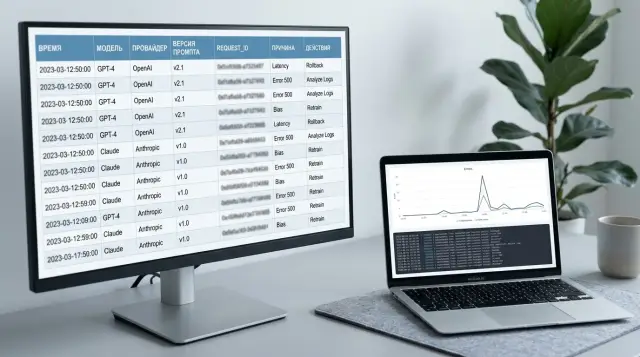
Why details disappear quickly after an outage
Right after an outage, the team remembers the loudest part of the problem very clearly. The JSON response failed, latency spiked, 429s started appearing, users began seeing strange text. But memory is bad at keeping the sequence of events. An hour later, people are already arguing about what happened first: the release, a route change to another model, rising timeouts, or a rollback.
In LLM systems, this is more obvious than in a regular web service. One request often passes through several layers: the application, the API gateway, a proxy, the model provider, cache, and safety filters. Each layer has its own clock, its own request ID, and its own log format. If the team uses a single gateway like AI Router and then also checks app and provider logs, the same error can easily turn into three different versions of one story.
After a rollback, the picture gets worse. An engineer restored the old prompt, turned off a feature flag, switched models, adjusted limits, and the system came back to life. That is the right thing for production. It is not the right thing for an investigation. The original state disappears fast. By evening, it is already hard to reconstruct which schema version expected JSON, which system prompt was active during the outage, and which route was chosen for that traffic.
These are the details that most often get lost in the first hour:
- the exact time the first symptom appeared and the moment it was noticed
- the release number, prompt version, and active flags
- request IDs that can connect logs across systems
- what the rollback actually did and what it changed
When facts are scarce, the team almost always slips into arguing about the cause. One person blames the model, another blames the new parser, a third blames the network or rate limits. The conversation drags on, and fixes are delayed. That is where an LLM incident review breaks down: not because of the template, but because the team loses its footing.
That is why you need to capture details in the first few minutes, while the team still has a live timeline in mind. Otherwise, the next release will follow the same chain, and the argument will start all over again.
What counts as an incident in an LLM system
You should treat any failure that changes product behavior and hurts the user, the business, or the risk profile as an incident. That means not only 500s, timeouts, and API outages. If the model suddenly starts replying in the wrong format, the hallucination rate goes up, or personal data leaks out, that is also an incident.
For an LLM postmortem, it is better to use a broad rule: if the system became more expensive, slower, more dangerous, or clearly worse in quality, the event needs to be recorded. Otherwise, the team only remembers that the "service was down," and the real cause is gone from memory the next day.
A common mistake is to look only at technical availability. An LLM system can return 200 OK and still break the product. A simple example: the chat successfully returned an answer, but JSON parsing failed because the model added extra text. Formally, the request finished. In practice, the post-release flow stopped working.
Silent failures are especially dangerous. They rarely make noise in monitoring, but they quickly damage metrics. Typical examples are broken JSON or another format the app did not expect, more hallucinations on common tasks, a PII leak or missed masking, a jump in request cost without any quality gain, and latency growth that makes users abandon the flow.
It also helps to note right away which layer the problem started in. That saves hours of argument after the release. In the incident record, it is better to state clearly where the failure happened: in the model, in routing between models, in the system prompt, in tool calling, in response post-processing, or in retry policy.
Sometimes more than one layer breaks, not just one. For example, the router sent traffic to another model, the new model handled the JSON schema worse, and the app did not validate the response before calling the tool. The user sees one failure, but the team needs to record the whole chain.
Maturity here is easy to spot: an incident is not just a service outage, but any deviation that changes the user result. Then the next release is checked not by a single status code, but by the system’s real behavior.
Which fields to record right after the outage
The first 15-30 minutes after an outage decide whether the LLM postmortem will be useful or turn into a pile of guesses. While logs are still close at hand and the participants still remember the details, record the hard facts first, without explanations or conclusions.
Start with an exact timeline. Write down when the incident began, when it ended or stabilized, and who noticed the problem first: monitoring, support, a customer, or the on-call engineer. If there were several waves of failure, note those too, otherwise everything will blur into one vague episode later.
Then describe the symptom from the user’s point of view. Not "the LLM behaved incorrectly," but something specific: empty response, broken JSON, extra fields appeared, the model answered in the wrong language, or latency went from 4 to 40 seconds. One exact example is more useful than five general phrases.
Next, save the identifiers that let you reconstruct the full trace: request_id or another request ID, trace ID, the affected API key, the service or client name where the request came from, and one or two input/output examples with sensitive data removed.
That is already enough to avoid searching for the incident blindly. If traffic goes through a gateway like AI Router, it is useful to save the request ID at the gateway level and at the provider level too, if the provider exposes it.
Also record exactly what the request passed through. You need the model, provider, route, prompt version, response template version, and any parameters that could have influenced the result. For an LLM system, this is often more important than the error text itself. The same prompt can fail in different ways on different models or with different providers.
Without release context, the picture is still incomplete. Note the release version, active flags, limits, recent changes in routing, JSON schema, caching, moderation, or PII masking. Even a small change made an hour before the outage often turns out to be the cause.
Finally, estimate the scope: how many requests were affected, which services were hit, which region or customer pool was impacted, and whether the issue was limited to one provider or across the whole chain. If it is immediately clear that the incident affected only one API key or one route, the team will save hours of searching.
A proper review starts not with conclusions, but with carefully collected fields. When the facts live in one place, the next release is checked against real traces of the failure, not against memory.
How to build a postmortem step by step
The first 30-60 minutes after an outage decide whether the team gets a clear picture or a pile of guesses. At that moment, it is better not to argue about who made the mistake. It is much more useful to quickly record the facts, while logs have not yet rotated out and people’s memory is still fresh.
A practical postmortem template is usually built like this:
- First, record the hard facts: what broke, when it started, who noticed it first, and which path was hit hardest — chat, classification, JSON responses, retrieval, or billing.
- Immediately export the incident traces: app logs, error and latency metrics, traces, a few raw requests and responses, and the prompt, model, and release versions.
- Then build a minute-by-minute timeline. It usually includes the release, the first alert, manual checks, the rise in 4xx or 5xx errors, model switching, rollback, and the moment the service started responding normally again.
- After that, check whether the explanation is complete. The cause should explain not just one symptom, but the whole picture. If a theory explains only the broken JSON, but not the rising timeouts or the cost spike, then you need to keep digging.
- At the end, turn the conclusions into work. Every action should have an owner, a deadline, and a clear result: add a contract test, freeze the response schema, introduce a canary release, or update alerts.
It is better to build the timeline from system data, not from memory. People often mix up the order of events, especially if the team was checking prompts, rate limits, and fallback behavior at night in parallel. If traffic goes through one gateway, it helps to compare timestamps across audit logs, the model, the provider, and the key. This makes it faster to understand where the failure started: in the app, in routing, or after the model switch.
Another useful trick is to keep 2-3 raw examples nearby. One successful request before the release, one failed request during the incident, and one after the fix. With that trio, it is easier to see what changed: the system prompt format, temperature, JSON schema, context length, or PII masking.
If, after the review, all you have left is "we need to be more careful," the template did not work. The result should be specific: "by Friday, add a valid JSON test for three models; owner: backend lead."
Who fills out the template and who checks the facts
One person rarely writes an accurate postmortem after an outage. A few hours later, people are already mixing up the time, the sequence of actions, and even the root cause. That is why it is better to split the template by role. Everyone fills in the section where they have verifiable facts.
Usually, one document owner brings all the parts together, while the others are responsible for their own sections. That way, the team separates the timeline from the hypotheses faster and does not argue about who "remembers better."
The incident manager collects the timeline: the first alert, escalation time, team actions, workarounds, and the moment the service started working normally again. The release developer describes everything changed before the outage: code, config, SDK version, a new response parser, or a route change to another model. The ML engineer checks the model, prompt version, request parameters, and eval results, and also looks at whether the tests matched real traffic and whether the response format broke. The platform engineer compares logs, timeouts, request limits, retries, and API gateway errors. If the team uses AI Router, they can also review audit logs, the route, PII masking, and whether traffic shifted to a different provider after the routing change. The team lead records the risk before the next release: assigns owners, deadlines, and the conditions that must be met before shipping is allowed.
Fact-checking should also be separated. The timeline is verified against alerts and logs, not memory. Release changes are verified against commits, flags, and configs. Conclusions about the model are verified against the model ID, prompt version, and test results, not against the phrase "it worked better before."
Who approves the final version
The final document is usually owned by the incident manager or the team lead. But they should not decide alone what counts as the root cause. If the team disagrees about a point, it is better to mark it as unconfirmed and write down which log, test, or experiment will settle the question.
A good template ends not with generalities, but with names. Every fix has an owner, a deadline, and a way to verify it before the next release. Otherwise, the postmortem stays a neat file, and the same outage returns a week later.
Example: a release that broke the JSON response
On Friday evening, the team enabled a new model for 20% of traffic. The switch looked quiet: HTTP statuses were normal, latency did not rise, and there were no obvious network errors. So for the first 15 minutes, everyone thought the release had gone well.
The problem showed up in a client service that expected strict JSON with fixed fields. The new model started answering in a different tool calling format, and the parser began to fail. For the user, it looked like a normal outage: the request was sent, the response seemed to exist, but the action did not happen.
This kind of case is easy to confuse with network issues or timeouts. The team went down the wrong path at first too: they checked retries, the load balancer, and API logs. But it quickly became clear that transport was working normally. The old route returned JSON in the expected format, while the new one returned a structure where tool arguments were wrapped differently.
What they recorded in the postmortem
In this review, it is worth recording not general statements, but specific fields: the model ID included in the release, the provider serving the responses, the prompt version, the traffic share at the time of the outage, and the sample response that broke parsing.
That set of fields was enough to end the argument with facts. When the team compared the sample responses from the new and old models, the cause became obvious: it was not the network and not the SDK. The contract between the model response and the code expecting another tool call format had broken.
If the team works through an OpenAI-compatible gateway like AI Router, these fields are especially important to preserve. The same endpoint can hide a model or provider change, and for an investigation that becomes the direct trail to the cause.
For the next release, the team did not rely on manual checks. They added a contract test that fails the build if the model returns JSON outside the schema, turned on canary for only 5% of traffic, and added a separate alert for rising parsing errors. That is cheaper than looking for someone to blame on Monday morning.
Mistakes that ruin a postmortem
The worst postmortem looks neat, but explains nothing. After it, the team only remembers a vague feeling: "something went wrong," and the same outage appears again in the next release.
The first mistake is vague wording. A phrase like "the model behaved strangely" is useless. You need observable facts: which request came in, which response came back, what the service expected, and where exactly the flow broke. If JSON did not parse, say so. If the model switched into another format, record that, not the feeling the outage left behind.
The second mistake is mixing facts and guesses in the same paragraph. When "5xx errors increased at 14:03" sits next to "the provider probably changed the model behavior," the document quickly loses precision. It is better to separate confirmed facts from logs, traces, and metrics, hypotheses the team is still checking, and decisions made during the incident.
What often gets forgotten
Very often, the team does not save input and output examples, and then argues from memory. You need at least 2-3 real examples with PII masked: names, numbers, addresses, and account details. Without that, it is hard to tell whether the outage was caused by a specific request type, a new prompt version, or a rare model response.
Another common gap is the cost of the incident. People somehow treat it as "a manager thing," even though the picture is incomplete without it. Record how many tokens were wasted, how many requests were affected by degradation, whether there were SLA penalties, and how many hours the team spent on manual checks, rollback, and review. Sometimes 40 minutes of downtime creates not only a metric dip, but also two days of manual support work.
And the last mistake is the simplest: the document is closed, but the tasks never go anywhere. If there are no backlog tickets, no owners, and no verification deadline after the review, the postmortem becomes an archive note. The correct ending is very simple: what changes in code, what changes in tests, which alert is added, and who will verify it before the next release.
Quick checklist before the next release
Teams often repeat the same mistake not because they forgot the lessons, but because they never turned them into verifiable actions. After any outage, you need a short set of checks that lives next to the release, not in an archive of notes.
If the last incident broke the JSON response, the new release should prove one thing: the same failure will not slip through unnoticed again. A green smoke test will not save you here. You need a test for that exact scenario, with the same response format, the same request parameters, and the same client code that failed in production.
Before shipping, it helps to go through these points:
- every post-incident task has an owner, a deadline, and a status
- tests reproduce the failure that was found, not a neighboring case
- monitoring catches a repeat of the same failure within minutes
- the team has already checked rollback and the fallback route
- there is one document for the incident where the timeline, cause, fix, and open tasks all match
Teams often get the rollback check wrong. They assume it will "just work," but they do not test dependencies, limits, response format, or timeouts. If you work through a single LLM gateway like AI Router, it is worth making sure ahead of time that the right IDs, audit logs, and client integration behavior are preserved when the model or route changes.
An incident review is only useful when it changes the release process. If it resulted in a test, an alert, a task owner, and a verified rollback plan, the document worked. If it left behind only text, the team will end up fixing the same outage at night again.
What to do next with the template
The template should not grow after every outage. If the team adds three more fields after each incident, people stop filling it out properly after a couple of months. It is better to keep one short form with 8-12 items, which is enough to make a decision before the next release.
Keep the form short
A survey with more than twenty questions rarely helps. People write vague phrases, skip details, or postpone filling it out until evening, when memory has already started to fail them. Keep only what helps you understand the cause, assess the impact, and put one concrete barrier in place to prevent a repeat.
Once a month, it is useful to open the latest LLM postmortems and see which rows stay empty. If a field is left blank in several reviews in a row, the reason is usually simple: it is not needed, or the question is too vague. In both cases, the form should be shortened.
Add fields only when they matter
For LLM failures, the usual DevOps fields are often not enough. If request routing, the provider, or response handling rules affect the incident, add a few more lines to the template: route or model route name, the provider that answered the request, content label if labeling affected the result, and the audit log that can reconstruct the sequence of events.
Do not add these fields just for completeness. They are needed when you cannot separate a code bug from a routing error, a limit, or a processing policy without them.
If traffic goes through AI Router, it makes sense to compare the incident not only with app logs. Check audit logs, key limits, the model route, and content labels. In practice, an outage often looks like a release bug, when the cause is simpler: requests went to the wrong place, one key hit a rate limit, or the response came back with a different label and broke the flow.
For teams in Kazakhstan, it is convenient to keep these records together with incident data and release journals, in one working environment. Then it is easier to quickly pull up the prompt version, route config, response log, and the decision the team made after the outage.
A good template lives after the meeting, not just during it. If it gets bloated again in a month, cut it without mercy.