LLM Log Retention Periods: How to Separate Records by Class
Let's break down LLM log retention periods: how to separate operational, debug, and audit records so you do not accumulate unnecessary data.
Why one retention period for all logs creates problems
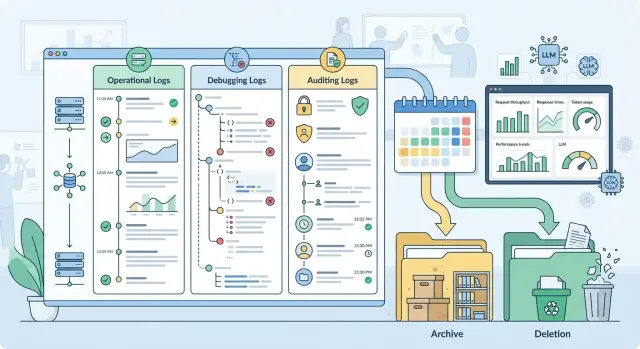
The idea of "keep everything for 180 days" sounds simple, but it almost always leads to poor results. Different logs serve different purposes. Operational logs help you see errors, latency, and rate limits. Debug records are needed when a team is investigating a failure in the prompt, routing, or model output. Audit events need to live longer because they are used to verify access, employee actions, and disputed operations.
If every record gets the same retention period, a mistake is almost inevitable. Either you delete something too early that you still need for a review, or you keep something far too long even though it no longer helps and only increases risk and cost.
This problem shows up especially fast in LLM systems. One request carries not only text, but also service fields: tokens, retries, tracing, prompt version, safety labels, and user data. If the system also keeps the agent step history and tool calls, one conversation turns into dozens of records.
After a few months, a single retention period starts hurting in two places at once. Storage grows too large, and useful signal gets buried under unnecessary copies. At the same time, risk increases: old raw logs still contain personal data, document fragments, ticket numbers, pieces of chat history, and internal prompts for the model.
The "keep it just in case" approach is usually the most expensive one. A log's usefulness almost always drops over time, while the risk of keeping it grows. The full request body may help today when the team is fixing an incident. Three weeks later, that same record is probably no longer needed, but if there is a leak or an internal review, it will raise a lot of extra questions.
This is especially noticeable where traffic goes through a single LLM API gateway. Operational events keep piling up, audit is needed for access control and actions, and raw debug data quickly grows to an unreasonable size. If you do not separate retention periods in advance, the team first collects everything and only later realizes it cannot sort it out cleanly and safely.
How to split records into three classes
It is more useful to split logs by purpose, not by service or storage location. One request to a model can leave three different traces. That is normal. Problems start when they are mixed into one log.
Operational logs are for the service's day-to-day work. In most cases, it is enough to keep request_id, call time, model name, provider, status, latency, input and output token counts, cost, error code, and retry count. These fields show where latency increased, why requests are failing, and which route worked. The full prompt and full response usually get in the way here more than they help.
Debug records are needed for a short time and for a specific task. They may include the system prompt version, call parameters, provider_request_id, error stack, fallback route, a short prompt fragment, or a trimmed response. It is better to turn them on selectively and mask sensitive data right away. Otherwise, debugging quickly becomes a storage space for unnecessary information.
The audit trail solves a different problem. It is not for debugging, but for a provable history of actions. It usually stores actor_id or a service account, action type, time, policy decision, whether PII was masked, a content label, processing region, key ID, a hash of the request or response, and a record of who accessed the data. This log should answer "what happened and under which rules," not copy the whole conversation.
What people most often mix up
The most common confusion is between user_id and the user's personal data. For operations and audit, an internal identifier or hash is usually enough. Phone numbers, IIN, email addresses, and free text should not end up there.
Another mistake is putting the model's response text into audit. For review purposes, a hash, a policy label, and the fact that a response was issued are usually enough. If the text is needed at all, it belongs in short-term debug data.
This is especially clear in an LLM gateway. For a bank's chat assistant, the operational log will show a timeout, a latency increase, and a switch to another model. A debug record will help find a bad retry and a problematic request parameter. An audit event will record that the system masked PII, processed the request in the correct region, and logged access to the operator's response.
What data should not go into logs without review
Logs almost always receive more data than they actually need. If you write everything into a log, IIN, document numbers, phone numbers, email addresses, physical addresses, dates of birth, card numbers, policy data, and fragments of medical records quickly end up there. For a team, this is not a minor issue but a direct source of risk.
The problem is that this data does not leak only from the request text. It hides in chat history, tool arguments, JSON from a CRM, OCR output, file names, attachment metadata, and even error messages.
In practice, four groups of data end up in logs by accident:
- personal data: IIN, full name, date of birth, passport details, phone number, email, address;
- financial and contract data: card number, IBAN, contract number, account, application, policy number;
- medical and insurance data: diagnoses, test results, discharge notes, insurance status;
- internal company data: employee data, ticket fragments, and documents.
Secrets are a separate problem. Logs often retain Bearer tokens, API keys, cookies, OAuth codes, webhook secrets, signed URLs, database connection strings, and temporary passwords. They are often visible in HTTP headers, query params, stack traces, environment dumps, debug print output, and saved cURL requests. Attachments are no less dangerous: PDF files, images, audio, and base64 strings sometimes end up in the log in full together with extracted text.
The full text should be kept only where it is impossible to investigate a short incident without it. In many cases, a safer substitute is enough. A mask preserves the shape of the value while hiding the string itself. A hash lets you see that the same customer or token appeared several times without revealing the original value. A template ID or prompt version is often more useful than the full text when the team is looking for the cause of a failure in a specific build.
Model outputs are not harmless either. The model may repeat personal data from the request, summarize a document, or return part of an internal conversation. Tool output is even riskier: search, SQL, CRM, OCR, and file connectors can return raw text that must not be logged. For operational and audit records, it is usually enough to keep the time, model, status, latency, response size, error code, and document ID without its contents.
If you have a gateway with PII masking and audit logs, like AI Router, this rule should be applied before the event is written, not after. If a record does not help find a failure, confirm access, or pass a review, it does not belong in the log.
How to set retention periods step by step
Retention periods are better assigned not to the whole service, but to specific fields and event types. One request can have a dozen traces: call time, model ID, token count, response code, prompt fragment, masked user ID, IP, block reason, audit record. Each field has its own purpose, so each one should have its own retention period.
Start with an inventory. Gather a complete list of what the API, background workers, proxy, queue, monitoring, SIEM, and intermediate services write. Extra data often lives there, not in the main application.
Next, give each field one clear purpose. Does the field help fix a failure? Track spend? Detect abuse? Support audit? If the purpose is vague, the field probably should not be stored.
After that, assign the minimum period needed for the task, not "just to be safe." Latency metrics and error codes often need 14–30 days. Debug records with prompt fragments are better kept for only a few days or not stored at all. Audit events stay longer because they are used to check who did what and when.
It is also worth defining a temporary extension rule for incidents. If the team is investigating a leak, a spike in errors, or a disputed operation, it temporarily extends retention only for the affected records and only until the review is closed.
And there is one simple step that is often forgotten: assign an owner. Someone has to approve retention periods, record exceptions, and review the matrix when the product, law, or logging setup changes.
The request and response text usually causes the most debate. Here it helps to cut volume right away. For debugging, a short fragment, a template, a hash, a session ID, and technical response markers are often enough. If a field can contain personal data, masking must happen before it is written.
There is a useful test for every field: what exactly do we lose if we delete it after 7 days, 30 days, or 180 days? If the answer is vague, the period is probably too long. If the field does not help fix, count, or prove an action, it is better not to store it at all.
Where the line between a log and an archive is drawn
A log is for current work. An archive is kept for rare cases: incident review, access review, billing dispute, internal control. When a team keeps everything in one layer, search slows down, costs rise, and deleting something becomes scary.
In hot storage, you should keep only what is needed every day. For most teams, that means operational logs: request time, response code, model, token count, client or service ID, chain-of-call tracing, whether a filter fired, and whether PII was masked. Full prompt and response texts are rarely needed that often.
A practical storage model usually looks like this:
- short retention in the hot tier - raw request and response texts, if they are needed to investigate errors;
- medium retention in the cold tier - debug records for incidents and disputed cases;
- long retention - metadata for control, billing, and reviews;
- after the retention period ends - deletion without archive, unless a separate rule applies.
Cold storage should not turn into a second "live" database. Access is slower there, permissions are tighter, and search is more limited. That is a normal tradeoff for keeping old records from interfering with day-to-day work.
In many cases, it makes sense to keep metadata longer than raw text. For audit purposes, the date, request ID, service user, model version, prompt length, response status, whether the record was redacted or masked, and the hash of the conversation are often enough. This kind of set leaves a trace of the event without dragging along extra texts containing personal data.
The line between a log and an archive is drawn not by age, but by how often the data is used and why it is kept. If the on-call team needs the record every week, it is still a log. If someone checks it once a quarter, it is already an archive. If it is not needed for investigation, reconciliation, or regulatory requirements, it should be deleted.
It is better to describe deletion as a rule, not a manual decision. For example: the record has lived through its time in the hot and cold tiers, it is not part of an investigation, it is not needed for financial reconciliation, and it is not covered by a separate regulation. After that, the system deletes it without archive. Then retention policy works like a policy, not like a "keep it just in case" storage pile.
A bank chatbot example
A customer writes to the bank chat: "Check the status of my application, my IIN is 123456789012." For the service, this is a normal request, but for logs it is already a risk. If the team writes the entire conversation into every log without review, the IIN quickly spreads into debugging, monitoring, and archives.
The working setup is simpler. One conversation creates several different records, and each one has its own retention period. The bank does not need the full customer text everywhere where only the fact of the model call is needed.
In the operational log, only the minimum remains: request time, session ID, which model was called, API response code, latency, and token usage. In the debug trail, the team keeps only what helps investigate a failure: error ID, prompt version, service name, and a short masked fragment instead of the customer's full text. In the audit log, the system stores access to the conversation, routing changes, a new key issuance, a change in rate limit, or masking rules.
If the model returns with code 200, the operational log already answers most support questions. It shows that the call happened, when it was sent, how long it took, and which service handled it. There is no need for the IIN or the full conversation text.
If the request fails with an error, developers can temporarily enable a more detailed debug trail. But even then, there is no reason to keep extra data. Instead of "Check the status of my application, my IIN is 123456789012" the log should contain something like "Check the status of my application, my IIN [MASKED]." Such a record is often enough to keep for 24–72 hours while the team closes the incident.
Audit lives longer. It does not need the customer's conversation, but it does need the answer to another question: who got access to the data, when, who changed the settings, and who disabled protection. These are the events most often requested during an internal review.
If the bank sends LLM requests through a single OpenAI-compatible gateway like AI Router, this setup is easier to keep in one place. You can set separate retention periods for operational, debug, and audit events, and mask PII before anything is written to logs.
Where teams most often make mistakes
Problems usually start not with the retention period itself, but with extra copies. The team sets a rule for one system, but the data already exists in five places: in the application, in the gateway, in APM, in the queue, and in the export for analytics. After that, the retention policy only exists on paper.
The most common mistake is writing the full prompt and response into several systems at once. People do this for easier debugging, but later the same conversation lives longer than planned. It is much safer to keep the full text in one controlled place and leave request_id, time, model, status, and a few technical markers everywhere else.
Another common story: detailed debug was turned on after an incident and forgotten. A week later, it is no longer temporary; it has become the new normal. Logs grow quickly, user data gets into them, and working with old records becomes expensive and inconvenient.
Teams also mix up the log types themselves. Access audit answers the question of who accessed data and when, or who triggered an action. Technical tracing is needed to find a failure, timeout, or extra retry. Debug records help the developer understand a specific breakage here and now. Separately, there are backups, queues, and exports that are often simply forgotten.
When audit is mixed with tracing, chaos starts. Audit is supposed to be kept longer and controlled more strictly. Technical records, on the other hand, are often only needed briefly. If everything sits in one table or one index, the longest retention period wins and junk piles up for months.
There are also hidden copies: backups, dead-letter queues, CSV exports for support, and test dumps. They often live longer than the main logs. If PII masking is enabled in production but raw text is sitting in a backup, the rule effectively did not work.
That is why deletion has to be tested in practice. Take one test request_id, wait until the retention period ends, and try to find it in the main store, in a backup, in the queue, and in exports. If you use a gateway like AI Router, it is helpful to describe separately what the application stores, what the gateway stores, and what goes into your SIEM. Otherwise, duplicates come back quickly.
Who approves retention periods and how they change
A retention matrix should not be signed by one person alone. If the product team decides to keep logs longer, it will almost always leave too much. If only security sets the period, the team may not have enough data to investigate failures.
A workable setup is usually simple. Product owns the meaning of the data: why the log is needed, who uses it, and how often. Security looks at risk: does the record contain personal data, tokens, request text, model output, or service identifiers. Legal and compliance align the periods with contracts, internal policies, and regulatory requirements. The platform team implements this in the system: separates log classes, schedules deletion, enables masking, and prevents manual copies where possible.
It is best to extend retention only by request and only for a limited period. Not "until it comes in handy," but, for example, for 14 or 30 days for a specific incident, transaction dispute, or review.
Such a request only needs four things: which set of records must be kept longer, who requested the extension, why it is needed, and when the data will be deleted or moved to archive.
The right to extend should not be given to everyone. Usually the service owner submits the request, security approves it, legal joins in if the log involves personal data or disputed operations, and the platform executes the decision. This noticeably reduces the number of requests to keep "everything just in case."
An exception log is useful even where retention periods are already approved. It does not store the logs themselves, but the history of decisions: what was extended, for what reason, who approved it, and when the extension expires. This kind of log is very helpful in internal reviews and when investigating old incidents.
The matrix should be reviewed not for the sake of a checkbox, but after product changes. A new communication channel, a CRM integration, prompt caching, a different model provider, new audit events, or a new masking method changes the data set. After such changes, old retention periods often no longer fit.
If the team uses a single LLM gateway, such as AI Router, the review is especially important when new models, providers, and routes are added. Routing itself does not solve retention policy. People inside the company still define it, in writing and with clear responsibilities.
A short check before launch
Before release, logs should be checked just as strictly as access rights and rate limits. The mistake here is usually simple: the team writes to the log "just in case," then keeps extra data for months and cannot quickly show who read the records and why.
Before launch, it helps to go through a short checklist:
- each field has one reason to be stored and a clear lifetime;
- PII is masked before it is written to the log;
- detailed debug is enabled only during diagnosis;
- deletion has been tested not only in the main store, but also in copies;
- access to audit records is transparent and is itself logged.
In practice, that is enough to eliminate most problems. For example, a bank chatbot can keep operational events longer than detailed debug records, but only if those events do not contain raw customer messages or unnecessary identifiers.
If the team works through an LLM gateway like AI Router, the rules do not change. One endpoint does not replace discipline: each log class needs its own retention period, masking must happen before writing, and deletion must reach every copy.
A good sign before release is simple: an engineer opens the log schema and answers three questions in a couple of minutes - what do we write, why do we keep it, and when do we delete it. If any of those answers turns into a long debate, it is better to pause and clean up the rules first.
What to do next
Start with one working table. Without it, retention periods quickly turn into a pile of exceptions that only two people on the team remember. The table should capture the field, record class, purpose of storage, retention period, storage location, who has access, and what happens after the period ends.
Usually six columns are enough: field or event name, record class, whether PII is present, retention period, deletion or anonymization method, and rule owner.
Then check not the document, but the actual behavior of the systems. Teams often configure deletion in the main database, but forget about the test environment, exports to object storage, and backups. Because of that, the data looks "deleted," but in reality it sits there for months. It is better to run one test: create a record, wait for the period to end, and make sure it disappears from every place the team can find it.
Also agree on how retention will be extended during an investigation. This rule is better written down in advance, not on the day of the incident. Specify who can place a record on hold, on what basis, for how long, and who removes the extension. Otherwise, operational logs very quickly start living forever.
If the team uses AI Router, it is worth comparing your retention matrix with how your audit logs, PII masking, and local data storage requirements are set up. For banks, telecom, and the public sector, the debate is usually not about logging itself, but about the field set and the lifetime of each record.
The final test is simple: any engineer, analyst, or security employee should be able to answer three questions in five minutes. What do we write to the log, why do we store it, and exactly when do we delete it. If there is no clear answer to even one of those, the retention policy is not ready.
Frequently asked questions
Why split logs into classes at all?
Because each type of record serves a different purpose. Operational logs help catch errors and track usage, debug logs are needed for a short period, and audit logs preserve a history of actions and decisions. One retention period for everything either deletes useful data too early or keeps unnecessary text and personal data for too long.
What log classes should an LLM service have?
Most often, three classes are enough. An operational log stores request time, model, status, latency, token count, and errors. A debug trail keeps prompt versions, stack traces, retry routes, and short text fragments. Audit logs record who did what, when it happened, which policy applied, and which region processed the data.
Do we need to store the full prompt and model response?
In most cases, no. For support and monitoring, metadata is usually enough: request_id, response code, latency, token count, and service name. Keep the full text only for a short time and only when you need it to investigate a specific failure and cannot find the cause otherwise.
What data should never go into logs without review?
First remove IIN, phone numbers, email addresses, physical addresses, document numbers, card numbers, contracts, medical data, and any secrets such as API keys, cookies, and Bearer tokens. These values often come not only from the text itself, but also from JSON, OCR, chat history, headers, and error messages.
If a field is needed for analysis, mask it before writing it. When you only need to connect events, store a hash or internal ID instead of the original value.
How long should operational and debug logs be kept?
For operational logs, 14–30 days is often enough. That is usually long enough to spot error spikes, latency growth, and routing issues. If your team rarely returns to old data, do not keep it longer just out of habit.
Detailed debug logs should be kept for much less time. Often 24–72 hours or a few days until the incident is closed is enough.
When does it make sense to extend retention?
Extend retention only for a specific case: an incident, a transaction dispute, or an internal review. State right away which records will be kept longer, who requested the extension, why it is needed, and when the system will delete the data.
Do not save the entire set "just in case." It is better to extend retention only for affected request_id values, sessions, or the failure period.
How is audit different from debug logs?
Audit answers the question "who did what." Debugging answers the question "why did it break." That is why audit stores actor_id, action type, policy decision, masking status, and data access, not the full customer conversation.
If you mix these logs together, the longest retention period wins. In the end, raw text and extra copies will live where they do not belong.
How do you know when a record has become archive?
A log is needed by the on-call team for daily work. An archive is needed rarely: for a dispute, a review, or an old incident. If a record is accessed every week, keep it in the hot tier. If it is checked once a quarter, move it to archive or delete it after the retention period.
Raw request and response texts are rarely worth keeping in hot storage for long. Metadata for billing and control can be kept longer.
How can we verify that log deletion really works?
Take one test request_id and wait until the retention period ends. Then try to find it in primary storage, backups, queues, APM, exports, and the test environment. If the record shows up anywhere, the rule did not work.
This check should be repeated after changes to logging, routing, and integrations. Extra copies usually live in neighboring systems, not in the main database.
Who should approve log retention periods?
Retention periods are best approved together. The service owner explains why each type of record is needed, security reviews the risk, legal and compliance check the requirements, and the platform team configures masking, deletion, and access.
If only one side makes the decision, it almost always creates an imbalance. Either the team keeps too much, or it lacks enough data to investigate failures.