LLM API Retries: How Not to Double Your Bill When Failures Happen
Retries for LLM APIs help you survive failures, but without limits and idempotency they can quickly drive costs up. We break down timeouts, delays, and checks.
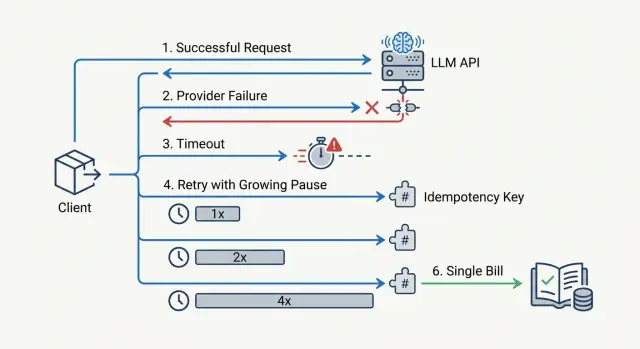
Why retries quickly inflate your bill
Retries have an annoying trait: a timeout on your side does not prove the provider did nothing. The request may have reached the model, generation may already have started, and the response just did not get back in time. If the app sends the same prompt again at that moment, you get two paid calls instead of one.
At first, this feels minor. The team sets a 15- or 20-second timeout, then adds retry=3 "just in case." On paper, that looks like protection from failures. In practice, it is often a direct multiplier for costs.
A simple example: a bot sends a request with 8,000 input tokens and waits for an answer. The provider responds slowly, the app decides the request is stuck, and sends a retry. The first call still finishes, and the second one also reaches the model. The user only needs one answer, but you pay for two runs of the same prompt.
It gets worse when retries run in parallel. One worker does not wait for the response, another picks the same task from the queue, and the load balancer shifts part of the traffic to a backup route. One failure quickly turns into three or four calls with the same context. If the prompts are long, the bill does not grow by percentages, but by multiples.
Without a hard attempt limit, this spreads through the whole flow. A short outage at the provider happens at the same time as a traffic spike, and every new message starts creating duplicates. Within minutes, the system spends tokens not on useful answers, but on fighting its own recovery logic.
Even if you work through an OpenAI-compatible gateway, the problem does not go away. The retry decision is almost always made by your code, SDK, or client layer.
That is why retries should be treated as part of API cost control, not just as insurance against errors. Idempotency, attempt limits, and careful timeouts are not there for neat config. They stop one failure from quietly doubling the bill at the end of the month.
When to retry a request and when to stop
A retry is not for every error. A good rule is simple: retry things that look like a temporary network issue or overload, and do not retry things that are broken in the request itself.
It usually makes sense to retry a broken TCP or TLS connection, DNS failure, a connection reset, and status codes 429 plus some server-side errors like 500, 502, 503, and 504. With 408 and client timeouts, you need to be careful. First, figure out where the request stopped. If you do not know whether it reached the model, a blind retry is risky.
The logic is different for 400, 401, and 403. These responses almost always mean invalid JSON, an unsupported parameter, a bad API key, missing permissions, or a context limit that was exceeded. A retry will not fix any of that. It will only burn time and, in some cases, increase the bill.
The same goes for 5xx errors. 500, 502, 503, and 504 can often be retried. But 501, an incompatible response format, or a clear request schema error usually calls for a code fix, not another attempt.
The trickiest case is timeouts and stream drops. If the connection fell before the first tokens arrived, a retry is usually safe. If the stream broke after you already received part of the response, the request state is no longer obvious. The model may have generated almost everything, and billing may already have gone through. At that point, it is better to rely on request_id, idempotency_key, and your own logs than to send the same request again at random.
The type of operation matters more than it seems. For plain text generation, a retry after 429 or 503 is often reasonable. If the same call starts a tool call, creates a CRM ticket, or sends a message, retrying the whole pipeline may perform the action twice. In that case, it is better to split the steps: one request to the model, and a separate external action with its own operation ID.
If you are unsure, ask yourself one question: did the request definitely not run, or did you simply not see the result yet? Only the first case is worth retrying.
How to set timeouts without creating extra duplicates
One shared timeout for all requests almost always leads to unnecessary retries. Short tasks start retrying for no reason, while long tasks get cut off just before the answer is ready. In the end, the provider still counts tokens for the first call, and the client has already sent a second one.
Usually, the problem is not the retries themselves, but the fact that the client decides too early that the "request died."
Separate two limits right away: time for connection setup and time for the model response. For the connection, a short window is usually enough. If TCP or TLS have not come up within 1-3 seconds on a normal network, waiting another 20 seconds rarely helps.
Waiting for the response is different. It should depend on the task type and the length of the generation. Classification, extracting a field from a document, or a short JSON response all live in one range. A long report, a long chat reply, or a generation of hundreds of tokens lives in another.
Even if you are calling one OpenAI-compatible endpoint, for example through AI Router, latency still changes by model and provider. That is why it is better to set the timeout per call scenario, not once for the whole client.
Starting values
- Short replies: connection 2 seconds, response 10-20 seconds.
- Normal chat: connection 2 seconds, response 30-45 seconds.
- Long generation: connection 2-3 seconds, response 60-90 seconds.
- Streaming: connection 2 seconds, first token 10-15 seconds, then a separate limit between chunks.
These numbers are not universal, but they are better than one 30-second timeout for everything. Start there and review logs for real response lengths, cancellations, and repeated calls.
A simple guideline: the timeout should be a little longer than a normal successful response, not twice as short as a rare slow one. If 95% of short requests finish in 8 seconds, set 12-15 seconds, not 5.
Do not put moderation, knowledge-base search, and long email generation into one bucket. These tasks behave differently. When you split them into separate timeout profiles, false duplicates drop noticeably.
How to choose delays between retries
A retry delay that is too short almost always hits your wallet. If the provider is already overloaded, sending the same request again after 200 milliseconds rarely helps. It just adds another attempt to the same queue and raises the chance of getting a second paid call when the service recovers.
For most scenarios, two or at most three attempts are enough. More usually makes sense only for background jobs where delay is not critical. In chat, knowledge-base search, or an operator interface, a fourth or fifth attempt usually does more harm than good.
The delay should grow after each failure. The most practical option is exponential backoff with a small amount of randomness. That way, thousands of clients do not hit the provider at the same second right after a short outage.
For interactive requests, a scheme like this is often enough:
- first delay: 500-800 ms;
- second delay: 1.5-2.5 s;
- third delay: 3-5 s.
It is better to add 15-30% random jitter to each delay. Then two identical sessions will not follow the same path.
Also limit the total waiting budget for a request. If the answer needs to appear on screen for a user, keep everything together, including delays and network timeouts, within 8-12 seconds. For background processing, you can allow 30 seconds or a little more, but you still need an upper limit. Otherwise, one problematic request can hang for a long time and drag the queue with it.
There is another practical rule: the more expensive the model and the longer the answer, the more careful retries should be. If the service sends a large prompt to an expensive model, one extra attempt can cost much more than the error itself. In those cases, fewer retries with a normal delay are better.
A fixed 1-second delay for every case looks neat only on paper. Under real load, it often creates the snowball of costs you were trying to avoid.
How to protect against double billing
If the same request goes out twice, the provider may count it as two separate generations. For LLMs, that is especially painful: a long prompt and a large answer quickly turn a small failure into a noticeable overrun.
The most reliable protection is to treat idempotency not at the HTTP request level, but at the business-operation level. The user clicks "generate a reply for the customer," the system creates one operation, and all retries happen only inside it.
One key for one operation
Generate one idempotency_key at the moment the action starts, and link it to the user, the action type, and the object you are working with. For example: user_42:reply_ticket:9182. The format can be anything as long as it is stable and does not change between retries.
A new retry should not create a new key. That is a common mistake. The app gets a timeout, assumes the request did not reach the provider, and sends the same prompt again with a different ID. For billing, that often looks like two different operations.
On your side, you should store not only the key, but also the final operation result: status, user ID, prompt or payload hash, and the final answer or a link to it in your database. If the provider has already returned a successful result, the system should return it again and not call the model a second time.
This rule does not change when you work through a gateway. Protection against double billing has to live in the application, not only on the provider side.
A simple test looks like this. A manager asks for a call summary. The model has already finished, but the network dropped before your server received the answer. If you saved the operation key and can check it again, the system will either fetch the ready result from its database or clearly show that the first attempt has already completed. You do not need to start a new generation.
How to set up retries step by step
It is better to configure retries from the economics, not the code. If one generation costs much more than a normal request, one extra retry can burn through the budget quickly. This is especially visible on long responses, where the model has already started counting tokens and the client decides the request is stuck.
- First, calculate the cost of one extra attempt. Take the average input and output size, multiply by the model price, and add the error rate. If the service makes 10,000 requests a day, even 2% extra retries can noticeably increase the bill.
- Then split errors into two groups. Retry network failures,
429, and some5xxresponses. Do not retry4xxerrors caused by an invalid format, a prompt that is too long, authorization failures, or other final cases. - After that, set different timeouts. The connection timeout should be short. Set the read timeout longer, because the model may respond slowly, especially with large prompts or streaming. A total request deadline is still needed.
- Then add delays between retries and a limit on the number of attempts. Usually, 2-3 attempts with increasing delay and a little randomness are enough.
- Finally, test the setup with an artificial failure. Disable one provider, slow down the responses, or return
500in a test environment. Watch not only success, but also the number of retries, token growth, and the final cost.
If you have several routes or providers, this test is especially useful. A well-tuned setup gives a moderate increase in latency during failure, but it does not turn one request into three paid ones.
A real-world load example
In the evening, a support chat receives many messages at once. A bank customer writes: "I can't log in to the app." The backend sends a request to the LLM to quickly draft an answer for the operator and suggest the next step.
The problem does not start in the model, but in the client settings. The provider is overloaded at that moment and responds in 18 seconds. Your service waits only 10 seconds, decides the request failed, and immediately sends a retry.
The timeline looks like this:
- 00:00 - the first request goes to the provider;
- 00:10 - the client timeout fires, and the service starts a retry;
- 00:18 - the provider finishes the first request and returns an answer;
- 00:28 - the response to the second request arrives.
If the request has no protection, the system gets two valid answers to one question. One may already have gone to the operator, and the second one arrives later and overwrites the dialog state, duplicates the log entry, or breaks the metrics. Worst of all, you will most likely pay twice for the same work.
This kind of failure often looks almost harmless. In monitoring, you only see one timeout and one successful retry. But the bill grows because of small things like this. At scale, a few extra duplicates per minute quickly turn into a meaningful amount.
That is where idempotency helps. The original call and the retry should use the same idempotency_key. Then the application understands that this is not a new task, but an attempt to finish the old one, and it does not create a second business operation on top of the first.
The practical takeaway is simple: do not only count retries. Watch the combination of three things — timeouts, retry delays, and idempotency. If even one link is missing, cost control breaks down quickly, even in a normal support chat.
Common setup mistakes
Retries usually break not because of one bad setting, but because two layers of logic disagree with each other. The team adds retries in its own code, and then finds out that the SDK already does the same thing. One failure turns into 4-6 identical requests, and the bill rises faster than it shows up in the logs.
Another common mistake appears with streaming. If the model has already sent the first tokens, the request should not be treated as failed just because the connection dropped later. An automatic retry at that point often creates a duplicate answer and duplicate cost.
In practice, the most common mistakes are these: enabling retries in both the SDK and your own service; retrying a stream after the answer has started; treating any timeout as a model error; not recording request_id and the idempotency key; and allowing almost unlimited retries for 429. Each of these mistakes is bad on its own, and together they create chaos.
It gets worst when all of it comes together in one chain. The client received 20 tokens, then the connection dropped, the SDK sent a retry on its own, and your code sent one more. If there is no request_id in the logs, incident review turns into guesswork.
The normal practice is much simpler: one retry layer, separate rules for streaming, a hard attempt limit for 429, and mandatory request_id logging. That is already enough for most duplicates to disappear.
A short check before launch
Before launch, it helps to do a short stop-check. Five minutes of setup often saves a noticeable amount, especially if the model responds slowly and errors come in waves.
Check four things.
First, split the rules by response code. 429 needs a retry with a delay that grows over time. Some 5xx errors can also be retried, but with a tighter limit. For most 4xx errors, you do not need a retry: the request is already broken.
Second, limit the number of attempts. One user request should not go beyond three attempts, including the first one. If you allow five or seven, one provider outage quickly turns into a snowball of costs.
Third, keep the idempotency key longer than the retry window. If the client can repeat a request for 2 minutes, but the server forgets the key after 30 seconds, you are opening the door to duplicates yourself.
Fourth, look not only at errors, but also at money. Your metrics should show duplicate share, extra tokens spent on retries, average attempts per request, and spending by error code.
There is also a simple test. Take the same request, force a client timeout, then send it again with the same idempotency key. The service should either return the same result or clearly show that the first call has already been processed. If the system creates two separate billing events, the configuration is still too rough.
What to do next
Do not change the retry policy across all traffic at once. First, choose one route with predictable load, where it is easy to calculate the cost of an error. An internal employee chat, a support bot, or one RAG scenario with stable request volume will do.
This narrow rollout is almost always better than a big migration in one day. On one route, it is easier to see which timeouts cut off real answers, which retries create duplicates, and where the bill grows without any benefit.
Then you need a short review cycle: turn on the new rules for only part of the traffic, compare the cost of duplicates before and after the change, check the audit trail for request_id and API keys, and then see whether one key is hitting the rate limit and triggering extra retries in nearby services.
Even a 2-3 day slice gives a clear picture. If 70 out of 1,000 requests were going into extra retries before, and after the change only 15 remain, the effect is visible right away in both the budget and response time.
If you have several providers, a single entry point makes this review much easier. For example, in AI Router you can change base_url to api.airouter.kz, keep the same SDKs and prompts, and watch audit logs and key-level limits in one place. That is useful when you compare routes, track duplicates, and do not want to spread logic across every service.
Once one route shows stable results, move the same rules to neighboring scenarios. But do not roll them out blindly. First get a predictable bill and clean request tracing, then expand the scope.
Frequently asked questions
Why can retries quickly increase the bill?
Because a client-side timeout does not mean the provider did nothing. The request may have reached the model, and it may have already started counting tokens.
If the app sends the same prompt again at that moment, you get two paid calls instead of one result.
Which errors can be retried without much risk?
Usually you can retry temporary network failures and overload: a dropped connection, DNS failure, 429, 500, 502, 503, and 504.
The simple rule is this: if the problem looks like a short-lived outage, a retry may help. If the problem is in the request itself, a retry only wastes time and money.
When is it better to stop and not retry?
Do not retry 400, 401, 403, schema errors, a context that is too long, or unsupported parameters. Those responses mean the request needs to be fixed, not sent again.
Also check calls that trigger tool call, a CRM action, or sending a message. Retrying the whole pipeline can perform the action twice.
How many attempts should you set by default?
For interactive scenarios, two, at most three attempts together with the first send are usually enough. More attempts rarely save a chat or search request, but they often create duplicates.
If the task runs in the background and delay is not important, you can allow a bit more time. Even then, you still need a hard limit.
How do you choose timeouts so you do not create duplicates?
Do not use one shared timeout for everything. Split the time for connection setup and for waiting for the model response.
In practice, connection setup often only needs 1–3 seconds. For the response, use a range based on the task type: short reply 10–20 seconds, normal chat 30–45, long generation 60–90. The timeout should be a little longer than a normal successful response, not too short.
What should you do if the stream broke halfway through the answer?
First check whether you received the first tokens. If the connection dropped before the answer started, a retry is usually safe.
If the stream broke after part of the text, do not send the same request blindly. Check request_id, idempotency_key, and your logs, because the model may have already finished and billing may already have happened.
How does idempotency_key protect against double billing?
Create one idempotency_key when the business operation starts, and use it for every retry. Do not generate a new key for each retry.
Store the operation status, payload hash, and final result on your side. Then, if the request is repeated, the system can return the ready answer and avoid calling the model a second time.
Should you enable retries in both the SDK and your own code?
No, that is not a good idea. If both the SDK and your service retry the same failure, one request can easily turn into several identical calls.
Keep only one retry layer and make it visible in the logs. That makes costs and incident review much easier to control.
Which metrics help you notice that retries are already hurting?
Do not look only at the number of errors. You need metrics for duplicate share, average attempts per request, extra tokens spent on retries, and costs by response code.
It also helps to log request_id, idempotency_key, and the request route. Without that, you will see the bill rising, but you will not know why.
Does an OpenAI-compatible gateway solve the retry problem automatically?
The gateway itself does not remove the problem, because the retry decision is usually made by your code or the SDK. If the client sends a duplicate, the gateway still sees it as a new call.
What the single entry point does help with is control. In AI Router, you can keep the same SDKs and prompts, change base_url to api.airouter.kz, and watch audit logs, limits, and key behavior in one place.