Knowledge Base Search: Embeddings or a Generative Model?
Knowledge base search can be built with embeddings or a generative model. Here we cover indexing, reranking, and answers with citations.
What is the problem here
Knowledge base search rarely breaks because of one big mistake. Usually several small issues get in the way at once, and together they produce weak results.
The first problem is simple: people ask using words that do not match the document wording. An employee writes: “how do I restore access after changing my phone,” while the knowledge base contains an article titled “reissue of the second factor.” The meaning is the same. The words on the page are not. Because of that, regular search often misses the right passage even in a well-built knowledge base.
The second problem is that the answer rarely lives in one paragraph. Part of the rule may be in a policy, the steps in an instruction, and the exceptions in a update from last month. If the system finds only one piece, it gives an incomplete answer. For the user, that is worse than an honest “not found,” because the mistake looks believable.
The third problem is noise in the data. The knowledge base almost always has duplicates, old versions, drafts, empty templates, and pages where there are two useful lines of text and ten lines of boilerplate. That clutter hurts both simple search and smarter approaches. The system starts surfacing not the best document, but the one that happens to contain similar words more often.
There is also another practical point. The user does not just want an answer. They want to understand where it came from. This matters especially in banking, telecom, and healthcare, where you cannot rely on “it probably works that way.” You need a quote from the source, and better yet, several short quotes from different places. Then the answer can be checked quickly, and a disputed case can be opened in the original document and read in full.
So knowledge base search is not only a question of “what was found,” but also “how much can you trust it.”
What embeddings give you
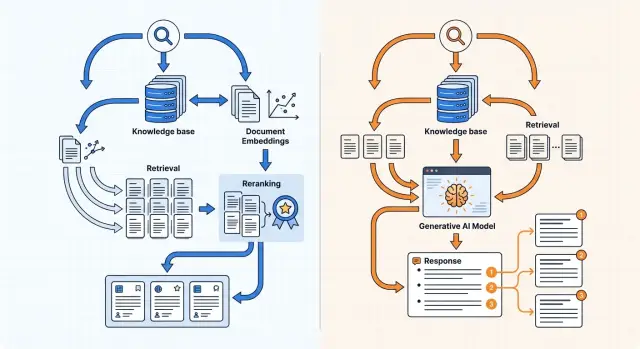
Embedding search works well when people ask one way and the answer in the knowledge base is written another way. The system turns the question and each text chunk into vectors, then looks for the chunks that are closest in meaning. For a knowledge base, this is often more useful than regular keyword search.
Because of that, it finds more than exact wording matches. If an employee writes “where is customer data stored,” and the document says “data residency inside Kazakhstan,” this layer may still surface the right passage. The same thing works for pairs like “audit logs” and “audit-logs.”
On a large knowledge base, it is also fast. A vector index does not scan every document one by one. It quickly selects a small set of candidates that can be handled further. That is why embeddings are convenient as the first layer when you have thousands of pages of documentation, policies, or tickets.
Where it shines and where it falls short
This kind of search works best for questions with different wording, synonyms, and short context. It handles FAQs, instructions, and internal articles fairly well if the text is already split into clean chunks.
But semantic closeness is not the same as answer accuracy. Without additional ranking, search often pulls up a passage that is only “similar” and does not answer directly. For example, instead of the exact excerpt about limits at the API key level, the system may return a general section about security or access control.
There is another limit as well. Embedding search by itself does not write the final answer. It finds candidates. If you need a short answer with a quote, wording check, and assembly from several sources, one vector layer is not enough.
In practice, this is a strong foundation, but not the whole system. Embeddings quickly narrow the search space and are good at catching meaning when the words do not match. Other parts of the pipeline handle precision at the final step.
What a generative model gives you
A generative model is useful when search has already found the materials, but the person needs a connected answer, not a list of documents. It handles long questions better, understands clarifications in a dialogue, and is less likely to lose the meaning if the user writes in an unstructured way.
This is especially noticeable with complex requests. If an employee asks: “What return conditions apply to corporate customers, and are there exceptions for preorders?” the model can take one piece from the return policy, add a fragment from the B2B contract, and produce one answer instead of two separate links.
Its strength is not search at any cost, but assembling an answer from several retrieved fragments. When facts are spread across different parts of the knowledge base, the model can merge them into a short text, remove repetition, and preserve the logic. For the user, that is often easier than reading five documents in a row.
But this approach has a weak spot. If the context has too little information, is outdated, or does not fit the question well, the model starts filling in the gaps. It writes plausible text, and the mistake looks confident. In a knowledge base, that is dangerous: a person sees a smooth answer and does not immediately notice that there is no exact basis in the documents.
That is why letting the generative model handle the entire search process is usually a bad idea. If it has to read too many documents for every request, the cost rises quickly and the answer slows down. This is noticeable even at moderate traffic. It is much better to first narrow the candidate set with search and reranking, and only then give the model the 5–10 best passages.
Citations require a strict mode. In the prompt, it is best to state the rules directly:
- answer only from the provided passages;
- after each important fact, include the source;
- if there is not enough data, write “no confirmation found in the knowledge base”;
- do not merge similar wordings into one “general” citation.
This approach works well: the model writes naturally, but does not drift too far from the documents. If the team uses a gateway like AI Router, it is convenient to compare several models quickly on the same set of passages and see which one handles citations and long context more carefully.
How to build an index without extra noise
A bad index breaks knowledge base search even before embeddings and reranking. If the chunks contain site menus, buttons, icon labels, footers, and template duplicates, search starts pulling garbage. Then the model answers confidently, but not from meaning — from noise.
First clean the source. Keep only the text that a person reads to get an answer. Remove navigation, boilerplate blocks, disclaimers, repeated page headings, and the same phrases from every document card. If the same paragraph appears in five places, keep one clean copy.
Splitting text into 500 or 1,000 characters may be convenient, but it often breaks the meaning. It is better to split by document structure: section, subsection, instruction step, separate rule, note. Then a passage answers one question fully instead of stopping in the middle of a condition.
Store metadata next to each passage: document title, section name, date, version, and source type. This helps a lot later when you need to filter out stale text. For policies and instructions without versioning, search quickly starts mixing old and new rules.
Do not put everything into one general index. FAQs, formal policies, and live chat solve different problems and are written in different language. It is easier to split them into at least three collections: FAQs for short common questions, policies and rules for exact requirements, and chat or tickets as a supporting layer.
Another common mistake is losing the data format. Tables, lists, and attachments should be marked separately. A pricing table, a list of exceptions, and a PDF appendix are not the same as a normal paragraph. If this is not marked, search will return a passage without context, and numbers or conditions will get distorted.
A good index is boring. It contains less text than the source, but almost every passage can be cited without embarrassment.
How to set up reranking step by step
For knowledge base search, reranking is needed almost all the time. With embeddings, you often find passages that are semantically close, but among them there are still extra pages, general rules, and fragments with similar wording.
The usual flow looks like this:
- First, vector search pulls 20–50 candidates. If you take fewer, the right passage can be lost. If you take too many, the reranker spends time on noise.
- Then the reranker receives the question and the retrieved chunks. It scores each pair of “question + passage” and produces a score that better reflects the real usefulness of the text for answering.
- Next, anything below a low score should be filtered out. The threshold is better tuned on your own questions, not guessed.
- The final model should get the best 3–8 chunks. That makes it easier to produce an answer with citations and avoid mixing neighboring topics.
This becomes especially visible with short queries. A question like “return limit for a product” or “vacation transfer” is too broad. Embedding search may lift both the needed section and similar documents that use the same words but mean something else.
Long questions behave differently. When the user writes more details, embeddings work better, but reranking still removes extra chunks. That lowers the risk that the model will combine an answer from different documents and add unnecessary information.
A simple example: an employee asks whether unused vacation can be moved to the next year. The first pass may return the general vacation policy, an HR memo, and a section about sick leave. After reranking, only the pieces about transfer rules, deadlines, and exceptions usually remain.
If the team already routes LLM requests through a single gateway, such as AI Router, this setup is easier to test in practice. You can quickly swap rerankers, check latency, and compare quality on short and long questions without changing the client code.
How to build answers with citations
An answer with citations works only when the model does not “remember” anything on its own. For a knowledge base, it is better to make this rule strict: the model answers only from the fragments you pass in the request. If the relevant fact is not there, it says so: “no answer found in the sources.”
Give each fragment a short, visible ID. Simple labels like DOC-12, FAQ-03, or POL-7 work well. Then the model will not paraphrase the source vaguely and can place a link to the exact chunk of text right after the disputed claim.
A good answer format is simple: a statement, then a citation in brackets. For example: “Log retention period is 90 days [POL-7].” If one sentence contains two different facts, it is better to use two citations instead of one general one at the end of the paragraph.
A general answer without references should be explicitly forbidden in the instructions. Otherwise, the generative model will almost always produce a smooth text that sounds confident but is not grounded in the documents. This is a common failure mode: the answer reads well, but it cannot be checked.
It helps to give the model four simple rules: do not use knowledge outside the provided fragments, place the source ID after each checkable fact, do not combine several unrelated claims into one citation, and state clearly that the data is insufficient if the fragments do not confirm the answer.
After generation, one more filter is needed. It checks not the style of the answer, but the link between the sentence and the citation. If the model wrote “the contract can be terminated on any day [DOC-4],” the check should confirm that DOC-4 really contains that condition and not just words about termination.
In practice, this solves half the problems. Even a simple post-check removes the most unpleasant errors: invented dates, wrong limits, and links to the wrong document.
Example with common questions
On common questions, the difference between embeddings and a generative model shows up fastest. One query may depend on a table in an appendix, another on a fresh FAQ, and a third on two documents at once.
Where embeddings are accurate
The question “What is the log retention period?” often breaks simple keyword search. The knowledge base usually contains a logging policy and a separate appendix with a table of retention periods. Embeddings often find the appendix better because the query and the passage are close in meaning, even if the table uses wording like “audit log retention period” or “retention.”
But one retrieved chunk is not enough. The user does not just need the table fragment, but a short answer: what the period is, which logs it applies to, and where it is defined. Here the generative model is more useful. It takes the period from the appendix, adds the condition from the policy, and assembles one connected answer with two citations.
The question “Can I pay in tenge?” is different. Search often finds the FAQ, the payment terms page, and an old page that is no longer current. Embeddings may bring all three documents at once. Then reranking pushes the old page down and keeps the text with a direct and current answer at the top.
Where the model helps more and where it makes mistakes
The question “What should I do if there is an error on the invoice?” rarely lives in one place. One document describes the verification process, another contains the email template, and a third explains the response deadline. Embeddings usually retrieve the needed pieces separately. The generative model wins at the last step: it puts the actions in the right order and adds a citation after each step.
The mistake is subtler. The model may give a citation from a section that is close, but not the right one. For example, it may take a paragraph about “correcting details” instead of the section about a disputed invoice amount. The text is similar, the reference is technically there, but the answer points in the wrong direction. That is why citations need to be checked not only by textual similarity, but also by the section title, document type, and the meaning of the action itself.
When a hybrid setup is the better choice
A hybrid setup is needed when the knowledge base cannot be trusted blindly and the cost of a mistake is higher than a few extra milliseconds. That is true in banking, telecom, healthcare, and any internal knowledge base with many similar instructions, policy versions, and almost identical answers.
In that case, it is better to split the work into parts. Let embeddings quickly find 20–50 candidates. That is cheap, fast, and works well even on a large knowledge base. But it often pulls in passages that are close in meaning while having a different tariff, a different deadline, or an older version of the rule.
If there are many documents and the texts are very similar, a reranker is needed after the first search. It does not write the answer; it simply rearranges the retrieved passages in a more accurate order. In practice, this noticeably reduces the number of “almost right” hits. For a knowledge base, that matters more than it seems: the user does not see the difference between a slightly wrong answer and a mistake.
The generative model is best added at the very end. Let it take the already selected passages and produce a short answer with citations. This way the model hallucinates less, mixes documents less often, and does not spend tokens scanning the whole knowledge base.
It is also worth keeping a separate mode for “show only the retrieved passages.” That is useful when an employee wants to verify the source manually, when the answer must pass internal review, or when the model is unsure and it is better not to paraphrase anything.
One model should not run the entire pipeline by itself. If it searches, ranks, and writes the answer, you lose control over the error. Then it becomes hard to tell where the failure happened: in the index, in passage selection, or in generation.
For knowledge base search, hybrid usually wins in real work. Fast initial embedding search gives speed, reranking adds precision, and the generative model produces a convenient final answer. Each step has one job, and that is almost always more reliable than asking one model to guess everything at once.
Where teams most often go wrong
Most problems do not start in the model, but in how the team prepares the knowledge base. Even a good search quickly loses value if documents are indexed in raw form, without structure, versions, or proper passage boundaries.
Indexing mistakes
PDFs are often loaded as one continuous block of text. As a result, headings, tables, footnotes, and notes get fused into one stream. Search finds words, but loses the meaning of the document. If an instruction has a section called “Exceptions,” and old limits sit next to it in a table, the model can easily assemble an answer from pieces that should never have been side by side.
The opposite extreme is cutting text too finely. When a team splits text into 100–150 character chunks, the passage no longer carries a complete thought. A question about returns may land on a chunk with the phrase “within 14 days,” while the condition “only for online orders” is left in the neighboring chunk and gets lost.
Another common mistake is failing to update the index after edits. The document has already changed, but search is still pulling the old version. For a bank, retail company, or telecom team, that quickly turns into wrong answers for customers and extra manual checks.
Answering mistakes
Even with good search, teams often put too many passages into the prompt. The model sees 15–20 chunks, some of them contradict each other, and the answer becomes muddy. Usually it is better to give fewer but cleaner passages: a few strong candidates after reranking almost always work better than a long pile of text.
Citations are also mishandled all the time. Any neighboring paragraph or a chunk with a similar topic is not a citation. A citation must directly support the specific sentence in the answer. If the answer includes a sum, deadline, or condition, there should be an exact line from the source nearby, not a general paragraph from the same section.
A solid system relies on simple things: clean parsing, a sensible chunk size, a fresh index, and strict citation checks. Without that, the debate between embeddings and a generative model loses its meaning.
Quick check before launch
Launching knowledge base search without a short test is a bad idea. In a demo, everything looks convincing, but real questions quickly reveal empty answers, wrong citations, and unnecessary model spend.
For the first check, 30–50 real questions from employees or customers are enough. It is better to use not “ideal” wording, but normal wording: with typos, short clarifications, and vague expressions. That shows how the system behaves in real life, not in a lab.
Before launch, it is worth checking five things:
- each question has a gold source: a specific document, section, and version;
- you evaluate search, reranking, and the final answer separately, not only the overall result;
- you calculate the cost of one answer, including search, reranking, and generation;
- the system can stay silent if it did not find strong enough confirmation in the knowledge base;
- the team has already decided who updates the index after new files, edits, and deleted old versions.
The “silence” point is especially important. If the model answers at random, the mistake looks believable and stays in production longer. For a knowledge base, an answer like “no confirmation found” is safer than a confident invention with someone else’s citation.
Another common mistake is testing only accuracy and forgetting about cost. The same question can be solved for roughly 2 cents or 20. Across hundreds of thousands of requests, that difference becomes painful. If the team compares several models through an OpenAI-compatible gateway like AI Router, it is easier to run one question set without changing the SDK and immediately see where the extra cost does not bring a visible quality gain.
If the index is updated a week after a document changes, the whole test loses its meaning. Before launch, you need a simple, clear process: who uploads the new version, how the old one is marked, and when the system stops referencing it.
Where to start in practice
Take 30–50 real questions that people already ask. Mix support requests, common sales questions, and excerpts from internal policies. That way you test not a pretty demo, but real traffic: short factual queries, long questions with conditions, and disputed wording.
It is convenient to split the set into several types: a simple fact like “What is the response time for a request?”, a step-by-step question like “What should be done if a customer asks to delete data?”, a question with an exception like “When does the rule not apply?”, and a conversational request where the user’s words do not match the document wording.
Then run the same set through three setups. The first is embedding search with reranking. The second is hybrid: keyword search plus vector search, followed by reranking. The third is a generative answer based on retrieved passages with citations. Do not change the sample during the test, or the comparison will quickly lose meaning.
It is useful to put the results into one table:
| Setup | Accuracy | Cost | Latency | Citation quality |
|---|---|---|---|---|
| Embeddings | ||||
| Hybrid | ||||
| Generative answer |
Do not look only at the share of correct answers. Often the system sounds plausible but points to the wrong document or pulls a quote from a neighboring paragraph. For a knowledge base, that is a bad sign. If the source is unstable, users quickly stop trusting both search and the answer.
If the team runs the same scenario through several models and providers, there is no need to rewrite the integration for every test. Through AI Router on airouter.kz, you can change the base_url to api.airouter.kz and compare options without changing the SDK, code, or prompts. This is especially convenient during benchmarking, when you need a fair check rather than a new environment build.
After the test, keep the simplest option that consistently finds the right source. If embeddings already give you the correct document and solid citations, do not make the setup more complex. If they often miss on synonyms, long questions, or rule exceptions, then it makes sense to add hybrid search and a generative layer.
Frequently asked questions
What is better for a knowledge base: embeddings or a generative model?
Embeddings retrieve passages by meaning, even when the wording in the question and the document does not match. A generative model does not search better on its own, but it can turn the retrieved chunks into a short, well-phrased answer with citations.
Why does regular keyword search often miss the right answer?
Because people ask in conversational language, while documents are written in formal or technical language. A query about restoring access may not share the same words as an article about reissuing the second factor, even though the meaning is the same.
When do you need hybrid search instead of just a vector layer?
Use a hybrid approach if you have many similar documents, old versions, and exceptions to rules. First search quickly retrieves candidates, then reranking removes the noise, and the model writes the final answer only from the best passages.
How many passages should be given to the model for the final answer?
Usually 3–8 strong passages after reranking are enough. If you give the model 15–20 chunks, it is more likely to mix topics, pick up old versions, and produce a muddy answer.
How should documents be split into passages?
Do not cut text by raw character count if you want to keep the meaning intact. Split by document sections, instruction steps, separate rules, and notes so one passage answers one question completely.
What should you do with duplicates and outdated versions in the index?
First remove navigation, template blocks, empty pages, and duplicates. Then keep the date, version, and source type for each passage so search does not confuse a fresh policy with an old draft.
Why do answers need citations at all?
Without citations, people do not know where the answer came from or whether they can trust it. The easiest approach is to place a short passage ID right after the checked fact so a disputed point can be opened and verified in a minute.
What if the model did not find direct confirmation?
Ask the model to answer only from the provided passages and to state clearly when there is no confirmation in the base. That kind of refusal is more useful than a smooth but invented answer that will later be treated as correct.
How can you check the system before production launch?
For the first run, 30–50 real questions from employees or customers are enough. Look not only at accuracy, but also at response cost, latency, citation quality, and whether the system can stay silent when there is not enough data.
Can you compare several models without changing the integration?
Yes, if you already work through an OpenAI-compatible gateway like AI Router. Just change the base_url to api.airouter.kz and run the same set of questions through different models without changing the SDK, code, or prompts.