Key-Level Request Limits for Teams Without the Chaos
Key-level request limits help separate load by service, environment, and role so a noisy client doesn't slow down everyone else.
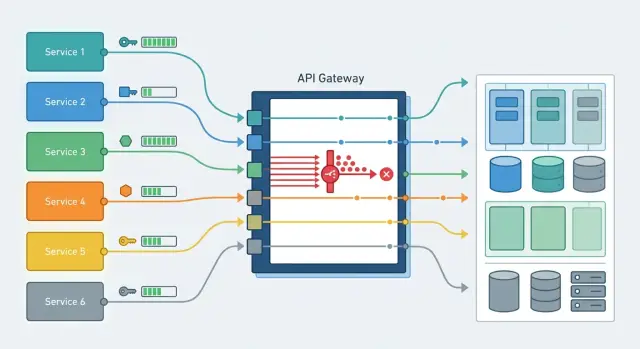
Why one shared limit breaks things
When production, tests, and batch jobs all go through the same API key, they share one request budget. On a diagram, that looks neat. In real life, it almost always causes problems.
The issue usually doesn't start in production, but next to it. A developer launches a load test, analysts kick off overnight processing, someone checks a new prompt across hundreds of requests. If everyone shares one limit, that traffic gets mixed with live traffic. Users see slow responses or 429s even though the service itself is healthy.
The biggest problem is usually one noisy client or one noisy task. Raise the request rate fast enough and the shared budget can disappear for a minute, an hour, or sometimes the whole day. The rest of the team then sees only higher latency, a growing queue, and failures in their own flows.
Then troubleshooting breaks down. The chart shows the limit was exhausted, but it doesn't answer the main question: who actually used it up? The production team blames the integration, the integration blames the test environment, and the test environment stays quiet because its jobs were using the same key. By the time people manually gather logs, customers are already feeling the impact.
Support in this setup almost always works in firefighting mode. Instead of clear rules, someone manually disables access, asks teams to wait, and hunts for the culprit by timestamps. That takes more time than setting up limits properly in the first place.
For LLM applications, this is especially painful. One service sends short requests, another sends long batch jobs, and a third does background retries. If all of them sit under the same cap, the system doesn't cut the heaviest flow first; it cuts whoever happens to hit the limit. That's why key-level limits are not about bureaucracy. They let each part of the system stay within its own bounds and keep from slowing down the others.
How to layer limits
One shared threshold almost always leads to manual incident handling. A workable setup is built from several layers. Usually four are enough:
- a separate limit per service;
- a separate limit per environment;
- a separate limit per role or key type;
- a modest default for new keys until you have usage history.
Separating by service removes the most common problem. Chat traffic almost always comes in bursts, especially during working hours. Search and retrieval usually create steadier load. Background jobs are the most dangerous: one batch with tens of thousands of records can take over the whole pool and slow down responses for live users. If each service has its own ceiling, the failure stays local.
Production needs its own reserve. Do not share it with tests or the sandbox. A developer may accidentally run a load test, QA may start a mass check, and the shared limit will disappear at the worst possible moment. Production should live separately, even if dev traffic looks small.
Role-based layers help you manage risk more precisely. User traffic needs stable response times. Integrations can usually tolerate a short delay. Batch jobs can be restricted more tightly or moved into a night window. Admin keys are best kept with a small but guaranteed reserve so the team can step in and fix an issue even during a spike.
A default limit for new keys is useful too. A new service rarely gets the right number on day one. Give it a modest ceiling, collect a week or two of real traffic, then raise it. That way you don't choke the launch and you don't let unknown traffic into the shared pool.
If your team works through a single gateway compatible with OpenAI, this setup is easier to maintain. In AI Router, you can issue separate keys for services and environments and avoid mixing everything into one global limit.
Limits by service
If all services access the LLM through one key, problems show up fast. A nightly import, a mass document check, or a bad retry loop can burn through the whole budget, and then a user opens chat or a form and gets a slow response.
That is why it's better to separate services not by team or owner, but by load profile and the cost of failure. In practice, there are usually four groups: customer-facing chat and in-app suggestions, real-time search and classification, background jobs and imports, and internal tools and test flows.
Services that users see directly need predictable behavior. For them, it's better to keep a steady limit without sharp spikes. The ceiling can sit a little below the theoretical maximum, but the responses will stay stable at peak time.
Background jobs should be limited more tightly. They rarely need instant responses, but they love to consume every available request when the queue grows or a worker starts retrying errors. For those tasks, a simple setup is usually enough: a smaller limit, a queue, and a clear retry rule with a pause. The import will finish later, but it won't take down the service users are actually seeing.
Don't set limits based on a rough feeling. Look at real traffic: how many requests the service sends on an ordinary day, what happens at peak, how long the spike lasts. If chat peaks at 20 requests per second and the background reconciliation has short bursts of 200, the same ceiling for both makes no sense.
Where the gateway already supports key-level limits, it's convenient to issue a separate key for each service. Then a noisy worker can't take resources away from the production flow, and you can immediately see who hit the limit and where to fix the queue instead of just increasing the numbers.
Limits by environment
The same limit for every environment almost always hurts production. Tests, debugging, and one-off runs can easily consume the shared pool, and then the live service gets 429s at the worst possible moment.
Production should have its own pool with a hard minimum that nobody can take away. If you have a shared budget in requests or tokens, don't keep it all in one bucket. Set aside a separate limit for production keys and do not let stage or dev borrow from it, even temporarily.
A test environment can work with a much lower limit. It's there to validate the release, integration, and a few load scenarios, not to run endless experiments. When stage gets almost the same limit as prod, teams quickly get used to running everything there, and test noise starts interfering with real users.
The development sandbox needs an even smaller limit. Developers often fire off many short requests, try different models, tweak prompts, and forget to turn off a script. A small dev limit doesn't get in the way, but it catches these cases well. One laptop's mistake doesn't turn into a team-wide problem.
During a release, limits can be raised, but only in a targeted way. Don't open all of stage or dev for several hours. It's better to temporarily raise the limit only for the specific group of keys involved in the release.
The rule of thumb is simple: prod gets its own pool and an untouchable minimum, stage runs on a moderate limit, dev and the sandbox stay on a small limit, and during a release the team manually raises the ceiling only for the keys that need it. After the release, normal values should be restored immediately. People often forget that part, and a temporary increase ends up living for weeks and causing a new incident.
One practical example. A retail team notices that nightly tests in stage suddenly start sending ten times more requests because of a new catalog check. If stage shares a common pool, production search starts slowing down. If stage has its own low ceiling, the tests will hit that limit, the team will see the spike in logs, and production will keep running as usual.
Limits by role and key type
The same limit for every key almost always creates imbalance. One service sends traffic steadily and often, a partner suddenly creates a spike, and an employee's personal key is only needed for testing and debugging. If you mix those scenarios, one source will quickly eat the whole budget.
The easiest way to split keys is by who uses them and why: service keys for internal applications, partner and external customer keys, employee personal keys, admin keys, and temporary contractor keys.
For external customers, it's useful to set two thresholds at once: one per minute and one per day. The per-minute limit cuts off sudden spikes if a partner's retry loop breaks or a bad release goes out. The daily limit protects the budget and keeps one integration from using up all capacity by evening.
Batch jobs are better placed in a separate key class. They have their own rhythm, and it rarely looks anything like live user traffic. Overnight reindexing, mass labeling, or evaluation runs should not compete with production requests. They need their own limit and, if necessary, their own execution window.
An admin key with no limit is a bad idea. These are the keys that tend to live the longest, get copied into several services, and become a quiet source of risk. Even for admins, it's better to keep a hard ceiling, narrow permissions, and a separate action log.
For contractors, the rule is even simpler: issue a temporary key with an expiration date. If someone needs access for two weeks, the key should turn itself off even if nobody remembers to revoke it.
In practice, the setup is pretty ordinary. Customers get a per-minute and per-day limit, the internal service gets a stable working range, analysts get a modest personal cap, and contractors get a temporary key for the project duration. As a result, one noisy client doesn't slow everyone else down.
How to roll out the scheme step by step
It's better to start with an access map, not with numbers. In many teams, keys live longer than the tasks they were created for. As a result, the same key gets used by stage, an internal bot, and a customer-facing service, and its owner may have moved teams long ago. Until you sort out which key is used by whom and what it's for, new limits will only add confusion.
First, build a simple register: key name, service, environment, owner, and backup contact. The main goal is to eliminate anonymous keys and shared tokens that everybody uses.
After that, give yourself a week of observation. Don't change the rules the same day. Look at traffic for each service: normal load, peak hours, and rare spikes after a release or mass email. The picture often becomes clear quickly: prod is stable, staging is noisy in the morning, and an internal tool creates short but sharp spikes.
Then you can roll out the scheme in stages:
- Set a base limit for normal operation of each key.
- Add a separate ceiling for short spikes so a release or batch job doesn't hit a hard wall instantly.
- Turn on a failure log with the reason: which key, which service, and which limit was triggered.
- Set up simple alerts for the service owner, not the whole platform team.
- Move teams to the new scheme one by one, starting with the most predictable services.
Don't try to find perfect numbers right away. A sensible starting point and a couple of adjustments based on real traffic are enough. If a payment service usually makes 20 requests per second, don't set it to 200 just in case. Wide limits rarely save you. More often, they hide the problem until the first serious overload.
A good check is simple: the service owner knows the limit, understands where the alert goes, and can request a change quickly. If that is not true, the setup is still too rough.
Example: one noisy client doesn't disturb everyone
A company has three flows. The first is support chat, where agents need a fast answer every minute. The second is the manager dashboard, where employees view customer cards and documents. The third is a nightly reconciliation job that processes files in batches and checks for mismatches.
The trouble starts at night, when the batch job suddenly increases traffic. If all three flows go through the API under one key and share one limit, the reconciliation quickly consumes the entire request budget. Chat gets slower, and the manager dashboard starts seeing delays, even though the users themselves did nothing wrong.
The workable setup is much simpler. The team creates separate keys for each flow and gives them different limits: support-chat-prod gets high priority and a small but stable reserve; manager-cabinet-prod lives on a medium limit without sharp spikes; docs-reconcile-batch moves into a separate class for overnight processing.
Now, if reconciliation suddenly sends too many requests, the system cuts only that key. The batch job gets a 429, slows down, or goes into retry with a pause. Support chat and the dashboard keep running at their own pace because nobody spent their budget for them.
Troubleshooting in the morning is easier too. The log doesn't just say "limit exceeded"; it shows the exact cause: which key hit the ceiling, when it happened, and how many requests it managed to send. Instead of searching across the whole system, the team immediately knows where the problem is.
If the gateway supports key-level limits and audit logs, this setup can be rolled out without changing the client code. In AI Router, this is one of the practical use cases: different keys for different flows, a single OpenAI-compatible endpoint, and a clear picture in the logs.
Mistakes that create bottlenecks
API bottlenecks are more often caused by bad load separation than by a limit that is too small. A team introduces key-level limits, but keeps the old habits: one secret for everything, identical quotas for everyone, and no visibility into failures. Then any spike quickly turns into a queue.
The most common mistake is using the same key in production, tests, and on developers' laptops. Someone runs a load scenario or accidentally enters an endless loop, and the live service gets the same restrictions.
The second mistake is giving every role the same ceiling. A background job, an admin panel, and a public API all have different load patterns. One number for all of them leads to two extremes: some hit the ceiling all the time, while others sit on reserve they don't need at all.
The third mistake is looking only at the per-minute limit. That cuts sudden spikes, but it doesn't catch slow quota burn throughout the day. A daily limit helps you spot forgotten jobs, long-running loops, and quiet retries.
The fourth mistake is never revoking old keys. After a project, pilot, or contractor engagement, access often stays alive on its own. Sometimes it's exactly one forgotten key that creates extra traffic for weeks.
The fifth mistake is setting the limit and forgetting about monitoring. If nobody watches 429s, retry counts, and the noisiest keys, the bottleneck grows quietly. It gets worse when the client immediately sends a new request after a failure and makes the problem even bigger.
There's a simple test that quickly shows how good the setup is. The log should make it clear which service, which environment, and which key type used up the quota. If it takes half an hour to answer that question, the setup is already bad.
Quick check before launch
Before release, it's useful to simulate a simple failure: one client or one service suddenly increases traffic tenfold. If that makes everything else slow down, the setup still isn't ready. This test shows weak spots better than any pretty diagram.
Limits by themselves won't save you if keys are issued without order. Problems usually start not with the numbers, but with the fact that nobody knows whose key it is, what traffic it should carry, and who should get the signal when it fails.
Before launch, check a few things:
- every service has its own key and a clear owner;
- production is separate from the test environment;
- external customers have their own limits;
- failures are written to the log, and the alert reaches the right person quickly;
- there is a clear path to raise a limit temporarily and then return to the normal value.
If even one item is shaky, it's better to slow the release down. One extra day of preparation is usually cheaper than a night of manual incident handling and searching for the service that clogged the shared channel.
What to do next
First, assign an owner for the limit scheme. This is not a formality. One person or a small group should decide who gets a key, what it is called, what limit it gets, and who handles overruns. When there is no owner, exceptions pile up very quickly, and within a month nobody understands why two similar services follow different rules.
It's best to keep the issuance rules short and boring. Usually four fields are enough: which service uses the key, which environment it runs in, who owns it on the team side, and what traffic peak is expected. That is enough to keep prod, stage, background jobs, and manual tests from getting mixed into one stream.
Then establish a simple review rhythm. Once a month, open the real traffic data and look at three things: where 429s appear often, which keys live with almost no load, and which services grow sharply during peak hours. If a limit isn't needed, cut it. If a service consistently hits the ceiling, raise the limit only for that service, not for the whole account.
It's also useful to run a practice spike from time to time. Launch a controlled wave of requests as if one client or one worker got out of control. Then check who got hit first, whether the alerts reached the right team, and whether production kept its normal speed.
If you route model requests through AI Router, the logical next step is to move limits to the key level instead of the whole account, and review audit logs by service on a regular basis. They quickly show which flow is consuming the quota, where 429s are rising, and which one should be isolated with its own ceiling.
The plan for the next week is very practical: assign an owner, split keys by service and environment, turn on failure logs, and verify once that a noisy client really cannot take everyone else down.
Frequently asked questions
Why does a single shared limit on one API key often break things?
Because production, tests, and background jobs start competing for the same pool of requests. It only takes one noisy workflow to suddenly raise traffic, and live users will see delays or 429s even though the service itself is working fine.
It gets even worse when you try to diagnose it. The logs only show a shared limit being reached, not which service or task caused it.
Which layers should you separate limits by first?
Usually three dimensions are enough: service, environment, and usage type. Keep prod, stage, and dev separate, and within them split chat, background jobs, integrations, and manual testing.
This setup contains failures. If one batch job hits the ceiling, it won't drag chat or production search down with it.
Where should I start if all services are on one key today?
Start with an access map. Build a simple register: which key belongs to which service, which environment it lives in, and who owns it.
Then watch real traffic for at least a week. After that, set the first values instead of guessing up front.
Should production be separated from stage and dev?
No, you should not. Production needs its own pool with a reserve that tests and sandboxes cannot touch.
Even if dev seems quiet, one forgotten script or a big QA run can burn through the shared limit at the worst possible moment.
What limit should I set for a new key if there is no history yet?
Give new keys a small, safe limit. That is usually enough for a service to go live while the team collects real usage data without putting neighbors at risk.
After a week or two, raise the limit based on data, not gut feeling. That makes it easier to avoid extra headroom and surprise spikes.
Why set both a per-minute and a per-day limit?
A per-minute limit cuts off sudden spikes. It helps when a client's retry loop breaks or someone suddenly sends too many requests in a short time.
A daily limit keeps overall usage under control. It helps you spot quiet background jobs and long-running loops that slowly eat the quota by the end of the day.
What should I do with batch jobs and nightly tasks?
It's better to move them into a separate key class and give them a stricter limit. They rarely need an instant response, but they can quickly consume the entire available pool if the queue grows or a worker starts retrying errors.
Add a pause before retrying and use a queue. Then the job will finish later, but it won't hurt the services users rely on.
Should admin and employee personal keys be limited too?
Yes, otherwise they often become a hidden risk. These keys get copied between services, forgotten, and then quietly keep creating extra traffic.
For admins, it's better to have a separate key with a clear ceiling, narrow permissions, and an action log. That's enough to fix incidents without leaving a big access hole.
What logs and alerts do I need to find the source of 429s quickly?
Log more than just the failure itself. The journal should show the key, service, environment, time, and the limit that triggered.
Then the team can immediately see who hit the ceiling. Without that, people waste time on manual investigation instead of fixing the queue or changing settings.
Can I set key-level limits without rewriting client code?
Yes, if you use an OpenAI-compatible gateway. In that case, it's usually enough to issue different keys for services and environments, and leave the client code and SDKs alone.
AI Router is a good fit for this: access rules and key-level limits change, while the integration stays the same.