JSON Schema Fallback: How to Switch Models Without Breaking Tool Mode
JSON schema fallback matters when a backup model changes fields, types, or response format. We break down how to choose backup models, validators, and checks.
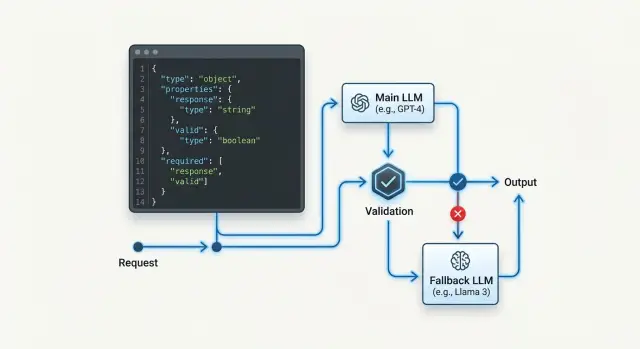
Where the schema breaks during fallback
The failure is usually visible not in the answer itself, but in one field that disappears or changes type. As long as the primary model responds consistently, tool mode feels reliable. Problems start when routing sends the request to a backup, and that model treats the same contract a little differently.
The most common case is a missing required field. The first model returns customer_id, topic, and priority, while the backup decides that priority can be omitted because it is already clear from the text. For a human, that is acceptable. For code, it is already an error: the tool expects a complete object and does not know what to do with incomplete JSON.
A field type breaks just as often. One model returns the ticket number as a string "10452", another as the number 10452. At a glance, there is almost no difference. But if the system later compares the ID as a string, writes it to a CRM, or passes it to a tool with a strict schema, the request fails on the spot. It is a particularly annoying bug: the response looks almost right, but the pipeline still falls apart.
There is also the quiet problem of extra fields. Suppose the schema allows only name, phone, and city, but the backup model adds comment, confidence, or provider_note. Some parsers will accept that, others will reject the whole object. Worse, extra fields often appear only on some requests, not all of them. That is why teams spend a long time looking in the wrong place.
Another pain point is text around the JSON. One model returns a clean object, while another writes something like:
{"name":"Alya","phone":"+77010000000"}
Sometimes Done, here is the result: appears before it, and sometimes a short explanation comes after it. A parser that expects only JSON fails immediately.
Usually four things break:
- a required field disappears
- a field type changes
- extra fields appear
- ordinary text shows up around the JSON
So similar text quality means very little. In tool mode, what matters is not a nice answer, but the same structure at every step.
What counts as a compatible response
A compatible response is not just JSON that looks similar. It is a response your code accepts without branching, manual fixes, or guesswork. If after a model switch the parser, validator, and tool call all work the same way, the response is compatible.
When you plan a fallback, do not look at writing style. Look at the contract. It is usually simpler than it seems: which fields are required, what type each field has, which values count as empty, and which extra fields are allowed.
Put simply, a compatible response passes three checks: the JSON parses, the schema matches, and the business meaning is not lost. Everything else is cosmetic.
Minimal contract
Start by locking down the fields without which the next step does not work. If the tool expects customer_id as a string and amount as a number, then "123" and 123 are not the same thing. You should not leave such things to the model’s judgment.
Also define empty values separately. null, an empty string, an empty array, and a missing field all mean different things. For example, email: null may mean "there is no email", while a missing email may mean the model did not fill the field at all and the response should be treated as an error.
It is also better to decide in advance what to do with extra fields. If one model sends confidence and comment while another does not, that is fine as long as your code ignores them. The problem starts where an extra field unexpectedly changes the logic.
A minimal contract should answer four questions:
- which fields are always required
- what type each field has
- which empty values are allowed
- which extra fields do not break processing
Another common source of failure is the format of values. Dates are best kept in one format, for example YYYY-MM-DD. Money is better sent either in minor units or as a number with a clear rounding rule. Do not mix identifiers: if request_id is a string in your system, do not let the model sometimes return a number and sometimes a UUID.
If you switch models through one gateway, the application should not notice the provider change at all. The answers may differ in style, but not in structure.
How to choose the primary and fallback model
The primary model for tool mode is not chosen by how smartly it writes text. Look at something else: how often it returns JSON that passes your schema on the first try. If a cheaper model breaks types, skips required fields, or adds extra text around the object, that savings disappears quickly.
All candidates should go through the same test set. Include simple calls, long schemas, enum fields, nested objects, empty values, and noisy prompts. One prompt, one tool contract, one validator. Otherwise you are comparing not models, but randomness.
For each model, it helps to measure five things: the share of responses that pass JSON Schema without fixes, the share of correct tool calls on long schemas, average latency and time variance, behavior on timeouts and truncated output, and only then the cost of a successful response.
Long schemas break even strong models. One model handles 8 fields easily but gets confused at 20 and starts corrupting nested arrays. Another fills required fields well but fails on enum and returns a near-synonym instead of an allowed value. You only see that in real tool calls.
I would not put a model in primary if it gives less than 95% valid responses on your set and the tool triggers actions in the system. For informational scenarios, the threshold may be lower. For requests, payments, order statuses, or KYC, it is better to be stricter.
Usually 2-3 fallbacks are enough. Do not choose three almost identical models from similar providers. It is better to build a set with different behavior: one fallback closer to the primary in accuracy, another faster and cheaper, and a third suited to scenarios where data residency and schema stability matter.
If you run tests through an OpenAI-compatible gateway, selection is faster because you do not need to change SDKs, code, and prompts for each provider. AI Router works like that: just switch base_url to api.airouter.kz and run the same test pack against several models. But the criterion stays the same: the winner is not the model that looks good in a demo, but the one that keeps your contract intact for weeks without surprises.
How to define the contract for tool mode
If the model needs to call a function, a clear prompt is not enough. You need a strict contract that survives a provider change. In fallback scenarios, the weak point is usually not the model itself, but vague fields, similar enums, and extra parameters.
Give each function one purpose and a short description. You do not need a paragraph about business logic. Two things are enough: when to call the function and what it should return. If the function creates a ticket, say exactly that: it creates a ticket in CRM and returns ticket_id.
Be strict with enums. A list of 3-5 values usually works better than a long set of similar options. If your code only ever keeps new, pending, and closed, do not add waiting, in_progress, and on_hold. Similar values confuse even strong models.
Remove optional fields that your code does not need anyway. Every extra field creates a new chance to get null, an empty string, or text like "not specified". If the system looks up a client by customer_id, do not ask the model for name, region, and comments just in case.
Also forbid free text where you expect a code, ID, or date. The order_id field should accept order_78421, not "the customer’s order from last week". The delivery_date field should be a date in one format, not "tomorrow after lunch".
In practice, simple constraints usually help:
- for identifiers, set
pattern,minLength, andmaxLength - for dates and statuses, keep one format and one value list
- for numbers, set boundaries if they are known
- for strings, forbid extra text when you need a code
Version your schema from day one. Add schema_version to every function call and change the version for any incompatible change. Then, when you switch models, you can immediately see which model-schema pair failed.
A dry contract does not look very pretty, and that is normal. The less freedom it has, the easier it is to keep tool mode stable.
How to set up fallback step by step
It is better to configure fallback as a chain of checks, not as a simple switch to any available model. If the backup model answers quickly but changes field structure or argument format, tool mode breaks just as badly as in a full outage.
First, collect a small reference set of prompts. It usually includes short, long, ambiguous, and rare cases. Run the base model on this set and look not only at the meaning of the answer, but also at the shape: required fields, types, enums, nested objects, and empty values.
Then connect the first backup and run the same set unchanged. Compare them against one contract. If the primary model returns customer_id as a string, but the backup sometimes returns a number or null, that is already an incompatible response, even if the text looks plausible.
A practical sequence usually looks like this:
- Check the base model on reference cases and record the valid-response rate.
- Add one backup model and compare not the wording, but schema pass rate and tool calls.
- Enable retry only after a timeout, network error, or clear validation failure.
- Add the next backup one at a time so you can see which model introduced the break.
- Log the reason for every switch: timeout, 5xx, invalid JSON, schema violation, empty tool arguments.
Retry before validation often only gets in the way. The model may have returned something that looks like JSON but does not pass the check. If you immediately send the same request to the next model and do not record the reason, the team will later not understand where the tool call actually failed.
A useful split of roles helps. The router decides when to switch models. The validator decides whether the result can go into code. These roles are better kept separate.
For example, in a customer request scenario, the base model extracts intent, priority, and department. If it misses the timeout, the system goes to fallback. If the backup returns JSON but forgets department, the request should not go to CRM. First log it, then try again according to the rule, not by guesswork.
Which validators to add
When models change, tool mode is usually broken not by big errors, but by small ones. One model returns clean JSON, another adds a phrase before the object, and a third writes a number as a string. If you pass that answer directly into business logic, the failure spreads far down the chain and becomes unpleasant to debug later.
It is safer to add several layers of checks. Then fallback does not turn into a lottery, and you can change backup models without manually cleaning every response.
Minimum set of checks
First, the parser checks for valid JSON syntax. If the response does not parse, there is nowhere to go дальше. Then the validator checks the schema: types, required fields, and allowed enum values. After that, a normalizer brings tricky fields into one format. Dates are stored in one format, numbers become numbers, and empty strings like "" or "N/A" become null if the contract allows it.
A separate filter should reject responses where the model wrote text before or after the JSON. For tool calling, that is not a small issue, but a defect. And finally, the logger stores the raw model response alongside the error text and provider name. Without that, you will not know who broke the contract.
This order is better than one catch-all check for "is everything okay". It shows the failure point immediately. If the model returned "amount": "15000", the parser will pass, the schema may fail, and the normalizer may fix the response in some scenarios. If Done, here is the result: appears before the JSON, it is better to reject the response immediately than to try to guess what the model meant.
There is a simple rule: do not mix format fixes with business rules. First bring the response into contract shape, and only then decide whether you can create a ticket, send an event to CRM, or call the next tool. Otherwise the same bug will appear in different places.
Even if you route requests through a single API gateway, validators are still necessary. The gateway makes provider replacement easier, but it does not remove differences in how models follow the schema.
Example with a customer request
A bank bot takes a request to reissue a card. After a short conversation, it must send only four fields to the backend: reason, city, contact_time, and consent. In such a scenario, tool mode works only while the response matches the schema exactly.
The schema is simple: reason, city, and contact_time are strings, consent is a boolean. In normal operation, the primary model responds like this:
{
  "reason": "card is damaged",
  "city": "Almaty",
  "contact_time": "after 18:00",
  "consent": true
}
The backend creates the request right away. No guesswork is needed.
The problem starts on the day the main provider times out. The router receives a clear error and only then enables the backup model. That is how fallback should work: the system should not jump between models without a reason, or you will get random format differences even on healthy traffic.
The backup model may understand the meaning correctly, but still break the contract:
{
  "reason": "card is damaged",
  "city": "Almaty",
  "contact_time": "after 18:00",
  "consent": "Yes"
}
For a human, the answer looks fine. For the schema, it does not. The consent field must be a boolean, and the string "Yes" violates the type.
The validator here needs simple discipline:
- It accepts a small fix if the meaning does not change. For example, it removes extra text around JSON or converts
"true"totrue. - It does not guess if the value is ambiguous or the business logic is strict.
- If it sees a type error, it asks the same model to repeat the answer against the same schema once.
- If the repeat still fails, it marks the call as
schema_errorand hands control to the router.
"Yes" can be corrected only in one case: the product already knows from a trusted source that the user gave consent, and the model only restated that fact in words. If there is no such source, it is better to ask for a repeat. Otherwise the bot will invent consent where nobody gave it.
It is exactly these small things that break the entire chain. One wrong type looks harmless, but after a model switch it breaks the whole tool call.
Where teams go wrong
Most often the problem is not the fallback itself, but how it is enabled. The team sees a cheaper model, puts it in reserve, and thinks the task is done. Then tool mode starts returning answers that look normal to the eye but do not pass the schema.
The first mistake is simple: people look at token price and barely look at the share of valid responses. For JSON, that is a poor guide. If the backup model is 20% cheaper but breaks structure in 8% of cases, the total cost of the system often becomes higher because of retries, repair attempts, and manual reviews.
The second mistake appears when switching providers. Teams think that if the API looks like OpenAI, tool calling will behave the same way. In reality, the differences are often in small details: where the model puts arguments, how it serializes numbers, what it does with empty fields, whether it returns text together with the tool call. These small details are exactly what break the parser.
The third mistake sits in the schema itself. Field descriptions are made too vague: comment, result, status. The model sees a fuzzy field and starts inventing the format. One provider returns a short string, another an object, a third an array with one item.
Another common slip is too much freedom in the schema. If you leave extra fields allowed, it initially feels convenient. In practice, the parser loses hard boundaries: today the model adds harmless_note, tomorrow provider_meta, and the day after that a nested object your code does not expect. For tool mode, a strict contract is almost always better.
People also often confuse three different mechanisms:
- Retry is for when the same model with the same contract may answer correctly on the second try.
- Repair is for when the response is almost right and can be safely brought into the schema.
- Fallback is for when the current model or provider handles the scenario poorly overall.
If you mix everything into one branch, the system becomes noisy and unpredictable. You no longer know what actually helped: a repeat, a JSON fix, or a switch to another model.
A proper check looks boring, but it works. For the primary and fallback model, measure separately the valid JSON rate, the correct tool call rate, the number of extra fields, average latency, and the cost of a successful response. If the fallback passes text tests but fails on the schema, it is not a fallback. It is just another model with different behavior.
Quick check before launch
Before release, check not only that the model can call a tool, but also that it does so the same way on every backup route. One successful response in a sandbox proves nothing. You need repeatability.
For each tool, keep a reference JSON response. This is not just an example from documentation, but a sample that passes your schema, contains all required fields, and sets the format for tricky parts: dates, null, enums, arrays, and nested objects. If a tool has three typical scenarios, it is better to store three references.
Then run the same tests against each backup model. Do not change the prompt for each one, or you are testing not compatibility, but a set of manual hacks. If the primary model returned a correct call 20 times in a row, the backup should pass the same run with the same messages, the same schema, and the same temperature settings.
Also check the validator separately. It should write the rejection reason so clearly that an engineer can understand it from the log in 10 seconds. Not invalid output, but what exactly broke: customer_id field missing, status is not in enum, items[2].price expected number, got string.
It helps to separate two actions in advance: when the system asks the model to repeat an answer, and when it switches to fallback right away. A repeat is for when the error is small and the model is likely to fix it on the second try. Switching to backup is better when the response completely broke the structure, mixed text with JSON, or violated the same schema twice in a row.
Before launch, this list is usually enough:
- each tool has a reference JSON and a schema version
- the primary and backup models have passed the same test set
- the validator returns the exact reason for rejection
- retry and switch rules are written down explicitly, not based on feeling
- logs save the model, provider, tool name, and schema version
The last point is often forgotten. If logs do not include the schema version and model name, you will not know what exactly broke after the provider switch.
What to do next
After the first working setup, do not leave fallback unattended. The backup chain gets stale quickly: you change the prompt, add a field to the schema, the provider updates the model, and yesterday’s backup already returns a different JSON. That kind of failure usually shows up at the worst possible moment.
It is useful to keep a short matrix and update it together with the code. It records the entire contract, not just model names: which tool is called in each scenario, which JSON schema is considered valid, which model is primary and which backups are allowed, which validator checks the response, and what counts as an error.
This table quickly reveals weak points. If one tool has three backups but only one reliably passes the enum check, the problem is not fallback in general, but a specific "model plus schema" pair.
Next, you need a regular run on fresh examples. Take recent requests, remove personal data, and run the same set through the primary model and all backups. Look not only at the success rate. Check what percentage of responses pass the validator on the first try, where the model skips required fields, where it changes a value type, and where it chooses the wrong tool.
After any notable change, the backups should be reviewed again. The reason can be anything: a new model, a different system prompt, a provider change, even a small shift in post-processing rules. Changing base_url by itself does not make models interchangeable.
If part of the traffic must stay inside Kazakhstan, it is easier to check backups through one compatible layer rather than build different logic across the codebase. In that case, AI Router can be useful as a single gateway: you can keep your existing SDKs and prompts, store audit logs and key-level limits in one place, and still test different models against the same contract.
The working rhythm is fairly simple: update the schema, run a fresh set the same week, review a few worst cases, and remove weak backups. That takes less time than dealing with one broken tool call on Monday morning.
Frequently asked questions
What usually breaks during fallback in tool mode?
Most often it is not the meaning that breaks, but the shape. The fallback model may drop a required field, change a type, add an extra attribute, or wrap JSON in plain text, and then the parser or tool call fails.
How do you know a fallback model is truly compatible?
Look at whether the answer goes through the same path without hacks. If the JSON parses, the schema matches, and the code calls the tool without manual edits, the model is compatible.
Should extra fields be allowed in the schema?
It is better to block extra fields by default. Allow them only where your code definitely ignores them and they do not change the logic later in the chain.
What should be in a minimal JSON contract?
Lock down the required fields, the type of each field, allowed empty values, and the format of tricky values like dates, money, and IDs. Add schema_version from day one so you can quickly see which model-schema pair failed.
How should you choose the primary and fallback model?
Choose not the model that writes nicely, but the one that returns valid JSON more often on your cases. Then compare latency, behavior on timeouts, and the cost of a successful response, not just token price.
When should you retry and when should you switch to fallback right away?
First give the same model one chance to recover if you hit a timeout, network error, or a minor schema issue. If the error repeats or the provider is unstable, switch to fallback and always log the reason.
Which validators should you place before a tool call?
Usually four layers are enough: a JSON parser, schema validation, careful format normalization, and a filter that removes text before or after the object. In logs, keep the raw response, model, provider, and error text, or you will spend a long time searching blind.
Can the model’s answer be corrected automatically?
Only fix things that do not change the meaning. For example, you can strip garbage around JSON or convert "true" to true, but you cannot guess that "Yes" means user consent if you do not have another reliable source.
How many fallback models should you keep in the chain?
Usually two or three fallbacks are enough. Use models with different behavior, not three nearly identical options, and rerun them after every schema, prompt, or provider change.
How can you quickly check fallback before launch?
Before release, run each model on the same set of reference cases and compare the schema pass rate, not the wording. Make sure the validator writes the exact reason for rejection, and that logs keep the tool name, model, provider, and schema version.