Hybrid Document Search: BM25 and Embeddings
Hybrid document search helps you find orders, contracts, and tickets more accurately. Learn how to combine BM25 and embeddings, tune the setup, and avoid common mistakes.
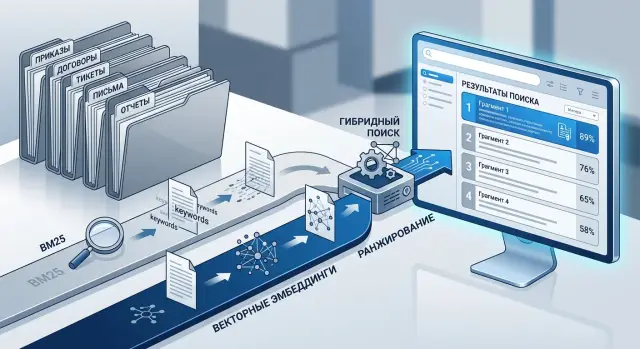
Why one search method misses the documents you need
The problem is often not the index, but the language of the documents themselves. The same meaning is recorded in different ways across the company. An employee searches for "unpaid leave," while the order uses the wording "without preserving salary," the contract hides it inside a long clause, and in a ticket someone simply writes "unpaid leave" or an abbreviation.
With orders, everything comes down to dry language. The text is short, template-based, and full of dates, numbers, and references to internal rules. If you search for the exact phrase, the document is found quickly. But if a person phrases the query in their own words, word-matching search often misses it.
Contracts are a different problem. The meaning is rarely on the surface. A simple idea can easily hide in a ten-line paragraph: first the exceptions, then the conditions, then a reference to an appendix. If search looks only at words, it latches onto frequent legal phrases and brings the wrong passages to the top. If it looks only at meaning, it may find something on the same topic, but not the exact clause with the needed deadline, penalty, or obligation.
Tickets are even noisier. People write fast, with slang, abbreviations, and typos. One employee writes "CRM won’t load," another says "crm is lagging," and a third writes "503 on the customer card." For ordinary search, these are almost different worlds. Semantic search is not perfect either: it may find a similar complaint, but confuse an incident with a bug, a question with an access request, or a local issue with a company-wide one.
That is why a single method almost always loses something:
- exact-word search misses paraphrases, slang, and abbreviations;
- semantic search smooths out wording, but can lose important details;
- short documents lack context;
- long ones carry too much noise.
In real work, a query rarely sounds the same as the text in the database. This is especially true when orders, contracts, and tickets all live in one corpus. That is why hybrid document search usually works better: BM25 keeps precision on terms, numbers, and exact phrasing, while embeddings help where people use different words.
When BM25 is better, and when embeddings are needed
BM25 is useful when one symbol changes the meaning. If an employee searches for order No. 47, article 12.3, error code E102, or an exact phrase like "business trip," this kind of search is almost always more reliable than a purely semantic one.
The reason is simple: BM25 looks at specific words and how rare they are in the corpus. The more closely the query matches the text, the higher the chance that the right document will appear near the top. This is especially noticeable in orders, because they contain many numbers, dates, job titles, department names, and fixed phrases.
Embeddings are useful in a different situation. They help when a person phrases the query differently from the document. In tickets, this happens all the time: one employee writes "the cash register freezes," another says "the terminal responds slowly," and a third says "the sale does not go through." The meaning is close, but the words are different. BM25 often misses these links, while embeddings catch them.
With contracts, a mixed approach is almost always needed. They depend on both exact wording and close meaning. A lawyer may search for "penalty for delay," while the text says "liquidated damages for breach of deadline." At the same time, the contract number, clause 5.4, and the counterparty name must not be lost. One signal is not enough.
A simple rule of thumb works well. Orders usually benefit more from exact matches on words, numbers, and clauses. Tickets usually benefit more from meaning-based search. Contracts are best ranked with both signals together. For policies and procedures, it depends on how people are used to searching inside the company.
A good check is to take one query and see what both methods bring up. The query "how to arrange remote work for 2 days" may not match the wording of the order, which says "temporary remote work mode." Embeddings will catch that. And the query "order 184 from March 15" is almost always better handled by BM25.
In practice, it is rarely worth choosing just one method. If the corpus mixes orders, contracts, and tickets with different writing styles, BM25 keeps precision on phrasing, while embeddings cover paraphrasing and everyday language. Together, they give a steadier result.
How to prepare the corpus for indexing
Poor search often starts not with the model, but with the corpus. If orders, contracts, and tickets are all stored in one index without structure, the system confuses short administrative phrases with important contract terms and loses documents by number or date.
Start by separating documents by type. An order usually follows a strict template, a contract has many repeated formulations, and a ticket is written in natural language, with mistakes, abbreviations, and pieces of conversation. Even this alone often improves the first-stage retrieval.
For each document, store not only the text but also clear fields: number, date, author or assignee, department, and status. These fields help both BM25 and filters. Users often search not by meaning, but by a reference point: "contract 154 from March," "ticket from IT," "order for the branch." If this information is hidden inside the main text, search quickly becomes noisy.
Also remove administrative clutter. Headers and footers, repeated signatures, approval stamps, long disclaimers, and duplicate pages bloat the index. In the end, the same template starts weighing more than the actual content. This is especially noticeable in contracts: standard blocks appear in hundreds of files and make it harder to tell one document from another.
It is better to normalize abbreviations before indexing. If one place says "cont.", another says "contract," and tickets use "ctr.", search splits the matches. Choose one standard and apply it everywhere. The same goes for department names, job titles, and common internal abbreviations.
It is also better not to mix the main text and attachments. An email, a scanned appendix, a ticket comment, and the actual contract text serve different purposes. If you put them into one field, a short query may return a document only because the word appeared in the appendix, not in the main content. It is simpler to keep separate fields: body_text, attachment_text, comments.
A simple example: a contract has a number, a date, a counterparty, and the body of the document, while the attachment has its own text and its own type. Then a search by number finds the contract itself, while a search by a phrase from an act separately brings up the appendix. It also makes weighting easier later.
How to chunk documents
Chunks that are too large hide the answer inside extra text. Chunks that are too small break the meaning. You need a piece that makes sense without the neighboring page.
With contracts, the boundaries usually already exist in the structure. Split them by sections, clauses, and appendices, not by a fixed number of characters. A clause about penalties is better stored separately from payment terms, even if both are short. Then BM25 can find exact words, and embeddings can pull in similar phrasing.
Orders work differently. One order often mixes the topic, deadlines, responsible people, and attachments. The main text is best split into meaningful blocks, and each appendix should be stored as a separate fragment. If an appendix is a table, add a short context: order number, topic, and what the appendix is.
Tickets do not look like formal documents, so they need to be split differently. Conversation is best divided by stages: problem description, clarification, checking, final resolution. The final answer rarely lives on its own. If an engineer writes "the cause is access rights," there should be at least a short summary of which incident it was about.
Each fragment is better stored not as plain text alone, but together with metadata: document topic, type, number and date, department or author, and the identifier of the section, clause, or appendix. This helps both search and filters. In enterprise search, people often look not just for "payment terms," but for "payment terms in a supply contract for 2024." Without metadata, such queries are easily confused.
A useful check is very simple: give the fragment to a colleague without the surrounding text and ask whether they can answer a typical query. If the answer is clear, the size is right. If the person needs the paragraph before or after, you split it too aggressively.
A good rule of thumb is not the number of characters, but a complete thought. One complete block almost always works better than two random 800-character pieces.
How to set up hybrid search
Hybrid search is better built as a simple pipeline, not a set of complicated rules. The same query can contain both exact anchors and semantic hints. That is why BM25 and embeddings should run together.
First normalize the query so exact matches are not broken. Bring dates, document numbers, and common abbreviations into one form. For example, "contract 15/24 from March 3" and "contract No. 15-24 from 03.03.2024" should be reduced to one standard form. The same applies to "spec", "technical brief", "SLA", and "service level." Otherwise BM25 sees noise and vector search gets extra ambiguity.
After that, the usual flow looks like this:
- Send the normalized query to both indexes: BM25 for exact word forms and vector search for semantic similarity.
- Take the top-N results from each list. At first, 30-50 fragments from each side is often enough.
- Merge the results by fragment id so the same piece of text does not appear twice in the output.
- Bring the scores to a common scale. Raw BM25 and vector scores are not comparable, so they need normalization.
- Calculate a final score with simple weights. For contracts, BM25 often carries more weight; for tickets, embeddings can be emphasized more.
At the first run, do not overcomplicate the formula. Often something like this is enough:
общий_балл = 0.6 * bm25_norm + 0.4 * vector_norm
This is not a universal ratio, but for a mixed corpus it gives a clear starting point. If people often search by order number, date, customer name, or the exact wording of a clause, increase the BM25 share. If queries sound vague, like "complaints about slow delivery" or "termination terms without penalty," strengthen the vector side.
A single example shows this right away. The query "contract for SLA for the Almaty branch" may return the right fragment even when the text does not contain the abbreviation SLA, but instead says "response time" and "service level." Vector search will pull up such a passage by meaning, while BM25 helps avoid losing the fragment with the exact branch name or appendix number.
Users usually do not need a long list. It is better to show 5-10 strong fragments than whole documents one after another. That way the person sees the relevant paragraph, date, number, and context faster. For enterprise search, this is almost always more convenient than a result page full of dozens of long PDFs.
An example with one query
An employee’s query sounds like this: compensation for overtime after termination. If you search only by exact words, part of the answer will appear quickly, but part will stay lower in the results. This is exactly where the mixed approach becomes especially visible.
BM25 will usually bring up the order where "overtime," "compensation," and "termination" appear together. A labor contract or addendum may also appear nearby if it clearly explains how the company calculates overtime, when it pays it, and whether there are limits after termination. For a lawyer or HR specialist, this is a good starting point, because exact matches often lead to the official rule.
But in a real archive, some of the needed information is not in orders, but in correspondence and internal tickets. There, people write differently: "extra hours," "additional payment," "did not make it into the final calculation," "the hours were not paid after termination." Embeddings usually find these records even if the query words do not match exactly. They surface the real cases where a similar situation was already discussed and explained.
A good result in this case looks coherent: at the top is the order with the rule for overtime payment, next is the contract or appendix with the calculation terms, then a finance ticket with a similar case, and an HR answer with an exception if some hours were not approved in advance.
The user sees not one document, but a connected set. First the rule, then the terms, then the real case. This greatly reduces the risk that someone will take a neat phrase from an order and miss an exception in the contract or the payment practice from tickets.
If the search is assembled carefully, the employee does not jump between folders and systems. They open 3-4 results and quickly understand what is due under the documents, where exceptions happen, and how a similar case was already handled inside the company.
How to tune the weights and verify the result
Weights are better tuned not on one successful example, but on live queries. Collect at least 30-50 queries for each document type: separately for orders, contracts, and tickets. For each query, immediately mark which fragment you consider the correct answer.
That alone is enough to stop the search from feeling like magic. You will immediately see where the system catches exact words and where the query meaning matters more.
For orders, it is usually useful to give BM25 the advantage. These texts contain many numbers, dates, department names, and exact phrases like "put into effect" or "approve the schedule." A good starting point is 0.7 for BM25 and 0.3 for embeddings.
For tickets, the picture is often the opposite. People write briefly, with errors, slang, and different ways of describing the same problem. Here you can start with 0.4 for BM25 and 0.6 for embeddings, then watch the results.
Contracts usually fall between these extremes. They contain both exact terms and long paraphrased passages. So it makes sense to start with a nearly even balance and then shift the weight toward whichever side misses more often.
Do not look at abstract "quality." Focus on a few simple signs:
- whether the needed fragment appears in the top 3 results;
- whether it appears at least in the top 10;
- whether documents of the wrong type are moving to the top;
- whether nearly identical pieces of the same text are being duplicated.
The top 3 results show whether the search feels usable. The top 10 show whether the system can find the right material at all, even if ranking is still rough.
Change one parameter at a time. If you raise the embedding weight, change chunk size, and turn on a new score normalization all at once, you will not know what actually helped. It is enough to keep a simple table: settings version, top-3 hit rate, top-10 hit rate, short note on the errors.
A good sign of a well-tuned setup looks like this: for the query "order to move shifts to May," the correct order with the exact wording appears at the top, and for "cash register freezes after refund," the search brings up similar tickets even if the wording is not identical.
Common mistakes
Problems in hybrid search are usually not caused by the model, but by the way the team prepares the corpus and mixes signals. The demo looks convincing, but in real use the system misses the needed clauses, numbers, and semantically close answers.
The most common mistake is storing the whole contract or a long order as one block. Then BM25 finds the document because of a rare word, but cannot surface the right fragment. Embeddings also weaken: one large block mixes the subject of the contract, penalties, deadlines, and appendices. The user searches for "change in payment deadline" and gets the first page of a 40-page document.
Raw OCR text also hurts a lot. If a scan turns "contract" into "dorоgor," the search breaks in two places at once. Exact search does not see the term, and semantic search gets noisy text and builds weak vectors. Before indexing, this text needs cleaning: remove bad line breaks, broken symbols, repeated headers, and page numbers.
Another mistake is ranking queries of different types in the same way. A contract number, an ID number, a request code, and a phrase like "why didn’t the client receive the act" should not be processed by one single scheme. Otherwise an exact match sometimes loses to a document that is merely similar in topic.
Many teams forget about synonyms and the company’s internal language. One department writes "legal unit," another says "legal department," and a third uses a code like "DP-07." For people, these mean the same thing. For an index without a synonym dictionary, they are three different entities.
Quality testing also often gives a false impression. The team takes ten neat queries where every word is spelled correctly and decides the search is already good. In real life, employees search differently: they shorten department names, mix up order numbers, paste a piece of an email into the query, or use a conversational phrase from a ticket. If you test only "clean" queries, real failures stay hidden. It is better to use logs of actual requests and look separately at exact queries, semantic queries, and mixed ones. Then it quickly becomes clear where a different weight is needed, where the dictionary is lacking, or where bad OCR is damaging the index.
Short checklist before launch
Before launch, it helps to check not one polished demo result, but everyday working queries. Orders, contracts, and tickets speak different languages: contracts care about number and date, tickets are written in everyday speech, and orders often repeat template phrases.
- Separate documents by type. Sometimes separate fields are enough, and sometimes it is better to create separate indexes for contracts, orders, and tickets.
- Keep metadata next to the text. Date, number, status, and department often matter more than the text itself.
- Collect at least 30 real queries. You need actual phrases like "contract 45/23," "March leave order," "ticket about payment failure."
- Turn on query and click logging. Without it, search is hard to improve.
- Decide in advance what the response should look like. In some scenarios, showing a fragment is better; in others, the whole document works better; sometimes you need both.
There is also a simple sanity check. If an employee searches for "rental contract for a warehouse, signed in spring," the system should return not just similar text, but a document that can be quickly checked by date, status, and number. If these fields are missing from the results, the person will still have to search manually.
For the first release, you do not need a perfect setup. You need a clear baseline that lets you measure mistakes and gradually adjust BM25 and embedding weights based on real user behavior.
What to do after launch
Launching the index does not finish the work. Even a good search starts making mistakes when people write the way they are used to, not the way you expected in tests. In real use, abbreviations, shorthand, partial contract numbers, and tickets full of slang quickly appear.
Save the queries after which the user opened no document or immediately returned to search. That is the most honest signal. It is useful to review at least 20-30 such cases manually each week instead of looking only at average metrics.
Usually the misses show up in a few places: people use an abbreviation that is not in the dictionary; the needed document is chunked into pieces that are too small or too large; BM25 pulls exact words too strongly from the wrong document type; embeddings find a text that is similar in meaning, but not the right order, contract, or ticket.
The abbreviation and common-phrasing dictionary should be expanded continuously. Companies rarely write the same way every time: "additional agreement," "addendum," and "AA" can mean the same thing, and "ticket not closing" and "request is stuck" often point to the same class of issues. If these pairs are not accounted for, search will lose good documents simply because of language.
Once a quarter, it is worth revisiting chunk sizes and the weights between BM25 and embeddings. The corpus changes. Today you may have many short orders, and in three months long ticket conversations will be added, so the old settings will start adding noise. That is not a major rebuild, just normal search hygiene.
If an LLM sits on top of search, it is convenient to keep model routing and auditing in one layer. For example, AI Router at airouter.kz gives you one OpenAI-compatible endpoint, audit logs, rate limits, and PII masking, and the team does not have to rewrite the integration when changing models.
And do not turn search into a chat too early. A chat can hide misses beautifully: the answer sounds confident even when the system retrieved the wrong fragment. First make sure frequent queries reliably surface the right results near the top, and only then add generation on top of retrieval.
Frequently asked questions
Why is BM25 alone often not enough?
Because people and documents use different language. BM25 is good at matching exact words, numbers, dates, and legal articles, but it often misses paraphrases, jargon, and abbreviations.
Embeddings fill that gap, but they can sometimes lose the exact clause, error code, or order number. In a real corpus, these two signals usually complement each other.
When does BM25 work best?
Use BM25 first when the query depends on an exact match. That could be an order number, an article, an error code, an ID number, a date, or a fixed phrase like “business trip.”
In these cases, even one character can change the meaning, and word-based search usually ranks results better than pure semantic search.
When should you rely more heavily on embeddings?
Embeddings are useful when employees phrase things in their own words. One person writes “the cash register is freezing,” another says “the terminal is slow to respond,” and a third says “the sale won’t go through.”
If the meaning is close but the wording is different, vector search often finds the right tickets and fragments faster than ordinary word matching.
Should orders, contracts, and tickets be separated by type?
Yes, this often helps from the start. Orders, contracts, and tickets use different language, have different lengths, and contain different noise, so one shared index starts confusing template phrases with useful text very quickly.
At minimum, keep the document type in a separate field. If the corpus is large and highly mixed, it makes sense to split the types into different indexes or at least different ranking schemes.
What fields and metadata should be stored alongside the text?
Don’t hide everything in one large text field. Store the number, date, status, author, department, counterparty, and document type in separate fields.
That lets you filter the results and rank them more accurately. A query like “contract 154 from March” is handled much better when the number and date are separate from the body text.
How should documents be split into chunks?
Cut by complete thought, not by character count. For contracts, sections, clauses, and appendices usually work well. For orders, use meaningful blocks and separate appendices. For tickets, use conversation stages: problem description, clarification, solution.
A simple test is this: give the fragment to a colleague without the surrounding text. If they understand what it is about, the size is good. If not, the fragment is too short.
How do you build a hybrid search in practice?
Usually a simple scheme is enough. Normalize the query, send it to both BM25 and the vector index, take the top-N results from both lists, merge them by id, and then calculate a combined score.
At the start, use a simple formula, for example 0.6 for BM25 and 0.4 for vectors. Then adjust the weights by document type and by real queries, not by one nice-looking example.
What starting weights should you use between BM25 and embeddings?
For orders, you can start with BM25 weighted more heavily, for example 0.7 to 0.3. For tickets, the opposite often works better because they contain more conversational language, mistakes, and abbreviations.
For contracts, it is reasonable to start with a near-even balance. Then watch where the system fails: if it misses numbers and clauses, increase the BM25 weight; if it misses paraphrases, strengthen the vector side.
How do you know the search is tuned well?
Collect a set of real queries and mark the correct fragments right away. Even 30–50 queries for each document type will give you a useful picture.
Check whether the right fragment appears in the top 3 and at least in the top 10. Also make sure documents of the wrong type are not rising to the top and that nearly identical parts of the same text are not being duplicated.
What usually hurts results after launch?
Most often, the search is broken not by the models, but by the corpus. Long documents are indexed as one chunk, OCR leaves broken characters, repeated headers inflate template text, and nobody maintains an abbreviation dictionary.
After launch, save queries with no clicks and cases where the user immediately returns to search. They quickly show where the dictionary is lacking, where fragments are too small or too long, and where ranking mixes up document types.