Human in the Loop: Confidence Thresholds Without Manual Hell
Human-in-the-loop is not needed for every check: learn confidence thresholds, request types, and a simple escalation path to an operator.
Where constant manual review breaks the process
The idea of checking every answer only feels safe at the beginning. In practice, it quickly breaks speed, cost, and the whole point of automation. If the model responds in 3 seconds and a person spends 60-90 seconds on the same review, the difference is obvious to the customer.
The queue grows even under normal load. Imagine support with 600 requests a day. If one employee can carefully review 25 answers an hour, that is about 200 reviews in 8 hours. Two people will handle roughly 400. Another 200 will already be left for later on the first day.
It gets worse after that. The next day, the old backlog piles up with new requests. After a week, the delay is measured not in minutes, but in hours. At that point, the human in the loop does not reduce risk - it adds a new one: the customer waits longer, the operator rushes, and the team spends time on the queue instead of on edge cases.
Time is not the only problem. Costs grow almost linearly with traffic: more requests mean more shifts, more reviewers, and more overhead. And errors do not disappear. A tired employee will also miss a strange answer or approve it on autopilot. In the end, the LLM stops being automation and becomes an expensive draft.
Repetitive requests are especially exhausting. When an employee sees "where is my order" or "how do I reset my password" for the hundredth time, attention drops. They read the first lines, and a small mistake, an extra promise, or the wrong amount goes unnoticed.
There is also a less visible effect. A team that gets used to checking everything usually does not build proper escalation rules. A simple case and a disputed case follow the same route. The system does not learn to separate safe requests from those that cannot go through without a person.
That is why full manual review almost always runs into a dead end. People are better kept where the cost of a mistake is truly high: money, personal data, disputed decisions, unusual complaints. Then the queue is shorter, answers are faster, and the team’s attention goes where it is really needed.
Which requests should go straight to a person
The best starting point for a human-in-the-loop setup is to separate routine work from cases where an error is costly for the customer or the company. You do not need complex math here. In many cases, the type of request itself tells you whether an operator is needed.
Send requests to a person right away when a mistake clearly affects money, customer rights, or company obligations. This usually includes:
- refunds, charges, tariff changes, contract closure, and fine recalculations;
- changing a phone number, address, passport details, or access to transaction history;
- complaints, consents, service cancellation, and disputes over contract terms;
- rare or strangely worded requests where the model is more likely to guess;
- requests without required details, such as no number, date, or payment amount.
Routine requests look different. If the customer asks about delivery status, opening hours, standard tariff terms, or wants a short summary from an approved knowledge base, you usually do not need to involve a person. The mistake is annoying, but it rarely leads to a dispute or direct loss.
A simple rule of thumb: if after the model’s answer an operator still has to verify a fact, a document, or the right to perform an action, do not waste time on an extra round. Pass the conversation to a person right away.
It also helps to flag cases where the model wants to call a tool but gets no result. A customer asks for their account balance, but the CRM does not respond. In that situation, the model often tries to "be helpful" and builds an answer on guesses. That should not happen. If the tool did not return data, the conversation should go to an operator with a short reason.
It is also useful to look at how often a request appears. If a request comes up once a month, there is usually no stable answer pattern. In banking, healthcare, or SaaS, this often shows up in disputes over charges, unusual discounts, and old contracts. Those requests are better not left on autopilot.
The working rule is simple: automate what is frequent, clear, and reversible. Anything that changes money, rights, personal data, or requires guessing is better sent to a person right away.
How to set confidence thresholds without complex math
To tune LLM confidence thresholds, you do not need a separate data science project. It is enough to take 100-200 recent requests from live traffic and label the answers with a simple scheme: "can send," "needs edits," "cannot send." Even on that sample, you can already see where the model fails often and where manual review adds little value.
If requests go through a single gateway, it is convenient to take the first sample from audit logs. For a start, you only need a few fields: the request itself, the model’s answer, the final outcome for the customer, and whether the request was escalated to a person.
Then keep 2-3 signals that the team will actually look at every day.
- Model confidence. This can be the model’s own estimate, a score from your pipeline, or a simple proxy signal.
- Topic risk. Payments, refunds, personal data, medicine, and legal questions require a stricter threshold.
- Cost of error. A wrong answer about opening hours is annoying. A wrong answer about a fee or contract is expensive.
Do not try to collect ten metrics at once. The more complex the setup, the faster people start bypassing it manually.
It is better to define three zones instead of one universal threshold:
- auto-reply;
- sample review;
- mandatory human handoff.
For safe FAQs, you can start cautiously: send everything above 0.85 automatically, let the 0.65-0.85 range go to sample review, and pass everything below that to an operator. For financial or medical topics, it makes sense to raise the threshold even higher, even if the model looks confident.
Once a week, review the boundaries against fresh samples. If there are almost no bad answers in the auto-reply zone, you can expand it a little. If people often correct answers from the middle zone, the threshold should go up or that request type should be moved to manual handling. That way the system learns from real traffic, and the team does not get stuck in constant review.
A simple routing process, step by step
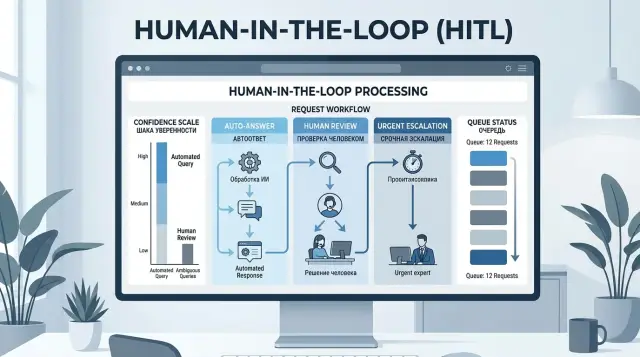
Good LLM request routing is simpler than it sounds. First, you look at the risk of the request, then at the model’s confidence, and then at data or tool failures. After that, the request goes either to an automatic reply or to the right human queue.
This order helps keep different escalation reasons separate. It is one thing when the model itself is unsure. It is something else entirely when it is confident, but the topic is risky or the system did not get the needed data from the CRM, order database, or internal service.
A basic flow looks like this:
- identify the risk class: low, medium, or high;
- check the model’s confidence within that class;
- look at service signals: tool error, timeout, empty fields, data conflict;
- send the request to the right queue and save the reason.
At the first step, common sense matters more than formulas. A tariff change, refund, medical recommendation, complaint, contract dispute, or work with personal data should usually go straight to a person. A simple question like "where is my order" or "what are your hours" can often be handled without manual review.
Next, the model’s confidence should be checked only within its own risk class. For low risk, the threshold can be looser. For medium risk, it should be higher. For high risk, confidence alone should not decide everything.
Then check what the answer was built on. If an external tool did not respond, the order number did not load, or the record is missing an amount or date, there is no reason to trust a nice-sounding answer. That request should go to a person right away, because the issue is not wording but a gap in the data.
Queues are better separated too. Financial questions go to one group, complaints to another, and standard support to a third. Then the operator gets not an abstract "hard case" but a clear task.
The escalation reason should be short and consistent: "high risk," "confidence below threshold," "CRM error," "missing required field." It takes only seconds, but later it makes it easy to see exactly where the process breaks: in the model, in the routing rules, or in the data sources.
If the team works through AI Router, such reasons are convenient to store next to the audit logs. That makes it easy to see not only the model’s answer, but also why the system did not let it through automatically.
Which risk signals to watch besides confidence
A model’s confidence alone often creates a false sense of control. The answer may sound calm and convincing, yet still be risky. That is why the human in the loop is needed not for every answer, but for cases with clear risk signals.
The most common signal is PII and other sensitive data in the request or the answer. If the user writes an IIN, card number, address, diagnosis, or details of an employment dispute, the route should be tightened right away. Even a correct answer can create a problem if that data cannot be stored or repeated without review.
The second important signal is a conflict between the model’s answer and the data in your systems. The model says the order has been delivered, but the CRM shows "in transit." Or it promises a refund even though the rules no longer allow it. Here the important thing is not the nice wording, but whether it matches the source of truth. If there is a mismatch, a person should see the answer.
It is also worth watching the shape of the answer. Too short an answer to a complex question, too long an answer with extra details, a sudden change in tone compared with normal messages, an attempt to work around the rules with odd wording, or a repeated prompt after a failed answer - all of these should raise suspicion.
Unusual wording often breaks simple filters. A user may not ask for something forbidden directly, but try to get around the rule with hints, role play, or a chain of clarifications. These cases are better caught not by stop words, but by behavior: a confusing context, pressure on the system, a request to "answer as if" or to "ignore previous instructions."
A repeated request matters too. If a person has rephrased the question twice after a bad answer, that is a signal. Most of the time, the model did not understand the task, not just a small detail. In a support flow, that conversation is better handed to an operator quickly than dragged through several more turns and frustrating the customer.
If the team has a gateway with PII masking and audit logs, these signals are easier to collect and review without manually searching through logs. In AI Router, such features can be used as part of the overall flow. But the rule stays simple: the model’s confidence should be viewed together with the context, not instead of it.
Example scenario in a support flow
Imagine a bank support flow where the LLM reads incoming messages and chooses one of three actions: answer automatically, ask for clarification, or hand the conversation directly to an employee. In this setup, the human in the loop stays in the process, but does not spend the day on repetitive requests.
A customer writes: "What is the fee for the plan for transfers between my own accounts?" This is usually a safe question. If the model correctly identifies the topic and finds the exact answer in the database, it can respond on its own. Keeping such requests under constant manual review makes no sense.
Another example is trickier: "Change my card cash withdrawal limit." Here it is not enough to phrase the answer well. The system needs to check who is writing, which product the customer has, whether the required verification was passed, and whether there are any profile restrictions. If all fields are present and the scenario is clearly described, the request can go forward automatically. If even one field is missing, it is better not to guess. Such a conversation goes to a clarification queue, where the bot asks for the missing details using a template.
There are also requests that should go to a person immediately, even with high LLM thresholds: "I do not recognize this transaction," "Money was charged twice on my card," "I think someone else got access." A disputed transaction, fraud risk, a charge complaint, or a possible legal dispute - none of these belong in auto-replies.
In practice, the route can be reduced to four rules:
- a simple question about a tariff or service status goes to auto-reply;
- a request to change a limit is processed only with complete information and a clear intent;
- disputed transactions and complaints go directly to an employee;
- incomplete requests go to clarification, not to an endless queue.
After one or two weeks, the team should look not only at answer quality, but also at the share of manual handoffs. If almost all requests are going up, the thresholds are too strict. If handoffs are few but corrections are many, the thresholds are too loose. The right balance is found in live traffic, not in a pretty diagram in a presentation.
Mistakes that bring back manual hell
Most often, the process breaks not because of the model, but because the rules are too blunt. The most common mistake is using the same threshold for all topics, channels, and scenarios. After that, the review queue grows every day, and the team does not understand why.
The reason is simple: a delivery address change in chat, a complaint about a card charge, and an internal FAQ for employees carry different risk. If you keep one universal threshold, you either let dangerous cases through or bury people in routine work.
Another common mistake is sending almost all new request types to a person just because they are new. At first, it seems cautious, but after a week manual review eats up the entire gain from automation. For new categories, it is better to set a short observation period, not a permanent "operator only" status.
The review queue also should not be left without a limit. If there is no upper bound, the system starts piling up tasks that nobody has time to process. In the end, the customer waits longer, the operator rushes, and quality drops exactly where you wanted to improve it.
It is useful to have a simple rule: if the queue goes over the limit, some borderline cases follow a fallback path. For example, the model asks the user for clarification instead of putting the request at the end of a forty-minute line.
Many teams also do not collect escalation reasons. A person corrects the answer, closes the ticket, and that is the end of it. Then it is impossible to tell where the system is failing: in topic classification, in the confidence threshold, in the prompt, or in missing data.
Without that feedback, the human in the loop becomes an expensive filter, not a way to improve routing. Even a simple reason tag helps: "missing context," "risky topic," "model confused the intent," "company policy decision needed."
There is also the opposite extreme: manual review is never removed even where the model has been answering reliably for a month. This is easy to see with repeated requests like order status, standard return terms, or basic instructions. If the metrics are stable, part of the flow should be allowed to go to auto-reply.
A healthy setup is simple: people handle rare, disputed, and expensive mistakes, not read thousands of safe answers one after another. Otherwise, it is not quality control - it is a traffic jam.
Quick checklist before launch
Before launch, it helps to check not the model itself, but the decision path. If you have a human in the loop, that person should step in rarely, for a clear reason, and at the right moment.
Check a few things.
- Split the flow into three zones: low risk and high confidence, the gray zone, and high risk with no auto-reply.
- Show the operator the escalation reason, not just the phrase "review this answer."
- From day one, track two numbers: the share of escalations and the customer response time.
- Change thresholds based on the request log, not on the general impression from a couple of loud cases.
- Do not delay simple requests without a reason.
A good sign before launch is this: the operator understands why the request came to them, and the team can explain why that exact threshold is in place now. If you are comparing several models through one gateway, this is especially convenient: it is easier to see where the differences come from the model and where they come from the routing rules.
If even one of these points is not covered, it is better to spend another day tuning it. That is almost always cheaper than sorting out a manual backlog later.
What to do next
Start with one request type where mistakes are easy to notice and count. For a first step, support requests with standard answers are a good fit: refunds, tariff changes, order status, and routine information requests. Do not try to take on the entire flow at once. That way, the human in the loop stays a targeted mechanism, not a new form of manual review for everything.
First, establish a baseline week with no changes. Look at how many errors reach the customer, how many answers the employee edits manually, and how much time each request takes. Then turn on sample review for two weeks and compare the numbers for the same request type.
During the pilot, four metrics are enough:
- the share of requests sent to a person;
- the share of errors after auto-reply;
- the share of answers the operator corrected;
- the average customer response time.
If manual touches decreased and the error rate did not go up, the setup works. If errors increased, do not argue with the result. It is better to raise the threshold, narrow the request class, or add another escalation rule.
Then build a protection layer around the setup. First, turn on audit logs so you can see which request was handled automatically, which one was sent to a person, and why. Next, add PII masking so IINs, phone numbers, card numbers, and addresses do not enter prompts or logs in plain text. After that, set limits at the key level so one service does not consume the entire budget or clog the whole flow.
For businesses in Kazakhstan, such requirements often appear very early. If the team is building an LLM flow through AI Router, it can use one OpenAI-compatible endpoint, keep data inside the country, and maintain audit logs without building this layer from scratch.
In two weeks, you will have not a debate about the approach, but a clear picture in the numbers. From there, it becomes obvious where automation handles things on its own and where a person should stay in the chain.