Embedding Dimensionality: Where Search Breaks and Code Breaks
Embedding dimensionality affects search, indexes, and storage schemas. We show where code breaks, where quality drops, and how to migrate safely.
Where the real problem is
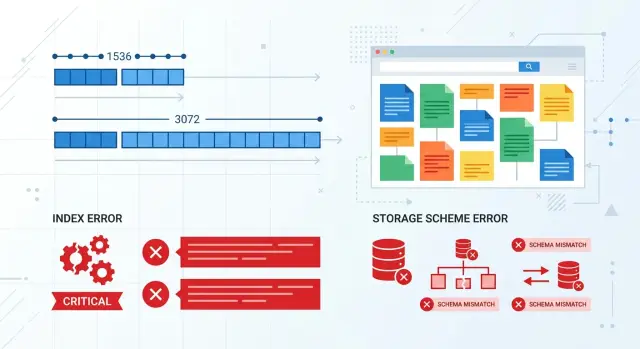
Switching the embedding model breaks more than search. More often, it breaks the agreement between the model, the database, the index, and the code that calculates similarity. When everything runs on one dimensionality, that is invisible. The problem shows up on the day the service expects 1536 numbers and gets 3072.
Embedding dimensionality is not a small tweak; it is part of the data contract. If your storage schema is built for a fixed vector length, the new output simply will not fit. Some databases will fail immediately on write. Others will accept the data after an implicit conversion, and that is worse: the breakage goes deeper and appears later.
Usually the failure happens in one of four ways:
- the new vector cannot be written because its length is different
- the vector index refuses to build or update
- the similarity service crashes at runtime on a similarity operation
- search mixes old and new vectors and returns a strange result order
The last case is the most unpleasant. The code does not crash, the dashboard stays green, and requests are still being processed. But the results are already wrong, because distances between vectors only make sense inside the same space. Old and new embeddings can describe the same text using different rules, and you should not mix them in one index.
Imagine product search in an online catalog. Product pages were indexed with the old model, while new user queries are already encoded by the new one. Formally, search still works, but someone types "wireless headphones" and suddenly cases, adapters, and random accessories appear at the top. The team starts tuning ranking, even though the reason is simpler: queries and documents live in different vector spaces.
The problem is not that the new model returned a different vector. The problem is that almost the entire chain around the vector quietly assumes one length and one geometry. If you do not check that in advance, you will get either a loud failure or a silent drop in quality. The second one is usually more expensive.
Why you cannot just swap the model
An embedding model changes more than the length of an array of numbers. It changes the space where texts live. The document and the query may stay the same, but their position relative to each other is no longer the same.
People notice dimensionality first because code likes fixed lengths. But that is only the visible part of the problem. The new model spreads meaning across axes in its own way: one is better at separating legal and operational wording, another brings short everyday queries closer to long instructions.
Even the same length does not save you
If both the old and the new model return, for example, 1536 numbers, that does not make them compatible. Those 1536 coordinates describe text using different rules. You cannot mix old document vectors with new query vectors. Search does not always fail with an error, but it starts lying quietly.
You can see this in a simple example. The database has articles like "how to close an account", "freezing a suspicious transaction", and "change phone number". The old model might confidently put the first article at the top for the query "close card". After the model switch, the same query may sometimes lift material about transaction checks instead, because the new geometry connects the words "close", "block", and "check" more strongly.
Similarity thresholds stop working the same way too. If you used to treat a document as relevant when cosine similarity was above 0.82, after migration that number means almost nothing. The distance distribution changes, so the "nothing found" filter, deduplication, and rerank after search all start behaving differently.
Even in an OpenAI-compatible gateway, where you can switch models without touching the SDK, that kind of swap is never free. You still need to recompute embeddings for the corpus, rebuild the vector index, and test metrics on live queries. Otherwise search still technically works, while users are already seeing a different set of documents.
Where search quality changes
Search quality often changes in places the team does not expect. The system may not crash, the index may build without errors, and the top 10 for some queries may stay almost the same. That is what makes it confusing: it feels like the switch was harmless, even though the new model already sees text similarity differently.
It shows up most clearly on short queries. When a user types one or two words, the model has fewer signals to work with, and any shift in vector geometry immediately affects the results. A long query often helps itself: it has more context, more detail, and search can more easily find the right document.
The query "card limit" shows this well. The database may contain pricing pages, risk rules, FAQ entries, and news. One model will surface the page with the exact rule, while another will push up a general product overview because the words are related by topic but not by the user’s intent.
Where the problem is easy to miss
Filters and rerank often hide the drop. If vector search sits behind a filter by product, language, or date, it may accidentally remove bad candidates and make the result look fine. Rerank does the same thing: it cleans up the top of the list, but it does not bring back documents that the base search never found.
That is why the team looks at the first three answers and thinks everything is okay. But recall has already dropped, and so has the chance of finding the right document in harder cases.
Multilingual collections react even more strongly. If the database mixes Russian, Kazakh, and English, a model migration can sharply change the distances between languages. Yesterday, a Russian query confidently found a Kazakh document, and today that document falls lower even though the meaning has not changed.
Old chunking adds noise too. If you used to split text too coarsely, too finely, or right in the middle of an idea, the old model may have tolerated it. New embeddings sometimes forgive such chunks less well, and the issue looks like a search-quality change even though part of the problem sits in data preparation.
That is why it is dangerous to change everything at once: the model, the index, and the chunking scheme. Later it becomes hard to tell what actually broke search. In practice, it is not one parameter that changes, but the entire similarity logic.
Where code breaks
Code usually does not fail when you call the model. It fails on the next step, when the new vector has to be saved, passed along, or used in ranking. If yesterday the model returned 1536 numbers and today it returns 3072, the problem quickly goes beyond search quality. The contract between system parts breaks.
The most common failure lives in storage. pgvector, Milvus, Qdrant, and other systems expect an exact vector length where the schema is already defined. If a column was created as vector(1536), a 3072-length vector will not fit on its own. The database will return an error, and the indexer will stop.
In practice, it looks very ordinary. A nightly batch job takes documents in batches, computes embeddings, and writes them to the index. The first incompatible record fails with an error, the job stops, and half the catalog remains on the old vectors. In the morning, the API still returns 200 OK, but search is already running on a mix of old and new data.
There is also a subtler class of failures: serialization between services. One service computes embeddings, a second normalizes them, and a third stores them in the index. If the array length is hardcoded somewhere in the contract, the new format breaks the pipeline. Sometimes the service crashes immediately. Sometimes it is worse: it quietly truncates the array, pads with zeros, or skips the record as corrupt.
Caching also causes trouble. It holds embeddings for documents, queries, or intermediate results longer than the model version lives. After the switch, some requests get new vectors while others get old ones from cache. The code still appears to work, but the index and ranking are now comparing incompatible data.
Usually the failure hides in one of five places: the database or index schema hardcodes vector length, the batch job cannot skip and log incompatible records, the exchange format between services does not validate array length, the cache does not separate data by model version, and monitoring only watches response status and latency.
The last point is especially nasty. A regular monitor sees that the endpoint is alive, there are no 500 errors, and latency is normal. Everything looks fine. But ranking is already broken: relevant documents fall lower, duplicates rise higher, and similarity filters produce strange noise.
If the team changes the model through a compatible API gateway, the risk does not disappear. A compatible endpoint preserves the call code, but it does not remove the need to check vector compatibility. Embedding dimensionality should be treated as part of the data schema, not a tiny detail of the model response.
A real search example
A support team has search over a knowledge base. An agent types a simple question, the system looks for similar snippets, and then shows a ready answer or a set of articles. For a long time, everything worked on an embedding model that produced a 1536-dimensional vector.
Then the team ran an offline test and saw a strong result from a new model with a size of 3072. On the labeled set, it did a better job with paraphrased questions and confused similar topics less often. The change seemed safe: swap the model in the pipeline and gradually reindex the base.
The failure did not start with a loud error, but with a quiet mismatch. One service was already writing new 3072-length vectors, while another was still sending data to the old index, whose schema expected 1536. The system rejected some records immediately. Others went through only halfway: the text and metadata were saved, but the vector never made it into the index.
From the outside, everything looked almost normal. The API answered successfully, the job queue was not stuck, and monitoring was not red. There were few clear errors in the logs, because the application considered the request handled if it saved the document fully or at least reached the end of the step.
A day later, the agents noticed strange behavior. For questions like "how do I change my password" or "where can I see my bill", search started returning nearby documents in meaning, but not the right ones. The answers looked plausible, and that only made things worse: people took longer to realize the problem was in the data, not in the wording of the query.
Usually, in this situation, three symptoms stand out: old articles are found better than new ones, the same query gives different results at different times, and simple questions break more often than complex ones.
That is how embedding dimensionality shows up in real work. It is not just vector compatibility that breaks. Trust in search breaks too. The team finds the cause only after comparing how many documents the pipeline accepted, how many vectors were actually written, and how many objects reached search without an embedding. Even a small gap between those numbers quickly hurts quality.
How to move to a new model step by step
It is better to treat an embedding model switch like a schema migration, not a small tweak. Otherwise the problem will surface at the worst possible time: the index accepts the new vector, search quietly starts mixing up documents, or the code fails on a length mismatch.
First, record not only the model name in config, but also the embedding dimensionality. Add the index version there too, and the distance metric if you set it explicitly. The team should be able to see right away which vector is in the database and which code works with it.
It is safer to keep the old and new schemas side by side until you see the result on real queries.
- Create a new column or table for fresh vectors and build a separate index.
- Keep the old embeddings in use so you have a clean baseline and a fast rollback.
- Take one shared set of real queries: frequent, rare, short, misspelled, and long.
- For each model, check whether the right document lands in the top results, how many queries return nothing, how long search takes, and what it costs.
- Move traffic in slices, for example 5% and then 20%, and keep an instant switch back to the old index.
It is better to compare against real usage, not a pretty demo set. If search over contract documents used to find the right template for the query "termination at the client’s initiative", and the new model now tends to surface general service documents instead, quality has already dropped even if the average score looks similar.
You can check recall simply by asking whether the right document appears in the top 5 or top 10 results. That is often enough to spot where quality changes. Also check end-to-end latency separately: embedding generation, write time, index query time, and application response time. Sometimes the new model ranks better but adds 150-200 ms, and users notice that.
Do not delete the old index on launch day. Keep both versions running in parallel until quality, cost, and code errors all look stable. It is the boring path, but it is cheaper than an emergency.
If you work through a unified gateway like AI Router, where you can switch models through the same OpenAI-compatible call, the temptation to skip this migration is even stronger. API-level convenience is useful, but the index and the data still need a separate version, reindexing, and real-query testing.
What to measure after launch
Right after the switch, do not look only at overall accuracy. Search often breaks more quietly: query volume stays flat, errors are low, and people just stop finding the right document on the first try. After a model change, it is more useful to watch a few metrics every day rather than once a week.
It helps to keep the first set of metrics in one dashboard:
- share of empty results by query type
- shift in
top-10for frequent queries - indexing errors and number of rejected vectors
- index size and memory usage
- write latency and search latency
Look at empty results by group, not just as a system-wide average. Short queries, long phrases, article numbers, customer names, and mixed Russian-English queries behave differently. If empty results rose from 1-2% to 6-8% only for short queries, there is already a problem, even if the average metric still looks acceptable.
A shift in top-10 is not always bad by itself. It becomes bad when it is broad and random. Take frequent queries and compare old and new results: how many documents disappeared from the ten, how many new ones entered, and how often the first relevant document moved down. If you have search over a knowledge base, a query like "card limit" should not suddenly pull up general pages instead of the exact answer.
Indexing errors should be counted separately from query errors. Code is sometimes silent: some documents did not make it into the index because the vector came in a different length, the serializer cut off the tail, or the database rejected the write. In logs, it may look like a small issue, but in practice you lost 3-5% of the corpus.
There are four more signals that are often underestimated: the index getting larger after reindexing, higher memory use on the search node, slower insertion of new documents, and higher p95 and p99 search latency.
If the new model produces a vector that is twice as long, the index usually gets heavier too. Search may stay accurate, but writes of new data slow down, and memory can run out at the worst possible moment — during background reindexing. That is why a good launch is judged not only with relevance metrics, but also with operational metrics.
Mistakes that get expensive
The most common and most expensive mistake is mixing new vectors with old ones in the same index. On paper, it looks like a careful migration: part of the documents have already been re-embedded, while part have not. In reality, search starts behaving strangely. Some queries improve sharply, others quietly degrade, and the team spends weeks arguing over where relevance actually broke.
The problem is not only vector length. Even if the old and new model produce the same dimensionality, their spaces may be organized differently. Then nearest neighbors no longer mean the same thing. The index still responds, there are no errors in the logs, but the results lead the user in the wrong direction.
The team loses just as much money when it looks only at offline metrics. On a test set, the new model may deliver a 4-5% gain in recall, and that is enough for everyone to approve the release. Then real queries arrive with typos, short phrases, internal jargon, and mixed Russian-Kazakh text, and the picture changes. If you did not test live traffic, you did not test search — you tested a classroom setup.
Another trap is storing dimensionality only in documentation or a wiki. The runtime never reads documentation. The code must validate vector length during indexing and during query time. If the team switches models through a compatible gateway, the application may continue running without SDK changes. That is convenient, but it also makes it easier to miss the moment when the new model returned a vector of a different length.
Teams often break two layers at once: they change the embedding model and the chunking at the same time. After that release, nobody knows what caused the effect anymore. Maybe the new model really is better. Or maybe the text was simply split into smaller chunks and search started finding obvious matches. When you change two things at once, you lose cause and effect.
The most stressful scenario is deleting the old index before the A/B test is finished. Teams do that to save space or to avoid keeping two versions of the data at once. After that, any failure turns into an emergency: there is no rollback, nothing to compare against, and the argument about search quality has to rely on indirect signs.
Short checklist
Embedding dimensionality mistakes rarely look like one big outage. More often, search quietly degrades first, and code fails later, once different vectors have already been mixed in the database and index.
The minimum set of rules is better kept in the system itself, not just in documentation.
- Store the model version and model name with every vector.
- Check vector length before writing to the database.
- Keep only one type of embeddings in a single index.
- Add tests that deliberately try to write vectors of different lengths into the index.
- Keep a ready rollback: the old index, the old model, and switching through config or a flag.
This is easy to verify in a simple scenario. You change the embedding model because you expect better quality. The new model starts returning a vector of a different length. If the database schema validates the size, the error appears on the first write. If it does not, junk lands in the index, and search starts behaving oddly: some queries work, some do not, and relevance floats without a clear reason.
Even if you access models through a unified API gateway, these checks are still necessary. The gateway simplifies provider switching and routing, but it will not fix vector compatibility for you.
A good rule is simple: a model changes only together with the data version, the index, and a rollback plan. Then embedding dimensionality stops being a hidden mine and becomes an ordinary technical parameter that the team keeps under control.
What to do next
Start with a small set of live queries and run it before every model change. Do not use synthetic examples like "cat" or "contract". Take 30-50 queries from real work: short ones, long ones, misspelled ones, and ones with rare terms. Such a set will quickly show where embedding dimensionality does not seem to bother the code, but is already hurting search.
Keep three things next to every document and index: the model name, the vector size, and the indexing date. It is boring discipline, but it saves hours of debugging. When vectors of 1536 and 3072 are mixed in the database, the problem is rarely visible right away. First quality drops a bit, then someone hits a write error, and later the team no longer understands what exactly is in the index.
Even in a small team, it helps to separate four tasks: test search quality on the new model separately, change the storage schema separately when vector length changes, reindex old documents separately, and enable the new model in production separately. If you merge all of that into one release, you will not know what failed: the new model, the old index, or the write code.
A convenient unified API also requires discipline. If the team switches models through AI Router and the endpoint api.airouter.kz, it is easy to forget that embeddings cannot rely on almost the same call. That gateway speeds up experiments and provider switching, but you still need to check vector length before writing and keep a separate index version.
A practical rule is simple: any embedding model migration starts not in production, but with a controlled run. If the new model improved search on your query set, passed vector compatibility checks, and does not break the schema, only then move traffic. In embeddings, caution is almost always cheaper than a rushed rollback.
Frequently asked questions
What breaks first when a model starts returning a vector of a different length?
The data contract breaks first. The database, index, or similarity service expects, say, 1536 numbers, but gets 3072. In the best case you see a write error right away. In the worst case part of the pipeline accepts the new vector, and search starts mixing up documents without an obvious failure.
Can I just switch the model if the API and SDK stay the same?
No, that’s not enough. A compatible call keeps the model request code the same, but it does not make the old index compatible with the new embeddings. For a safe migration, keep a separate data version, re-embed the corpus, and check results on live queries.
If both models return 1536 numbers, can old and new embeddings be mixed?
No. The same length does not mean the vectors live in the same space. If you mix old document embeddings with new query embeddings, search may not crash, but it will start returning a strange result order.
Why can search get worse even though monitoring looks normal?
Because some failures do not bring the service down. The endpoint responds quickly, the queue is fine, and relevance has already dropped. You usually see it first with short queries: the user types a couple of words, and similar but irrelevant documents suddenly rise to the top.
Where does code usually fail after switching the embedding model?
Usually the storage layer or the indexer fails. A vector(1536) column will not accept 3072, the batch job stops, and part of the catalog stays on the old vectors. Serialization between services and caches also often breaks if they do not check the model version and array length.
How do I move to a new model without silently breaking search?
The safest path is to treat the model change like a schema migration. Create a new index next to the old one, re-embed the corpus, compare both versions on real queries, and then move traffic in slices. Do not delete the old index until you see stable results.
What should I measure right after switching to a new model?
Do not look only at average accuracy. Every day, check the share of empty results, the shift in top-10, indexing errors, search latency, and index size. If the new model produces a longer vector, memory and write speed often suffer too.
Do I need to re-embed all documents?
Yes, in the usual case you should re-embed the whole corpus. Old documents and new queries need to live in the same vector space, otherwise you get a mixed result set. Partial reindexing is only a temporary step if you keep separate indexes and route traffic very clearly.
How does caching break search when embeddings change?
A cache can easily hide the problem. After the switch, some requests get new vectors, while others get old ones from cache, and the system compares incompatible data. Split the cache by model version and clear it during migration, or debugging will take longer than the model switch itself.
If I work through AI Router, does the dimensionality problem go away?
No, the gateway does not remove the compatibility check. AI Router makes it easier to switch models and providers through the same OpenAI-compatible endpoint, but your team still has to control vector length, index version, and reindexing. For embeddings, that is part of the data schema, not a small detail of the response.