Draft and Action in the AI Workflow: How to Set a Barrier
Draft and action in the AI workflow help prevent a model from immediately changing a ticket status, limit, or record. Let’s break down the rule, steps, and checks.
Why models should not change records on their own
LLMs are good at writing drafts, but poor at handling consequences. They read text and infer intent. For a model, phrases like "check whether the ticket can be closed" and "close the ticket" are too similar. If it has direct access to a record in the system, that guesswork turns into action immediately.
That is the point of separating draft and action. The model can suggest a reply, fill in fields, and prepare a reason for the status change. But the actual change should be done by another layer: a person, a business rule, or a service that sees more context than a single text request.
The problem is not only wording. One imprecise phrase is enough to change a ticket’s status. A client writes: "If the documents are in order, you can send it on." The model reads this as permission and moves the ticket to the next stage. In reality, the manager meant to check the attachments first. At first this looks minor. Later the team has to untangle a complaint, deadlines, and extra notifications.
The risk is even higher with numbers. If the model changes a client’s limit on its own, a mistake in a single digit can affect money or access to the service. Mixing up 100,000 and 10,000 is easier than it sounds. Especially when part of the data came from a chat, part from the CRM, and the request was written in a hurry.
There is also a less visible problem. A wrong record in the system often lasts longer than the mistake itself. It gets fixed manually later, but by then it may already have reached reports, notifications, queues, and neighboring systems. Data drifts apart. People start arguing not about the decision, but about which version is real at all.
That is why models should be allowed to suggest, not apply. This barrier does not slow things down as much as it seems. It filters out expensive mistakes before they reach a ticket status, a customer limit, or an operation history.
Even if the team works through a single LLM gateway like AI Router, the rule does not change. Convenient access to models should not mean convenient access to production writes.
Where draft ends and action begins
The boundary is not where the model "understands something," but where the system is about to write something. While AI reads an email, chat, or ticket and suggests a reply, status, or limit, that is still a draft. The moment data goes into a CRM, ERP, billing system, or internal registry, it becomes an action.
The rule that follows is simple: the model has one job — prepare a proposal. It can fill in fields, draft a short explanation, and flag questionable spots. But the system write must wait for a separate step.
On the review screen, a person should see not only the final result, but also every value that will change. Errors often hide in the details: the model picked the right status, but set the wrong date, amount, or assignee. One extra auto-filled parameter can break a process more than a wrong sentence.
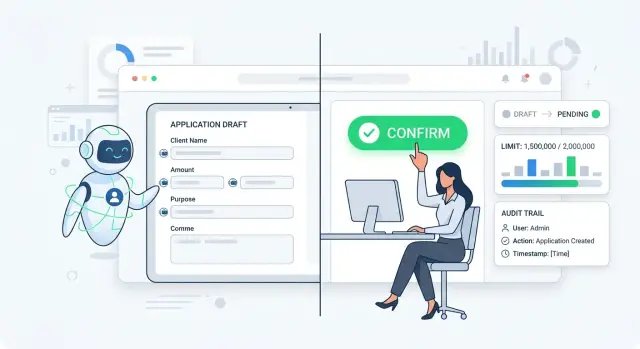
The most useful view shows the current value, the new value, the source of the suggestion, and warnings about doubtful data. The confirmation button is better kept separate from normal viewing. That way employees do not click it automatically.
It helps to separate this both in the interface and in the service logic. The preview screen should be separate. The "Apply" button should be separate. For sensitive operations, add a second barrier: approval from another employee, a mandatory reason, or a choice from a predefined action template.
A good example is ticket status handling. The model reads the client’s conversation and suggests "waiting for documents," adds a draft comment, and sets the next contact date. The employee sees the old status, the new status, the comment, and the date, makes edits if needed, and only then saves. Until the button is pressed, nothing changes in the system.
Only verified values should be passed onward. A field must pass type validation, the status must be in the allowed list, the amount must not exceed the limit, the date must not be in the past, and required fields must be filled in. If a rule fails, the service should return the draft for revision rather than trying to guess further.
If the team uses a single gateway like AI Router, it is still better to keep this boundary outside the model call. Routing and model selection do not change the rule: AI prepares the draft of the change, and the system writes only what a person or a separate control service has checked and approved.
How to build a two-step flow
A workable setup starts with one simple restriction: the model does not write to the system by itself. First it reads the request, extracts the meaning, and builds a draft of the future action. That draft already has structure: what the user wants done, which record is affected, what value is there now, and what the model suggests putting in its place.
If a client writes: "Close ticket 1845, the issue is resolved," the model does not close it. It prepares a proposal: current status is "In progress," new status is "Closed," reason is "issue resolved," source is the client’s message. That way the team sees not a guess from the model, but a concrete change proposal.
On the second step, the interface shows this draft to a person before anything is written to the system. On one screen, it is best to keep the current value, the new value, the reason for the change, the original text, and a separate confirmation button. If the request includes an amount, limit, or recipient, those should be shown nearby as well.
This screen removes a common mistake: the employee does not search for the difference across tabs and does not approve the action blindly. They can see immediately what changes and why.
Before confirmation, the rules should compare the draft with what the system currently knows about the record. If the ticket is already closed, the limit is above the allowed threshold, or the recipient is not on the approved list, the service should not move the action forward. The model’s confidence does not matter here.
After that, the employee confirms the change with a separate click. It is better if this click cannot be embedded in the model’s response or hidden inside the main flow. Otherwise the barrier quickly becomes a formality.
Only after confirmation should the service write the log and send the command to the target system. It is useful to store the old and new values in the log, who approved the change, what text came in, which rules were triggered, and which request ID linked all the steps.
On paper, this looks slower. In practice, it saves hours. One extra screen is almost always cheaper than a wrong ticket status, a limit changed by mistake, or a record that later has to be untangled through logs.
Which actions should not be given to the model directly
Do not give models the right to take steps after which a record changes without a human. A mistake in the response text can be fixed quickly. A mistake in a status, amount, or customer profile leaves a trace in the process.
If you separate draft and action, block the model from performing irreversible and sensitive operations. It can suggest an option. The final decision should be made by a person or a rule with strict validation.
The first candidate for a ban is changing a ticket status. The model easily misreads context: it sees the phrase "issue resolved" and closes the ticket, even though the client was only repeating an earlier conversation. The same applies to tickets and contracts. Closing seems minor, but then the team loses the queue, SLA, and investigation history.
Do not let the model change limits, discounts, charge amounts, or credit thresholds. These actions affect money and risk. One vague request like "can we raise it a little more" should not change the terms for the customer.
Creating, merging, and deleting customer records should also go through confirmation. The model can mix up two people with similar names, merge duplicates incorrectly, or delete a record that should only have been marked.
Sending messages to customers on behalf of the company is also better kept behind the barrier. Let the model prepare the draft email, SMS, or chat reply. But the actual sending should depend on checking the recipient, amount, attachments, tone, and legal text. For banking, retail, or healthcare, that is normal caution, not overkill.
If an action changes a status or process stage, money, limits, pricing, a customer record, a contract, or an outward message sent in the company’s name, the model should not start it on its own.
The standard setup is simple: the model reads the request, prepares a proposal and explanation, and the system shows a person a confirmation button. It takes a few seconds longer, but it saves you from mistakes that would otherwise take weeks to investigate.
Example with a ticket status
Imagine a simple situation in a bank. A customer writes in chat: "Please speed up my application review, I need the money today." The model can quickly understand the request, draft a reply, and suggest a new status such as "urgent review."
Many teams then take an extra step and give the model permission to change the record immediately. On paper, that looks convenient. In real work, it can easily create an error: the ticket will move to another flow even though the limit has not been checked or the reason for speeding it up does not fit the rule.
A proper flow is calmer. The model prepares a proposal, and the employee sees it as a draft, not as a fact in the system.
For verification, a few fields are usually enough: the reason for the customer’s request, the current ticket status, the status suggested by the model, and the result of the limit check. That is enough for the person to understand what the system is trying to do.
If the client is simply pushing for speed and the product limit is already exhausted, the status change must not be confirmed. The rule should block the confirmation button until the service returns a clear check result.
This barrier removes a common mistake: the model sounds confident, and the employee agrees automatically. When the old and new statuses are shown side by side and the reason is visible right away, there are fewer questionable decisions. The person checks a concrete action, not a model’s guess.
After confirmation, it is no longer the model that changes the record. A separate service does it through a clear request. It receives the ticket ID, old status, new status, who approved the change, and why.
Then the service writes the log: time, employee, reason text, limit check result, and the status change itself. If a complaint or internal review comes later, the team can see the full chain without guesswork.
That is the separation between draft and action. AI does not change a ticket status on its own. It suggests an option, and the system applies the action only after a check and explicit approval.
Where teams go wrong most often
Failures usually appear at the seam between the model’s answer and the real action. The model writes a neat draft, the team relaxes, and the final barrier quietly disappears.
The first common mistake is hiding confirmation inside a long form. The operator scrolls through the screen, sees familiar fields, and clicks one button at the bottom. Formally, a person confirmed the step. In practice, they may not have noticed that AI is proposing a change to status, amount, or recipient.
The second mistake is more dangerous: the model is allowed to call a method in the system immediately after answering. If the tool call triggers update_status, change_limit, or create_record without a separate review screen, the draft has already become an action. Then any imprecision in the prompt turns into a database record.
Another issue is using an old value from cache. AI remembers that the client’s limit was 500,000 tenge an hour ago and builds the draft from that number. But in the live system, the limit is already different. So you need to compare against the current value from the system itself, not from the model’s memory, cache, or a past response.
Usually you should double-check at least the current ticket status, operation amount, currency, recipient or account, and the validity period of the decision if it affects the record.
There is also a more boring mistake that hurts the most later: the team does not log who approved the step, when it happened, and what the system changed after approval. Then the argument lasts for weeks: did the model suggest the action, did the operator click the button, or did the integration send the request itself?
The sign of a rough process is simple. If an employee cannot answer these three questions in five seconds — what will change, where the current value came from, and who approves the step — then the barrier is still too weak. In such a flow, AI is better left as a helper, not an executor.
Quick check before launch
Before release, check that draft and action really happen as separate steps. If the model can change a status, limit, or record in the system immediately, then you do not have a barrier.
A safe setup looks like this: the model suggests, the rules check, the person approves, and the service applies the change.
The model should have only one safe outcome — a draft. It can suggest a new ticket status, a limit amount, or a comment, but it must not write this directly. If the update happens in the same step, even through a hidden button or a background call, that is already an action.
Before launch, it helps to run through a short checklist:
- the person sees the old and new values side by side;
- the system does not accept a draft without required fields;
- the service always asks for separate confirmation before writing;
- the log stores the user request, the model’s answer, and the final action;
- without confirmation, the record stays unchanged.
The list looks simple, but teams often cut corners exactly here. They test the scenario with demo data, see a good model response, and forget to check the writing moment. Later, in the live process, one imprecise phrase changes a ticket status without human review.
A good test looks like this: the model suggests moving a ticket from "Under review" to "Approved." The operator sees both statuses, the reason for the change, and the fields that still need to be filled in. If even one required field is missing, the system does not allow the action to be confirmed. If everything is fine, the operator clicks a separate confirmation, and only then does the service change the record.
Check the log too. It should keep three things: what came in, what the model suggested, and what was actually written to the system. Then disputed cases can be resolved in minutes, not from employees’ memory.
If model calls go through AI Router, it is useful to turn on audit logs at the key level and check masking of personal data before writing. This does not replace the separation between draft and action, but it makes control much easier.
If even one item is missing, do not launch the scenario on real tickets. First remove direct writing, then add confirmation and logging.
Who confirms and what to keep in the log
The person who confirms a change should not be the one who wrote the prompt, but a role with authority for the operational decision. In a simple process, that may be an operator. In a more sensitive one, it may be a team lead, risk manager, or back-office employee. The model prepares the draft; the person decides whether it goes into the system.
This is especially important where an error affects money, deadlines, or a customer’s status. If AI suggests increasing a limit or moving a ticket to "approved," the last click should belong to a specific role. Otherwise, after a failure, no one will quickly know who made the decision.
In the log, it helps to store not only the fact of the action, but also the context. A minimal set is: old and new values, the prompt text or version, the model’s actual response, the name of the employee or service account that clicked confirm, the time, the ticket ID, and the environment where it happened.
Old and new values are needed not for reporting, but for resolving disputes. If a ticket moved from "document review" to "rejected," the log should show both states. Then the team sees not just an event, but the exact difference.
It is also worth saving the prompt version and the model response. A week later, you will not remember why the model decided the client failed the check. If the log has the prompt, response, and model, the issue can be reproduced and fixed.
The confirmation mark should be tied to a person or a service with a clear role. A record like "change applied" is almost useless. You need something like: "confirmed by: employee ID 4821, role: second-line operator."
Test and production logs should be strictly separated. When all events are mixed together, the team quickly loses trust in the logs. In test, you can keep more debugging data; in production, only what is needed for audit, investigation, and rollback.
If you already have a routing layer for LLMs, it is better to plan the same fields at the shared layer from the start. Then the log does not depend on one model or one provider, and the process stays understandable even after a routing, prompt, or model version change.
What to do next
Do not try to redesign the whole process at once. Pick one risky scenario where a mistake immediately affects money, deadlines, or the customer. Most often that is changing a ticket status, adjusting a limit, or writing to a live system.
With one such example, it is much easier to see where draft ends and action begins. If the team cannot draw that line for one case, it will definitely get confused across ten.
Next, put a simple barrier between the model’s response and the system change. Let the model prepare only a draft of the action and a short explanation. Add a separate "Confirm" button instead of auto-running from the model’s answer. Run several real cases from your own practice manually. Then check that the log records every change without gaps. Only after that should you enable the scenario for live traffic.
Manual review here is not a formality. Take a normal ticket, a disputed ticket, a case with incomplete data, a request with an obvious mistake, and an example where the model could misread the intent. This kind of run quickly shows where AI does not change the ticket status on its own, and where your code accidentally gave it too many rights.
The log should answer a simple set of questions: what the model suggested, who confirmed the action, what changed exactly, when it happened, and what the value was before the change. If after testing you cannot reconstruct the chain in a minute, the barrier is still too weak.
If the team routes models through AI Router, it is convenient to keep one shared endpoint, audit logs, and key-level limits in one place. But the confirmation rule is better kept in your own service, close to the business logic. That is where you fully control who can click the button, under what conditions the system changes a record, and what ends up in the journal.
After the first scenario, do not expand the setup blindly. First make sure one flow works without questionable auto-actions, with a clear log and manual confirmation. Then apply the same template to the next risky step: for example, from ticket status to a limit or to a CRM record.