Different tokenizers across providers: why the numbers don't match
Different tokenizers across providers change price, limits, and the real context length. Let's look at where the calculations diverge and how to check them in advance.
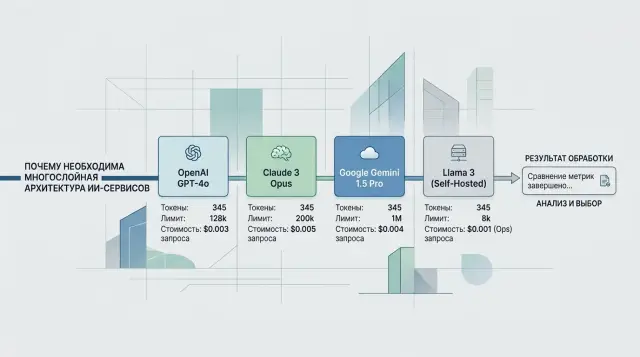
Why one line gives different numbers
The same phrase does not have one fixed number of tokens. A model does not read text as a whole, the way a person does. It breaks the string into pieces according to the tokenizer's rules, and those rules differ across providers and models.
Because of that, a short request like "Check order status 15482" may take up one number of tokens on one backend and noticeably more on another. The difference is especially common in Russian, mixed text, JSON, code, dates, emojis, and strings with spaces or dense punctuation.
The problem is not just the text itself. A chat model almost never receives a "bare" string. The provider wraps the request in service parts: message roles, system instructions, the response format, tool descriptions, and sometimes a schema for structured output as well. The team sees one line in the code, but billing counts a different, longer package.
Usually the mismatch comes from three places: the tokenizer itself splits words, numbers, and symbols differently; the API adds hidden wrapping for chat, tools, and the response format; and the backend may serialize messages in its own way before sending them to the model.
That is why the same prompt does not only produce different numbers in logs. It also takes up a different amount of context. This matters when you are close to the window limit, send a long conversation history, or attach a large JSON file. What fits with one provider may hit the limit earlier with another.
This is where teams get confused. A developer looks at a local token counter, sees 7,800, leaves some room, and assumes everything is fine. Then they change only the base_url to a compatible backend, for example through AI Router, keep the same SDK and the same prompts, and the real request now returns a different number. The code did not change, and the string did not change either. What changed was the way the system turned it into tokens.
The topic quickly stops being theoretical. It affects context length, request predictability, and whether your calculations match what the provider's counter shows later.
Where the difference in tokens comes from
For the model, a string does not exist "as is." First the tokenizer cuts it into pieces that the model can work with. And that is where the differences start: one tokenizer may keep a word almost intact, while another breaks it into several chunks.
This is more noticeable in Russian than many people expect. Cyrillic words, mixed text like "invoice 2457 under the contract," dates, quotation marks, brackets, and even an extra space often produce a different count than a similar phrase in English. A short string for a person can become long for a model simply because of how it is split up.
What exactly changes the count
The total does not depend only on the words. Usually everything you send to the model is counted: the system message, roles like system and user, the JSON wrapper with field names, the schema for structured output or tool calling, and the service tokens added by the provider itself.
Because of that, teams often look only at the prompt text and underestimate the real size of the request. On paper you have 700 characters, but in practice the model sees noticeably more tokens.
There is another layer too. Providers differ not only in the token vocabulary, but also in how they package messages. Two APIs can be compatible in request format, but that does not mean they count the size in the same way. OpenAI API compatibility only means the request can be sent in a similar way. It does not promise the same tokenizer, the same service tokens, or the same billing.
This is easy to see in a multi-provider setup. The team sends the same OpenAI-compatible request through AI Router to different models and gets different usage, even though the code did not change. Usually that is not a bug. Each backend simply splits the text and assembles the messages in its own way.
The most unpleasant case is structured output. The stricter the schema and the longer the field names, the larger the volume becomes. Sometimes a couple of "convenient" JSON fields cost more tokens than the user's actual question.
How this affects price and limits
The same string may take 900 tokens on one backend and 1,100 on another. At first glance the difference seems small, but in a working system it quickly eats both budget and context room.
You feel this first with limits. If you expected the system prompt, conversation history, five RAG snippets, and still enough room for the answer to fit into the context window, an extra 10-20% in tokens breaks the plan. Not five snippets fit anymore, but three. Or you have to cut the history, and the bot loses important conversation details.
Even with OpenAI API compatibility, this does not go away. The team may change only the base_url and keep the same SDK, code, and prompts, but token counting still depends on the specific model and provider.
The money impact is even more obvious. Billing is almost always tied to input and output tokens, which means the cost of the same scenario changes without any product changes. If the service makes 200,000 requests a day and the new backend adds an average of 150 input tokens per request, that is 30 million extra tokens a day. Over a month, that adds up to an amount that is hard to dismiss as "rounding error."
There is also a less obvious hit to answer quality. When the prompt nearly fills the context limit, there is little room left for output. The model answers more briefly, cuts off mid-thought, or fails to provide the full list of steps. From the outside, it looks like the "model got worse," when in fact it simply did not have enough window space left for the answer.
This shows up most often in long conversations with 10-20 messages of memory, in RAG scenarios with large document excerpts, in tool calling with function schemas, and in tasks where the answer must not be shorter than a certain minimum, such as support or compliance.
Different tokenization changes more than the log counter. It changes how much context really fits, how much the request costs, and where the model starts trimming the answer earlier than you expected.
Example with a support bot
An online store support bot does not need a complex prompt, but even that kind of scenario can easily break expectations. For each request, it sends a system instruction with response rules, the customer's message, and three product cards the bot can suggest instead.
The customer writes: "I need a smartphone with eSIM and fast delivery." The first model receives the full package. It sees all three cards, compares delivery times, memory, and price, and then gives a clear answer in a few sentences.
The second model receives almost the same text, but counts it differently. Russian words, item numbers, quotation marks, numbers, JSON fragments, and brand names are split into more tokens. As a result, the last card no longer fits into the context window. The app trims the tail of the request, and the model answers using only two products. From the outside, it looks like the bot simply "forgot" part of the catalog.
Nothing looks different at a glance. The developer sees the same lines in the logs. The manager sees the same template. But in practice two things change at once: the input becomes more expensive because the provider counted more tokens, and the answer becomes shorter because less room is left for output after the long input.
The difference can be unpleasant even at a small scale. With one provider, the request takes 1,450 tokens; with another, 1,680. If the limit is near, those extra 230 tokens eat the buffer for the answer. The bot starts writing more tersely, skips details, or stops asking a clarifying question. The team often blames this on a "weaker" model, even though the problem is something else.
That is how this shows up in practice: the same string leads to different usage, a different amount of remaining context, and a different result. The team argument quickly goes in the wrong direction. One person suggests changing the model, another wants to shorten the system instruction, and a third blames the product catalog. But the first step should be simple: compare the real token count for each backend.
In support, this shows up immediately because the same template is run thousands of times a day. A few extra hundred tokens per conversation can easily turn into extra monthly spending and shorter answers where the customer expects precise help.
Where teams make mistakes most often
The first mistake is simple: the team takes a local token-counting script, gets a number, and treats it as the truth. That is fine for rough estimates. It is not enough for production, because the provider counts the request as its own backend sees it, not as your test notebook sees it.
That is exactly where familiar calculations break down. The same text can take a different number of tokens on two models, even if the API looks identical from the outside.
The usual miss starts with looking only at the user's input text. But the count is almost always broader. It includes the system prompt, conversation history, schema for structured output, tool descriptions, roles, and service fields added by the SDK or gateway.
Because of that, a short question like "Where is my order?" says almost nothing about the real load. If a long system prompt and a JSON schema spanning two screens are sitting next to it, the actual request size can grow several times over.
The second common mistake is counting only input and forgetting output. The team sees that the input fits within the context limit and relaxes. Then the model answers longer than expected, and the request either becomes more expensive, hits the limit, or cuts off the answer in an awkward place.
This is especially noticeable in support. Suppose the bot receives a message in Russian, product codes in English, an address with numbers, and then calls a tool with a large JSON payload. On short tests, everything looks fine. In a long conversation, the numbers are different: Cyrillic, mixed text, and large JSON blocks are often split into tokens in a less predictable way.
Typical mistakes repeat themselves:
- they compare price and limits only with a local tokenizer, without checking the provider side;
- they measure one request without the model's answer;
- they leave out the system prompt, tools, and schema from the calculation;
- they test one- or two-line phrases and then apply the conclusions to 20-message conversations;
- they test only plain text and do not check Cyrillic, JSON, tables, or mixed-language input.
If you work through a compatibility layer such as AI Router, the temptation is even stronger: the endpoint is the same, but the backend behind the model is different. So you need to check not "on average across the API," but on real models, with real payloads and the expected answer length. Otherwise cost and available context will start drifting away from the plan in the first week.
How to test everything before launch
Checking a test phrase almost always creates false confidence. Differences show up most clearly not on short examples, but on real requests with a system prompt, conversation history, JSON schema, and a long response format.
Start with your workflow, not the model. Take 10-20 live requests from logs or expected scenarios. The set should be uneven: short questions, long messages, text with numbers, tables, names, order codes, and mixed Russian and English.
Include everything that will go to production in each test: the full system text, role and style instructions, the schema or strict JSON format, the message history if your product uses it, and the expected answer size, not just the user input.
This is where estimates most often break. The team counts only the user's message and then wonders why the context limit runs out earlier. In practice, system instructions and service wrapping consume a significant part of the volume.
Then run the same set through each backend you need. Do not look only at input. Compare three numbers: input tokens, output tokens, and total usage. If one backend splits the text into more tokens, you will see it immediately in both price and available answer length.
A good simple test is a support request of 700-900 characters, a system prompt of 1-2 pages, and an answer in JSON with the fields status, reason, and next_step. On one model, that package may pass with room to spare; on another, it may almost hit the limit before the answer even starts generating.
Before release, leave room for error. Usually 15-25% context buffer and a separate per-request budget cap are enough. If the average usage looks fine but 2-3 long cases stand out, do not ignore them. Those are exactly the requests that later cause answer cutoffs, extra retries, and unexpected charges.
If you work through a single gateway such as AI Router, this check is easier to repeat across several providers without changing the SDK or code. But the discipline matters more than the tool: test not the model in a vacuum, but the full request exactly as it will go to production.
How to keep the spread under control
You cannot remove the spread completely. The same text will still be split differently. But you can make the spread predictable if you keep request shapes stable.
Most often, tokens are inflated not by the task itself, but by the template around it. Teams repeat the rules in the system prompt, then repeat them again in a developer message, and then insert them once more into the user instructions. If a rule is already present once and the model follows it, the second and third repeats usually only consume context.
RAG has a similar story. It is easy to put long excerpts into the index, but the request should include only what actually helps the answer. Instead of five large text chunks, it is often better to provide two short ones with exact facts. For a support bot, this is obvious right away: one extra knowledge-base insertion can cost more than the answer itself.
Another simple measure is not to change the system prompt format between tests. If one model is checked with a short instruction and another with a longer rewritten one, the comparison is already broken. You will not know whether the difference comes from the backend or from the template.
What to count separately
Scenarios with tools, JSON, and long histories are better measured separately rather than all together. That is where token counts and limits usually diverge the most.
It helps to keep a small stable test set: a short question without history, a 10-15 message conversation, a tool call with arguments, an answer in strict JSON, and a request with RAG inserts.
After every model or route change, record the total token growth on this set. Look not only at the average, but also at the edge cases. If a new backend adds 7-10% to input tokens, that may already be enough to shift the monthly budget or cause long conversations to be trimmed.
If the team switches models through a single OpenAI-compatible gateway like AI Router, it is convenient to run this measurement right after changing the route. Then you can see whether only the model response changed, or whether the service overhead for the prompt, tools, and output format also grew. It is boring discipline, but it saves a lot of money and stress in production.
Quick pre-launch check
Before launch, do not look at the average request. Look at the heaviest one. A long conversation with nested JSON, chat history, and a tool description can suddenly hit the limit even though normal messages pass without a problem.
A good practice is simple: collect the 10-20 longest scenarios from the real product and run them through the backend that will go live. Do not use only short sandbox tests. They almost always create a picture that is too calm.
Check more than plain text. Cyrillic, long numbers, item codes, tables, code fragments, and JSON structures have a big effect on tokens. The message "order number 000184750029" and the same idea in conversational wording can take up different amounts of space, even though people cannot see the difference.
Also count everything the team often forgets: the system prompt and hidden service fields, the schema for tools and function calling, the response format if you ask for JSON, the conversation history the app adds on its own, and any error text, retries, or service inserts.
If you keep only the raw user request, the estimate is almost certain to be too low. Then the model will start trimming the context, answer more briefly, or cost more than you expected.
You also need a context buffer. Usually 10-20% is enough, and for complex chains it is better to keep more. If a test request uses 115,000 tokens out of a 128,000 limit, that is already tight. Any extra table, new JSON field, or long tool response will eat the rest.
If you change the backend through a compatible OpenAI API, check everything again, even if the code did not change. In AI Router, you can keep the same SDK and the same request, but the actual count for a specific model can still differ.
After launch, do not rely on manual checks. Set up metrics for input and output tokens, the share of requests near the context boundary, and sudden growth in usage by model. An alert on day one is more useful than an incident review a week later.
A good final test looks boring, and that is a good sign. If long requests pass, JSON does not blow up the budget, and the token graph stays stable, the release usually goes smoothly.
What to do next
First, agree within the team on how you measure tokens. Otherwise the developer looks at a local tokenizer, finance looks at the provider bill, and SRE looks at context limit errors. Everyone has different numbers, and arguing here is pointless.
It is usually best to pick one reference and use it consistently. For billing, that is almost always the actual usage from the backend that processed the request. For early estimates, you can keep a local count, but it should be clearly labeled as a forecast, not the final number.
If you already use several providers, do not try to reduce everything to one "perfect" number. A better rule is simple: the team makes price and limit decisions based on the model's real response data and production logs.
You also need a short working checklist. Choose one counting standard and document it. After changing the model, run the same request set and compare usage. After changing the provider, check price, answer truncation, and context buffer separately. And keep a dashboard for input tokens, output tokens, and limit errors so you can review the most expensive scenarios once a week.
Problems often show up after a quiet backend replacement. Yesterday the support bot fit within 12,000 tokens, and today on a different provider the same conversation suddenly gets close to the limit. The code did not change, and the text did not change, but the tokenization did. It is better to catch that with a test set of real requests than after user complaints.
If you route traffic through several providers, it helps to keep one OpenAI-compatible endpoint and compare usage for each route in one place. For example, AI Router lets you send identical payloads through different routes without changing the SDK or code, and for companies in Kazakhstan it provides monthly B2B invoicing in tenge. That does not replace testing on your own requests, but it makes comparison between backends much easier.
The most useful next step is simple: take 20-30 real prompts, run them through every model you want to use, and save four numbers for each run: input, output, total cost, and the remaining room before the context limit. After that, there usually is not much left to argue about.
Frequently asked questions
Why does the same string produce a different token count?
Because the token count depends on more than the text itself. Every model has its own tokenizer, and the provider also adds service overhead: roles, the system prompt, schema, tools, and the response format.
As a result, the same string becomes a different package on two backends, and billing is calculated from that package.
Why does a local tokenizer often not match the provider's numbers?
A local counter usually sees only your text or a simplified version of the request. The provider counts what actually reached the model after the SDK, API, and backend wrapped it up.
A local estimate is fine for rough planning, but the final price and context size should come from the actual usage in the provider's response.
What does the provider add to a request besides the user text?
Most often, roles, the system prompt, the conversation history, the JSON wrapper, tool descriptions, and the schema for structured output are included in the count. Sometimes the backend also changes how messages are serialized before sending them.
So a short user question on its own tells you almost nothing about the full size of the request.
Which types of text show the difference most clearly?
The difference is most visible in Russian, mixed Russian and English, JSON, code, dates, long numbers, item codes, quotation marks, brackets, and dense punctuation. Emojis and extra spaces can also change the count.
If you work with support, RAG, or tool calling, test exactly these kinds of data, not just plain text in a couple of lines.
How does the difference in tokens affect the context limit?
Very simply: the same request takes up more space in the context window. If you were already close to the limit, part of the history, RAG snippets, or JSON may no longer fit.
Because of that, the application trims the end of the request earlier than you expected, even though the prompt in the code did not change.
Can this make the model answer more briefly?
Yes, and it is a common case. When the input uses more tokens, less room is left for the answer, and the model writes more briefly or cuts off its thought.
From the outside, that is easy to mistake for a weaker model, when the real reason is often that the request used too much of the window.
How can I check the real numbers before launch?
Use real product scenarios, not a test phrase. Take 10–20 live workflows from your product and run each full payload: system prompt, history, tools, schema, and the expected answer length.
Compare input tokens, output tokens, total cost, and remaining space before the limit for each model. That way the difference becomes visible before release, not after complaints.
How much context buffer is best to keep?
For ordinary scenarios, a 15–25% context buffer is often enough. If you have long conversations, RAG with large snippets, or tools with large JSON, keep more.
When a test already comes close to the window limit, any new piece of data can break the calculation very quickly.
What if I changed only the base_url and did not touch the code?
Check everything again on the same set of real requests. A compatible API keeps your code and SDK, but it does not promise the same tokenizer, the same message packaging, or the same usage.
Even if the app works without errors, the price and the available answer length can shift noticeably.
How can I reduce token variance in production?
Make the request shape stable. Do not repeat the same rules in several places, cut unnecessary JSON, and send only the RAG snippets that actually help the answer.
A fixed test set also helps. After every model or route change, compare usage on the same payloads and track input, output, and limit errors.