Cross-Border Data Transfer in LLMs: Risks Beyond the API
Cross-border data transfer in LLMs does not happen only in the model call, but also in logs, analytics, and supporting services. Let’s look at the risk points.
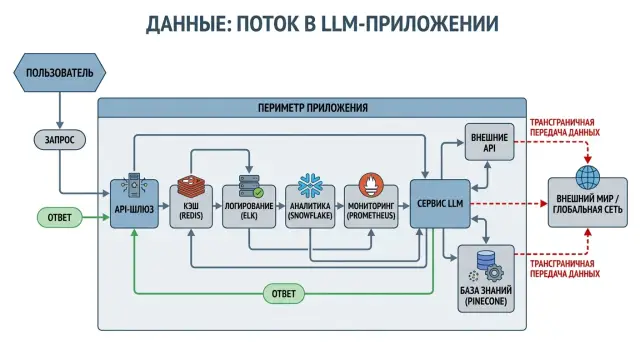
Why the risk starts before the model is called
Teams often draw the data path too simply: the app sends a request to an LLM, and the model returns an answer. In that picture, only the main call is visible. In a real system, there are almost always several more layers between the user and the model.
The request passes through a gateway or proxy, then goes into logs, monitoring, tracing, metrics, and alerts. If something breaks, the same piece of text can end up in an error dump, a ticket, or a message to the on-call team. That is why the risk does not appear in just one place, but in several at once.
Each layer usually stores at least part of the request: prompt, system message, user ID, file name, a fragment of the response, tokens, IP address, session ID. Sometimes that is enough to reconstruct the meaning of the conversation or build a user profile.
The main problem is that these copies live separately from one another. The team checked the model provider, signed the contract, and decided the matter was closed. But APM stores raw request bodies in a different region, analytics carries user properties outside the perimeter, and a support tool saves a screenshot of the model response.
This kind of scenario happens all the time. A bank or retail team leaves the base_url on a local LLM gateway and assumes the data stayed inside the country. At the same time, developers turn on detailed logs, the product team looks at events in external analytics, and on-call receives an alert with a fragment of the prompt in a third-party notification channel. The main call stayed under control, but the copies have already spread further.
Even if the model itself or the gateway runs in Kazakhstan, that is not enough. You need to look at the entire data route: who receives the request, who writes it to logs, who calculates metrics, who sends errors, and where all of it is stored. Otherwise, a carefully managed model call will not protect you from leakage through a neighboring service.
What data travels with the request
When an app sends a request to an LLM, it is not only the user's question that leaves the perimeter. The request is usually built from several layers, and each one can carry personal data, internal company rules, or technical markers.
Most often, the prompt text and conversation history, system instructions, fields from a CRM or form, files, and service attributes such as IP, user agent, and trace id are sent out. On a diagram, this looks like one JSON object. In practice, it is several different types of data at once.
The prompt text is obvious, but conversation history is often more sensitive than a single message. The user may have previously entered an address, phone number, national ID, payment details, or order number. If the app sends the full context every time, it keeps sending old sensitive fragments again and again.
System instructions are also often overlooked. The user does not see them, but the model provider and any intermediate gateway do. These instructions often contain response templates, escalation rules, internal product names, customer segments, and parts of the knowledge base. That is not personal data, but it is still company data.
Another common source of risk is service fields. For example, a bank chatbot may take a customer's question and quietly add a contract number, request status, and email so the model can answer more accurately. That is convenient for the product. For compliance, it is already an transfer of identifiers beyond the original system.
The risk is higher with files. PDFs, ID scans, screenshots, medical records, and photos of receipts contain more than they seem to at first glance. Even if only extracted text goes into the model, the attachment itself, an image preview, or the OCR result often remains nearby.
Technical fields also cannot be treated as harmless. IP, user agent, session id, and trace id may not identify a person by name, but they help link a request to a specific device, employee, or customer session. When these markers match up across logs and analytics, the full chain can be assembled fairly quickly.
That is why you need to check not just one prompt, but the entire request package. If the team uses a gateway like AI Router, look separately at which fields it proxies onward, what goes into audit logs, and where PII masking is enabled before sending.
How logs become a separate transfer channel
Teams often focus only on the model call and miss a quieter route: service logs. Even if the model or API gateway is inside Kazakhstan, data can leave the perimeter through logging, tracing, and archives.
The most common scenario is simple. A developer turns on debug mode, and the app writes the raw prompt, model response, user_id, email, or contract number to the log. That is handy for troubleshooting. For security, it is already a separate copy of the data that lives by its own rules.
The problem then grows at the infrastructure level. The gateway stores the request body on a 4xx or 5xx error so the failure can be investigated later. APM and distributed tracing automatically collect parts of the payload, headers, and session metadata. One request to the LLM leaves a trace in more than one place.
The chain usually looks like this: the app writes the full prompt to logs, the gateway stores the request body on error, APM copies fragments of the payload, the team exports logs to external storage or SIEM, and backups keep these records for months. Each point in the chain creates another transfer route.
In practice, it looks routine. A bank tests an internal assistant for operators. The model itself is called through a local gateway, but the app logs are sent to an external monitoring service that stores the text of customer requests. The transfer did not happen in inference, but in the support layer.
Audit logs often cause confusion. Audit is necessary, but it rarely needs the raw user text. In many cases, a hash, request length, time, status, and route ID are enough. If the platform separates audit and technical logs and can mask PII, the risk is much lower.
The rule here is simple: treat logs as a data transfer just like the API call itself. If the record is not needed for incident investigation, do not store it. If it is needed, trim the fields, mask PII, and keep the retention period short.
How analytics moves data beyond the perimeter
Many teams close the risk at the API level and relax too early. In reality, data often leaves through analytics, which sits next to the app and receives almost the same text as the model.
A typical example is product events with properties like prompt_text, response_text, user_email, or account_name. That makes it easier for analysts to build reports and see where the user dropped off in the conversation. But at that moment, a data transfer has already happened, even if the model call itself stayed inside the country.
BI systems add their own risk. The team exports request logs there to measure conversion, average conversation length, or the share of errors. If the storage region is left at its default setting outside Kazakhstan, what crosses the border is not an aggregate, but a full set of rows with text, identifiers, and service fields.
Session recording tools create another quiet channel. They can capture input in a form before the user even clicks "Submit." If a chat, search box, or contact form does not mask fields, the service sees everything: the customer's question, contract number, address, complaint, internal order code.
Quality evaluation systems also easily start storing too much. The team wants to compare model responses and puts conversation examples into a separate labeling service or dashboard. A month later, there are hundreds of real conversations with personal data, even though a de-identified fragment would have been enough for the metrics.
Even careful teams trip over this. You can route traffic through a gateway with storage in Kazakhstan, PII masking, and audit logs, and then send the original request text to cloud analytics in one event. The perimeter breaks not in the model, but in the surrounding stack.
If analytics truly needs content, it rarely needs the whole conversation. A short anonymized fragment, a hash, a scenario tag, or an error counter almost always solves the same problem without exporting raw data.
Which services people forget about
The review usually ends with the model and the main gateway. But data also moves into neighboring services that look secondary on the architecture diagram. That is often where the most unpleasant risk hides.
Content moderation is a common example. The app first sends the user's text to a separate checking service, and only then to the model. For the user, that is one request. For the data, it is two transfer channels.
The same goes for translation and OCR. When someone uploads a passport scan, invoice, or contract, OCR receives not a short fragment, but the entire document. If the system then translates the text before analysis, the document passes through yet another service.
A vector database is not as neutral as it seems either. In many setups, the original text fragments, metadata, file names, customer IDs, and sometimes raw parts of the conversation for search debugging sit next to embeddings. If the database or its backups are outside the country, that is already a separate data route.
Cache is often forgotten first. To speed up responses and lower costs, teams keep prompts and responses for hours or days. That is convenient, but the cache holds the same data as the model: user requests, document fragments, responses with sensitive information. If the cache is an external managed service, it has its own storage rules, backups, and logs.
Support adds another channel. Users send screenshots of errors, and those screenshots show the chat, request number, customer name, and sometimes part of a document. Then these images end up in a help desk, corporate email, an internal messenger, or with a contractor handling the incident.
The same project can look safe at the top level and still transfer data through OCR, cache, help desk, and moderation services. Formally, the main API is under control. In reality, the actual data crosses the border in several places.
What this looks like in a normal project
A bank launches an internal chat for contact center and back-office employees. An employee pastes a customer question, a request number, and part of an internal policy, and the model helps draft a reply in 20 to 30 seconds.
On the diagram, everything looks calm: the prompt goes through an OpenAI-compatible gateway, the team enables audit, rate limits, and PII masking, and then the request goes to the model. It seems the data route is clear and controlled.
The problems begin around the call itself. Developers connect request logging to troubleshoot errors. An APM tool is added nearby to track latency, response size, and failure rate. If the default settings are left in place, these systems quickly end up with not only technical metrics, but also fragments of the prompt, the response text, the employee identifier, the ticket number, and parts of personal data.
A week later, the product team asks for a report: what do employees ask most often, where does the chat fail, and which topics need further training. Analysts export example questions into a separate service where they build dashboards and collections of real conversations. Formally, that is no longer a model call, but analytics. In practice, it is another copy of the same data.
Then support gets involved. An employee complains that the chat gave a strange answer about a loan application. They create a ticket and attach a screenshot of the chat window. The screenshot shows the customer's name, contract number, amount, and the model's answer. The ticket lives in a different system, with a different contractor and a different retention period.
In the end, the data crosses the border not once, but several times: when the request is sent to the model, when raw logs are written to the observability service, when examples are exported to analytics, and when a ticket is created with a screenshot or a copy of the conversation.
Usually, this does not look like an obvious violation. Most often, it is all built from small conveniences: detailed logs were enabled, events were sent to the usual dashboard, support was asked to save the case for investigation. But for an audit, that does not matter. The data moved, multiplied, and landed in several environments that the team did not initially even count as part of the LLM application.
How to check the data route
It is better to start the review not with the model, but with the first place where the user enters text. If you look only at the API call, the real route almost always seems shorter than it actually is.
First, draw the full chain on one diagram: form or chat, backend, gateway, queue, model call service, logging, analytics, storage, backup, archive. If the team uses AI Router or another compatible gateway, the diagram should include not only the endpoint itself, but also all the layers around it, including audit logs, PII masking, and external observability tools.
Then go through each node and answer a few simple questions:
- Does the service see the raw payload in full, or only metadata?
- In which country and region does it store data?
- Does it write anything to logs, alerts, dumps, or backups?
- Who inside the team and among contractors can read it?
- Can raw request recording be turned off or the retention period be shortened?
After that, take one real scenario and walk through it manually. For example, an employee sends a contract number and a short problem description in chat. That text may pass through a web server, end up in tracing, be saved in analytics as a "request example," go to an alert on error, and remain in an archive after log rotation. In such a chain, the model call itself is only one point of risk.
The last step is often skipped: check the access rights. Even if the data is stored in Kazakhstan, the risk remains when raw logs are read by contractors, support, or analysts without a clear reason. A good scheme ends not with the model, but with a list of places where the data is no longer needed and can simply be left unstored.
Mistakes that keep repeating
The most common mistake is to check only the model provider and relax. If their terms look clear, it seems the issue is closed. But data transfer often happens later: in app logs, in the error system, in product analytics, in backups, and in test environments.
The second typical mistake is to leave detailed logging on in production. Developers turn it on during launch and forget to switch it off. As a result, the full prompt, the model response, user ID, phone number, address, or request number ends up in the logs.
The third mistake is tied to analytics. It is convenient for the team to see which requests cause users to drop the conversation, where quality drops, and which scenarios produce long answers. To get that, full message text is sent into events. That is convenient for the product, but a poor practice for personal data.
Another trap is treating backups and test environments as something secondary. In reality, that is often where the most complete copies of data end up. A test environment is filled with a production export to check a new scenario faster, and then it lives for months without proper access control.
Many people also confuse anonymization with a simple hash. If you hash an email or phone number without salt, that does not automatically make the data safe. Even with salt, a hash does not always solve the problem if the customer's name, request text, and event time remain nearby.
Warning signs are usually easy to spot: the logs contain full request and response text, analytics stores user properties with email, phone number, or national ID, the test database is built from production data, and backups go to the cloud without a separate route check. These mistakes are rarely about bad intent. Usually, it is haste and the habit of doing things "the usual way."
What to do after the audit
An audit is useful only when it leads to changes in how the system works. If the flow map shows that data is leaving not only through the model API, shorten the route to the minimum. The fewer systems see the full request text, the lower the risk and the easier the control.
The first step is to remove unnecessary copies of the text. Often, the full prompt goes to several places at once: app logs, APM, analytics, help desk, and a debugging store. For most tasks, that is not needed. One service only needs the response status, another only needs the request length, and a third only needs an anonymized session ID.
The second step is to mask personal data before writing to logs and before sending to external tools. If the app first writes raw text and only then cleans the copy, the data has already gone through an extra channel. Masking should be at the entry point.
The third step is to move the most sensitive scenarios into a local environment. This is especially important for banks, healthcare, public services, and any processes where personal data and service fields quickly appear in prompts. If the flow cannot be anonymized without losing meaning, it is better to keep it closer to the data source and on infrastructure with storage inside Kazakhstan.
Then you need simple, clear rules:
- which systems may receive the full text at all;
- which fields are always masked;
- how many days logs, traces, and dumps are stored;
- who can read raw data;
- which services cannot be connected without a new review.
It helps to separate flows by sensitivity. A FAQ bot for a website and an internal operator assistant are not the same operating mode. That separation lowers cost and removes unnecessary restrictions where they are not needed.
If the team needs a single gateway for working with different models, it is worth looking not only at API compatibility, but also at where the data is stored, how audit logs are set up, and whether PII masking is available. For some companies, that immediately simplifies route control. In that sense, AI Router can be one practical option for a local environment in Kazakhstan, especially if you need a single OpenAI-compatible endpoint, data storage inside the country, and monthly B2B invoicing in tenge.
A good audit result looks simple: the team can quickly answer which fields leave the perimeter, who sees them, and how long they are stored. If there is no clear answer to those three questions, the risk remains, even when the model call itself seems safe.
Frequently asked questions
Why does the risk start before the model replies?
Because text almost never goes straight to the model and back. The gateway, logs, tracing, alerts, analytics, and sometimes the help desk all see it. Even if inference itself stays inside the country, copies of the request can move further through supporting services.
What data usually goes out with an LLM request?
Most often, the raw prompt, chat history, system instructions, user ID, ticket number, email, IP, session id, and trace id leave the perimeter. Also check files and OCR: one PDF or scan usually contains more sensitive data than a short text query.
Is it risky to store the full prompt in logs?
Yes, if you write raw requests and responses to the log. A log becomes another copy of the data with its own retention period, access rules, and backups. For incident troubleshooting, a status code, timestamp, request length, and route ID are usually enough without the full text.
Does analytics need the full conversation text?
Almost never. Analytics usually only needs a scenario tag, dialog length, error code, or a short anonymized fragment. If you send the full text of messages into product events, you are creating a new data transfer channel yourself.
Which services do teams forget most often?
OCR, moderation, translation, vector databases, cache, APM, SIEM, and ticketing systems are the ones most often forgotten. The user sees one chat, while the data is actually moving through several separate layers with different storage rules.
Is a local gateway enough to keep data from leaving the country?
No, that is not enough. A local gateway closes only part of the route. If the application sends raw events to external analytics or keeps full logs in another region, the data still leaves the required perimeter.
How can you quickly verify the real data route?
Start with one real scenario and follow it from the input form to the log archive. Look at who sees the payload in full, what gets written to logs, where backups are stored, and who has access. That kind of check quickly reveals extra copies of the text.
Should raw text be stored in audit logs?
No, an audit log rarely needs the raw text of the request. It usually only needs the time, status, request length, hash, and service ID. If the platform can separate audit logs from technical logs and mask PII at the entry point, the risk is much lower.
Why are test environments and backups risky?
Because they often hold the most complete copy of production data, and controls there are weaker. Teams pull production data into test environments for convenience, then the environment stays around for months, while backups go to the cloud without a separate route check.
What should be fixed first after an audit?
First remove unnecessary text copies from logs, analytics, and tickets. Then turn on PII masking before recording and shorten retention periods. If a scenario cannot be anonymized without losing meaning, keep it in a local environment where data is stored inside Kazakhstan. For that setup, a single gateway like AI Router is convenient if you need local storage, audit logs, and compatibility with your current SDKs.